Test Ahrefs Content Explorer Now 2026: Top SEO Automation Tool

Key Takeaways
-
Ahrefs Content Explorer indexes 21.7 billion pages. It adds 10 million new pages daily. It refreshes 300 million pages daily. This means competitive snapshots shift materially week over week.
-
A documented discrepancy exists between Ahrefs' academy page (14.4 billion pages) and the live product page (21.7 billion). The academy figure is an outdated snapshot.
-
Content Explorer supports filters across traffic, domain rating, referring domains, language, author, word count, platform, publish date, and page status. This gives enough precision for topic targeting.
-
Finding low-competition topics is a built-in workflow. Filter by traffic volume against a low referring-domain count. This surfaces gaps larger sites have not captured yet.
-
API access is gated behind the Enterprise tier. This limits programmatic use for teams on lower-cost plans.
-
The tool has a real learning curve. The interface is clean. Extracting actionable signal requires SEO fluency. It is not casual browsing.
-
Price-to-value for SMBs depends heavily on publishing frequency. If you are not producing content consistently, the math gets harder to justify.
Quick Summary
When you want to orient quickly before a new project, a reference view saves time. Here is the snapshot our team reaches for before any research sprint kicks off.
What Does Ahrefs Content Explorer Actually Cover?
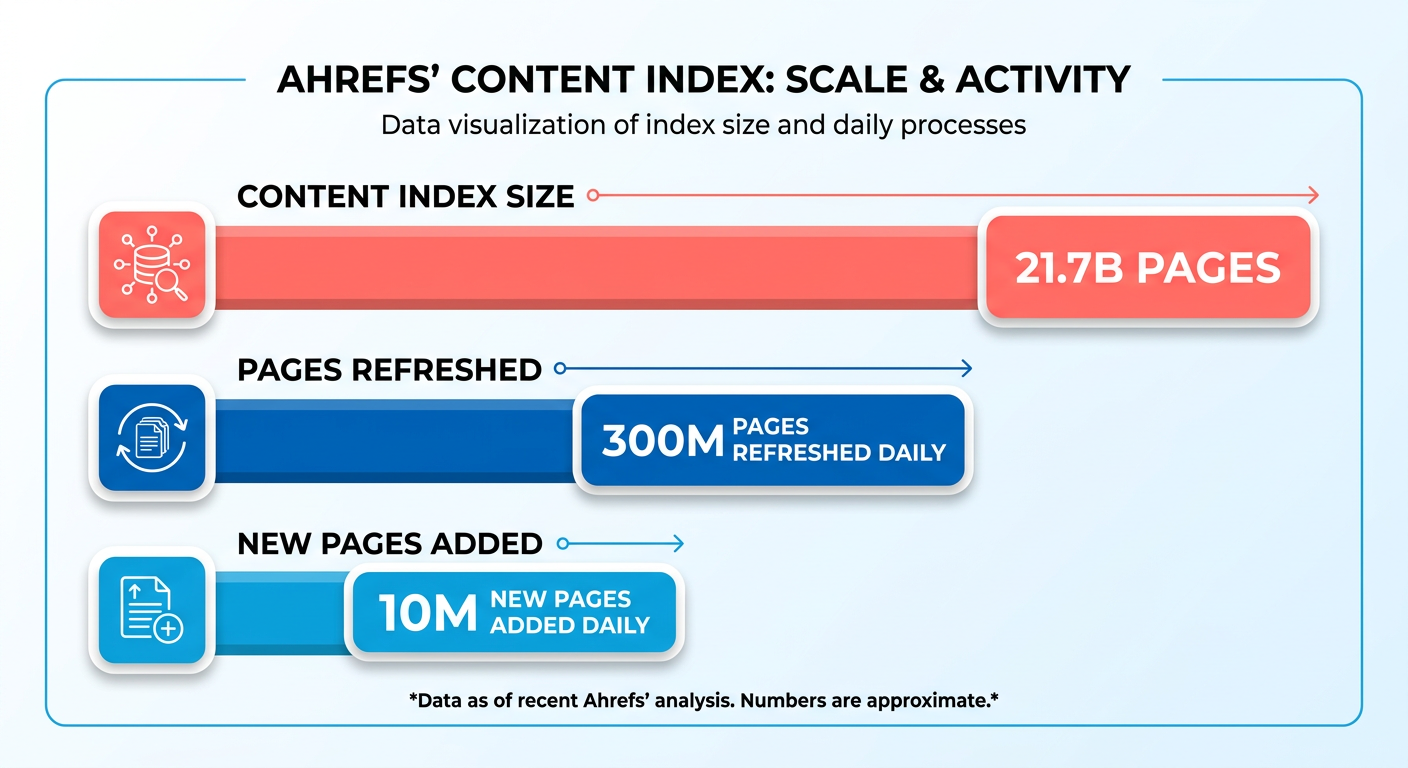
Content Explorer runs on top of Ahrefs' web index. It updates continuously. Because rankings and competitor content shift fast, working from a stale database means you are often chasing opportunities that have already closed.
On the index size discrepancy mentioned in the takeaways: the academy page reflects an older number. The live product page is current. For active research, use the live metrics.
Quick-Reference Table: Ahrefs Content Explorer in 2026
| Dimension | Detail |
|---|---|
| Index size | 21.7B pages (live); 10M new pages / day |
| Filters available | Traffic, traffic value, DR, referring domains, language, author, word count, platform, publish date, page status |
| Low-competition topic finding | Yes. Filter by traffic with few referring domains |
| API access | Available on Enterprise tier |
| Setup time (first run) | Varies by familiarity with SEO tooling; most users can run a first filtered search shortly after account creation |
| Learning curve | Intermediate. UI is clean, but extracting signal requires SEO fluency |
| Best fit: SMBs | Useful, but price-to-value depends on content velocity |
| Best fit: Agencies | Strong. Multi-client research at scale |
| Best fit: SaaS teams | Strong. Topic clustering and competitor gap analysis |
| Pricing model | Monthly and annual tiers; no meaningful free trial for Content Explorer specifically |
| Known gaps | Limited video-search coverage; some regional index gaps |
Before You Dive In
-
The index is the moat. 41.9 billion keywords tracked across the broader Ahrefs platform means Content Explorer surfaces opportunities that smaller-index tools miss entirely.
-
Metric fluency matters. Getting real value here requires understanding how Domain Rating and traffic value interact. Search volume alone does not tell you much. You need to know what these proprietary metrics actually signal about ranking difficulty.
-
Do the cost math honestly. For smaller operations, the subscription is a real line item. Teams need to evaluate whether they are publishing enough to justify the data access.
-
The research-to-publishing gap is real. Every Content Explorer walkthrough stops at the insight stage. The tool finds a low-competition topic. Your team then has to write it, schedule it, distribute it, and build links around it. That execution layer is where most teams lose the momentum the research created. AnyPost.ai is built for that gap: automating the move from keyword insight to published, distributed content without requiring a separate team or toolstack.
-
Skip Content Explorer for video and regional-specific SEO. Coverage there is thinner. You will not get the same data confidence you do for standard web content in major markets.
Why Keyword Lists Aren't Enough Anymore
The web is noisier than it has ever been. AI-assisted publishing has flooded every niche with superficially optimized pages. The old model of owning a target keyword list breaks down fast when fifty competitors are publishing to the same terms.
The question has shifted from "which keywords should we target?" to "which topics have real traffic potential, weak competition, and link-building angles we can actually execute?" Content Explorer is built to answer the second question.
By letting you cross-reference multiple performance metrics simultaneously, the tool surfaces pages that succeed on content merit rather than domain authority. That is the research layer. But most teams discover pretty quickly that exporting a spreadsheet of opportunities and turning it into an active production calendar are two very different things.
What the Data Scale Actually Enables
With a database processing 400 million monthly AI prompts, patterns emerge that smaller datasets miss: niche topics with outsized traffic-to-competition ratios, guest posting targets with the right domain profile, brand mention clusters worth monitoring.
Ahrefs' proprietary dataset spans 170 trillion web-index pages. Because it cannot be adequately piped through external tools, the research layer is closed by design. Once Content Explorer flags a viable angle, turning that data into a live asset is entirely on your operational stack.
Deep Dive into Content Explorer's Filter System
The search bar is obvious. The filtering architecture underneath it is where most teams underuse the tool. And where the real research happens.
What Filters Actually Ship
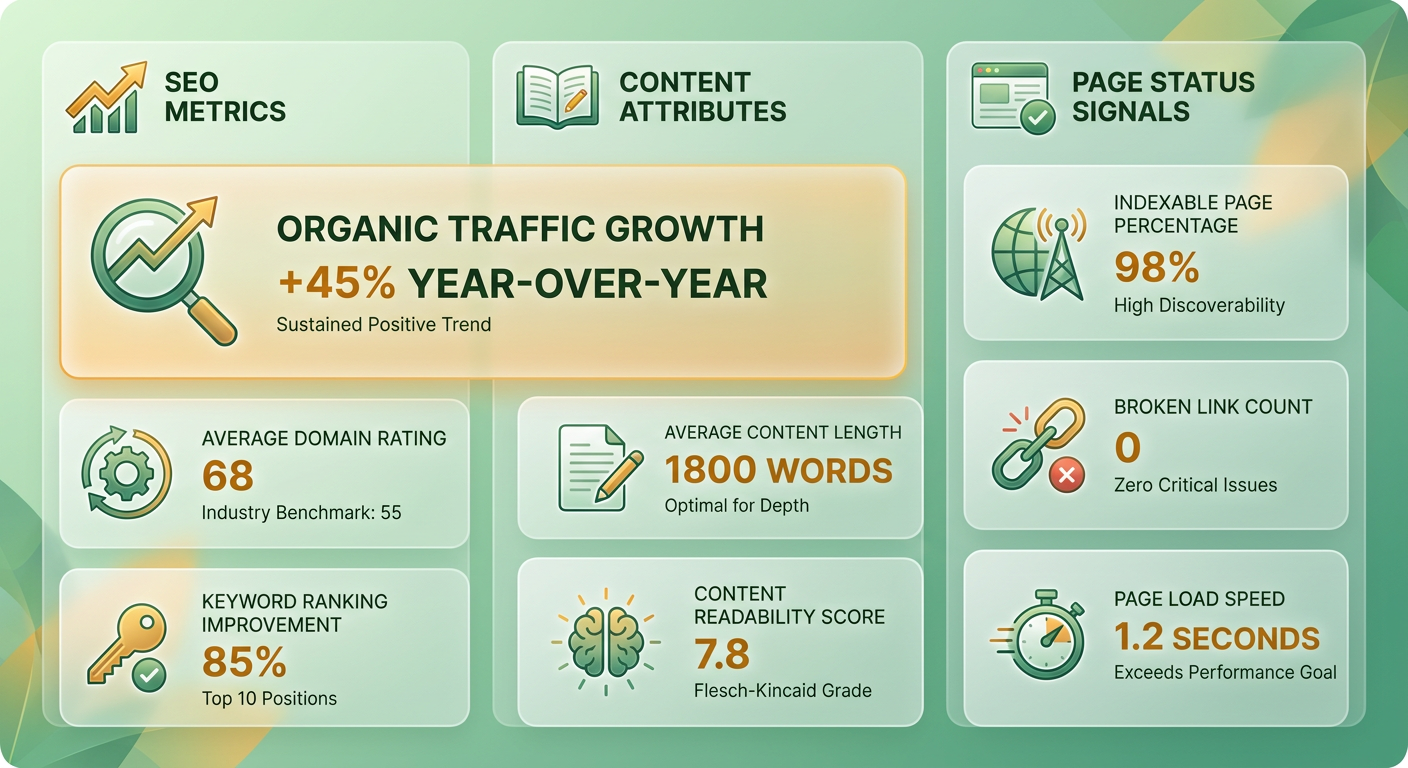
Content Explorer gives you three distinct filter categories you can stack against any search: SEO metrics, content attributes, and page status signals.
SEO metric filters cover website traffic, page-level traffic, traffic value, domain rating, and referring domains. Content attribute filters let you narrow by language, author, word count, platform, and publication date. Page status adds a live/dead filter so you can surface recently broken pages for link-building outreach.
The filter combination that works best for low-competition discovery: set domain rating to a ceiling of 40, referring domains under 10, and page traffic above 500. This stack surfaces pages already getting organic traction without much link equity behind them. Those are the topics worth targeting.
The Freshness Layer
A topic cluster that looked saturated last month may now have a weaker top-ranking page if that page lost traffic after a core algorithm update. The database expands continuously. This means static reports lose utility fast.
The freshness workflow we rely on: filter by publication date to the last 90 days, sort by referring domains, and look for pages that acquired links quickly. Fast link velocity on a new page usually signals genuine editorial interest in a topic. It is not manufactured links.
SERP Depth, API Access, and What Happens After the Data
For each result, you get referring domain counts, estimated organic traffic, domain rating of the host site, word count, and author attribution where available. That per-result depth is enough to qualify or disqualify a topic in a few seconds without clicking through to the actual page.
On the automation side, Ahrefs built Agent A with access to 101 endpoints covering the full dataset. That endpoint breadth means you can pull Content Explorer signals programmatically rather than working through the UI. Agent A connects natively to tools like WordPress, GitHub, and Slack. So a freshness alert can trigger a content update workflow without a human in the loop.
One note on scope: skip Content Explorer for purely technical SEO audits. Site Audit and Site Explorer handle crawl issues and backlink analysis better. Content Explorer earns its place in ideation, freshness monitoring, and link prospect discovery. Those three use cases alone justify building a repeatable filter workflow around it.
Setting Up a Real-World Test with AnyPost.ai
Using Ahrefs well splits into two phases: pulling the right data out of Content Explorer, and feeding it into a publishing workflow that handles the rest automatically. Most teams nail the first phase and drop the ball on the second.
Start with Your Seed Keyword List

Build your seed list before you touch any export. A good seed list for a typical SMB SaaS use case runs 15-30 terms: your core product category, three or four adjacent pain-point phrases, and a handful of comparison or alternative queries where buyers are actively shopping.
For a project management SaaS, that might look like: "task management for remote teams", "asana alternative for small business", "how to track team productivity", "project status report template." Specificity matters. Broad seeds like "productivity" return too much noise in Content Explorer to act on quickly.
Run each seed through Content Explorer with the low-competition filter combination, and look for pages where a site with modest authority is ranking and pulling meaningful traffic. Those are your entry points.
Pulling and Mapping the Data
Content Explorer exports to CSV. The fields that matter for what comes next: page title, URL, traffic, referring domains, word count, and published date.
From there, the goal is moving that data into a publishing workflow that can act on it. AnyPost.ai is built for exactly this stage. It takes your content research and turns it into SEO-optimized articles published automatically in your brand voice. Its Persona Engine matches your tone across every piece. Traffic data helps prioritize which topics to tackle first. Word count gives you a target length. Published date tells you whether a topic is fresh territory or a refresh opportunity.
The published date field is underused by most teams. Content Explorer surfaces pages that are ranking well but have not been updated recently. Those are often the fastest wins because the topic already has proven demand.
What Happens After the Research
Content Explorer surfaces the opportunity. What happens next is entirely on your workflow.
AnyPost.ai handles the execution: generating SEO-optimized articles matched to your brand voice, publishing them automatically to your existing website, and running backlinking strategies in parallel to strengthen search visibility as new content goes live. Rather than manually managing each piece through publication and distribution, the platform keeps your content engine running continuously across your primary marketing channels.
For high-volume pipelines, the manual CSV export process becomes a bottleneck on its own. At that pace, having automated content generation, automated backlinking, and multi-platform publishing running in concert is what makes the difference.
For a deeper look at how this maps to a full B2B lead generation setup, our checklist for using Ahrefs Content Explorer in B2B campaigns walks through the field mapping in more detail.
How Content Explorer Compares to the Alternatives
The most striking difference between Content Explorer and competing tools is not filter depth or export options. It is what each tool leaves out entirely.
Page-Level vs. Keyword-First Thinking

Most content-discovery tools start and stop at keyword lists. Content Explorer does something different: it surfaces actual pages, not just queries. By analyzing live URLs, you can see how specific content structures perform in search. You can see which authors drive the most engagement. You can see how publication dates correlate with traffic retention.
Keyword-centric alternatives give you volume estimates and difficulty scores. Those are useful for prioritization. But they say nothing about the link-earning profile of a topic. They say nothing about who is publishing in your niche. They say nothing about how fast competitors are producing content.
If your workflow ends at "here's a list of topics to write about," keyword tools are sufficient. If you need to know which angles attract backlinks, which content formats dominate a niche, and which pages have stale traffic that outreach can reclaim, keyword-first tools do not go there.
Raw Data Depth
Where Ahrefs pulls ahead is not just crawl scale. It is how the data connects. Referring domain counts tie directly to traffic estimates in the same interface. So you can spot pages that rank without many links and flag them as realistic targets. Competing tools often silo their link data from their traffic data. This forces you to cross-reference exports manually before you can make a call on opportunity quality.
Some alternative tools advertise larger raw link counts. A larger crawl database is not the same as a more accurate live-link picture. Ahrefs prioritizes freshness: links that have gone dead are marked and filtered. So your outreach list reflects the current web rather than a snapshot from six months ago. The methodology matters as much as the headline number.
Where Every Tool in This Category Hits the Same Wall
Across every tool evaluated, including Ahrefs, they all stop at the insight layer. Content Explorer tells you a topic has high traffic potential and weak backlink competition. It flags stale pages ready for freshness updates. It surfaces broken pages your outreach team can target.
What none of these tools do is execute. The moment a researcher closes the export, the insight sits in a spreadsheet. Nothing schedules the article. Nothing maps the brand voice to the draft. Nothing distributes the published piece to the channels where it picks up initial engagement signals that accelerate indexing.
That dead zone between "Content Explorer found an opportunity" and "that opportunity is live, distributed, and earning links" is where most content teams lose momentum. Treating Ahrefs as a read-only intelligence source and pairing it with an automated publishing pipeline is what closes the gap. At scale, multiple clients, multiple product lines, publishing targets that cannot be hit manually, the ability to move directly from data to live content is what determines how efficient your marketing operation actually is.
Frequently Asked Questions
1. Does the discrepancy between Ahrefs' 14.4 billion and 21.7 billion page figures mean the data is unreliable?
No. The variance simply reflects different update cycles between static educational resources and the live production database. Because the web index expands continuously, users should always rely on the real-time metrics displayed within the active tool interface rather than static documentation.
2. Which types of teams get the weakest return from Content Explorer, and why?
Low-volume publishers and hobbyist creators typically see a lower return on investment. Because the tool is designed for deep, ongoing competitive analysis, its cost is difficult to justify if you only produce content occasionally. The value of the data scales directly with your publishing frequency and operational capacity.
3. Can Content Explorer replace a dedicated keyword research tool entirely?
While Content Explorer is excellent for analyzing page-level performance and link-earning potential, it is optimized primarily for standard written web content. For specialized formats or highly localized search environments, teams will still benefit from using dedicated keyword tools to fill in specific data gaps.
4. Is API access to Content Explorer available on standard paid plans?
Programmatic access is reserved for top-tier accounts. Teams on standard plans must perform their research and export data manually through the web interface. While this requires more hands-on effort, the UI still provides full access to the filtering capabilities needed for deep analysis.
5. What is the fastest practical filter combination for finding low-competition topics in Content Explorer?
The most effective approach is to filter for pages that secure significant organic search traffic despite having very low domain authority and minimal backlink profiles. This combination highlights content gaps where high-quality writing can rank without requiring extensive link-building campaigns.
6. What does Content Explorer actually leave undone once a research gap is identified?
The tool is strictly an intelligence platform. It does not assist with content creation, scheduling, multi-channel distribution, or active outreach. Once an opportunity is identified, teams must rely on external systems or automated publishing pipelines to turn those insights into live, distributed assets.
7. How should teams interpret fast link velocity on newly published pages in Content Explorer?
Rapidly acquiring links shortly after publication indicates strong editorial interest and a highly shareable content format. Identifying these pages helps you understand what types of assets are currently attracting natural backlinks in your industry. This allows you to model your own content after successful examples.
