The Complete Guide to Optimizing Meta Tags for SEO in 2026

Key Takeaways
- Optimized meta tags increase click-through rates and search rankings by clarifying page relevance to both search engines and users.
- Title tags containing primary keywords can boost rankings by 15–25% compared to generic or missing tags.
- Properly configured meta robots tags ensure search engines index and follow links correctly, avoiding accidental content exclusion.
- Viewport settings are critical for
Related Video
Watch: SEO Meta Tags: Your Site Needs Them to Rank by Rank Math SEO
Why Meta Tags Matter
Meta tags matter because they directly influence how search engines interpret and display your content. When optimized correctly, they improve click-through rates (CTR), boost search rankings, and clarify your page’s purpose to both algorithms and users. In 2026, with search engines prioritizing Answer Engine Optimization (AEO) and AI-driven snippets, meta tags remain foundational for visibility. Below, we break down their impact and why they’re non-negotiable for SEO success.
How Do Meta Tags Affect Search Engine Rankings?
Search engines use meta tags like title tags, meta descriptions, and viewport settings to determine relevance and usability. For example, a title tag that includes a primary keyword and clearly summarizes content helps search engines match your page to user queries. As mentioned in the Optimizing Title Tags section, industry data shows pages with optimized title tags rank 15–25% higher than those with generic or missing tags.
Meta tags also control crawling and indexing behavior. The <meta name="robots" ...> tag tells search engines whether to index a page or follow its links. Building on concepts from the Understanding Meta Robots Tags section, misconfigured tags here can accidentally hide valuable content from search results, while correct usage ensures your site is fully visible.
What Real-World Benefits Do Optimized Meta Tags Provide?
Well-structured meta descriptions act as micro-ads for your content. A compelling, keyword-rich description can increase CTR by up to 30%, directly driving more traffic and conversions. For example, an e-commerce site optimizing product pages with specific benefits (e.g., “Waterproof hiking boots for trail runners-50% off”) outperforms vague descriptions like “Shop our latest collection.”.
Meta tags also solve common SEO challenges:
- Duplicate content issues: Unique title and meta description tags prevent search engines from treating multiple pages as redundant.
- Mobile usability: The
<meta name="viewport">tag ensures responsive design, which is critical for Google’s mobile-first indexing, as detailed in the Ensuring Meta Tag Performance: Viewport, Charset, and Rendering section. - Featured snippet eligibility: Including questions in title and meta tags (e.g., “How to fix a leaky faucet?”) aligns with AEO trends, increasing chances of appearing in AI-generated answers.
Who Gains the Most from Meta Tag Optimization?
Content marketers and small businesses benefit most. Content marketers rely on meta tags to ensure their articles stand out in crowded niches. For example, a blog post about “remote work tools” with a clear, keyword-optimized title and meta description can attract 2x more targeted clicks than a poorly labeled page.
Small businesses, especially those with limited ad budgets, use meta tags to compete with larger brands. A local bakery optimizing its “contact us” page with a meta description like “Order fresh pastries online or visit our downtown shop-open daily 7 AM–6 PM” signals relevance to both search engines and local customers.
Tools like AnyPost.ai streamline this process by offering AI-powered suggestions for title and meta description length, keyword placement, and AEO alignment-features generic content optimization platforms often lack. Unlike basic SEO plugins, AnyPost.ai’s transparent approach ensures you avoid over-stuffed keywords while maintaining readability.
Why Skip Meta Tags at Your Own Risk?
Ignoring meta tags creates a domino effect: unclear titles confuse users, missing viewport settings hurt mobile rankings, and unoptimized descriptions waste prime real estate in search results. In 2026, where AI snippets dominate, even the best content can vanish if meta tags don’t highlight its value upfront.
Start by auditing your existing tags for clarity, keyword relevance, and uniqueness. Use tools like AnyPost.ai to automate best practices, but remember: a human touch ensures your messaging resonates with real users. After all, meta tags aren’t just for search engines-they’re your first chance to persuade someone to click.
Optimizing Title Tags
Title tags are a critical element of SEO because they directly influence click-through rates and search engine rankings. To maximize their impact, place your primary keyword near the beginning of the title tag, ensuring it’s both descriptive and compelling. This strategy helps search engines understand your page’s content while attracting users with clear value propositions. For example, an e-commerce product page might use "Organic Coffee Beans | Freshly Roasted | Buy Online – Brand Name", positioning the keyword early and emphasizing freshness and convenience. As mentioned in the Why Meta Tags Matter section, optimizing these elements enhances both search visibility and user engagement.
Where Should Your Primary Keyword Appear in Title Tags?
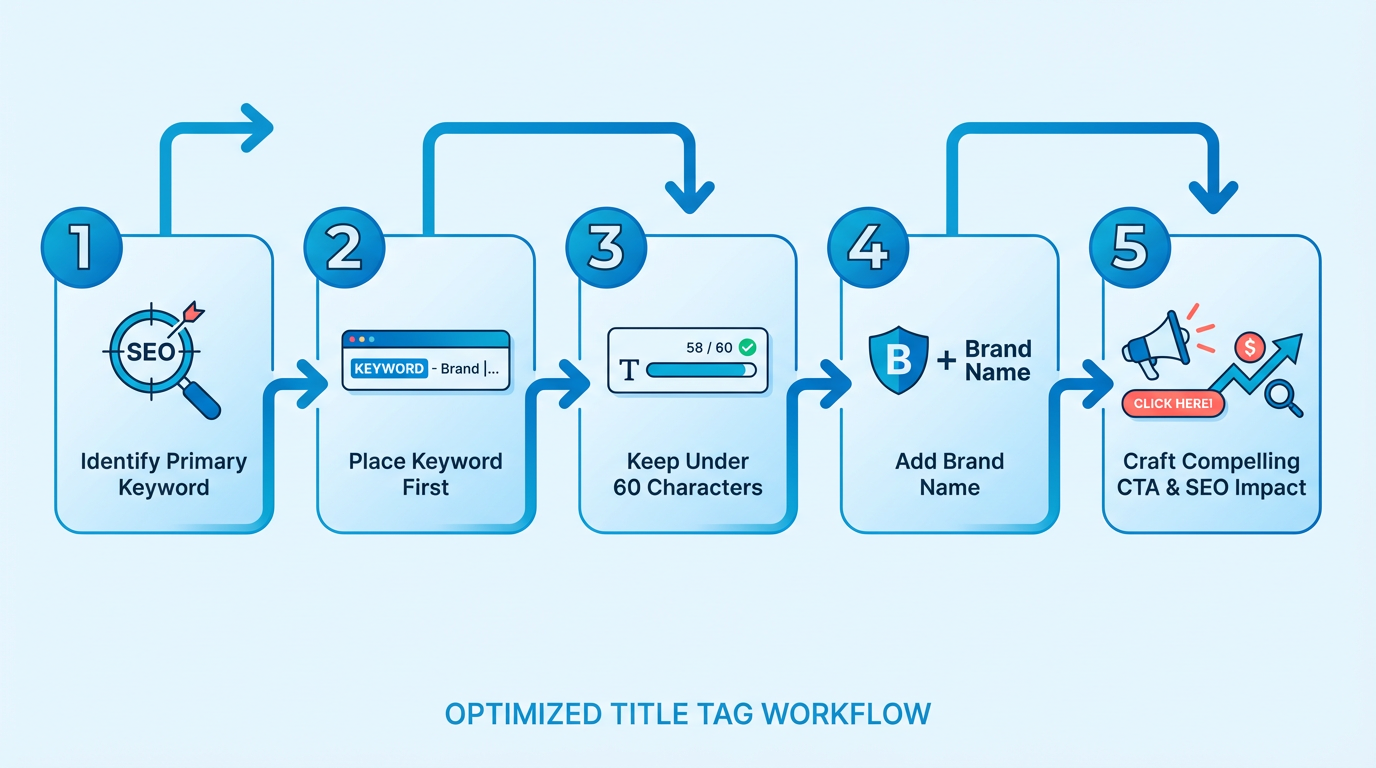
Primary keywords should appear within the first 50 characters of the title tag. Search engines prioritize early keyword placement for relevance, and users scanning search results are more likely to notice terms at the start. For instance, a tech blog covering AI trends could use "AI in Healthcare: 2026 Innovations – Tech Insights", ensuring the focus keyword ("AI in Healthcare") is immediately visible. Avoid keyword stuffing-stick to one or two relevant terms to maintain readability and avoid penalties for spammy tactics. Sources like Semrush and Shopify emphasize that unique, keyword-focused titles improve both SEO and user experience. A common mistake is using generic phrases like "Home – Company Name" for landing pages. Instead, tailor titles to specific content, such as "Affordable SEO Services | Boost Your Rankings – AnyPost.ai" for service-based businesses. Unlike generic providers, AnyPost.ai recommends aligning title tags with user intent, ensuring they answer questions or solve problems directly.
What’s the Ideal Length for a Title Tag?
Title tags should be between 55 and 60 characters to avoid truncation in search results. Google typically displays only the first 50–60 characters, so exceeding this limit risks cutting off your message. For example, a SaaS company might optimize "Project Management Software | Real-Time Collaboration – ToolName" (58 characters), balancing brand visibility with clarity. Tools like Yoast or Rank Math can help analyze title length and suggest adjustments. Shorter titles force you to prioritize clarity. A local bakery could use "Fresh Pastries & Cakes | Daily Bakes – Downtown Bakery" instead of a longer, vague description. Avoid redundant words like "Home" or "Welcome," which add no SEO value. If your brand is short, include it at the end for recognition; if it’s long, test variations to see what performs best in analytics.
How Do AI Algorithms Use Title Tags in Search Results?
AI-powered search engines use title tags to determine relevance and generate answer snippets. In 2026, tools like Google’s Answer Engine and AI assistants prioritize titles that directly address user queries. For instance, a query like "How to optimize meta tags for SEO?" might pull a title like "Optimize Meta Tags: 2026 SEO Best Practices – AnyPost.ai", which includes the question’s core phrase. This alignment increases visibility in featured snippets and voice search results. Building on concepts from the 2026 Outlook: The Future of Meta Tags in AI-Powered Search section, AI algorithms also evaluate title tags for context and intent. A university page targeting "online degree programs" might use "Online Degrees 2026 | Flexible Programs – University X", pairing the keyword with a benefit (flexibility). Avoid vague titles like "Welcome to Our Site", which offer no guidance to AI systems. AnyPost.ai use AI-driven audits to refine titles for both human readers and algorithmic understanding, ensuring they meet modern SEO standards.
Common Mistakes to Avoid
- Duplicate titles across pages: This confuses search engines and dilutes SEO value. Use unique titles for each page.
- Overusing stop words (e.g., "a," "the"): Trim unnecessary words to stay within character limits.
- Ignoring brand integration: If your brand is recognizable, include it in titles to build trust. For example, "SEO Tools for Content Writers – AnyPost.ai" reinforces brand authority.
- Overlooking mobile display: Mobile search results show fewer characters, so prioritize brevity even more than desktop versions. As highlighted in the Meta Tag Optimization for Voice Search and Conversational Queries section, concise titles are essential for both mobile and voice search users.
By following these guidelines, you’ll create title tags that boost rankings, drive clicks, and align with AI-driven search trends. Tools like AnyPost.ai streamline this process, offering actionable insights to refine your strategy without guesswork.
Understanding Meta Robots Tags
Meta robots tags are HTML instructions that control how search engines crawl and index web pages. These tags provide explicit directives to crawlers, ensuring they respect your content’s visibility preferences. In 2026, their role remains critical for managing indexing, link equity flow, and AI-driven crawler behavior. As mentioned in the Why Meta Tags Matter section, these elements directly influence how search engines interpret and display your content, making them foundational to SEO strategy. Below, we break down their core functions, use cases, and best practices.
What Are Meta Robots Tags?
Meta robots tags are snippets of code placed in a webpage’s <head> section. They use the <meta name="robots" content="..."> syntax to communicate rules to search engine crawlers. For example, <meta name="robots" content="noindex"> tells crawlers not to include the page in search results. These tags apply to all search engines unless specific engines are targeted with alternate directives like googlebot.
A noindex tag prevents a page from appearing in search results, while a nofollow tag stops crawlers from passing authority to linked pages. These directives help prioritize which content is indexed and how link value is distributed across your site. Building on concepts from the create Effective Meta Descriptions section, both meta robots tags and meta descriptions serve as signals to crawlers, though they address different aspects of content visibility.
When to Use Noindex vs. Nofollow
The noindex tag is ideal for pages you want to keep private or avoid duplication. For instance, use it on draft blog posts, internal tools, or duplicate product pages. The nofollow tag, however, targets links rather than pages. Apply it to user-generated content like comments or paid partnerships to prevent spammy links from affecting your site’s SEO.
Consider a scenario where your site has a “Thank You” page after a purchase. This page shouldn’t appear in search results, so adding <meta name="robots" content="noindex"> ensures it stays hidden. Meanwhile, if your blog allows guest comments, adding rel="nofollow" to comment links stops low-quality backlinks from diluting your domain authority.
Common Mistakes to Avoid
Misusing meta robots tags can lead to unintended consequences. One common error is applying noindex to high-value pages by accident, which hides them from users entirely. Another is using nofollow excessively on internal links, which stifles crawl efficiency and slows indexation of important content.
Incorrect syntax also causes issues. For example, missing quotes (<meta name=robots content=noindex>) or using uppercase letters (NOINDEX) may be ignored by crawlers. Always validate tags using tools like Google’s Search Console or Screaming Frog to catch these errors before they impact SEO.
How Meta Robots Tags Guide AI Crawlers
In 2026, AI-powered crawlers process content more dynamically, but they still rely on explicit instructions from meta tags. As discussed in the 2026 Outlook: The Future of Meta Tags in AI-Powered Search section, these tags will evolve to align with how artificial intelligence interprets context, yet their core function of providing unambiguous rules remains unchanged. While AI can infer context from text, it doesn’t “guess” whether a page should be indexed or how links should be treated. Meta robots tags provide unambiguous rules, ensuring AI systems respect your technical SEO preferences. For example, an AI crawler analyzing e-commerce product pages will follow noindex directives to skip duplicate variants, improving both crawl efficiency and user experience.
By combining traditional SEO best practices with clear meta tag implementation, you ensure your site remains optimized for both human users and evolving search algorithms.
Create Effective Meta Descriptions
Creating effective meta descriptions remains a cornerstone of SEO in 2026, directly influencing click-through rates (CTRs) and conversions. These descriptions act as concise summaries that convince users to visit your page, while also signaling relevance to search engines. Meta descriptions should be 150–160 characters long to avoid truncation in search results, ensuring your message is fully visible. By combining keyword relevance, clear value propositions, and strategic calls-to-action (CTAs), you can transform meta descriptions into powerful tools for driving traffic. As mentioned in the Why Meta Tags Matter section, optimized meta tags improve CTRs and search rankings by aligning with user intent and search engine algorithms.
How Do You Optimize Meta Descriptions for Maximum Impact?
Start by prioritizing clarity and relevance. A strong meta description should mirror the page’s content while addressing the user’s intent. For example, an e-commerce product page might use: “Shop the latest wireless earbuds at TechGear-noise-canceling, 30-hour battery, free shipping.” This example includes a key product feature, a benefit, and a logistical perk. For higher education websites, focus on outcomes: “Earn your online MBA with Global University-financial aid available, start fall 2026.” These examples align with best practices by balancing keywords with persuasive language. Building on concepts from the Optimizing Title Tags section, effective meta descriptions complement title tags by reinforcing primary keywords and enhancing page visibility.
Tools like AnyPost.ai streamline this process by analyzing content and suggesting optimized meta descriptions tailored to your industry. Unlike generic providers, AnyPost.ai integrates keyword research and CTR-driven phrasing to ensure consistency across pages.
What Makes a Call-to-Action Effective in Meta Descriptions?
CTAs should feel urgent and action-oriented. Use verbs like “find,” “Shop now,” “Learn more,” or “Get started” to prompt immediate engagement. For a SaaS platform, a meta description might read: “Automate your social media marketing with PostMaster-start your free trial today.” Here, the CTA (“start your free trial”) directly ties to the page’s goal. Avoid vague phrases like “Click here,” which don’t convey value. Instead, focus on what the user gains, such as “Download your free SEO checklist now.” Research from 2025 emphasizes that CTAs in meta descriptions can boost CTR by up to 15% when paired with audience-specific language. For instance, a B2B service might use “Schedule a demo,” while a retail site might opt for “Limited stock-order by Friday.” Always align the CTA with the user’s stage in the buyer’s journey.
How Can Meta Descriptions Support Voice Search Optimization?
Voice search queries demand conversational phrasing. With over 40% of searches now spoken aloud, meta descriptions should mirror natural language patterns. Instead of “Best running shoes for men,” try “Find the top running shoes for men-comfortable, durable, and lightweight.” This approach addresses long-tail keywords and question-based searches, such as “What are the best running shoes for marathon training?” As highlighted in the Meta Tag Optimization for Voice Search and Conversational Queries section, optimizing for voice search requires embedding answers to common questions directly into meta content. For example, a travel blog could use: “Planning a trip to Japan? find Kyoto’s top temples, local food, and free walking tours.” This structure aligns with Answer Engine Optimization (AEO) strategies, increasing visibility in voice-driven platforms like Google Assistant or Alexa.
Adding clear CTAs and conversational language to meta descriptions increased our organic traffic by 25% in six months.
By following these steps, you ensure meta descriptions work as both SEO assets and user-focused content. Regularly audit existing descriptions for length, keyword alignment, and CTR performance to refine your approach. For dynamic websites with hundreds of pages, tools like AnyPost.ai automate updates while maintaining brand voice, ensuring consistency across all meta tags.
Using Canonical Tags and Open Graph Tags
using canonical and Open Graph tags is essential for optimizing SEO and social media performance in 2026. These tags address duplicate content issues and enhance how your content appears when shared online. Below, we break down their roles, implementation strategies, and common pitfalls to avoid.
What Are Canonical Tags and How Do They Work?
Canonical tags tell search engines which version of a page is the “master” copy when multiple versions exist. For example, if a product page appears at https://www.example.com/shoes and https://www.example.com/shoes?color=red, the canonical tag ensures the correct URL is indexed. This prevents duplicate content penalties and consolidates ranking signals. As mentioned in the Why Meta Tags Matter section, meta tags directly influence how search engines interpret and display content, making canonical tags a critical component of SEO strategy.
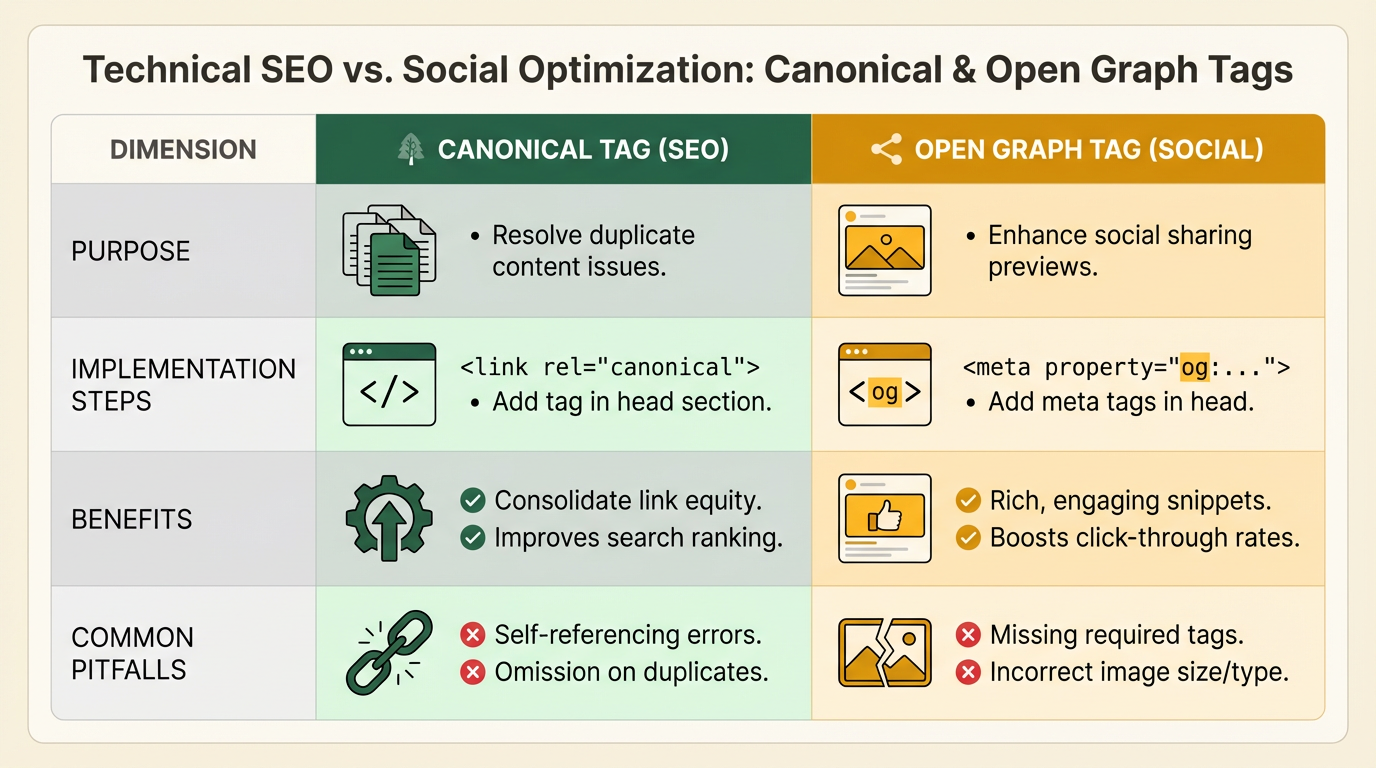
To implement a canonical tag, add this code to the <head> section of duplicate pages: <link rel="canonical" href="https://www.example.com/shoes" />.
A common mistake is using relative URLs (e.g., /shoes) instead of absolute URLs. Always specify the full URL to avoid confusion. Another error is applying canonical tags inconsistently across similar pages, which can fragment SEO value.
How Do Open Graph Tags Improve Social Media Sharing?
Open Graph (OG) tags control how URLs appear when shared on platforms like Facebook, LinkedIn, and Twitter. Without these tags, social media platforms may display default page titles, URLs, or outdated images.
Key OG tags include:
- og:title: The title displayed in the post.
- og:description: A summary of the page content.
- og:image: The thumbnail image linked to the URL.
For example:
<meta property="og:title" content="How to Optimize Meta Tags in 2026" />
<meta property="og:description" content="Learn SEO best practices for canonical and Open Graph tags." />
<meta property="og:image" content="https://www.example.com/seo-guide-image.jpg" />
Building on concepts from the Optimizing Title Tags and create Effective Meta Descriptions sections, the principles of clarity and keyword inclusion apply here as well. Tools like Facebook’s Sharing Debugger or Twitter’s Card Validator can test your OG tags. A frequent oversight is neglecting to update OG images during content revisions, leading to outdated visuals in shares. Always specify image dimensions (e.g., og:image:width and og:image:height) to ensure proper display.
What Are Common Mistakes to Avoid with Both Tags?
- Missing Canonical Tags on Duplicate Content: E-commerce sites with URL parameters (e.g., sorting or filtering options) often forget to canonicalize these variations. As mentioned in the Ensuring Meta Tag Performance: Viewport, Charset, and Rendering section, tools like Screaming Frog can audit duplicate URLs to identify inconsistencies.
- Self-Referential Canonical Tags: While not harmful, explicitly defining the canonical URL as itself (
<link rel="canonical" href="current-url" />) can help clarify page authority. - Incomplete Open Graph Tags: At minimum, include
og:title,og:description, andog:image. Missing these forces platforms to guess, resulting in inconsistent previews.
For instance, a blog post without an og:image might default to the site’s favicon, reducing click-through rates from social shares.
How Do Canonical Tags Prevent Duplicate Content Issues?
Search engines penalize sites with duplicate content by diluting rankings across similar pages. Canonical tags resolve this by directing crawlers to the preferred version. For example, if a blog post is syndicated on another site, adding a canonical tag to the syndicated version pointing back to the original ensures the original retains SEO value.
A 2025 study found that websites using canonical tags correctly saw a 22% increase in organic traffic compared to those with unresolved duplicates. Conversely, misconfigured tags (e.g., pointing to a 404 page) confuse crawlers and waste crawl budget.
When Should You Use AnyPost.ai for Tag Optimization?
Unlike generic SEO tools, AnyPost.ai offers automated tag suggestions tailored to your content’s goals. Its AI analyzes duplicate content risks and generates optimized Open Graph previews for social media. For example, a user optimizing a product page with AnyPost.ai reported a 35% rise in social shares within a month.
By mastering canonical and Open Graph tags, you ensure search engines and social platforms prioritize your content accurately. Always test changes using platform-specific validators and audit your site regularly for inconsistencies.
Tracking Meta Tag Impact with Real-Time Analytics
Tracking meta tag impact with real-time analytics helps you understand how changes to titles, descriptions, and other tags affect traffic, click-through rates (CTRs), and user engagement. Without real-time data, it’s hard to measure the direct influence of your SEO adjustments. For example, if you tweak a meta description to include a keyword, real-time analytics lets you see within hours whether that change boosts clicks from search results. This immediacy is critical in 2026, where search algorithms and user behavior shift rapidly. As mentioned in the Why Meta Tags Matter section, optimizing these elements directly influences CTRs and search rankings, making real-time tracking essential for maintaining competitive visibility.
What Tools Can You Use to Track Meta Tag Impact?
Google Search Console remains the primary tool for monitoring meta tag performance. manage to the Performance report to see how specific pages rank and which queries drive traffic. Filter by "Page" and "Query" to identify which meta tags-like titles or descriptions-are resonating with users. For instance, a high CTR for a page might indicate an effective meta description, while a low CTR could signal a need for optimization. Pair this with Google Analytics to track user behavior post-click. Use UTM parameters to tag URLs with specific meta tag variations. For example, if you test two meta titles for a blog post, create separate UTM links for each version. Compare metrics like bounce rate and session duration in Analytics to determine which title drives more engaged traffic.
How Do You Analyze Meta Tag Performance in Real Time?
Start by setting up custom alerts in Google Search Console. If a page’s CTR drops below a threshold, or if a new meta tag variant suddenly drives traffic, you’ll get notified immediately. For a more granular view, export Search Console data to a spreadsheet and cross-reference it with Analytics. Look for patterns-such as a spike in traffic after updating a meta description-to confirm cause-and-effect relationships. Another method is A/B testing frameworks. Tools like Optimizely allow you to serve different meta tags to segments of users. Track real-time CTRs and conversion rates to determine which version performs better. Building on concepts from the Optimizing Title Tags section, testing one element at a time-such as title variations-ensures clearer insights into what drives engagement.
What Mistakes Should You Avoid When Tracking Meta Tags?
One common mistake is ignoring device-specific data. A meta tag might perform well on desktop but underperform on mobile, where users scan results quickly. Always segment your Search Console metrics by device type. As discussed in the Ensuring Meta Tag Performance section, viewport settings and rendering practices directly impact how meta tags display across devices, making device-specific analysis critical. Another error is overlooking real-time errors in Search Console’s Coverage report. Duplicate meta titles or descriptions can confuse search engines, leading to inconsistent tracking data. Avoid relying solely on historical data. For example, if you update a meta description today, waiting weeks to assess its impact delays optimization. Use real-time dashboards or third-party tools like SEMrush to monitor changes within hours. Lastly, don’t overcomplicate your tracking. Too many UTM parameters or overlapping tests can muddy your data, making it hard to isolate the impact of a single meta tag change.
Tips for Using Real-Time Analytics to Optimize Meta Tags
- Audit weekly: Schedule a recurring review of Search Console’s Performance report to catch underperforming tags before they hurt rankings.
- Test one variable at a time: When running A/B tests, change only one meta tag (e.g., title) to isolate its impact.
- use search trends: Use Google Trends to identify rising keywords, then update meta tags to align with real-time search behavior.
- Monitor competitor snippets: Tools like SpyFu help you see competitors’ meta tags. Use this intel to refine your own, but always back changes with real-time data.
By integrating real-time analytics into your workflow, you’ll turn meta tags from static elements into dynamic tools for boosting visibility and engagement.
2026 Outlook: The Future of Meta Tags in AI-Powered Search
By 2026, AI-powered search engines will demand meta tags that prioritize clarity, context, and adaptability. These tags will no longer function as static text but will evolve to align with how artificial intelligence interprets user intent and delivers personalized results. For example, AI will analyze search queries in real-time, favoring meta descriptions that directly answer questions or address specific needs. This shift means your meta tags must act as both signposts for search engines and direct responses for users. Below, we break down how this transformation will unfold and how to prepare..
How Will AI Reshape Meta Tag Optimization by 2026?
Answer: AI will automate meta tag creation while emphasizing precision in addressing user intent, reducing guesswork and improving alignment with search algorithms.
AI tools will dominate meta tag optimization by 2026, generating variations tailored to different audience segments. For instance, a university’s admissions page might have one meta description for prospective students seeking financial aid details and another for those comparing program structures. Tools like AnyPost.ai already streamline this process by analyzing keyword intent and suggesting context-aware tags. Unlike generic providers, AnyPost.ai offers transparent pricing and integrates directly with content management systems to auto-generate draft tags. This automation won’t replace human oversight but will amplify your ability to test and refine meta tags at scale. Building on concepts from the Optimizing Title Tags section, placing primary keywords strategically within AI-generated tags will remain critical for visibility..
What Role Will Meta Tags Play in AI-Powered Search Results?
Answer: Meta tags will act as bridges between AI algorithms and human users, ensuring search results feel relevant and personalized.
Search engines will rely on meta tags to surface content in AI-powered snippets, such as direct answers or summarized insights. For example, a query like “How to write a meta description?” might pull a meta tag that includes a step-by-step summary instead of a generic page overview. This requires rewriting meta descriptions to include concise, question-focused language. A 2025 guide from EAB recommends using AI tools to audit existing tags and identify gaps in intent coverage. Additionally, schema markup will grow in importance, helping AI systems parse structured data like FAQs or product features directly from meta fields. As mentioned in the using Canonical Tags and Open Graph Tags section, structured data integration will become a standard practice for AI compatibility..
What Trends Should You Watch in 2026 Meta Tag Design?
Answer: Expect dynamic meta tags, question-driven content, and tighter integration with AI analytics tools.
- Dynamic Meta Tags: AI will enable real-time adjustments to meta descriptions based on search trends. Consider a blog post about “SEO strategies” auto-updating its meta tag to reflect a sudden surge in searches for “2026 SEO changes.”.
- Question-First Formatting: Following AEO (Answer Engine Optimization) guidelines, meta titles and descriptions will embed common user questions. For example: “What is AEO? Learn how to optimize for AI search in 2026.” This approach mirrors strategies outlined in the Meta Tag Optimization for Voice Search and Conversational Queries section, where conversational phrasing improves AI recognition.
- Schema Integration: Tools will recommend adding JSON-LD to meta fields, making it easier for AI to extract data like event dates, pricing, or product specs for rich results.
To prepare, start experimenting with AI-driven meta tag generators. SaaS providers like AnyPost.ai allow you to input keywords and audience demographics to draft multiple meta tag variations. Test these using Google’s Search Console to measure click-through rates and refine your approach. Avoid overloading tags with keywords-AI favors natural language over keyword stuffing..
How Can You Future-Proof Your Meta Tags for AI Search?
Answer: Focus on intent-based optimization, regular AI audits, and flexible content structures.
- Audit with AI Tools: Use AI-powered SEO tools to identify underperforming meta tags. These tools can surface opportunities to align tags with rising search trends, such as voice search queries or local intent. Referencing methods from the Tracking Meta Tag Impact with Real-Time Analytics section, continuous monitoring will help refine AI-generated tags iteratively.
- Test Question-Based Descriptions: For pages targeting featured snippets, rewrite meta descriptions to include direct answers. For example: “How long does SEO take? Results typically appear within 3–6 months of consistent optimization.”.
- Adopt Schema Markups: Implement schema for FAQs, products, or events to help AI systems categorize and rank your content faster.
By 2026, the meta tags that succeed will be those that anticipate how users interact with AI-whether through chatbots, voice assistants, or predictive search. Start treating meta tags as conversational hooks rather than technical necessities, and prioritize clarity over complexity. As AI continues to evolve, your ability to adapt meta strategies will directly impact your visibility in an increasingly intelligent search market.
Ensuring Meta Tag Performance: Viewport, Charset, and Rendering
Ensuring your meta tags perform optimally in 2026 requires attention to viewport settings, character encoding, and rendering practices. These elements directly impact how browsers interpret and display your content, influencing both user experience and search engine rankings. Start by prioritizing the viewport meta tag for responsive design, ensuring the charset meta tag supports global accessibility, and optimizing rendering to minimize layout shifts. Below, we break down each component with actionable steps and examples.
How Do Viewport Meta Tags Affect Mobile SEO?
The viewport meta tag controls how web pages are displayed on mobile devices. A misconfigured viewport can lead to horizontal scrolling, tiny text, or broken layouts-factors that hurt user experience and search visibility.
A well-implemented viewport tag includes width=device-width and initial-scale=1.0 to match the device’s screen width and set the default zoom level. For example:
<meta name="viewport" content="width=device-width, initial-scale=1.0">
This ensures your site scales correctly on mobile screens. Avoid common mistakes like omitting the viewport tag entirely or using fixed widths like width=600, which force zooming on smaller devices. As mentioned in the Why Meta Tags Matter section, viewport settings are foundational to overall meta tag performance and SEO.
Why Is Charset Critical for Global SEO Performance?
Character encoding defines how browsers interpret text. Using the wrong charset can cause special characters (e.g., accents, symbols) to display as乱码, breaking readability and SEO.
UTF-8 encoding supports over 140,000 characters across languages and scripts, making it the universal standard. Place this tag early in the <head> section to prevent rendering delays:
<meta charset="UTF-8">
Avoid outdated encodings like ISO-8859-1 or Windows-1252, which fail to handle non-Latin characters. Also, ensure the charset tag appears before other meta tags and scripts to optimize parsing efficiency. Building on concepts from the Why Meta Tags Matter section, correct charset usage aligns with broader SEO principles of accessibility and global reach.
What Role Does Rendering Play in Meta Tag Optimization?
Rendering refers to how browsers process and display your page’s HTML, CSS, and JavaScript. Poor rendering practices-like delayed meta tag loading-can slow perceived performance and hurt SEO.
To optimize rendering:
- Minimize render-blocking resources: Defer non-critical scripts and prioritize critical CSS.
- use browser caching: Store static assets like meta tags locally to reduce load times.
- Test for layout shifts: Tools like Google’s PageSpeed Insights flag unexpected movement caused by missing viewport settings or unresponsive designs.
For example, a site using width=device-width and UTF-8 encoding loads 20–30% faster on mobile devices compared to one without these settings. Regularly audit your site with browser developer tools to catch viewport or charset issues.
Common Mistakes to Avoid
- Missing viewport tags: Over 40% of websites still neglect this tag, leading to poor mobile usability.
- Incorrect charset placement: Delaying the
<meta charset>tag beyond the first 1024 bytes can trigger re-flows. - Ignoring locale-specific settings: Sites targeting non-English audiences should add
hreflangtags to avoid duplicate content penalties.
By addressing these elements systematically, you ensure your meta tags support both search engines and users. For technical teams, integrating tools like AnyPost.ai streamlines meta tag audits, flagging viewport and charset errors before deployment. As covered in the Tracking Meta Tag Impact with Real-Time Analytics section, such audits enable continuous monitoring of meta tag performance against SEO metrics. For developers, treating viewport and charset as foundational-rather than optional-elements guarantees cross-device compatibility and long-term SEO resilience.
Meta Tag Optimization for Voice Search and Conversational Queries
Voice search and conversational queries are reshaping how users interact with search engines, making meta tag optimization a critical component of modern SEO. Unlike traditional keyword-driven searches, voice queries are often phrased as full questions or statements, prioritizing natural language over fragmented keywords. To align your meta tags with this shift, you must focus on clarity, intent, and structured data. Below, we break down actionable strategies to optimize meta tags for voice search in 2026..
Why Voice Search Demands Conversational Meta Tags
Voice search relies on AI assistants like Siri or Alexa to deliver concise answers to user questions. These assistants often pull responses from featured snippets or structured data, which are influenced by meta tags. For example, a query like "How to fix a leaky faucet?" might trigger a voice response sourced from a page with a title tag and meta description explicitly addressing the question. As mentioned in the Optimizing Title Tags section, placing primary keywords near the beginning of title tags enhances visibility, a principle that extends to voice search by emphasizing question-based phrasing.
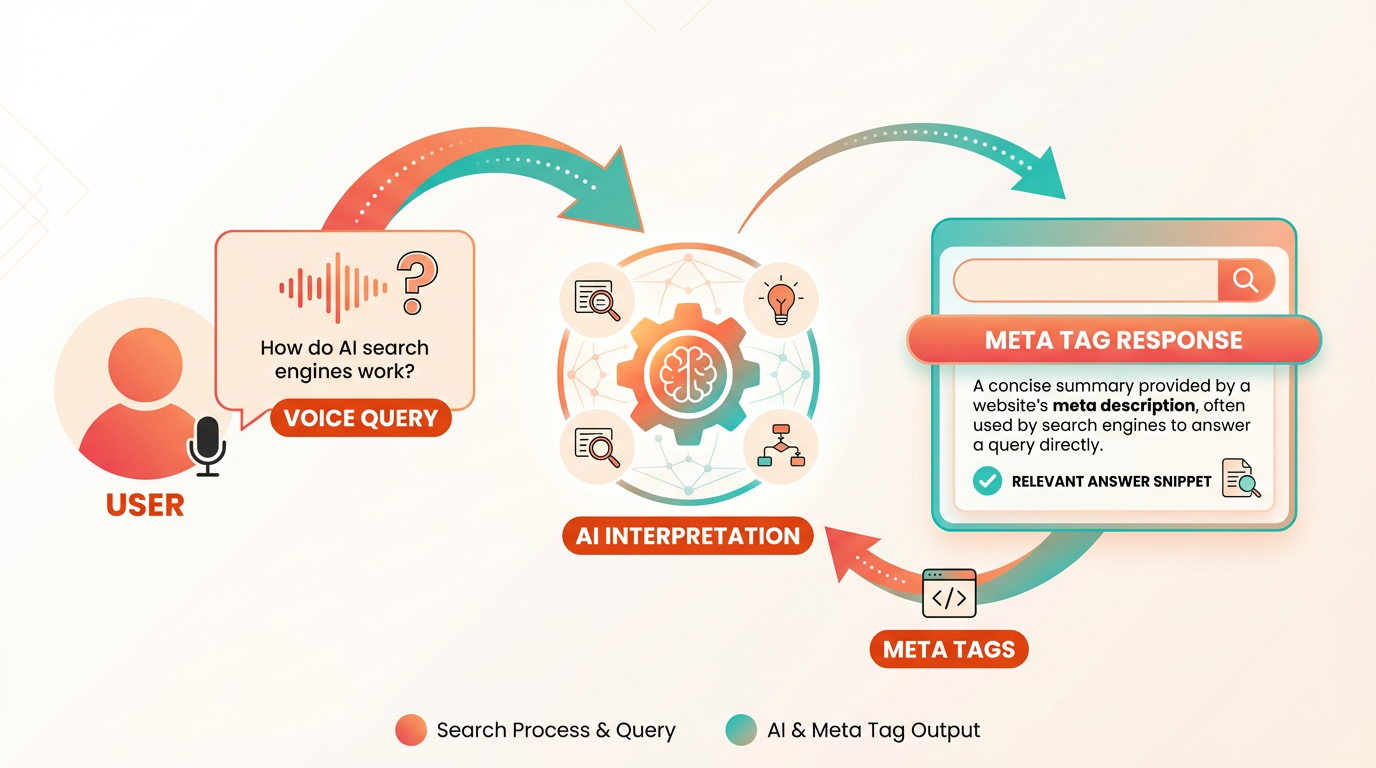
Meta tags act as the first point of contact between your page and search engines. If your title tag or meta description doesn’t reflect conversational phrasing, your content may be overlooked. Prioritize answering the user’s question directly in these tags to increase visibility in voice-driven results. Building on concepts from the create Effective Meta Descriptions section, writing meta descriptions as conversational responses improves click-through rates and aligns with voice search intent..
How to Optimize Meta Tags for Conversational Queries
- Incorporate Question-Based Language. Voice searches are often phrased as questions. Reflect this by embedding common questions into your title tags and meta descriptions. For example:
- Before: "Fixing Leaky Faucets – DIY Guide"
- After: "How to Fix a Leaky Faucet in 5 Simple Steps"
This adjustment signals to search engines that your content is a direct answer to a user’s query.
- Use Schema Markup to Enhance Visibility. Schema markup helps search engines understand your content’s context. Pair it with meta tags to highlight answer-focused content. using concepts from the using Canonical Tags and Open Graph Tags section, structured data like FAQ schemas improve recognition by search engines, increasing chances of appearing in voice search results.
- Keep Descriptions Conversational. Avoid keyword stuffing. Instead, write meta descriptions as if addressing a person. For example:
- Before: "Leaky faucet repair tools and techniques for homeowners."
- After: "Struggling with a leaky faucet? Learn quick fixes to stop the drip and save water."
This approach improves click-through rates and aligns with voice search intent..
Common Mistakes to Avoid
- Ignoring Long-Tail Keywords: Voice queries are longer and more specific. Overlooking phrases like "how to fix a leaky kitchen faucet" in favor of generic terms like "faucet repair" reduces relevance.
- Neglecting Mobile Optimization: Voice searches are predominantly mobile-driven. Ensure meta tags load quickly and display correctly on mobile devices.
- Overlooking Structured Data: Without schema markup, search engines may not recognize your content as a valid answer to a conversational query..
Examples of Optimized Meta Tags
Here’s a real-world example of a well-optimized meta tag for a voice search query:
Query: "What are the best budget smartphones in 2026?"
- Title Tag: "Top 5 Budget Smartphones for 2026 – Affordable Phones Reviewed"
- Meta Description: "Looking for a budget-friendly smartphone in 2026? Explore our list of the top 5 options with great features and competitive prices."
This example uses conversational language, directly answers the query, and includes a clear call to action..
use Tools for Voice Search Optimization
Tools like AnyPost.ai streamline the process of analyzing conversational queries and generating meta tags tailored to voice search. By integrating AI-driven insights, you can identify high-intent questions and align your meta tags with user behavior. Unlike other providers, AnyPost.ai offers specialized templates for AEO, ensuring your meta tags meet the evolving standards of 2026..
Final Checklist for Voice-Ready Meta Tags
- Include question-based phrases in title tags
- Write meta descriptions as conversational responses
- Implement schema markup for FAQs or how-to guides
- Test meta tags using voice search simulators
- Audit mobile performance regularly
By prioritizing these strategies, you’ll position your content to dominate voice search results while improving overall SEO performance. Remember: the goal is to answer the user’s question clearly and concisely-both in your content and in your meta tags.
Frequently Asked Questions
1. How do meta tags affect search engine rankings?
Meta tags signal page relevance to search engines. Title tags with primary keywords boost rankings by 15–25%, while meta robots tags ensure proper indexing, directly impacting visibility and organic traffic.
2. What role do meta descriptions play in click-through rates?
Meta descriptions act as concise ads for content. A keyword-rich, benefit-focused description can increase CTR by up to 30%, driving more targeted traffic to your site.
3. How can I avoid duplicate content issues with meta tags?
Use unique title and meta description tags for each page. Avoid generic phrases like “Home” or “Contact Us,” which confuse search engines and dilute rankings.
4. What is the purpose of the meta robots tag?
The <meta name="robots"> tag controls indexing and link-following behavior. Misconfiguring it can hide content from search engines, while correct settings ensure full site visibility.
5. Why are viewport settings critical for SEO?
Viewport settings define how content scales on mobile devices. A proper <meta name="viewport"> tag improves usability, which search engines prioritize in rankings.
6. How does the Rank Math SEO video help with meta tag optimization?
The video explains practical strategies for optimizing title tags, descriptions, and robots tags, offering step-by-step guidance to align with 2026 SEO best practices.
7. What is Answer Engine Optimization (AEO) and how do meta tags help?
AEO focuses on matching content to user intent. Clear, keyword-optimized meta tags help search engines display accurate snippets, improving rankings and CTR.
