Turn One AI Draft Into X Posts, Newsletters, and YouTube Scripts

Key Takeaways
- Repurposing one AI draft into a blog post, newsletter, and YouTube script can significantly reduce production time compared to building each from scratch.
- Structured repurposing runs faster than rebuilding each format separately, with derivative pieces finished in a fraction of the original time.
- The human voice pass is the one stage that resists automation. Speed-first pipelines that skip it let generic output slip through.
- The full workflow spans five stages: a master draft, then blog, newsletter, and script, then a final human review.
- The newsletter is often the easiest deliverable, producing a concise email that drives return traffic.
- The blog post and YouTube script typically require more effort. The voice pass ranks hardest despite taking only half an hour.
- Every minute cut from production is a minute lost from tone enforcement. That's why fast pipelines can erode brand voice.
Quick Summary
Scaling across channels usually feels like a bad choice: rewrite everything by hand forever, or ship generic automated copy nobody remembers. A structured pipeline gives you a third option. One source document becomes platform-ready assets in a fraction of the time.
The catch is that speed can dilute your point of view. Formatting automates fine. Verifying editorial tone doesn't. The table below maps each stage against what it actually costs you.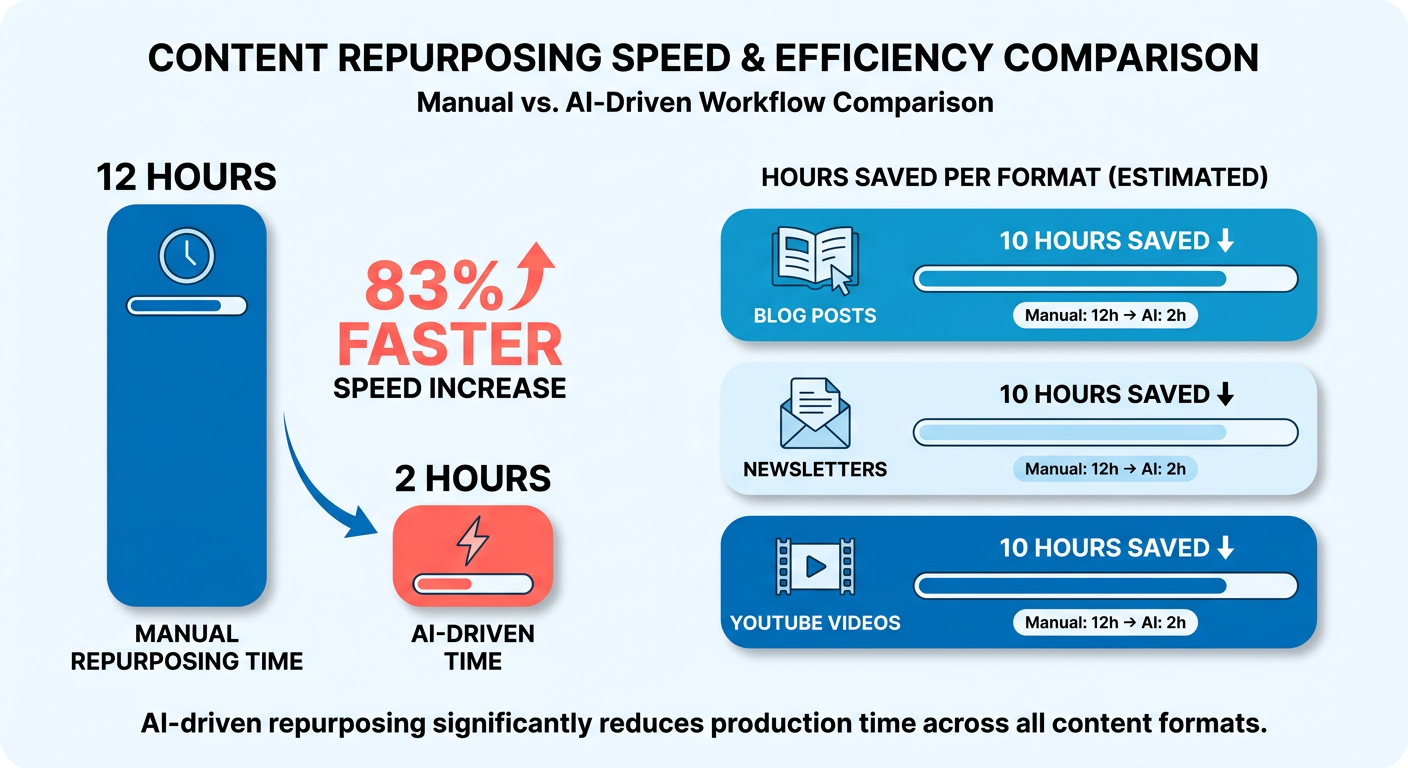
The full workflow at a glance
Here's the end-to-end pipeline, from master draft to three published deliverables. Difficulty is rated 1-5 so you can gauge readiness before you start.
| Stage | Primary Tool | Avg. Time (hrs) | Difficulty (1-5) | SEO Benefit | Output Format |
|---|---|---|---|---|---|
| Master draft | AI writer | 0.5 | 2 | Keyword + intent baseline | 1,200-word source doc |
| Blog post | AI writer + editor | 0.75 | 3 | On-page ranking, internal links | 1,200-word article |
| Newsletter | AI summarizer | 0.25 | 1 | Retention, return traffic | 5-section email |
| YouTube script | AI scripting | 0.5 | 3 | Video SERP + watch-time signals | 8-minute script |
| Voice pass | Human review | 0.5 | 4 | Consistency across all three | Edited final copies |
That final review row is the one people skip. It's also the single biggest reason machine-generated phrasing reaches the public.
Where the payoff actually comes from
Reach, cost, and leads. But only if voice survives the automation. Multi-channel publishing can generate significantly more total impressions than posting to a single channel. That's the traffic case in one line.
Cost. AI repurposing can cut production costs substantially, potentially reducing per-piece cost from a range like $150-300 down to $40-80. One draft can seed many derivative pieces if you push volume.
Traffic. The impressions bump comes from format variety, not repetition. Search wants keyword-optimized, platform-native variants. That pulls your format decisions away from a fixed voice template, which is where the tension starts.
Leads. A blog post captures search intent, the newsletter nurtures return visits, the video builds watch-time signals. Three touchpoints from one draft, each feeding a different part of the funnel.
The tradeoff to watch
SEO reach and brand consistency get sold as the same benefit. They aren't. SEO wants platform-native, keyword-tuned variants. Consistency wants a locked voice. Your master draft has to serve both, not one.
Build the 1,200-word draft as a voice anchor first, then let AI handle the format second. Generate all three deliverables quickly with no review layer and you'll hit the reach numbers, sure. You'll also ship copy that sounds like everyone else's.
This workflow is a poor fit for one-off announcements or topics with no search demand behind them. Save the overhead for evergreen topics where three formats each earn their keep.
The summarize-and-republish step is where voice slips most. Some platforms offer brand-personality features that pull from your existing site content, so every derivative piece, newsletter included, sounds like you wrote it.
Why repurposing one draft beats writing three
One master draft that becomes a blog post, a newsletter, and a YouTube script isn't a shortcut. It's a way to keep up when you can't feed every channel by hand. Many marketers say they don't have enough content to fill their channels, and cranking out a separate piece for each one burns hours you don't have.
A structured pipeline stretches your reach across platforms. The catch is the same one that shows up everywhere in this workflow: keeping a human-sounding voice when you're producing at speed.
Why repurposing beats writing more
The answer isn't necessarily more content. It's more mileage out of what already works. Many marketers already repurpose content, and a significant portion call it their most effective strategy. Volume for its own sake doesn't move the needle.
Attention is the real constraint. Your audience won't hunt for your message across formats. You meet them where they already are.
A blog reader, a newsletter subscriber, and a YouTube viewer each take in the same idea differently. Many consumers watch video to learn about a product, and a large portion of what the brain processes is visual. One draft, three shapes, three audiences served.
The real cost comparison
Staffing three specialists for blog, email, and video costs far more than one workflow doing the same job. A dedicated content writer can command a significant annual salary. Build a three-person team for blog, newsletter, and video and you're carrying triple that overhead before a single piece ships. A repurposing pipeline collapses those roles into one process.
The SEO multiplier is the payoff. One pillar piece, repurposed across channels, keeps earning organic traffic long after the original went live. Every platform variant becomes a new entry point for search and discovery.
But financial efficiency hides the real problem: quality control. High-volume output leaves little room for manual editing, and that's exactly how generic phrasing slips through.
Where SEO and brand voice pull apart
The tension between search optimization and brand identity is structural, not a workflow bug you can fix. Search engines reward platform-specific keyword placement. Brand guidelines demand a unified tone. The only way through is a master draft built to hold both at once.
Some advanced tools use a business context graph for this. It analyzes your existing digital footprint and maps your brand's specific terminology and stylistic preferences, so the automated variants stay aligned with the identity you already have.
Point your multi-channel effort at topics with broad educational value. Highly specialized, single-channel updates don't earn back this kind of structural work.
Step 1: Build a master draft that serves all three formats
Your master draft is the single source of truth every format pulls from. Build it right and one comprehensive draft feeds your website, email, and video production without a pile of manual rewrites.
The common mistake: optimizing the master draft purely for search, then watching the tone break the moment you start cutting for format. The fix is to bake both keyword targets and stylistic constraints into the first generation pass, so the core voice holds.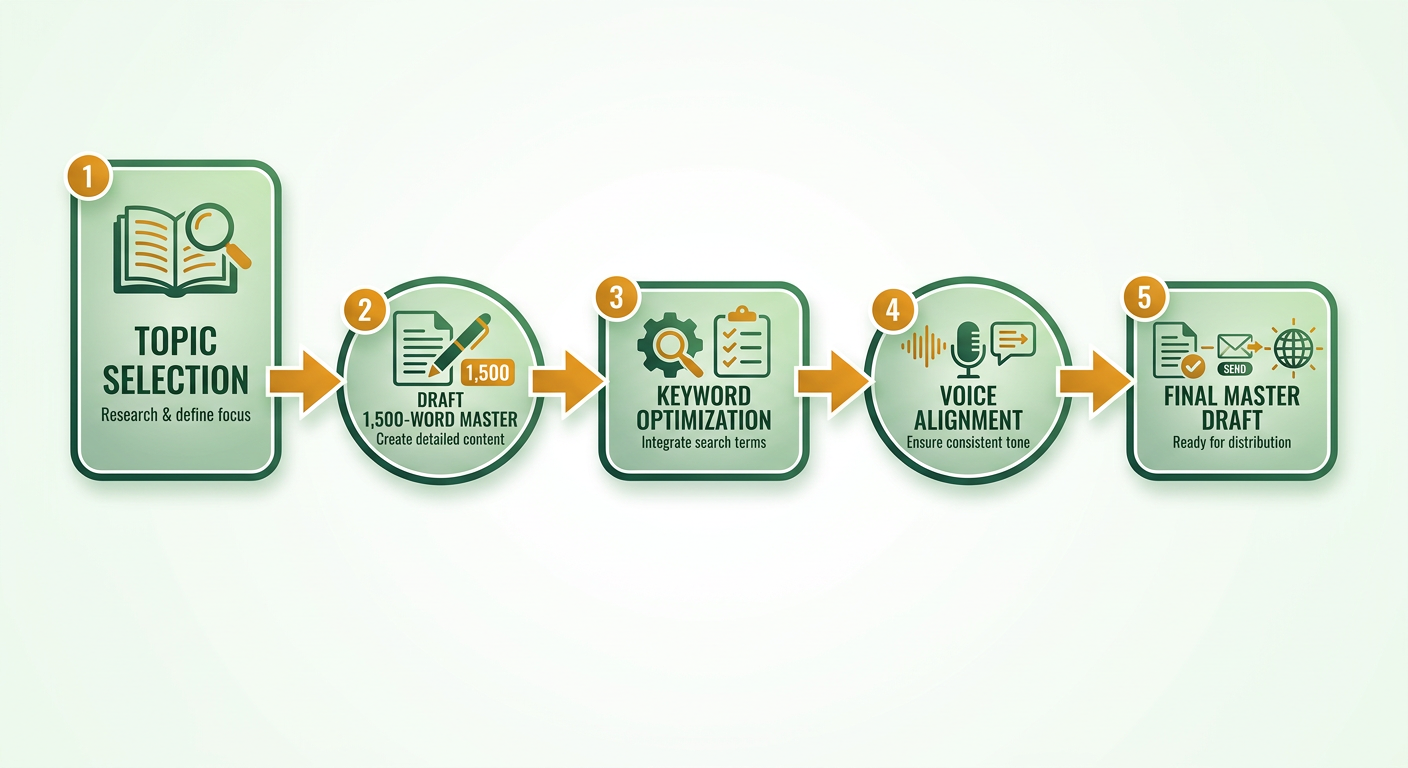
What goes in the brief before you prompt
Start with three fixed inputs: target keyword, persona, and primary goal. These are the constraints that keep all three formats consistent. Skip the brief and every derivative drifts a different direction, which is exactly how voice erodes across channels.
Write the persona into the prompt, not just the topic. If your brand sounds blunt and technical, say so before the model writes a word. Voice is cheapest to enforce at generation time. Retrofitting it into a newsletter cut is where teams burn the hours they thought they'd saved.
Set the primary goal per format too. A blog post wants organic reach. A newsletter wants a click. A script wants watch time. One master draft serves all three only if you know which goal each variant chases before you write.
How to structure a draft that survives repurposing
Use five universal sections every format shares: Hook, Problem, Solution, Proof, CTA. They map cleanly onto a blog intro, a newsletter teaser, or a video cold open. When the skeleton is consistent, format transformation becomes extraction, not rewriting.
That modular structure cuts editing overhead hard. Instead of rewriting, you pull pre-defined blocks for the email and video and keep the core message intact. Structure it right and each new format costs minutes of extraction, not a full second draft.
Build in modular data blocks: stats, quotes, and case snippets as standalone units. Each block should stand on its own, so you can drop it into a newsletter or a script without dragging the surrounding context along. The blog post uses all of them. The newsletter picks two. The script narrates one.
The prompt tip that saves the most rework
Ask the model for two extras: repurposable bullet points and visual cue suggestions. Bullets become your newsletter's scannable sections. Visual cues become B-roll notes and thumbnail ideas for the script. You're front-loading the format work into the draft itself.
The master draft is what decides whether you can hold search optimization and brand identity together. Embed your target keywords into specific structural blocks while keeping the persona consistent across the whole thing, and your editorial standards survive the cuts. For distribution, some platforms' delivery tools can parse this draft to generate and schedule email campaigns directly.
Step 2: Map the draft to platform-specific formats
Turning one source into three formats needs deliberate mapping. Without a plan, automated tools spit out disjointed variations that dilute the message. Here's how to move between channels without losing the thread.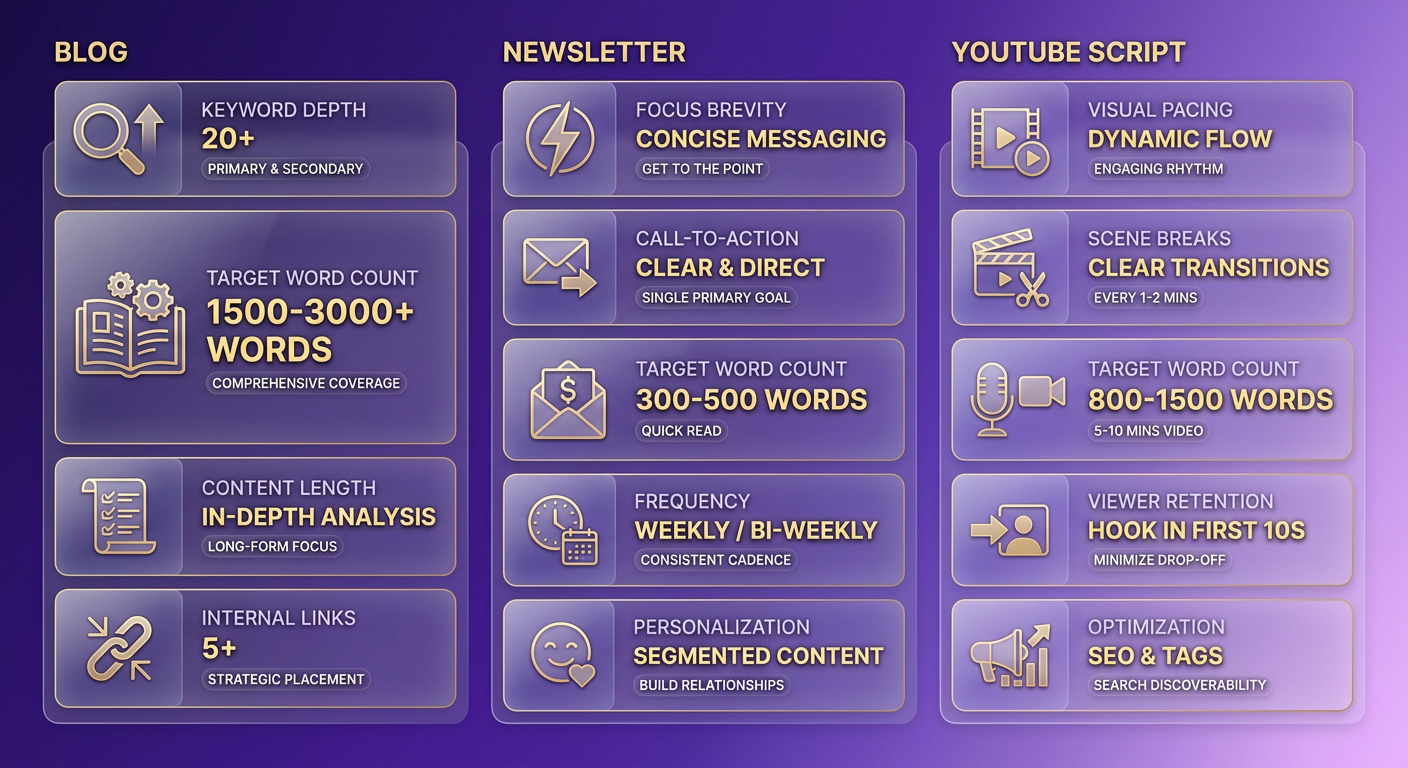
Map each section with a content matrix
Build a Content Matrix that assigns every paragraph or bullet to one or more outputs before you write a single derivative. This is the one manual step you should never batch. It's your voice-control layer.
The matrix is a simple grid. Down the left, list each knowledge unit from your master draft. Across the top, three columns: Blog, Newsletter, Script. Mark which units go where, then note the tone shift each destination needs. A stat that anchors the blog might become a subject-line hook in the newsletter and an on-screen graphic cue in the script.
The mapping also forces a priority call: not every unit deserves a spot in all three. A dense case study might carry the blog but bury a newsletter, where a single takeaway does more work. Deciding what to cut per format is faster as a grid decision than a mid-draft judgment call. Map once, transform with confidence.
What changes for each platform
Each deliverable needs its own SEO placement and its own voice calibration. Here's the split:
- Blog → long-form, SEO-rich. Primary keyword in the H1, the first 100 words, and the meta description. Add headings, internal links, and FAQ or How-To schema so search engines parse the structure. This format tolerates the most keyword density before voice suffers.
- Newsletter → concise, skimmable. A subject line that pairs a long-tail keyword with an emotional trigger. Preview text and 2-3 CTA buttons. Cut ruthlessly. This is where voice erodes fastest, because trimming for skimmability strips the connective tissue that carries your tone.
- YouTube script → visual storytelling. Target keyword in the title, the first 30 seconds, and the description. Timestamps, on-screen graphic cues, a hook that lands fast. Emails with personalized subject lines can see higher open rates, and the same instinct applies to a video title: the first line decides whether anyone stays.
The pattern holds across every cut: the newsletter's lift usually comes from the subject line and CTA placement, not the raw content. Once your mapping is set, some platforms can generate matching email layouts to fit your distribution schedule.
Can you auto-populate each format from the master draft?
Yes. Some platforms offer multi-source integration that can auto-populate each format and generate FAQ and How-To schema for the blog automatically. That handles throughput.
But automation just moves the work. The gain comes from letting AI do the format transformation while the voice-check on each output stays a human job. Style-matching tools can help even highly condensed summaries hold your editorial voice, but they don't replace the read-through.
Step 4: Automate formatting, design, and publishing
Once your mapping is finalized, a connected publishing pipeline distributes each format to its platform with formatting, links, and scheduling pre-configured.
That mechanical setup clears the repetitive tasks so you can spend your attention on quality control. Automate the technical steps of publishing and you protect your team's time for reviewing the actual messaging before it goes live.
Push each format to its platform
Set up one destination per format so nothing gets hand-copied. Blog posts push straight to your CMS. Newsletters export to your email platform via API. YouTube scripts run through avatar video generation and upload through the YouTube API. Each route carries the branding and links you defined once.
- Blog → CMS: Multi-platform publishing sends the post to WordPress or Webflow with headers, internal links, and images in place.
- Newsletter → email tool: Export via API with merge tags pre-filled, so personalization tokens map without manual pasting.
- YouTube script → video: An avatar engine can turn the script into a video, then auto-upload through the YouTube API with title and description attached.
The point is removing copy-paste steps, not removing judgment. Wire these routes up once and the mechanical publishing steps disappear. The only work left is the voice-check gates, which is exactly where you want your manual time going.
What placeholders and error-handling actually prevent
Dynamic placeholders inject dates, UTM parameters, and personalized tokens at publish time, so you write the template once and every send stays current. Error-handling catches the failures automation would otherwise ship silently: broken links, missing merge tags, empty fields.
Always run preview mode before anything goes live. Preview renders the filled template exactly as readers will see it. Validation checks then flag broken links or unresolved tokens before they reach an audience. One broken UTM parameter can strip attribution from an entire campaign, leaving you unable to prove which channel drove the conversion. A newsletter that opens with a raw {{first_name}} tag loses the reader instantly.
Automation accelerates both good and flawed output. Skip the validation layer and you ship errors at the same speed you ship wins. The preview gate is non-negotiable.
Why stagger the release order
Stagger your releases, blog first, then newsletter, then video, to build funnel flow instead of dumping everything at once. The blog post earns search traffic and hosts your links. The newsletter drives your list to that post. The video extends the same message to a third segment that never opened the email.
The ordering protects voice too. Automated systems can help hold stylistic alignment across channels, but a final human review is what catches the contextual nuance before publication.
Step 5: Keep the brand voice consistent across all channels
Voice consistency is the one thing automation can't guarantee, and it's exactly what mass-output pipelines sacrifice. Generate a blog post, a newsletter, and a YouTube script from one draft and each transformation nudges the tone a little. The fix isn't more manual rewriting. It's a voice system that runs at generation time plus a fast audit after.
This is where the search-optimization tension finally resolves. You build a voice layer that holds while the SEO layer flexes underneath it. Brands that pull it off can see meaningful gains in brand recall.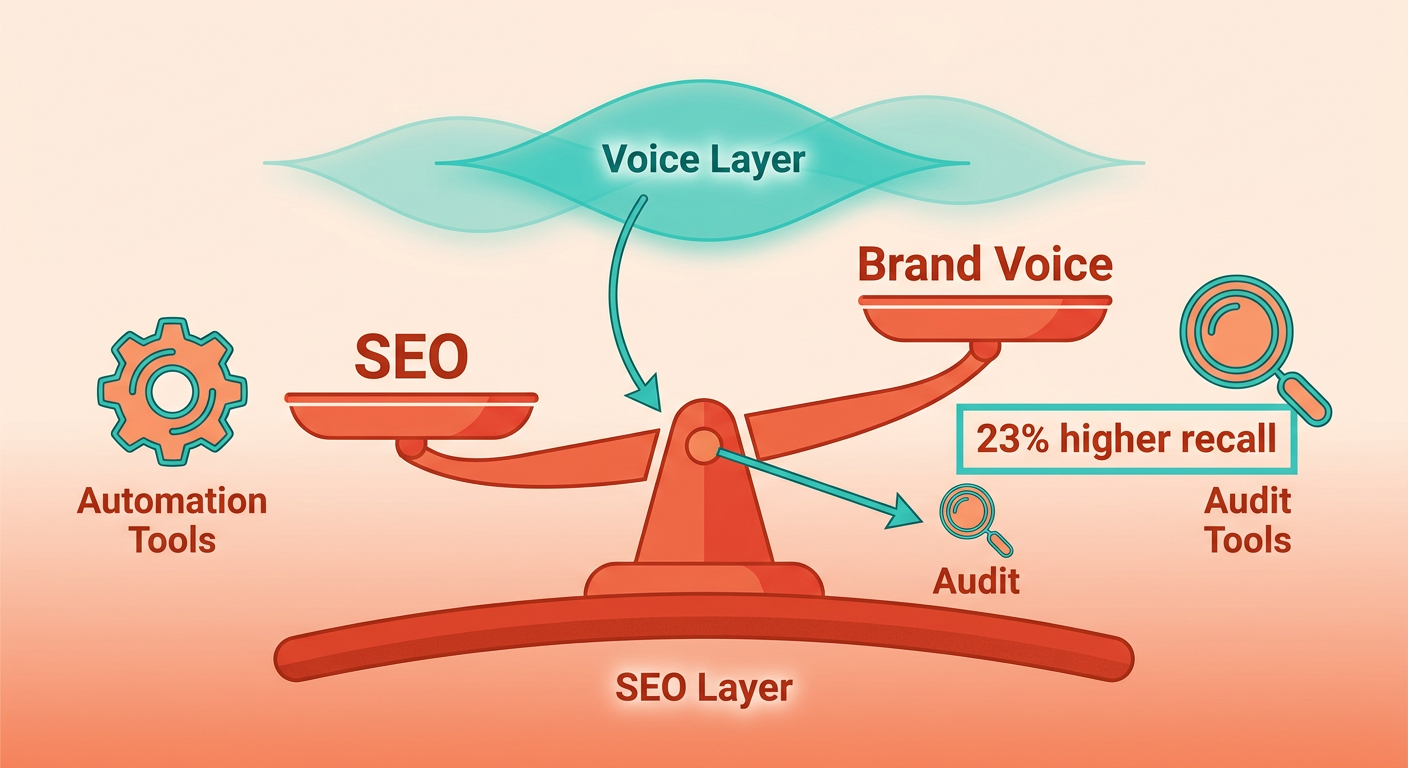
What goes in a brand voice playbook
A Brand Voice Playbook is a one-page spec that defines your key adjectives, target sentence length, and jargon allowance, so every derivative pulls from the same tone rules.
Keep it to three fixed inputs. First, three to five voice adjectives (confident, plain-spoken, skeptical) that every format has to hit. Second, a sentence-length target so your YouTube script doesn't balloon into blog cadence. Third, a jargon allowance that says which terms stay and which get cut for a newsletter audience.
Wire these into your generation templates and the AI produces on-brand drafts from the start, which spares you the heavy post-editing.
How to run a post-generation voice audit
Run a 5-point voice audit on every output before it ships. This is the one step that can't be batched. Automation can check that a format fits its platform. It can't check whether the words still sound like your brand.
Score each deliverable against five checks:
- Adjective match: Does it hit your three-to-five voice words?
- Sentence rhythm: Is length within your playbook target?
- Jargon fit: Right density for this platform's audience?
- Terminology: Same product terms, capitalization, and phrasing across all three?
- Visual identity: Brand colors, fonts, and avatar style applied to the video and newsletter?
A tone analyzer can speed up the first three, but a human owns the final call. A tech startup running its blog post, newsletter, and explainer video through this checklist might land a high voice match score. The small gap is usually a keyword-heavy sentence the SEO pass forced in. That's the tradeoff made visible, and the audit is where you catch it.
Why visual consistency counts as voice
Voice isn't only words. Your colors, fonts, and avatar style carry tone as much as your adjectives do, and audiences form a brand impression almost instantly. A newsletter in off-brand colors reads as off-voice even when the copy is perfect.
Some platforms coordinate your visual templates alongside text generation, so design elements and copy get reviewed in one step. That frees your audit time for the words, where machines still can't judge whether a sentence sounds like you.
Step 6: Track performance, iterate, and scale
Tracking performance is how you confirm the pipeline is holding quality over time. Watch channel-specific metrics and you can spot where a formatting change knocked audience engagement.
Traffic numbers alone leave you blind to the subtle shifts in experience. You need search visibility and brand engagement side by side.
Which KPIs matter for each channel
Track a distinct KPI set per format, because each derivative gets found and consumed differently. A metric that signals success on one channel means nothing on another.
- Blog: organic traffic, dwell time, SERP rankings, backlinks. Dwell time is your voice proxy here. If people land and bounce, the keyword pulled them in but the tone pushed them out.
- Newsletter: open rate, click-through, conversion, list growth. Open rate tests your subject line. Click-through tests whether the shortened voice still earned trust after the cut.
- YouTube: watch time, audience retention, subscriber gain, in-platform search ranking. Retention curves show exactly where a script's pacing broke. The first 15 seconds decide whether a viewer stays or swipes away.
Watch time and audience retention deserve extra weight. Video tends to earn significantly more shares than text and images combined, so a script that reads fine on paper but stalls on pacing leaves that reach on the table.
Feed insights back into your prompts
Turn every KPI dip into a prompt edit. If newsletter click-through drops, the shortened voice is the first suspect, so tighten the voice constraint in your prompt before you touch the subject line. This is A/B testing at the prompt level.
The cleanest test is swapping hook phrasing. Rewrite the opening line of your master draft, run both versions through the same pipeline, and measure the downstream shift in dwell time or retention. One prompt variable, one KPI, one clear read.
Build a unified dashboard so you see all three channels at once. Some platforms offer real-time analytics that pull your performance data into a single view alongside your KPI targets. When blog traffic climbs but newsletter conversions sag, you catch the tradeoff in real time instead of a month later.
Scale to a full content calendar
Batch-create your master drafts. Instead of one topic at a time, build a month of master drafts up front, then run every one through the same mapping and voice pipeline. The generation pipeline scales cleanly. The quality-control step is the one that stays hands-on.
Some platforms are built for high-volume production, so you can expand the content calendar while holding to your brand guidelines. Volume jumps, but the voice layer scales with it, not against it.
The goal, start to finish, is squeezing every bit of value out of your core insights across every channel your audience actually uses.
Frequently Asked Questions
1. How long should each format be when repurposing one master draft?
Format lengths should match user intent and platform norms. Search-focused articles require enough depth to cover the topic thoroughly, email updates should be concise enough to read on a mobile screen without scrolling endlessly, and video scripts must be paced to maintain viewer engagement from the opening hook to the final call to action.
2. What happens if I skip the human voice pass to save time?
Skipping the final editorial review allows generic, machine-generated phrasing to reach your audience. While automation excels at changing formats, it cannot judge whether the tone aligns with your brand's values. A brief human review ensures your unique perspective is preserved before publication.
3. Is repurposing worth it for a small blog with a niche audience?
For highly specialized audiences or time-sensitive announcements, a multi-channel pipeline may introduce unnecessary overhead. This workflow is most effective for evergreen topics with broad appeal, where adapting the message for different platforms helps you reach distinct segments of your market.
4. Why does the newsletter lose brand voice faster than other formats?
Email campaigns require extreme brevity, which often leads to over-editing. When you strip out conversational transitions to save space, you risk removing the subtle stylistic choices that define your brand's personality. Maintaining voice in short formats requires focusing on high-impact areas like the opening hook and direct calls to action.
5. How does staggering the release order help with brand consistency?
Publishing your assets sequentially rather than all at once creates a natural quality control buffer. It allows you to monitor how your audience responds to the primary piece and make real-time adjustments to the tone or messaging of subsequent formats before they go live.
6. What does a 5-point voice audit actually check?
The audit evaluates how well each asset matches your established brand guidelines. It looks at word choice, sentence structure, technical terminology, and visual presentation. While software can assist with initial checks, a human editor is needed to ensure the content feels authentic and cohesive.
7. How can I keep visual branding consistent without editing every piece by hand?
Using standardized design templates within your publishing tools ensures that your color schemes, typography, and imagery remain uniform across platforms. This programmatic approach guarantees a professional presentation while allowing your team to focus their energy on refining the written copy.
