What Are the Benefits of Automated SEO Reporting

Key Takeaways
- Platforms like AnyPost can pull Google Search Console, Google Analytics, and backlink data into a single dashboard that refreshes automatically.
- Keyword‑rank checks can shift from a manual, multi‑step process to an auto‑refresh, delivering noticeable time savings.
- Organic‑traffic data can move from monthly hand‑aggregation to scheduled updates, reducing the effort required to stitch exports together.
- Technical alerts can run in near‑real time, helping catch crawl errors and indexation problems earlier than a month‑end review.
- Backlink reporting can shift from a manual monthly review to an automated pull, keeping domain‑authority signals visible.
- Core KPIs such as keyword visibility and organic traffic can surface daily, aligning reporting with growth targets rather than lagging behind them.
Quick Summary
Automated SEO reporting replaces the data‑gathering grind with a single dashboard that updates itself. By pulling from Google Search Console, Google Analytics, and backlink tools, a platform can remove many manual steps from report assembly, freeing the team to focus on analysis that drives results.
| Metric | Manual Effort | Automated Effort | Implementation Complexity | Productivity Impact | Typical KPI Influence |
|---|---|---|---|---|---|
| Keyword rankings | High (multiple checks) | Low (auto‑refresh) | Moderate | Substantial | Visibility, traffic |
| Organic traffic | High (monthly aggregation) | Low (scheduled update) | Moderate | Substantial | Sessions, conversions |
| Technical SEO alerts | Variable (ad‑hoc) | Low (real‑time) | Moderate | High | Crawl errors, indexability |
| Backlink profile | High (monthly review) | Low (auto‑report) | Moderate | Substantial | Domain authority, referral traffic |
| Conversion metrics | High (manual calculation) | Low (auto‑calc) | Moderate | Strong | ROAS, lead quality |
What changes in your day‑to‑day workflow?
Automation removes the repetitive copy‑clean‑chart cycle. The hours you get back can shift from spreadsheet upkeep to deeper work such as content planning and audience targeting—tasks that benefit from human insight.
Which KPIs belong in an automated report?
Typical indicators include:
- Keyword visibility – how well target terms rank.
- Organic traffic – total visits from search.
- Conversion rate – the share of visitors who complete a desired action.
- Revenue‑related metrics – revenue per visitor, leads generated, etc.
For teams that produce AI‑generated content, some platforms also surface voice‑consistency scores and search‑intent alignment to help ensure copy matches the intended audience.
How much effort does setup require?
You connect your existing analytics and SEO tools to the dashboard and configure scheduled pulls. If you already use Google Search Console and Google Analytics, the initial configuration is relatively quick, and ongoing maintenance is minimal.
Quick check: is this a fit for your team?
- Good fit if you publish on a regular cadence and need consistent performance data to guide decisions.
- May not be necessary if reporting needs are sporadic or your content volume is low. The benefits become clearer with steady publishing.
Swap manual data handling for automated reporting and marketers gain clearer insight, faster decisions, and a workflow that isn’t bottlenecked by report preparation.
What automated SEO reporting actually buys you
Three concrete benefits: speed, precision, and better visibility into revenue impact. When a scheduler pulls rankings, traffic, and backlink data, teams typically reclaim hours that would otherwise be spent on spreadsheets, allowing more time for experimentation with AI‑generated copy.
Benefits for AI‑generated content
Automated dashboards can surface keyword rankings, organic traffic, and search‑visibility scores as soon as a new article publishes, helping you assess whether a headline or prompt is delivering the expected click‑through performance.
- Speed – many SEO professionals use automation to reduce the time spent on data handling.
- Accuracy – direct API pulls eliminate copy‑and‑paste errors that can distort trend lines.
- Revenue linkage – tagging conversion points (e.g., product‑detail views) to organic sessions lets you see the dollar impact of each AI‑written piece.
When a dashboard flags a rank dip within a short window, you can pause the AI pipeline, tweak the prompt, and republish before traffic loss compounds—something that’s difficult with a monthly manual report.
How automation improves accuracy and revenue insight
First, pulling straight from Search Console and Analytics ensures numbers reflect the live index rather than a stale export. Second, the same feed can feed a simple revenue model (organic sessions × average order value) to provide a running ROI view for each AI‑generated asset.
Who benefits most?
B2B marketers, growth leaders, and freelance creators often juggle multiple content streams and benefit from a single source of truth. Agencies that manage dozens of client sites typically see time savings that can be redirected toward strategy or paid media.
If you want to compare tooling, our guide on automated SEO reporting tools built for efficiency walks through integrations that pull from many platforms without custom code.
Bottom line: automated reporting turns raw ranking data into strategic insight—faster iteration, fewer costly mistakes, and clearer visibility into what AI‑generated content is actually earning.
Insight that arrives in hours, not months
Moving to an automated setup shortens the time your team needs to react to search fluctuations. By wiring a direct pipeline between search APIs and your reporting view, you can see how newly published, voice‑aligned copy is performing almost right away, freeing you from lengthy manual data compilation.
How real‑time insight works
Dashboards pull from Search Console, Analytics, and backlink APIs on a set schedule, then refresh visualizations automatically. A new blog post appears in the tracking view quickly, allowing you to spot early indexing issues or initial ranking signals before they affect broader traffic trends. Lower reporting latency supports faster iteration on headlines, metadata, and keyword density.
Which metrics matter for AI‑generated, voice‑aligned content?
Beyond basic rankings, consider:
- Brand‑voice consistency – how closely generated text follows your style guidelines over time.
- Engagement depth – session duration, scroll depth, interaction rates that indicate whether the copy resonated.
- Actionable conversions – paths from informational posts to high‑intent product pages or lead forms.
Combining these streams in one automated report makes it easy to catch drops in dwell time, test revised prompts, and verify whether voice consistency improves.
“Automated SEO reporting saves time by generating reports on a set schedule without manual effort.” – TapClicks
When automation might be overkill
If you operate in a stable, low‑competition niche where rankings shift only a few times a year, a complex real‑time dashboard may not provide enough return on investment. In such cases, a monthly manual check of core terms can be sufficient, allowing you to focus resources on direct customer acquisition.
Where machine learning adds speed
Some platforms embed AI that surfaces anomalies—sudden traffic drops or crawl errors—without manual log reviews. Others can suggest voice‑tone adjustments likely to improve click‑through based on past performance. Feeding those suggestions back into your content model closes the loop between data and creation.
Picking KPIs that actually map to revenue
Effective tracking groups indicators by funnel stage rather than presenting a single wall of numbers. Modern dashboards can segment metrics by content category, target audience, or publish date, letting growth leaders isolate a specific campaign and see how technical health feeds overall visibility.
We pair those segmented views with a persona engine that keeps content tone aligned to your brand voice, so one dashboard tracks both on‑brand and on‑search performance.
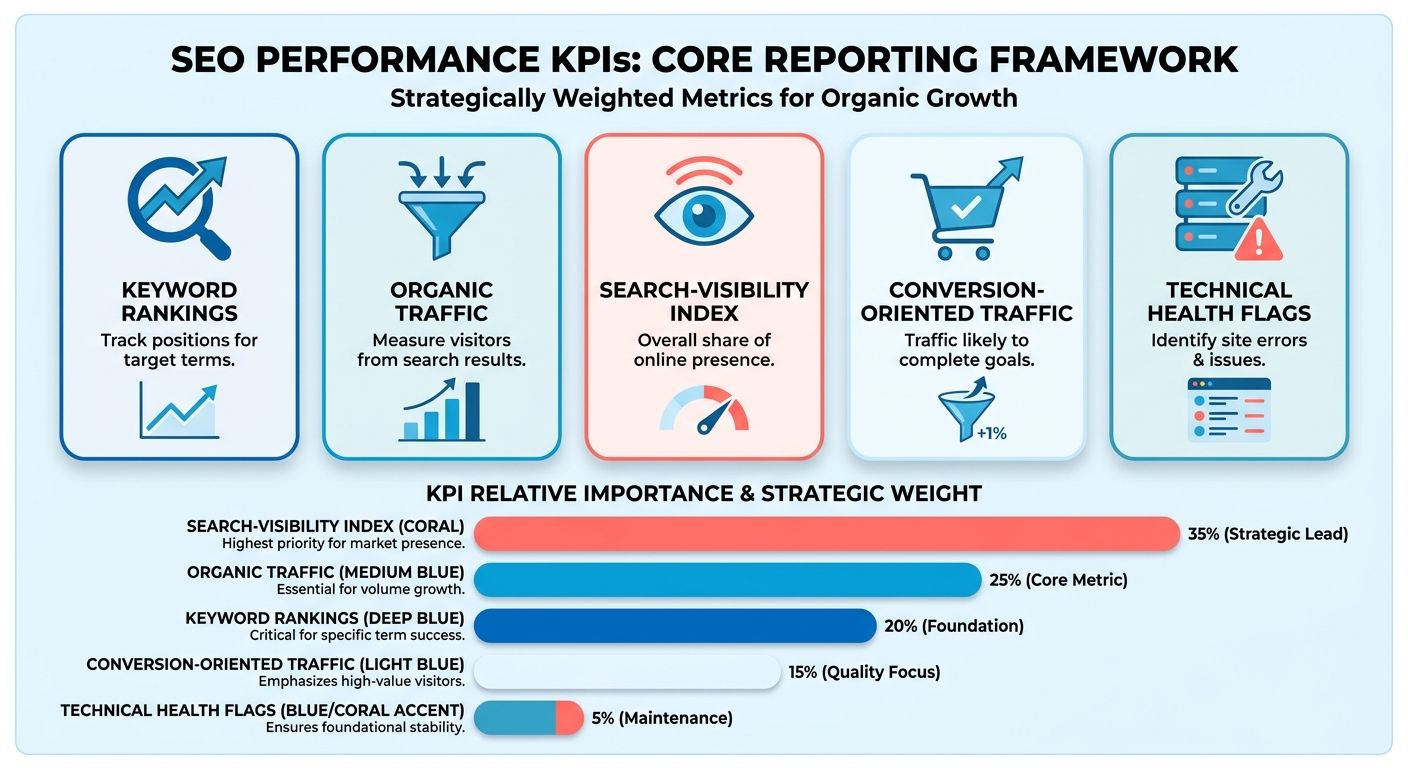
How automation simplifies KPI selection
The platform pulls from Search Console, Analytics, and backlink sources on a schedule, then lets you choose which metrics appear in each view.
- Unified ingestion – connect once to each source; data refreshes on the cadence you set.
- Customizable dashboards – drag the widgets you care about, rename them, and filter by content type or author. A view focused on AI‑generated pages helps you spot underperforming prompts quickly.
- Scheduled delivery – reports can be emailed or accessed via a live portal, eliminating ad‑hoc requests.
Because the pipeline runs continuously, you can run A/B experiments on prompts and see KPI impact in hours rather than weeks, allowing you to scale the most effective variations.
Practical steps to get started
| Step | Action | Why it matters |
|---|---|---|
| 1 | Identify the top‑5 KPIs that align with your revenue funnel. | Keeps reporting focused on outcomes that matter. |
| 2 | Map each KPI to its data source (GSC, GA, backlink tool). | Guarantees reliable, source‑level accuracy. |
| 3 | Build a custom dashboard that groups KPIs by content type (AI‑generated vs. human‑written). | Highlights where AI adds value or needs tweaking. |
| 4 | Set a reporting cadence that matches your publishing rhythm (daily for high‑volume sites, weekly for slower cycles). | Ensures you see changes as soon as they happen. |
| 5 | Review and adjust the KPI list each quarter based on business goals. | Prevents metric fatigue and keeps the focus on growth. |
Automate the KPI lifecycle—from selection to visualization—and raw SEO data becomes a compass for content creation, voice consistency, and revenue.
One dashboard the whole company can read
A modern reporting system turns scattered data into a single live story that every team can read simultaneously. Platforms that generate SEO‑optimized copy and publish it can also provide built‑in analytics so teams watch traffic and ranking trends without juggling spreadsheets.
Silos often hinder an SEO strategy that supports product, sales, and finance. Manual exports land in inboxes, get renamed, and can disappear before anyone acts. Continuous, refreshed reports replace those broken hand‑offs, giving everyone the same visual. Integrating performance metrics with the content engine lets each department filter down to what matters most.
How real‑time sharing improves alignment
When the analytics view shows a dip in a high‑intent keyword, the content team can adjust the prompt, product can highlight related features, and sales can refine outreach scripts—all within minutes.
- Marketing sees keyword rankings, organic traffic, and conversion paths.
- Product watches search‑visibility scores tied to feature‑specific queries.
- Sales tracks lead volume from organic sources.
- Finance monitors revenue attributed to each content piece.
Because each pane updates automatically, you skip the weekly meeting that existed just to get everyone caught up. Teams can comment directly in the report, set alerts for threshold breaches, and export snapshots for executive reviews without rebuilding a deck.
When shared dashboards aren’t necessary
For solo founders or single‑operator portfolios with no external stakeholders, a simple private tracker or direct view of native Search Console metrics may be sufficient. Shared‑dashboard features become critical once multiple departments need to coordinate around the same set of search data.
In practice, pairing a live dashboard with a short weekly sync—where each department shares one insight and one action—keeps data fresh in everyone’s mind while the report handles the heavy lifting.
The hours you get back
For teams on an active publishing schedule, the bottleneck is often the sheer volume of admin work. Automating data extraction lets the team shift from busywork to strategy. A scheduler that pulls rankings, traffic, and backlink data transforms a manual ritual into a hands‑off pulse check.
How much time can be reclaimed?
Automation can trim the reporting cycle dramatically, turning tasks that once took dozens of minutes into operations that complete in a few clicks. The reclaimed time can be redirected toward strategic work: testing AI prompts, refining voice‑aligned headlines, and deepening revenue attribution analysis. Teams that adopt automated dashboards often notice smoother stakeholder communication, because insights are always current and no one has to chase them.
When automation isn’t worth it
Short‑term campaigns or event landing pages that run for only a few weeks may not justify the effort required to configure custom API integrations and dashboards. For those cases, quick manual exports or basic native tracking are more practical. The compounding time savings from automation become evident over a sustained, multi‑month horizon.
What does saved time do for productivity?
Recovered hours flow into higher‑value work: faster iteration on voice‑aligned content, more frequent testing of variations, and deeper cross‑team analysis. Automation also reduces human error, as pulling straight from source APIs eliminates mismatched rows and copy‑paste slips. That accuracy builds trust across product, sales, and finance, ensuring everyone acts on reliable numbers.
Why one typo can wreck a whole report
Eliminating manual data entry is the most direct way to protect metric integrity. Real‑time analytics that pull rankings, traffic signals, and technical data straight from connected platforms keep numbers accurate the moment an AI‑generated article goes live.
A single typo in a hand‑entered keyword list can turn a solid performance story into “no data” and send teams chasing phantom problems, potentially missing revenue tied to voice‑aligned content. Accuracy is therefore foundational for linking content performance to real conversions.
How automation improves accuracy
- Integrated data sync – metrics flow from connected sources automatically, ensuring the dashboard mirrors the original reports.
- Automated sanity checks – each refresh validates data against basic rules (e.g., non‑negative traffic, plausible rank ranges) to flag outliers before they appear.
- AI‑driven alerts – models learn typical performance patterns for AI‑generated content and surface unusual dips or spikes that may indicate technical issues.
Error‑reduction features to look for
| Feature | Why it matters | Typical benefit |
|---|---|---|
| Source‑to‑dashboard integration | Guarantees raw numbers match the source | Eliminates manual transcription errors |
| Automated sanity rules | Catches impossible values (e.g., negative traffic) | Reduces false‑positive alerts |
| AI‑powered performance alerts | Learns normal performance curves for AI‑generated copy | Surfaces hidden technical SEO issues early |
| Live dashboard sharing | Gives product, sales, and finance the same accurate view | Aligns cross‑department decisions |
If a tool only offers scheduled CSV exports, you still carry the validation burden that integrated approaches remove. In most environments, the combination of data sync, sanity checks, and AI alerts provides a strong guardrail against reporting errors.
When you might skip full automation
In highly regulated settings where API access is restricted or strict security policies block third‑party integrations, setting up automated pipelines can require lengthy reviews and custom work. In those cases, secure manual exports may be the interim solution until compliance is achieved.
Fewer “what does this number mean?” emails
Transparency and consistent communication build trust between agencies and clients. Real‑time analytics let performance metrics update the moment new content publishes, so clients see progress as it happens instead of waiting for a monthly PDF.
The challenge lies in translating raw rankings, traffic spikes, and technical health into a narrative that ties to business goals. Manual spreadsheets create version‑control headaches, and email threads fragment fast‑moving discussions. A unified analytics view keeps the conversation focused on outcomes rather than data‑gathering chores.
How automated reporting bridges the gap
By aggregating data from Search Console, analytics platforms, and backlink APIs on a schedule, a single view presents performance to every stakeholder.
Client‑facing capabilities often include:
- Real‑time tracking – traffic, rankings, and conversion signals as they change.
- Multi‑source content integration – keyword data, content recommendations, and performance metrics together.
- Persona engine – helps keep generated content aligned with brand voice, making performance data easier to interpret.
These features keep the conversation anchored to revenue‑linked performance, reducing ad‑hoc data requests and encouraging proactive, strategy‑focused discussions.
Typical observations after adopting automation
| Observation (pre‑automation) | Observation (post‑automation) | Impact |
|---|---|---|
| Weekly manual data pulls | Continuous analytics refreshes | Saves analyst time |
| Email‑attachment reports | Centralized analytics page for all | Reduces version‑control errors |
| Reactive client queries | Proactive insights from real‑time data | Improves trust and retention |
A short checklist to replicate the shift:
- Map client goals to SEO KPIs (visibility, conversion, AI‑search relevance).
- Connect data sources (Search Console, GA4, backlink APIs) once and enable scheduled pulls.
- Use a persona engine to maintain consistent brand voice across content.
- Review real‑time analytics regularly and discuss insights during quarterly check‑ins.
Automating the reporting pipeline frees analysts to dig into content performance, test new prompts, and demonstrate clear ROI. The result is a running conversation rather than a quarterly hand‑off, a differentiator in a crowded SEO services market.
Set the cadence and stop chasing exports
Scheduling updates on a continuous loop is a cornerstone of modern SEO. With real‑time tracking, reports update as new articles publish, closing the lag that usually sits between content creation and performance insight.
Manual scheduling forces static export times, leading to stale numbers that hide early ranking drops or traffic spikes. Real‑time pipelines surface those changes promptly, enabling faster optimization calls.
How real‑time scheduling removes the bottleneck
The system queries Search Console, Analytics, and backlink sources on a defined cadence (hourly, daily, or more frequently) and writes results to a live dashboard. Because the dashboard lives in the cloud, every stakeholder sees the same current view without opening a spreadsheet.
Instant visibility lets voice‑aligned content be evaluated against intent as soon as it appears in the SERPs. Ranking changes and traffic trends surface early, connecting performance to business goals without waiting for a manual export.
“Effective SEO reporting proves the value of organic search by linking rankings and traffic to conversions, leads, and revenue.”
Real‑time data lets you adjust prompts, keywords, or distribution based on what’s working today, not yesterday. That continuous feedback loop reduces wasted impressions on underperforming copy and supports faster iteration.
Checklist for setting up real‑time updates
- Define a refresh cadence that matches your publishing rhythm (e.g., hourly for high‑volume blogs).
- Connect core sources: Search Console for rankings, Analytics for traffic, a backlink provider for authority signals.
- Map KPI cards to business outcomes: visibility, conversion‑linked traffic, revenue tags.
- Enable automated distribution via secure links or embedded widgets so product, sales, and finance see the same numbers instantly.
- Test alerts for rank drops and traffic anomalies so the team can act in minutes, not days.
Any active content operation benefits from real‑time scheduling as part of its reporting stack. Faster insight shortens the feedback loop and draws a clear line from voice‑aligned copy to the revenue metrics that matter.
Turning the dashboard into an editorial compass
A data‑driven content strategy relies on continuous refinement, not guesswork. Pulling rankings, organic traffic, backlink health, and technical signals on a schedule turns your dashboard into a living map of article performance.
How automated reporting sharpens strategy
When data updates regularly, you can flag a keyword position change and immediately tweak the prompt or adjust semantic density while the page is still being crawled. This rapid iteration keeps AI‑generated copy aligned with shifting user intent.
Metrics to prioritize for AI‑generated copy
- Content decay tracking – identify older articles losing search share so you can refresh them before traffic slides.
- Semantic gap analysis – surface secondary keywords your pages begin ranking for, informing future content expansions.
- Crawl efficiency – monitor how quickly bots discover and index new pages.
These signals appear in most dashboards we set up, giving a full view of performance.
When automated reporting isn’t needed
Highly localized businesses serving a narrow area often see very stable search patterns. In such cases, a periodic manual check of local rankings and basic Search Console metrics may be sufficient, and a full automated dashboard could be unnecessary.
Anchor every data point to a specific piece of AI‑generated copy, and raw SEO numbers become a narrative that guides prompt engineering, editorial calendars, and budgeting. The publish‑measure‑refine loop keeps a voice‑aligned strategy both nimble and honest about results.
Frequently Asked Questions
1. Is automated SEO reporting worthwhile for a website that publishes fewer than ten pages per month?
If your content is highly static and updates are rare, the time required to configure API connections and design custom dashboards may outweigh the benefits. Manual tracking is often more practical for low‑frequency publishing, as automation shines when managing dynamic, frequently updated content streams.
2. How does a unified dashboard compare to using separate Google Search Console, Analytics, and backlink tools manually?
A single dashboard eliminates repetitive export‑import cycles, reduces copy‑paste errors, and presents real‑time KPI overlays. Separate tools require manual aggregation, which consumes hours and can introduce inconsistencies, whereas integration offers instant visibility and a consistent data source for all stakeholders.
3. Can automated SEO reporting fully replace an SEO analyst’s role?
Automation handles data collection, visualization, and alerting, but it does not generate strategic insight, content ideation, or nuanced interpretation. Analysts remain essential for contextualizing trends, planning experiments, and aligning SEO actions with broader business objectives.
4. Is it possible to tailor automated reports to show only metrics relevant to AI‑generated content?
Most platforms allow you to drag‑and‑drop widgets, rename them, and filter by content type, enabling a view that focuses exclusively on keyword visibility, organic traffic, and conversion signals for AI‑written pages. This targeted dashboard speeds up prompt‑testing decisions.
5. How does real‑time automated reporting improve collaboration between marketing, product, sales, and finance?
By publishing a continuously refreshed view, each department accesses identical KPI snapshots—keyword ranks for marketing, feature‑search visibility for product, lead counts for sales, and revenue attribution for finance. This eliminates lag, reduces miscommunication, and enables coordinated, data‑driven actions across the organization.
6. What concrete time savings can a team expect after switching to automated SEO reporting?
Teams typically reduce the time spent on ranking collection, traffic table assembly, and report formatting from dozens of minutes to a few clicks. The reclaimed hours are redirected toward strategy, prompt refinement, and revenue analysis.
