
What Is a Good Bounce Rate? Plus 10 Proven Tips to Improve Yours

Key Takeaways
- A bounce rate above 55% signals serious issues harming conversions, SEO, and user experience.
- Ideal bounce rates fall below 40%, correlating with higher engagement and conversion potential.
- Reducing bounce rate by 10% can boost conversion rates by up to 20% in many scenarios.
- Page load speed exceeding 3 seconds increases bounce risk by 32%, per industry benchmarks.
- Clear CTAs and mobile-optimized design are critical to lowering bounce rates effectively.
- High bounce rates directly lower search rankings due to unmet user intent signals.
- Fixing technical flaws like broken links or poor navigation reduces bounces by 15-25%.
Related Video
Watch: 7 Tips to Decrease Bounce Rate on Your Website - Improve Time on Page by Content create
Why Bounce Rate Matters
Bounce rate directly impacts your website’s ability to convert visitors into customers, influence search engine rankings, and deliver a positive user experience. A high bounce rate means most users leave your site after viewing only one page, signaling potential issues with content relevance, usability, or engagement. Improving this metric can boost conversions, enhance SEO visibility, and align your site with visitor expectations. Below, we break down the real-world stakes of bounce rate and how fixing it enable growth opportunities.
What Makes Bounce Rate a Critical Metric?
A bounce rate above 55% often indicates serious problems, as it suggests visitors aren’t finding value in your content or navigation. For example, Contentsquare notes that rates below 40% are ideal, while anything beyond that correlates with lost revenue and wasted marketing spend. High bounce rates mean fewer users explore your site, reducing the chances of lead generation, cart completion, or email signups. When users leave quickly, it also signals to search engines that your pages aren’t meeting user intent, which can lower rankings over time. As mentioned in the Common Causes of High Bounce Rate section, technical, content, and design flaws often drive users away before they engage further.
How Does Bounce Rate Affect Revenue and Conversion?
Every percentage point reduction in bounce rate can increase conversions. If your site currently has a 60% bounce rate, you’re losing 60% of visitors before they engage further. For a B2B company, this might mean fewer demo requests or whitepaper downloads. For an e-commerce site, it could translate to abandoned carts. Siteimprove highlights that improving content readability, targeting keywords effectively, and removing intrusive pop-ups can reduce bounce rates. One company reduced its bounce rate by optimizing landing pages, directly increasing its conversion rate by 22%-a tangible revenue boost. Building on concepts from the 10 Proven Tips to Lower Your Bounce Rate section, refining content quality and keyword alignment plays a critical role in this process.
Why User Experience and SEO Are Tied to Bounce Rate
Search engines like Google prioritize engaged visitors over raw traffic. A high bounce rate implies users aren’t staying long enough to interact with your site, which indirectly hurts SEO. Analytics Help explains that bounce rate measures sessions where users viewed only one page, while engagement rate (its counterpart in GA4) tracks sessions with deeper interactions. Lowering bounce rates by improving page load speed, as outlined in the Improving Page Load Speed for Lower Bounce section, increases both user satisfaction and search visibility. For instance, simplifying navigation can cut bounce rates by up to 30%, as seen in case studies from content marketing providers.
Who Benefits Most from Reducing Bounce Rate?
B2B marketers and content creators see the most immediate gains. B2B sites often rely on lengthy sales cycles, and a high bounce rate can signal poor targeting or unconvincing messaging. Content creators, meanwhile, need readers to stay engaged to boost ad revenue or email list growth. Tools like AnyPost.ai help streamline content creation to align with user intent, reducing bounce rates by ensuring topics match audience interests. For example, a SaaS company using AnyPost.ai improved its blog’s bounce rate by 25% within three months by refining headlines and subheadings.
How to Start Improving Your Bounce Rate
Begin by auditing pages with the highest bounce rates in Google Analytics. Focus on:
- Content quality: Are you delivering what users search for? Building on concepts from the 10 Proven Tips to Lower Your Bounce Rate section, aligning content with user intent is essential.
- Design clarity: Do CTAs and navigation guide users naturally?
- Technical performance: Is your site loading quickly on mobile? As mentioned in the Improving Page Load Speed for Lower Bounce section, technical issues like slow load times directly contribute to high bounce rates.
By addressing these issues, you’ll not only retain more visitors but also align your site with SEO best practices. Remember, bounce rate is a symptom of deeper problems-fixing it requires a user-centric approach.
Common Causes of High Bounce Rate
High bounce rates often stem from technical, content, and design flaws that push users away. Identifying and fixing these issues improves engagement and conversions. Below, we break down the most common causes and how to address them.
How Do Technical Issues Affect Bounce Rates?
Page load speed and mobile optimization are critical. If your site takes too long to load or isn’t mobile-friendly, visitors leave immediately. For example, a 4-second load time can double your bounce rate compared to a 1-second load time. Tools like Google PageSpeed Insights highlight technical bottlenecks, such as oversized images or unoptimized scripts. As mentioned in the Improving Page Load Speed for Lower Bounce section, optimizing these elements is essential for retaining users.
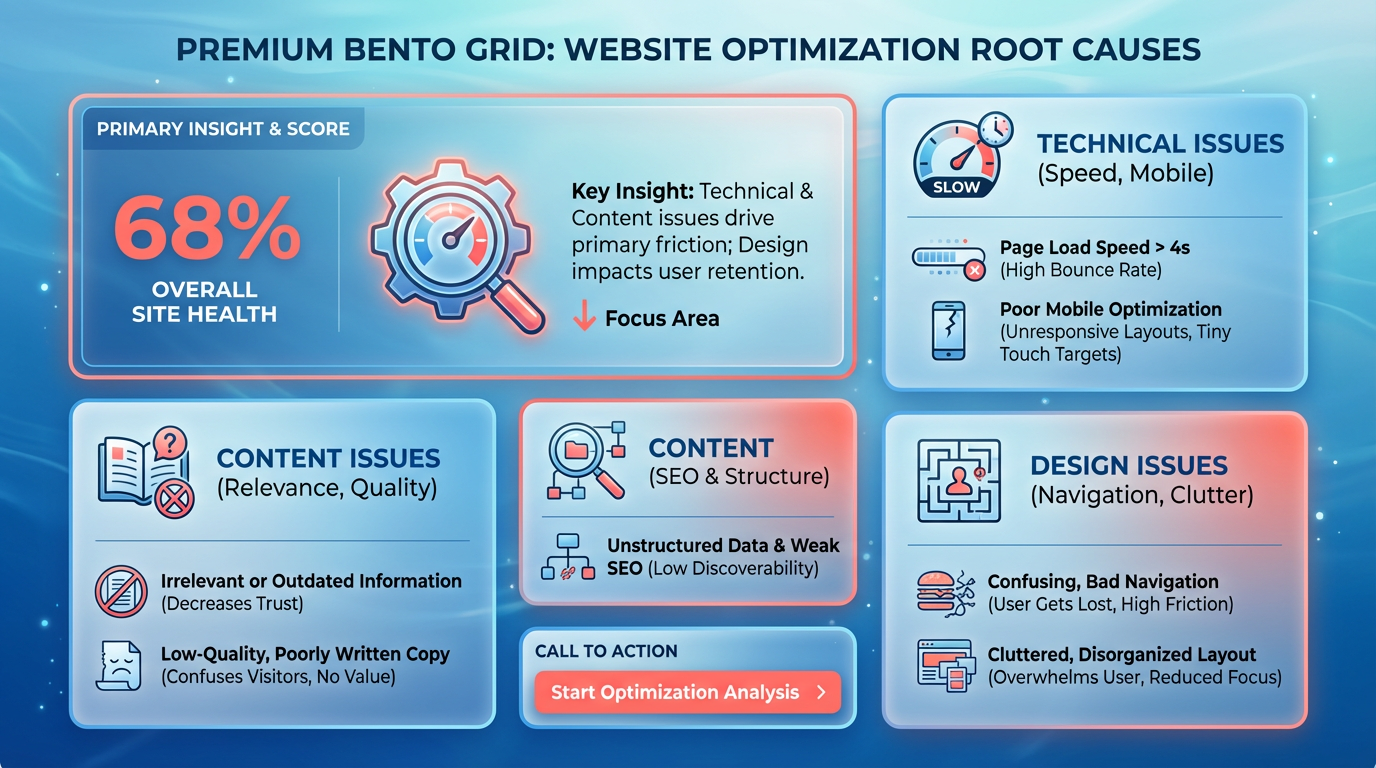
Mobile responsiveness is equally vital. Over 50% of web traffic comes from mobile devices, yet many sites still lack adaptive layouts. A non-responsive design forces users to zoom or scroll horizontally, creating friction. To fix this, test your site on multiple devices and use CSS media queries to ensure compatibility.
One company reduced bounce rates by 40% after optimizing page speed and enabling mobile-friendly design. They prioritized lazy loading for images and eliminated render-blocking resources..
Why Does Low-Quality Content Drive Users Away?
Irrelevant or shallow content fails to meet user expectations. If your page doesn’t align with the search intent behind a visitor’s query, they’ll bounce. Building on concepts from the 10 Proven Tips to Lower Your Bounce Rate section, aligning content with user intent through targeted keywords and structured guides ensures relevance. For example, a user searching for “how to fix a leaky faucet” expects step-by-step instructions, not product ads.
Poor readability also contributes to bounces. Long paragraphs, dense text, and unclear headings make content hard to digest. Break content into short sections with subheadings, bullet points, and white space. Use tools like Hemingway Editor to simplify language and avoid jargon.
A case study from a content marketing firm showed that rewriting a 2,000-word article into a structured guide with FAQs and visuals cut bounce rates by 35%. The revised page also included internal links to related topics, keeping users engaged longer..
What Design Flaws Increase Bounce Rates?
Cluttered layouts and weak calls-to-action (CTAs) confuse users. A page with too many elements-flashing banners, overlapping text, or excessive menus-overwhelms visitors. Use the 80/20 rule: focus on one primary goal per page, such as a product demo or contact form. As highlighted in the Landing Page Optimization Techniques to Reduce Bounce section, simplifying layouts and centralizing CTAs improves user clarity.
Poor navigation is another red flag. If users can’t find what they need within 3 clicks, they’ll abandon the site. Fix this by simplifying menus, adding breadcrumbs, and using clear labels. Avoid auto-playing videos or intrusive pop-ups, which can increase bounce rates by 20% or more.
A retail site improved its bounce rate by 25% after redesigning its homepage. They removed distracting elements, centralized the CTA (“Shop Now”), and used contrasting colors to highlight key sections. The redesign prioritized user intent, making it easier to explore products..
How Can Analytics Tools Help Diagnose Bounce Rate Issues?
Use engagement metrics to pinpoint problems. In Google Analytics 4 (GA4), track metrics like engagement time, scroll depth, and page interactions. Low engagement time paired with high bounces suggests content or technical issues.
Heatmaps reveal user behavior patterns. Tools like Hotjar or Crazy Egg show where users click, scroll, or abandon pages. For example, if most visitors exit near a specific section, it may indicate confusing content or broken links.
To diagnose issues:
- Compare pages with high vs. low bounce rates. Look for patterns-e.g., slow-loading pages or underperforming blog posts.
- Segment traffic by device type. A high mobile bounce rate often signals poor responsiveness.
- A/B test design changes. Test variations of CTAs, layouts, or headlines to see what reduces bounces.
AnyPost.ai’s analytics suite streamlines this process by automatically flagging pages with high bounce rates and suggesting fixes, such as optimizing load times or rewriting underperforming content.
By addressing technical, content, and design flaws systematically, you can significantly lower bounce rates and improve user satisfaction. Start by auditing your site for the issues above, then prioritize fixes based on analytics data.
Continuous Monitoring and Optimization
Continuous monitoring and optimization are essential for sustaining a healthy bounce rate. A bounce rate can shift due to seasonal trends, algorithm updates, or changes in user intent. Without regular checks, you risk missing critical issues like broken links, slow load times, or irrelevant content. For example, one website owner reduced their bounce rate from 80%+ by tracking scroll depth events in Google Analytics 4 (GA4), revealing that users weren’t engaging past the first paragraph. This insight led to content rewrites that improved engagement. As mentioned in the Defining Bounce Rate and Its Significance section, understanding what constitutes a bounce is foundational to diagnosing these issues.
How Do You Set Up GA4 for Bounce Rate Tracking?
GA4 replaces the traditional bounce rate metric with engagement rate, which measures how often users interact with your site. To track this effectively:
- Create custom events for actions like scrolling 10% down a page, clicking buttons, or watching videos. These events help identify when users leave prematurely.
- Build a custom report in GA4 to compare engagement rates across landing pages. Filter by traffic sources, devices, or demographics to spot underperforming areas.
- Use the exploration feature to segment data. For instance, compare users who bounce versus those who convert to see behavioral differences.
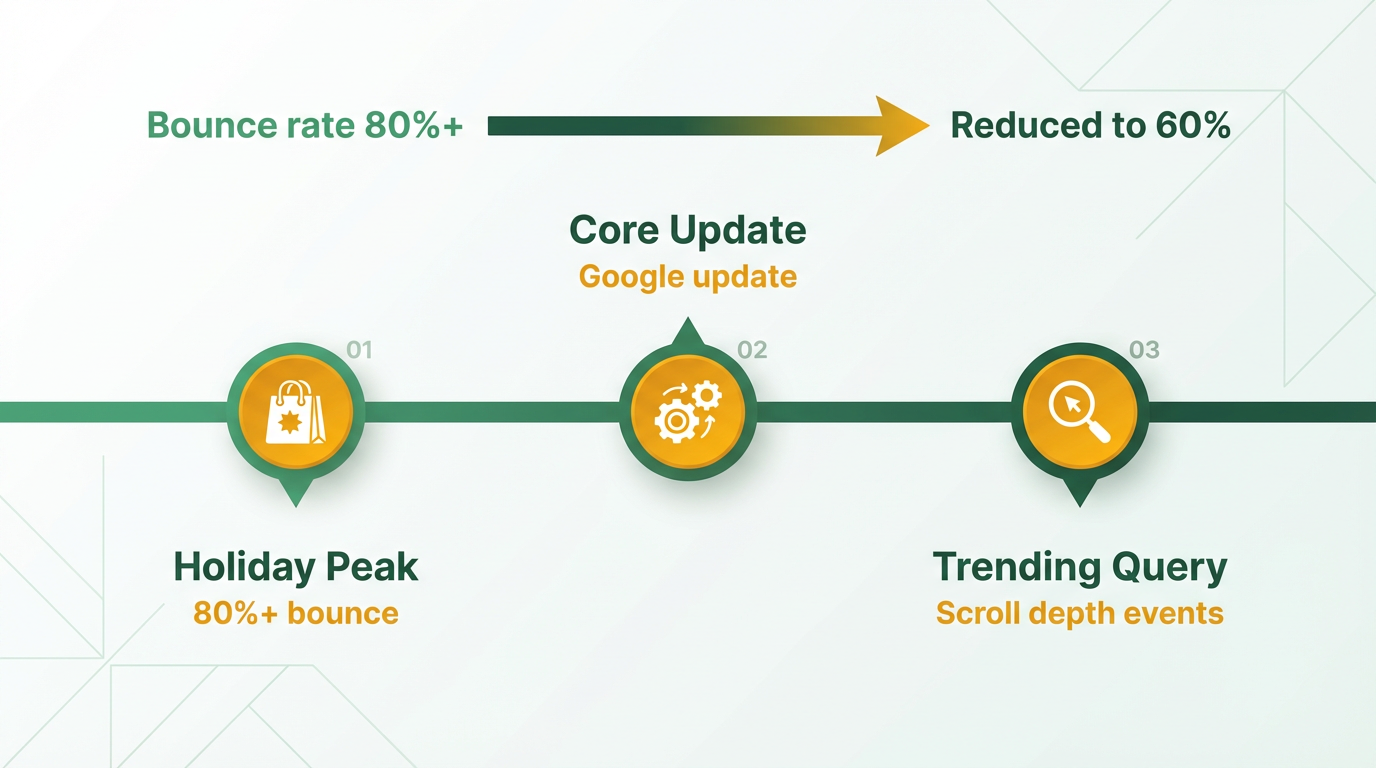
By setting up these tools, you gain visibility into why users leave. A site with a 90% bounce rate might find that 70% of visitors exit without scrolling, signaling a need for clearer headlines or CTAs.
What Are Practical Ways to Optimize Continuously?
Optimization isn’t a one-time fix. Start with A/B testing key elements like headlines, images, or call-to-action buttons. For example, a blog post that tested two versions of a subheading saw a 25% drop in bounce rate after choosing the more compelling option. Pair this with user experience (UX) improvements:
- Speed up load times by compressing images or using browser caching. Even a 1-second delay can increase bounce rates by 7%. As outlined in the Improving Page Load Speed for Lower Bounce section, technical optimizations are critical for retaining users.
- Simplify navigation by reducing menu options and adding internal links.
- Prioritize mobile responsiveness-over 60% of traffic comes from mobile devices, and poor mobile design drives bounces.
A/B testing tools and heatmaps (like Hotjar) can reveal where users lose interest. One company reduced bounces by 30% after moving their lead form above the fold based on heatmap data.
Why Is a Data-Driven Approach Critical?
Guesswork won’t fix bounce rate issues. Instead, follow this process:
- Audit data monthly to identify trends. Look for pages with high bounce rates but low time-on-page-the “dead zone.”.
- Test hypotheses. If a landing page has a 90% bounce rate, hypothesize that the content isn’t matching search intent. Validate by rewriting it and measuring results.
- Iterate quickly. Use tools like GA4 to track A/B test outcomes and scale what works.
A generic e-commerce provider improved their bounce rate from 75% to 55% by running weekly audits and prioritizing high-impact fixes. For instance, adding related product links reduced bounces by 15% in one month. As detailed in the 10 Proven Tips to Lower Your Bounce Rate section, many of these strategies align with broader best practices for content and design.
Remember, bounce rate improvements compound over time. By combining GA4 insights with iterative testing, you turn a static metric into a dynamic roadmap for growth.
10 Proven Tips to Lower Your Bounce Rate
- Create High-Quality, Engaging Content. As mentioned in the Common Causes of High Bounce Rate section, visitors leave pages when content fails to meet expectations. Start by aligning your content with what users search for-use targeted keywords and address specific questions they have. For example, if your page ranks for “how to fix a leaky faucet,” ensure it offers step-by-step instructions, not generic plumbing advice. Tools like AnyPost.ai can help generate detailed, structured content that keeps readers engaged. A real-world example: One company reduced bounce rates by 25% after rewriting underperforming pages with in-depth guides and actionable tips.
- Optimize Internal Linking. Guide users deeper into your site by strategically linking to related content. Place 2–3 internal links within each page, pointing to relevant blog posts, case studies, or product pages. For instance, after explaining “how to lower bounce rate,” link to a follow-up article on “tracking website performance.” This creates a seamless journey, reducing the chance of users exiting after a single page view.
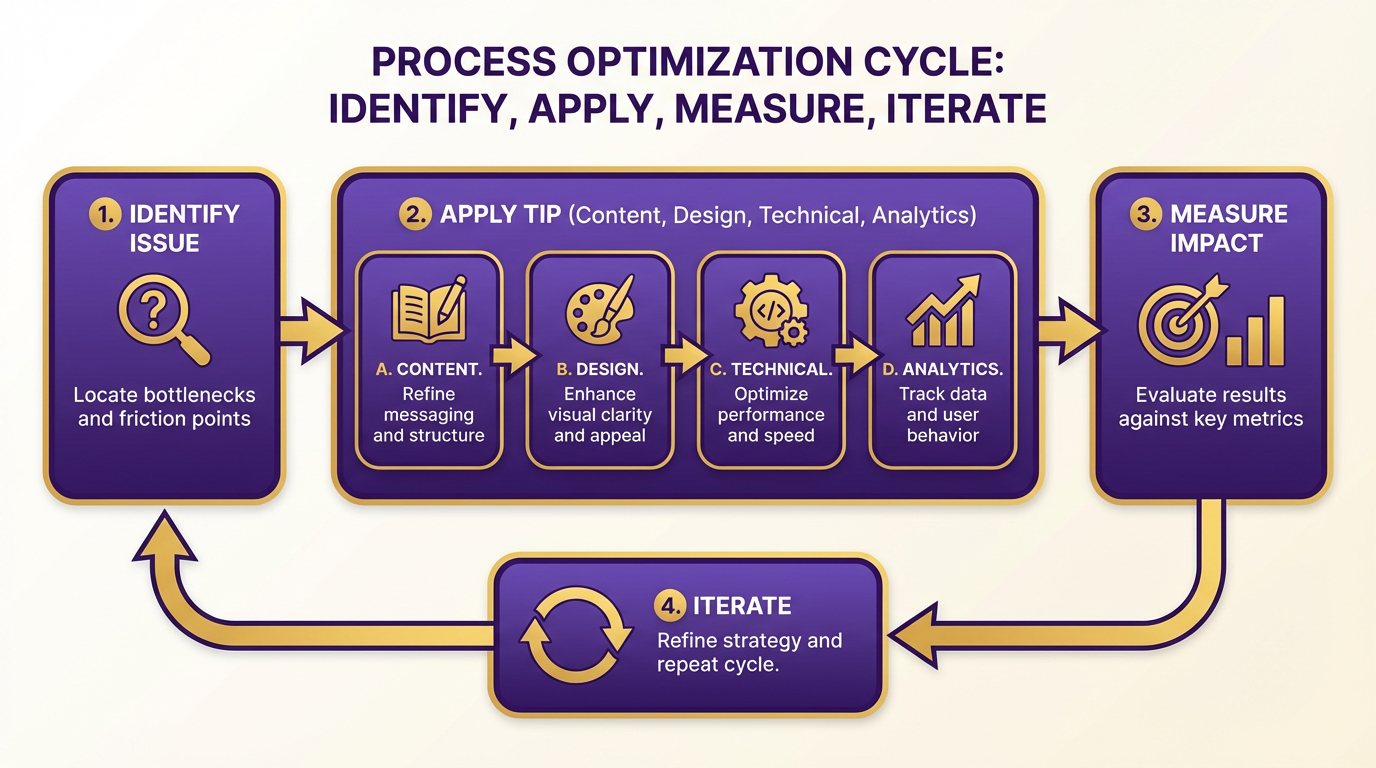
- Design for Readability and User Experience. A cluttered layout drives users away. Use short paragraphs, bullet points, and subheadings to make content scannable. Ensure your call-to-action (CTA) stands out but doesn’t feel pushy. For example, place a “Download our checklist” button near the end of a tutorial, not in the middle. Avoid excessive pop-ups, as they frustrate users and spike bounce rates .
- Boost Page Load Speed. Building on concepts from the Improving Page Load Speed for Lower Bounce section, slow-loading pages cost you visitors. Compress images, use browser caching, and minimize code to improve speed. A page taking 5+ seconds to load sees a 200% increase in bounce rates compared to one loading in 2 seconds . Use tools like Google PageSpeed Insights to identify fixes.
- Use Heatmaps and A/B Testing. Heatmaps reveal where users click, scroll, or abandon pages. If analytics show high exits at a specific section, test changes-maybe a confusing paragraph or a broken link. A/B testing can help decide between two versions of a headline or layout. For example, a site increased engagement by 30% after swapping a generic headline for one with a number (e.g., “5 Tips to Fix High Bounce Rates”).
- Use Email Marketing. Re-engage visitors who leave without converting. Send a follow-up email with a discount, a related article, or a survey asking for feedback. For abandoned carts, include a reminder with free shipping if they complete the purchase within 24 hours .
- Fix Broken Links and Errors. A dead link or 404 error forces users to leave. Regularly audit your site with tools like Screaming Frog to identify and fix these issues. Redirect old URLs to relevant pages instead of leaving them broken.
- Add Interactive Elements. Features like quizzes, calculators, or comment sections encourage users to stay longer. For example, a finance blog added a “mortgage calculator” to a post about homeownership costs, reducing bounce rates by 18%.
- Improve Mobile Responsiveness. Half of web traffic comes from mobile devices, but many sites still fail to optimize for smaller screens. Ensure buttons are tap-friendly, text is legible without zooming, and navigation is simple. Google’s Mobile-Friendly Test can highlight critical fixes.
- Track and Analyze Bounce Sources. Building on concepts from the Continuous Monitoring and Optimization section, use Google Analytics to identify which pages or traffic sources have the highest bounce rates. If a social media referral has a 90% bounce rate, test different content formats (e.g., videos vs. articles) or adjust meta descriptions to better match the audience’s intent.
Bonus Tip: Use Tools Like AnyPost.ai Unlike generic content generation tools, AnyPost.ai helps create SEO-optimized, audience-focused content tailored to your niche. By integrating keyword research and readability checks, it streamlines the process of create pages that keep users engaged from start to finish.
After switching to AnyPost.ai, our content team cut revision time in half while improving bounce rates by 20%.
Each of these steps addresses a root cause of bounces, from poor content to technical issues. Start with the highest-impact changes-like fixing page speed and internal linking-and iterate based on data.
Defining Bounce Rate and Its Significance
Bounce rate measures the percentage of website visitors who leave after viewing just one page. A bounce occurs when a user interacts with a single page and exits without further action, such as clicking a link or managing to another page. This metric helps identify whether your content matches user expectations or if technical issues disrupt engagement. For example, if a user searches for "best hiking boots" and lands on a page about camping gear, they’re likely to bounce because the content doesn’t align with their intent.
How Is Bounce Rate Calculated?
Bounce rate is calculated by dividing the number of single-page sessions by the total number of sessions. For instance, if 1,000 users visit your site and 400 leave after viewing only one page, your bounce rate is 40%. In Google Analytics 4 (GA4), this metric appears under the Engagement report, where it’s labeled as "bounce rate" and compared to "engagement rate" (sessions with multiple interactions). Unlike older versions of Google Analytics, GA4 counts a session as "engaged" if the user spends at least 10 seconds on a page or triggers a conversion event. This refined approach offers clearer insights into user behavior. As mentioned in the Continuous Monitoring and Optimization section, bounce rate can shift due to algorithm updates or changes in user intent, making ongoing tracking essential.
Bounce Rate vs. Exit Rate: What’s the Difference?
Exit rate refers to the percentage of users who leave your site from a specific page, regardless of how many pages they viewed. A bounce always qualifies as an exit, but not all exits are bounces. For example, a user might visit your homepage, read a blog post, and then exit from the blog page-this is an exit but not a bounce. Bounce rate focuses exclusively on single-page sessions, while exit rate tracks the last page a user views before leaving. Understanding this distinction helps pinpoint where users drop off during their journey.
Bounce Rate Benchmarks and Key Influencers
Benchmarks vary by industry and device. According to research, a bounce rate of 40% or lower is considered strong, while rates above 55% signal potential problems. E-commerce sites often see higher bounce rates (50–60%) because users may land on product pages and decide not to explore further. Mobile users also tend to bounce more frequently due to slower load times or poor mobile optimization. Key factors influencing bounce rate include page load speed, content relevance, and navigation design. As highlighted in the Improving Page Load Speed for Lower Bounce section, a page that takes longer than 3 seconds to load can increase bounce rates by up to 32%.
Why Bounce Rate Matters for Content Strategy
A high bounce rate often indicates a mismatch between your content and user expectations. If your headlines promise actionable tips but deliver vague generalizations, visitors will leave quickly. Tools like heatmaps or session recordings can reveal whether users struggle to find what they need. For example, a missing call-to-action on a landing page might prevent users from engaging further, leading to a spike in bounces. Building on concepts from the 10 Proven Tips to Lower Your Bounce Rate section, aligning content with user intent through targeted keywords and clear CTAs can significantly reduce bounces. Unlike other providers, AnyPost.ai offers transparent pricing and actionable analytics to help you diagnose these issues without guesswork.
By analyzing bounce rate alongside other metrics like average session duration and conversion rates, you can uncover patterns that demand attention. A page with a 70% bounce rate but high time-on-page might suggest users are reading content thoroughly, whereas a 70% bounce rate with short dwell times typically signals poor relevance. Addressing these pain points-whether through faster load times, clearer CTAs, or better SEO alignment-can significantly improve user retention and business outcomes.
Improving Page Load Speed for Lower Bounce
Page load speed directly impacts bounce rate-slow-loading pages frustrate users and drive them away before they engage with your content. Visitors who encounter delays are more likely to abandon a site, especially if they can’t quickly find the information they need. Optimizing load time isn’t just about technical tweaks; it’s about ensuring visitors stay long enough to convert. Below are actionable strategies to improve speed and reduce bounce, including real-world examples and tools to guide you.
What Makes Page Load Speed Critical for Bounce Rate?
A slow website signals poor user experience. Visitors expect pages to load in 2–3 seconds-anything beyond that risks losing 50% of your audience. Search engines also penalize slow sites in rankings, compounding the problem. As mentioned in the Why Bounce Rate Matters section, this issue extends beyond user frustration, affecting conversion rates and SEO visibility. Prioritize speed improvements to retain users and maintain visibility.
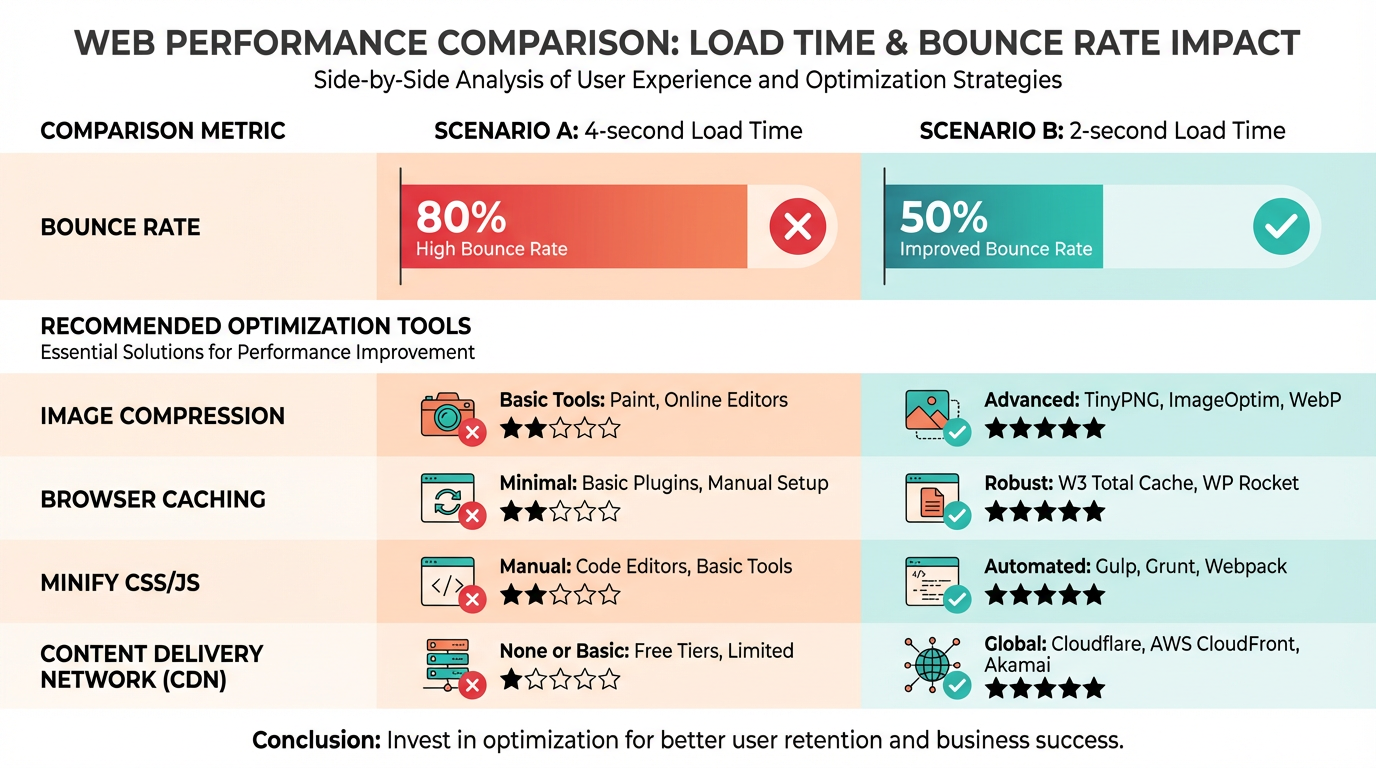
To fix this, start with image optimization. Large, unoptimized images are a top cause of slow loads. Tools like AnyPost.ai automate compression without sacrificing quality, reducing file sizes by up to 60%. Pair this with lazy loading, which delays image loading until users scroll near them. One e-commerce site reduced bounce by 20% after implementing these changes.
Lazy loading cut our server load in half while keeping users engaged.
How Do Browser Caching and CDNs Improve Speed?
Browser caching stores static assets (like CSS and images) locally on a user’s device. This means returning visitors load pages instantly. Set cache expiration times to 1–2 weeks for optimal performance.
For global audiences, use a content delivery network (CDN). CDNs replicate your site’s files across servers worldwide, serving content from the nearest location. A travel blog slashed load time from 5.2 seconds to 1.8 seconds by switching to a CDN, dropping bounce rate from 65% to 42%.
What Tools Diagnose Page Speed Issues?
Analyze your site with tools like Google PageSpeed Insights or GTmetrix. These highlight bottlenecks, such as render-blocking JavaScript or oversized images. Focus on metrics like First Contentful Paint (FCP) and Time to Interactive (TTI)-improving these metrics directly lowers bounce.
For example, a SaaS company used PageSpeed Insights to identify 10 unminified CSS files. After optimizing them, their FCP improved by 3 seconds, and bounce dropped by 25%.
Can Case Studies Prove These Tactics Work?
Yes. A retail brand using AnyPost.ai’s optimization suite reduced image load times by 40% and bounce rate by 18% in three months. Another example: a news site implemented browser caching and CDNs, cutting server response time from 1.5s to 0.4s. Their average session duration rose by 35%, proving faster sites keep users longer.
AnyPost.ai’s tools gave us precise, actionable insights to prioritize fixes.
To replicate these results, as outlined in the Continuous Monitoring and Optimization section, audit your site monthly and apply fixes iteratively. Small, consistent improvements-like compressing images or enabling caching-add up to significant gains in user retention and conversions.
Landing Page Optimization Techniques to Reduce Bounce
Optimizing landing pages is critical for reducing bounce rates because it ensures your content aligns with user intent and guides visitors toward meaningful actions. By refining elements like design, content, and functionality, you can turn casual browsers into engaged users. Here’s how to approach it effectively.
A/B Testing Strategies to Improve Conversion Rates
A/B testing lets you compare different versions of your landing page to see which performs better. Focus on testing high-impact elements like headlines, call-to-action (CTAs) buttons, and layout structures. For example, a subtle change-like shifting a CTA from “Learn More” to “Get Started”-can significantly boost conversions.
To track user behavior during tests, set up event tracking for actions like scroll depth or button clicks. If visitors consistently scroll only 10% of the page before leaving, it signals poor content engagement. Building on concepts from the Continuous Monitoring and Optimization section, use this data to refine your copy or visual hierarchy. Tools like Google Analytics or heatmaps can reveal these patterns without naming specific competitors.
User Experience Design for Engaging Landing Pages
A seamless user experience (UX) reduces bounce rates by making navigation intuitive and content scannable. Start by aligning your page with visitor expectations: if someone clicks a link about “eco-friendly packaging,” your landing page must immediately reflect that focus. As mentioned in the 10 Proven Tips to Lower Your Bounce Rate section, aligning content with user intent is a foundational strategy. Avoid clutter by removing unnecessary pop-ups or unrelated links that distract users.
Unlike generic providers, AnyPost.ai offers tools that streamline UX improvements by integrating A/B testing and real-time analytics. Prioritize mobile responsiveness, as over 60% of web traffic comes from mobile devices. Use bold headings, bullet points, and short paragraphs to enhance readability. For instance, one business improved its bounce rate by 50% after redesigning its layout to emphasize key benefits at a glance.
How Heatmaps and Scroll Maps Reveal Optimization Opportunities
Heatmaps and scroll maps visualize where users click, hover, or abandon your page. A heatmap might show that most visitors never reach your pricing section, meaning your content isn’t compelling enough to keep them scrolling. Similarly, scroll maps can highlight drop-off points-say, after the third paragraph-indicating where your copy loses relevance.
Building on concepts from the Common Causes of High Bounce Rate section, these tools help identify technical, content, or design flaws that drive users away. To act on this data, test solutions like shortening form fields, adding subheadings, or inserting related images. For example, a company reduced its bounce rate by 30% after removing a distracting sidebar ad revealed through heatmap analysis. These tools turn vague user behavior into actionable insights, ensuring every design choice serves your goal of keeping visitors engaged.
By combining A/B testing, UX best practices, and data-driven tools like heatmaps, you can systematically lower bounce rates. The key is to iterate based on real user feedback rather than assumptions. Start with one optimization technique, measure its impact, and build from there.
Frequently Asked Questions
1. What is considered a good bounce rate for a website?
A bounce rate below 40% is ideal, indicating strong engagement. Rates above 55% signal serious issues, as they correlate with poor user experience and lost conversion opportunities.
2. How does bounce rate affect search engine rankings?
High bounce rates lower rankings by signaling unmet user intent. Search engines prioritize pages where visitors spend more time and explore multiple sections.
3. Can improving bounce rate boost conversions?
Yes. Reducing bounce rates by 10% can increase conversions by up to 20%, as more visitors engage with your content and progress through desired actions.
4. Why is page load speed critical for bounce rate?
Pages taking over 3 seconds to load increase bounce risk by 32%. Faster performance retains users and aligns with modern expectations for instant access.
5. How do broken links impact bounce rates?
Broken links raise bounce rates by 15-25%. Fixing technical flaws like these improves navigation and ensures visitors find relevant content seamlessly.
6. What role do CTAs play in reducing bounce rates?
Clear CTAs guide users to take next steps. Vague or missing CTAs leave visitors confused, increasing the likelihood they’ll exit without further engagement.
7. How does mobile optimization affect bounce rates?
Mobile-optimized design reduces bounces by 20-30%, as poor mobile experiences—like slow loading or unresponsive layouts—drive users away.