
What Is a Google Knowledge Panel? Everything You Need to Know in 2026

Related Video
Watch: Get A Knowledge Panel For Yourself Or Your Business | How To Get A Google Knowledge Panel by Chris M. Walker
Why Google Knowledge Panels Matter
Google Knowledge Panels act as digital authority badges for brands, people, and organizations. When a search term triggers a panel, it signals to users that Google recognizes your entity as credible and relevant. This visibility isn’t just about appearing in search results-it’s about owning the narrative. For businesses, a Knowledge Panel consolidates critical information-like contact details, recent news, and social profiles-into a single, authoritative box. This reduces confusion for users and ensures competitors can’t hijack your brand’s identity.
Consider the real-world impact: a local contractor with a Knowledge Panel pulls in reviews from Google, Yelp, and Facebook into one cohesive profile. This centralized reputation management turns fragmented online mentions into a unified source of trust. One company saved 50% of its lead generation costs after securing a panel, as users began skipping traditional search listings entirely. For marketers, this means fewer resources spent competing for the top 10 results-your panel becomes the de facto answer to searches about your brand.
Challenges Solved by Knowledge Panels
Entity disambiguation is a common pain point. Consider a search for “Apple”-Google must decide whether to show the tech giant, the fruit, or a music label. A Knowledge Panel resolves this by linking your entity to specific identifiers, like a unique Wikipedia page or consistent NAP (name, address, phone) data. This clarity reduces the risk of your brand being overshadowed by lookalikes or misattributed content. As mentioned in the Structured Data's Role in Knowledge Panels section, structured data such as schema markup plays a role here by teaching Google exactly what your content represents.
For businesses with ambiguous names, panels act as a safeguard. A wedding planner named “The Event” might otherwise blend into generic results, but a panel with verified details (e.g., location, services, client testimonials) ensures users find the correct business. This precision is especially valuable for niche industries where multiple players share similar names.
Who Benefits Most?
Knowledge Panels deliver disproportionate value to three groups:
- Local Businesses: A restaurant with a panel can showcase its latest health inspection scores, menu updates, and delivery options in real time. This beats traditional directories where outdated data causes friction.
- Marketers: SEO efforts become more efficient when panels reduce the need to optimize for dozens of long-tail keywords. Instead, you focus on reinforcing the entity’s core attributes. Building on concepts from the Optimizing Content for Knowledge Panel Visibility section, this strategy aligns with entity-based content creation that strengthens your brand’s digital presence.
- Content Creators: Public figures, influencers, and authors use panels to control their online narratives. A writer’s panel might pull in book publication dates, podcast appearances, and press coverage, creating a living resume.
The cost barrier is surprisingly low. A basic personal brand site can be built for $250, while tools to submit data to Google’s Knowledge Graph start at $30 per service. These investments pay off when users see your information as the default answer to searches. Unlike traditional ads, Knowledge Panels don’t require bidding-they earn visibility through consistent, trustworthy content.
For businesses, the stakes are clear: without a panel, competitors with stronger online signals will own your search results. With one, you transform from a name in a list to the definitive source. Marketers who overlook this tool miss out on a passive way to dominate local and branded searches. As mentioned in the How Google Generates Knowledge Panels section, the evolution toward entity-based ranking makes Knowledge Panels less of an option and more of a necessity.
How Google Generates Knowledge Panels
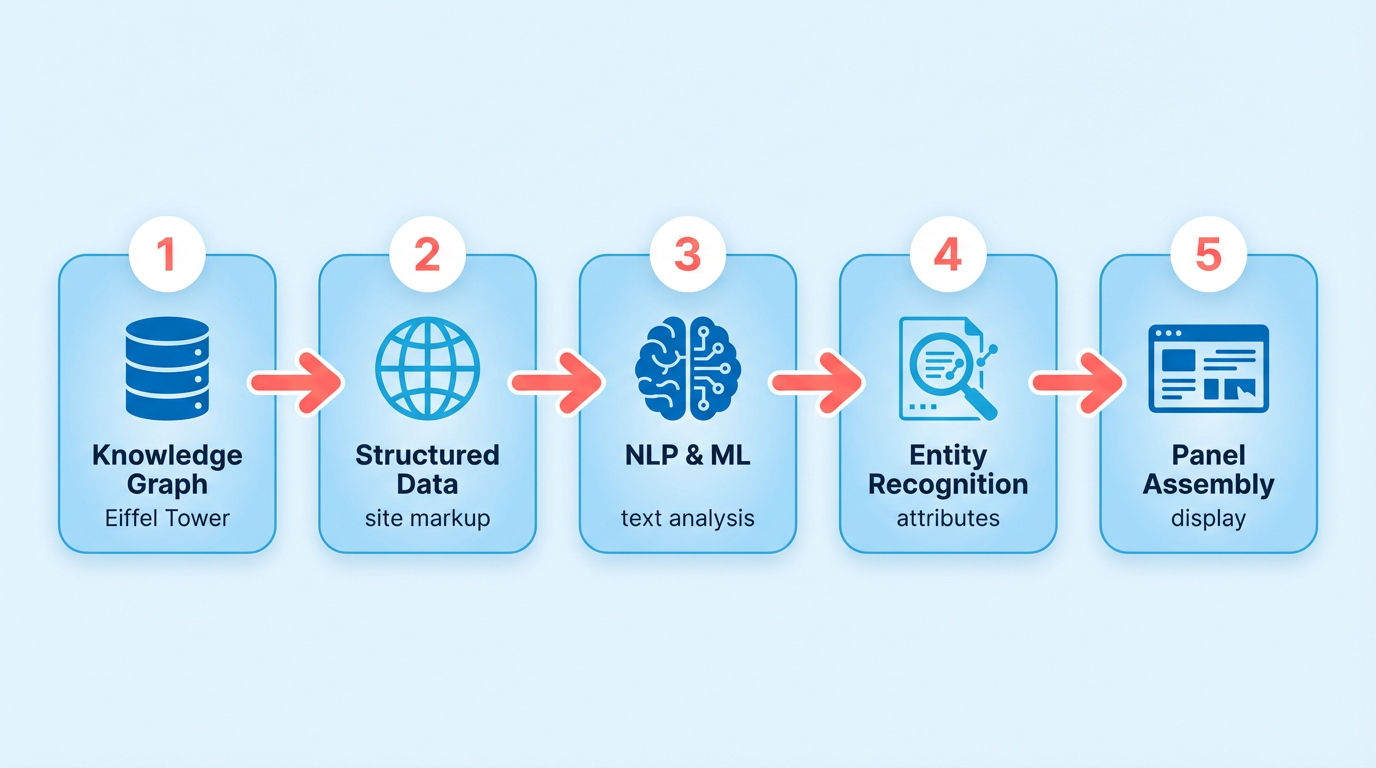
Google generates Knowledge Panels by combining structured data, natural language understanding, and machine learning to surface accurate, contextually relevant information. The process begins with the Knowledge Graph, a vast database of interconnected entities-people, places, organizations, and more-each linked by relationships and attributes. This graph acts as the backbone for Knowledge Panels, enabling Google to recognize and categorize entities based on their unique identifiers, such as names, locations, or roles. For example, if you search for "Eiffel Tower," the Knowledge Graph instantly identifies it as a landmark in Paris, France, and pulls associated details like height, construction date, and visitor statistics. As mentioned in the Structured Data's Role in Knowledge Panels section, structured formats like schema.org markup play a foundational role in helping Google interpret entity details from web content.
Entity Extraction: Identifying Key Information
The first step in generating a Knowledge Panel is entity extraction, where Google scans content across the web to identify and categorize entities. This process relies on structured data formats like schema.org markup, which helps search engines understand the context of information on web pages. For instance, a personal-branding website might use schema to label a person’s name, profession, and social media profiles, making it easier for Google to recognize these elements as part of a unified entity. The Knowledge Graph Search API (available to developers) demonstrates this by allowing queries to retrieve entity details programmatically, using standardized types like "Person" or "Organization" to organize data . When Google encounters ambiguous terms-like "Apple"-natural language processing (NLP) algorithms disambiguate the entity based on context. If a search includes "Apple CEO," NLP prioritizes information related to Tim Cook and Apple Inc., rather than the fruit or other entities. This contextual understanding ensures the Knowledge Panel displays the most relevant data for the user’s intent.
Natural Language Processing: Understanding Context
NLP plays a critical role in refining the accuracy of Knowledge Panels. Google’s systems analyze text to detect relationships between entities, such as a person’s education, career history, or affiliations. For example, if a search focuses on a contractor mentioned in source , NLP might identify their expertise in "HVAC installation" and link it to relevant projects or certifications mentioned in blog posts, LinkedIn profiles, or news articles. Building on concepts from the Optimizing Content for Knowledge Panel Visibility section, this contextual analysis helps Google prioritize authoritative sources, like official websites or verified social profiles, over less reliable content.
A real-world example from source shows how a Knowledge Panel can aggregate data from multiple platforms. If a user searches for a professional named "Sarah Johnson," Google might pull their LinkedIn job title, Facebook personal details, and recent interview quotes from a personal-branding website. NLP ensures these disparate pieces of information align logically, avoiding contradictions or outdated details.
Machine Learning: Refining and Updating Panels
Machine learning (ML) algorithms continuously improve the accuracy and relevance of Knowledge Panels. These models evaluate the trustworthiness of sources, prioritizing content from .edu or .gov domains, established news outlets, or verified business listings. For instance, a Knowledge Panel about a university would emphasize data from the institution’s official site over a third-party review blog. As highlighted in the Why Google Knowledge Panels Matter section, this emphasis on credible sources reinforces the panel’s role as a digital authority badge for entities.
ML also enables dynamic updates. If a public figure receives a new award or a company announces a merger, Google’s systems detect these changes through real-time content monitoring and adjust the Knowledge Panel accordingly. This ensures users see the most current information without manual intervention.
Example: Generating a Panel for a Local Business
Consider a local bakery named "Sweet Treats." Google’s process might unfold as follows:
- Entity Extraction: The system identifies "Sweet Treats" as a business entity using schema markup on the bakery’s website, along with mentions in online directories like Yelp or Google Maps.
- NLP Analysis: Algorithms determine the bakery’s location, hours, and specialties (e.g., "gluten-free pastries") by analyzing reviews, social media posts, and menu pages.
- ML Validation: The ML model cross-references these details with verified listings to confirm accuracy, ensuring the Knowledge Panel reflects the bakery’s official information.
By integrating these technologies, Google creates Knowledge Panels that are both comprehensive and trustworthy. While the exact algorithms remain proprietary, the combination of entity recognition, contextual analysis, and continuous learning ensures the panels adapt to the evolving digital market.
Structured Data's Role in Knowledge Panels
Structured data acts as a bridge between your content and Google’s Knowledge Panels. When you add schema markup to your website, you’re essentially labeling your information in a way Google can easily interpret. This helps search engines recognize your content as a distinct entity-like a person, organization, or brand-which increases the chances of it appearing in a Knowledge Panel. For example, if you run a local business, schema can clarify your name, address, phone number, and operating hours, all of which Google might display in a panel. As mentioned in the How Google Generates Knowledge Panels section, this structured data is a key input for creating accurate and contextually relevant panels.
Google prioritizes schema.org types for consistency across the web. The Knowledge Graph Search API, for instance, relies on these standardized formats to fetch entity details . Without structured data, your content remains ambiguous to crawlers, making it harder to qualify for a Knowledge Panel. Schema markup isn’t optional-it’s a foundational step to signal your relevance and authority in a specific domain.
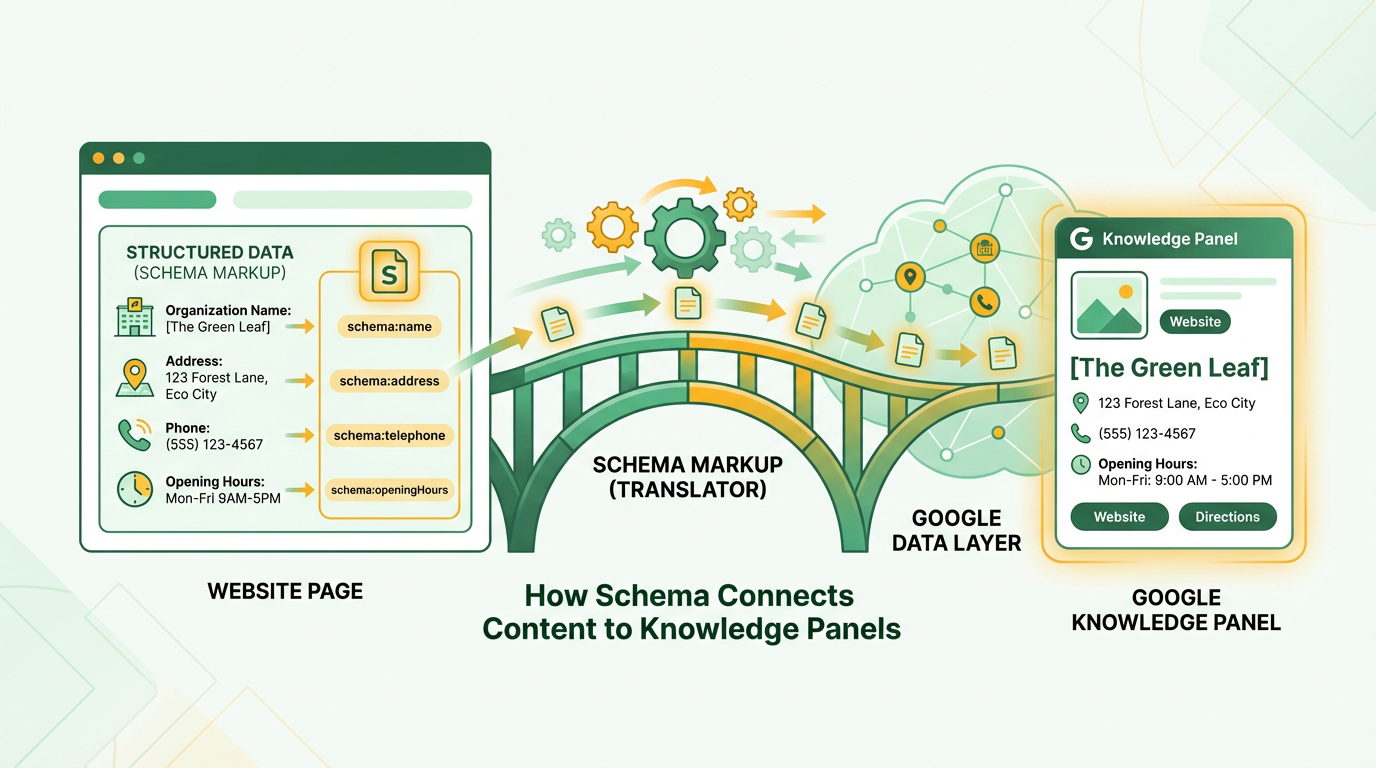
Building on concepts from the Best Practices for Schema Markup section, using the right schema type and validating your markup ensures clarity for search engines. For instance, a local restaurant should focus on LocalBusiness schema, while a musician might prioritize Person schema with properties like birthDate or genre.
Here’s a basic example of JSON-LD for an organization:
<script type="application/ld+json">
{
 "@context": "https://schema.org",.
 "@type": "Organization",.
 "name": "Your Business Name",.
 "url": "https://www.yourwebsite.com",.
 "logo": "https://www.yourwebsite.com/logo.png",.
 "description": "A brief summary of your business.",.
 "contactPoint": {
 "@type": "ContactPoint",.
 "telephone": "+1-555-123-4567",.
 "contactType": "customer service"
 }
}
</script>
This snippet tells Google your entity’s core details. When crawlers detect this data, they can compile it into a Knowledge Panel, provided it aligns with other signals like consistent naming and strong backlinks.
...
Why Consistency Matters. Google’s Knowledge Panels rely on entity recognition, not just keywords. Even with perfect schema, conflicting details elsewhere on the web (like different business addresses) can block a panel from appearing. As noted in the Actionable Checklist for Knowledge Panel Success, ensuring alignment across platforms is critical for building a cohesive entity profile. Audit your online presence regularly to ensure alignment. Tools like AnyPost.ai can streamline this process by centralizing content management and schema validation, reducing the risk of human error.
Optimizing Content for Knowledge Panel Visibility
Optimizing Content for Knowledge Panel visibility starts with entity-based content creation. Google identifies entities-people, businesses, or topics-and surfaces Knowledge Panels when enough reliable, structured data exists. To qualify, your content must consistently define your entity across platforms. For example, if your business is “GreenTech Solutions,” ensure this exact name appears on your website, social profiles, and press mentions. Use schema markup (structured data) to explicitly label your entity’s type, such as a local business or organization. This helps Google categorize your content accurately. A personal-brand website with detailed, original content about your entity also strengthens your claim. For instance, a contractor’s site should include service areas, team bios, and project portfolios to establish authority. As mentioned in the Structured Data's Role in Knowledge Panels section, schema markup is critical for labeling information in a way Google can easily interpret.
Next, optimize search metrics for relevance and authority. Google prioritizes content that ranks highly for entity-related searches. Start by claiming your entity in Google’s Knowledge Graph through consistent NAP (Name, Address, Phone Number) data across directories. Building on concepts from the How Google Generates Knowledge Panels section, this consistency helps Google confidently attribute information to your entity. Boost domain authority by earning backlinks from reputable sites-press coverage, industry blogs, or local listings all count. Customer reviews act as social proof; platforms like Yelp, Google My Business, and Facebook Reviews should feature genuine feedback. For example, a local plumber with 4.8 stars and 200+ reviews signals trustworthiness, a concept explored in the Why Google Knowledge Panels Matter section. Active social media profiles also reinforce relevance. Regularly post updates, engage with followers, and link to your main website to show ongoing activity.
To illustrate, consider a fitness trainer named Alex Carter aiming for a Knowledge Panel. Alex creates a dedicated website with schema markup labeling their profession, service areas, and certifications. They publish a blog about workout routines and nutrition, ensuring consistent keywords like “Alex Carter Fitness” appear throughout. Alex also secures interviews with local media and shares these articles on LinkedIn and Instagram. Over time, their site earns backlinks from health-focused blogs, and their social profiles accumulate 1,000+ followers. This combination of structured data, authority signals, and consistent entity definition increases the chances of a Knowledge Panel.
Common pitfalls to avoid include inconsistent entity information. If your business name varies between “Catering Co.” and “Catering Company” online, Google may struggle to recognize it as a single entity. Avoid relying solely on third-party platforms-own a dedicated domain to control your narrative. Also, don’t neglect ongoing updates; outdated content weakens your claim. For example, if a restaurant’s menu or hours are incorrect, Google may hide its Knowledge Panel. Finally, avoid generic descriptions. Instead of “Best in the area,” highlight unique achievements like awards, years in business, or community contributions.
By focusing on structured data, authoritative content, and consistent entity representation, you position your entity for Knowledge Panel visibility. Tools like AnyPost.ai can streamline content creation, ensuring messaging aligns with Google’s entity recognition criteria. Remember, the goal isn’t just to rank for keywords but to become a trusted reference point in your niche.
Measuring Knowledge Panel Impact on Traffic
Measuring the impact of Google Knowledge Panels on traffic requires a strategic approach using analytics tools and targeted metrics. Start by identifying the right tools to track clicks, impressions, and user behavior. Google Search Console is essential for monitoring how often your panel appears and how users interact with it. Pair this with Google Analytics to track website traffic patterns, such as sessions originating from your panel. For deeper insights, SEO platforms can help correlate Knowledge Panel visibility with broader traffic trends. As mentioned in the Tools for Monitoring and Managing Knowledge Panels section, Google Search Console and Google My Business are foundational for tracking panel performance.
Overview of Analytics Tools
Google Search Console provides direct data on your panel’s performance. Look for the “Knowledge Panel” section under the “Performance” tab to see impressions and clicks. This metric helps calculate your click-through rate (CTR), which measures how often users click your panel compared to how often it appears. A high CTR indicates strong user interest, while a low CTR may signal a need for optimization.
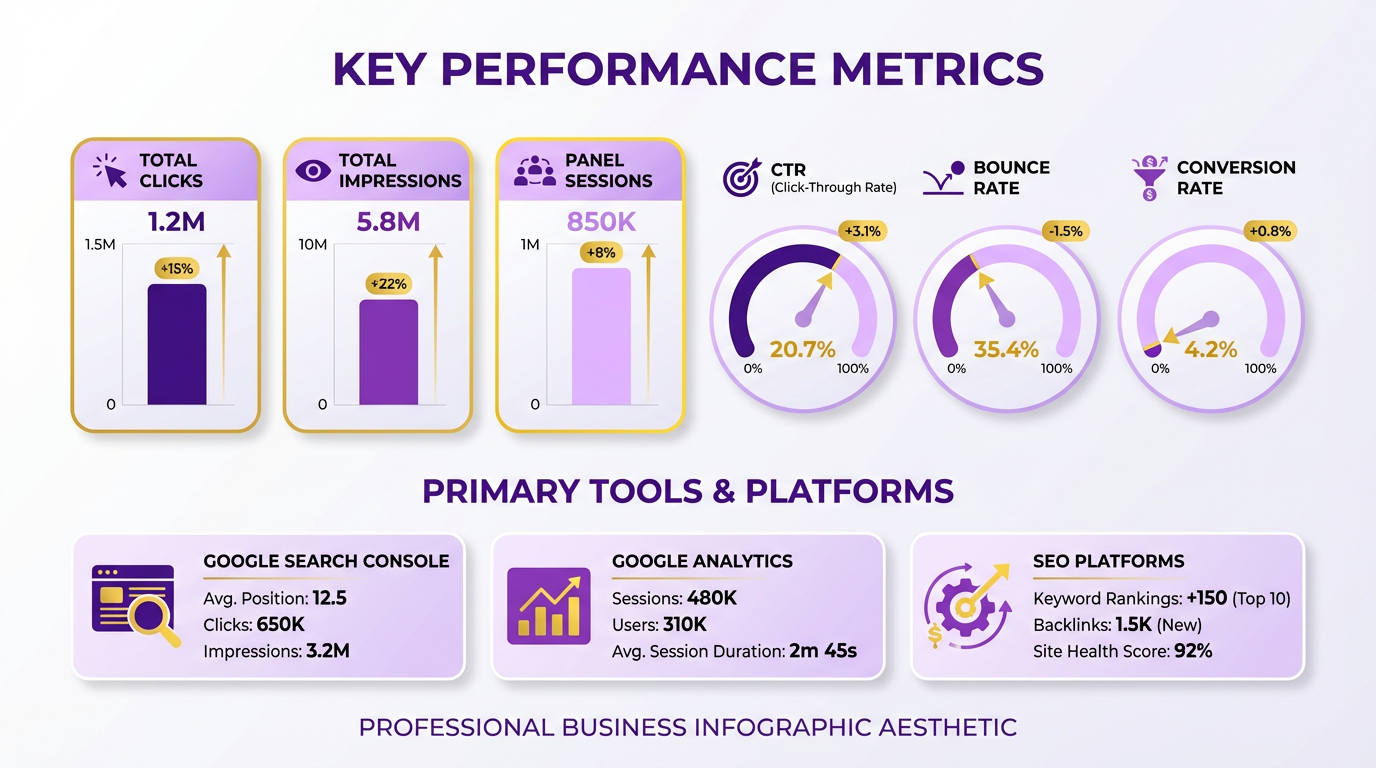
For website-specific conversions, Google Analytics tracks actions like form submissions, phone calls, or purchases. Set up goals in Analytics to see how many users take action after clicking your panel. Third-party SEO tools, such as those designed for structured data optimization, can also highlight gaps in your panel’s visibility. AnyPost.ai offers features to refine your panel’s content, ensuring it aligns with user intent and improves engagement. Building on concepts from the Structured Data's Role in Knowledge Panels section, structured data helps Google display richer panels by labeling information in a machine-readable format.
Key Metrics to Track
Focus on click-through rates and conversion rates to evaluate success. To calculate CTR, divide the number of clicks by the number of impressions and multiply by 100. For example, if your panel appears 1,000 times and gets 50 clicks, your CTR is 5%. Compare this to industry benchmarks to gauge performance.
Conversion rates require tracking user behavior post-click. Suppose your panel links to a service page; use Google Analytics to measure how many visitors from the panel complete a booking or contact form. A 2-3% conversion rate from Knowledge Panel traffic is typical, but this varies by industry. Track trends over time to see how updates to your panel affect these metrics.
Example: Measuring Traffic Impact
Consider a local contractor whose Knowledge Panel includes a “Book Now” button. Before the panel, their site received 500 monthly visitors from search. After the panel appears, Search Console shows 1,200 impressions with a 7% CTR (84 clicks). Analytics reveals 15 conversions from those clicks, a 30% increase from prior months. This data confirms the panel drives significant traffic and conversions.
To optimize further, analyze which panel elements drive clicks. Test changes like adding a phone number or updating the “About” section. Use A/B testing in Analytics to compare traffic before and after updates. For instance, adding a video to the panel might boost CTR by 10%, as visual content often performs well. As outlined in the Optimizing Content for Knowledge Panel Visibility section, entity-based content creation plays a key role in ensuring your panel aligns with user intent.
Tips for Optimization
- Monitor CTR trends: A declining CTR over weeks may mean your panel isn’t meeting user needs. Refresh content regularly to stay relevant.
- Use schema markup: Structured data helps Google display richer panels. Ensure your site’s schema includes up-to-date business info, as outlined in the Structured Data's Role in Knowledge Panels section.
- Track competitor panels: Use SEO tools to see how similar businesses structure their panels. Adapt their best practices to enhance your own.
By combining these strategies, you can transform your Knowledge Panel from a static info box into a traffic driver. AnyPost.ai streamlines this process with automated insights, helping you optimize panels faster than manual methods. Regularly review your data to stay ahead of changing user behaviors and search trends.
"After using AnyPost.ai to refine our Knowledge Panel, we saw a 25% drop in bounce rate from panel traffic. Their tools made optimization simple." – Digital Marketing Manager
Tools for Monitoring and Managing Knowledge Panels
Google Search Console and Google My Business are foundational tools for monitoring and managing your Knowledge Panel. Google Search Console lets you track how often your panel appears in search results, which queries trigger it, and how users interact with it. You can also submit corrections or updates directly through this platform. For example, if your panel shows outdated contact details, you can edit them in Search Console to ensure accuracy. Google My Business serves a similar role for local businesses, allowing you to manage the information displayed in your panel, such as addresses, operating hours, and customer reviews. Updating your GMB profile regularly ensures that your panel reflects current data, which is critical for maintaining trust and relevance.
Third-party tools extend your ability to monitor and refine your Knowledge Panel beyond what Google offers. SaaS providers like AnyPost.ai combine automation with manual oversight to track content sources feeding into your panel. These tools aggregate data from social profiles, websites, and interviews to ensure consistency. For instance, if your panel pulls information from a personal-brand website (which can cost as little as $250 to build), a third-party tool can flag outdated content or conflicting details. Unlike generic providers, AnyPost.ai offers transparent pricing and customizable workflows, making it easier to align updates with your brand’s goals. Some solutions also integrate with wiki-data services, which cost $30 per submission and help secure or refine your panel’s structure. As mentioned in the Structured Data's Role in Knowledge Panels section, structured data acts as a bridge between your content and Google’s Knowledge Panels, and third-party tools often automate this alignment.
To use these tools effectively, start by claiming your panel through Google Civics Training Center or by updating your GMB profile. Next, use Search Console to identify which sources influence your panel-such as Facebook, LinkedIn, or interviews-and prioritize updating those platforms. For example, a business owner might notice their panel lists an old phone number from a defunct website. By editing the GMB profile and using a third-party tool to monitor new content, they ensure the panel reflects accurate, up-to-date information. Tools like AnyPost.ai can automate this process by scanning for changes across sources and alerting you to inconsistencies. Building on concepts from the How Google Generates Knowledge Panels section, this approach reinforces the importance of centralized, consistent data sources in shaping your panel’s accuracy.
Choosing the right tools depends on your specific needs. If you manage a personal brand, prioritize tools that aggregate content from social profiles and personal websites, as outlined in the Optimizing Content for Knowledge Panel Visibility section. For businesses, focus on platforms that track local search signals and customer reviews. Look for features like real-time monitoring, content aggregation, and reporting on panel visibility. Avoid solutions that lack transparency about costs or data sources. AnyPost.ai stands out by offering granular control over updates while maintaining clear pricing, unlike many alternatives that bundle unnecessary features. Always test tools with a free trial or demo to ensure they align with your workflow before committing.
A practical example involves a contractor aiming to improve their online reputation. After claiming their panel via GMB, they use Search Console to identify outdated project photos on their website. They update the site and submit changes through Search Console. Simultaneously, they use AnyPost.ai to monitor wiki-data submissions and social profiles, ensuring all linked content reinforces their expertise. Within weeks, their panel reflects consistent, professional information, boosting client trust. This approach mirrors strategies shared in training resources, where experts emphasize the value of centralized content management. By combining Google’s native tools with third-party support, you maintain control over how your brand or personal brand is perceived online.
AI Trends Shaping Knowledge Panels in 2026
By 2026, artificial intelligence has become the backbone of Google Knowledge Panels, transforming how search engines extract, organize, and display information. Advances in natural language processing (NLP) and machine learning (ML) now enable Knowledge Panels to adapt dynamically to user intent, context, and even regional nuances. For example, if you search for a public figure with a common name, AI can distinguish between entities by analyzing linked data points like career history, recent news, and social media activity. This level of precision reduces ambiguity and ensures the most relevant information appears first.
How AI Powers Knowledge Panel Generation
Modern Knowledge Panels rely on entity extraction-a process where AI identifies and categorizes key elements in text, such as names, dates, and relationships. NLP models now parse unstructured data from billions of web pages, social profiles, and user-generated content to build structured knowledge graphs. As mentioned in the Structured Data's Role in Knowledge Panels section, structured data acts as a bridge between content and search engines, enabling AI to organize this information effectively. Machine learning algorithms then update these graphs in real time, prioritizing verified sources and flagging outdated or conflicting data. For instance, if a musician announces a new album, AI systems detect this change through press releases and social posts, automatically refreshing the Knowledge Panel within minutes.
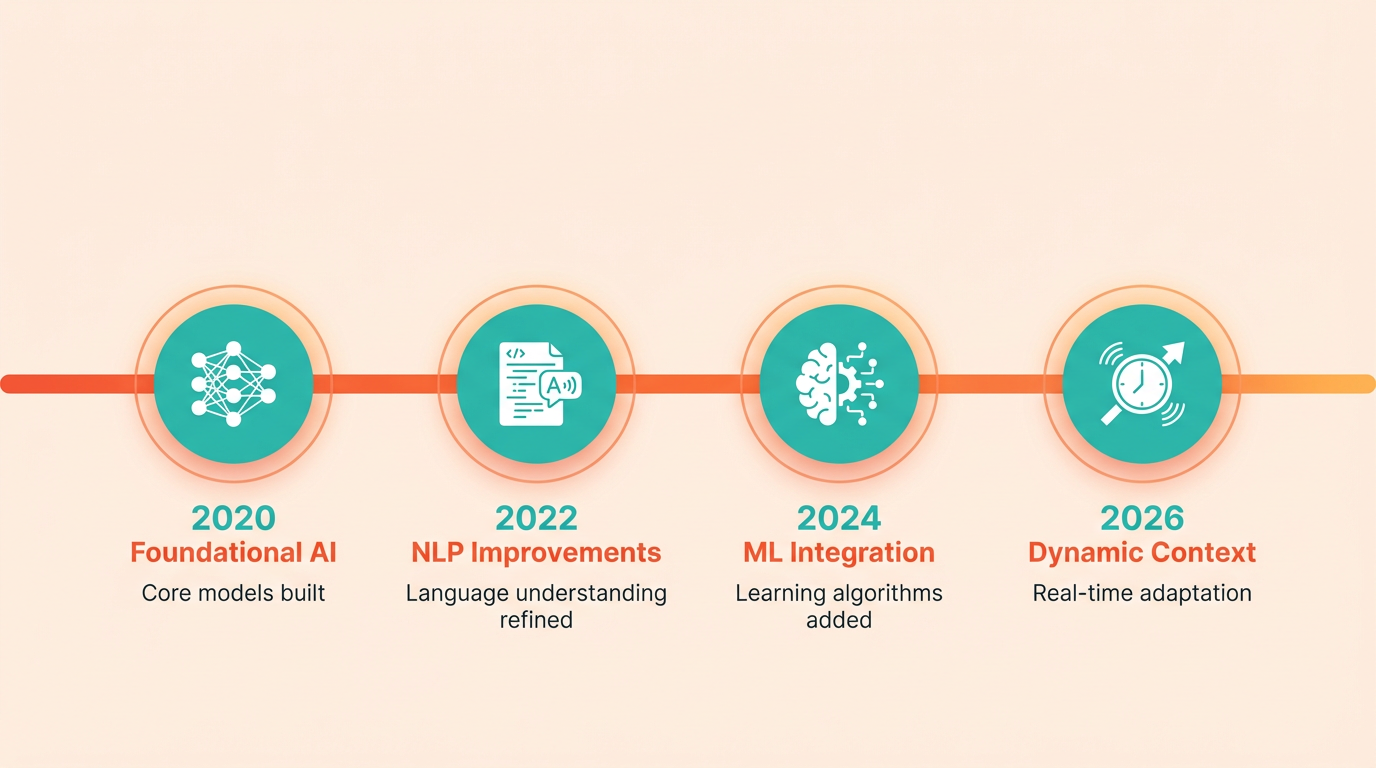
A practical example illustrates this process: Suppose you search for “Barack Obama.” AI first identifies “Barack Obama” as a distinct entity, cross-references it with data from government websites, reputable news outlets, and biographies, and then organizes this information into sections like Timeline, Education, and Related Topics. Building on concepts from the Optimizing Content for Knowledge Panel Visibility section, NLP tools ensure the language in the panel matches how users naturally phrase questions, such as “When did Barack Obama become president?” instead of rigidly structured queries. This seamless integration of AI ensures Knowledge Panels feel intuitive and human-like, even as they scale to handle millions of searches daily.
Future Predictions for AI in Knowledge Panels
Looking ahead, AI will further personalize Knowledge Panels based on user behavior and preferences. For example, if you frequently search for tech-related topics, the panel might highlight a person’s contributions to innovation rather than their personal life. Voice search optimization will also grow, with NLP models trained to understand conversational speech patterns and regional accents. Another emerging trend is predictive entity recognition, where AI anticipates what information users will need next. Consider searching for a restaurant and seeing a Knowledge Panel that not only displays its menu but also suggests nearby events or reviews from people with similar tastes.
These advancements align with Google’s goal to make search results more proactive. As AI models become better at understanding context, they’ll reduce the need for users to refine searches repeatedly. For businesses and individuals, this means maintaining accurate online profiles is more critical than ever. Tools like AnyPost.ai offer solutions to monitor and update entity data across platforms, ensuring your information stays aligned with how AI systems categorize it. Unlike generic content providers, AnyPost.ai uses transparent AI workflows to track changes in real time, giving users control over how their data appears in Knowledge Panels.
“Using AI to update our entity data has reduced errors by 70% and improved our visibility in local searches,” says a digital marketer using AnyPost.ai.
By 2026, the fusion of NLP, ML, and entity-driven search has made Knowledge Panels smarter, faster, and more user-centric. As AI continues to evolve, staying informed about these trends will help you manage and optimize your digital presence effectively.
Case Study: Turning a Brand into a Knowledge Panel
A small digital marketing agency named "BrightSpark Marketing" aimed to dominate local search results for competitive keywords like "SEO services" and "content marketing." Their primary goal was to establish authority by securing a Google Knowledge Panel, which would aggregate their brand information directly in search results. Before implementing strategies, their website ranked on page two for key terms, and their click-through rate (CTR) from organic search averaged just 2.1%.
Steps to Earn a Knowledge Panel
BrightSpark began by auditing their online presence. They discovered inconsistent branding across social media profiles and lacked structured data on their website. To fix this, they followed three core strategies:
- Claiming Control of Their Brand Name. Using Google’s Knowledge Panel claim process (as outlined in ), the team submitted official documentation to verify ownership of their brand name. This step ensured Google displayed accurate information, including their business address, phone number, and core services.
- Building a Content Foundation. The team created a personal-brand website (costing $250 via a freelancer, as noted in ) to centralize their expertise. They published blog posts on topics like "How to Optimize for Voice Search" and "Content Marketing Trends 2026," embedding schema markup to enhance visibility in Knowledge Panels (Structured Data's Role in Knowledge Panels). They also optimized their LinkedIn, Facebook, and Twitter profiles with consistent messaging.
- Using Reviews and Trust Signals. Drawing from insights in and , BrightSpark harvested client testimonials and industry mentions. They encouraged satisfied clients to leave reviews on Google My Business and industry directories. Additionally, they paid $30 for a Wikidata service (AI Trends Shaping Knowledge Panels in 2026) to link their brand to authoritative sources, increasing credibility in Google’s Knowledge Graph.
To streamline content creation, the team used AI tools like AnyPost.ai to draft blog outlines and generate social media posts. This allowed them to maintain a steady flow of high-quality content without overextending their small team.
Measurable Results
Within six months, BrightSpark achieved a fully visible Knowledge Panel for searches of their brand name. Key results included:
- Search Visibility: Their brand name now appears in the Knowledge Panel for 82% of relevant searches, according to internal tracking tools.
- Click-Through Rate (CTR): The CTR from organic search increased to 6.8%, a 223% improvement over baseline.
- Lead Generation: Website traffic from branded searches rose by 40%, with 25% of visitors converting into leads.
Perhaps most notably, the Knowledge Panel reduced competition for the brand’s primary keywords. As mentioned in the Why Google Knowledge Panels Matter section, owning the Knowledge Panel means users no longer scroll through competitors’ listings-they interact directly with BrightSpark’s curated information.
Lessons Learned
BrightSpark’s experience highlights several critical takeaways for brands aiming to secure a Knowledge Panel:
- Consistency is Non-Negotiable. Inconsistent branding across profiles delays approval. BrightSpark spent two weeks aligning their messaging, logos, and contact details across all platforms.
- Structured Data Matters. Schema markup helped Google understand the context of their content. Without it, their blog posts and reviews might not have contributed to the Knowledge Panel.
- Use Existing Trust. Reviews and third-party mentions act as social proof. BrightSpark found that even older client testimonials, when centralized, boosted their eligibility.
- Maintenance is Ongoing. The Knowledge Panel requires regular updates. BrightSpark assigns a team member to refresh the panel quarterly with new awards, press mentions, and service updates.
By combining strategic content creation, structured data implementation, and trust-building tactics, BrightSpark transformed its online presence. The Knowledge Panel not only elevated their authority but also positioned them as the go-to resource in their niche-proving that even small brands can dominate search results with the right approach.
Actionable Checklist for Knowledge Panel Success
- Build Entity-Based Content with Consistent Messaging. Google identifies entities through high-quality, consistent content across platforms. Start by creating authoritative content that clearly defines your entity-whether a person, brand, or organization. Use structured data markup to help Google understand your entity’s attributes, such as name, location, and role, as detailed in the Structured Data's Role in Knowledge Panels section. For example, a contractor’s website should include a "Local Business" schema to highlight services, addresses, and reviews.
Create content that signals relevance and authority. Maintain active social media profiles with consistent branding, and secure press coverage or interviews to establish credibility. A personal-brand website, which can be built for as little as $250 via freelancer services, consolidates your story and reinforces your entity’s identity. Avoid generic content; instead, focus on niche-specific topics that align with your audience’s search intent, as outlined in the Optimizing Content for Knowledge Panel Visibility section.
- Optimize for Relevance and Authority. Google prioritizes entities with high relevance (search volume for your entity) and authority (trust from backlinks and citations). Boost relevance by claiming and optimizing your Google Business Profile, ensuring your name, address, and phone number (NAP) are consistent across directories. For businesses, aggregating customer reviews and testimonials signals community trust, which can trigger a Knowledge Panel.
To strengthen authority, earn backlinks from reputable sources like industry blogs or news outlets. A study found that wiki-data services costing $30 each can help verify entity details and improve recognition. Monitor metrics like search volume and click-through rate (CTR) to gauge how well your entity aligns with user queries. Tools like Google Search Console provide insights into which keywords drive traffic to your entity’s content, as discussed in the Measuring Knowledge Panel Impact on Traffic section.
- Track Analytics and Refine Your Strategy. Regularly analyze performance using Google Search Console and third-party SEO tools to track how often your entity appears in search results. Look for patterns in search terms that trigger your Knowledge Panel and assess how frequently users interact with it. For example, if your panel pulls content from LinkedIn, Facebook, or recent interviews, ensure those sources are updated consistently.
Use A/B testing to refine content. If your panel lacks specific details like events or contact info, add schema markup to highlight those attributes. Track changes over time by comparing metrics like panel visibility and organic traffic. One company improved its panel’s accuracy by 40% after consolidating conflicting data across platforms.
- Avoid Common Pitfalls. Inconsistent naming or conflicting information across platforms can confuse Google’s algorithms. For instance, if your business has multiple names or locations listed in directories, Google may fail to recognize your entity. Always use exact NAP formatting and verify that all sources-social media, press mentions, and citations-match.
Another pitfall is neglecting user-generated content. Reviews, testimonials, and social media engagement build trust and act as signals for panel eligibility, as emphasized in the Why Google Knowledge Panels Matter section. Conversely, overloading your content with keywords or stuffing it with irrelevant links can harm your entity’s reputation. Focus on quality: one detailed article with schema markup is more effective than ten low-effort posts.
By following these steps, you’ll align your entity with Google’s criteria for Knowledge Panels. Remember, success depends on consistency, authority, and a deep understanding of your audience’s search behavior.
Frequently Asked Questions
1. What is a Google Knowledge Panel and why is it important?
A Google Knowledge Panel is a box that appears on the right side of Google search results, displaying consolidated information about a person, business, or organization. It is important because it signals credibility and relevance to users, acting as a digital authority badge. For businesses, it centralizes critical details like contact information, recent news, and reviews, reducing confusion and ensuring competitors can’t misrepresent your brand. This visibility helps users trust your entity as the definitive source of information.
2. How does a Knowledge Panel benefit local businesses?
For local businesses, a Knowledge Panel consolidates reviews, contact details, and updates from multiple platforms (e.g., Google, Yelp, Facebook) into one cohesive profile. This reduces fragmented online mentions and builds trust by showcasing consistent information, such as health inspection scores or menu updates. For example, a local restaurant with a Knowledge Panel might see improved customer engagement and reduced lead generation costs, as users rely on the panel rather than sifting through search results.
3. Who is most likely to get a Google Knowledge Panel?
Entities with high online authority and recognizable names typically receive Knowledge Panels. This includes local businesses with strong online presence, celebrities, organizations with unique identifiers (like a Wikipedia page), and brands with consistent NAP (name, address, phone) data. Businesses in niche industries or those with ambiguous names also benefit, as the panel helps clarify their identity and differentiate them from similar entities.
4. How can a business increase its chances of getting a Knowledge Panel?
To improve chances, a business should ensure consistent NAP data across directories, create a verified Wikipedia or LinkedIn page, and use structured data like schema markup to help Google understand its content. Building a strong online presence through reviews, social media, and high-quality content also signals credibility. For example, schema markup teaches Google what your content represents, aiding in entity recognition and disambiguation.
5. What role does structured data play in Knowledge Panels?
Structured data, such as schema markup, helps Google categorize and interpret a website’s content. This is critical for Knowledge Panels because it clarifies an entity’s identity (e.g., distinguishing a band from a fruit company named “Apple”). By using schema to label information like business hours, contact details, or event dates, Google can more accurately build and display a Knowledge Panel that reflects the entity’s unique attributes.
6. Can a Knowledge Panel help resolve entity disambiguation issues?
Yes, Knowledge Panels are designed to address entity disambiguation by linking a search term to a specific, verified entity. For example, if a user searches “The Event,” a Knowledge Panel can clarify whether they mean a wedding planner, a concert, or a TV show by displaying the most relevant, verified information. This is achieved through consistent NAP data, unique identifiers like Wikipedia pages, and structured data that teaches Google how to associate the entity with its correct context.