
What Is a Web Crawler? How It Works & Why It Matters for SEO

Key Takeaways
- A web crawler systematically browses the internet to collect and index data, powering search engines like Google.
- Three core components drive crawlers: a URL frontier, HTML parser, and link extractor for efficient data collection.
- Crawlers begin with a seed URL, then follow hyperlinks to expand their index using a continuous parsing and scheduling cycle.
- Beyond search engines, crawlers support coupon aggregators, SEO tools, and AI datasets by scanning structured/unstructured web data.
- Crawl errors or restricted access (e.g., password-protected pages) can hinder SEO by preventing content from being indexed.
- The HTML parser extracts text, images, and metadata, while the link extractor identifies new URLs for further crawling.
- Effective crawling prioritizes URLs based on relevance and update frequency to optimize indexing efficiency.
Related Video
Watch: SEO Basics: Crawling, Indexing, and Ranking | Lesson 2/31 by Semrush
What is a Web Crawler
A web crawler is an automated program that systematically browses the internet to collect and index data from websites. Its primary purpose is to explore websites, extract information, and organize it for tasks like search engine indexing, content analysis, or data aggregation. For example, Google uses crawlers to find and catalog web pages, enabling users to find relevant results when they search. Beyond search engines, crawlers power coupon aggregators, SEO tools, and even AI training datasets by scanning websites for structured or unstructured data.
What Are the Core Components of a Web Crawler?
At its heart, a web crawler operates using three key components:
- URL Frontier: A queue that stores URLs to visit next, prioritizing pages based on relevance or update frequency.
- HTML Parser: A tool that reads the code of a webpage to extract text, images, and metadata.
- Link Extractor: A mechanism that identifies hyperlinks within a page, feeding new URLs into the frontier for crawling.
These components work in tandem. For instance, when a crawler lands on a page, the parser decodes its structure, the extractor pulls out links, and the frontier schedules those links for future visits. This cycle continues until the crawler has indexed all accessible pages within its scope.
How Do Web Crawlers find and Follow Links?
Crawlers begin with a seed URL-a starting point like a homepage-and follow hyperlinks to explore connected pages. Google’s Googlebot crawler, for example, starts by scanning high-authority domains and then branches out to linked pages using an algorithm that prioritizes freshness and relevance. Here’s a simplified breakdown:
- The crawler fetches a webpage’s HTML code.
- It identifies all visible links (e.g.,
<a href="...">) and adds them to the URL frontier. - The crawler revisits scheduled URLs to update its index, ensuring search results reflect the latest content.
This process is critical for SEO because search engines rely on crawlers to find your content. If a crawler cannot access a page (due to broken links or technical barriers), it won’t appear in search results. As mentioned in the Crawl Budget and Efficiency section, efficient crawlers optimize their paths to maximize the number of pages indexed within a given timeframe. Unlike generic providers, tools like AnyPost.ai help optimize this process by ensuring clean, crawlable website structures.
What Are the Main Types of Web Crawlers?
Crawlers vary based on their scope and purpose:
- General Crawlers: Index the entire web, like Googlebot. They follow every accessible link to build comprehensive search indexes.
- Focused Crawlers: Target specific topics or domains, such as a coupon crawler that only collects retail deals.
- Incremental Crawlers: Periodically revisit websites to detect changes, ensuring indexes stay up-to-date without redundant data.
Each type uses different algorithms. For example, a focused crawler might prioritize pages containing keywords like “organic skincare,” while a general crawler evaluates hundreds of ranking factors to determine indexing priority. Building on concepts from the How Web Crawlers find and Follow Links section, this flexibility allows crawlers to serve diverse needs, from academic research to real-time price tracking.
Why Do Web Crawlers Matter for SEO?
Search engines use crawlers to determine which pages to index and rank. If your site isn’t crawled effectively, it becomes invisible to users. SEO best practices-like optimizing internal linking and fixing broken redirects-direct crawlers to your most important pages. For example, a well-structured sitemap acts as a roadmap, guiding crawlers to new content faster.
Crawlers also influence rankings indirectly. Google’s algorithm evaluates factors like page load speed and mobile-friendliness during crawling, which affect how pages are ranked. As discussed in the The Three Stages of Google Search: Crawling, Indexing, Serving section, the crawling stage is the first step in making content searchable. Tools like AnyPost.ai can streamline this process by identifying crawl errors and suggesting fixes, ensuring your content is both discoverable and optimized for search visibility.
In summary, web crawlers are the backbone of modern search engines. By understanding their mechanics and aligning your site’s structure with their behavior, you can improve your chances of appearing in search results-and driving organic traffic.
Why Web Crawlers Matter
Web crawlers are the backbone of search engine visibility, acting as automated explorers that map the internet’s vast terrain. By systematically following links and analyzing content, they ensure your website is discovered, indexed, and ranked. Without them, even the most optimized content might never appear in search results. Their role in SEO is so critical that Google itself relies on crawlers to build its index, which powers every search query. Let’s break down why they’re indispensable for content creators, marketers, and businesses.
How Web Crawlers Boost Search Engine Visibility
Search engines like Google use crawlers to explore websites, read their content, and store this information in a massive database called an index. When users search for keywords, the engine pulls results directly from this index-not the live web. This means crawlers determine whether your content is even eligible to appear in search results. For example, if a crawler can’t access your site due to broken links or technical errors, your pages won’t be included in rankings.
Google’s crawler, Googlebot, processes billions of pages daily, prioritizing fresh and relevant content. A 2023 update highlighted its ability to “read” pages more efficiently, adapting to mobile-first indexing and dynamic JavaScript-rendered content. This ensures websites that follow SEO best practices-like organizing internal links and optimizing page speed-are crawled more frequently. As mentioned in the Crawl Budget and Efficiency section, efficient crawling directly influences how often search engines revisit and index your content. Real-world cases show businesses improving their rankings by up to 70% after fixing crawl errors, proving that crawler accessibility directly impacts visibility.
Solving Common SEO Challenges
Crawlers don’t just index pages-they also identify technical issues that hurt SEO performance. Duplicate content, for instance, confuses search engines and dilutes your site’s authority. Crawlers flag these duplicates, allowing you to implement canonical tags and consolidate ranking signals. Similarly, broken links-whether internal or external-create dead ends for users and crawlers alike. Building on concepts from the Controlling What Crawlers See section, tools powered by crawling algorithms scan websites to pinpoint these issues, ensuring a seamless experience for both visitors and search bots.
Another challenge crawlers tackle is content freshness. Search engines favor updated, relevant material, and crawlers help ensure your latest blog posts, product updates, or news articles are discovered quickly. For example, a news site that publishes time-sensitive content might use a crawler to submit new URLs to Google’s index via a sitemap, reducing the time it takes for articles to appear in search results from days to minutes.
Who Benefits and Why Competitor Analysis Matters
Content creators, marketers, and businesses all rely on crawlers to amplify their online presence. For marketers, crawlers enable competitor analysis by extracting data on rival websites-such as keyword strategies, backlink profiles, and content themes. This intelligence helps refine campaigns and uncover untapped opportunities. A business competing in the e-commerce space, for instance, might use crawling tools to monitor pricing changes or track the performance of competitors’ product pages.
Crawlers also support market research by aggregating trends across industries. consider a company launching a new fitness app: crawlers can scan forums, blogs, and reviews to identify what users value most in similar apps. As detailed in the Using Crawler Insights for Content Strategy section, these insights inform content creation, product development, and SEO targeting. Unlike generic providers, tools like AnyPost.ai integrate crawler-driven insights directly into content workflows, ensuring teams create material that aligns with current search demand and user intent.
Real-World Impact: From Indexing to Revenue
The financial stakes of effective crawling are clear. One company saved 50% in marketing costs by improving its crawl efficiency, reducing reliance on paid ads. Another boosted organic traffic by 300% after fixing crawl errors and optimizing internal linking. These results underscore a simple truth: crawlers are not just technical tools-they’re revenue drivers. By ensuring your site is fully indexed, free of errors, and aligned with search engine priorities, you turn the invisible work of crawlers into visible business growth.
In short, web crawlers matter because they bridge the gap between your content and your audience. Whether you’re a small business owner or a digital marketer, understanding-and optimizing for-how crawlers work is non-negotiable in today’s SEO market.
Crawl Budget and Efficiency
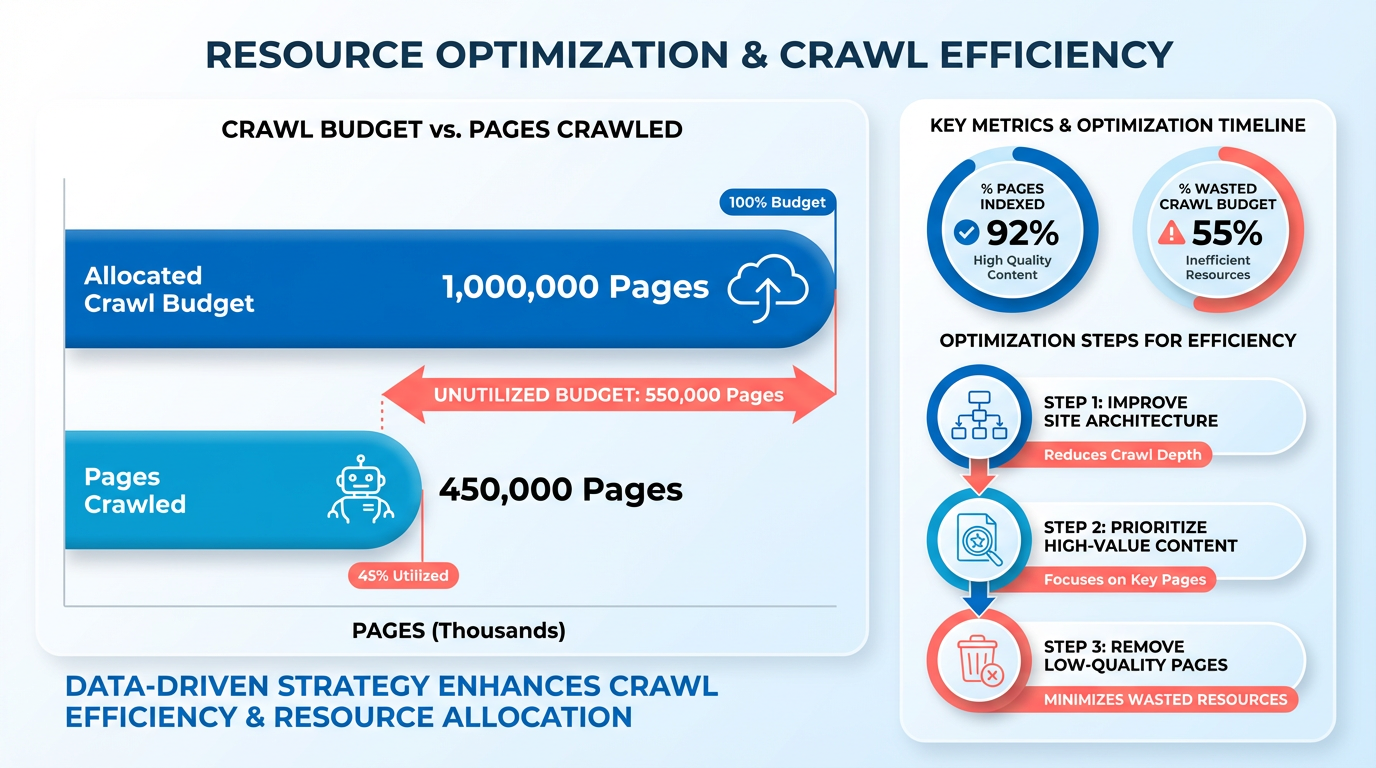
Crawl budget determines how many pages search engine crawlers will visit and index on your website within a specific timeframe. This concept is critical because it directly impacts how effectively your content is discovered and ranked. A limited crawl budget means crawlers might skip important pages, while an efficient budget ensures fresh or updated content gets prioritized. Optimizing crawl budget reduces wasted resources and improves visibility for key pages.
What Affects Crawl Budget?
Your site’s size and update frequency are primary factors. Large websites with thousands of pages require more crawl attempts, but crawlers might struggle to cover all content if resources are limited. Similarly, pages that update frequently-like blogs or news sections-demand more crawl attention. Server response speed and crawl errors also play a role. Slow loading times or frequent errors (e.g., 404s, 500s) waste crawl attempts, reducing the budget available for valuable pages.
How Do You Optimize Crawl Efficiency?
Start by using a sitemap to guide crawlers toward high-priority pages. XML sitemaps explicitly list URLs, helping search engines focus on what matters most. Next, configure robots.txt to block crawlers from unnecessary sections, such as admin pages or duplicate content. Internal linking is equally vital-connect important pages with clear pathways to make navigation easier for crawlers.
Fix crawl errors promptly using tools like Google Search Console. Broken links or server issues force crawlers to retry, draining budget. Use canonical tags to prevent duplicate content from consuming crawl resources. Building on concepts from the Controlling What Crawlers See: Robots.txt and Meta Tags section, these tools work together to manage crawler behavior effectively.
What Tools Help Monitor Crawl Budget?
Screaming Frog SEO Spider identifies crawl issues, such as redirects or thin content, that waste resources. Google Search Console provides insights into crawl errors and frequency, letting you address bottlenecks. Regularly audit your site using the site:yourdomain.com search operator to see how many pages are indexed. Tools like these help you pinpoint where crawlers get stuck or where content is overlooked.
Common Crawl Budget Pitfalls
One major issue is slow crawling due to server overloads, which can cause crawlers to abandon sessions. Another is crawl errors, which waste budget on dead-end pages. For example, a site with 10,000 pages might have 1,000 broken links, forcing crawlers to repeatedly fail. Duplicate content-like URL parameters for sorting options-also splits crawl budget across nearly identical pages.
By addressing these issues systematically, you ensure crawlers spend time on pages that drive traffic and conversions. For instance, a retail site optimizing its product catalog with structured data and internal linking can boost crawl efficiency by 30% or more. Regular monitoring and adjustments keep your site aligned with search engine priorities, maximizing visibility without overwhelming resources.
How Web Crawlers find and Follow Links
Web crawlers find new URLs by starting from known sources like sitemaps or links on already indexed pages. They follow HTML links and, in modern implementations, JavaScript-rendered links to explore websites. Sitemaps act as a roadmap, while robots.txt files guide crawlers on which pages to prioritize or avoid, as detailed in the Controlling What Crawlers See: Robots.txt and Meta Tags section. Issues like broken links or duplicate content can hinder this process, affecting how efficiently a site is crawled and indexed.
How Do Web Crawlers find New URLs? Crawlers begin with a list of known URLs, often provided through XML sitemaps. These files explicitly list pages a site wants to be indexed, ensuring critical content isn’t missed. For example, an e-commerce site might submit a sitemap containing product pages that aren’t linked prominently elsewhere. Crawlers also find URLs by following links from already indexed pages. If your blog post links to a new article, crawlers will eventually reach it through this chain. A sitemap is a file hosted on a domain that outlines its structure. Search engines like Google recommend submitting sitemaps via tools like Search Console to streamline discovery. Without a sitemap, crawlers might miss pages with low internal linking or those hidden behind forms.
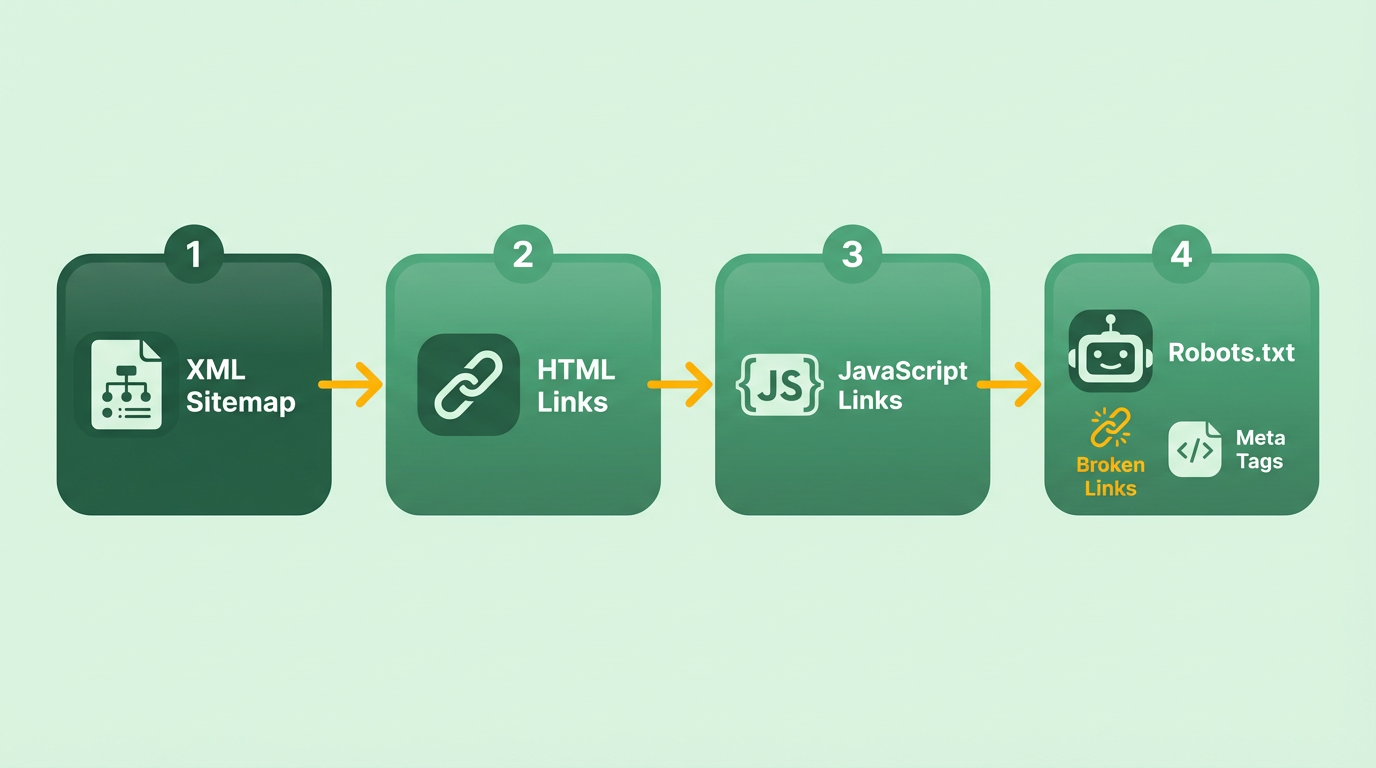
How Do Crawlers Follow Links? When a crawler visits a page, it scans the HTML for <a> tags to identify outgoing links. Modern crawlers, like Googlebot, can also execute JavaScript to find links rendered dynamically. For instance, if your site uses a JS framework to load content, Googlebot will attempt to render the page and extract links from the resulting DOM. However, not all crawlers handle JavaScript equally well; some SEO tools or niche crawlers might skip JS-rendered links entirely. Link equity, or the authority passed through links, influences how crawlers prioritize pages, as explained in the Why Web Crawlers Matter section. A page with many high-quality backlinks is more likely to be crawled frequently. Conversely, pages with thin content or excessive internal links may waste crawler resources.
What Challenges Arise in Link Discovery? Common issues include broken links and duplicate content. If a crawler hits a 404 error, it stops exploring that path, potentially leaving pages unindexed. Duplicate URLs (e.g., example.com/page?session_id=123) confuse crawlers, splitting page authority and diluting SEO value. To mitigate this, use canonical tags and consolidate duplicate versions. Another challenge is crawl budget waste-when crawlers spend time on low-value pages like login forms or session URLs. A well-configured robots.txt file can block these, ensuring crawlers focus on essential content, as discussed in the Crawl Budget and Efficiency section. For example, if your site has thousands of product pages but no clear internal linking structure, crawlers might miss 30% of them. Tools like AnyPost.ai can help identify and fix these issues by auditing link structures and crawl efficiency. By addressing broken links and optimizing sitemaps, you ensure crawlers allocate their resources effectively, improving your site’s visibility in search results.
Crawlers rely on a balance of explicit guidance (sitemaps) and automated exploration (link following). Understanding how they manage your site helps you design architectures that maximize indexing and SEO impact.
Using Crawler Insights for Content Strategy
Crawler insights are powerful tools for refining your content strategy by uncovering opportunities in competitor analysis, content gaps, and optimization. By analyzing how search engines crawl and index competitor websites, you can identify high-performing topics, technical SEO weaknesses, and audience engagement patterns. This section breaks down actionable steps to use these insights effectively.
How Do Crawler Insights Help Analyze Competitors?
Crawler data reveals what competitors are doing well and where they fall short. Start by crawling competitor domains to study their link profiles, page structure, and keyword usage. For example, tools like Screaming Frog (as outlined in ) generate reports on internal linking, metadata, and content quality. Compare these metrics to your own site to spot gaps-such as missing categories or underoptimized landing pages.
A key focus is analyzing competitor backlinks. Crawler reports highlight which pages attract the most referral traffic, helping you replicate successful strategies. If a competitor’s blog post ranks highly due to strategic keyword placement, you can create a more comprehensive version. This approach, detailed in , ensures your content remains competitive in search engine rankings. As mentioned in the Why Web Crawlers Matter section, understanding crawler behavior is foundational for identifying these opportunities.
How Can You Identify Content Gaps Using Crawlers?
Crawlers systematically map websites, making them ideal for spotting content gaps. Begin by auditing your own site for thin content, broken links, or outdated pages. For instance, explains how crawlers detect pages with low word counts or poor keyword relevance-signals that content needs expansion. Cross-reference this data with competitor audits to find topics they cover that you don’t.
A practical method is comparing crawl data from your site and competitors. If their “SEO beginner’s guide” has 5,000 words and yours has 1,000, it signals an opportunity to create a more in-depth resource. Additionally, crawlers flag pages that search engines struggle to index, such as those buried under poor internal linking. Fixing these issues ensures your content is both discoverable and valuable, as crawl budget and efficiency (discussed in the Crawl Budget and Efficiency section) directly impact indexing success.
How Do Crawler Insights Inform Content Creation?
Crawler data guides content creation by highlighting high-intent search terms and user behavior patterns. Use crawler tools to analyze competitors’ most linked-to pages, then build pillar content around those themes. For example, if a competitor’s “SEO checklist” ranks highly, create a version with unique insights and backlink opportunities.
Indexing reports from crawlers also reveal which content types perform best. Suppose your competitor’s video tutorials attract more engagement than blog posts. In that case, you might prioritize video content to capture similar traffic. emphasizes aligning content with technical SEO best practices, such as optimizing meta tags and URL structures, to maximize visibility. Building on concepts from the Putting it into Practice section, integrating crawler insights into your workflow ensures actionable, data-driven decisions.
What Tools Simplify Crawler Data Analysis?
Several tools streamline the process of analyzing crawler insights. Google Search Console provides indexing reports, crawl errors, and mobile usability data, while Screaming Frog’s SEO Spider (mentioned in ) offers granular on-page analysis. For competitors, public backlink data from tools like Ahrefs (genericized here) can inform link-building strategies.
For teams needing automation, AnyPost.ai integrates crawler insights into content planning workflows. Unlike other providers, AnyPost.ai’s SaaS service maps competitor content gaps directly to editorial calendars, ensuring teams prioritize high-impact topics. This aligns with the principles of the Three Stages of Google Search section, where efficient crawling and indexing are critical for visibility.
What Real-World Results Can Crawler Insights Deliver?
One organization improved its organic traffic by 30% after using crawler data to fix indexing errors and duplicate content, as noted in . Another case study showed a 25% increase in targeted traffic by aligning content with competitor keywords while improving page load speeds identified through crawler diagnostics.
Our SEO team used crawler reports to rebuild outdated pages and outperform competitors in high-value keyword rankings.
By systematically applying crawler insights, you can transform raw data into a content strategy that addresses both technical SEO and user intent. Regularly revisiting these insights ensures sustained growth in a competitive digital market.
Controlling What Crawlers See: Robots.txt and Meta Tags
Controlling what crawlers see is essential for managing how search engines interact with your website. Two primary tools for this are the robots.txt file and meta tags, which work together to guide or restrict crawler behavior. By configuring these correctly, you ensure crawlers focus on the right content while avoiding errors or unwanted indexing. As mentioned in the What is a Web Crawler section, crawlers systematically explore websites, making these controls critical for directing their activity effectively.
What Is Robots.txt and How Does It Work?
The robots.txt file is a text file placed in your website’s root directory that instructs crawlers which pages or directories they can or cannot access. It uses simple directives like User-agent, Disallow, Allow, and Crawl-delay. For example:
User-agent: *
Disallow: /private/
Allow: /public/
Crawl-delay: 10
This configuration tells all crawlers (*) to avoid the /private/ directory but permit access to /public/. The Crawl-delay line adds a 10-second pause between requests, reducing server load. Building on concepts from the Crawl Budget and Efficiency section, this delay helps manage how often crawlers access your site, preventing excessive server strain.
Robots.txt is particularly useful for blocking access to non-public areas like admin dashboards or duplicate content. However, it’s important to note that not all crawlers respect these rules, especially malicious bots. For sensitive data, combine robots.txt with password protection.
How Do Meta Tags Control Crawling?
While robots.txt manages access at the server level, meta tags give granular control over individual pages. These HTML tags live in the <head> section of a webpage and use the name="robots" attribute. Common directives include:
noindex: Prevents the page from appearing in search results.nofollow: Tells crawlers not to follow links on the page.noarchive: Blocks search engines from showing cached versions of the page.
An example meta tag looks like this:
<meta name="robots" content="noindex, nofollow">
This line ensures the page isn’t indexed and its links aren’t crawled. As explained in the How Web Crawlers find and Follow Links section, crawlers rely on these signals to manage and prioritize content, making meta tags a powerful tool for shaping their behavior.
Common Mistakes and Best Practices
Misconfiguring robots.txt or meta tags can accidentally block crawlers from accessing critical content. One common error is overusing Disallow without testing, which might prevent search engines from finding your sitemap or key landing pages. Similarly, applying noindex to high-value pages can erase their visibility in search results.
To avoid these pitfalls:
- Test your robots.txt using Google Search Console’s crawler testing tool to ensure it doesn’t block your sitemap or important URLs.
- Use meta tags sparingly and only on pages you intentionally want to hide (e.g., duplicate content or login pages).
- Keep configurations simple. Overly complex rules increase the risk of errors.
- Monitor crawl errors in tools like Search Console to identify pages crawlers struggle to access.
For example, a site might use robots.txt to block crawlers from scraping PDF archives while applying noindex to draft blog posts. This layered approach ensures crawlers focus on published, optimized content.
The Three Stages of Google Search: Crawling, Indexing, Serving
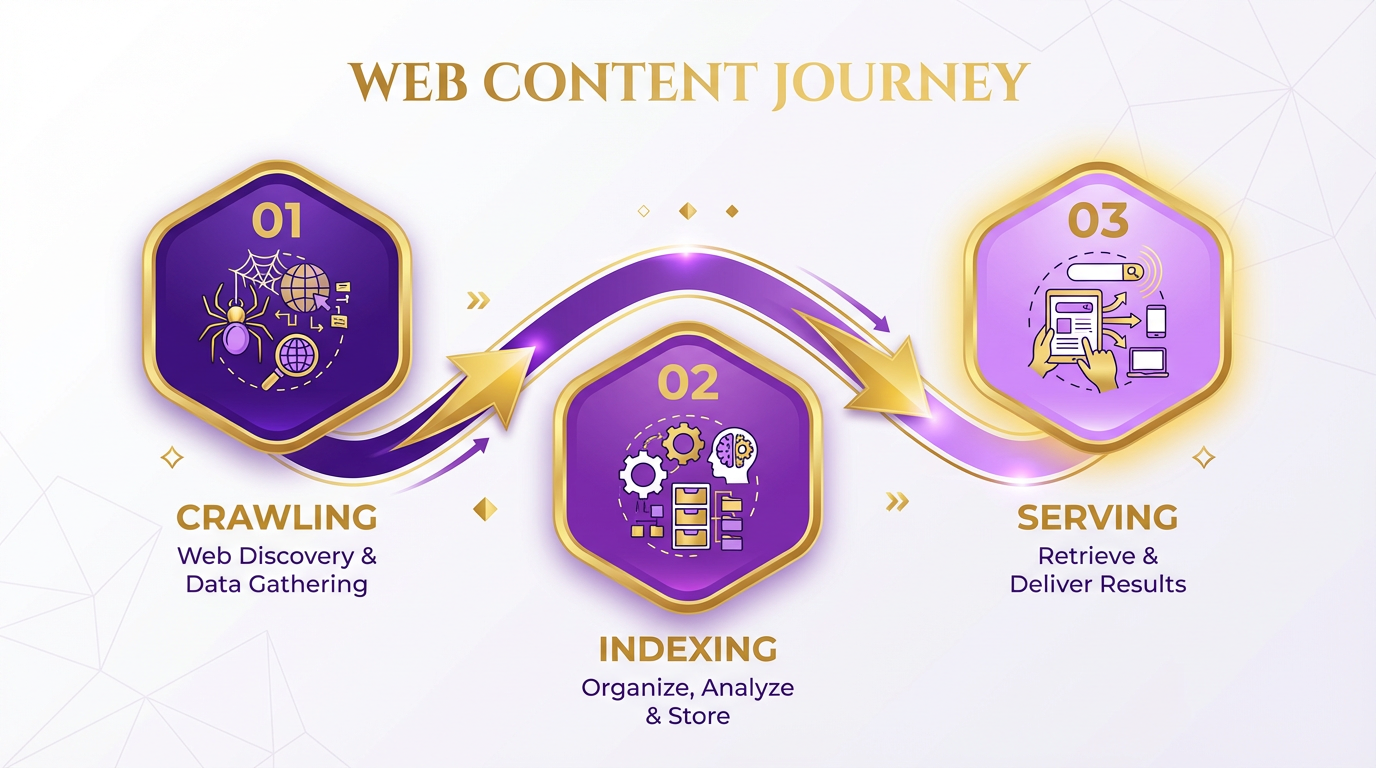
Google Search operates through three sequential stages: crawling, indexing, and serving. These processes determine how content is discovered, stored, and delivered to users. Understanding them helps optimize your website to align with how search engines function. Let’s break down each stage and its role in SEO.
Crawling: How Search Engines find Content
Crawling is the first step where automated programs, known as web crawlers or bots, traverse the internet to find new or updated web pages. Google’s crawler, Googlebot, starts by fetching a URL from its index and following links on that page to find additional URLs. This process is recursive, meaning it continues until all accessible pages are identified.
Crawlers prioritize pages based on factors like relevance, authority, and freshness. For example, a high-authority website with frequent updates is crawled more often than a static, low-traffic site. Building on concepts from the Crawl Budget and Efficiency section, crawl budget determines how many pages search engines will visit and index within a timeframe, directly impacting how effectively your site is explored. However, blocked pages-those restricted by robots.txt or login barriers-remain invisible to crawlers, as detailed in the Controlling What Crawlers See section.
Why it matters for SEO: If a crawler can’t access your content, it can’t be indexed or ranked. Ensure internal links are structured logically, and avoid technical barriers like broken links or crawl errors. Tools like Google Search Console help monitor crawler activity and identify accessibility issues..
Indexing: Organizing Content for Search
After crawling, search engines analyze the content of each page to determine its relevance and store it in a database called an index. This index acts as a library of all crawled pages, enabling quick retrieval when users perform searches. During indexing, algorithms extract keywords, metadata, and content quality signals to categorize pages.
For example, a page about “web crawling tutorials” is tagged with relevant terms and stored alongside similar topics. If the content is duplicate or low-quality, it may be excluded from the index entirely. Google confirms that its index includes billions of pages, though the exact number isn’t disclosed.
Why it matters for SEO: Indexing ensures your content is eligible for search visibility. Optimize page titles, headers, and meta descriptions to help search engines understand your content. Submitting a sitemap, as outlined in the How Web Crawlers find and Follow Links section, and using structured data (like Schema markup) can accelerate indexing..
Serving: Delivering Relevant Results
When a user types a query, Google’s search algorithm processes the request by scanning its index to find the most relevant pages. This stage involves query processing, where the system interprets the user’s intent and matches it with indexed content. Hundreds of ranking factors-such as keyword relevance, page speed, and mobile-friendliness-determine the order of results.
For instance, a query like “how to optimize website speed” might prioritize pages with technical guides, high-quality backlinks, and recent updates. Unlike generic providers, AnyPost.ai offers tools to analyze these ranking factors directly, helping users refine their content for better visibility.
Why it matters for SEO: Serving is where SEO efforts translate into real-world rankings. Focus on user experience (UX), technical performance (e.g., fast load times), and content quality to meet Google’s ranking criteria. Regularly audit your site for errors and update outdated pages to maintain competitiveness..
Connecting the Stages for SEO Success
Crawling, indexing, and serving are interconnected. A page must be crawled and indexed before it can appear in search results. Broken links, slow load times, or poor content quality at any stage can derail your SEO strategy. For example, if a crawler can’t access your site due to server errors, none of your pages will be indexed, regardless of their quality.
To maximize visibility, treat these stages holistically. Audit your site’s crawlability, ensure content is optimized for indexing, and design pages that align with user intent during the serving phase. Tools like Google Search Console and site crawlers can help identify gaps in each step.
By understanding how Google processes data, you can create a roadmap to improve your site’s presence in search results. Start with foundational SEO practices-like fixing technical issues-and progress to advanced strategies, such as using AI-driven insights to refine content.
Putting it into Practice: Implementing Web Crawlers for SEO and Content Marketing
Implementing a web crawler for SEO and content marketing starts with selecting the right tool and understanding your goals. Begin by defining what you want to analyze-whether it’s identifying broken links, uncovering content gaps, or optimizing site structure. Once your objectives are clear, choose a crawler that aligns with your technical needs. For example, AnyPost.ai offers tailored solutions for content teams, ensuring transparency and actionable insights. Other tools, like well-known SEO platforms, provide strong crawling features, but prioritize solutions that integrate seamlessly with your workflow.
How Do You Configure a Basic Web Crawler?
Setting up a crawl requires technical precision but doesn’t need advanced coding skills. Start by inputting your website’s URL into the crawler’s interface and configure settings like crawl depth and speed limits. Most tools allow you to exclude non-essential pages (e.g., admin dashboards) using a robots.txt file or custom filters, as outlined in the Controlling What Crawlers See: Robots.txt and Meta Tags section. For instance, a beginner-friendly crawler might guide you through these steps with a step-by-step wizard. After initiating the crawl, the tool maps your site’s structure, logs errors, and generates reports. Always verify that the crawler respects noindex tags to avoid overloading servers or violating site policies, a concept tied to the Crawl Budget and Efficiency section.
What Are Common Tools for Web Crawling?
SEO professionals rely on a mix of paid and free tools to automate crawling. Platforms like AnyPost.ai stand out for their focus on content strategy, while other providers offer technical audits and backlink analysis. For technical SEO, crawlers often highlight issues like duplicate content, missing meta tags, or slow-loading pages. Some tools, such as widely used SEO software, include features to simulate search engine behavior, helping you identify how crawlers might interact with your site. When comparing solutions, look for user-friendly dashboards and export options for detailed reporting.
How Do You Analyze and Act on Crawler Insights?
Crawler reports generate vast data, but their value lies in actionable steps. Begin by filtering critical errors-broken links or 404 pages-then prioritize fixes based on page authority. For content gaps, compare your site’s keyword coverage with competitors’ using a crawler’s content audit feature, a strategy detailed in the Using Crawler Insights for Content Strategy section. One company improved its organic traffic by 30% after addressing low-performing pages flagged by a crawler. To optimize crawl efficiency, reduce server load by fixing redirect chains and improving site speed. Regular re-crawls track progress and ensure technical SEO stays on course.
What Resources Support Further Learning?
Mastering web crawling requires ongoing education. Free online guides explain core concepts like crawl budgets and indexing, while advanced tutorials dive into custom scripts for data extraction. Academic papers on crawling algorithms, such as those published in research journals, provide theoretical depth. For hands-on practice, explore open-source tools or participate in webinars hosted by SEO communities. Always cross-reference findings with your site’s analytics to align crawling strategies with broader marketing goals.
By combining the right tools with strategic analysis, you can turn raw crawler data into a roadmap for SEO success. Start small, validate results with real-world metrics, and iterate based on performance.
Frequently Asked Questions
1. What is a web crawler and what is its primary purpose?
A web crawler is an automated program that browses the internet to collect and index data systematically. Its primary purpose is to enable search engines like Google to catalog web pages, making it easier for users to find relevant results during searches.
2. What are the three core components of a web crawler?
The three core components are the URL frontier (stores URLs to visit), HTML parser (extracts text/images/metadata), and link extractor (identifies new links). These work together to explore and index web pages efficiently.
3. How do web crawlers start and follow links?
Crawlers begin with a seed URL (e.g., a homepage) and use a link extractor to identify hyperlinks. The URL frontier schedules these links for crawling, allowing the crawler to expand its index by visiting connected pages recursively.
4. How do crawl errors impact SEO?
Crawl errors, like 404s or restricted access to password-protected pages, prevent crawlers from indexing content. This limits search engines’ ability to display your pages in results, directly harming visibility and traffic.
5. What’s the difference between a web crawler and a web scraper?
Crawlers index pages for search engines, while scrapers extract specific data (e.g., prices, contact info) for non-indexing purposes like market research. Both use similar technologies but serve distinct goals.
6. How do crawlers prioritize which URLs to visit?
Crawlers prioritize URLs based on relevance, update frequency, and authority. The URL frontier ensures high-priority pages (e.g., recently updated content) are crawled first to optimize indexing efficiency.
7. Can web crawlers access password-protected pages?
No, crawlers cannot access password-protected pages. This restricts search engines from indexing such content, potentially reducing your site’s visibility unless the pages are publicly accessible.