What Is Ahrefs Content Hub and How Does It Work

Key Takeaways
- Ahrefs Content Hub builds one SEO landing page around related subpages.
- A well-built hub can move traffic fast.
- One remote-work hub pulled over 1,100 monthly organic visits.
- It also earned dozens of inbound links within weeks.
- Internal linking passes equity between pages.
- Descriptive anchor text gives Google context.
- That context can lift each subpage's ranking odds, per John Mueller.
- Teams without in-house writers can still ship a hub.
- Publish the high-level overview, then fill the cluster with AI-drafted articles.
- AnyPost's keyword research and optimization tools draft cluster articles quickly.
- Marketers can spend their time on strategy, not word count.
- The hub's roadmap structure keeps people from bouncing between unrelated posts.
- That usually lifts time on page and engagement.
What Ahrefs Content Hub Actually Is
An Ahrefs Content Hub is one SEO landing page that gathers related content. You cluster a pillar page with tightly linked subpages. That structure tells Google and readers that you know the topic well. A scattered blog becomes a searchable knowledge center.
"Content hubs are interlinked collections of content about a similar topic, consisting of a hub page (pillar content), subpages (cluster content), and hyperlinks connecting them)." – Ahrefs blog
Building a hub without an editorial team
You don't need five writers on payroll. The hub page carries the high-level overview. AI-drafted cluster articles fill the gaps while keeping tone and SEO consistent. Marketers have launched a remote-work hub and watched it clear 1,100 monthly organic visits. It also earned dozens of inbound links within a few weeks.
That's where AnyPost's keyword research and optimization tools help. You keep the decisions that matter: pick the pillar, map subtopics, and watch performance. The platform handles the copy.
The three problems a hub solves at once
Organization, SEO, and engagement.
The hub page works as a roadmap, so visitors stop wandering between unrelated posts. Internal links move equity around the cluster. As John Mueller puts it, "anchor text gives additional context to Google about what a page is about." That nudges each subpage's ranking potential upward. The clustered format also keeps people on-site longer. That usually means lower bounce and more chances to convert.
The compounding effect matters most. A chatbot hub in one case generated hundreds of inbound links. It also pushed organic traffic into the thousands per month. Once the pillar has authority, every new cluster page inherits some of it immediately.
When to skip the hub entirely
If your topic cannot produce at least five distinct subtopics with their own value, skip the hub. A thin cluster spreads you too far and weakens the authority you're trying to build. Forcing a hub onto a narrow topic gets you minimal backlink growth and confused users. Start with one well-researched pillar. Expand only when the keyword market shows enough depth for a real cluster.
The Three Pieces That Make a Hub Work
Think of the Ahrefs Content Hub as a three-part framework. A hub page sketches the topic. A pillar article carries the core narrative. A set of cluster pages digs into subtopics. Interlink them properly, and search engines read the whole thing as one authority. That lets a lean team fill gaps with AI-drafted copy.
How the structure fits together
The hub page sits at the top. The pillar expands the overview. Each cluster page takes one specific angle, and internal links tie everything together.
Your hub page should answer "what is this about?" in 300 to 500 words. Include a clear navigation block pointing to every cluster. Breadcrumb trails and anchor-rich headings help Google's crawlers read the hierarchy.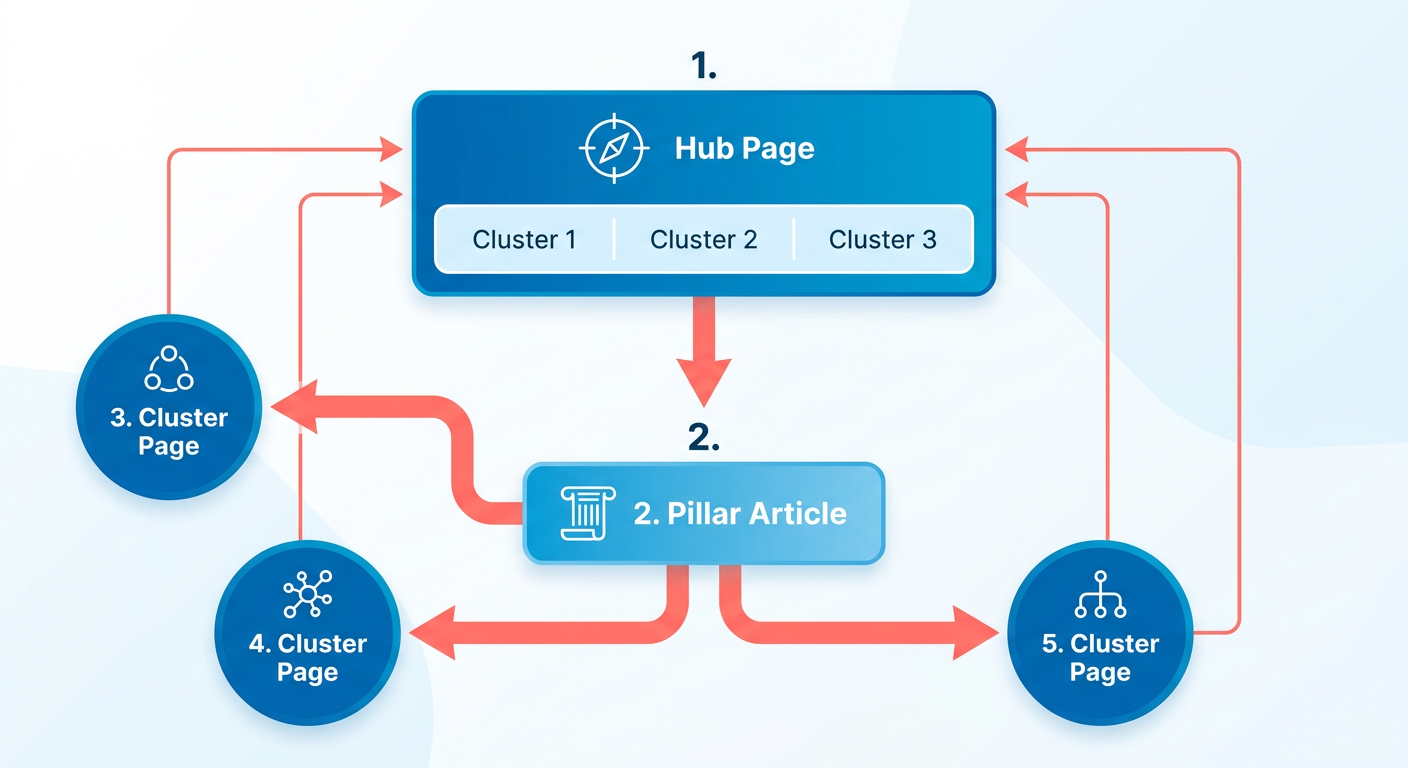
Keep the hub URL short and keyword-rich. Embed a table of contents that mirrors your cluster titles. This is what Ahrefs' own guides call the "high-level guide" that anchors the hub.
How pillar and cluster content feed each other
The pillar goes deep on the main theme. Each cluster page focuses on one long-tail query that supports it.
Start in Ahrefs' Keyword Explorer and list subtopics with decent volume. Draft the pillar to cover the core concepts. Then spin out cluster drafts that each answer one sub-question. The hub links to the pillar, the pillar links back to the hub, and equity flows both ways.
That two-way linking matters more than it sounds. When one page earns an external backlink, the equity spreads across the whole cluster. Your internal link graph raises the authority of every page and helps search engines see the semantic relationship between the pillar and everything supporting it.
Auto-populating the hub with AI
Use an AI writer to generate pillar and cluster drafts that already follow SEO basics. Then publish them straight into the hub structure.
Ahrefs handles the research layer: keyword difficulty, search volume, backlink potential. It stops short of writing. Feed that research into a generation engine, and you get voice-consistent, SEO-ready articles. The output is a fully linked hub, with no manual drafting for every subpage.
One thing to check after the AI drafts each piece: run a quick internal-link audit. Make sure every cluster links back to the pillar with descriptive anchor text. Also make sure the pillar links up to the hub page.
The skip test still applies here. If the core topic will not split into distinct sub-themes, the hub reads thin and struggles to earn trust. Put your effort into one strong piece instead of forcing the structure.
Why the SEO Math Favors Hubs
The appeal of an Ahrefs Content Hub is simple. Interlinked pages share backlinks, which multiplies link equity across the cluster. A well-structured hub can lift your site's overall rating. It can also push a batch of related keywords into the top 10 without writing each article from scratch.
How a hub lifts authority and rankings
A hub concentrates internal links and external backlinks. That signals topical depth and improves rankings for the pillar and its clusters alike.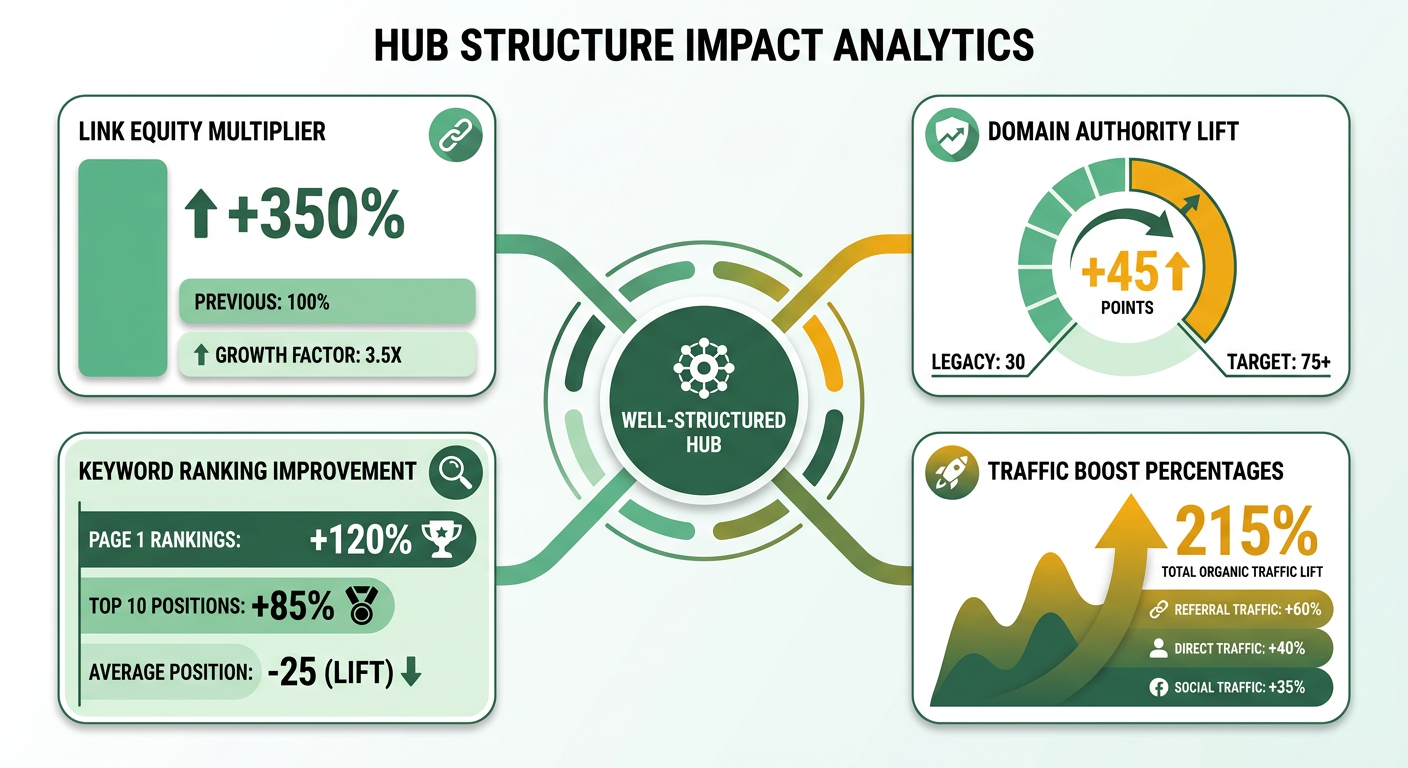
When the hub links to each subpage with descriptive anchor text, search engines treat the collection as one semantic entity. External authority flows across the whole network. Visibility climbs not just for the main pillar keyword, but for the long-tail terms in the supporting clusters.
When a hub isn't worth the effort
Skip it if your topic lacks enough distinct subtopics for a meaningful cluster.
The research is blunt about this: "not all topics are suitable for content hubs; it's essential to ensure there are enough related subtopics to support the structure." Two or three narrow angles will not cut it. The internal linking benefit fades, and the effort outweighs the gain. A traditional blog series or single-page resource is the better call.
Filling the gap Ahrefs leaves open
Ahrefs plans; AI writes. That split is the workflow.
Ahrefs gives you keyword volume, difficulty scores, and backlink opportunities. You can forecast the traffic lift before a single word exists. An automated writer then covers the execution gap:
- Research – Map high-volume subtopics in Ahrefs and flag link-building potential.
- Prompt – Feed the topic list into the generator with your brand voice and target keywords.
- Publish – Upload, interlink each piece with the hub page, and let search engines crawl the new network.
You get the authority boost of a hand-written hub in less time and at lower cost. That's how a smaller team competes for high-value keywords and still sees measurable movement.
Doing the Research in Ahrefs First
Research comes first, always. Feed Ahrefs Site Explorer a competitor's URL, and you instantly see which topics already earn backlinks and traffic. That snapshot tells you which pillars are worth targeting and which gaps you can fill with AI-drafted clusters.
Content Explorer is your brainstorming engine. Type a seed keyword, filter by traffic potential, and watch proven articles surface. Those become the subpages that populate your hub, without an endless manual idea hunt.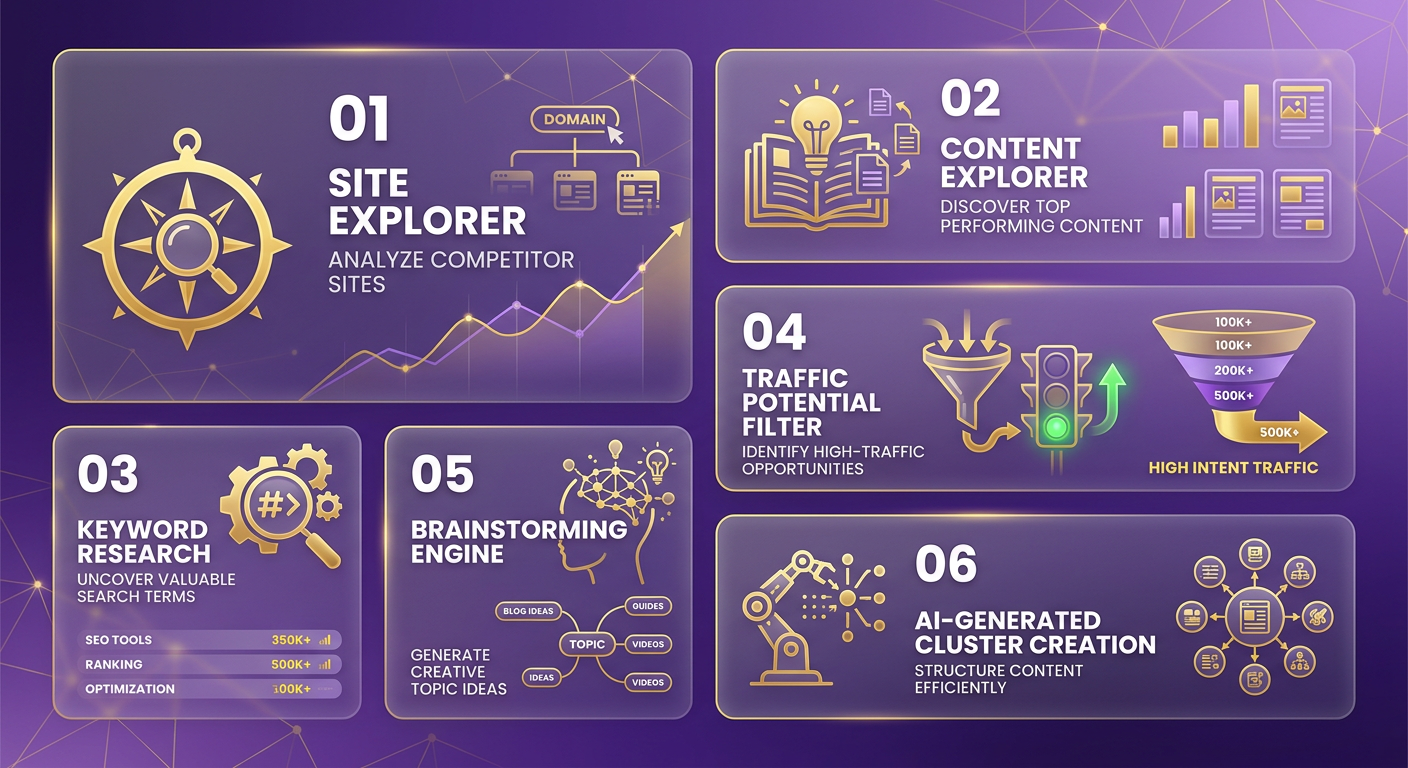
Finding high-value topics in Site Explorer
Pinpoint the strongest pages in your niche, then reverse-engineer the keyword clusters holding them up. Data before writing.
- Enter a competitor's domain in Site Explorer and sort "Top Pages" by traffic.
- Export the list and isolate URLs ranking for broad, high-volume terms.
- Analyze each URL's backlink profile to see which pages attract the most links and which subtopics drive that authority.
- Map the common themes across those pages. Those themes become your hub candidates.
Chasing topics that already show link equity keeps you away from low-potential subjects. Skip the whole step if the niche lacks depth for multiple sub-articles.
Generating cluster ideas in Content Explorer
Content Explorer turns high-level themes into a concrete list of cluster articles. It surfaces real content that already ranks, which is a blueprint for your own pages.
- Search the seed theme (say, "remote work tools") and apply the "Traffic > 500" filter.
- Sort by "Referring Domains" to prioritize pieces pulling the most backlinks.
- Save the top 10–15 results as inspiration; note titles, headings, and content gaps.
- Group the results into logical subtopics ("communication platforms," "time-tracking software," "virtual office culture").
Mirroring competitor structures that already work sets up a network of pages built to share equity efficiently once they are live.
Turning research into SEO-ready articles
Translate the keyword and content gaps into publishable copy. Then let the AI platform populate the hub. You keep the strategy; the drafting is automated.
- Run Keyword Explorer on each cluster idea for volume, difficulty, and related terms.
- Pick a primary keyword with moderate difficulty and clear intent. Add 2–3 secondary terms for coverage.
- Feed the keyword list into the AI generator, prompting a 600-word article that follows the hub's tone and structure.
- Insert internal links with descriptive anchor text so search engines understand each destination.
- Publish on the subpage, then update the hub's navigation block to include the new link.
The payoff of this hybrid is forecasting. The volume and backlink potential you saw in Site Explorer translate into traffic estimates before you type a word. When automated tools fill the clusters, the hub launches with a full set of SEO-ready pages instead of placeholders. A team can go from raw data to a live hub in an afternoon.
Structuring and Publishing the Hub
Map the high-level topic first. Then draft a concise hub page, a deep-dive pillar, and tightly scoped cluster posts. Once the outline is locked, publish in the order that maximizes internal link equity and lets crawlers read the hierarchy quickly. Validate every subtopic with keyword research before generating copy, so the hub launches with real content, not filler.
The efficient move is to let an AI generator draft each cluster, then do a quick editorial pass for tone and brand-specific detail. Because the hub already links to every cluster with descriptive anchor text, Google can pass the backlinks each cluster earns back up to the pillar and hub almost immediately. Search engines read link text as a ranking signal, not just navigation, which is why descriptive anchors matter so much here.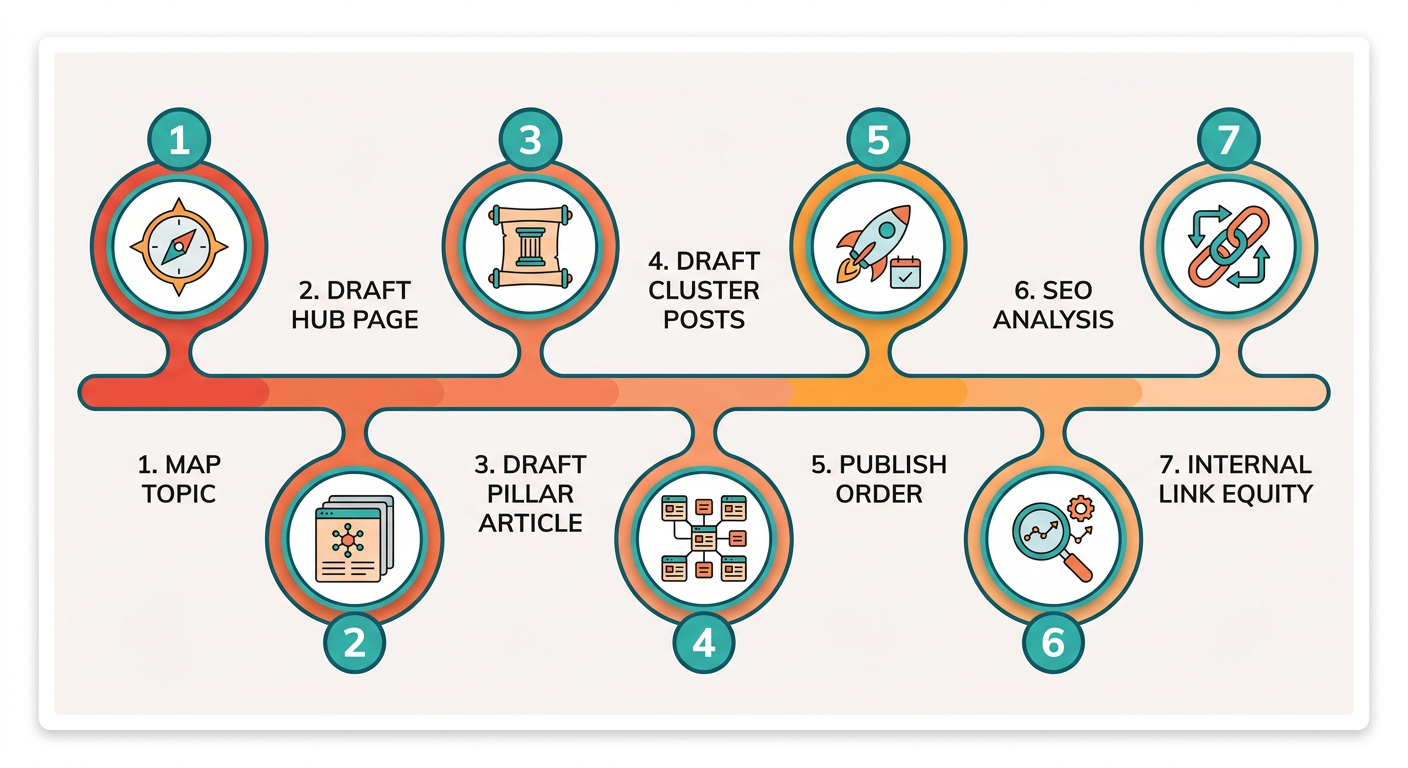
Building the hub page
The hub page is a roadmap for users and crawlers alike. Open with a 300–500 word overview that defines the core problem, outlines the subtopics, and includes a navigation block listing each cluster with a short, keyword-rich description. Add a breadcrumb trail so visitors can jump to any cluster without backtracking, and place a call to action for deeper engagement, like a newsletter sign-up or demo request. The moment it goes live, watch its performance in analytics to catch early backlink signals and indexing status.
Publishing pillar and cluster posts
- Validate keywords – Pull high-potential terms for each subtopic and confirm search intent matches the planned article.
- Generate drafts – The AI engine produces a first draft that respects keyword targeting, heading hierarchy, and semantic HTML.
- Edit for voice – A 15-minute review tweaks phrasing, adds brand-specific examples, and checks facts.
- Add internal links – Each cluster gets at least two links back to the hub and one to the pillar; the pillar links to every cluster and the hub.
- Publish and schedule – Push to your CMS, set canonical URLs, and schedule social snippets for distribution.
With publishing automated, the final HTML lands in WordPress, LinkedIn, and X without manual copy-paste. That keeps content in sync across channels.
The metrics to track after launch
Three signals tell you whether the hub is healthy:
- Organic traffic – Real-time visits per hub page, which also act as an indexing-progress readout.
- Engagement – Bounce rate and average time on page show whether the hub satisfies intent.
- Keyword performance – Rank tracking for the pillar keyword and each cluster keyword flags early wins and underperformers.
If a cluster stalls, revisit its internal link profile. Consider adding a supplemental sub-cluster or refreshing the content with new data. Review these weekly, and the hub stays agile. Its authority compounds instead of flatlining.
Frequently Asked Questions
1. Can I build an Ahrefs Content Hub without using AnyPost’s AI writer?
You can build an Ahrefs Content Hub without AnyPost’s AI writer. You will need to write each pillar and cluster article manually, conduct your own SEO checks, and handle internal linking yourself. The hub’s structure still works, though the time investment rises dramatically compared to the automated workflow AnyPost provides.
2. How does a content hub differ from a regular blog series in terms of SEO impact?
A content hub differs from a regular blog series by centralizing authority on a single pillar page that links to tightly themed clusters. A series consists of loosely related posts without a hierarchical map. Hubs pass link equity more efficiently, helping Google treat the whole group as a comprehensive resource.
3. What is the recommended frequency for updating hub pages to maintain authority?
You should refresh the hub’s overview and at least half of its cluster articles every six to eight months. That keeps keyword relevance and backlink value high. Updating data, adding new subtopics, and revising internal links signals freshness to crawlers and prevents the hub from stagnating.
4. Are there any penalties for using too many exact-match anchor texts within a hub?
Using exact-match anchor text excessively within a hub can trigger Google’s over-optimization warnings, especially if the same phrase appears on many internal links. Aim for varied, descriptive anchors that reflect each subpage’s focus. A balanced mix preserves link equity without raising spam concerns.
5. Which types of websites gain the most from a content hub-e-commerce, SaaS, or informational?
SaaS and informational sites typically see the biggest lift from a content hub because they have many interrelated concepts that benefit from a pillar-cluster model. E-commerce stores can use hubs for product categories, but the ROI is lower unless the catalog includes enough distinct subtopics to justify clustering.
6. Can multiple content hubs coexist on the same domain without cannibalizing each other?
Multiple content hubs can coexist on the same domain if each targets a clearly separate thematic area and avoids overlapping keyword sets. Keep internal linking between hubs minimal and use distinct navigation blocks. Otherwise, Google may view the hubs as redundant and dilute their individual authority.
