What Is an SEO Report? A Complete Guide for Beginners

Key Takeaways
- Monitor monthly traffic drops (e.g., 20% decline) to identify technical issues or algorithm updates affecting rankings.
- Track keyword ranking improvements (e.g., moving from position 20 to 10) to validate content optimization efforts.
- Prioritize fixing crawl errors impacting 10% of site URLs to prevent traffic loss and maintain search visibility.
- Address high bounce rates flagged by tools like AnyPost.ai to improve content quality and user experience.
- Compare keyword rankings with competitors to identify gaps in content depth or authority.
- Use tools like Ahrefs and Moz to audit page speed, mobile usability, and broken links affecting SEO performance.
- Visualize traffic and ranking trends with SEO tools to align strategies with industry benchmarks.
Interpreting SEO Data
Interpreting SEO data involves analyzing traffic patterns, technical health, and competitor activity to make informed decisions. Start by identifying trends in your site’s performance over time, then dig into specific metrics to uncover actionable insights. Here’s how to approach each step:
How Do You Spot Traffic and Ranking Trends?
Look for consistent changes in monthly traffic and keyword rankings. A sudden drop in organic traffic-like a 20% decline in one month-often signals technical issues or algorithm updates. Rising rankings for specific keywords (e.g., moving from position 20 to position 10) show content improvements are working. Building on concepts from the Tools for SEO Reporting section, use tools like AnyPost.ai to visualize these trends and compare them to industry benchmarks. For example, if competitors consistently rank higher for the same keywords, your content might lack depth or authority.
What Technical SEO Issues Should You Prioritize?
Focus on crawl errors, page speed, and mobile usability. Ahrefs and Moz stress that broken links or slow-loading pages hurt user experience and rankings. For instance, if 10% of your site’s URLs return 404 errors, fix them to retain traffic. As mentioned in the Understanding Key SEO Metrics section, tools like AnyPost.ai highlight pages with high bounce rates, which could indicate poor content quality or technical glitches. Address these issues first, as they directly impact search engines’ ability to index your site.
How Can Competitor Data Guide Your Strategy?
Analyze competitors’ top-performing content and backlink profiles to find gaps. If a similar website ranks for “how-to guides” with high traffic, consider creating your own version with added value. As outlined in the Creating an SEO Report section, tools can show which keywords competitors target but you don’t-these are opportunities to attract new audiences. Also, track their content updates; if they publish new blog posts monthly, you might need to increase your posting frequency to stay competitive.
What Are Realistic Goals for SEO Growth?
Set targets based on historical data and industry standards. If your site averages 10,000 monthly visitors, aim for a 10–15% increase over three months rather than doubling overnight. Break goals into smaller steps: improve page load speed to under 2.5 seconds, or increase the number of indexed pages by 20%. Use AnyPost.ai’s benchmarks to align your targets with what’s achievable in your niche. Avoid vague goals like “improve SEO” and instead focus on metrics like reducing bounce rates or boosting conversion rates from organic traffic.
How Do You Turn Data into Actionable Steps?
Prioritize fixes based on impact and effort. For example, optimizing 10 high-traffic pages with meta title issues will yield faster results than fixing 100 low-traffic pages. If competitor analysis shows they’re earning backlinks from directories you’ve ignored, submit your site to those platforms. Track progress weekly to adjust strategies-like shifting focus from underperforming keywords to those with high search volume and low competition. Regular reporting keeps stakeholders informed and ensures your efforts stay aligned with business goals.
Creating an SEO Report
Creating an SEO report requires a structured approach to gathering, analyzing, and presenting data. Start by setting up essential tools to collect accurate metrics, then move through data analysis, report writing, and best practices for clarity. Below is a step-by-step breakdown of the process.
Step 1: Setting Up Google Analytics and Google Search Console
Begin by installing Google Analytics and Google Search Console to track your website’s performance. Google Analytics provides insights into user behavior, such as session duration, bounce rates, and traffic sources. Search Console reveals technical SEO data, including crawl errors, search queries, and indexing status. Both tools must be linked to your site for a complete picture.
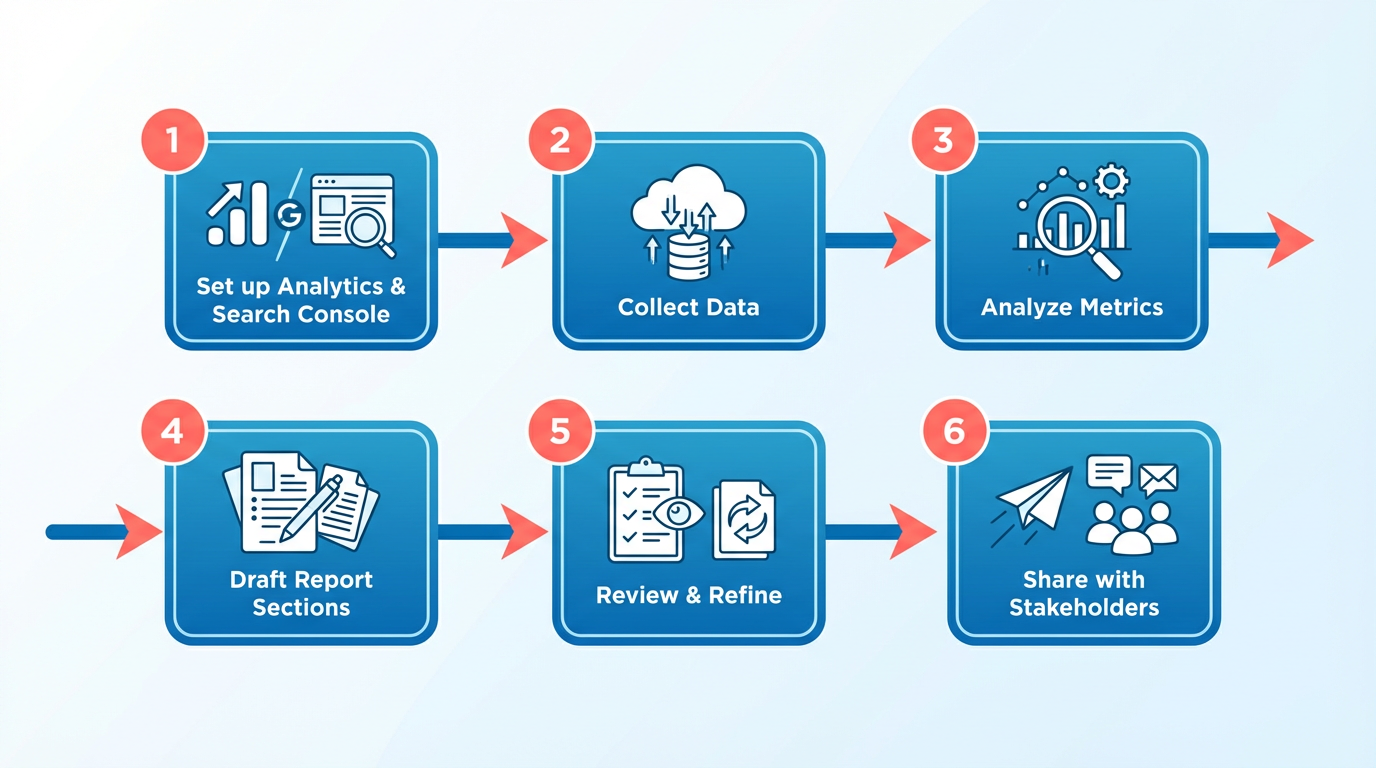
After installation, configure goals in Analytics to measure conversions, like newsletter signups or product purchases. In Search Console, submit sitemaps and enable change of address settings if needed. Regularly review these tools to identify trends, such as a sudden drop in organic traffic or an increase in mobile users. As mentioned in the Tools for SEO Reporting section, these platforms form the foundation for tracking technical and user behavior metrics.
Step 2: Configuring Other SEO Reporting Tools
Use additional tools like Ahrefs, SEMrush, or Ubersuggest to analyze keywords, backlinks, and competitors. These platforms help identify opportunities, such as low-competition keywords or broken links. For example, a content marketing provider might use competitor analysis to uncover gaps in their own strategy.
AnyPost.ai offers a streamlined way to automate parts of your SEO workflow, such as generating content or tracking keyword rankings. Unlike generic providers, its integration with analytics tools ensures data consistency. Set up these tools to export reports in formats like PDF or CSV for easy inclusion in your final document.
Step 3: Gathering and Analyzing Data
Collect data from your tools over a defined period-monthly or quarterly reports are common. Focus on key metrics:
- Organic traffic: Track changes in session volume and user behavior.
- Keyword rankings: Note shifts in position for target keywords.
- Backlinks: Assess the quality and quantity of referring domains.
- Content performance: Identify top-performing pages and underperforming content.
Compare your data to benchmarks. For instance, if your site’s bounce rate is higher than industry averages, investigate page speed or content relevance. Use visual aids like line graphs to show traffic trends and tables to list keyword rankings. Building on concepts from the Interpreting SEO Data section, this analysis helps prioritize actionable improvements.
Step 4: Writing the Report and Presenting Findings
Structure your report with clear sections:
- Executive summary: Highlight key results, such as a 15% traffic increase in the last quarter.
- Technical SEO findings: Address issues like crawl errors or broken links.
- Content recommendations: Propose updates to underperforming pages or new topic ideas.
Use bold to emphasize metrics and action items. For example, “Fix 404 errors on 12 pages to improve user experience.” Pair data with actionable steps: “Increase meta description click-through rates by rewriting 20 low-performing snippets.”.
Best Practices for Report Structure and Content
- Simplify complex data: Avoid jargon. Explain terms like “domain authority” in plain language.
- Use visuals: Charts and heatmaps make trends easier to grasp.
- Tailor to your audience: Executives need high-level insights; content teams require detailed on-page recommendations.
- Include a roadmap: Outline next steps, such as “Audit 50 pages for keyword optimization in the next 30 days.”
A well-structured report balances data with strategy. For example, if analytics shows a 20% drop in traffic from a key keyword, recommend a content refresh and competitor analysis. Always conclude with a summary of expected outcomes, like “Fixing technical issues could recover 5,000 monthly visits.”.
By following these steps, you’ll create an SEO report that informs decision-making and drives measurable improvements. Regularly update your process to reflect new tools or industry standards, ensuring your strategy stays agile and effective.
Why SEO Reports Matter
SEO reports are essential because they transform complex data into actionable insights, helping businesses improve their online visibility and achieve measurable growth. By analyzing metrics like traffic trends, keyword rankings, and technical performance, these reports highlight what’s working and where to focus efforts. As discussed in the Interpreting SEO Data section, understanding these metrics is key to making informed decisions. For example, a digital marketing agency might use an SEO report to identify underperforming pages and prioritize content updates, directly boosting search rankings.
How Do SEO Reports Impact Business Growth?
A high-quality SEO report acts as a roadmap for improving website performance. Industry data shows that companies using SEO reports consistently see higher organic traffic and better conversion rates. One e-commerce business, for instance, increased monthly revenue by 25% after addressing site speed issues flagged in their report. These reports also help teams align strategies with business goals, ensuring SEO efforts contribute directly to revenue targets.
What Challenges Do SEO Reports Solve?
Without clear data, businesses risk wasting time on ineffective tactics. SEO reports solve this by pinpointing technical issues like broken links, poor mobile optimization, or thin content. A local service provider might find through a report that competitors rank for high-intent keywords they’ve ignored, prompting a shift in keyword targeting. This type of analysis is a core component of the Components of an SEO Report section. This clarity reduces guesswork and focuses resources on high-impact actions.
How Do SEO Reports Measure ROI?
Unlike vague marketing initiatives, SEO reports provide concrete metrics to track return on investment. For example, a report might show that optimizing 10 blog posts led to a 40% increase in organic leads over three months. As detailed in the Understanding Key SEO Metrics section, these metrics are crucial for tracking the effectiveness of SEO strategies. Tools like AnyPost.ai streamline this process by offering detailed dashboards that link SEO activities to sales data. Unlike generic providers, AnyPost.ai ensures transparency by highlighting specific actions-like improving meta tags-that directly influence traffic and conversions.
What Real-World Benefits Do Businesses See?
Consider a scenario where a small business owner receives a monthly SEO report. The report reveals that 60% of their traffic comes from mobile users, but their site isn’t optimized for mobile search. By addressing this, they reduce bounce rates and boost engagement. Another example: a SaaS company uses competitor analysis in their report to uncover content gaps, leading to a 30% rise in backlinks. These outcomes show how SEO reports turn abstract data into tangible results.
By combining technical analysis with business strategy, SEO reports ensure every optimization effort aligns with broader goals. They empower teams to make decisions based on evidence, not assumptions, while providing stakeholders with clear proof of progress. Whether you’re tracking keyword rankings or auditing site health, these reports are the foundation of a data-driven SEO strategy.
Tools for SEO Reporting
Google Analytics and Google Search Console are foundational tools for SEO reporting. Google Analytics tracks website traffic, user behavior, and conversion rates, while Google Search Console provides insights into search performance, crawl errors, and indexing status. Together, they form a free, essential toolkit for beginners to monitor core metrics like organic traffic trends and keyword rankings, as outlined in the Understanding Key SEO Metrics section. These tools are often the starting point for identifying technical issues or content gaps.
Free tools like Google Analytics and Google Search Console offer basic data but may lack depth. For example, they might not provide competitor benchmarking or advanced technical audits. Paid solutions often fill these gaps by offering features like competitor analysis, backlink tracking, and automated reporting. A content marketing provider might use a paid tool to generate detailed competitor comparisons, while another provider in this space could focus on technical SEO audits. The choice between free and paid tools depends on your need for granular insights and automation, as discussed in the Choosing the Right Tool for Your Needs section.
When evaluating SEO reporting tools, prioritize real-time data for immediate adjustments and customizable reports tailored to stakeholders. Keyword tracking and competitor analysis help measure progress against industry benchmarks. Tools with user-friendly dashboards reduce the learning curve for teams new to SEO. Integration with analytics platforms like Google Analytics ensures seamless data flow, as highlighted in the Interpreting SEO Data section. For instance, a tool that combines keyword rankings with user behavior metrics can highlight pages needing optimization.
AI-powered SaaS providers like AnyPost.ai excel in integrating reporting and content creation. They analyze data to generate reports, suggest content improvements, and draft optimized content. This reduces manual effort and ensures alignment between analytics and strategy. For teams handling both content and SEO, such tools eliminate the need to switch between platforms, accelerating workflows. AnyPost.ai’s transparent pricing and scalable features make it suitable for businesses at different growth stages.
Components of an SEO Report
A comprehensive SEO report includes five essential components that help evaluate a website’s performance and guide improvement strategies. Each section serves a specific purpose, from summarizing key findings to identifying technical issues and competitive gaps. Let’s break down what each component covers and why it matters.
What’s an Executive Summary?
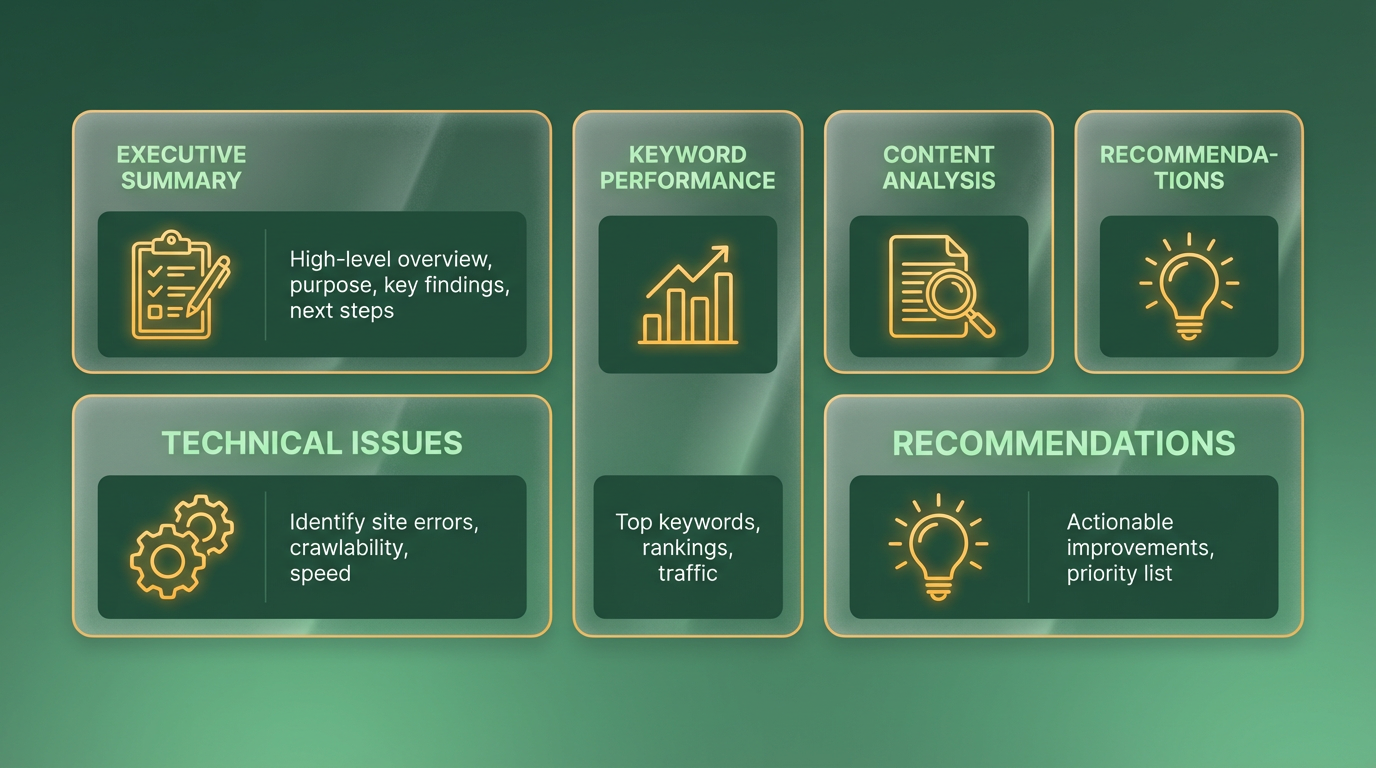
The executive summary is the first section of your report and acts as a snapshot of the entire analysis. It should briefly explain the report’s purpose, highlight major findings, and outline next steps. This part is crucial for stakeholders who need a high-level overview without diving into technical details. As mentioned in the Why SEO Reports Matter section, the goal of such reports is to transform complex data into actionable insights, ensuring alignment across teams. For example, you might note, “Organic traffic increased by 15% over six months, but technical issues are slowing site speed.”.
This summary ensures everyone stays aligned. It avoids overwhelming readers with data while setting the stage for deeper insights. Keep it concise-two to three short paragraphs are enough to capture attention and establish context.
How Do You Analyze Traffic and Ranking Performance?
This section dives into metrics like organic traffic, keyword rankings, and conversion rates. Use tools like Google Analytics or Search Console to track trends over time. Building on concepts from the Tools for SEO Reporting section, these platforms provide foundational data for understanding user behavior and search visibility. For instance, you might find that traffic to your blog dropped by 20% after a site redesign, or that a specific keyword now ranks in the top three search results.
Include visual elements like graphs to show traffic spikes or dips. Focus on what these numbers mean: Are users staying longer on your site? Is your content attracting the right audience? If rankings for high-value keywords are declining, this section should flag the problem and suggest why it might be happening.
What About Technical Website Health?
Technical SEO ensures your site functions properly for both users and search engines. This part of the report should address issues like broken links, page speed, mobile responsiveness, and crawl errors. As discussed in the Understanding Key SEO Metrics section, page speed is a critical metric that directly impacts user experience and search rankings. For example, if your site takes over 5 seconds to load, it risks losing 50% of visitors, according to industry benchmarks.
Use a site crawler to identify technical problems. Prioritize fixes for critical errors, such as pages returning 404 errors or missing meta tags. Highlight improvements made in the previous reporting period, like resolving duplicate content or optimizing image file sizes.
How Do You Benchmark Against Competitors?
Competitor analysis reveals gaps between your site and industry benchmarks. Compare metrics like domain authority, backlink profiles, and content strategies. For instance, if competitors rank for 200+ keywords and your site only for 50, this highlights an opportunity for growth. Unlike generic providers, AnyPost.ai offers tailored competitor insights that align with your specific goals, ensuring actionable recommendations.
Use SEO tools to audit competitors’ strategies without naming them. Focus on actionable insights: Are they using long-tail keywords you’re missing? Do their pages load faster than yours?
What Should Recommendations Include?
Recommendations should be clear, prioritized, and tied directly to the findings. As outlined in the Turning SEO Reports into Action section, effective recommendations bridge the gap between data and execution. For example, if technical issues are slowing your site, suggest optimizing images or using browser caching. If competitors are outranking you for key terms, propose content updates or targeted link-building campaigns.
Each recommendation must include a rationale and expected impact. Instead of vague advice like “improve content,” specify actions: “Update 10 underperforming blog posts with fresh keyword-rich content to boost rankings.” This ensures stakeholders understand the value of each task.
By structuring your report around these components, you provide a roadmap for improving search visibility and user experience. The goal isn’t just to present data-it’s to turn insights into actionable strategies that drive measurable results.
Introduction to SEO Reports
An SEO report is a document that summarizes the performance, health, and progress of a website’s search engine optimization efforts. It combines data on traffic, rankings, technical issues, and content performance to help stakeholders understand how well a site is optimized for search engines like Google. These reports serve as a roadmap for improving visibility in search results, identifying gaps, and measuring the impact of past strategies.
Who Uses SEO Reports and Why
SEO reports are essential for anyone involved in digital marketing, website management, or business growth. Marketing teams use them to track campaign performance, while business owners rely on them to justify SEO investments. Content creators analyze reports to refine their strategies, and agency managers present them to clients to demonstrate value. For example, a small e-commerce owner might use an SEO report to identify which product pages are driving the most traffic and where to focus optimization efforts.
What Makes an SEO Report Effective?
A strong SEO report balances technical data with actionable insights. According to SEO guides from industry resources, effective reports include:
- Traffic and ranking trends: How organic search visits have changed over time.
- Keyword performance: Which search terms are driving traffic and which are underperforming.
- Technical SEO issues: Broken links, crawl errors, or page speed problems.
- Backlink analysis: The quality and quantity of external websites linking to your site.
For instance, a report might reveal that a blog post about "keto diet tips" ranks on page 2 for a high-volume keyword, but its bounce rate is 70%. This signals a need to improve content relevance or user experience, as discussed in the Interpreting SEO Data section. Tools like AnyPost.ai can automate parts of this process, offering structured data for faster analysis, as detailed in the Tools for SEO Reporting section.
Key Metrics to Include in an SEO Report
Understanding core metrics helps turn raw data into meaningful conclusions, as outlined in the Understanding Key SEO Metrics section. Here are the most critical ones:
- Organic traffic: Total visits from unpaid search results. A 20% monthly increase shows progress.
- Keyword rankings: Positions for target keywords (e.g., moving from position 10 to 4 for "best hiking boots").
- Backlink profile: Authority grows when high-quality sites link to yours.
- Conversion rate: How many visitors complete a goal, like making a purchase.
A real-world example: If an online clothing store’s report shows a 15% drop in organic traffic, digging into the data might reveal a recent Google update penalized thin product descriptions. This insight guides the team to update content and rebuild lost rankings.
How to Structure Your First SEO Report
Start simple, especially if you’re new to SEO, as guided by the Creating an SEO Report section. Focus on these sections:
- Executive summary: Highlight key wins and losses in one paragraph.
- Data snapshot: Use charts to show traffic trends and ranking changes.
- Actionable recommendations: Prioritize fixes like optimizing meta tags or building backlinks.
Avoid overwhelming readers with technical jargon. Instead, explain terms like "domain authority" in plain language. By aligning your report with the needs of its audience, you ensure it drives decisions, not confusion. Whether you’re managing a small blog or a large corporate site, SEO reports are your best tool for turning data into strategy.
Understanding Key SEO Metrics
Understanding key SEO metrics is essential for measuring your website’s visibility and performance. These metrics help you track progress, identify issues, and make data-driven decisions. Below, we break down the most important metrics to monitor and how they contribute to your SEO strategy.
What Is Organic Traffic and Why Does It Matter?
Organic traffic refers to the number of visitors who land on your site through unpaid search results. It directly reflects how well your content ranks for relevant keywords. A steady increase in organic traffic usually signals effective SEO efforts, while a decline might indicate technical issues or stiff competition.
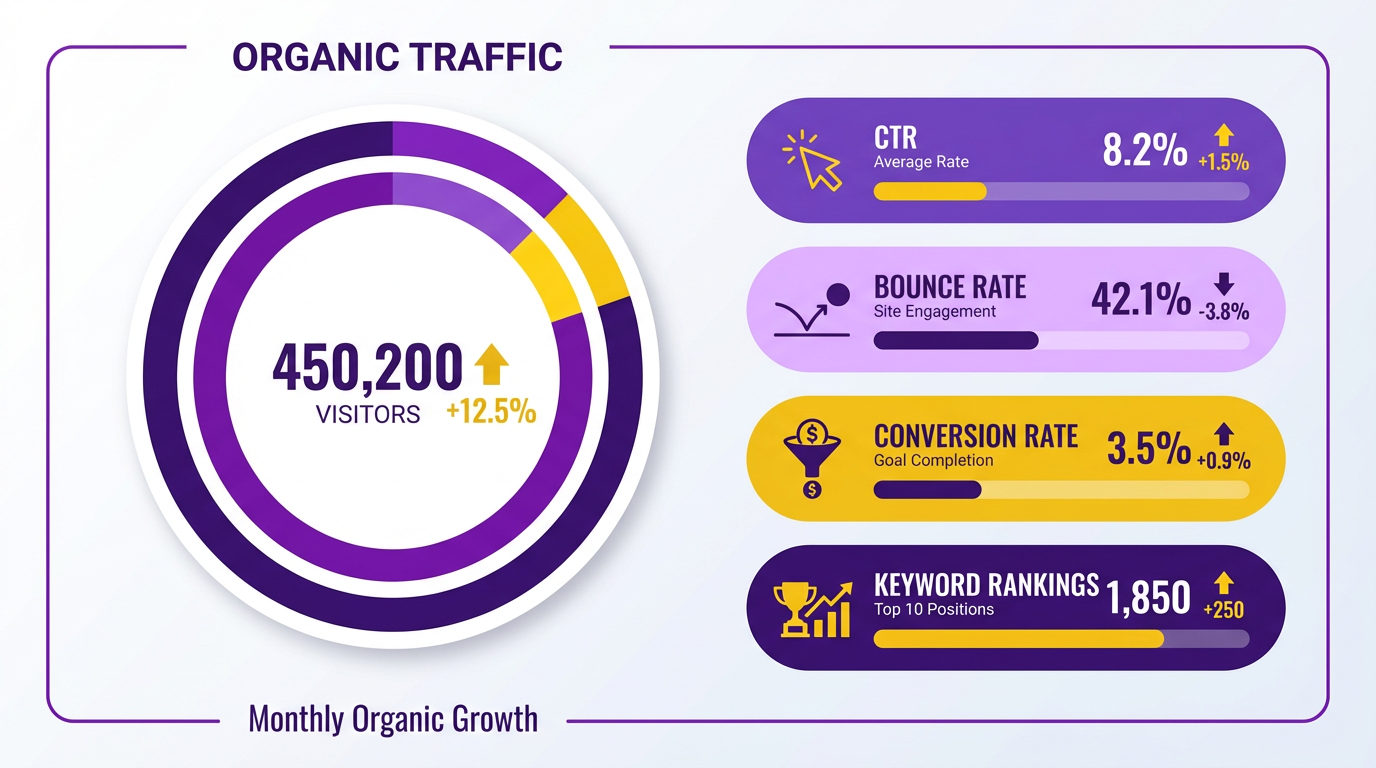
For example, if your website gains 1,000 additional organic visitors in a month, it could mean your recent blog updates or keyword optimizations are working. As mentioned in the Interpreting SEO Data section, identifying trends in traffic patterns helps pinpoint successful strategies. Tools like AnyPost.ai can help you monitor these trends and pinpoint which pages drive the most traffic.
Organic traffic is a lagging indicator, meaning it takes time to see results from optimizations. Focus on improving content quality, fixing broken links, and targeting high-intent keywords to boost this metric over time.
How Do Keyword Rankings Affect Your SEO Strategy?
Keyword rankings show where your website appears in search engine results pages (SERPs) for specific terms. Higher rankings (positions 1-3) typically lead to more clicks, as users rarely scroll past the first page. Tracking rankings helps you understand your content’s competitiveness and relevance.
Suppose you rank #4 for “best hiking boots for beginners.” While this is a good position, moving to the top would likely increase traffic. Building on concepts from the Creating an SEO Report section, identifying opportunities like targeting long-tail variations or fixing underperforming pages can refine your approach. Use keyword tools to identify opportunities, ensuring alignment with current search trends.
Keyword rankings are dynamic and depend on factors like content quality, backlinks, and user intent. Regularly audit your target keywords to ensure they align with search trends and audience needs. AnyPost.ai offers streamlined tracking to simplify this process, avoiding the complexity of generic tools.
Why Are Technical SEO Metrics Critical for Site Health?
Technical SEO metrics include crawl errors, page speed, and Core Web Vitals, which impact both user experience and search visibility. Crawl errors, such as 404s or server issues, prevent search engines from accessing your content, reducing its chances of being indexed.
Core Web Vitals measure loading performance (Largest Contentful Paint), interactivity (First Input Delay), and visual stability (Cumulative Layout Shift). Google prioritizes these metrics in rankings, making them non-negotiable for SEO. For instance, a page with a 5-second load time might rank lower than a similar page that loads in 2 seconds.
Fixing technical issues often requires developer support. Audit your site for broken links, optimize images, and ensure your hosting provider supports fast performance. As outlined in the Tools for SEO Reporting section, technical diagnostics can flag problems early, streamlining troubleshooting. Tools like AnyPost.ai integrate these diagnostics, saving time compared to manual checks.
How Do Impressions, Clicks, and CTR Work Together?
Impressions count how many times your site appears in search results, while clicks track actual visits. Click-through rate (CTR) is the percentage of impressions that convert to clicks. A low CTR might signal unappealing titles or meta descriptions.
Consider your page appears 1,000 times but only gets 100 clicks. That’s a 10% CTR-below average for most industries. Improving your title tag to include a power word like “Free” or “2024” could boost engagement. By comparing your CTR to competitor benchmarks, as discussed in the Interpreting SEO Data section, you can identify gaps and refine meta data or content structure. AnyPost.ai’s reporting tools simplify this comparison, offering actionable insights without requiring advanced technical skills.
How Can You Use These Metrics to Evaluate SEO Performance?
Combine metrics to create a holistic view of your SEO health. Rising organic traffic paired with high CTR suggests strong content and keyword strategies. Conversely, stagnant traffic despite improved rankings might mean your site isn’t capturing clicks effectively.
For example, a 20% increase in organic traffic over six months is positive, but if bounce rates also rise, your content may not meet user expectations. Cross-reference technical metrics-like a 40% improvement in Core Web Vitals-to see how performance changes impact engagement. As emphasized in the Turning SEO Reports into Action section, aligning metrics with business goals ensures strategies drive meaningful outcomes. Set benchmarks based on historical data or industry standards. Regularly review trends to adjust your strategy. AnyPost.ai’s automated reports simplify this process, offering clean visuals and summaries to guide decision-making.
By focusing on these metrics, you’ll gain clarity on what’s working and where to improve. Use them to justify SEO investments and demonstrate value to stakeholders.
Turning SEO Reports into Action
SEO reports become valuable only when you act on the insights they reveal. To turn data into strategy, start by aligning metrics like organic traffic, keyword rankings, and conversion rates with business goals such as lead generation or sales. As mentioned in the Understanding Key SEO Metrics section, these metrics provide the foundation for evaluating performance. For example, if a report shows a 30% increase in traffic to a product page but no rise in conversions, investigate whether the content matches user intent or if technical barriers like slow load times are deterring purchases. This connection between SEO performance and revenue ensures stakeholders see the tangible value of optimization efforts.
How Do You Translate SEO Data into Actionable Steps?
Every report should highlight clear next steps based on its findings. If technical SEO audits reveal crawl errors on 10% of your site, prioritize fixing those issues to improve search engine visibility. For content improvements, identify underperforming pages with high traffic but low engagement and update them with fresh, relevant information. Building on concepts from the Creating an SEO Report section, prioritize manual fixes for urgent technical flaws before optimizing content for user intent and keyword relevance.
What Role Does Content Strategy Play in SEO Execution?
SEO reports often expose gaps in your content compared to competitors. For instance, if competitors rank for 50+ related keywords and your site covers only 20, create new content to fill those gaps. As outlined in the Advanced SEO Reporting and Strategy section, focus on topics with high search volume and low competition, using keyword clusters to build topic authority. This approach not only boosts rankings but also positions your brand as an industry leader in specific niche areas.
How Can You Measure the Impact of SEO Changes?
After implementing fixes, track metrics over 8–12 weeks to assess results. For technical adjustments like improving site speed, monitor rankings for target keywords and note if they climb. For content updates, compare page-level metrics (e.g., bounce rate, time on page) before and after changes. If a page’s bounce rate drops from 60% to 40% after a rewrite, it signals better alignment with user needs. Regular reporting ensures you refine tactics continuously, avoiding the trap of one-time fixes without long-term evaluation.
Why Is Iteration Critical in SEO Strategy?
SEO is not a set-it-and-forget-it process. Search algorithms evolve, user behavior shifts, and competitors adapt. Schedule monthly reviews of reports to identify new opportunities, such as rising keywords or emerging technical issues. For example, a sudden drop in rankings might indicate a competitor’s backlink growth or a Google algorithm update. By iterating on strategies-whether shifting focus to voice search optimization or improving mobile usability-you stay agile and maintain a competitive edge. Continuous improvement turns static reports into dynamic tools for sustainable growth.
Advanced SEO Reporting and Strategy
Advanced SEO reporting goes beyond basic metrics to analyze technical performance, content quality, and strategic alignment with business goals. This section dives into advanced concepts like technical SEO audits, AI-driven insights, and integrated marketing approaches to help you build a data-driven strategy.
What Advanced Technical SEO Concepts Should You Master?
Advanced technical SEO focuses on optimizing website infrastructure to maximize search engine visibility. Start with site speed optimization-tools like Google PageSpeed Insights identify slow-loading elements, while tools like Screaming Frog analyze crawl errors and broken links. Next, ensure mobile responsiveness; Google’s Mobile-Friendly Test tool checks if your site meets core web vitals standards. Finally, structured data markup helps search engines understand content context. For example, adding schema for reviews or products can boost rich snippet visibility.

AnyPost.ai streamlines these tasks by automating technical audits and flagging issues like duplicate content or missing meta tags. Unlike generic providers, it offers detailed recommendations tailored to your site’s architecture, saving time during reporting cycles. As mentioned in the Tools for SEO Reporting section, foundational tools like Google Search Console complement these efforts by providing technical health insights.
How Can AI and Machine Learning Improve SEO Strategy?
AI tools now analyze search trends, predict keyword performance, and optimize content in real time. Machine learning models process vast datasets to uncover patterns-like seasonal search spikes or competitor strategy shifts-faster than manual analysis. For instance, AI can identify low-competition keywords with high conversion potential by cross-referencing search intent and historical performance.
AnyPost.ai integrates AI-driven insights to refine content strategies. Its algorithms assess readability, keyword placement, and semantic relevance, ensuring your content aligns with both user needs and search engine algorithms. Building on concepts from the Interpreting SEO Data section, this approach transforms raw traffic patterns into actionable optimization opportunities.
How Do You Measure SEO ROI and Future-Proof Your Strategy?
Attributing organic traffic to business outcomes requires tracking conversion paths. Use UTM parameters to differentiate organic vs. paid traffic sources, then analyze metrics like cost per acquisition (CPA) or customer lifetime value (CLV). As outlined in the Understanding Key SEO Metrics section, CPA calculations help quantify the financial impact of SEO-driven conversions.
Future-proofing involves adapting to emerging trends like voice search optimization or AI-generated content. Voice queries favor concise, conversational answers, so repurpose existing content into FAQ formats. Tools like AnyPost.ai can simulate voice search patterns to highlight gaps in your content. Additionally, monitor core web vitals updates-Google frequently adjusts ranking factors to prioritize user experience.
By combining technical precision with predictive analytics, advanced SEO reporting transforms raw data into actionable strategies. Tools like AnyPost.ai ensure your approach stays agile, aligning with both current best practices and future innovations.
Frequently Asked Questions
1. What is an SEO report and why is it important?
An SEO report evaluates website performance using metrics like traffic, rankings, and technical health. It identifies issues (e.g., crawl errors) and tracks progress, enabling data-driven decisions to improve visibility and user experience. Tools like AnyPost.ai streamline analysis.
2. How do you identify sudden drops in organic traffic?
Monitor monthly traffic trends; a 20% decline may signal technical issues or algorithm updates. Use tools like Google Search Console to analyze clicks, impressions, and compare against competitors for actionable insights.
3. Which technical SEO issues should be fixed first?
Prioritize crawl errors affecting 10%+ of URLs, slow page speed, and mobile usability flaws. Tools like Ahrefs and Moz flag these issues, which directly impact indexing and user experience if left unresolved.
4. How can competitor analysis improve SEO strategies?
Analyze competitors’ top content and backlinks to find gaps. For example, if they rank for high-authority keywords you lack, create deeper content or build similar backlink profiles to close visibility gaps.
5. What tools are recommended for SEO reporting?
Use Ahrefs for backlink audits, Moz for technical health checks, and AnyPost.ai to visualize traffic trends and high-bounce-rate pages. These tools collectively address ranking, usability, and content optimization needs.
6. How do you track keyword ranking improvements?
Track keyword positions over time (e.g., moving from rank 20 to 10). Tools like AnyPost.ai highlight progress, validating content optimizations and guiding further focus on underperforming keywords.
7. What role does bounce rate play in SEO reports?
High bounce rates (e.g., >60%) indicate poor content quality or technical issues. Tools like AnyPost.ai identify these pages, prompting fixes like better CTAs or faster load times to improve engagement and rankings.
