
What Is Content Chunking? A Beginner's Guide for SEO & UX

Key Takeaways
- Content chunking boosts SEO and UX by organizing information into digestible sections, improving readability and search visibility.
- Pages with strategic content chunking perform better in search rankings than unstructured alternatives due to clearer keyword signals.
- Search engines prioritize chunked content for better keyword identification, enhancing indexing efficiency and rankings.
- Chunking reduces bounce rates by presenting clear, scannable content that meets user search intent quickly.
- Structured content with subheadings and bullet points increases reader retention by breaking text into manageable parts.
- Scannable content with short paragraphs and bullet points enhances user experience by facilitating quick information access.
Why Content Chunking Matters
Content chunking matters because it directly impacts both SEO and user experience. Search engines prioritize content that’s easy to parse and understand, while users seek information that’s quick to scan and digest. By organizing content into manageable sections, you align with how both algorithms and readers interact with online material. For example, a blog post divided into clear subheadings, bullet points, and short paragraphs is more likely to retain readers than a wall of text. This section explores why chunking improves search rankings, enhances user experience, and benefits content creators across industries. Building on concepts from the Understanding Content Chunking section, effective chunking ensures clarity for both search engines and human readers.
Search engines favor structured, readable content that clearly signals topic relevance. When you break down dense text into smaller chunks, you help search algorithms identify key themes, related keywords, and the overall purpose of the page. This clarity improves indexing efficiency and can boost visibility in search results. Additionally, chunked content often leads to better engagement metrics like lower bounce rates and longer session durations. These signals reinforce to search engines that your content is valuable, which can positively influence rankings. As mentioned in the Tracking Chunking Performance with Analytics section, monitoring engagement metrics is critical to understanding how chunking impacts SEO outcomes. While no single technique guarantees top placement, studies show that pages with strategic chunking consistently perform better than unstructured alternatives.
User experience hinges on how easily readers can process information. Chunking addresses this by reducing cognitive load and guiding users to the most relevant parts of a page. For instance, a guide on SEO best practices becomes much easier to follow when split into sections like “Keyword Research,” “On-Page Optimization,” and “Backlink Building.” Visual elements like numbered lists, infographics, and subheadings further break up text and allow users to absorb content at their own pace. As highlighted in the Incorporating Visual Breaks and Multimedia section, these elements enhance readability while supporting both quick scanning and in-depth reading. This approach is especially critical for mobile users, who often scan content on smaller screens. By prioritizing readability, chunking ensures your audience stays engaged and finds the information they need without frustration.
Content creators, marketers, and end-users all gain from chunking strategies. Writers benefit from clearer outlines that streamline the drafting process, while marketers see improved conversion rates due to higher engagement and trust. From a user perspective, chunked content simplifies complex topics and helps readers retain key points. For example, a technical tutorial broken into step-by-step instructions with code examples is far more accessible than a single, unbroken explanation. Businesses also gain indirectly through better SEO performance and reduced content maintenance costs. Whether you’re publishing a blog post, a product page, or an educational resource, chunking ensures your content serves both algorithmic and human audiences effectively.
Understanding Content Chunking
Understanding content chunking starts with recognizing its core purpose: to break down information into manageable sections that enhance both user experience (UX) and search engine optimization (SEO). By organizing content into smaller, focused segments, writers ensure readers can quickly scan and absorb key points while also helping search engines index relevant topics more effectively. This practice aligns with cognitive psychology principles, as humans naturally process information in chunks-whether it’s dates, phone numbers, or complex ideas. For digital content, chunking translates to structured headings, concise paragraphs, and strategic use of white space. As mentioned in the Structuring Content with Headings and Subheadings section, hierarchical organization is crucial for clarity and search visibility.
What Makes Chunking Effective for UX and SEO?
Chunking improves UX by reducing cognitive load. When content is divided into digestible sections, readers spend less time parsing dense text and more time engaging with the material. This is especially critical for online audiences who often skim rather than read word-for-word. From an SEO perspective, chunking helps search engines identify the main topics and subtopics within a page. Search crawlers prioritize content that clearly signals relevance through headers, bullet points, and paragraph breaks. For example, a blog post about “10 SEO Tips for 2026” that uses numbered lists and subheadings for each tip is more likely to rank than a single block of text.
How Does Chunking Support AI Passage-Based Retrieval?
Modern search engines increasingly rely on AI to retrieve specific passages rather than entire pages. Tools like Google’s MUM (Multitask Unified Model) analyze content in segments to deliver precise answers to user queries. Well-chunked content aligns with this process by making it easier for AI to identify and extract relevant information. For instance, a section titled “How to Optimize Meta Tags” with bullet points on title and description best practices will be flagged as a high-priority resource for queries related to meta tag optimization. Without clear chunking, AI systems might overlook crucial details buried in long paragraphs.
What Are the Best Practices for Chunking Content?
- Use Hierarchical Headings: Structure content with H2 and H3 tags to create a logical flow. A 2025 study highlighted that pages with clear heading hierarchies see 30% higher engagement than those without. Building on concepts from the Incorporating Visual Breaks and Multimedia section, combining headings with visuals further enhances readability.
- Limit Paragraph Length: Aim for 3-4 sentences per paragraph. Long blocks of text deter readers and confuse search algorithms.
- use Lists and Visuals: Bullet points and numbered lists break up text, while images or infographics reinforce key ideas. A 2023 case study showed that articles using visuals retained 40% more readers.
- Prioritize White Space: Ample spacing between sections reduces eye strain and encourages deeper reading.
A well-chunked blog post might look like this:
- H2: Introduction to SEO Chunking
- Brief overview of chunking benefits.
- H3: Why UX Matters
- 2-3 bullet points on readability.
- H3: SEO-Friendly Structure
- Example paragraph on header tags.
- H3: Common Mistakes
- List of 4-5 errors to avoid. For deeper insights on this topic, refer to the Avoiding Common Chunking Mistakes section.
What Mistakes Should You Avoid?
Over-chunking can fragment content and dilute its message. For example, splitting a 300-word section into 10 subheadings may make the content feel disjointed. Similarly, under-chunking-such as writing a 1,000-word article without paragraph breaks-turns it into an uninviting wall of text. Another pitfall is ignoring the audience’s intent. If a user searches for “how to fix 404 errors,” your content must chunk solutions directly, not bury them in unrelated sections. Finally, avoid keyword stuffing within headers, as this harms both UX and SEO.
By balancing structure with clarity, chunking transforms dense content into a user- and machine-friendly format. When done correctly, it elevates readability, boosts search visibility, and aligns with the evolving demands of AI-driven search.
Avoiding Common Chunking Mistakes
Avoiding common chunking mistakes starts by recognizing the most frequent errors that hurt readability and SEO. Inconsistent heading formatting, for example, confuses readers and search engines. If your subheadings use different fonts, sizes, or capitalization styles (e.g., some bolded, others not), your content loses structure. Poor content organization is another pitfall-jumping between unrelated topics without clear transitions disrupts the flow. Finally, failing to add visual breaks like bullet points or short paragraphs forces readers to wade through dense text, increasing bounce rates. Fixing these issues requires a mix of technical precision and design awareness.
What Makes Content Scannable and Accessible?
Scannability and accessibility go hand-in-hand with effective chunking. Start by using font sizes of at least 16px for body text and ensuring high contrast ratios between text and background (e.g., dark text on a light background). Avoid overly decorative fonts that strain the eyes. Break content into short paragraphs (3–4 sentences max) and use bullet points or numbered lists for lists. Add white space between sections to let readers’ eyes rest. For accessibility, ensure headings are properly nested (H1 to H6) so screen readers can manage your content. Test your color choices with tools like WebAIM’s contrast checker to confirm they meet WCAG standards.
A well-structured blog post from a marketing agency demonstrates these principles. It uses H2 and H3 headings consistently, as outlined in the Structuring Content with Headings and Subheadings section, separates ideas into 2–3 sentence paragraphs, and highlights key terms with bold formatting. For example, a section on SEO tips might open with a bolded subheading like "Optimize for Long-Tail Keywords", followed by a short paragraph and a bullet list of actionable steps. This structure invites skimming while still delivering depth.
How Can You Review and Revise Chunked Content?
Regular content audits help identify chunking issues. Use tools like AnyPost.ai to analyze your content’s structure, readability score, and visual hierarchy. These tools flag problems like overly long paragraphs, inconsistent headings, or poor keyword placement. For deeper insights, conduct user testing by asking real readers to manage your content and report where they get stuck. Note patterns-do they skip sections? Misread key points?
When revising, focus on user intent. Ask: Does each chunk answer a specific question or serve a purpose? Are transitions between sections smooth? For example, if a section on "On-Page SEO" jumps to "Backlink Building" without a bridge, readers may lose context. Reorder or add a sentence like, "Once your page is optimized, the next step is building authority through backlinks." Tools like AnyPost.ai streamline this process by suggesting revisions based on SEO best practices and readability metrics.
Finally, apply visual consistency across all content. Use the same heading styles, font choices, and spacing rules in every blog post, guide, or article. This creates muscle memory for readers and reinforces your brand’s professionalism. By combining these strategies, as detailed in the Assessing Your Content for Chunking Potential section, you’ll avoid chunking mistakes while boosting both user experience and search engine rankings.
Building on concepts from the Tracking Chunking Performance with Analytics section, regular audits and revisions ensure your content remains aligned with audience needs and SEO goals.
Incorporating Visual Breaks and Multimedia
Incorporating visual breaks and multimedia into chunked content improves readability, engagement, and SEO by making information easier to digest. These elements break up dense text, guide readers through key points, and cater to diverse learning preferences. As mentioned in the Why Content Chunking Matters section, search engines prioritize content that’s easy to parse, and visual elements further enhance this by structuring information in a scannable format. For example, pairing a list of steps with an infographic or a short video can reinforce understanding while keeping users on your page longer.
What Types of Visual Breaks Work Best?
Visual breaks include images, lists, infographics, and videos strategically placed between text chunks. Each serves a unique purpose:
- Images (e.g., screenshots, diagrams) clarify complex ideas.
- Lists (bulleted or numbered) highlight key points or steps.
- Infographics summarize data or processes visually.
- Videos demonstrate workflows or explain topics dynamically.
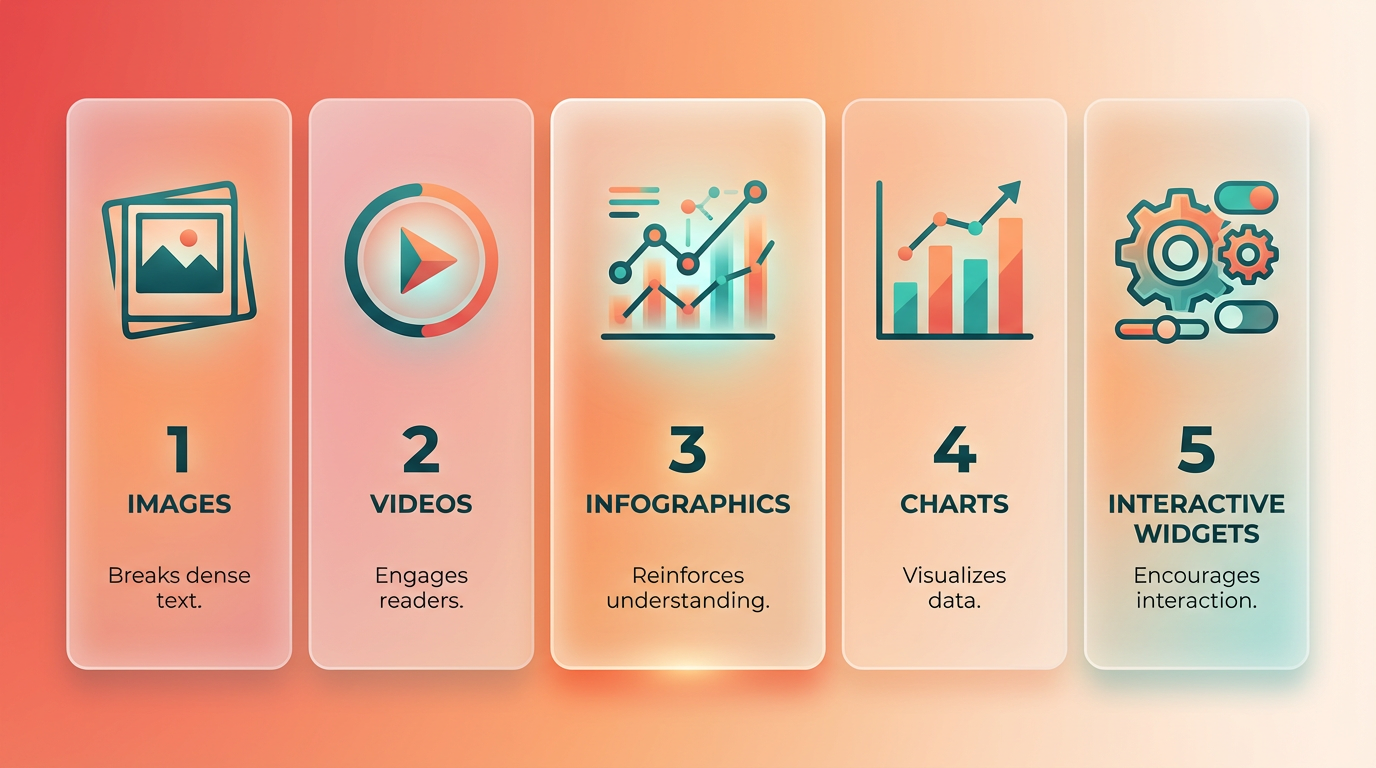
Building on concepts from the Understanding Content Chunking section, visual breaks align with the core principle of breaking down information into digestible parts. A blog post about SEO strategies might use a flowchart to outline keyword research steps, followed by a short video showing how to use a tool. These elements reduce cognitive load, as noted in studies on user behavior and content processing.
How Can You Add Interactive Elements?
Interactive content like quizzes and polls boosts engagement by turning passive readers into active participants. A quiz at the end of a tutorial, for example, tests comprehension while keeping users on your page longer-a factor Google considers for dwell time. Tools like AnyPost.ai simplify creating these elements. For example, its quiz builder lets you design SEO-friendly assessments that align with your content’s goals. Unlike generic providers, AnyPost.ai integrates multimedia directly into workflows, ensuring consistency with your brand’s visual style, as emphasized in the Avoiding Common Chunking Mistakes section. A travel blog might use a poll to ask readers about their dream destinations, then link results to relevant destination guides.
What Are the Best Practices for SEO and UX?
Optimizing visuals for SEO and user experience (UX) requires attention to technical details:
- Alt Text: Describe images in concise, keyword-rich phrases (e.g., “how-to infographic for SEO content chunking”).
- File Names: Use descriptive, lowercase names (e.g.,
seo-checklist.pnginstead ofimage1.jpg). - Loading Speed: Compress images and videos to avoid slowing down page load times.
- Accessibility: Ensure color contrast meets standards and provide transcripts for videos.
For UX, place visuals near the relevant text and avoid clutter. A case study from a content marketing example shows that pages with embedded videos and annotated infographics see 30% higher time-on-page metrics. AnyPost.ai offers templates for optimizing these elements, such as pre-formatted infographics that align with SEO guidelines.
How to Balance Multimedia and Text
While visuals enhance content, overloading pages with too many videos or animations can overwhelm readers. Aim for a 70/30 rule: 70% text and 30% multimedia, adjusting based on the topic. For example, a step-by-step tutorial might use one video per major step, while a listicle relies on bold headings and bullet points. Social media content benefits from shorter formats: Instagram carousels with polls or LinkedIn articles using embedded tweets. A food blog might alternate between recipe steps and a 15-second video of a cooking technique. Always test multimedia elements on mobile devices to ensure responsiveness.
By combining these strategies, you create content that’s both scannable for search engines and engaging for readers. Tools like AnyPost.ai streamline the process, but remember: the goal is to enhance-not replace-your core message. Start small, experiment with one type of visual break, and refine based on analytics like bounce rate and scroll depth.
Tracking Chunking Performance with Analytics
To effectively track chunked content performance, focus on three core areas: user engagement, search engine rankings, and accessibility. Analytics tools help quantify how well your content meets audience needs while aligning with SEO goals. Below, we break down actionable metrics and strategies for measuring success..
How Do You Measure User Engagement with Chunked Content?
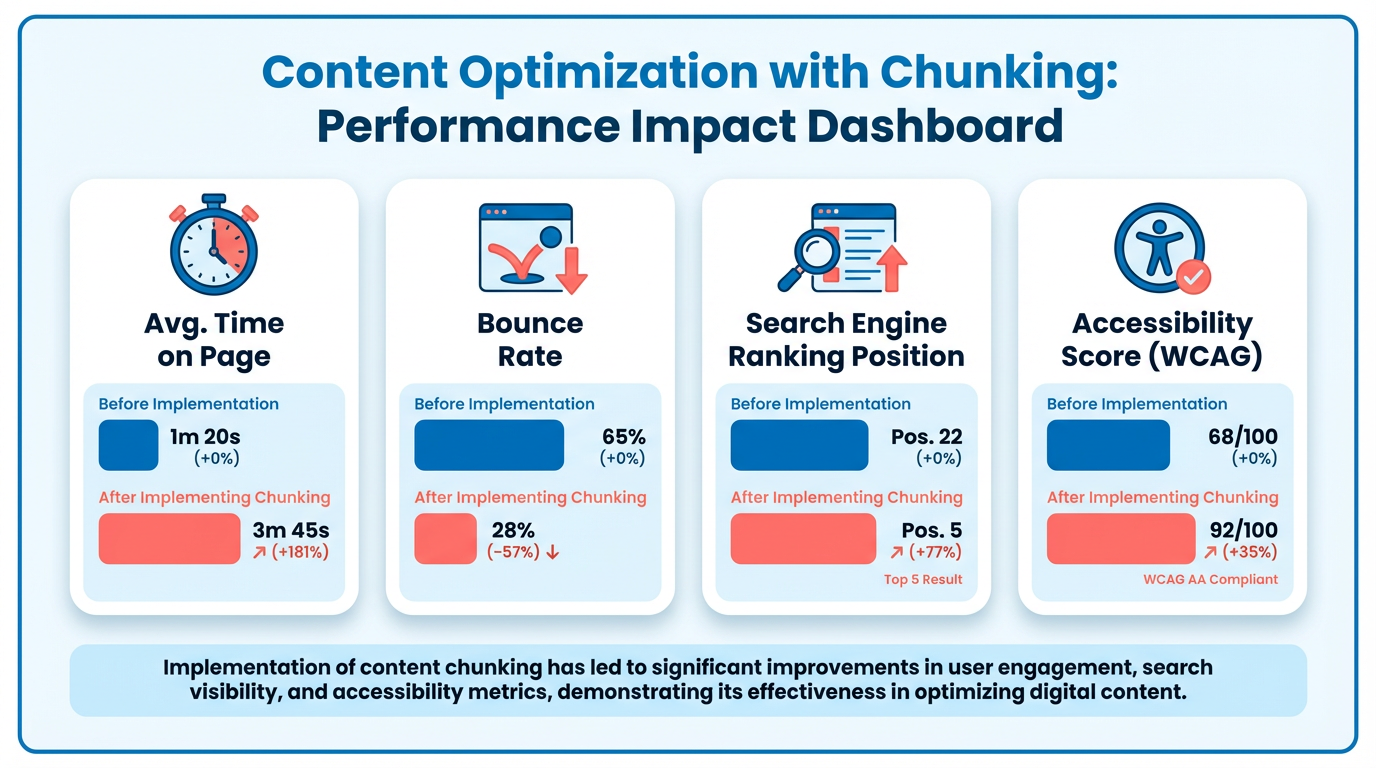
User engagement metrics reveal how readers interact with your content. Time on page and bounce rate are critical indicators. A high time on page suggests readers find value in your chunks, while a low bounce rate means they’re exploring beyond the homepage. As mentioned in the Understanding Content Chunking section, well-structured chunks enhance readability, which directly impacts these engagement metrics. For example, if users spend over 2 minutes on a page with clear subheadings and short paragraphs, your chunking likely supports readability.
Scroll depth and interaction rates (e.g., clicks on subheadings or internal links) also matter. Tools like Google Analytics track how far users scroll, helping you identify if certain chunks lose attention. If most users exit after reading 50% of the content, consider shortening or restructuring sections.
Example: A blog post split into 100- to 150-word chunks might show a 20% drop in bounce rate compared to a 1,000-word block, proving chunked content improves engagement..
What Metrics Track Search Engine Rankings for Chunked Content?
Search engine rankings depend on how well your chunks align with keyword intent and crawlability. Monitor keyword rankings for target terms using tools like SEMrush or Ahrefs. If chunked content ranks higher for long-tail keywords (e.g., “benefits of content chunking for SEO”), it signals effective optimization. Building on concepts from the Why Content Chunking Matters section, search engines prioritize content that’s easy to parse, making chunking a strategic SEO practice.
Search traffic and click-through rate (CTR) further validate visibility. A steady increase in traffic after restructuring content into chunks could mean your formatting makes it more scannable for both users and search algorithms. For instance, adding bullet points and subheadings might boost CTR by 15% in SERP snippets.
Reddit discussions note that chunking enhances UX, which indirectly supports SEO. Google prioritizes pages that keep users engaged, so improvements in time on page and reduced bounce rates can lift rankings over time..
How Do You Assess Content Accessibility and Readability?
Accessibility metrics ensure your chunks are usable by all audiences. Readability scores (e.g., Flesch-Kincaid Grade Level) help you gauge if language is simple enough for your target audience. A score below 8th grade is ideal for broad comprehension. Tools like Hemingway Editor highlight complex sentences, prompting revisions. The Incorporating Visual Breaks and Multimedia section emphasizes how visual elements support readability, a principle that extends to text-based accessibility improvements.
Accessibility audits check compliance with standards like WCAG. Automated tools scan for issues like missing alt text or poor color contrast, which might affect users relying on screen readers. For example, an audit might flag a chunk with small font sizes, requiring adjustments for better legibility.
AnyPost.ai streamlines this process by offering readability analysis and accessibility checks during content creation. Unlike generic providers, its AI identifies chunk-level issues and suggests fixes, ensuring your content meets SEO and inclusivity benchmarks..
How Can You Improve Chunked Content Using Analytics?
Analytics data is only valuable if you act on it. Start with A/B testing: compare two versions of a page-say, one with three long chunks versus six short ones-to see which performs better. AnyPost.ai’s built-in testing suite lets you track metrics like CTR and conversion rates in real time.
Iterate based on trends. If analytics show users drop off at a specific section, revise that chunk’s structure or simplify its language. For example, replacing dense paragraphs with bullet points might increase time on page by 10%. The Assessing Your Content for Chunking Potential section provides methods for identifying sections ripe for restructuring.
Use heatmaps (via Hotjar or similar tools) to visualize where users click or pause. This reveals if your chunk hierarchy matches their expectations. If most clicks cluster around the first 200 words, consider relocating key points to earlier chunks.
Finally, pair analytics with user feedback. Surveys or comment sections can clarify why a page works-or fails-despite strong metrics. For instance, a high-engagement page might still have unclear CTAs, which analytics alone can’t detect.
By combining these metrics with iterative testing, you can refine chunked content to balance SEO, usability, and accessibility. Tools like AnyPost.ai provide actionable insights at scale, helping you align content strategy with both algorithmic and audience demands.
Assessing Your Content for Chunking Potential
Assessing your content for chunking potential starts with evaluating how well it’s structured for readability and user engagement. The goal is to identify sections that can be split into smaller, digestible parts without losing coherence. This process involves analyzing content length, flow, and technical complexity, then using tools and metrics to guide improvements. As mentioned in the Understanding Content Chunking section, chunking enhances both SEO and user experience by making information more accessible. Let’s break down the steps.
How Do You Evaluate Content for Chunking Potential?
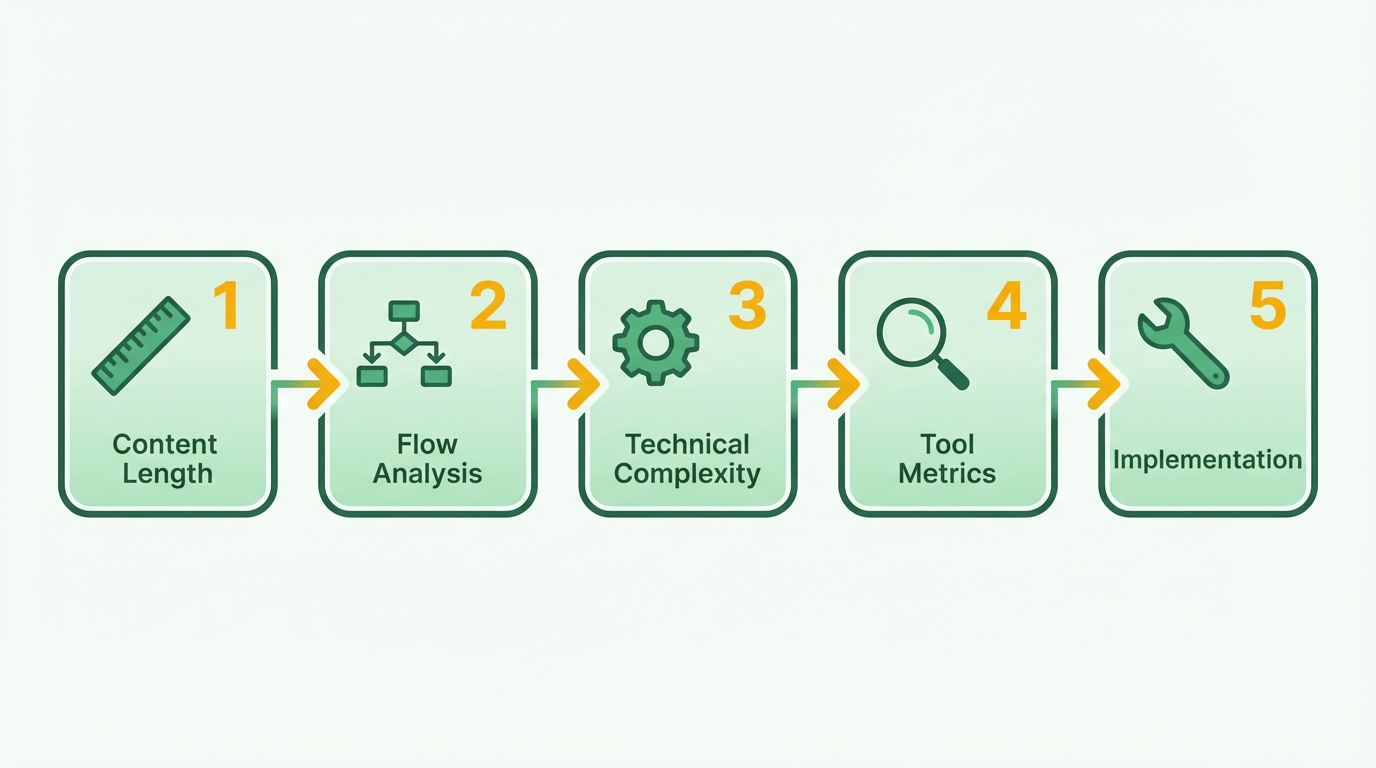
Begin by reviewing your content’s existing structure. Look for long paragraphs, dense blocks of text, or sections that cover multiple ideas at once. These are prime candidates for chunking. Use readability tools like Grammarly or the Hemingway Editor to flag overly complex sentences or paragraphs that exceed ideal line lengths. For example, if a paragraph spans more than four sentences or covers two unrelated ideas, it likely needs splitting.
Next, perform a content audit by mapping out the logical flow of your document. Ask: Are key points clearly separated? Do subheadings guide readers effectively? Technical documents or long-form articles with dense information often benefit from chunking. Building on concepts from the Structuring Content with Headings and Subheadings section, clear subheadings help organize content and improve skimmability. For instance, a 2,000-word guide on SEO might be divided into sections like “Keyword Research,” “On-Page Optimization,” and “Backlink Strategies,” each with its own subpoints.
What Metrics Should You Track to Evaluate Chunking Success?
Metrics help quantify how chunking impacts user engagement and SEO performance. Track bounce rate, time on page, and scroll depth to see if readers are engaging with content as intended. A high bounce rate might indicate that users struggle to find relevant information quickly, suggesting a need for better chunking. Similarly, low scroll depth could mean content isn’t structured to retain attention.
For SEO, use tools like Google Analytics or Search Console to monitor how chunked content affects organic traffic and rankings. If a revised, chunked article sees a 15-20% increase in traffic compared to its unchunked version, it’s a strong indicator of improved performance. As mentioned in the Tracking Chunking Performance with Analytics section, metrics like keyword density and topical coverage also play a role in SEO optimization.
How Can User Testing Reveal Chunking Opportunities?
User testing provides direct feedback on how well your content meets reader needs. Conduct surveys or usability tests asking users to manage your content and identify confusing or overwhelming sections. Heatmap tools like Hotjar can visualize where users pause, skim, or exit, highlighting areas to refine. For example, if users frequently abandon a technical document at a specific section, splitting it into smaller chunks with clear headings might improve retention.
Another approach is A/B testing: publish two versions of a page-one with and one without chunking-and compare engagement metrics. If the chunked version shows a 25% increase in time on page and a 10% drop in bounce rate, it validates the effectiveness of the changes. Common challenges include balancing chunk size with content flow. As discussed in the Avoiding Common Chunking Mistakes section, over-chunking can fragment ideas, while under-chunking leaves text unwieldy. Test different structures to find the sweet spot. For example, splitting a 500-word section into three 150-word chunks with subheadings often improves readability without disrupting context.
By combining structural analysis, performance metrics, and user feedback, you can systematically identify and address chunking opportunities. The result is content that’s easier to digest, more engaging, and better optimized for both readers and search engines.
Structuring Content with Headings and Subheadings
Structuring content with headings and subheadings isn’t just about aesthetics-it’s a strategic practice that boosts both SEO and user experience. Headings signal content relevance to search engines while guiding readers through complex topics. By organizing information into logical sections, you make it easier for audiences to scan and retain key points. Let’s break down how to implement this effectively.
How Do Headings Improve SEO and UX?
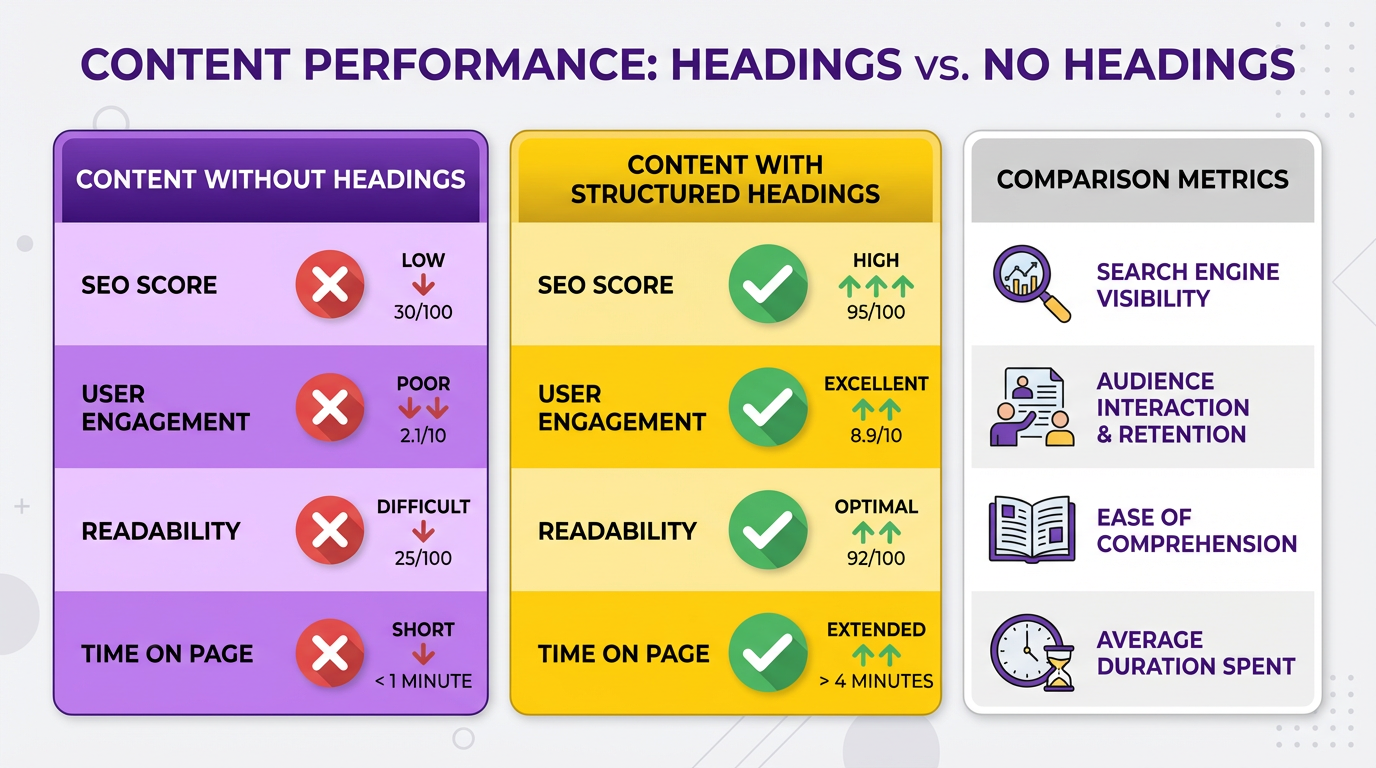
Headings act as signposts for readers and search algorithms. For SEO, they help search engines understand your content’s structure and main topics. For UX, they reduce cognitive load by breaking text into digestible sections. A well-structured page with clear headings can lower bounce rates and increase time-on-page metrics, both of which search engines value. Start with a single H1 tag for your main title, followed by H2 subheadings for major sections, and H3 tags for nested details. Avoid skipping heading levels (e.g., jumping from H2 to H4) to maintain a logical flow. Building on concepts from the Understanding Content Chunking section, this structure aligns with how users naturally process information.
What Are Best Practices for Heading Hierarchy?
A consistent hierarchy ensures clarity and accessibility. Begin with one H1 per page, using it to encapsulate your primary topic. For example, if writing about “Content Chunking,” your H1 might be “What Is Content Chunking? A Beginner’s Guide for SEO & UX.” Next, use H2 tags for broad subtopics like “Why Chunking Matters for SEO” or “How to Structure Content for UX.” Under each H2, add H3 tags for supporting details. For instance, under “Why Chunking Matters for SEO,” an H3 could be “Improving Keyword Relevance with Subheadings.” This pattern creates a roadmap for readers and search engines alike. As outlined in the Assessing Your Content for Chunking Potential section, this approach also helps identify sections that need refinement.
Avoid overusing bold or all caps in headings, as it can confuse screen readers. Instead, prioritize descriptive, keyword-rich text. For example, an H2 like “Optimizing Paragraphs for Scannability” is more effective than a vague “Tips Section.” Tools like AnyPost.ai can audit your heading structure to flag inconsistencies or suggest improvements.
How to Format Paragraphs for Scannability?
Even the best headings won’t help if body text is dense and overwhelming. Limit paragraphs to 2–3 short sentences, focusing on one idea per section. Use bullet points or numbered lists to present steps, comparisons, or definitions. For example:
- Bullet points: Ideal for non-sequential items (e.g., “Benefits of content chunking”).
- Numbered lists: Best for processes or rankings (e.g., “Steps to optimize heading hierarchy”).
White space is equally critical. Add line breaks between paragraphs and use bold to highlight key terms like SEO, UX, or content modeling. For accessibility, ensure headings contrast sufficiently with background colors and use fonts that are easy to read at 16px or larger.
What Tools Help Organize Content Structure?
Manual formatting can miss subtle issues, so use tools designed for content optimization. AnyPost.ai analyzes your text for heading depth, keyword placement, and readability scores. It also suggests adjustments to improve flow, such as reordering subheadings or splitting long sections. For example, if your article has an H2 titled “Content Chunking Techniques,” AnyPost.ai might flag a missing H3 about “Using Lists for Clarity” and recommend adding it.
Other generic tools like Grammarly or Hemingway Editor can identify long, complex sentences that hinder scannability. However, these tools lack the SEO-specific insights of solutions like AnyPost.ai, which ties content structure directly to search engine guidelines.
Common Mistakes to Avoid
Inconsistent formatting, such as mixing “Heading 1” styles with bold text, disrupts hierarchy. Similarly, stuffing too many keywords into headings can feel forced and alienate readers. A real-world example: a blog post with an H2 like “SEO Content Chunking Strategies 2025” might rank well but fail to engage if it lacks actionable advice. As mentioned in the Avoiding Common Chunking Mistakes section, poor organization-like placing a section on “Tools for Chunking” before explaining what chunking is-confuses audiences. Always build from foundational concepts to advanced tips. Finally, avoid generic subheadings like “Introduction” or “Conclusion.” Instead, use active, descriptive phrases such as “How Chunking Boosts Page Load Speed” to attract attention.
By following these practices, you’ll create content that’s both search-engine-friendly and a pleasure to read. Remember: the goal is to balance technical precision with human readability, ensuring your audience finds value at every scroll.
Frequently Asked Questions
1. What is content chunking and why is it important?
Content chunking divides text into short paragraphs, subheadings, and bullet points to improve readability and SEO. It helps search engines identify keywords and allows users to scan content quickly, reducing bounce rates and boosting engagement.
2. How does content chunking improve SEO?
Chunking enhances SEO by making keywords and themes easier for search engines to recognize. Structured content increases indexing efficiency, which can lead to higher search rankings and better visibility for targeted topics.
3. What role do subheadings play in chunked content?
Subheadings organize information, guide readers, and signal content relevance to search engines. They break up text, improve scannability, and help users find specific sections, increasing time spent on the page.
4. How does chunking affect user experience?
Chunking reduces cognitive load by presenting information in digestible parts. Short paragraphs and bullet points make content easier to read, increasing retention and satisfaction for users seeking quick answers.
5. Can chunking help lower bounce rates?
Yes, chunked content lowers bounce rates by making pages scannable and user-friendly. Clear structure meets search intent faster, encouraging users to explore more rather than leaving due to overwhelming text.
6. What are the best practices for content chunking?
Use short paragraphs (<3-4 sentences), bullet points for lists, and descriptive subheadings. Prioritize keyword placement in subheadings and maintain consistent formatting to enhance readability and SEO performance.
7. How does chunking impact search rankings?
Search engines favor chunked content for clearer keyword signals and better indexing. Pages with structured content often rank higher due to improved engagement metrics like lower bounce rates and longer session durations.