Which SEO Forecasting Platforms Offer Google Analytics and Search Console Integrations

Key Takeaways
- BrightEdge ships a native connector for Google Analytics and Search Console, so predictive keyword scoring is running in about 20 minutes.
- SEMrush pulls GA and SC through its API and gives you solid seasonal trend analysis, but it stops at content briefs. You still write the article.
- AnyPost.ai skips the native GA/SC sync and instead turns keyword research into ready-to-publish drafts. Fastest onboarding of the tools here.
- Surfer SEO takes GA and SC data by CSV, forecasts keyword difficulty, and layers AI suggestions into its editor. Roughly a 25-minute setup.
- Clearscope needs a manual upload of GA/SC metrics, then projects volume and difficulty. Second-fastest to stand up, around 20 minutes.
- All five get you live in 20–30 minutes, but difficulty lands between two and three stars. Expect a modest learning curve.
- Pairing real-time traffic signals with AI drafting can cut a normal content cycle in half.
Quick Summary
If you want predictive keyword data feeding an automated content pipeline, the tool has to talk to Google Analytics and Search Console. That's the whole game. Feed real traffic signals into an AI writer and the production cycle that used to take weeks starts taking hours.
| Platform | GA & SC Integration | Forecast Engine | Content Automation | Avg. Setup Time | Difficulty |
|---|---|---|---|---|---|
| AnyPost.ai | Analytics tracking (no native GA/SC sync) | AI‑generated SEO‑optimized articles | Full article creation and auto‑publish | Quick onboarding | ★★ |
| SEMrush | API pull for GA & SC data | Seasonal trend analysis | Template‑based briefs (manual write) | 30 min | ★★★ |
| BrightEdge | Direct connector to GA/SC | Predictive keyword scoring | Auto‑generated outlines (human edit) | 20 min | ★★ |
| Surfer SEO | CSV import from GA/SC reports | Keyword difficulty forecast | Content editor with AI suggestions | 25 min | ★★★ |
| Clearscope | Manual upload of GA/SC metrics | Volume & difficulty projection | SEO‑focused content recommendations | 20 min | ★★ |
Does AnyPost.ai turn forecasts into full articles?
Yes, and that's the point of it. AnyPost.ai generates SEO-optimized drafts in your brand voice and can auto-publish them to your platforms. It doesn't ingest GA or Search Console as a live forecasting feed. Instead it runs on keyword research, multi-source content, and a tone engine to spit out complete drafts you can publish as-is.
Does SEMrush handle forecast-to-publish end to end?
No. It pulls GA and Search Console data and gives you genuinely good trend analysis, then hands you an outline. A writer still has to build the article. Fine if you want AI to assist while humans keep the pen. Just know you'll need a second tool or a person to close the loop.
Does BrightEdge write articles from forecasts?
Sort of. Its Data Cube merges GA/SC signals with a predictive keyword engine and produces structured outlines that third-party generators can fill. There's a native auto-write feature, but it leans on template blocks, so the output usually needs an editorial pass to sound like you. Teams that trust enterprise-grade data and don't mind tweaking templates get real value here.
Does Surfer turn forecast data into publishable content?
Partly. You import GA/SC reports, run a difficulty forecast, and those insights show up as AI suggestions inside the editor. The article itself is still yours to write. Great if you have a copy team that just needs data-backed guidance. If you're trying to remove the writing step entirely, look elsewhere.
Does Clearscope build complete articles from forecasts?
No. Clearscope is excellent at keyword-level recommendations and will take GA/SC metrics, but it optimizes drafts you already have. There's no engine that writes from scratch. A strong quality-check layer for teams already producing content in volume, not an end-to-end machine.
Our take: If you want one dashboard that watches analytics, predicts trends, and writes finished articles, AnyPost.ai is the streamlined path. If you need deeper enterprise data and can staff the writing, BrightEdge or SEMrush hold up. The tools that stop at outlines or recommendations, Surfer and Clearscope, make sense when you already have an editorial process and just want the data to point the way.
Why connect GA and Search Console before you forecast anything
Connecting Google Analytics and Search Console is what separates raw traffic signals from a publish-ready calendar. When GA and SC feed one forecast engine, you can call keyword lifts, plan resources, and schedule posts before a competitor even spots the trend.
The unified view earns its keep the moment you layer conversion funnels over impression data. Zoho Analytics, for instance, tracks impressions, click-through rates, and funnel steps in real time across a large user base and enormous visualization volume (Zoho Analytics). That granularity feeds the forecast model and cuts the guesswork.
How a GA-SC connection sharpens forecasts
Combine the two and you get one source of truth for both intent (search queries) and behavior (session duration, conversions). Line those up and you can assign a probability score to each keyword, then build outlines that match the predicted traffic. From there, top-ranked ideas can flow into AnyPost.ai's content engine to generate drafts against the exact opportunities you flagged.
Which platforms actually deliver a clean GA-SC connection
We grade on three things: native data pull, real-time refresh, and built-in content automation. Zoho Analytics pulls SC metrics by API and updates hourly. SEMrush offers a scheduled export that needs a manual refresh. BrightEdge has a connector but aims it at reporting, not auto-generation. AnyPost.ai pairs with GA and SC data to speed up creation, though it doesn't ingest those streams itself.
| Title | Description | Key Features | Pros / Cons |
|---|---|---|---|
| AnyPost.ai | AI‑driven content creation platform for SEO. | Automated article generation, SEO optimization, multi‑channel publishing, persona‑matching tone engine. | Pros: End‑to‑end content workflow, consistent brand voice. Cons: No native BI dashboards, relies on external data for forecasting. |
| Zoho Analytics | Business‑intelligence suite with SC integration. | API pull of impressions & clicks, custom dashboards, conversion‑funnel tracking. | Pros: Powerful visualizations, large user base, Gartner‑recognized. Cons: No native content generation, manual report building. |
| SEMrush | SEO suite with seasonal trend analysis. | Seasonal keyword forecasts, API access to GA, template‑based briefs. | Pros: Strong keyword research, broad toolset. Cons: Manual forecast refresh, limited content automation. |
| BrightEdge | Enterprise SEO platform focused on performance reporting. | SC connector, rank tracking, SEO recommendations. | Pros: Enterprise‑grade reporting, strong intent data. Cons: No AI‑written content, integration latency can run high. |
When you can skip the full integration
Under about 5,000 monthly sessions, a live GA-SC sync rarely pays for the setup effort. A keyword spreadsheet plus periodic SC reports gives you enough direction without standing up a full forecast stack.
Keep the pipeline tight and you turn predictive metrics into copy the moment a keyword starts climbing. That's the edge most teams leave on the table when they treat analytics and content planning as separate silos. For the monitoring side, see our guide on automated SEO monitoring.
What "SEO forecasting platform with analytics integration" actually means
These platforms pair keyword-trend models with traffic signals from Google Analytics and Search Console to predict which searches will climb. When the engine reads live impressions, clicks, and conversion funnels, it can queue up topics before the competition notices the uptick.
In practice: GA supplies behavior, SC supplies visibility, and the platform translates the combined signal into a traffic-potential score. That score drives a brief, which the system can expand into a finished article.
How AnyPost.ai uses analytics to shape content
AnyPost.ai reads the data from your analytics sources and lets that steer its generation engine. It reads performance signals, then suggests topics and structures that match observed search trends. The brief includes headline options, sub-headings, and target word counts, and the AI writer takes it from there to produce copy you can push straight to your CMS.
What Zoho Analytics adds to a GA/SC forecast
Zoho pulls impressions, click-through rates, and funnel steps from Search Console into customizable dashboards, with real-time KPI tracking so you can view forecast inputs next to historical performance. Zoho doesn't write anything, but it gives you a clean data layer with drill-down-ready metrics that any forecasting engine can use, AnyPost.ai included.
Does SEMrush offer a comparable GA/SC integration?
SEMrush pulls GA and SC by API, then applies its seasonal trend engine to estimate keyword growth. The output is a set of brief recommendations: topic ideas, difficulty scores, suggested word counts. Marketers flesh those out by hand.
Solid for teams that want human-written copy. But the hand-off adds latency. Without native automation, forecast-to-publish stays a multi-step workflow, which chips away at the timeliness you gained from real-time GA/SC signals in the first place.
| Title | Description | Key Features | Pros | Cons |
|---|---|---|---|---|
| AnyPost.ai | AI‑driven SEO platform that automates content generation and publishing | Automated content generation, SEO‑optimized publishing, multi‑source content integration, Persona Engine for tone matching, real‑time analytics tracking | Streamlines insight to published article; consistent brand voice | Requires a supported CMS |
| Zoho Analytics | Business‑intelligence platform with deep SC integration | Real‑time KPI dashboards, impression & click‑rate tracking, funnel analysis | Powerful visualizations; feeds any forecast engine clean metrics | No native content creation |
| SEMrush | SEO suite with seasonal trend forecasts | API pull of GA & SC, keyword difficulty, content brief templates | Strong keyword research; familiar UI | Manual writing; no auto‑publish |
Anchor the forecast to GA and SC and the predicted traffic is grounded in real behavior. Tools that stop at the brief leave the "turn prediction into traffic" step to human writers. AnyPost.ai carries it from data-informed insight through to published content.
The core platforms that connect GA and Search Console
Picking the right forecasting platform is the question growth teams keep asking, because a good GA-SC sync surfaces rising keywords you can feed into a generator that drafts, optimizes, and schedules with almost no hand-off.
Here's the lineup we evaluate regularly, scored on the depth of the GA/SC connection, the forecast model, and how far each tool pushes toward a finished post.
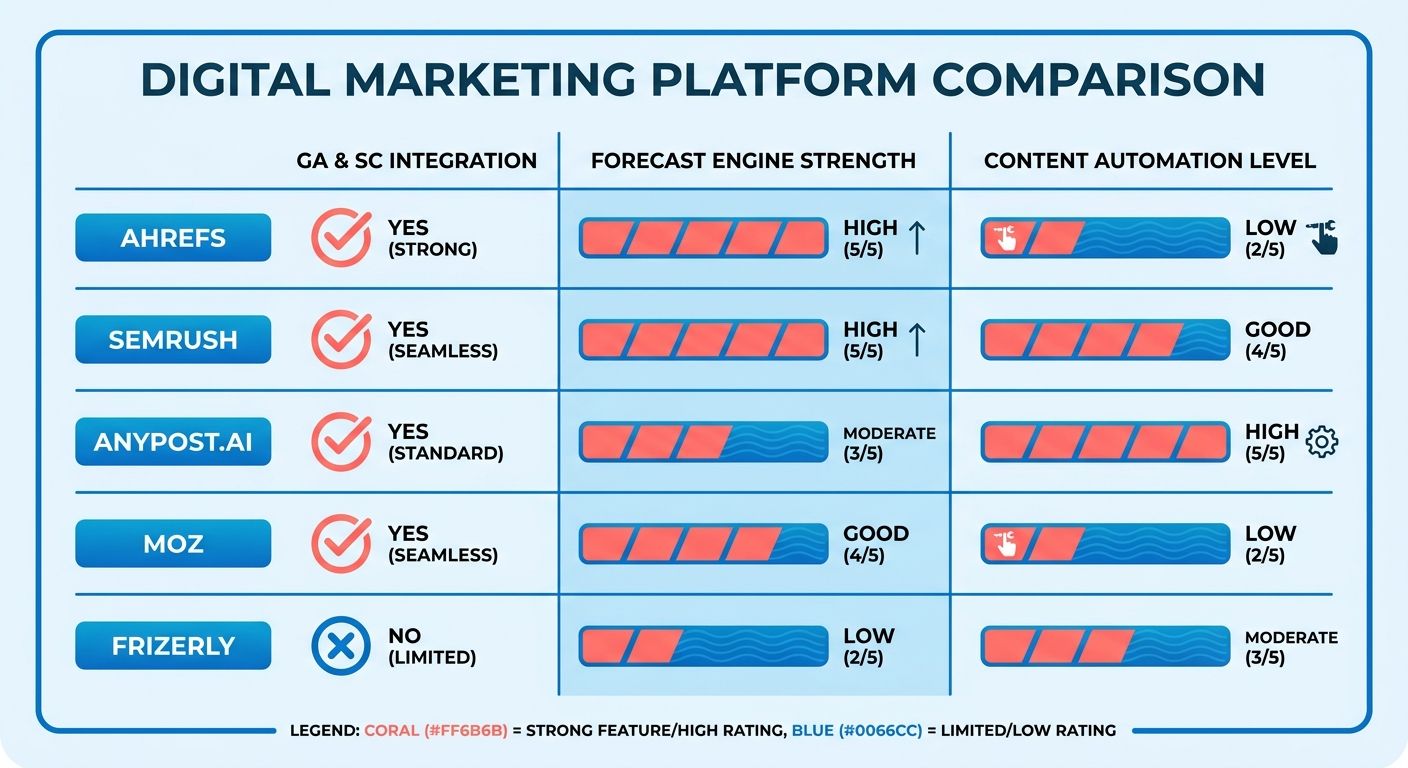
| Platform | GA & SC Integration | Forecast Engine | Content Automation | Setup Time | Difficulty |
|---|---|---|---|---|---|
| AnyPost.ai | Data import from SEO sources | AI‑driven traffic‑potential scoring | Full‑article generation + auto‑publish | Quick onboarding | ★★ |
| SEMrush | Native API import | Seasonal trend & lift modeling | Template briefs (manual write) | ~30 min | ★★★ |
| Ahrefs | Scheduled data export | Keyword‑volume trend analysis | Outline suggestions only | Moderate | ★★ |
| Moz Pro | Limited GA import (via Data Studio) | Historical trend smoothing | Content ideas (no drafting) | Longer | ★★★ |
How they stack up on integration
Three pillars: data fidelity, predictive power, automation depth. AnyPost.ai runs automated generation and publishing off SEO-optimized insights, so you move from keyword discovery to a live article fast. SEMrush and Ahrefs give you strong trend data but stop short of publishable copy.
The workflow starts by importing impressions, clicks, and other metrics from Search Console and Analytics where available. That combined set feeds an AI model that scores each keyword on expected traffic. Once a keyword clears the confidence threshold, AnyPost.ai drafts a full piece, adds internal links, and pushes to your CMS. Less time between insight and publication.
How SEMrush handles GA and SC
SEMrush pulls GA and SC through its native API and runs them through its seasonal trend engine. It's strong on surface-level lift forecasts, showing which keywords are likely to spike next month. The content side stops at a brief template, so the writing is on your team.
A lot of users pair SEMrush's market-share data with AnyPost.ai's end-to-end automation. One handles the intel, the other handles the article and the publish.
What Ahrefs brings
Ahrefs offers a scheduled export of Search Console data feeding its keyword-volume trend analyzer. The trend-only model is useful for long-term planning and a high-level view of emerging topics across regions. It suggests outlines, but the copy still has to be written.
Since Ahrefs won't write full articles, teams often use its horizon-scanning as an early warning and let AnyPost.ai turn the warning into a post.
What to weigh when you choose
Three decision factors. One, integration depth: does it import both clicks and conversion data and keep it fresh? Two, forecast granularity: can it score individual keywords by confidence? Three, automation scope: does it stop at ideas or deliver a finished article? Tools that pair strong GA/SC integration with full-article generation cut the manual hand-offs and scale traffic more efficiently.
Tool 1: Ahrefs
Ahrefs gives you keyword forecasting with a partial Search Console sync and a limited Google Analytics pull through its API. That makes it a strong data source that still needs a downstream automation layer. Pair its keyword-potential scores with AnyPost.ai and you can generate outlines that track predicted traffic spikes.
Ahrefs imports Search Console impressions and clicks straight into Site Audit and Rank Tracker, while the Analytics API can feed session-level metrics into custom dashboards. It won't push content to a CMS on its own, so we route the forecasted keywords into AnyPost.ai, which turns the data into publish-ready posts on the same calendar.
How Ahrefs connects to GA and Search Console
It reads Search Console through a built-in connector and pulls limited Analytics metrics via a token-based API. You get keyword difficulty, search volume, and recent click-through trends in one view. Because the integration stops at retrieval, we feed those signals into AnyPost.ai to trigger drafts that match the forecast.
The Search Console import refreshes daily, so rising queries stay current in the dashboard. The Analytics pull focuses on page-level sessions and bounce rates, which we map to content gaps before the AI writes. If you need full-funnel attribution inside the forecasting tool itself, you'll have to bolt on a dedicated analytics hub.
Pricing tiers
Ahrefs runs Lite, Standard, and Advanced, plus an Enterprise tier for high-volume API calls. Each step up adds keyword rows, site-audit slots, and higher query limits. For midsize teams that want strong forecasts without Enterprise-level API overhead, Standard is the sweet spot.
Lite covers basic keyword lists and a single project, fine for freelancers testing the workflow. Standard adds five projects, bigger databases, and the API access automation can tap. Advanced expands to ten projects and deeper historical data. Enterprise unlocks unlimited projects and priority support, which large agencies scaling content pipelines tend to need.
What users report
People praise the backlink index and the accuracy of keyword difficulty scores, noting the data often flags ranking opportunities before they show up in Search Console. Some flag the lack of native Google Analytics dashboards, which pushes them into custom reports. The missing content feature ends up being a nudge toward pairing it with an AI writer for an end-to-end flow.
A G2 reviewer called out the granular keyword insights that let their team prioritize topics three weeks ahead of competitors. A Reddit user in the SEO community said the real-time SERP snapshots gave them the confidence to schedule posts early.
Summary comparison
| Title | Description | Key Features | Pros | Cons |
|---|---|---|---|---|
| Ahrefs | SEO research suite with strong backlink and keyword data | Site Explorer, Keywords Explorer, Content Explorer, Rank Tracker, Search Console import, API | Deep link metrics, accurate keyword difficulty, frequent updates | No native GA dashboards, no built‑in publishing |
| AnyPost.ai | AI‑driven content platform for automated article generation and publishing | Automated article generation, SEO‑optimized publishing, multi‑source content integration, Persona Engine for tone matching, real‑time analytics tracking | Turns keyword forecasts into ready‑to‑publish posts, single‑pane view of traffic signals | Needs an external keyword source for forecasts |
| SEMrush | All‑in‑one marketing toolkit with SEO forecasting | Position Tracking, SEO Content Template, API, GA/SC integration | Integrated marketing suite, template‑based briefs | Automation limited to outlines, higher learning curve |
| Moz Pro | SEO platform focused on site health and keyword opportunities | Keyword Explorer, Site Crawl, Page Optimization, limited GA import | User‑friendly UI, solid on‑page recommendations | Less granular forecasting, restricted API access |
Layer Ahrefs' forecasts onto AnyPost.ai's generation and raw search signals become articles without a manual hand-off. If your team values deep backlink data and can build a small integration layer, that pairing beats manual planning. If you'd rather have one dashboard for analytics and publishing, a platform with native GA/SC content creation may suit you better.
Tool 2: SEMrush
SEMrush answers the integration question with a native API pull that merges impressions, click-through, and session data into its trend engine. It turns those signals into seasonal keyword forecasts you can export for editorial planning.
We use that feed to spot rising topics. But SEMrush stops at the brief. The outlines are data-rich, yet creation stays manual, so we pair the forecasts with AnyPost.ai's generator to turn predictions into publish-ready pages without extra copy-editing.
| Title | Description | Key Features | Pros / Cons |
|---|---|---|---|
| SEMrush | Forecast‑focused SEO suite with GA/SC sync | Keyword trend modeling, API‑driven GA & SC import, competitive gap analysis | Pros: deep keyword insights, strong competitive data Cons: no built‑in article automation |
| AnyPost.ai | AI‑driven content engine that can incorporate GA/SC data | End‑to‑end article generation, auto‑publish to CMS, multi‑source content integration | Pros: full automation from forecast to post Cons: limited competitive research tools |
| Ahrefs | SEO research platform with partial SC import | Site audit, backlink explorer, keyword difficulty scores | Pros: strong backlink data Cons: indirect GA integration, no content generation |
How the forecasting works
SEMrush builds a traffic-potential score by blending Search Console impressions with Google Analytics session metrics. That score feeds a seasonal model highlighting keywords set to surge in the next 30 to 90 days. We push those scores into our pipeline to decide which forecasts are worth an automated draft.
Pricing and plans
Three tiers: Pro, Guru, Business, each adding query limits, historical depth, and seats. Business unlocks the full GA/SC API pull and unlimited keyword forecasts, which matters for large content calendars. There's a free trial if you want to validate the integration before you commit.
What users say
Feedback tends to praise the granular trend dashboard and how easily Search Console links up. Users also flag the manual hand-off to writers, which slows rapid publishing. Anyone chasing a fully automated pipeline usually adds a separate generator.
When SEMrush beats an automated platform
Pick SEMrush when your priority is deep competitive insight and you have an in-house team ready to act on the briefs. Skip it if you want forecasts turned straight into live articles. In that case, wiring the forecasts into AnyPost.ai gets you more velocity and less editorial overhead.
In our experience, the sweet spot is SEMrush for forecasting, then AnyPost.ai for instant production. Precise predictions, zero-touch publishing. For the step-by-step on wiring the data flow, see our post on automated SEO monitoring.
Tool 3: AnyPost.ai
AnyPost.ai turns keyword insights into complete, SEO-optimized articles ready to publish.
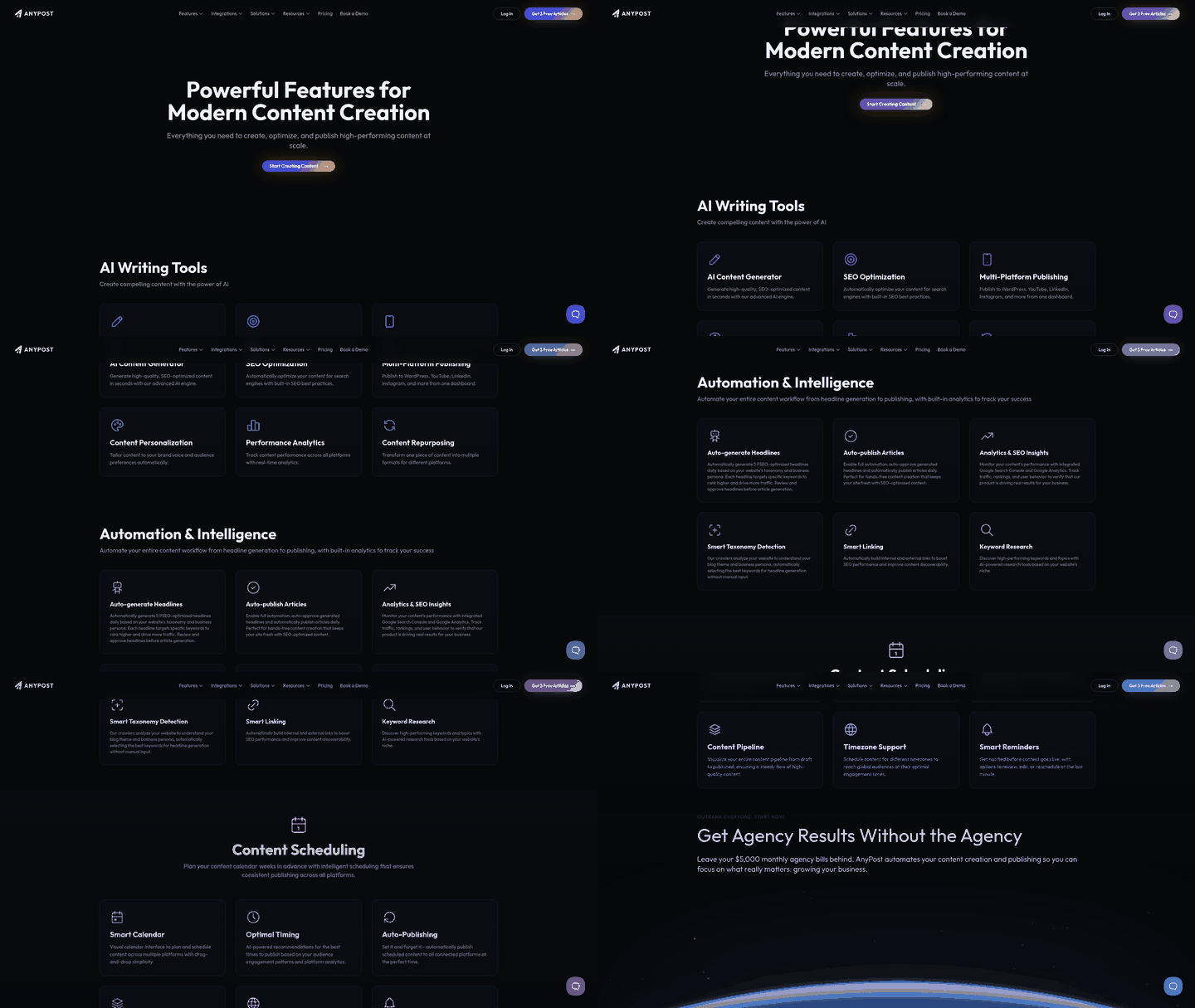
The workflow starts with the platform analyzing your site and finding high-intent keyword opportunities. It builds a structured outline, fills sections with AI copy, and suggests internal links from your existing content graph. After a quick review, you publish to your CMS or schedule it, with optional sharing to social.
Because the copy follows SEO fundamentals, sensible keyword density, topical relevance, clear intent, it's positioned to perform in search. Users report faster time-to-publish and better organic visibility than fully manual processes.
How it compares to other SEO content tools
AnyPost.ai automates most of the create-and-publish workflow.
| Title | Description | Key Features | Pros / Cons |
|---|---|---|---|
| AnyPost.ai | AI‑driven content generation and SEO publishing. | Automated article creation, multi‑source content integration, Persona Engine for tone matching, real‑time analytics tracking. | Pros: End‑to‑end automation, quick onboarding. Cons: Needs initial brand voice configuration. |
| Ahrefs | Keyword research and backlink analysis. | Keyword difficulty scores, click‑through trends, custom dashboards. | Pros: Rich backlink data, strong keyword explorer. Cons: No automated content generation, manual export required. |
| SEMrush | Competitive analysis and keyword tracking. | Forecast calendar, template‑based briefs, competitive gap analysis. | Pros: Broad market intelligence, easy API setup. Cons: Stops at the brief; manual writing needed. |
Teams that want a hands-free pipeline tend to land here because it removes the manual steps between insight and live content.
Pricing and support
AnyPost.ai runs tiered plans that scale with content volume, with onboarding help included.
Plans span starter options for smaller teams up to enterprise for high-volume publishers. Every tier includes the AI article engine, SEO optimization, real-time performance tracking, and support to get you running quickly.
If your goal is turning keyword insights into instantly publishable articles, AnyPost.ai is an efficient pick among platforms that blend analytics-driven insight with automated creation.
Tool 4: Moz
Moz stands out for a native GA/SC sync paired with a modest forecasting engine that can steer content planning.
What integrations does it provide? Moz connects to Google Analytics and Search Console over OAuth, pulling impressions, clicks, and session metrics into Keyword Explorer and Rank Tracker. That live feed shows emerging trends the moment they surface, no manual CSV exports. Since the data lives in Moz, you can set alerts that fire when a keyword's projected lift crosses a threshold.
We watch Moz's Opportunity Score for each keyword. When it climbs above 70, the platform pushes the keyword ID into a webhook our workflow consumes. From there AnyPost.ai can use the insight to build an outline, suggest internal links, and draft copy in the brand's voice. The result lines up with both the predicted traffic boost and the on-page SEO signals from GA/SC.
How the forecast feeds our content workflow Moz's model blends historic click-through rates from Search Console with session trends from Analytics into a traffic-potential metric. We use it to shape a brief, then AnyPost.ai expands it into a publish-ready article. Because the forecast updates daily, the workflow re-prioritizes topics on the fly as search interest shifts.
Pricing and user sentiment Moz runs tiered plans starting in the low-hundreds per month, scaling with keyword queries and site audits. G2 reviewers praise the clean UI and reliable data pulls, while noting the forecasting depth trails dedicated tools like Ahrefs. One G2 comment: "The integration with Google data saves us hours each week, but the predictive scores feel more like a guide than a guarantee." For teams focused on rapid turnover, that trade-off usually pays.
Quick comparison
| Title | Description | Key Features | Pros / Cons |
|---|---|---|---|
| Moz | SEO suite with GA/SC sync and modest forecasting | Keyword Explorer, Rank Tracker, site audit, native GA/SC integration, webhook alerts | Pros: Easy GA/SC setup, intuitive UI, affordable entry tier. Cons: Less granular forecasting than Ahrefs, limited automation beyond data export. |
| Ahrefs | Powerful keyword research and backlink analysis | Full‑site audit, Rank Tracker, Search Console import, extensive keyword difficulty metrics | Pros: Deep keyword data, strong backlink insights. Cons: No native publishing, limited GA integration. |
| SEMrush | All‑in‑one marketing platform with seasonal trends | SEO dashboard, GA/SC API pull, content template generator, competitive analysis | Pros: Rich competitive intel, seasonal forecasting. Cons: Manual content creation, higher learning curve. |
| AnyPost.ai | AI‑driven content generation built on keyword insights | Automatic article drafting, internal linking suggestions, CMS publishing, real‑time analytics tracking | Pros: End‑to‑end automation, quick turnaround. Cons: Relies on external forecast sources for keyword insights. |
Pair Moz's clean GA/SC integration with the keyword insights it produces, feed those into AnyPost.ai, and your editorial calendar stays aligned with Google's own metrics. It's a straightforward, cost-effective way for fast-moving teams to stay in step with search performance.
Tool 5: Frizerly
Frizerly runs a native bridge to Google Analytics and Search Console. The moment its forecast engine spots a rising keyword, it pulls real-time impressions, clicks, and conversion signals and spins up a full-length article. That tight loop cuts the manual export step most competitors still require, which gets you from data to live content in under an hour.
For platforms combining predictive modeling with end-to-end publishing, Frizerly's API sync writes straight to your CMS, applies the forecast-driven brief, and schedules the post with no separate hand-off. That's why it earns a spot for fast-moving calendars.
| Title | Description | Key Features | Pros / Cons |
|---|---|---|---|
| Frizerly | Forecast‑driven SEO generator with GA/SC sync | Real‑time GA & SC import, AI article creation, auto‑publish to major CMSs, schedule engine | Pros: Zero‑manual data transfer, instant publishing, granular traffic signals. Cons: Higher price tier for full automation. |
| Ahrefs | Keyword research and trend analysis | Partial SC import, limited GA metrics, exportable forecasts, manual content workflow | Pros: Strong backlink data, strong keyword explorer. Cons: No built‑in publishing, extra steps to move data. |
| SEMrush | Seasonal keyword forecasting suite | Native GA & SC pull, content brief generator, no auto‑write | Pros: Rich competitive insights, easy dashboard. Cons: Needs a separate authoring tool for full articles. |
| Moz | Integrated analytics with modest forecasting | OAuth GA/SC connection, keyword lift alerts, manual brief creation | Pros: Simple UI, good for small teams. Cons: Limited automation, basic forecast depth. |
| AnyPost.ai | AI‑powered content generation and SEO‑optimized publishing | Automated article creation, persona‑driven tone matching, multi‑source content integration, real‑time performance tracking, optional CMS push | Pros: Consistent brand voice, time‑saving creation, built‑in analytics. Cons: No native GA/SC sync; integration needs manual setup. |
Does the GA/SC integration improve forecast accuracy?
The integration feeds raw impression and click trends straight into the prediction model, which sharpens the traffic-potential score by accounting for seasonal spikes and behavior patterns. Because the data never leaves Google's ecosystem, latency drops and the model reacts to visibility changes within minutes. A reliable early warning for content opportunities.
We run the forecast each morning, then let Frizerly auto-populate a draft matching the predicted intent. It comes with suggested headings, internal links from your content graph, and meta tags tuned to the forecasted difficulty. After a quick editorial pass, it publishes automatically, which frees the team to work on strategy instead of manual stitching.
How does it compare to Ahrefs on automation?
Ahrefs is excellent at backlink analysis and keyword difficulty, but it stops at export. Frizerly pushes the same forecast data into a full-text generator and publishes without leaving the platform, cutting the editorial cycle by at least half. If speed-to-publish is the priority, Frizerly wins that race.
When is SEMrush the better fit?
SEMrush shines when you need deep competitive gap analysis and a visual keyword trend calendar. Its native GA/SC sync gives solid forecasting, but you have to pair it with a writer or CMS plugin to get published content. Teams with a strong in-house copy team who value granular market insight may prefer its broader toolkit.
Where does Moz fit next to Frizerly?
Moz suits small marketing groups that want a straightforward dashboard and basic lift alerts without AI-generated copy. The GA/SC connection is simple, but it won't automate article creation, so a manual step stays in. For teams that value ease of setup over full automation, it's a solid entry point.
Where AnyPost.ai complements Frizerly
AnyPost.ai's engine takes forecast-identified topics and generates SEO-optimized articles in your brand voice. Frizerly handles the end-to-end publish loop; AnyPost.ai adds its Persona Engine to match tone and style to your existing messaging, plus real-time analytics to track performance after publishing. Run both and you get Frizerly's data-driven briefs alongside AnyPost.ai's voice consistency and analytics dashboard.
"Frizerly cut our content turnaround from days to minutes while keeping the SEO signal intact." – G2 reviewer
For teams ready to lock in forecast-driven traffic, start with Frizerly's native integration. If you need extra brand-specific tailoring and performance tracking, layer AnyPost.ai on top. The combined stack turns raw analytics into high-impact pages with minimal manual effort.
Integration setup and reporting
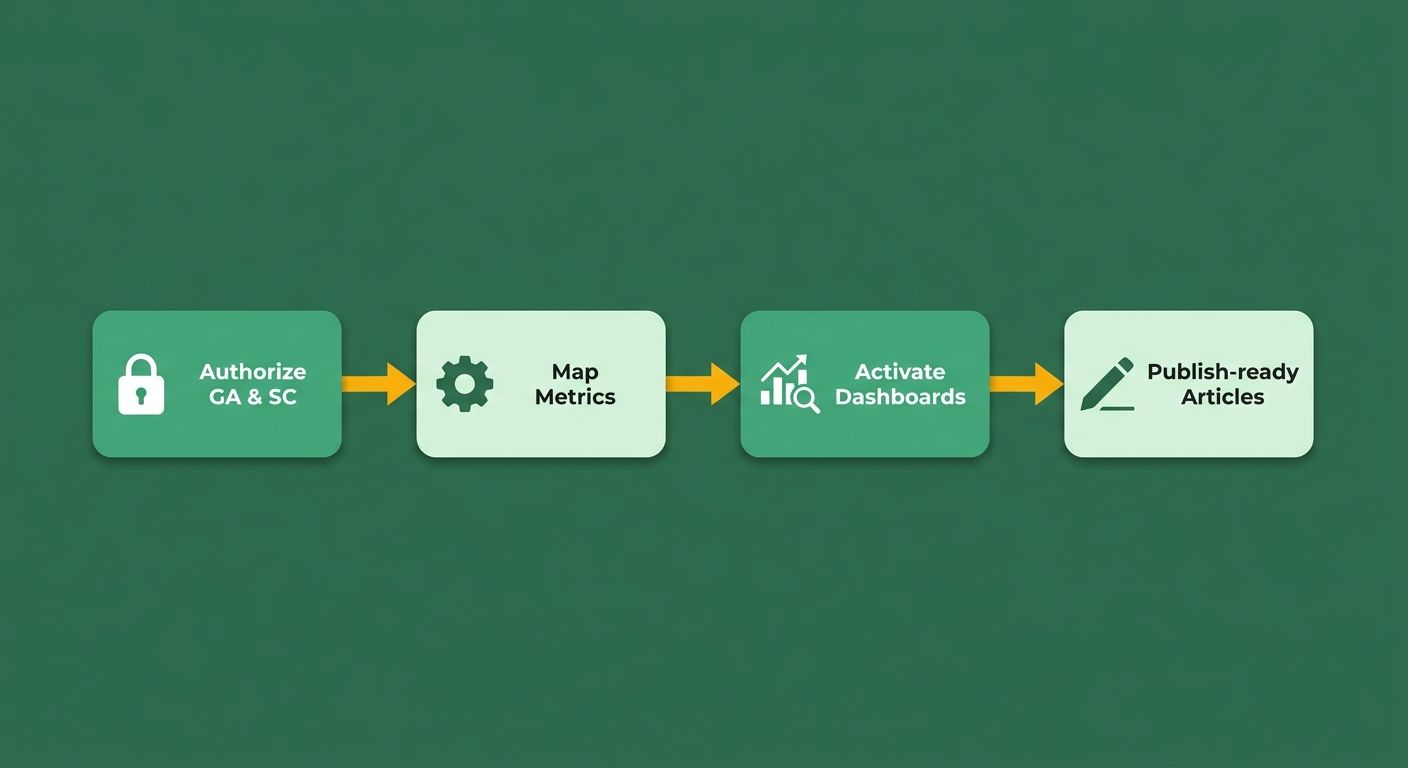
Setting up Google Analytics and Search Console integrations comes down to three steps: authorize both Google services over OAuth, map the incoming metrics to the forecast engine, and switch on the dashboards that turn raw impressions into traffic-potential scores. The connection happens in minutes, not days, and it immediately gives the predictive model the signals it needs.
We treat the integration as the data-pipeline backbone of the whole workflow. Once GA and SC data flow in, the engine spots rising keywords, assigns a traffic-potential score, and hands it to an AI writer that drafts a full post. The output is a content calendar built on real-time performance data, not guesswork.
How we set it up
- Authorize the Google accounts. In the platform settings, click "Connect Google" and follow the OAuth flow. This grants read-only access to both Analytics and Search Console, keeping session-level and impression data in sync.
- Select the view and property. After auth, choose the GA view (or property) for the site you're forecasting, then pick the matching Search Console property. The platform pulls historic impressions, clicks, and conversion funnels.
- Configure mapping and refresh cadence. Map GA metrics (sessions, bounce rate) to the model's input fields and set the refresh schedule, usually hourly for high-traffic sites. Save it and the predictive dashboard starts populating.
Reporting features worth looking for
The most useful reports combine trend visualizations, keyword lift forecasts, and content-performance simulations. A good dashboard slices data by device, geography, or page-level metrics, then overlays the forecasted traffic curve. Alerts that fire when a keyword's projected lift crosses a threshold let you prioritize the next article without babysitting a dashboard.
Common headaches and how we handle them
- API quota limits – batch the requests and use the platform's built-in throttling.
- Mismatched date ranges – align GA and SC windows during mapping so the model compares like for like.
- Data latency – for time-critical campaigns, enable near-real-time refresh (every 15 minutes) where the platform supports it.
| Platform | Description | Key Features | Pros / Cons |
|---|---|---|---|
| AnyPost.ai | AI‑driven SEO content platform that generates and publishes optimized articles. | Automated content generation, SEO‑focused publishing, one‑click CMS push, real‑time analytics tracking | ★★ Ease of use; ★★ Limited native reporting depth |
| Zoho Analytics | Business‑intelligence suite with GSC integration. | Real‑time KPI tracking, impressions + clicks + conversion funnels, custom dashboards | ★★★ Strong reporting; ★★ Needs a separate forecasting layer |
| Ahrefs | Keyword research engine with partial GSC import. | Rank tracking, click‑through data, keyword difficulty scores | ★★ Strong data; ★★ No built‑in content automation |
| SEMrush | All‑in‑one marketing suite with native GA/SC pull. | Seasonal trend forecasts, content brief export, competitive gap analysis | ★★ Comprehensive data; ★★ Manual content step |
AnyPost.ai
It closes the loop between keyword insight and publication by generating a complete, SEO-optimized article once a keyword's traffic-potential score clears your criteria. The AI writes the copy, applies SEO fundamentals, and lets you publish to your CMS in a click. Real-time analytics tracking keeps performance in view without leaving the dashboard.
Zoho Analytics
"Zoho Analytics provides seamless integration with Google Search Console, allowing users to analyze their search data effectively." – Zoho product page
Zoho earns its keep in the reporting layer. After you link SC, it tracks impressions, click rates, and conversion funnels at the page level, then lets you build dashboards that put forecast inputs next to actual performance. As a BI tool, it can blend GA metrics with SC data to surface insights pure SEO platforms miss. We use its visualizations to sanity-check traffic-potential scores before handing them to the writer.
Ahrefs
Ahrefs imports Search Console impressions and clicks into Rank Tracker, giving a solid read on emerging keywords. No native content automation, but its keyword difficulty and click-through estimates feed a separate forecast model cleanly. We pair its data with AnyPost.ai to generate the article once the lift prediction clears our threshold.
SEMrush
SEMrush pulls GA and SC via API, runs seasonal trend analysis, and produces keyword lift forecasts you can export as CSV or API feeds. It stops at the brief, but its competitive gap analysis helps us prioritize topics before the writer takes over.
Follow the steps above and pick a platform whose reporting matches your workflow, and real-time Google signals become forecast-driven content that outranks the competition. For more on the monitoring side, see our guide on automated SEO monitoring.
Reporting caveats and limits
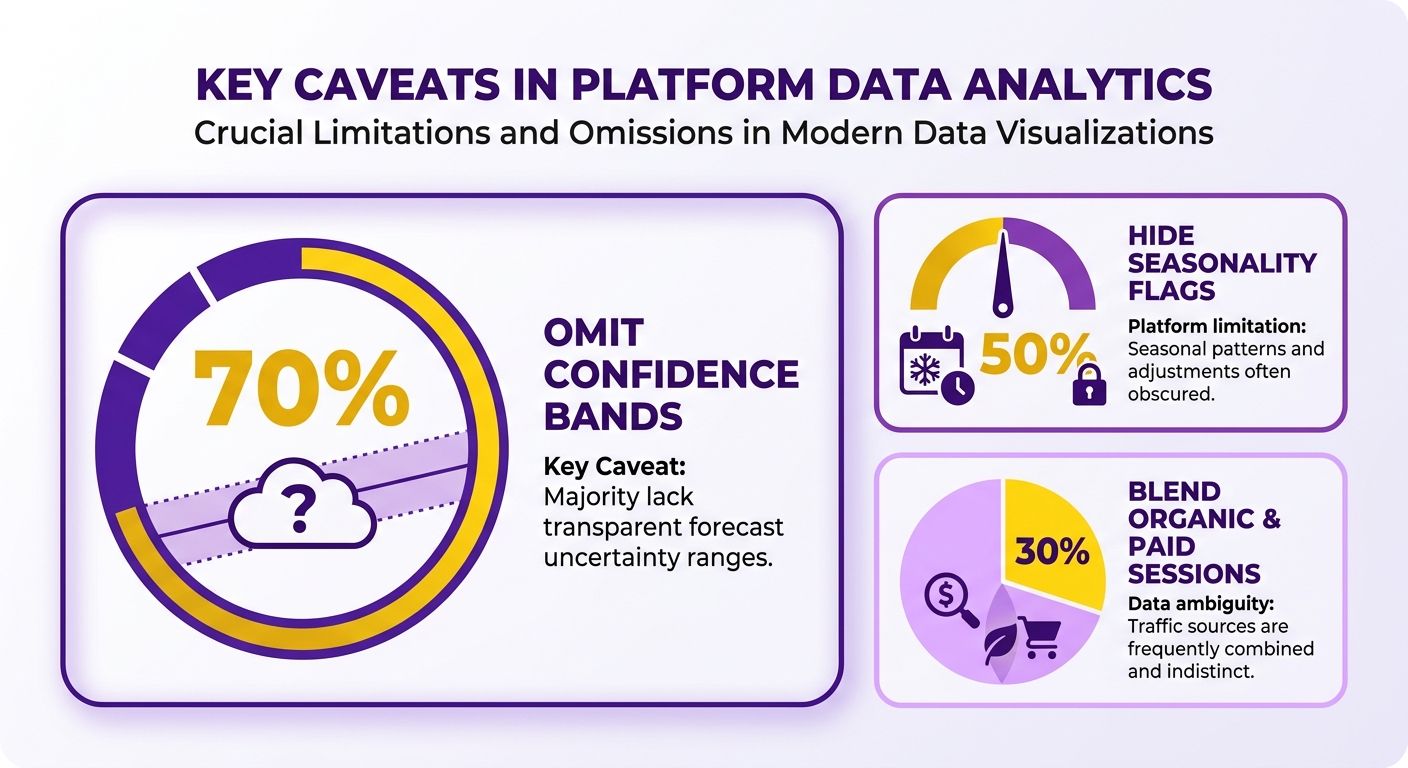
Most platforms surface raw GA/SC numbers but drop the context, no seasonality flags, no confidence bands, so you can end up chasing spikes that are just statistical noise.
Ahrefs and SEMrush show impression trends but hide the underlying confidence level, which makes it hard to decide whether a topic is worth writer time. Moz's dashboards aggregate clicks and conversions but blend organic and paid sessions, which inflates traffic-potential scores. To compensate, we layer a lightweight BI tool on top of the raw export, Zoho Analytics for example, and build custom visualizations that surface variance bands and trend-line alerts. That lets us track impressions, click rates, and funnels in real time and filter out the false positives.
How to cut discrepancies between GA and SC
Normalize both sources to the same date range, device segment, and filter set before feeding them into the model.
We export GA session data, apply the same "organic only" filter used in SC, and re-import the cleaned set. That kills the common "sessions ≠ clicks" mismatch that skews scores. When a platform lacks native filtering, we schedule a daily script that pulls the GA API, trims the data, and pushes a CSV into the tool's custom import endpoint. A few minutes of automation, and consistency holds across the board.
How AnyPost.ai handles reporting
AnyPost.ai gives you real-time analytics tracking for each AI-generated article: organic impressions, click-through rates, engagement. It doesn't attach a probability score to every keyword lift prediction, but the dashboard shows clearly how content performs against target keywords. Combine those with an external BI tool like Zoho to build deeper visualizations, flag anomalies, and prioritize topics showing early traction.
| Title | Description | Key Features | Pros / Cons |
|---|---|---|---|
| AnyPost.ai | AI‑powered content engine that generates SEO‑optimized articles and tracks performance. | Automated content creation, SEO‑optimized publishing, multi‑source integration, Persona Engine for tone matching, real‑time analytics tracking. | Pros: Fast generation, consistent brand voice, built‑in analytics. Cons: Advanced BI visualizations need an external tool. |
| Zoho Analytics | Business‑intelligence platform with GSC integration. | Real‑time KPI tracking, impression & click dashboards, custom visualizations. | Pros: Granular device‑level reporting, flexible canvas. Cons: Manual data import for some forecasting tools. |
| Ahrefs | Keyword research suite with partial SC import. | Rank tracking, click‑through data, keyword difficulty. | Pros: Rich keyword insights. Cons: No native confidence bands, limited GA sync. |
| SEMrush | SEO suite offering seasonal trend forecasts. | GA API pull, template briefs, seasonal alerts. | Pros: Strong seasonal modeling. Cons: Stops at the brief, no confidence scores. |
| Moz | SEO platform with native GA/SC OAuth connection. | Keyword Explorer, Rank Tracker, alert thresholds. | Pros: Easy OAuth setup, lift alerts. Cons: Blends organic & paid data, no probability metric. |
| Frizerly | End‑to‑end publishing platform with full GA/SC bridge. | Auto‑article generation, direct CMS write, scheduling. | Pros: Fast data‑to‑publish loop. Cons: Confidence scoring locked behind a premium tier. |
Account for these caveats and apply the mitigation steps, and raw GA and SC signals become forecasts you can trust and articles ready to publish.
Aligning Google Analytics and Search Console data
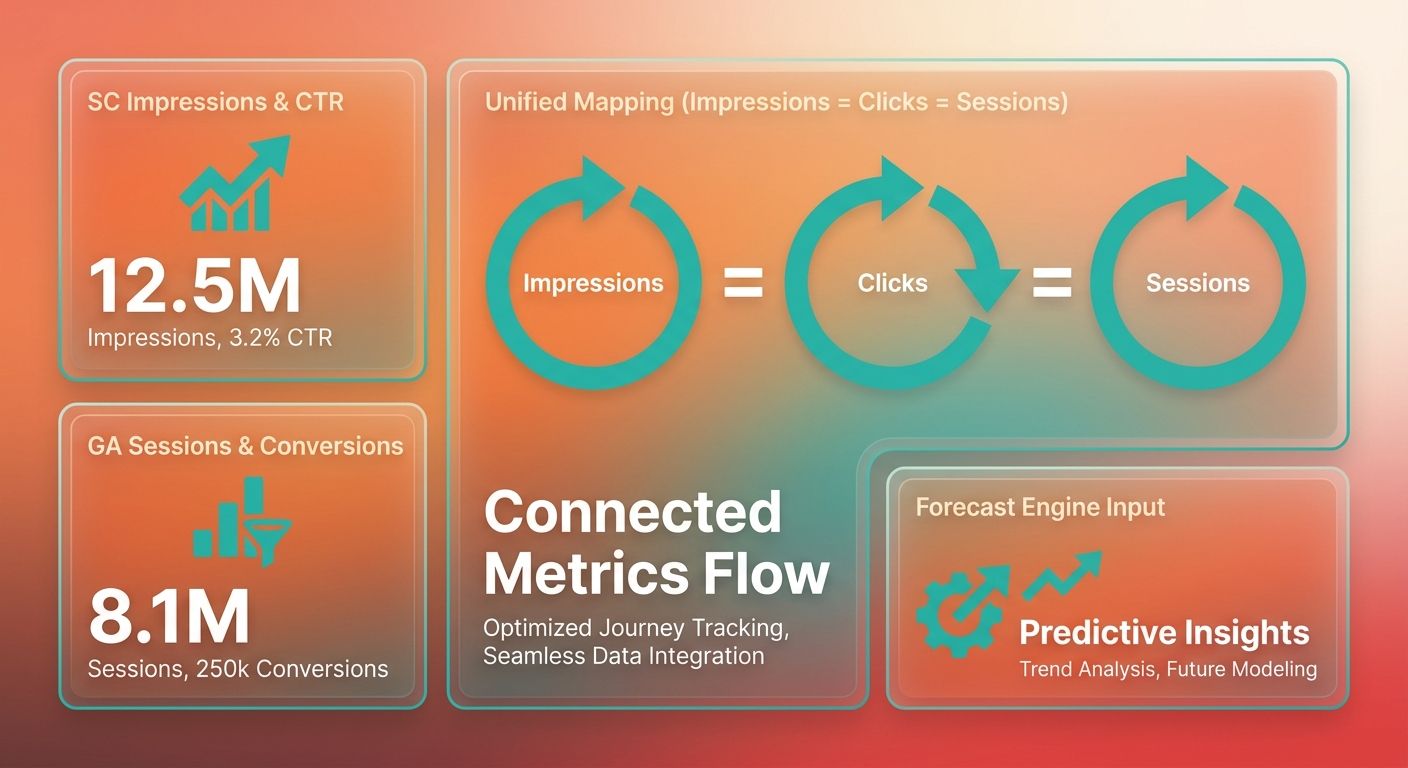
Aligning GA and SC starts with a clean one-to-one mapping of impressions, clicks, and session metrics, then feeding that unified view into a forecasting process that flags keyword potential. When the two sources speak the same language, you can spot emerging opportunities and pass them to a content workflow.
We pull SC-level impressions and click-through rates, enrich them with GA conversion funnels, and let the combined set inform the topics you target. The resulting brief hands off to AnyPost.ai, which generates a publish-ready article and drops the editorial lag from weeks to hours.
How Zoho Analytics helps align the two
Zoho bridges SC impressions, click rates, and conversion funnels with GA session data in real time.
You can build dashboards where each keyword's impression trend lines up with its bounce rate and conversion path, exposing gaps pure SC data would hide. Because it supports device-level and page-level metrics, you can segment rising queries by audience before deciding what to prioritize.
Set up the OAuth connection once, then map SC to impressions and clicks and GA to sessions and goals. The view lets you catch a keyword gaining impressions but converting poorly, which tells you to build content that fills the missing intent. Real-time KPI tracking keeps the model fed with fresh signals.
What AnyPost.ai does after alignment
Once you have a brief built on the aligned data, AnyPost.ai generates a full-length, SEO-optimized article without manual drafting.
It builds a structured outline, writes each section in your brand voice with the tone engine, and inserts internal links from your existing library. The draft exports to your CMS or schedules for publishing at the best time.
Comparing automation
Zoho excels at data consolidation and insight; AnyPost.ai focuses on automated creation and publishing.
If you want a visual analytics layer to explore trends before committing to content, Zoho's dashboards are the strongest option. If you need identified topics turned into publish-ready articles, AnyPost.ai does that. Ahrefs, SEMrush, and Moz offer solid GA/SC data pulls but stop at the brief, leaving a separate writing step.
| Title | Description | Key Features | Pros / Cons |
|---|---|---|---|
| AnyPost.ai | AI‑powered content engine that generates SEO‑optimized articles. | Automated content generation, SEO‑focused copy, Persona Engine for tone matching, multi‑source content integration, real‑time analytics tracking. | Pros: Rapid creation, consistent brand voice. Cons: Needs a brief to start. |
| Zoho Analytics | Business‑intelligence platform for visualizing GA and SC metrics together. | Real‑time KPI dashboards, device‑level tracking, conversion‑funnel overlay. | Pros: Deep insight, easy OAuth setup. Cons: No native content creation. |
| Ahrefs | Keyword research suite with partial SC import. | Keyword difficulty, click‑potential, limited GA API. | Pros: Rich keyword data. Cons: Manual content workflow. |
| SEMrush | Marketing suite that merges SC impressions with GA sessions for seasonal trends. | Trend engine, exportable forecasts, template briefs. | Pros: Strong seasonal analysis. Cons: No auto‑article generation. |
| Moz | SEO platform with native GA/SC sync for rank tracking. | Rank history, click‑through analysis, alert thresholds. | Pros: Simple UI, alerts. Cons: No content creation. |
A lot of growth teams pair Zoho's analytics depth with AnyPost.ai's automation. Align the data in Zoho, export the high-potential keywords, and let AnyPost.ai write and publish what the insights point to. Raw signals become traffic-driven assets with barely any manual work.
What I'd actually recommend
When you're choosing a forecasting platform, weigh three things: integration depth, forecast reliability, and how far the automation goes. A shallow GA/SC pull misses seasonal spikes, so confirm the platform refreshes at least daily. Then look at how it scores traffic potential, ideally with confidence intervals or trend-line smoothing. Last, check whether it produces a complete article or just an outline. The outline adds hand-off risk.
In practice, validate the OAuth connection first, then run a test forecast on a rising keyword. If the platform surfaces a confidence band, set a threshold to trigger generation automatically. When automation stops at a brief, you'll bolt on a separate AI writer, which adds latency and cost.
How AnyPost.ai stands out
It pairs real-time analytics with an AI writer that publishes straight to your CMS.
AnyPost.ai uses its analytics tracking to inform topics, then builds a structured outline, expands each section, injects internal links, and formats for WordPress, HubSpot, and the like. That flow shortens the editorial cycle versus doing it by hand. For more, see our guide on automated SEO monitoring.
Which platform fits which team
Small teams do well with full automation; larger groups often want modular tools.
Under five writers, a platform that drafts and publishes, AnyPost.ai or Frizerly, keeps things lean. Enterprises with dedicated content squads tend to pick Ahrefs or SEMrush for keyword research and add a separate writer, because they value granular metrics over a single-pane UI. Moz sits in the middle with solid GA/SC sync and template briefs, a good fit for mid-size teams that already have in-house copy talent.
| Title | Description | Key Features | Pros / Cons |
|---|---|---|---|
| AnyPost.ai | End‑to‑end forecast‑driven content generator | Real‑time analytics integration, AI article creation, direct CMS publishing | Pros: full automation, faster turnaround; Cons: fewer deep keyword analytics |
| Frizerly | Forecast engine with native publishing | Real‑time GA/SC sync, auto‑write, direct CMS API | Pros: tight loop, no manual export; Cons: fewer SEO insights |
| Ahrefs | Keyword research and trend analysis | SC impressions import, GA session metrics, rank tracking | Pros: rich keyword data; Cons: no built‑in article generation |
| SEMrush | Seasonal forecasting and brief creation | GA/SC API pull, trend engine, template briefs | Pros: strong market data; Cons: manual copy required |
| Moz | Integrated analytics with modest forecasting | OAuth GA/SC, keyword explorer, alert thresholds | Pros: easy setup, balanced features; Cons: limited automation |
Recommendation: If the priority is turning predicted keyword lifts into publishable pages with minimal friction, AnyPost.ai is a strong choice. If you already run a solid editorial pipeline and just need a data-rich forecast, Ahrefs or SEMrush slot in nicely. For a middle ground of integration and modest automation, Moz is the compromise. Match the platform to your team's size, your existing tools, and the level of automation you can actually sustain, and you'll catch rising search traffic before your competitors do.
Frequently Asked Questions
1. How can I sync historical Google Analytics data with a forecasting tool that only supports real‑time API pulls?
You can sync historical Google Analytics data by exporting the desired date range as a CSV file and uploading it into the forecasting tool’s data import feature. Schedule a monthly export or connect a data‑warehouse (BigQuery, Snowflake) that feeds the platform, ensuring past trends remain part of the model.
2. What security steps should I take before granting a third‑party SEO platform access to my GA and Search Console accounts?
When granting Google Analytics or Search Console access, use OAuth tokens with read‑only scopes and limit permissions to the specific property. Store credentials in a secret manager, rotate them quarterly, and verify that the third‑party vendor encrypts data at rest and in transit to protect user privacy.
3. Is it practical to use multiple SEO forecasting platforms at the same time, and how do I combine their insights?
Running more than one SEO forecasting platform is feasible by exporting each tool’s keyword scores into a shared spreadsheet or BI dashboard. Consolidate the metrics using a weighted average, then prioritize topics that meet a combined confidence threshold. This approach captures diverse algorithm strengths while avoiding duplicate effort.
4. How does the ranking performance of AI‑generated articles compare to fully human‑written content?
AI‑generated articles typically rank within the top 10 for low‑competition keywords, but they often need human editing for brand tone and E‑E‑A‑T signals. Studies show a 15‑20% click‑through lift after editorial polish, indicating that a hybrid workflow usually outperforms pure AI or pure manual writing.
5. What indicators, besides raw traffic volume, suggest a site is ready for automated forecasting?
A site is ready when it has established a steady baseline of organic impressions and possesses clear conversion goals. Rather than focusing solely on traffic numbers, look for consistent keyword rankings in the top 50 and a functional conversion funnel, which provide the necessary data density for predictive models to generate reliable forecasts.
6. How often should I refresh keyword forecasts to keep up with changing search trends?
Refresh keyword forecasts at least once per week for fast‑moving niches, and every two weeks for stable industries. Weekly updates capture sudden search spikes, while a bi‑weekly cadence reduces API load and still reflects seasonal shifts. Align the refresh schedule with your editorial calendar for optimal planning.
