Which SEO Platforms Offer Customized Reporting Options

Key Takeaways
- DashThis pulls from 30+ data sources and auto-schedules reports, which drops monthly assembly time to under an hour.
- SE Ranking ships 12+ ready-made templates plus API access, so you can build bespoke visualizations after a short scripting phase.
- AgencyAnalytics gives you a client portal, meaning you can hand off live, fully branded dashboards straight to the customer.
- A basic custom report goes live in one to two days. Fully automated, branded dashboards usually take three to five.
- Solo marketers rate these tools 2–3 out of 5 on difficulty. Agencies feel more of the weight, averaging 3–4.
- AnyPost.ai folds content creation into real-time analytics, and it scores the lowest difficulty rating among solo users.
Quick Summary
DashThis, SE Ranking, and AgencyAnalytics lead the pack on dashboard flexibility, with white-label templates and drag-and-drop builders. DashThis leans into multi-channel data aggregation and scheduling to reduce monthly reporting work. SE Ranking gives developers real API access for custom visualizations. AgencyAnalytics focuses on client transparency through secure, interactive dashboards.
How long does it take to get a custom report up and running?
Answer: A basic custom report is quick. The slower part is a fully branded, automated dashboard for multiple clients. That usually needs a real setup phase. Tools with pre-built integrations let you publish almost immediately after connecting accounts. Choose the developer API route for custom layouts, and you will need some scripting and testing. If you only need traffic and engagement metrics for AI-generated posts, AnyPost.ai surfaces real-time analytics inside the publishing interface, so there is no external data plumbing to wire up.
What's the difficulty level for solo marketers versus agencies?
Answer: The learning curve tracks with your scale. Solo marketers find these platforms easy enough on standard templates. Agencies hit friction fast, mostly from multi-client permissions and white-labeling. DashThis stays approachable with pre-built connectors that require little technical work. SE Ranking goes deeper, and full API value often means bringing in a developer. AgencyAnalytics centers on client management, so the portal features are strong but the upfront configuration is heavier. AnyPost.ai sidesteps most of this by keeping content creation and performance tracking in one dashboard.
| Tool | Custom Reporting Features | Integration Breadth | Time to Implement* | Difficulty (1‑5) |
|---|---|---|---|---|
| DashThis | White‑label templates, AI insights, auto‑scheduling | 30+ marketing tools (GA, SEMrush, Ahrefs) | 1‑2 days (basic) | 2 |
| SE Ranking | 12+ report templates, API for custom dashboards | GA, Search Console, major SERP tools | 2‑3 days (full) | 3 |
| AgencyAnalytics | Client portal, white‑label dashboards, AI alerts | 80+ integrations (ads, social, CMS) | 3‑5 days (agency) | 4 |
| Ahrefs | Custom report exports, bulk data pulls | API, Google Sheets, Zapier | 2‑4 days (advanced) | 3 |
| Google Analytics | Custom dashboards, event tracking, predictive insights | Native Google ecosystem | <1 day (basic) | 2 |
| AnyPost.ai | Automated content generation, SEO‑optimized publishing, real‑time analytics, multi‑source integration | Direct to WordPress, LinkedIn, X | 1‑2 days (auto‑linked) | 2 |
*Time estimates cover initial setup, template selection, and basic styling; ongoing maintenance is minimal for most tools.
So, practically: if you're a solo marketer who wants performance metrics for AI-generated content without juggling five dashboards, AnyPost.ai is the fast path. One-click publishing, built-in analytics, and reporting already in place. Run an agency with several clients, and DashThis or AgencyAnalytics give you scalability and white-label control, with a slightly steeper climb to get there.
Why reporting is where AI content proves its worth
This is the part that lets a single marketer see exactly which AI-written post moved keyword rankings and traffic. Budget shifts happen the same day, not next quarter.
AnyPost.ai tags each generated article with its target keywords and shows rank changes as they happen. When the tracker flags a climb, the dashboard puts the original post, the headline, and the key metric side by side. That visibility removes the guesswork. No month-long A/B test is needed just to confirm what already worked. That saves weeks of labor and speeds up decisions.
Which features actually separate the top platforms?
Answer: Three pillars: flexible dashboards, AI-driven insights, and native content-to-keyword linkage.
Here's how the leading tools stack up against those pillars, AnyPost.ai included:
| Platform | Custom Dashboards | AI‑Driven Insights | Content‑to‑Keyword ROI Link | Integrations (≈) | Pricing Tier |
|---|---|---|---|---|---|
| AnyPost.ai | ✅ Real‑time analytics dashboard | ✅ AI‑generated content recommendations | ✅ Automatic keyword tagging and rank tracking | Multiple CMS & analytics platforms | Tiered plans (starter to enterprise) |
| Reporting Ninja | ✅ Drag‑and‑drop | ✅ Centralized data, no AI layer | ❌ Requires manual tagging | 20+ | Basic (subscription) |
| DashThis | ✅ White‑label templates | ✅ AI insights, auto‑scheduling | ❌ No native content link | 20+ | Professional (subscription) |
| Raven Tools | ✅ WYSIWYG builder | ✅ AI not native, relies on external | ❌ No direct content‑ROI tie | 15+ | Professional (subscription) |
The native content-ROI link is the differentiator. It lets a solo marketer prove the value of each copy asset without a separate attribution model.
When can you skip the heavyweight reporting suite?
Answer: If your clients are a handful of low-budget sites and you only need basic traffic charts, a full SaaS is overkill.
In that situation, free Google Analytics plus a spreadsheet often covers it. You just give up automated alerts and brandable PDFs that help clients feel supported. Starting on a basic tier that still includes custom dashboards leaves room to upgrade once the ROI data starts moving spend.
Customized reporting was never about prettier charts. It's the bridge that turns AI-generated content into outcomes you can point to. Tie keywords back to the exact post that earned them, and you act on data the moment it lands, not four weeks later in a review deck.
Key Features of Customized Reporting
Plenty of SEO platforms advertise customized reporting. Where most of them fall down is connecting the content workflow to search performance. Traditional dashboards keep rank-tracking data and content management in separate silos, so you're stuck manually cross-referencing your publishing calendar against organic traffic spikes. AnyPost closes that gap by pulling content metadata straight into the reporting suite, which means you read performance metrics next to the original draft.
Across the wider market, standard custom reporting is about visual layout flexibility, brand customization, and automated delivery. SE Ranking and DashThis are genuinely good at aggregating search and ad data into clean, client-ready formats. But they run independently of your CMS, so they can't automatically match a specific article to keyword intent. That leaves teams exporting data and doing spreadsheet lookups to measure content ROI. An integrated publishing-and-analytics system does that mapping the moment you hit publish.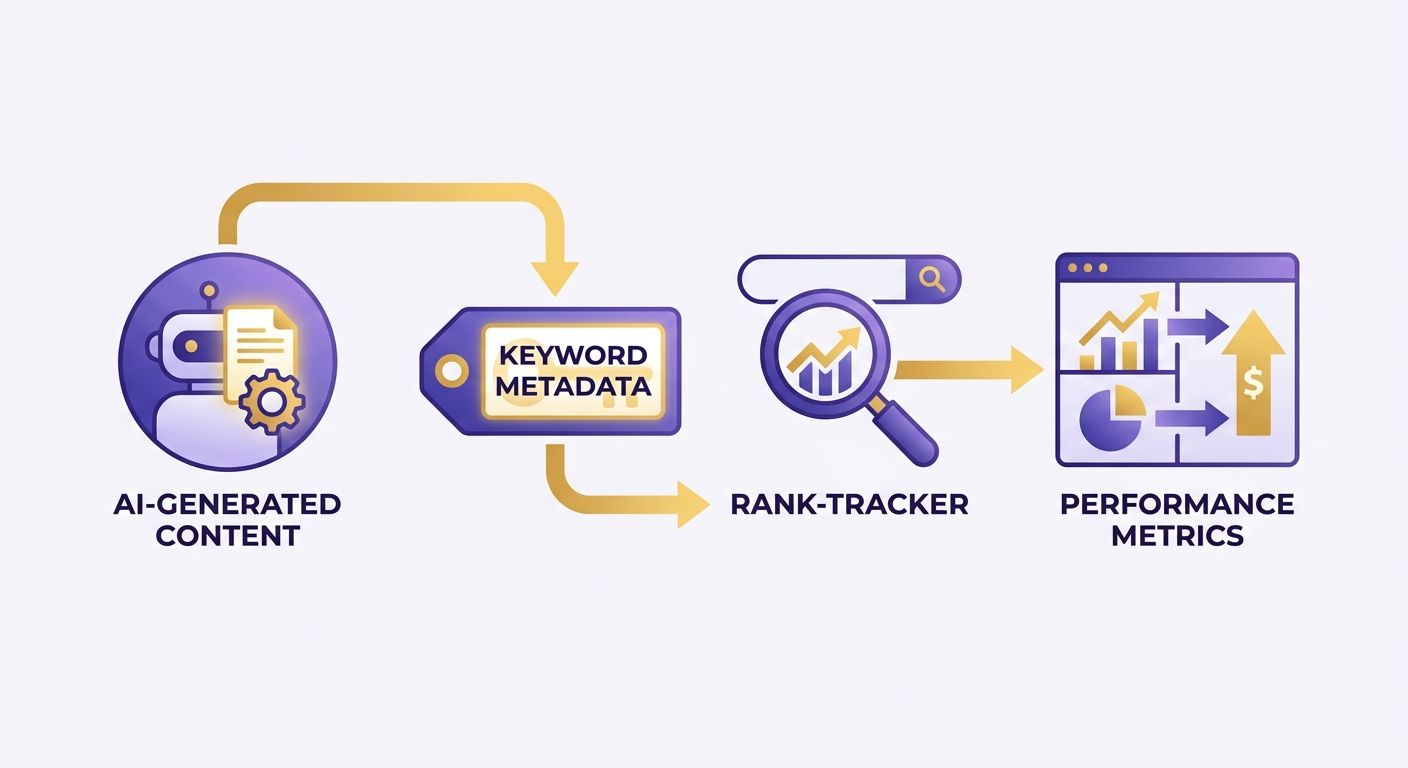
Which SEO platforms offer customized reporting options?
The way to judge these tools is report variety, layout flexibility, and data connectivity. The table below lines up the leaders against AnyPost's integrated content-to-keyword tracking.
| Feature | AnyPost.ai | DashThis | SE Ranking | AgencyAnalytics | Reporting Ninja |
|---|---|---|---|---|---|
| Report types | Keyword‑ROI, Content‑Performance, Funnel Analytics | SEO, PPC, Social, AI Insights | SEO, Backlink, Site‑Audit | White‑label client dashboards | Automated multi‑source reports |
| Customization | Drag‑drop builder + AI‑tagged post fields | White‑label templates, preset widgets | Custom templates, API for bespoke layouts | Fully brandable dashboards | Drag‑and‑drop plus custom widgets |
| Data sources | AI writer, Google Search Console, GA4, internal CMS | Extensive marketing integrations (GA, Ahrefs, SEMrush…) | GA, GSC, Majestic, Moz | Broad marketing & social suite (GA, Ads, Social) | GA, GSC, Google Ads |
| Automation / scheduling | Real‑time analytics + scheduled PDF/Link export | Auto‑schedule, AI insights | API‑driven auto‑refresh | Auto‑email, live client portal | Cron‑based report generation |
| Access & permissions | Role‑based view (author, analyst, client) | Team & client roles | User groups, API keys | Client‑portal login per project | Team‑level sharing links |
AnyPost's real-time analytics show ranking changes as they happen, and the reporting view carries the associated headline and meta details with them. That cuts out the month-long guess-and-check cycle the other platforms tend to force.
How does integrated content-to-keyword tracking change the game?
It turns reporting from a rear-view audit into a live performance console. Filter by a search term and you instantly get the exact URLs and publish dates behind the traffic change. Tools that only ingest raw ranking data can't do that. Less time spent on analysis means more time chasing the next keyword opportunity.
Industry analysts note the growing need for SEO tools that combine AI‑generated content insights with multi‑channel performance data.
Say a post about "sustainable packaging" drove a clear jump on the "eco-friendly packaging" keyword. You can see it, then replicate the style, tone, and structure that worked. On other platforms you'd export the ranking data, match it against a content calendar, and verify the correlation by hand.
What customization and automation features should you prioritize?
- Role‑based permissions – give authors view‑only access to their own performance while analysts see the full dataset.
- API‑driven data pulls – push AI‑generated metadata into the reporting engine without manual uploads.
- Scheduled delivery – send a PDF snapshot or a secure link to stakeholders on a daily or weekly cadence.
- White‑labeling – match client‑facing reports to your brand when needed.
Pair those features with native content-to-keyword linkage, and you get the most useful read for solo marketers and small teams. If the question you keep asking is "which AI post earned the ranking boost," AnyPost's integrated reporting connects creation and performance without extra tooling.
How the major platforms stack up on custom reporting
Customized reporting is a baseline expectation now, whether you're solo or running an agency. The tools that let you shape every metric, schedule delivery, and brand the output are DashThis, SE Ranking, AgencyAnalytics, and the specialized reporting engines. What separates them is how they pull data from search consoles, analytics suites, and marketing channels, then let you remix it into client-ready PDFs or live dashboards.
Which SEO platforms offer customized reporting options?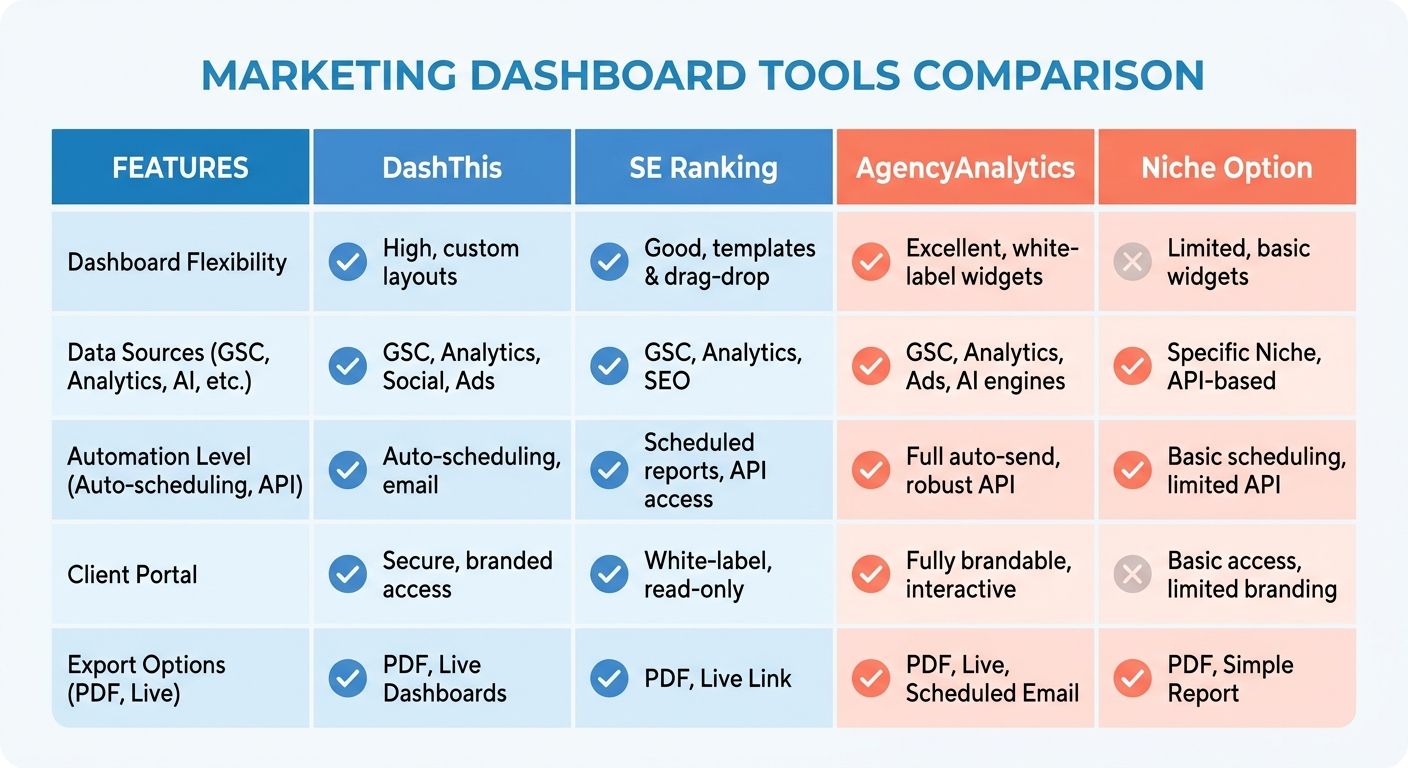
Judge them on layout flexibility, data-source connectivity, and scheduling. DashThis is built around a visual widget builder for multi-channel campaigns. SE Ranking gives you developer-friendly endpoints for custom database connections. AgencyAnalytics focuses on client transparency through secure, interactive dashboards, and specialized tools like Reporting Ninja focus on low-cost, fully automated report pipelines. Pricing runs from a free tier for basic dashboards up past $200 a month for enterprise, tracking the depth of customization you need.
| Platform | Customization depth | Data sources integrated | Automation & scheduling | Pricing (starting) |
|---|---|---|---|---|
| DashThis | Visual widget builder, custom branding | Multi-channel marketing connectors | Auto‑schedule PDFs, secure links | Free → $79/mo |
| SE Ranking | Custom report builder, developer API | Google Analytics, Search Console, third‑party APIs | Scheduled email delivery, webhook triggers | Free → $50/mo |
| AgencyAnalytics | Branded client dashboards, automated alerts | GA, GSC, social, PPC | Real‑time alerts, auto‑send | $79/mo |
| Reporting Ninja | Multi-source data mapping, custom widgets | GA, GSC, Google Ads | Fully automated nightly reports | $20/mo |
| AnyPost.ai | Automated content generation, SEO‑optimized publishing, real‑time analytics | Built‑in AI writer, multi‑source integration, GA/GSC sync | Scheduled publishing, analytics dashboards | Tiered plans, start free |
"Automated client‑ready reports" – a core expectation we see echoed across the leading tools.
For solo operators, automation is the real time-saver. Set a delivery cadence once and forget it. In advanced tools, webhook support lets you push data into external BI platforms for deeper analysis. Real-time alerts help teams react the moment rankings swing.
Where AnyPost's reporting lands
AnyPost keeps content generation, publishing, and performance analytics in one platform. The built-in analytics dashboard reports traffic, engagement, and SEO metrics for the articles it creates and publishes, so you can measure each piece without bouncing between tools. That single view makes it easier to check results and adjust quickly.
Other tools track rankings well enough, but they usually need extra steps to connect a published article to its performance data. AnyPost's integrated approach cuts the custom integrations and puts the key metrics next to your content in one place.
What to weigh when picking a tool
Four practical criteria:
- Depth of customization – Can you edit every chart, add your logo, and choose export formats? Tools that lock you into preset layouts get in the way of client branding.
- Integration ecosystem – Look for native connections to Google Analytics, Search Console, and any AI visibility sources you're already using. A single-pane view saves real time when data lives in multiple systems.
- Automation maturity – Real-time alerts and scheduled PDFs cut reporting time sharply. Many users say automation is what got their manual assembly hours back.
- Pricing alignment – Match the tier to how often you report. Free or basic plans handle occasional audits; enterprise plans open up API access and white-labeling for client work.
Map those factors onto the comparison table, and the platform that balances flexibility, data reach, and cost for your workflow tends to stand out. For solo marketers who need to trace performance back to the content that earned it, AnyPost's integrated setup is a direct path to the answer.
Choosing the Right Platform for Your Customized Reporting Needs
The right software comes down to your scale, how often you report, and how much detail your stakeholders expect. An integrated platform lets an independent marketer trace revenue back to specific content assets without toggling between disconnected apps.
The other question is fit: solo operator, growing agency, or enterprise team. Recent surveys show agencies routinely consolidate data from multiple tools during client reviews, and automating that step removes a lot of admin drag. Managing a single site? Speed of setup is the priority. Overseeing dozens of accounts? You need scalability and multi-user controls.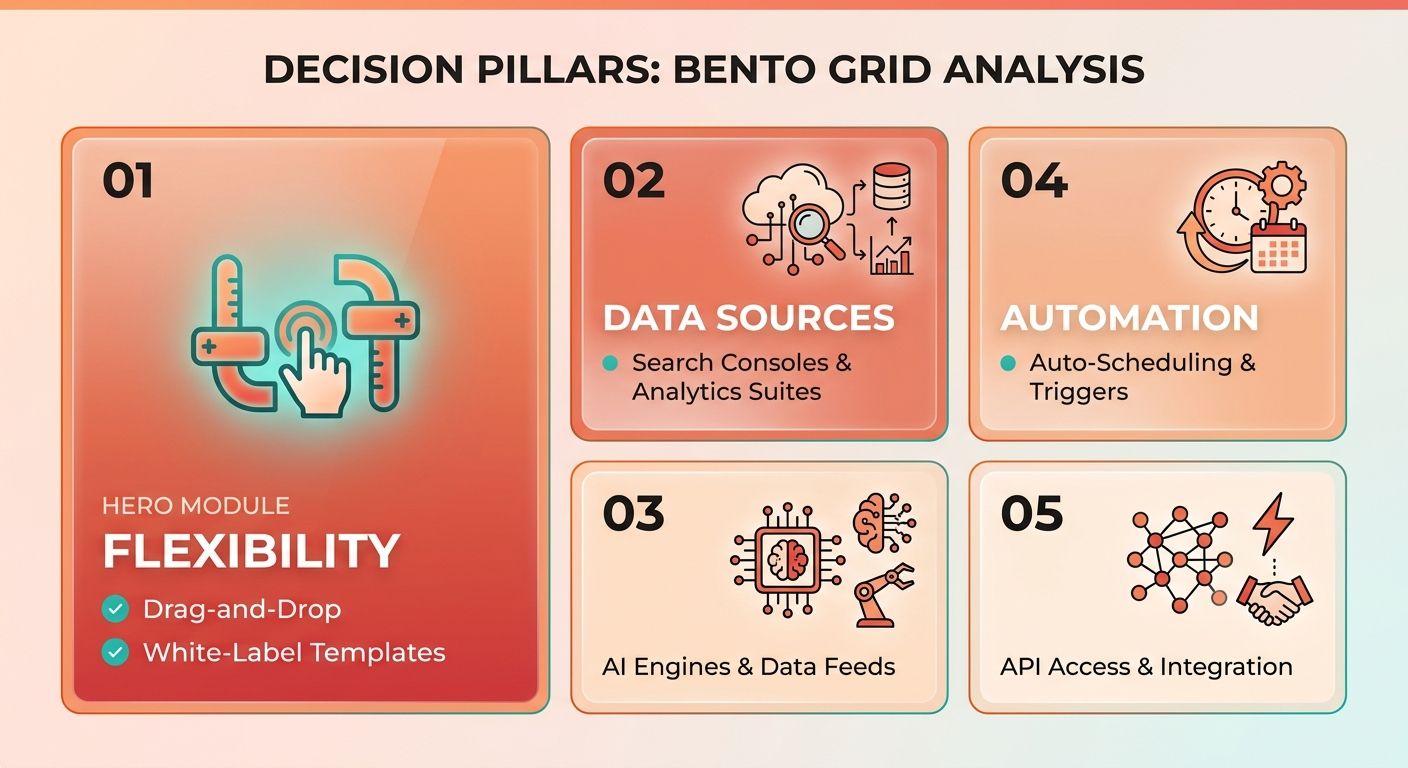
What criteria should we compare on?
Three core criteria separate the leaders:
- Customization depth – building custom layouts, applying white-label branding, and embedding content-creation metadata.
- Integration breadth – how cleanly the tool connects to your analytics sources, ad platforms, and content libraries.
- Automation & onboarding – automated scheduling, real-time alerts, and guided setup.
Here's a quick-reference table lining up well-known tools against those criteria. Pricing shows only the broad categories that appear across the market.
| Platform | Custom Report Flexibility | Integration Breadth | Automation & Scheduling | Pricing Tier |
|---|---|---|---|---|
| AnyPost.ai | Links keyword metadata to AI‑generated drafts; lets you create dashboards that surface ROI per post | Connects to publishing platforms and pulls performance data from its own analytics engine | Automated updates when rankings shift; scheduled email summaries | Professional‑level plans (details on website) |
| DashThis | White‑label templates, drag‑and‑drop widgets | Multi-channel connectors (analytics, search, ads) | Auto‑scheduling of reports | Basic‑level plans |
| SE Ranking | Custom report builder, developer API | GA & Search Console integration, plus third‑party APIs | Scheduled email PDFs | Free tier available |
| AgencyAnalytics | Branded client dashboards, automated alerts | Broad marketing & social suite | Real‑time alerts, auto‑send | Professional‑level plans |
| Reporting Ninja | Centralized data hub, drag‑and‑drop builder | GA, Search Console, Google Ads | Automated recurring reports | Basic‑level plans |
"Quality reporting builds trust and justifies your fees." – 9 Best SEO Reporting Software for Marketing Agencies
How implementation differs: solo vs agency
If you're solo, go for instant onboarding and minimal configuration. Out-of-the-box templates get your first report out almost immediately, skipping the tedium of manual API setup. If you plan to scale, look for multi-user permissions, role-based access, and interactive dashboards so stakeholders can view live data without a monthly PDF export ritual.
Agencies care more about white-labeling and bulk export. Serving dozens of clients, you want API-driven bulk data pulls or a client-facing portal to cut down on manual hand-offs. That's why so many agencies report real time savings once they automate scheduling and pull their data sources into one dashboard.
Where AnyPost.ai fits
AnyPost.ai's angle is bridging content creation and performance tracking. It embeds tracking identifiers into the publishing workflow, so you watch search visibility trends next to the original text and editorial suggestions. That's a direct line from post to KPI, with no switching between a content editor and a separate analytics tool.
Solo, you launch a custom report in minutes and see which post moved a target keyword from page 5 to page 1. For agencies the same feature scales: give each client its own content-generation workspace, then pull aggregated ROI dashboards for quarterly reviews. Because reporting lives in the same environment, setup stays short and the extra integration steps disappear.
The decision, in the end, is balancing customization, integration, and automation against your team's size and goals. If you want a tight link between AI-written content and keyword performance, AnyPost.ai gives you that built in, with content creation and measurable results in the same place.
Implementation Checklist for Customized Reporting
Setting up a customized reporting system takes a structured approach if you want accurate data and tools that actually talk to each other. The most dependable outcomes come from solutions that keep AI content creation, SEO-focused publishing, and instant analytics in one flow, so you move from draft to live performance tracking without a handoff.
Pre-implementation planning starts with matching your content objectives to specific, measurable keywords. List each target term, attach it to the AI-generated post that will host it, and decide which indicators matter most: rank movement, organic sessions, lead form completions. Then audit the data sources you already own, like Google Analytics, Search Console, and any third-party SERP trackers, and note which can feed directly into the reporting engine. For sources without an API, schedule a simple CSV upload so the data stream doesn't break.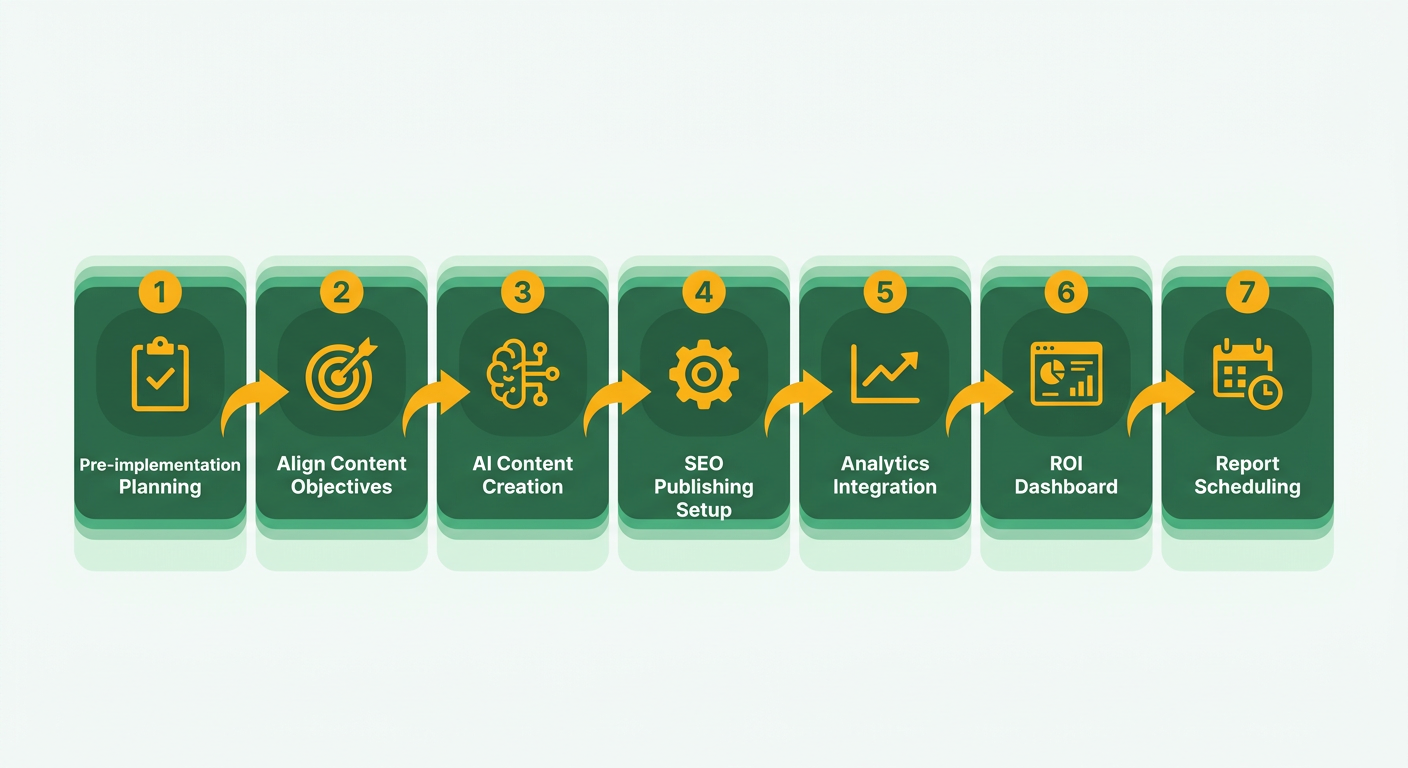
How do we set up the report framework?
Spin up a basic dashboard in your reporting tool of choice, then link it to AnyPost's live analytics module. Because AnyPost publishes SEO-optimized articles and records every interaction, you can pull keyword-level metrics straight into line graphs, traffic tables, and conversion funnels, with no manual tagging.
Which features should we configure for keyword-ROI tracking?
The core of the checklist is a feature matrix confirming each platform can tie a keyword's results to the AI-written post that generated them. Here's the comparison we lean on when evaluating tools:
| Feature | AnyPost (our platform) | DataLens | RankPulse | InsightBoard |
|---|---|---|---|---|
| Content‑keyword linkage | Direct mapping via built‑in identifiers | Requires custom webhook setup | Provides keyword‑to‑post IDs after import | Relies on manual CSV merge |
| Integrations | GA, GSC, WordPress, LinkedIn, X | Supports Zapier, HubSpot, Tableau | Connects to Bing Webmaster, Screaming Frog | Links to Meta Ads, Google Data Studio |
| Automation | Auto‑publish AI articles; metrics refresh hourly | Scheduled data pulls every 30 min | Manual refresh with one‑click trigger | Email‑driven report generation |
| Brand consistency | Persona Engine enforces voice guidelines | Theme editor for visual branding | No native branding controls | Custom logo and color palette |
| Pricing starter | Free tier up to 5 posts/month, then tiered plans | $15 / mo for core features | $25 / mo with unlimited keywords | $30 / mo with premium support |
If a platform can't do content-keyword linkage, you're back to guessing which post influenced the metric, which defeats the point of a custom report.
How do we keep the report accurate over time?
Run a quarterly review of data connections and alert thresholds. First, confirm the analytics feeds (GA, GSC) are still delivering fresh data, because a broken feed quietly produces stale ROI figures. Next, scan the AI-generated library for emerging keyword clusters that showed up since your last content refresh. Finally, tune the automation rules: if a keyword spikes past a preset limit, fire a Slack or email alert so you respond in minutes instead of waiting for the next scheduled report.
Map your keywords, configure linked widgets, run regular health checks, and a generic SEO dashboard turns into a solo-friendly command center that shows exactly how each AI-written post moves your bottom line.
Frequently Asked Questions
1. Can I export custom reports from these platforms in CSV or Excel format?
Export options include CSV and Excel across most platforms. DashThis lets you download raw data as CSV files, SE Ranking offers Excel sheets via its API, AgencyAnalytics provides per‑widget CSV exports, and AnyPost adds a one‑click CSV download of keyword‑ROI tables. All formats are ready for further analysis.
2. How do API rate limits affect automated reporting?
API rate limits determine how frequently data can be pulled without hitting errors. SE Ranking typically caps requests at 500 per hour, DashThis at about 1,000 daily, AgencyAnalytics around 200 hourly, while AnyPost’s plans grant higher limits that scale with usage, preventing most scheduling conflicts.
3. Is it possible to integrate non‑SEO data, like CRM leads, into these dashboards?
You can merge CRM or sales data into SEO dashboards using connectors. DashThis and AgencyAnalytics support Zapier and Google Sheets integrations, allowing you to pull lead counts into visual widgets. SE Ranking accepts custom JSON feeds, and AnyPost lets you upload a CSV of leads to associate them with specific articles.
4. What security measures protect data when using the API?
Data transferred through APIs is encrypted with HTTPS and requires OAuth 2.0 tokens that expire after a set period. Platforms also offer IP whitelisting and detailed audit logs. AnyPost adds role‑based access controls, letting administrators restrict which users can view or modify reporting data.
5. Can I set up role‑based permissions for clients on the reporting dashboards?
Role‑based permissions let you control dashboard visibility for each stakeholder. AgencyAnalytics creates individual client logins, DashThis assigns team roles such as editor or viewer, SE Ranking defines user groups with specific access rights, and AnyPost includes author, analyst, and client roles to segment data appropriately.
6. Do any of these tools support real‑time alerts for sudden ranking drops?
Real‑time alerts notify you when rankings shift sharply. AgencyAnalytics includes AI‑driven alerts that fire on sudden drops, AnyPost pushes notifications to your dashboard and email as soon as a keyword moves, DashThis can schedule frequent checks but lacks push alerts, while SE Ranking sends email warnings based on set thresholds.
