
5 AI Repurposing Moves That Turn One Blog Into Six Channels

Key Takeaways
- One blog post creates 3-5x more value when distributed across channels.
- About 70% of B2B buyers see the same topics repeatedly.
- Repurposing workflows cut content creation time by about 60%.
- AI automation can reduce that time even further.
- 94% of B2B marketers say repurposing extends original asset ROI.
- One researched post can supply 10+ formats.
- It can reach three to five times a single post's audience.
- A thorough blog post can support a five-to-seven-email drip sequence.
- Short videos from the post can perform well on TikTok and Instagram.
- Blog-based threads can increase referral traffic across channels.
Why one blog into six channels beats writing six things
Most B2B buyers face constant content repetition. When every publication covers the same topic, your blog must work harder to stand out. Learning how to repurpose content across six channels helps you avoid writing six new pieces.
The logic is simple. Share your insights across platforms where buyers already read. Turn one researched asset into tailored formats. This extends its reach and shelf life.
Why does one blog beat six separate posts?
Content repurposing means reshaping one asset into channel-native formats. Each platform gets the format it needs. Write once, then adapt for reach.
The efficiency is practical. Your team avoids starting from a blank page. Instead of beginning from scratch for X, email, and YouTube, you reuse research from a published blog. As the Dropbox Dash team puts it: "Create once, publish everywhere."
Each channel serves a different purpose. Visual platforms attract top-of-funnel attention. Email sequences support deeper consideration. Social threads can drive immediate site visits. AnyPost pulls real-time analytics from Google Search Console, showing what moved. You repurpose one idea and measure each channel's results.
What does AI actually change here?
AI makes repurposing repeatable, but voice consistency still matters. Without controls, AI can multiply brand-voice mistakes alongside content volume.
Some teams see AI as a multiplier for producing many formats quickly. Others warn that heavy AI use can create messaging mistakes. AnyPost's Persona Engine addresses that gap. It crawls your site and builds a Business Context Graph of your products, messaging, and audience. Each article can then match your voice.
Both views can be true. Productivity gains last when human oversight becomes easier. If your team re-edits every tweet and email, review time reduces the savings. Building voice consistency into the engine makes that oversight lighter.
Who should run this workflow first?
This workflow suits B2B SaaS marketers, lean content teams, and growth leaders seeking predictable pipeline. Publishing one solid blog each week provides enough source material.
Before dividing a post across six channels, confirm these fundamentals:
- Pick evergreen, high-value posts first. Long-term content repurposes better than time-sensitive news.
- Centralize your source content so every channel uses one searchable store.
- Set a per-format metric before publishing. Topic-level tracking can hide channel performance.
- Lock your brand voice into the tool, not a review checklist. Tone should remain consistent across blogs, threads, emails, and scripts.
Skip this if your blog output is thin or mainly news-driven. Repurposing multiplies existing material. It cannot create missing depth. When you have strong source material, AnyPost generates content in your voice and auto-publishes it across channels.
Move 2 – Reformat for X/Twitter: from atoms to a thread that gets read
A blog's atoms become a thread when sequenced well. Use this structure: Hook → 3-5 value nuggets → quote or stat visual → CTA. This turns a static post into a thread without starting over.
Many teams copy blog sentences into tweets. Engagement then flatlines. Threads need atomic thinking. Each atom becomes one self-contained tweet that earns the next tap.
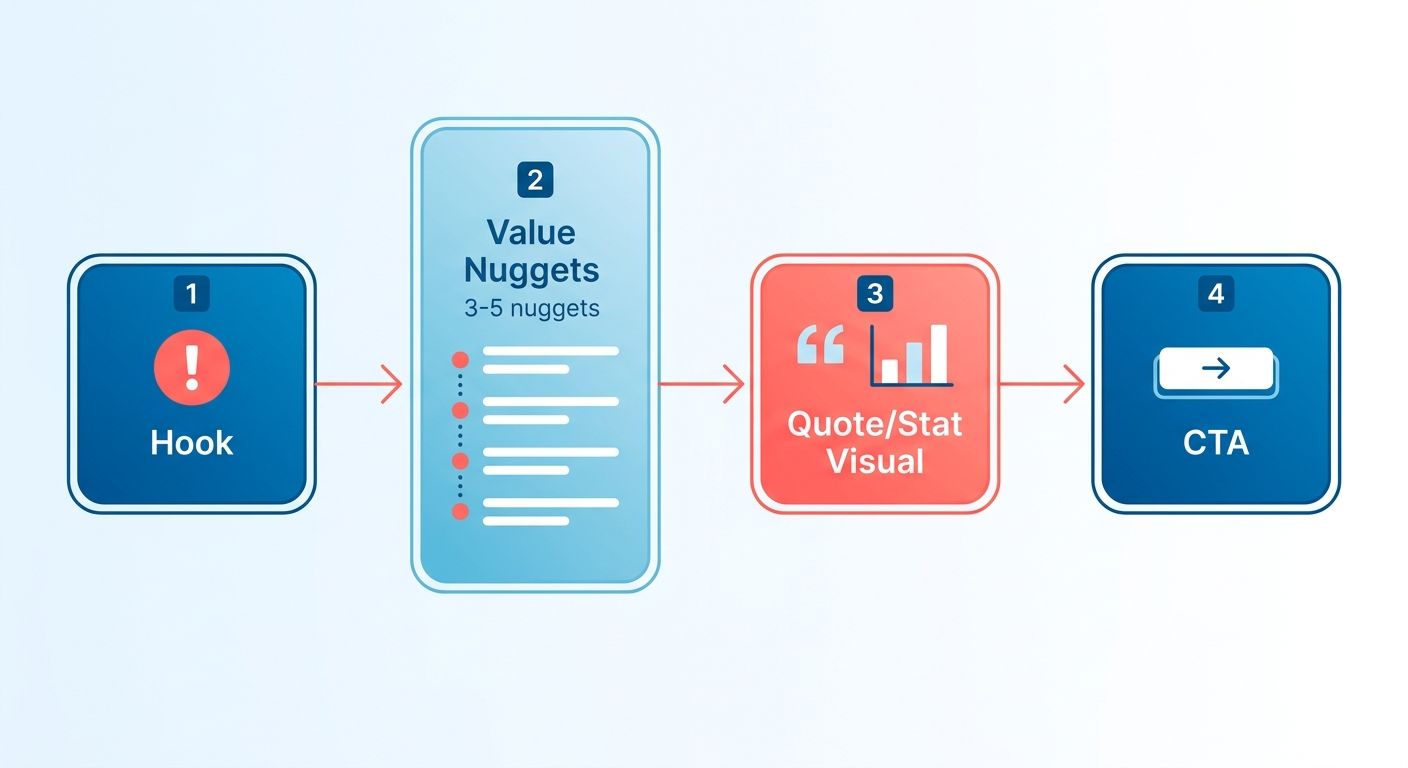
How do you structure a thread that actually gets read?
Pacing carries the thread. Open with a real pain point. Each following tweet should explain one specific, actionable insight. Space out the arguments so readers keep tapping.
AnyPost drafts against your brand guidelines. Each tweet maintains your professional tone. The transition from social media to your site feels consistent.
- Lead with a hook tweet that promises a specific payoff. The first line determines whether readers continue.
- Convert each atom into one tweet with one central idea. Crammed tweets lose readers.
- Keep the voice consistent so the thread sounds like one person speaking.
What visuals and hashtags make a thread convert?
Pair the thread with one quote graphic and 2-3 niche hashtags. A strong statistic or line can become a shareable image. Descriptive alt text also supports search visibility.
Use hashtags selectively. Two or three targeted tags can outperform ten broad ones. Publishing from AnyPost to X lets the thread ship the same day as the blog.
- Add one quote or stat visual near the middle. It breaks up text and creates a shareable element.
- Use 2-3 niche hashtags instead of broad ones. Focused tags reach interested readers.
- Post inside your optimal window to build early momentum.
Do repurposed threads really outperform?
Yes. Repurposed threads deliver an average 1.8x engagement boost over one-off tweets. Their structure carries a tested argument from the blog. That creates more coherence than spontaneous tweets often provide.
AnyPost auto-publishes to X, LinkedIn, and WordPress from one dashboard. One source post becomes several channel-native pieces. Metrics then show which angles resonate.
- Track engagement against your baseline to compare repurposed and standalone tweets.
- Publish straight from the blog draft so the thread ships the same day.
Move 3 – Adapt for email: from one blog to a nurture sequence
The email version of a blog should be a sequence, not one send. A single post can fuel a multi-day nurture. Leads receive the ideas step by step instead of in one message.
Many teams treat email as one touch. That misses the compounding effect of a sequence. AnyPost references your published material, so drafts align with your existing messaging.
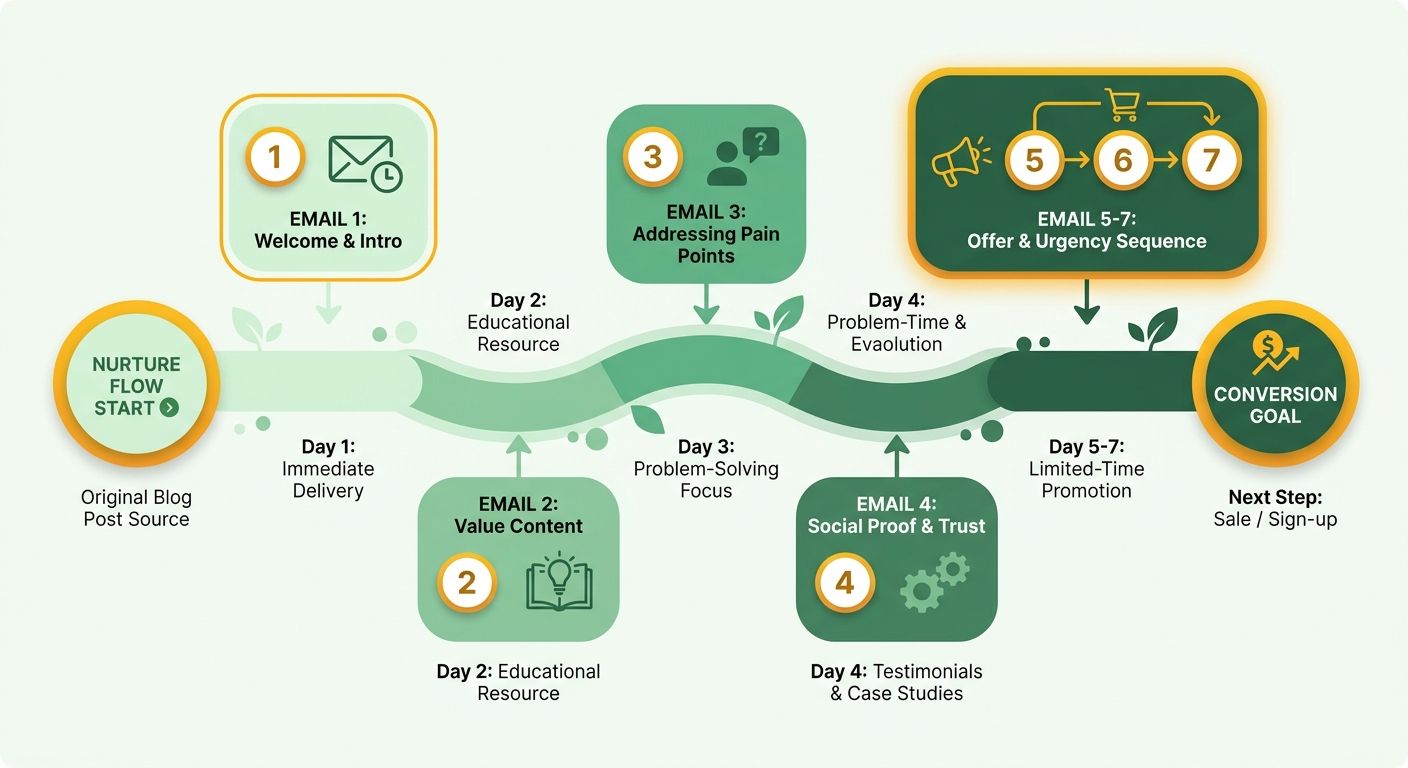
What makes an email convert instead of just land?
A high-conversion email follows a tight structure: a hook, three to four insights, a visual or CTA block, and a lead-capture footer. This keeps readers focused on one action.
Use this structure:
- Open with a hook intro promising one clear payoff. The first line must earn the scroll.
- Deliver 3-4 bite-size insights from your blog. Each should stand alone for skimmers.
- Add a visual or CTA block near the middle. It gives the click a clear destination.
- Close with a lead-capture footer. A short form or gated offer turns reading into a tracked contact.
How do AI subject lines and personalization lift opens?
A strong subject line can determine whether an email gets opened. Draft several variants and choose the sharpest. Because the engine follows your editorial style, the options remain professional.
Personalization adds relevance. CRM data can insert a recipient's industry or pain point. An email naming the reader's problem is stronger than a generic blast.
- Draft and compare a few subject lines before launch. Choose the variant with the higher opening rate.
- Insert personalization tokens for industry or pain point using CRM fields. Relevance supports opens.
Where do SEO and testing fit in?
Email should support the blog, not replace it. Add a "Read the full post" link with UTM parameters. This connects newsletter clicks to analytics and the original SEO asset.
Test each send. Compare two subject lines and two CTA placements. Use the results to guide the next send.
Your dashboard shows which sends drive clicks to ranking articles. This makes email performance easier to evaluate.
- Include a UTM-tagged "Read the full post" link for attribution.
- A/B test two subject lines and two CTA placements with every send.
Want the full workflow across every channel? Our guide on automating your content marketing workflow walks through seven assets from one blog.
Move 4 – Generate a YouTube script: from blog to a script you can record
A blog becomes a video through scripting, not reading aloud. Expand the post into a 5-8 minute script. Include a 15-second hook, a problem statement, three to four key points, and one CTA.
Start with the article you already have. Each section becomes a spoken beat. Your core arguments provide a natural starting point for a conversational script.
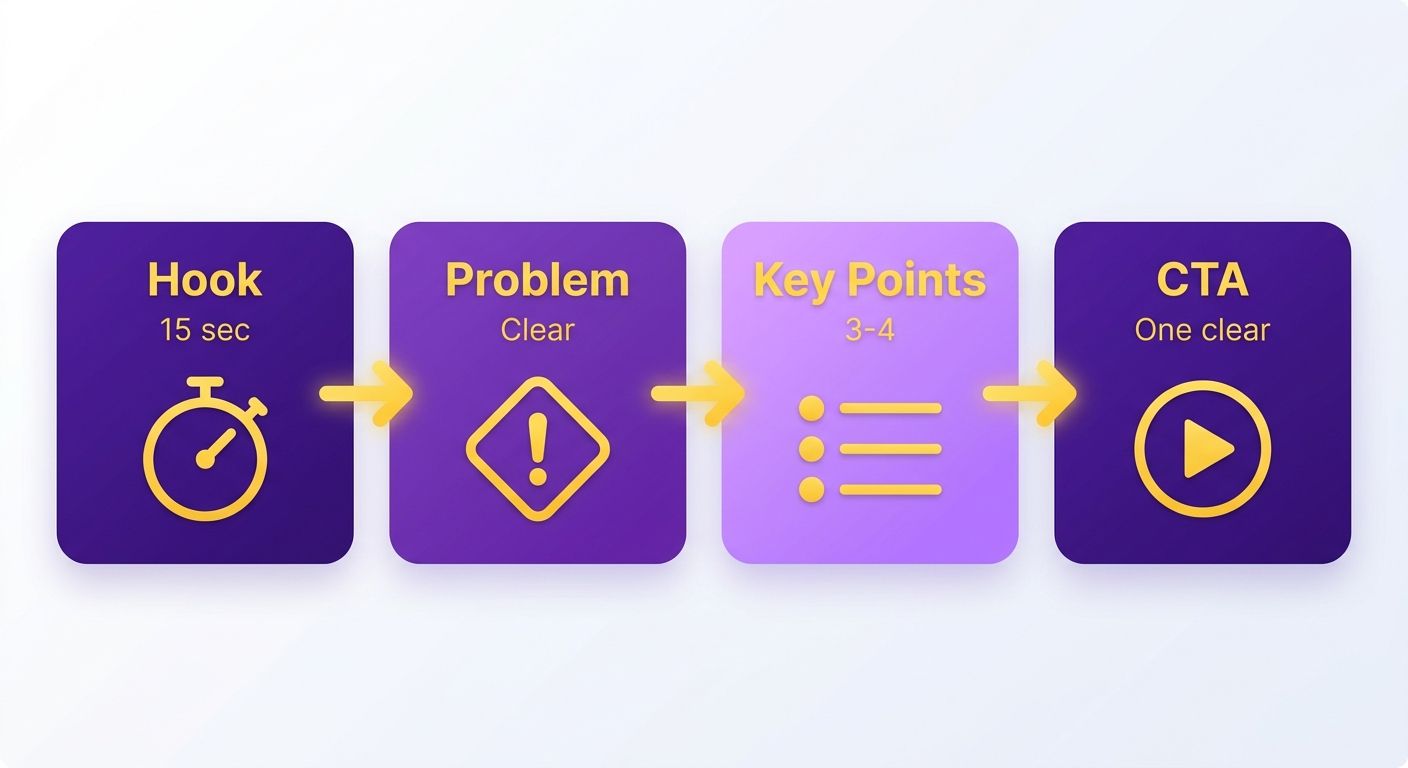
What goes into a script that records fast?
A recordable script turns written ideas into spoken cues. Map each point to visual transitions. This keeps the shoot organized.
- Write a 15-second hook that states the payoff. Lead with the outcome instead of a slow introduction.
- State the problem in one breath. A clear problem gives the script direction.
- Time three to four key points at ~45 seconds each. This supports a 5-8 minute runtime and removes filler.
- Close with one CTA, not three. Choose the subscribe, download, or demo request.
How do visual cues and SEO get handled?
Plan visual cues while mapping the script. For each beat, choose B-roll, screen-share, or animated graphics. This avoids improvising visuals during the shoot.
YouTube metadata, including titles, descriptions, tags, and captions, must be written on the platform. The SEO-focused article AnyPost produces provides keyword-aligned language to use.
- Match every point to a visual cue. Use B-roll for stories, screen-share for how-tos, and animated graphics for statistics.
- Write complete title, description, tags, and captions. Complete metadata supports search visibility and accessibility.
- Cross-post the same script to short-form. Export the full video to LinkedIn, then cut vertical clips for Reels and TikTok. One recording feeds four video surfaces.
Why bother turning a blog into video?
Video can improve time on site, a metric many blogs cannot match. Visitors who watch may stay longer than visitors who skim.
That watch time can extend across existing channels. Embedding the video in the written post connects both formats.
Prioritize high-value, foundational topics for video. An explainer about a timeless industry challenge can earn views and drive conversions months after publishing.
Move 5 – Expand to more blog and LinkedIn articles: multiplying reach
One blog can produce two additional written assets. A quick-read blog targets long-tail SEO traffic. A LinkedIn long-form article supports thought leadership in the feed. Both extend reach without requiring separate research.
Rewrite each asset instead of copying it. Rebuild the source atoms for each format while keeping the brand voice consistent. Tone alignment helps both pieces sound authentic despite different lengths and registers.
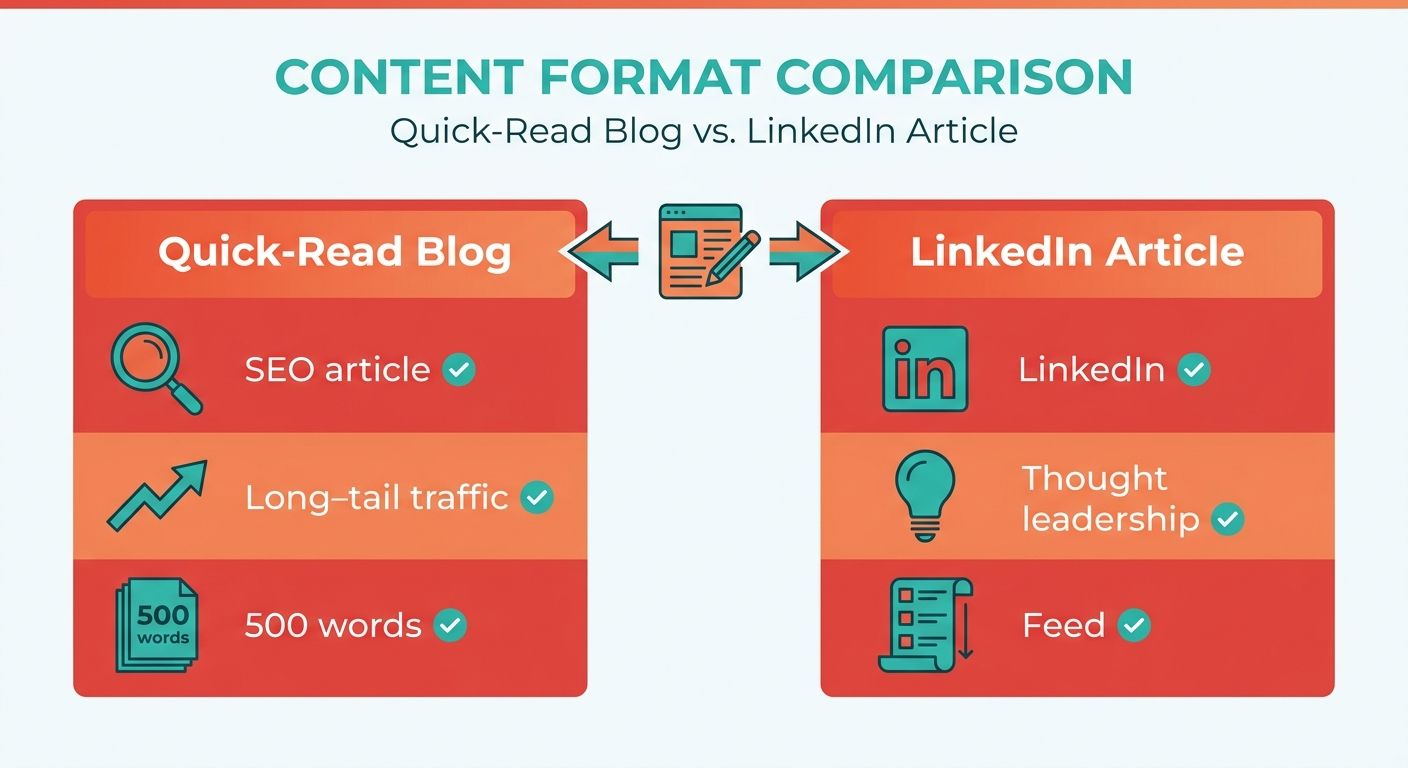
How do you build a quick-read blog and a LinkedIn article from one post?
The quick-read is concise and targets specific long-tail keywords. The LinkedIn version is longer, with personal framing and industry context. One source supports two audiences and intents.
- Generate the quick-read blog around long-tail phrases the pillar post may not rank for. Rewrite the core points into focused paragraphs.
- Draft the LinkedIn article with added context and a first-person angle. Use platform-specific hooks to earn the "see more" click.
- Keep both in your voice by generating from existing content instead of a blank prompt. This supports consistent messaging.
What internal linking and schedule keep the momentum?
Cross-link all five assets. Stagger their publication so each release supports the next.
- Cross-link every asset with UTM-tagged URLs to trace channel traffic. UTMs show whether LinkedIn sends readers to the original blog.
- Publish the quick-read 2 days after the original to reinforce the topic cluster while the pillar post indexes.
- Publish the LinkedIn article 4 days after the original to sustain momentum instead of creating one spike.
Managing distribution from one platform lets this schedule run without separate tools. Generating each asset from existing content also keeps internal-linking logic consistent.
Which metrics prove it worked?
Track organic keyword rankings, LinkedIn post impressions, and referral traffic from LinkedIn to the original blog. Together, these signals show whether expansion adds value.
- Watch organic rankings to confirm the quick-read captures missed long-tail terms.
- Track LinkedIn impressions to measure feed performance.
- Measure LinkedIn referral traffic through UTMs to confirm the article drives readers to the source.
The platform surfaces these signals directly. You can see whether expansion compounds rather than guess.
Skip the LinkedIn long-form if your buyers do not use the platform. For niche technical audiences, the 1,200-word effort may earn fewer impressions than a second SEO quick-read. Focus on the channels your readers use.
Automation and tracking: running six channels as one pipeline
The five moves work best as one pipeline. A new blog triggers the atomizer, feeds channel templates, reaches a scheduler, and reports through one dashboard. No manual copy-paste connects the steps.
Automation shifts time toward strategy, positioning, and testing. This works only when voice consistency begins during generation. Rewriting every asset later can consume the time saved.
What does the end-to-end workflow look like?
The pipeline is: Blog → Atomizer → Channel templates → Scheduler → Analytics. Each stage feeds the next. One published post becomes six channel-native assets.
Centralized content systems depend on searchable asset records. The atomizer turns your blog into retrievable units for every downstream channel.
- Set your trigger to fire on new blog published so the atomizer runs when the post goes live.
- Route each atom to its channel template: thread, email sequence, video script, and two written spin-offs.
- Connect a scheduler through integration tools so tweets, emails, videos, and LinkedIn posts publish on cadence.
- Confirm voice matching runs during generation, not review, so assets avoid manual rewrites.
How do you track performance across six channels?
Bring every channel's numbers into one view. Track impressions, clicks, leads, and SEO ranking by channel. Compare each result with your pre-automation baseline.
A unified dashboard makes comparison easier. When a thread outperforms email on clicks, you can shift effort accordingly.
- Log a baseline before automating so you can measure lift.
- Watch SEO ranking per channel separately. LinkedIn articles and quick-read blogs target different queries.
- Flag under-performing assets weekly instead of leaving weak emails in a sequence.
Closing the optimization loop
Use dashboard data to improve your copy. AI-driven insights flag assets that lag on clicks or rankings. They also recommend specific changes for the next cycle.
A weak hook on one tweet can inform future threads. Apply those lessons across the workflow.
- Review AI-recommended copy tweaks for assets below baseline.
- Re-run the pipeline on top performers to extend their reach.
- Track your cycle time per blog. Once stable, one post should move from published to fully distributed in under a day, with roughly 80% of that window unattended while the scheduler works.
After several cycles, the pipeline becomes the standard distribution process. One blog can reach every channel you use.
Frequently Asked Questions
1. How long should I wait before repurposing a blog post, or can I do it the same day?
Same-day repurposing works well for time-sensitive reach. A thread published with the blog reaches readers while the topic is fresh. Stagger written spin-offs across a week to maintain a steady content cadence.
2. Does repurposing work for any blog post, or only certain types?
Repurposing works best for evergreen, high-value posts. Avoid highly time-sensitive announcements and brief updates. Focus on comprehensive guides and deep-dive analyses with long-term value.
3. If my audience isn't on LinkedIn, should I still create the long-form article?
No. Redirect those resources if your audience does not use LinkedIn. Technical or developer-focused audiences may respond better to targeted SEO articles on your site.
4. Won't using AI across six channels make my brand voice inconsistent?
Voice inconsistency can occur when AI is used only to increase volume. Anchoring the generation engine to approved marketing assets helps maintain your brand guidelines. This also reduces manual editing.
5. How is a repurposed email newsletter different from just sending my blog to subscribers?
A repurposed newsletter does not copy the entire blog into one email. It divides the core arguments into a multi-part educational series. Readers receive shorter insights over several days, which can support click-through rates.
6. How do I know which channel is actually working if I'm publishing to six?
Set channel-specific goals before launching. Use unique tracking links for each platform. A centralized dashboard then lets you compare traffic and conversions across formats.
7. Why turn a blog into a video when written formats already reach readers?
Video supports audiences who prefer visual and auditory learning. One recording based on your blog script can also produce multiple short-form vertical clips. This extends your presence across social feeds with limited extra production.