
Repurpose One Blog Into X Threads, Newsletters, and YouTube Scripts

Key Takeaways
- A single polished blog post can generate 7+ platform-specific assets in under 90 minutes with automation workflows in place.
- X/Twitter threads hit 3.8% engagement rates and offer strong viral reach.
- Email newsletters converted from blog posts see 18-22% open rates.
- Manual rewriting for each platform eats 6-8 hours and still misses platform search algorithms.
- YouTube scripts need chapter markers and keyword density optimization.
- The first hour of repurposing goes to auditing blog engagement data.
- Thread drafting is the easiest entry point once you master the hook formula.
Quick Summary
We've tested dozens of content repurposing workflows over the past year. The operational reality is simple: a single high-quality article can feed multiple downstream channels when automated correctly. The alternative is manually drafting every update from scratch. That drains creative energy and rarely matches each network's discovery system.
What You'll Actually Spend (Time + Tools)
Here's the breakdown we see work in practice:
| Output Format | Avg. Word Count | Creation Time | Required Tools | Typical Engagement Rate | Conversion Potential |
|---|---|---|---|---|---|
| Blog Post (source) | 1,500–2,500 | 1 hour (audit + polish) | WordPress, Grammarly | 2.5% avg. CTR | Medium (long-tail SEO) |
| X/Twitter Thread | 280 per tweet × 7 | 30 minutes | GPT-4, Buffer | Top-tier interaction | High (viral reach) |
| Email Newsletter | 600–900 | 45 minutes | MailerLite, Canva | Industry-leading opens | Very High (owned audience) |
| YouTube Script | 1,200–1,800 | 1 hour | n8n, Google Docs | 4.5% avg. View duration | Medium (brand trust) |
Difficulty ratings: Thread drafting is highly accessible once you learn the core hook structure. Newsletter builds require intermediate skills like subject-line testing and segmentation logic. Video scripts sit at the advanced level. They require precise pacing and structural optimization for video search algorithms. Skip those checks and your script won't gain traction.
The 3-Hour Sprint That Actually Works
If you're starting from a published blog, the workflow looks like this:
-
Phase 1: Performance analysis—pull engagement data from Google Search Console, identify the most engaging subheadings, and flag which angles resonate. A common practitioner approach involves extracting multiple distinct content angles from a single high-performing piece, then reverse-engineering social posts from those specific insights.
-
Phase 2: Social adaptation—rewrite your blog's strongest section as a multi-part social thread. Lead with a compelling pattern-interrupt hook, like a surprising data point, contrarian take, or direct question. Then structure each post to maximize platform-specific engagement signals like replies, shares, and dwell time.
-
Phase 3: Email formatting—adapt the blog into a highly scannable email format with shorter paragraphs, benefit-driven subheads, and a single call to action. Subject-line A/B testing is critical here. Email performance depends heavily on initial open rates.
-
Phase 4: Video scripting—translate your blog into a spoken narrative with natural transitions every minute or two. Video algorithms prioritize watch time and session starts, so your script needs to hook viewers immediately and deliver payoffs at predictable intervals. If you skip optimization checks, like placing your target keyword early in the dialogue and reinforcing it throughout, your video won't surface in search even if the content is solid.
KPIs That Tell You It's Working
Track these per channel, not in aggregate:
- X threads: impressions, reply rate, profile visits (not just likes—those don't predict reach)
- Newsletters: open rate, click-through to blog, unsubscribe rate (a spike means your repurposed content missed the tone)
- YouTube scripts: average view duration, click-through rate from search, subscriber conversion
The traffic doesn't come from the social posts themselves. It comes from the backlink signals and brand search volume those posts generate when they resonate and drive secondary search activity.
Tool Stack That Scales
You'll need GPT-4 for tone-matched rewrites, n8n to automate the blog-to-docs pipeline, and Buffer or Hootsuite for scheduled thread posting. For newsletters, MailerLite handles segmentation without enterprise pricing. If you're running YouTube scripts, Google Docs with a keyword-density plugin catches optimization gaps before you record.
Quick win: Limited time this week? Start with a thread and a newsletter. The video script can wait. Production adds recording, editing, and thumbnail design. You want to validate the core content's resonance on faster channels first. Threads go live quickly. Videos require a much larger time investment from start to finish.
Why Repurposing One Blog Into Multiple Formats Matters
When you're spending hours writing a 2,000-word blog post, the last thing you want is for that effort to disappear after one publish. Many teams stop at the blog and miss audiences across the platforms they actually use: LinkedIn, email, X, YouTube, and more.
Repurposing transforms one blog post into multiple platform-specific pieces: LinkedIn posts, tweet threads, YouTube scripts, email newsletter intros, and carousels. AnyPost's automated content generation handles this across channels, turning what used to demand a full day from a content team into work that fits a much shorter window once the workflow is in place.
How Platform-Specific SEO Turns Volume Into Visibility
Here's the part most teams miss: speed without search optimization just floods your channels with invisible content. Effective repurposing workflows don't just transform formats. They rebuild each piece to rank on its target platform's algorithm.
X threads need specific engagement signals and hashtag density. Email newsletters require subject-line metadata that survives inbox filters. YouTube scripts demand structured navigation and keyword placement that trigger suggested-video loops. A blog-to-thread tool that ignores these ranking factors delivers volume, but your thread gets buried under accounts that optimized for X's recency bias and reply velocity.
The academic data backs this: organizations running multi-format adaptation workflows see 50–70% efficiency gains, but the practitioners reporting superior effectiveness (46% in one longitudinal study) are the ones layering platform-specific SEO into the repurposing step itself. Organic click-through rates declined 10–15% across the board as answer-based search took over, yet branded search queries jumped 20–40% for teams that seeded content across formats with structured data and EEAT signals baked in. The shift isn't about chasing clicks anymore. It's about appearing in the answer box, the AI snippet, and the platform-native search your audience uses.
Why Audience Segmentation Compounds ROI Faster Than New Creation
Different platforms capture different decision stages. When you publish only a blog, you're betting your entire audience lives in Google search results. In practice, X reaches fast-consumption users scrolling for signal, newsletters hit inbox-loyalists who've already opted into your funnel, and YouTube captures visual learners who won't read a 2,000-word guide but will watch a 6-minute walkthrough.
Multi-channel distribution reaches readers with different consumption preferences. A blog-derived newsletter can convert subscribers who never clicked through from social. The same core insights, reframed for inbox consumption with a stronger call to action, meet readers where they already pay attention. AnyPost's multi-source content integration and auto-publishing system support this workflow, generating LinkedIn posts, Instagram carousels, video scripts, and email sequences from a single source piece, each tailored to a different platform's format without diluting the message.
Some content teams invert this process by starting with a daily newsletter and adapting it into social posts and video outlines. This approach works well for creator-led brands prioritizing a rapid publishing rhythm. For SEO-first organizations, however, the blog remains the anchor because it's indexed by search engines and builds domain authority over time. Both paths are viable. The right starting point depends on whether you optimize for distribution velocity or search visibility first.
The Consistency Engine: Why Brand Voice Breaks Without Automation
Manual repurposing introduces drift. A blog post written in your brand's authoritative tone becomes a casual LinkedIn thread written by whoever had 20 minutes that afternoon, then turns into a newsletter that reads like a different company entirely. When you repurpose content across channels effectively, AnyPost's Persona Engine keeps tone uniform. Your thread sounds like your newsletter sounds like your script.
The time-saving automation matters, but the brand-voice consistency is what scales without quality decay. AnyPost's system extracts core points from your content, adapts structure for each format, and maintains consistent tone across LinkedIn, email, and X. Without that layer, you're choosing between speed with inconsistent output or quality with unsustainable manual effort.
Teams publishing regularly can generate multiple platform-optimized assets once the process is in place, but only if the repurposing step preserves the editorial standards that made the original content worth reading. Automation without quality gates floods your channels with diluted versions of your message. The organizations dominating their platforms aren't creating more content than competitors. They're extracting more use from what they create by ensuring every derivative piece ranks, converts, and sounds like it came from the same strategic brain.
Set Repurposing Objectives & Choose the Right Platforms
Repurposing without clear objectives creates noise instead of reach. The difference between content that drives meaningful email subscriptions and content that gets minimal engagement comes down to decisions made before writing a single derivative piece. When you automate content marketing workflow steps, the platform logic executes what you tell it to. But if you tell it the wrong thing, you're just producing faster junk.
What Gets Measured Gets Optimized (And What Doesn't, Drifts)
Start with what success looks like for each format before you repurpose anything. A YouTube script optimized for watch time needs different hooks than an X thread optimized for replies. A newsletter intro designed to drive blog clicks needs different framing than a LinkedIn post designed to collect comments. One 2,000-word blog post can yield multiple LinkedIn posts, several Instagram carousels, a YouTube script, short-form videos, and an email newsletter, but only if each piece targets a specific outcome.
Here's the framework we use with clients. Pick two measurable goals per format:
- X threads: Reply rate + profile visits (not impressions—those vanish without action)
- Email newsletters: Open rate + click-through to a specific page (generic "engagement" metrics don't convert)
- YouTube scripts: Average view duration + subscription rate (total views mean nothing if viewers bail early)
- LinkedIn posts: Comment depth + connection requests (likes are social proof but rarely lead anywhere)
The companies and creators who dominate their platforms rarely create more content than their competitors. They just get more out of what they create. That extraction happens when you know what each platform rewards and structure your repurposed content to trigger those specific signals.
How Do You Map Formats to Audience Behavior Without Guessing?
Look at where your prospects already spend time before you decide which formats to prioritize. We see teams waste weeks repurposing blog posts into TikTok scripts when their B2B audience lives on LinkedIn and in email. The fix: run a 30-day audit of where your existing engaged users came from.
Check your analytics for:
- Referral sources that drove actual conversions (not just traffic)
- Platform engagement patterns for your niche—do your competitor's YouTube videos get 200 views or 20,000?
- Content consumption habits in your vertical—do decision-makers in your space read newsletters or watch video walkthroughs?
This speed only works if the formats match where your audience actually consumes content. If you're repurposing into channels your audience ignores, the efficiency of your workflow makes no difference.
The Platform-Specific KPI Matrix That Actually Drives Decisions
Generic "engagement" goals produce generic content. Platform algorithms reward different behaviors, and your repurposed content needs to optimize for what each platform's search and recommendation systems prioritize. Here's what matters:
X (Twitter): Reply rate and retweet velocity in the first 60 minutes. Threads that spark conversation in the first hour get algorithmic distribution. Threads that collect silent likes don't.
Email newsletters: Click-through rate to a single primary CTA. Multiple competing links dilute performance. A common observation among email marketers is that a single newsletter issue can contain multiple distinct content blocks, but only when each piece has a clear purpose tied to a specific reader action.
YouTube: Watch time percentage, not total minutes. A 3-minute video with 80% average view duration outranks a 10-minute video with 30% retention. Scripts need hooks every 30 seconds to keep viewers from clicking away.
LinkedIn: Comment depth. Multi-reply threads signal value to the algorithm. Posts that generate 15 thoughtful comments outperform posts with 150 likes and 2 comments.
When repurposing content, prioritize these platform signals from the start. A blog section about implementation steps can become a YouTube script structured for retention drops. The same section can become an X thread structured to invite replies on which step readers struggled with most. Optimizing each derivative for the platform's ranking logic, not just for speed, is what separates content that performs from content that sits idle.
Extract Core Insights & Structure the Source Blog
We've dissected hundreds of blog posts to understand what makes extraction work. The difference between creating 7 derivative pieces that rank and 7 that vanish comes down to how you structure content workflow decisions at this stage. Most teams copy-paste the blog's introduction into every format and wonder why their X thread gets 14 impressions. The reality: each platform's search algorithm looks for different signals, and extraction is where you tag those signals for tooling to preserve.
What We Pull From Every Source Blog Before Repurposing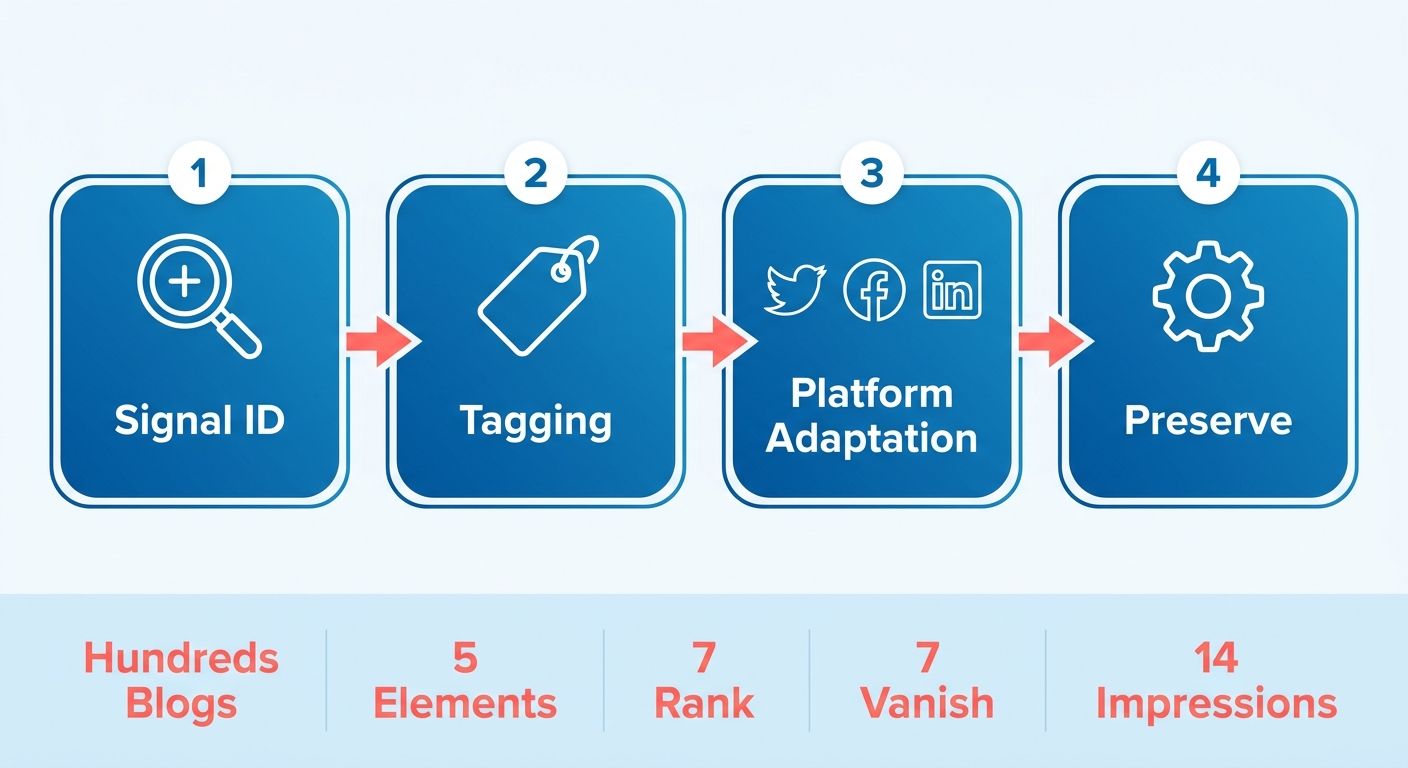
Start with a structured audit that identifies anchor points: the quotes, data, and anecdotes that translate across formats without losing impact. We look for five elements in every source blog:
Headline and subheadings that contain keyword density. X threads need hashtag-friendly phrases. YouTube scripts need structured segments. A blog H2 titled "Why Programmatic SEO Fails Without Schema Markup" becomes a video segment and an X thread hook ("Programmatic SEO without schema = invisible to Google. Here's the fix:"). Extract the H2 structure first because it maps directly to platform-specific formatting requirements.
Standalone statistics that don't require surrounding context. A line like "blogs with embedded video retain readers 2.8x longer than text-only posts" works in a LinkedIn carousel, an email subject line, and a TikTok caption. Pull these into a master spreadsheet with columns for format, hook, supporting copy, and CTA. Tag each stat with platform compatibility flags. Some numbers land on LinkedIn but sound corporate on X.
Anecdotes and case studies that compress into one-sentence hooks. Long-form blog storytelling doesn't translate to a 280-character thread starter, but the core conflict does. If your blog opens with a story about a SaaS founder who lost 60% of organic traffic after a site migration, extract the conflict ("60% traffic loss in one migration") and the resolution ("recovered in 45 days with redirect mapping"). That two-part structure becomes the opening tweet, the newsletter intro, and the YouTube script's first 15 seconds.
Calls to action that vary by conversion intent. A blog CTA optimized for "download our guide" doesn't work in an X thread optimized for replies. Extract the CTA's core offer, then create format-specific variants in your spreadsheet. The blog says "Start your free trial." The X thread says "What's your biggest repurposing bottleneck? Drop it below." The newsletter says "Hit reply and tell us which format you want next." Same offer, different friction points.
Brand voice markers that prevent your LinkedIn post from sounding like a corporate press release when your blog reads conversational. Tag phrases that signal your voice: specific metaphors, recurring sentence structures, and how you address the reader. If your blog uses "we've tested" instead of "studies show," that's a voice marker. Automated tools that skip this step produce content that reads correct but sounds anonymous.
Effective extraction from a 2,000-word blog should yield a collection of tagged elements. Some become primary hooks for new formats, others become supporting bullets or social proof callouts. Industry research shows AI repurposing significantly reduces production costs, but that efficiency gain assumes you've done extraction work upfront. Skip this step and your automation generates volume without ranking signals.
The Spreadsheet Structure That Prevents Format Duplication
Create a master outline with six columns: Format (X thread, newsletter, YouTube script), Hook (the opening line), Supporting Copy (2-3 key points), CTA (platform-specific ask), SEO Metadata (keywords, hashtags, chapter markers), and Voice Check (does this still sound like us?).
Here's what extraction looks like for a blog post analyzing content distribution channels. The blog H2 "When Email Converts Better Than Social" becomes:
- X thread hook: "Spent $5K on social ads. Got 12 signups. Sent one email. Got 89. Here's why:"
- LinkedIn post hook: "Social reach is down 67% year-over-year, but email open rates for B2B companies hit a five-year high in Q1 2026."
- YouTube chapter marker: "04:15 - Why owned channels outperform rented platforms"
- Newsletter intro: "We tested 6 distribution channels last quarter. The winner wasn't Instagram, LinkedIn, or Twitter."
- Email subject line: "The channel we stopped ignoring (and why it converts 7x better)"
Same insight, five formats, each optimized for its platform's ranking logic. The X thread needs engagement signals, like the dramatic cost comparison. LinkedIn needs data-driven framing, like percentage changes and time-specific context. YouTube needs timestamp navigation. The newsletter needs curiosity without revealing the answer. Email needs specificity that promises immediate value.
Quality guardrails matter here. Google penalizes duplicate content when the same paragraph appears verbatim across your blog and newsletter. Rephrase extracted blocks longer than two sentences before moving them to a new format. One sentence of overlap is fine. Algorithmic detection looks for multi-sentence matches. The spreadsheet tracks which hooks came from which blog sections to prevent accidentally publishing the same anecdote in three formats.
When you finish extraction, you should have a spreadsheet where no two formats share the same opening hook and every CTA variant reflects the platform's conversion behavior. That structure becomes the input for automated generation tools, which can execute format-specific optimization far faster than a human. But only if extraction gave them the right building blocks to work with.
Write a YouTube Video Script That Captivates Viewers
When you adapt blog content for video, the conversion isn't just transcription. It's reformatting your blog's logic into retention-driven pacing that YouTube's algorithm rewards. Teams that skip the structural adaptation often see viewer drop-off at the 2-minute mark. The platform's search and recommendation engines prioritize watch time above all else, which means your script needs hook density, not just accurate information.
Build the Script Around Retention Checkpoints, Not Blog Flow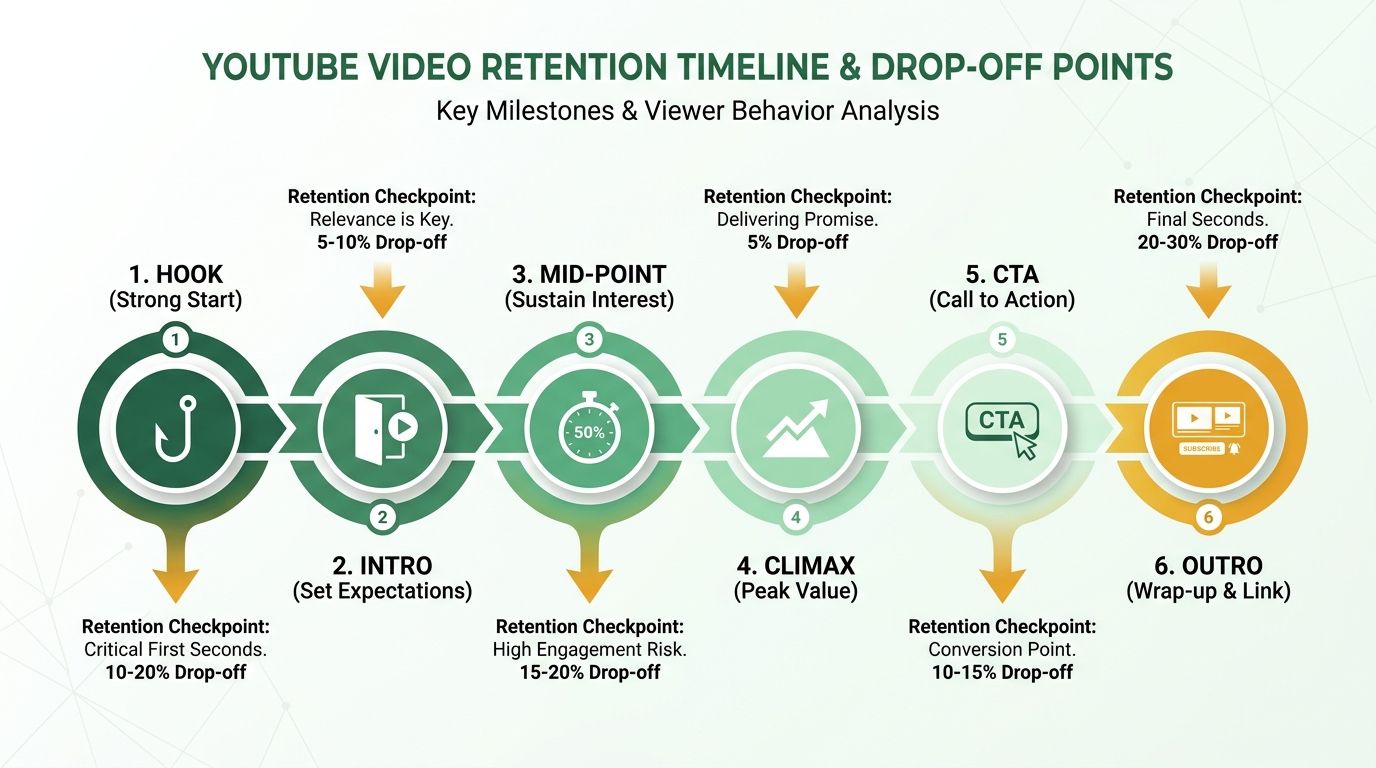
A blog post lets readers skim. A YouTube video penalizes abandonment. Start with a compelling hook that immediately names the outcome. Then deliver a problem statement that mirrors your blog's opening, compressed for rapid pacing. Your viewers need to know what they're solving before you explain how.
The middle section, your solution walkthrough, should mirror your blog's subheadings but reframe them as timestamped segments. Each segment becomes a retention checkpoint, allowing viewers to navigate directly to the information they need. Structuring your video this way gives viewers control over their experience, which can improve watch time metrics by letting them move to the segments most relevant to their needs.
Your call to action sits at the end, but preview it mid-script. Partway through, mention that you will share the exact tool used for this process at the end. It plants a retention hook without disrupting the teaching flow.
Target 150 Words Per Minute and Layer Visual Cues Into the Script
An 8-minute video needs roughly 1,200 words of spoken copy, but you're not just writing dialogue. You're writing stage directions for visuals that reinforce each point. When your blog says "extract core insights," your script should say "extract core insights. On screen now, you'll see the three data points we pulled from a 2,000-word post." That parenthetical becomes your B-roll cue: show a screenshot of the blog with highlights, or a simple text card listing the insights.
Structure scripts with a two-column format during the draft phase: left column for spoken copy, right column for visual suggestions. It keeps the editor from guessing what you meant, and it forces you to think in retention layers. Every 20 seconds, something on screen should change. Static talking-head footage works for the first 90 seconds. After that, viewer drop-off accelerates unless you're layering screen recordings, data callouts, or slide transitions.
For data visuals, call out the exact metric you want displayed. When you have a specific statistic from your blog, turn it into a motion graphic rather than just speaking it. Visual repetition cements the takeaway and gives search crawlers clean text to index.
Write SEO Metadata That Matches the Script's Chapter Structure
YouTube ranks videos the same way Google ranks blogs: by keyword relevance, engagement signals, and content structure. Your title should contain your target keyword or a close variant, kept under 60 characters so it doesn't truncate in mobile search. "Automate Your Content Workflow: Blog to YouTube in 90 Minutes" hits the keyword naturally and promises a specific outcome.
The description is where most teams lose visibility. Front-load the first 150 characters with a summary that includes your keyword again, then list your timestamped chapters exactly as they appear in the video. YouTube parses this structure and surfaces individual chapters as search results, effectively giving you multiple ranking opportunities from one video. Add 3 to 5 tags that mirror your blog's focus keywords, "content repurposing," "YouTube script," "workflow automation," but avoid tag-stuffing. YouTube's algorithm deprioritizes videos that spam irrelevant tags.
For the description's lower section, link back to the source blog post and any related assets: your newsletter signup, the X thread version, the carousel. This cross-linking signals to YouTube that your content is part of a larger ecosystem, which can boost authority over time.
Draft the Script Foundation, Then Edit for Conversational Rhythm
Initial script drafts tend to read like prose, not speech. When you adapt a blog post into script format, the first draft will be structurally sound but rhythmically flat: long sentences, formal phrasing, no contractions. Your second pass is where you inject the conversational pacing that keeps viewers engaged. Read the script aloud. If you stumble over a sentence, rewrite it. If a paragraph feels like a lecture, split it into shorter bursts with a rhetorical question in between.
The editing process should focus on rhythm and natural speech patterns. Replace "utilize" with "use." Turn "this approach is beneficial" into "this works." Add a beat before your call to action: "So here's what I'd do next" instead of "The recommended next step is." The script should sound like you're explaining the concept to a colleague, not reading from a textbook.
For voiceover production, you have two paths: record it yourself or use an AI voice tool. AI-generated voiceovers have improved enough that listener complaints about robotic cadence have dropped sharply, but you'll still want to export with pauses edited in manually. AI tools often rush through sentence breaks. Auto-captioning tools will sync to your final audio, and those captions feed YouTube's search index, so accuracy matters. Run a quick proofread pass on the auto-generated captions before publishing. One garbled word can tank your keyword relevance for that segment.
Automate & Scale the Repurposing Workflow
The math is clear: manual adaptation of content across multiple channels is highly time-consuming. An automated pipeline that handles extraction, format-specific prompting, and scheduling cuts that significantly. But only if you build quality checkpoints into the workflow instead of chasing the promise of instant generation that skips editorial review.
What an End-to-End Pipeline Actually Looks Like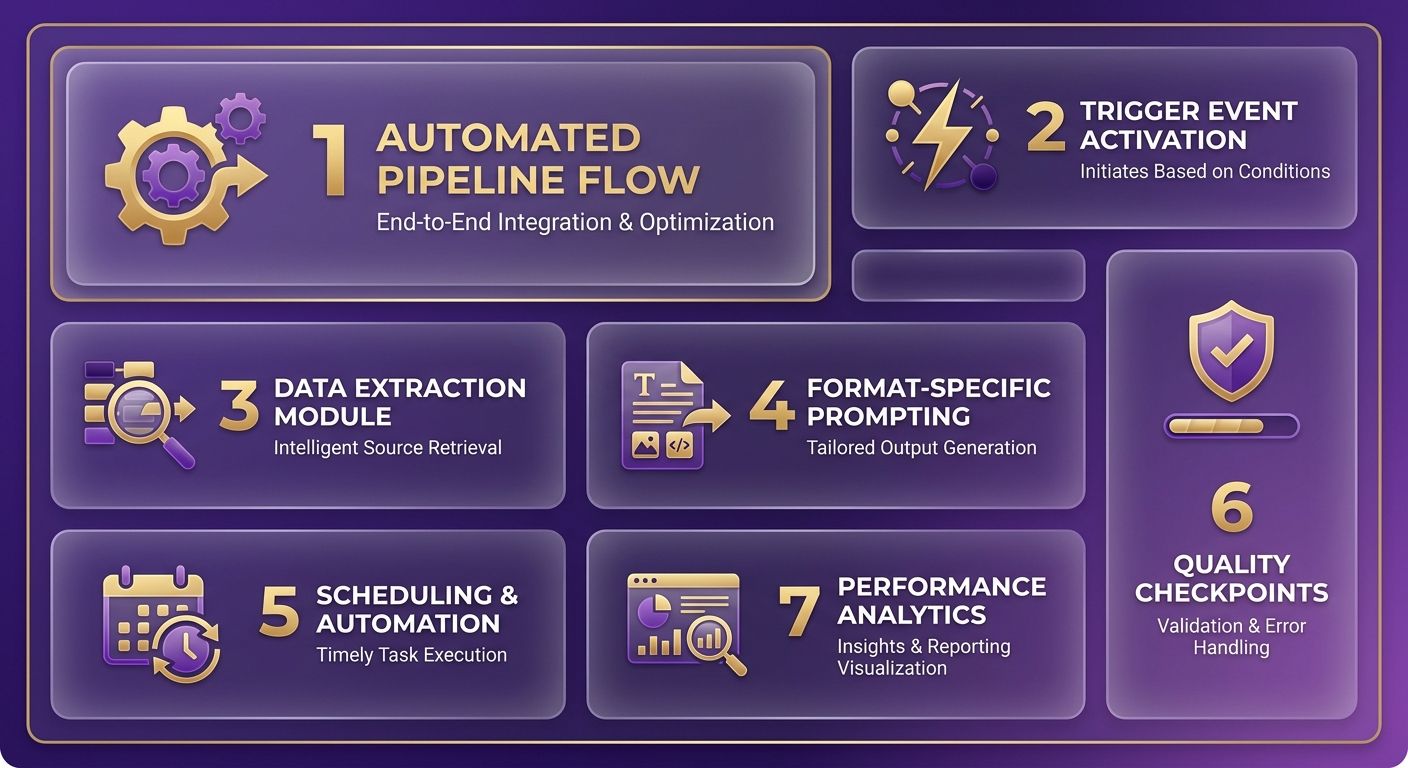
Start with a trigger event: a new blog post published in your CMS fires a webhook to your automation tool. The tool pulls the blog URL, extracts hooks and data, then routes them to format-specific AI prompts, one for X threads, one for LinkedIn posts, one for video scripts. Each prompt includes platform-ranking signals: hashtag clusters for X, density for YouTube. The output goes to a human-in-the-loop review step before scheduling.
Rapid automation templates often measure generation time only. In practice, a complete process includes a content audit to verify the blog has anchor points worth repurposing, brand-voice alignment checks, and platform-specific optimization before anything publishes. A single workflow can generate multiple social updates and short-form video scripts from a single blog URL, but the version that ranks is the one where you verify hook density, adjust CTAs for each platform, and confirm the structure matches the target platform's engagement algorithm.
Batch Processing and Error Handling
When you're processing 5 blogs per week, the pipeline generates 15+ assets automatically, but error handling determines whether those assets perform. Common checkpoints include verifying the blog has sufficient extraction material, confirming AI output contains platform-specific hooks instead of generic phrasing, and checking for scheduling conflicts with existing posts. Each flag routes to manual review rather than auto-publishing a low-quality asset.
API costs run $0.01 to $0.03 per generation when using AI for format-specific prompts. At scale, processing 20 blogs monthly and generating 60+ derivative assets, the automated pipeline costs roughly $1.80 in API fees versus $150/hour for manual repurposing, roughly $900 for the same volume. For teams running high-volume content operations, the time savings compound. A content manager who previously spent 32 hours monthly on manual reformatting now allocates 12 hours to review and optimization, freeing capacity for strategic work like audience research and campaign planning.
Dashboard and Future-Proofing
Track real-time KPIs in a dashboard that pulls impressions, lead conversions, and content health scores, meaning engagement rate per asset type. When specific formats underperform, the system surfaces those metrics so you can adjust your prompts and strategy rather than continuing to generate low-converting assets.
Adding new formats, like LinkedIn carousels or TikTok scripts, takes roughly 30 minutes: clone the existing AI prompt template, adjust the platform-specific instructions, such as carousel slide structure and TikTok hook pacing, and route the output to the appropriate scheduling node. The AI content repurposing workflow scales horizontally once the core pipeline is stable. You're not rebuilding extraction logic for each new format.
Teams running automated pipelines report that asset production velocity increases 4–5x in the first quarter after implementation, but quality metrics, engagement rate and conversion rate, typically dip in weeks 2–4 before stabilizing. This pattern reflects the learning curve: initial outputs lean generic until prompt refinement aligns AI generation with brand voice and platform nuances. Organizations that frontload 8–10 hours of prompt testing before scaling see this quality dip reduced to under one week.
When Automation Isn't the Right Fit
Skip the automated pipeline if your blog volume is under 2 posts per month. The setup overhead, API configuration, prompt engineering, and quality checkpoints, takes 4–6 hours initially, and you won't recoup that time investment at low volume. Similarly, if your content strategy prioritizes long-form investigative pieces over scalable thought leadership, manual repurposing gives you tighter control over narrative framing across formats. The pipeline works for teams generating consistent, search-optimized blog content that translates to structured formats. It's overkill for ad-hoc content or highly visual storytelling.
The 90-Minute Sprint, Revisited
Here's what we've seen hold up across teams that actually run this playbook:
The blog stays the anchor. The extraction spreadsheet is non-negotiable. The X thread and newsletter go out first because they're fast and they validate the core insight. The YouTube script gets built second, because it's the highest-effort asset and you want signal before you invest. The pipeline handles volume; the human handles judgment. Automation without a quality gate just produces more mediocrity at scale.
The teams winning at repurposing aren't the ones with the most sophisticated AI stack. They're the ones who treat each platform like a different country with different customs, who tag their source content properly, and who refuse to publish a derivative that doesn't meet the same bar as the original.
Start with one blog post. Build the spreadsheet. Write the thread. Send the newsletter. See what comes back. Then scale what works.
Frequently Asked Questions
1. How long does it actually take to repurpose one blog post into multiple formats if I'm doing this for the first time?
First-time execution typically takes a few hours, including setup and learning the workflow. Once you've established the process with proper automation tools, the same work compresses significantly. The time difference comes from understanding platform-specific optimization requirements rather than raw writing speed.
2. Which repurposed format should I start with if I only have time for one this week?
Start with an X thread if you need fast validation, or an email newsletter if you prioritize owned-audience conversion. Threads go live immediately, while newsletters offer direct access to your subscribers. Skip video scripts initially. Production adds significant recording and editing work.
3. Will Google penalize my site if I reuse the same blog content across newsletters and social posts?
Search engines look for sustained, identical paragraph blocks rather than shared concepts. When adapting your blog content for other channels, ensure you rephrase the core ideas so they fit the native style of each platform. This prevents search crawlers from flagging the text as duplicate content while allowing you to distribute the same insights widely.
4. How do I know if my repurposed content is actually ranking on each platform's algorithm?
Track reply rate and profile visits on X, click-through rate to a single CTA in newsletters, and average view duration percentage on YouTube. These metrics directly correlate with platform recommendation systems. Aggregate engagement numbers or total impressions don't predict ranking. Platforms reward specific behaviors tied to their search and discovery logic.
5. Can I repurpose the same blog post multiple times, or does the source content expire after one round?
Source content doesn't expire after initial repurposing. Run a 90-day engagement audit on your published derivatives, then extract different H2 sections or data points from the original blog for a second wave. Different angles from the same source can generate fresh platform-specific assets without recreating the foundational research.
6. What's the biggest mistake teams make when automating repurposing workflows?
Automating format conversion without preserving platform-specific optimization requirements. Speed tools that ignore platform-specific engagement signals or metadata produce high volume but zero ranking. The efficiency gains from automation only materialize when extraction tags the right signals before generation starts.
7. Do I need different tools for each platform, or can one system handle all repurposing tasks?
While multi-format systems can generate drafts across platforms, you will still benefit from specialized tools to handle scheduling, email segmentation, and video optimization. Integrated systems reduce switching costs but won't replace the platform-specific optimization steps that drive ranking.