Automated Content Creation: Turn One Blog Post Into 4 Channels, in Order
Quick Summary
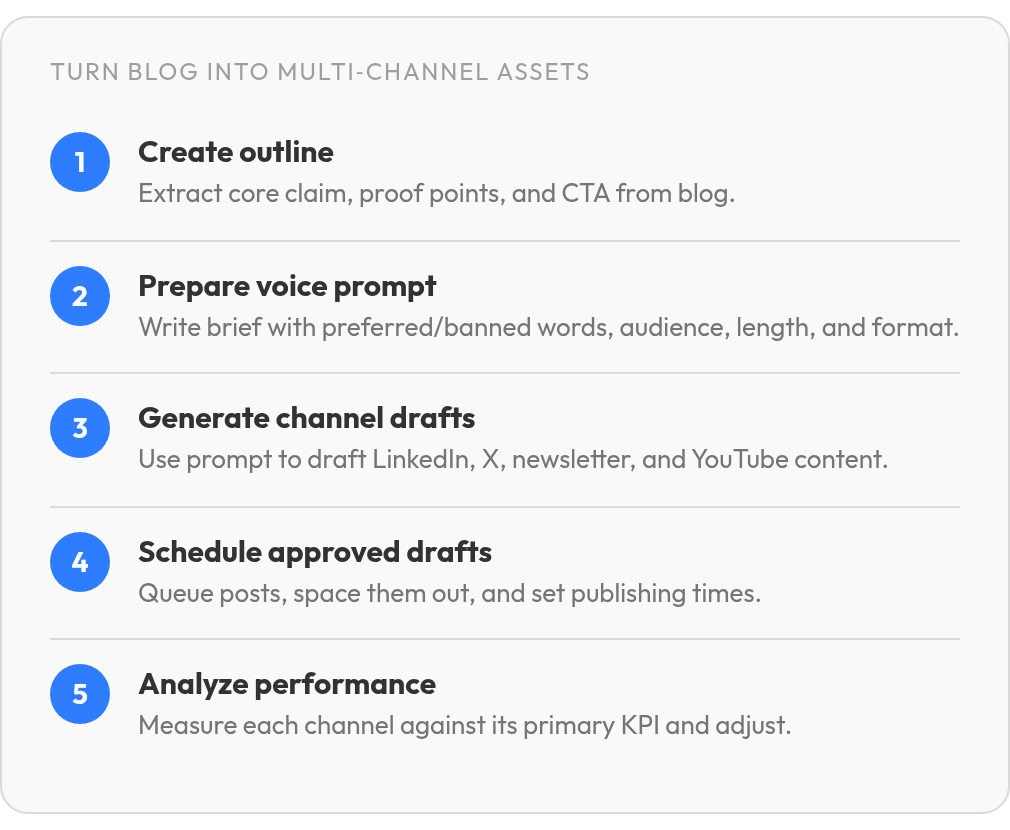
Writing the LinkedIn post or the video script is rarely where teams lose time. The bigger problems tend to be the order of the work and the voice check at each handoff. Automated content creation pays off when one blog post moves through a fixed sequence and a person reviews every draft before it ships. Here's the workflow we run, stage by stage:
| Stage | What happens |
|---|---|
| 1. Outline | Pull the post's core claim, proof points, and one call to action |
| 2. Brand-voice prompt prep | Write a voice brief (preferred words, banned words, sentence length) and one prompt per format |
| 3. Channel generation | Draft LinkedIn, then X, then newsletter, then YouTube |
| 4. Scheduling | Queue approved drafts and space them out |
| 5. Analytics | Check each channel against its own KPI |
Each Channel Gets One KPI
Give every channel output one primary metric. Otherwise someone ends up grading a newsletter on social numbers, and the newsletter always looks like it's losing.
| Channel output | Primary KPI |
|---|---|
| LinkedIn post | Impressions |
| X thread | Engagement rate |
| Newsletter | Open rate |
| YouTube video | Watch time |
Templates Move the Repeated Work
Manual copy-and-paste formatting is a hidden tax. Every channel starts from a blank draft, so you pay the same formatting cost every week. Templates turn that recurring cost into a one-time setup.
| Manual copy-and-paste | Template-based automation | |
|---|---|---|
| Repeated work | You reformat the post for every channel, every time | You build the format prompts once, then reuse them |
| Voice checks | You compare each draft to memory or a style doc | You check every draft against the same written brief |
Skip the template setup if you publish one post a month to one channel. At that volume, building it costs more time than it saves.
Format Decides Whether Repurposing Works
Automated content creation tends to go wrong when it treats a blog post as raw text to chop up and paste into every feed. It works when each channel gets its own prompt and its own length, and when a person checks each draft against your voice brief.
Automated Content Creation Pays Off Through Consistency
When one blog post feeds every channel, your LinkedIn post, X thread, newsletter, and YouTube script all carry the same core claim and proof points. Your team researches and fact-checks once instead of four times. The time savings come from reusing the thinking. The human review at each step still happens. We stopped asking where else a post could go. A more useful question is how the idea has to change on each platform. A LinkedIn post that does well can fall flat once you trim it into X posts, because the setup that made it work gets cut first. So our workflow keeps the source fixed and rewrites the format for each channel. If you run several brands or regions, our guide on keeping local voice at scale goes deeper on the voice side.### Weak Source Posts Don't Belong in This Workflow Skip this workflow when the original post has no clear claim. Repurposing a vague post just spreads a weak idea across four feeds, and now you have four mediocre assets to report on instead of one. Hold off on time-sensitive news reactions too. By the time the YouTube script clears review, the moment has often passed.## From Blog Outline to Persona‑Engine Prompt Off-topic drafts often start before the model writes a word. An SEO outline lists headings and keyword intent, but it rarely says who's reading or how your brand sounds. Feed it in raw and automated content creation tends to fill those gaps with generic filler, the kind of copy that could belong to any SaaS company on the internet. We turn the outline into a prompt before any channel draft exists. The pairing below shows the shape we use. It's an illustrative example, not a documented input format for any specific tool.
| Raw SEO outline | Illustrative brand-voice prompt |
|---|---|
| H1: How to Cut Onboarding Time in B2B SaaS | Source: the full outline, pasted below. Use only its claims. |
| Intent: informational, "reduce onboarding time" | Audience: ops leads at small SaaS teams who skim past hype |
| H2s: Why onboarding stalls; Three fixes; Measuring progress | Task: one LinkedIn post, 150 to 200 words, one call to action |
| Persona: Head of Customer Success | Voice: plain and direct, short sentences. Banned: "seamless," "strong" |
| CTA: download the checklist | Limits: no new stats, names, or claims. Flag gaps instead of filling them. |
What Keeps the Prompt From Drifting?
- Supply the source. Paste the outline itself. A summary of the outline gives the model room to wander.
- Name the reader. A specific audience changes word choice more than any tone label does. "Ops leads who skim past hype" does more work than "professional but friendly."
- Constrain the task. Set one format, one length, and one call to action per prompt.
- Ban additions. Tell the model to flag missing proof rather than invent it.
- Require review. A person checks each draft against the outline, claim by claim, before it ships.
If the outline is thin, skip the prompt work and fix the outline first. A prompt can't supply proof the source never had.
The Four‑Channel Suite (LinkedIn → X → Newsletter → YouTube)
Most teams pour their effort into the first draft and almost none into the format around it. With automated content creation, the format decides whether a blog idea survives the move to a new channel or ends up as a pasted paragraph nobody finishes.### What does each channel need from the draft?
- LinkedIn carousel: One idea per slide, short lines. Use a clear visual hierarchy so the headline reads before the body text. The last slide carries a single call to action.
- X thread: The opening post states the claim on its own. Each later post should make sense if someone sees it alone, and the sequence should build step by step. We use one or two hashtags, or none.- Newsletter: Write a plain subject line that says what's inside, plus a preheader that adds one detail. Break the body into modular sections a reader can jump between. This won't guarantee better open rates, but it makes the email easier to scan.- Short YouTube script: Open with a hook in the first lines. Add bracketed visual cues for the editor and close with a spoken CTA. Pair the script with a descriptive summary so viewers know what the video covers.
Skip the carousel if your post is a narrative argument with no distinct steps. Chopped into slides, a story reads like fragments.### Why build reusable channel templates?
By hand, you re-split slides, renumber posts, and rewrite subject lines every single time. A saved template for each channel removes that repeated work, so your review time goes to voice and accuracy instead of layout. You can keep templates in a doc or in an automation tool. Either way, test them on a few posts before you trust them.## Automation Wiring: Scheduling, Publishing, and Back‑End Checks The scheduler is the easy part. Most of the hours go to the checks between "approved" and "live," where one wrong link or a missing tag can undo a week of careful drafting. We treat scheduling as the final step of automated content creation, not the main event. A third-party scheduler can queue your LinkedIn, X, and YouTube drafts from one calendar. You get one view of every post. You also get another login, another set of permissions, and another place where drafts go stale. Confirm how any tool connects to your channels before you build your workflow around it.### No Draft Queues Without a Human Yes One simple gate is a short approval message sent to one reviewer per batch. It can ask three questions:
- Accuracy: Does every claim match the source blog post?
- Tone: Does it follow the voice brief's preferred and banned words?
- Brand safety: Would anything read badly out of context or as a screenshot?
A useful team rule: hold any batch that hasn't been reviewed rather than let it go live unchecked. While the reviewer has each draft open, they can also add internal links by hand, pointing back to the original post and one related article. A person can judge whether a link actually helps the reader. A template can't.
The Publish Checklist Covers What the Scheduler Can't Check
- SEO title and meta description: Write them for search. Don't paste in the H1.- Image alt text: Describe what each image shows.- UTM parameters: Set source, medium, and campaign per channel so newsletter clicks stay separate from X traffic.
You can skip UTMs only if nobody on your team opens the analytics report. In every other case, they're the cheapest way to see which channel earned its slot.
Your Next Move: Read the Numbers, Then Change One Thing
Publishing feels like the finish line. The numbers that come back are often the most useful input your next prompts will get. Automated content creation speeds up drafting, but it can't tell you which hook earned the click. That judgment stays with a person on your team.Pull each channel's numbers from its native analytics or your email service. One blended dashboard tends to hide how differently each format behaves.
- LinkedIn: impressions, engagement, and click-through rate on the link back to the post.- X: impressions on the opening post compared with replies and reposts across the thread.- Newsletter: open rate and clicks to the source article.
- YouTube: watch time and where viewers drop off.
How often should you review the numbers?Review weekly if you publish across all four channels most weeks. If you repurpose one post a month, review per campaign instead. Either way, give each asset enough time and enough impressions before you judge it. A thread that a few hundred people saw tells you very little.### What should you change after a review?Change one variable per cycle so you know what moved the number:
- Hook: if impressions hold but engagement falls, rewrite the opening line in that channel's prompt.- Tone: if replies call the post generic, tighten the voice brief.- CTA placement: if people read but don't click, move the link earlier.- Format: if carousel completion is weak, test a text post.- Publishing time: if reach dips on certain days, shift the slot in your scheduler.Log each change next to its result, so three months from now you're working from a record instead of a hunch. For a one-off post with a small audience, skip the loop. The numbers won't be large enough to justify a prompt rewrite.