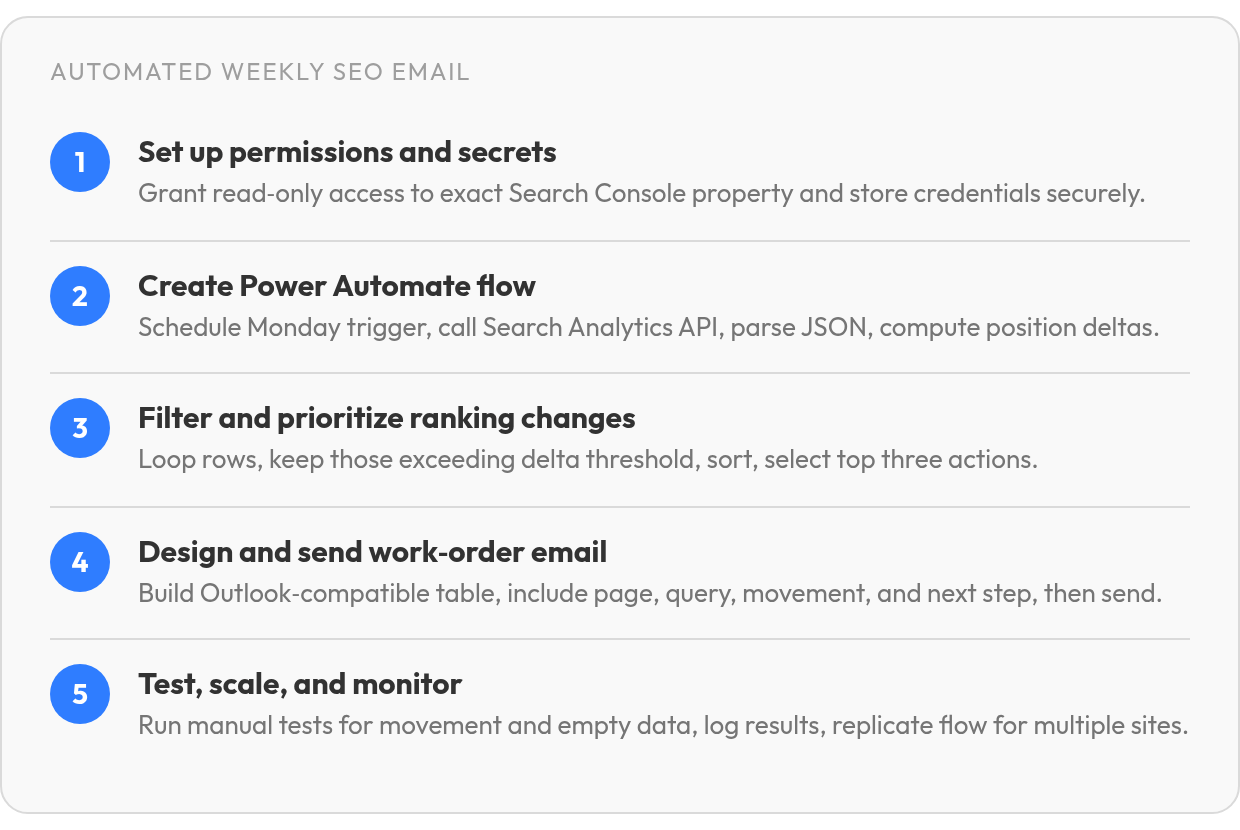
Automated SEO Reports by Email: A Power Automate Workflow for Weekly Actions

TL;DR
- Confirm that read-only authorization covers the exact Search Console property you're reporting on. Check Google's property-user and API authorization documentation rather than assuming access on a parent account is sufficient.
- Week-over-week deltas only mean something when both windows are the same length and run through identical filters and dimensions in the Search Analytics API.
- Quick-win rate (content tasks created ÷ flagged ranking changes × 100) tells you whether the weekly email is producing work or just producing email.
- Initial configuration and testing are front-loaded, so a single site checked once a week may not earn that effort back.
- A secret pasted into a flow action can be exposed to people with access to the flow. Use the credential-storage options supported by your environment instead.
Quick Summary
The sending is the easy part. Most teams assume the work in automated website reports by email is getting the message out; it's really deciding what earns a slot inside it.
| Element | What it looks like |
|---|---|
| Deliverables | A ranking-change list, three prioritized action items, and an optional link to a separately configured content-creation workflow |
| Prerequisites | Search Console access, Power Automate, an Outlook mailbox, and optional storage for report history. Confirm current licensing and any third-party API requirements before you build |
| Phases | Connect the data source, shape the weekly digest, then test it against a real week of ranking movement |
| Trade-off | Front-loaded setup and testing in exchange for a standing weekly habit |
Wire in one metric early: quick-win rate. Content tasks created, divided by flagged ranking changes, times 100. It's an internal signal about whether the email moves anyone, not a benchmark to compare against other agencies. A low number can mean the flagged items were the wrong ones, though it can also point to ownership, prioritization, or follow-through problems.
- The win: Monday opens with an email naming what moved and what to do about it, instead of someone rebuilding the same dashboard view.
- The cost: front-loaded setup and testing, plus occasional re-checking when permissions or report structure shift.
Why a ranking dashboard isn't a decision
A dashboard full of movement is not a decision. Multiply it across client properties and you've built a queue of interpretation work: open the property, compare the week, work out which page slipped, then remember to tell someone.
AnyPost.ai approaches that from the other side, emphasizing real-time analytics tracking and a short list of actions instead of a wall of charts. The point isn't more data. It's deciding what deserves attention.
Collecting is cheap now. Deciding is what swallows the afternoon.
The gap between a change landing and someone looking
Timing beats polish. A ranking change noticed late can already have shaped client conversations. Caught on a Monday, the cause may still be visible in the data: a title edit, a competitor's new page, an internal link that dropped out.
We don't claim faster noticing lifts traffic. The claim is narrower. It shortens the distance between something changing and someone investigating.
That's why we treat the alert as a routing layer rather than a report. Three actions, ranked, each one a task a person can pick up. Publishing happens somewhere else, and nothing we automate decides whether a page deserves to exist.
If you run one site and open Search Console daily anyway, the alert adds nothing you aren't already doing by hand.
Prerequisites: three accounts that have to agree
Setup is where these builds quietly stall. Not in the flow logic. Before a single report goes out, three things have to agree with each other: the Search Console property, the Power Automate environment, and the mailbox doing the sending.
Start with read access. Confirm that the account or service identity you authorize has read-only reporting permission on the exact property you want to report on, rather than assuming access on a parent account covers it. Google's own property-user and API authorization docs are the source of truth for the steps, and they do change. Read them before you start clicking consent screens.
Put credentials in the vault, not the action
Never paste a secret into a flow action or into the email HTML you're templating, because doing so can expose it to people with access to the flow. Where your licensing and tenant allow it, keep configuration values in environment variables or Azure Key Vault and configure the flow to retrieve them at runtime.
Confirm which mailbox you're actually signed in as
Authorizing a personal account is the fastest way to send client SEO reports from the wrong address. Check that the connector picked up the intended business mailbox and that it holds send permissions before you build anything. Testing under a personal login and switching later can require downstream connection and recipient changes.
Licensing and connector access vary by plan. Confirm yours first.
One site, checked weekly by hand? Start with our guide to weekly SEO reports by email instead. The setup cost may not pay back.
Pulling ranking data out of Search Console
Comparability lives in the date range. Ask the Search Analytics API for two adjacent windows of equal length, with identical filters and dimensions, so a week-over-week delta actually means something. Follow the API documentation for the response fields and aggregation you request. The digest must calculate its own comparisons rather than expecting a pre-diffed report.
What one row actually looks like
An illustrative response row, simplified: {"keys":["/pricing","enterprise seo"],"clicks":41,"impressions":1180,"ctr":0.0347,"position":7.8}. Use Search Console's documentation to interpret position; don't treat it as a simple fixed rank. In this example, compare it to last week's stored value and subtract.
Shaping the weekly payload
A flow can be configured with an HTTP action to fetch the response, Parse JSON to read the schema, and a loop to build an array of objects: URL, keyword, previous position, current position, delta. That array becomes the table in the email.
Treat the cutoff as an editorial rule, never as a standard. For example, you could test two positions as a hypothetical default trigger. Two may be noise on a low-volume query and meaningful on a head term, so tune it per property.
Check the current Search Console API quota docs before you schedule anything, and consider retry logic for transient failures.
Building the Power Automate cloud flow
Name the flow before you build it. Something like GSC-Weekly-Digest-{ClientSlug}, because one flow per property turns into a dozen quickly and "My flow (2)" is not an audit trail.
The trigger stays boring on purpose: Recurrence, Monday, 08:00, the client's time zone. Power Automate servers run on UTC, so either convert the client's local time to UTC when configuring the schedule or use the flow's supported time-zone setting. Verify the resulting run time before enabling the flow. Then configure a single HTTP action against Search Analytics.
That call supplies raw rows for the digest to interpret. Nothing pre-ranked. The judgement sits in the steps after it, and it's the difference between a digest someone reads and a spreadsheet attachment nobody opens.
Turning rows into three actions
Configure an Apply to each over the response, with a Condition testing each position delta against your threshold. Qualifying rows append to an array variable.
Sort that array explicitly, worst loss first, then take the first three. Verify the output order in a manual test rather than relying on a template's built-in "top items" step to preserve the order you expect.
What happens when a run fails
Add a parallel branch and open its Configure run after settings. Tick failed, skipped, and timed out. Configure the success path with its own send so a failed run does not prevent a separate successful run from sending.
Then configure the Outlook action. Optionally log every run to a SharePoint list: client identifier, start time, status, row count, error summary.
Designing an email that reads like a work order
A finished email should look like a work order, not a screenshot of a dashboard. Everything under the ranking-health summary is a numbered checklist: three blocks, each naming a page, a query, the movement, and one next move. Take the three blocks away and the email has no reason to exist.
Making it survive Outlook
Table markup with inline styles can carry that structure. Outlook's HTML rendering can differ from a modern browser's, so test a two-column table shell with style attributes on each cell rather than assuming stacked divs and an external stylesheet will render as intended.
Pull values from inside the loop, not from the trigger. The current item is the ranking row, so page and query sit in separate slots of its keys field. Point the expression editor at that item explicitly, then preview-send and confirm a real path renders rather than the array wrapper.
Keeping it out of the junk folder
Send from an authorized business mailbox, with an accurate sender name and a subject that matches the contents. Keep formatting plain, put useful text beside every link, and have your mail administrator confirm authentication before the first live send.
The optional button opens your content workflow's authenticated page. A button can't carry API credentials safely, so it stops at the door.
Testing it, scaling it, and where the flow stops
Turning the flow on is easy. Verifying it isn't. One important failure to test for is a table of zeros repeatedly landing in a client's inbox.
What a manual test has to prove
Run it twice by hand. Once against a week with real movement, once against a window where nothing crossed your threshold. The populated run should surface three actions or fewer. The empty run should send one plain sentence saying nothing moved, not a blank grid. Test empty data explicitly because it can expose Outlook formatting problems.
Open the run history and read the HTTP action output, not just the run status. A successful run does not prove that the response contained rows. When authentication fails, re-authorize the connection and re-check property-level permission before you start editing expressions.
Scaling past one property
One flow, many clients. Hold client ID, property identifier, recipient list, and an optional storage path in a table, then loop over it. Before you multiply that across an agency book, confirm current licensing, request limits, and usage entitlements against your own plan.
Track delivery success, recipient clicks where tracking is permitted, actions completed, and content tasks created. Those are internal scorekeeping, not benchmarks anyone else published.
The split that matters: the flow applies rules and routes work. A scheduled dashboard email distributes a document.