Best Automated SEO Reports in 2026: 7 Tools That Show What to Fix Next, Not Just What Dropped

Quick Summary
When you ask which SEO software offers automated reporting and actionable insights, you're really asking two separate questions. Most tools automate the reporting part—they pull data, schedule dashboards, send PDFs on a fixed cadence. Fewer tools translate those findings into changes your team can actually ship.
The gap sits between insight and implementation. A dashboard may surface broken links, missing meta descriptions, schema errors, or declining pages, but someone still has to open the CMS, rewrite copy, update markup, and verify the change went live. That handoff is where small teams lose time.
A review of tools in this category found only a few that touch the fix layer.
Key Takeaways
- Most SEO platforms automate audits and reporting but stop short of executing fixes, leaving manual CMS updates to your team.
- Monthly or quarterly performance reviews usually show more durable patterns than weekly dashboards.
- Some crawlers and domain-owner audit tools offer free entry tiers, though limits and capabilities vary.
- White-label reporting costs vary widely; some providers sell it as an add-on or reserve it for higher tiers.
- If configured around effort-to-impact, prioritization can focus teams on fixes such as broken links and meta rewrites rather than long audit lists.
- AI crawler visibility in AI assistants can matter as much as traditional rankings in some workflows, but standard rank trackers often miss it.

Tools that report vs. tools that fix
Different platforms automate different parts of the SEO workflow. Some audit your site and surface issues. Others generate recommendations or help prioritize fixes. A smaller subset can execute changes directly—updating titles, meta descriptions, or schema after approval.
The table below maps the tools reviewed across the dimensions that matter most when automation is the goal.
| Tool | Reporting | Prioritization | AI visibility | Content briefs | Execution | Pricing | Best-fit team |
|---|---|---|---|---|---|---|---|
| AgencyAnalytics | White-label client dashboards; forecasting layer for campaigns | Surfaces patterns rather than task-level fix priority | Not a native AI-citation tracker in the standard setup | No dedicated brief workflow | Not designed to publish CMS changes | Paid plans, agency-oriented pricing varies | Agencies managing multiple clients and reporting workflows |
| Semrush | Scheduled audits, rank tracking, reporting dashboards | Site Audit severity structure and On Page recommendations | May be available as an additional feature set depending on plan | On Page SEO Checker provides optimization suggestions | No direct CMS execution | Tiered plans, limited free plan | Larger teams with SEO, content, and development support |
| Ahrefs | Scheduled audits, rank tracking, alerts | Flags errors, warnings, and notices | Primarily traditional rankings; AI citation visibility not a core replacement | Not a dedicated brief generator | No built-in CMS workflow | Paid plans; free Webmaster Tools for owned domains | Technical SEOs or teams with an implementation owner |
| Screaming Frog | Crawl exports and diagnostics | Technical issue lists require manual triage | Not an AI-visibility tracker | No content briefs | No execution | Free limited tier; paid license | Technical SEOs and site health reviews |
| RankIQ | Limited to content scoring/optimization | Scores drafts against SERP patterns | No AI-visibility focus | Yes—content briefs and keyword/subtopic suggestions | No publishing/execution | Subscription-based | Writers and content teams needing structured briefs |
| AnyPost.ai | Publishing and content generation reports | Not a triage/audit tool | Can produce content for surfaces where AI assistants cite, but not a rank-tracker replacement | Generates content aligned with search intent | Publishes approved content to supported platforms after review | Plans for businesses, agencies, SaaS teams | Lean teams wanting content execution rather than another report |
Most tools stop at recommendations, which means the work still lands on your plate. You export a prioritized list, manually rewrite sections or adjust markup, then re-run the audit to confirm the fix landed.
The reporting-to-fix gap shows up most clearly in content maintenance. Older articles need regular updates to stay visible, but many platforms only flag the issue. They don't write the update, stage it for review, or publish it.
From a prioritized report to a content-update brief
For example, a 3–5-item prioritized report can be converted into a simple operational loop:
- Inputs: Pull the 3–5 highest-impact items, with URL, issue type, target term, current condition, and likely cause.
- Owner: Assign an editorial or SEO owner who approves the brief.
- Draft: For each item, write a content-update brief: the change requested, page/section, proposed update, keywords to preserve/include, and success metric.
- Approval: The owner reviews the brief against brand voice and search intent, then approves or returns it.
- Publishing: Publish the approved changes in the CMS or schedule them through an existing approval workflow.
- Re-audit: After an agreed waiting period, re-run the audit or check Search Console/analytics to confirm recrawl and improvement.
Budget-friendly entry points
If your priority is finding issues rather than executing fixes, several tools offer free or low-cost entry tiers. Some crawlers work well for small sites and spot checks, while domain-owner audit tools can give you baseline visibility into technical issues, backlinks, and ranking movement without a full paid stack.
For teams that need branded reporting across multiple clients, pricing structure matters as much as the feature list. Look closely at whether white-label capabilities are included in the base plan, sold as an add-on, or reserved for agency tiers. Audit-focused tools often charge by site, crawl volume, or project limits, while more comprehensive plans tend to cost more because they bundle dashboards, integrations, and client-facing presentation features. For enterprise buyers, total cost of ownership should include not just subscription cost but the internal time required to turn findings into shipped changes.
What small teams should track and how often
Brand visibility now spans organic search, AI citations, and social channels, but tracking everything at once buries the signal. Small teams should focus reports on a short list of decision-making metrics per cycle: keyword rankings for target terms, organic traffic to priority pages, and conversions from search. Add Core Web Vitals and indexing status if technical issues recur, but skip them when they're not tied to an active problem.
SEO doesn't behave like paid media, where yesterday's change can produce today's result. Reporting too frequently encourages teams to react to normal fluctuation instead of evaluating whether their last round of work produced a durable improvement. A better rhythm is to separate monitoring from stakeholder reporting.
Use automated crawls and alerts for fast detection. Use less frequent performance reviews to decide what to change next. That split keeps internal teams responsive without turning every ranking wobble into an emergency.
Why automated SEO reports matter in 2026
Many SEO teams still spend hours each month copying data between tools, formatting dashboards, and manually flagging what changed. Automated reporting cuts that cycle short and catches issues faster than manual review. Ranking drops, crawl problems, and content decay can surface before they sit unnoticed long enough to affect pipeline.
The 2026 shift isn't just about saving time. It's about turning SEO reporting into an operational system instead of a retrospective slide deck.
Why traditional reporting misses what matters
A page can lose traffic while its average position appears stable. Click-through rate may fall, SERP features may change, or a competing result may satisfy the query better. For example, some analyses describe a click-loss scenario where a page's average position remains stable even as SERP features absorb a large share of visible clicks.
Traditional reports often show what moved without explaining why it moved or what your team should do next.
That's where automated SEO reports become more useful than static dashboards. They combine sources like Google Search Console, Analytics, and rank tracking, then flag the issues most likely to matter. Instead of forcing your team to parse spreadsheets, the best systems separate urgent problems from background noise and point attention toward fixes that deserve review first.
Good reporting should reduce ambiguity. If a revenue page lost qualified traffic, the report should help you understand whether the likely cause is technical, content-related, or SERP-driven. Without that diagnostic layer, automation only makes the PDF arrive faster.
AI search visibility is the new reporting layer
Search visibility is no longer limited to classic blue-link rankings. AI-generated answers, citation surfaces, and crawler access now influence whether searchers ever encounter your brand. If reporting only tracks Google positions, it can miss the places where buyers are increasingly getting summarized answers.
Some recent analyses suggest AI/GEO visibility can drop when content is not accessible or structured for AI agents, and monitored samples showed GPTBot activity growing. These figures are directional, not universal, but they suggest crawler access and AI visibility are becoming a larger part of discovery.
That changes what an automated report needs to include. It should show whether your content is accessible, structured clearly enough to be understood, and visible across the newer discovery layer. The goal isn't to replace traditional rank tracking. It's to add context around where your brand appears, where it's absent, and which content assets need strengthening.
When analytics handle the pattern-hunting, decision-making speeds up. Your team can focus on strategy, editorial judgment, and implementation instead of spending the reporting cycle trying to locate the problem.
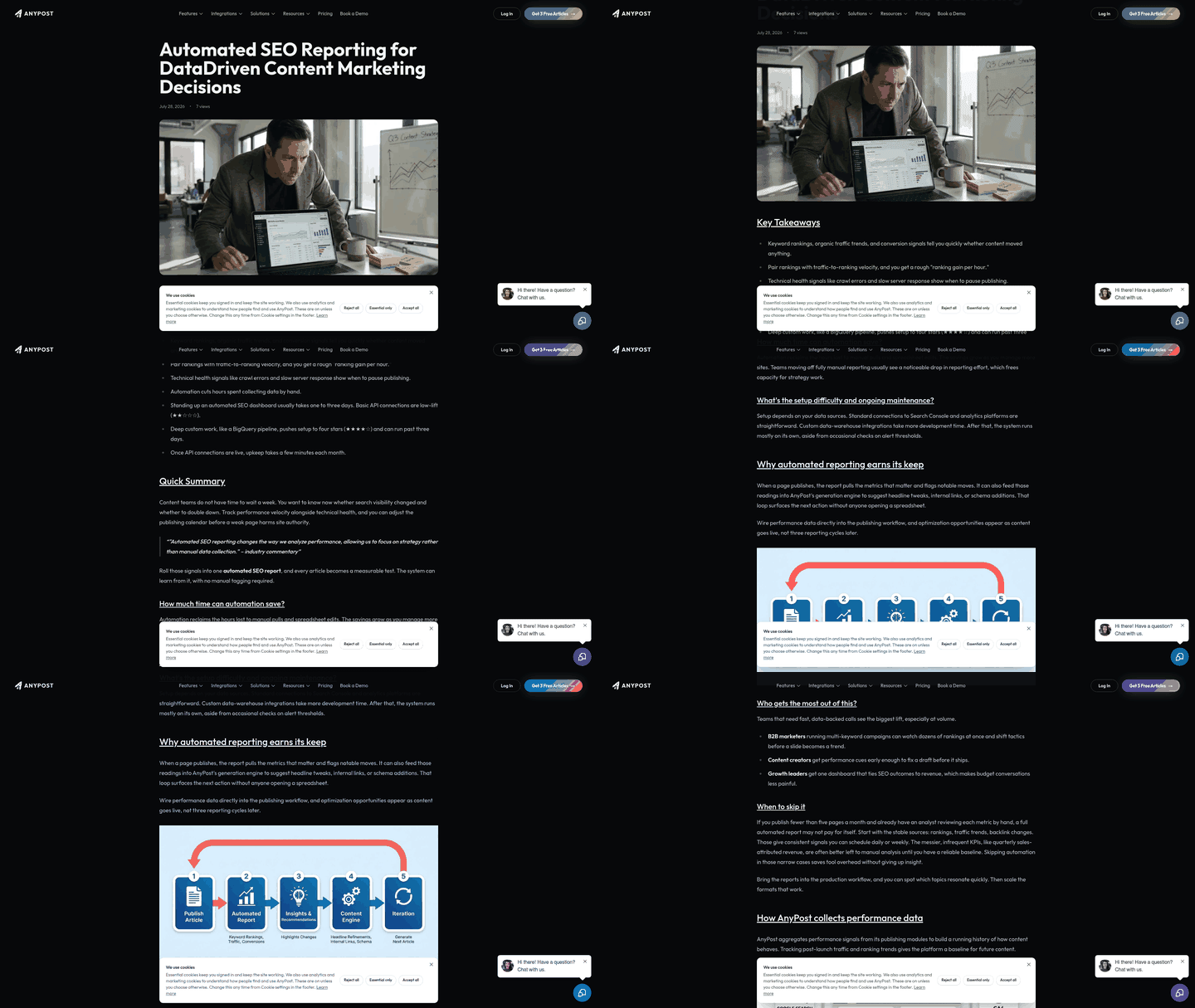
Tool 1: AgencyAnalytics
AgencyAnalytics built its reputation on white-label client dashboards. The provider also markets an AI forecasting layer that agencies managing multiple brands can use to anticipate traffic shifts before they appear in standard performance reviews. If configured, that forecasting layer can help explain to clients why a campaign may need attention even when the latest ranking snapshot looks calm.
The platform is positioned as a reporting and forecasting tool rather than a content-fix workflow. It can work well if your team already separates strategy from execution. If you're a lean team looking for a tool that closes the loop from insight to published update, this is still primarily a reporting layer.
Tool 2: Semrush
Semrush is widely used for audits, competitive research, and rank tracking. Its Site Audit tool can be scheduled to run recurring scans and organizes findings across technical health, on-page elements, and crawlability. The severity structure helps teams triage issues instead of treating every warning as equal.
What Semrush doesn't do is touch your site. Every recommended fix returns to your implementation queue. For a larger team with dedicated SEO, content, and development support, that workflow can be manageable. For a lean team, the value depends on whether someone has time to act on the findings.
Semrush handles audits and tracking, not implementation
The Site Audit tool checks technical health, on-page elements, and crawlability. Scheduled scans can be configured to run on a recurring cadence, and the dashboard organizes issues by severity so you can focus on critical problems before lower-priority cleanup.
The On Page SEO Checker adds an AI-assisted layer for optimization ideas across strategy, content, backlinks, and SERP features. That can be useful for planning, especially when you need to identify why a page is underperforming against competing results. Still, someone has to open the CMS, review the recommendation, and make the change.
Pricing and AI visibility tracking
Semrush plans include site audit features across various tiers, though scope and limits may differ. A free plan may be available with limited crawling; check current terms directly with Semrush. AI visibility tracking may be available as an additional feature set depending on the plan.
The pricing question is less about whether Semrush has enough features and more about whether your team will use enough of them. If you only need periodic audits, a lighter tool may be sufficient. If you need competitive intelligence, keyword research, reporting, and monitoring in one platform, the broader suite becomes easier to justify.
The Trustpilot caution
One thing worth noting: Trustpilot reviews flag concerns around renewal policies, cancellation friction, and refund handling. The product itself works as described, but the billing experience has frustrated enough users that it deserves attention before you commit.
If you want automated reporting and actionable insights without changing your implementation workflow, Semrush is a standard option. Just understand that "actionable" still means your team performs the action manually.
Tool 3: Ahrefs
Ahrefs delivers scheduled audits and granular technical analysis, but it stops at the flag. Your team still writes the fixes and pushes them live. For organizations with an SEO specialist or developer available to action alerts, that model works well. For a small marketing team juggling content, reporting, and campaigns, the queue can grow quickly.
The platform's Site Audit tool can be scheduled to run on a cadence you control, breaking findings into errors, warnings, and notices so you can triage what needs attention first. It flags problems like broken links, missing alt text, crawl errors, and schema issues, then organizes them in a dashboard built for diagnosis. You get the technical detail needed to investigate root causes rather than simply seeing that something went wrong.
Ahrefs handles audit, track, and alert—not execution
The rank tracker monitors position changes and sends alerts when rankings shift, so teams can respond before a decline becomes harder to recover from. Ahrefs Webmaster Tools gives site owners a no-cost way to inspect their own domain, according to the provider, while paid plans expand the depth and scope of analysis.
What you won't find is a built-in workflow that turns an audit finding into an approved CMS update. Ahrefs is strong at discovery and diagnosis. It's not designed to generate revised copy, publish content, or decide which implementation task should happen first based on business impact.
If your workflow already includes someone who translates audit data into staged fixes, Ahrefs gives you the technical depth to do that well. If you need software that closes the loop from detection to deployment, you'll need to pair it with a separate content or implementation layer.
Tool 4: Screaming Frog
Screaming Frog built its reputation on deep technical crawls that catch what surface-level audits miss. It renders pages in a headless browser, processes JavaScript-injected elements, and flags crawl errors, redirect chains, and schema issues that lighter tools may overlook. The provider offers a limited free tier for small-scale checks, while the paid license is better suited to ongoing technical reviews and larger crawls.
Scheduled crawls without execution
Screaming Frog supports scheduled crawls in its paid version, so teams can run recurring checks and catch regressions before they stack up. That places it in the audit-and-monitor category rather than the execution category. It tells you what broke; your team still updates the redirect, revises the title, repairs schema, or fixes the page template.
The tool doesn't generate content, deploy fixes, or manage your content workflow. It's a diagnostic engine. You can export crawl data as a CSV or connect it to Google Analytics and Search Console for cross-reference, but every change still requires manual work. That makes it powerful for technical SEOs and less complete for teams that need implementation support.
If your workflow already includes someone who reviews technical issues and pushes fixes to staging, Screaming Frog is a solid audit layer. If you want audit findings to flow directly into content updates or schema corrections without opening multiple systems, you'll need a tool that bridges detection and deployment.
Tool 5: RankIQ
RankIQ sits in the content-optimization category. It scores drafts against SERP patterns and suggests keywords or subtopics to include, but it doesn't publish changes or track what happens after you hit save. That puts it outside the full fix-and-track workflow many teams imagine when asking which SEO software offers automated reporting and actionable insights.
The tool generates content briefs by analyzing top-ranking pages for a target keyword, then scores your draft against those patterns. If your article misses a topic competitors covered, RankIQ flags it. If the draft appears thin against the current SERP, the score gives writers a target to improve toward.
The scoring system can help writers stay focused, but it doesn't replace editorial judgment. Someone still has to decide whether the recommendation fits the article, rewrite the paragraph, preserve the brand voice, and publish the revision.
Content tools recommend, they don't implement
We see this pattern across Surfer, Frase, and similar platforms: they audit content, flag gaps, and generate briefs, but applying those improvements lands back on your team. For a two-person marketing operation juggling client calls and campaign planning, that handoff becomes the bottleneck.
RankIQ is useful when you need structured guidance for content improvement. It's less useful if your main problem is operational capacity. The tool can tell you where a draft falls short, but it won't manage the revision workflow, push updates live, or confirm that the resulting page improved after publication.
Tool 6: AnyPost.ai
We built AnyPost.ai around a different point in the workflow: after you identify what needs fixing, someone still has to turn that insight into publishable content. That's the step where many small teams lose momentum.
Our approach automates content execution, not just recommendations. When you need updated content, we generate it and queue it for your review. You approve the changes, and we publish them directly to your site, whether that's WordPress, LinkedIn, X, Instagram, TikTok, or YouTube. Generation and publishing happen in one platform rather than across a chain of disconnected tools.
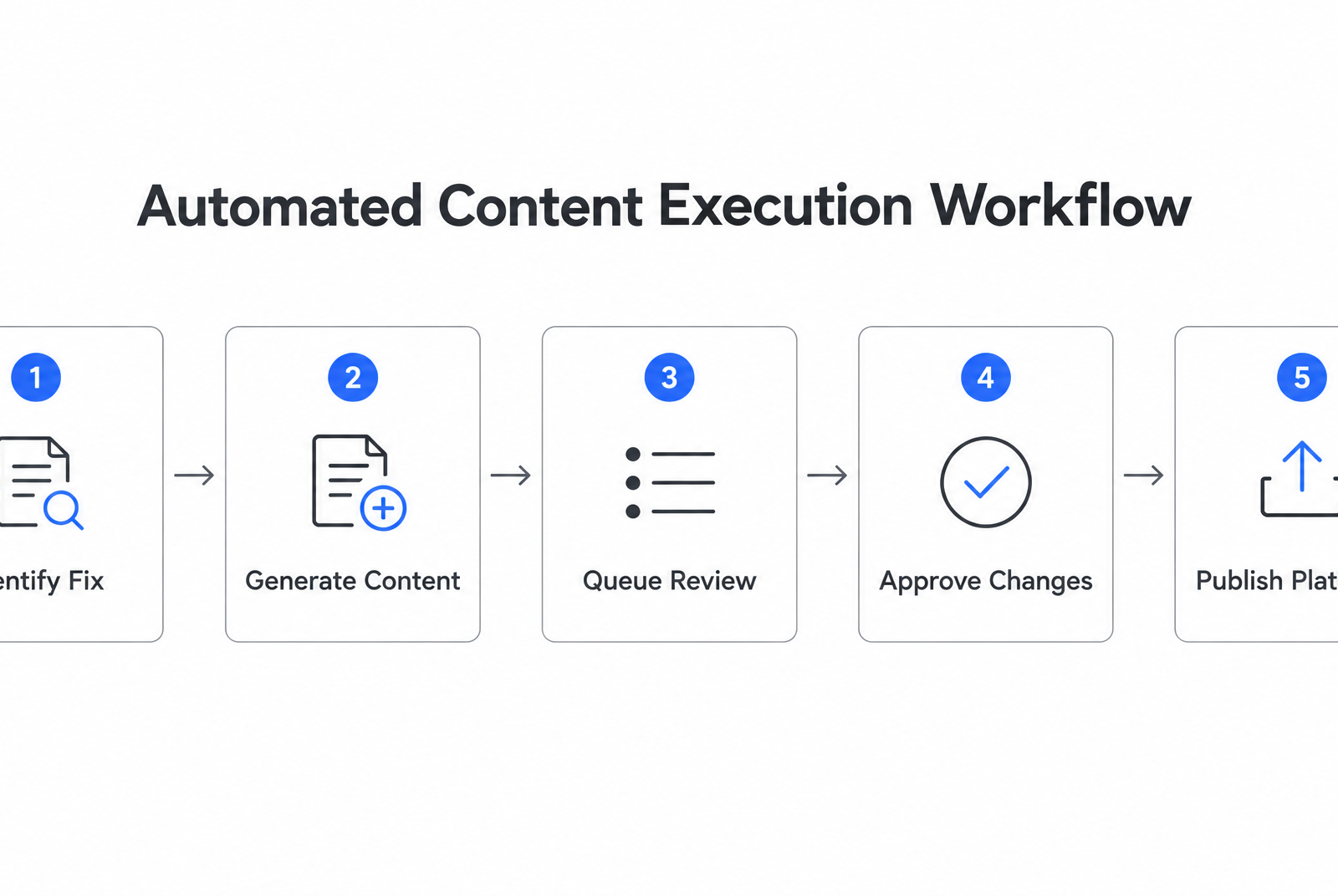
Automated reporting paired with content fixes
Most platforms report what dropped or flag what needs attention. We focus on producing the content required to act on those findings. If your site needs a batch of meta descriptions, we draft them and stage them for approval. If you want to cover a topic a competitor is ranking for, we generate an article aligned with that search intent.
The distinction matters when your team is lean. Many tools in the market focus on technical changes like schema or redirects. We handle content production—the layer marketers manage most often—and publish it directly to your existing website and social channels without requiring copy-paste work or manual formatting for each destination.
We offer automated content generation and multi-platform publishing. Plans are designed for businesses, agencies, SaaS companies, and marketing teams looking to scale content without increasing workload.
Which tool matches your workflow
Most teams reach for the biggest-name tool without first defining what they need it to do. That's the selection mistake we see most often: choosing based on feature lists instead of the specific workflow gap you're trying to close.
Before comparing tools, map the work your team performs after a report arrives. Do you need better technical diagnosis? Cleaner client dashboards? Content briefs? Forecasting? Or do you need help turning approved ideas into published assets? The right answer depends less on the brand name and more on which part of the process is currently slowing you down.
Budget, automation depth, and fix-layer coverage
Start with three filters: price, how much of the workflow you want automated, and whether the tool touches the fix layer. Deep technical crawlers surface many issues but often require expert prioritization. A single audit can produce long lists of schema problems, redirect chains, missing alt text, and crawlability warnings, but someone still has to decide which fixes matter most and which can wait.
Reporting suites make dashboards easier to generate, which works well for agencies and larger teams with dedicated implementation resources. For lean teams, the same reports can become another place where work accumulates. The key question is whether automation reduces work or merely reorganizes it.
We built our platform around that implementation gap. When you identify content that needs to be created or refreshed, we generate the material and queue it for review. Once approved, it can be published directly to your site and social channels from the same workflow.
Integration ecosystem and scalability
If you're already paying for an all-in-one SEO platform, its audit features may cover your needs without another subscription. Many integrate with Google Search Console and Analytics, so you're pulling data from sources your stakeholders already trust. The limitation is that findings still need an owner.
Some platforms automate content workflows but stay light on technical maintenance. If your primary need is generating meta descriptions, updating blog intros, or creating social-ready assets at scale, those tools close an important loop. If you need schema repairs, redirect management, or advanced crawl diagnostics, you'll likely need a separate technical tool alongside your content workflow.
For SMBs evaluating low-cost entry points, lightweight crawlers and domain-owner tools can provide enough visibility to get started. They're useful when someone on your team is comfortable translating findings into CMS changes manually.
The honest assessment: if your team wants automated execution, evaluate tools that demonstrably touch the fix layer or pair a reporting tool with a content-execution workflow. Otherwise, you're just moving the alert from your inbox to a different dashboard.
Questions People Ask
Do I need a separate tool for AI search visibility, or do traditional rank trackers cover it?
Traditional rank trackers are built around search engine positions, not whether AI assistants cite or summarize your brand. If AI visibility is part of your acquisition strategy, look for reporting that monitors those surfaces directly instead of assuming classic rankings tell the whole story.
What happens if my team can't keep up with the fixes flagged by automated audits?
The reporting workflow starts to lose value. When findings arrive faster than your team can review, prioritize, and implement them, automation creates a backlog instead of a performance lift. In that case, either narrow the report to fewer high-impact items or add a workflow that helps turn approved recommendations into live changes.
Can I run meaningful SEO reports without paying for enterprise-tier tools?
Yes. You can build a useful reporting setup with low-cost crawlers, native search data, and free domain-owner audit options. The tradeoff is execution: lower-cost tools can show you what needs attention, but your team will still need to interpret the findings and make the updates manually.
Why do some platforms recommend monthly reporting instead of weekly dashboards?
Because SEO changes usually need time to settle before the result is meaningful. Fast monitoring is still useful for catching technical problems, but stakeholder reports work better when they focus on trends, completed work, and outcomes rather than short-term movement that may reverse on its own.
