
Close the SEO Feedback Loop: Feed Search Console Data Back Into Your Content Queue

Key Takeaways
- Automated data pipelines replace monthly manual reviews with continuous optimization.
- Real-time data and Search Console alerts support a self-adjusting content queue.
- A least-privilege service account improves stability and limits key-leak damage.
- Google's developer platform provides programmatic access to search metrics.
- Impressions, clicks, CTR, and position guide each page's next action.
- Pagination matters on high-traffic sites. Each API call caps at 10,000 rows.
- A content-ops platform turns search data into actionable writing briefs.
Turn Your Search Console Pulls Into a Live Feed
Automating Search Console pulls turns a monthly audit into feedback. Every downstream decision uses GSC performance data: impressions, clicks, CTR, and position. Pull the data on a schedule and store it where planning tools can read it. This creates the foundation for the framework.
The performance report provides a 24-hour view of recent search activity. Search Console also emails you about new issues. Connect these sources to create a self-adjusting queue. You avoid daily logins while the system flags changes. Your pipeline then responds. AnyPost uses the same approach, surfacing changes from Google Search Console.
Setting up the API connection
Create a GCP project, enable the Search Console API, and generate OAuth 2.0 credentials—or a service account for headless jobs. Then use the searchanalytics.query endpoint to pull impressions, clicks, CTR, and position for your property.
Use a least-privilege service account, not your personal OAuth token. Grant read-only access to one property and nothing else. The pipeline keeps running when staff change. If a key leaks, the blast radius stays small.
Watch the row cap. Each searchanalytics.query request returns up to 10,000 rows. On large sites, paginate with startRow and split broad date ranges into smaller windows. Pulling daily data instead of one 90-day block helps you stay under the limit. It also provides cleaner trend data.
Where the data should live
Store your pulls where content-planning tools can access them. A Google Sheet works well for a small site. BigQuery scales for larger properties and supports SQL across months of history. Schedule daily or weekly jobs with Cloud Functions, Apps Script, or cron.
Keep a retention policy. You rarely need row-level data older than 16 months. That is all GSC serves anyway. Trim old raw pulls and keep aggregated summaries.
Routing signals to the right fix
Different GSC signals require different fixes. Treating every issue as a refresh wastes effort. Branch the queue by signal type.
- High impressions, low CTR: the ranking work is done. Route the page to a metadata-only edit. Fix the headline and meta description, but leave the body alone.
- Position 5–15 near-misses: route the page to a content-depth refresh. These pages already rank, so expanding them usually beats publishing something new.
- Rising long-tail queries: route the page to an FAQ or new section.
Your automation must also handle one key difference. Search Console clicks and Google Analytics sessions legitimately disagree. Clicks occur on the SERP, while sessions count on-site behavior. Do not force them into one number. Feed each signal into its own decision.
The three biggest wins
- Sharper CTR on underperformers, through metadata fixes on high-impression queries.
- Faster detection of ranking drops, because alerts and daily pulls flag decay early.
- Fewer manual audit hours, because the queue populates itself.
Timeline to close the loop from scratch: roughly 4–6 weeks. Weeks one and two cover API authentication and storage. Weeks three and four connect the routing logic. The final stretch tunes thresholds, so the queue responds to real signals instead of noise. For more on automated reporting, see our guide on the benefits of automated SEO reporting.
Read the Four Metrics That Decide What Gets Touched
Four signals drive each queue decision: impressions, clicks, CTR, and average position. With automation, they become routing rules instead of monthly report metrics. Each signal points a page toward a different action.
Here is what each metric measures. Impressions count whenever your listing appears in results, even below the fold. Clicks occur when someone visits through the result. CTR equals clicks divided by impressions. Position refers to your topmost ranking link, read from top to bottom. Ads do not occupy SERP positions, so perceived rank may look better than a screenshot suggests.
Scoring pages to surface the best refresh targets
Build a Performance Score that prioritizes high-impression, low-CTR pages. Use this formula: (Impressions × (1 − CTR)) × (1 / Position). A page with 12,000 impressions, a 1.8% CTR, and position 6 scores far higher than a low-traffic page ranking number one.
The score rewards existing demand and missed clicks. That is where a small change can produce meaningful traffic.
Which signal routes to which action
Two sources may appear to offer conflicting advice. One recommends metadata changes for high-impression, low-CTR pages. Another finds the largest gains from refreshing pages ranking 5–15.
These are different triggers for different jobs.
- Top positions, lagging click-throughs: focus on searcher psychology. Sharpen the title tag and meta description without changing the body.
- Striking-distance pages (positions 5–15): improve coverage. Add updated data, clearer headings, and deeper analysis to reach page one.
- Emerging secondary queries: provide direct answers. Add targeted FAQ blocks or dedicated subsections for specific intents.
Each action has a different cost and payoff. Treating every task as a generic refresh wastes effort. Automated routing closes the loop without manual review.
Spotting position decay before it costs you
Flag position decay by comparing average position week over week. Move any page that falls more than 3 spots higher in the queue. Search Console's near real-time data helps you catch these drops quickly.
For visual scanning, send the data to a dashboard. Build a heat map with impressions on one axis and CTR on the other. The bottom-right corner—high impressions and low CTR—is your priority zone. Our platform highlights these shifts directly, keeping reporting tied to the source data.
Off-site search metrics and on-site behavior represent different funnel stages. Keep them as complementary measures of post-click engagement.
Export the scored, prioritized list as a CSV. Import it into your content-queue tool, ready to trigger each page's next action.
From Prioritized List to a Queue That Runs Itself
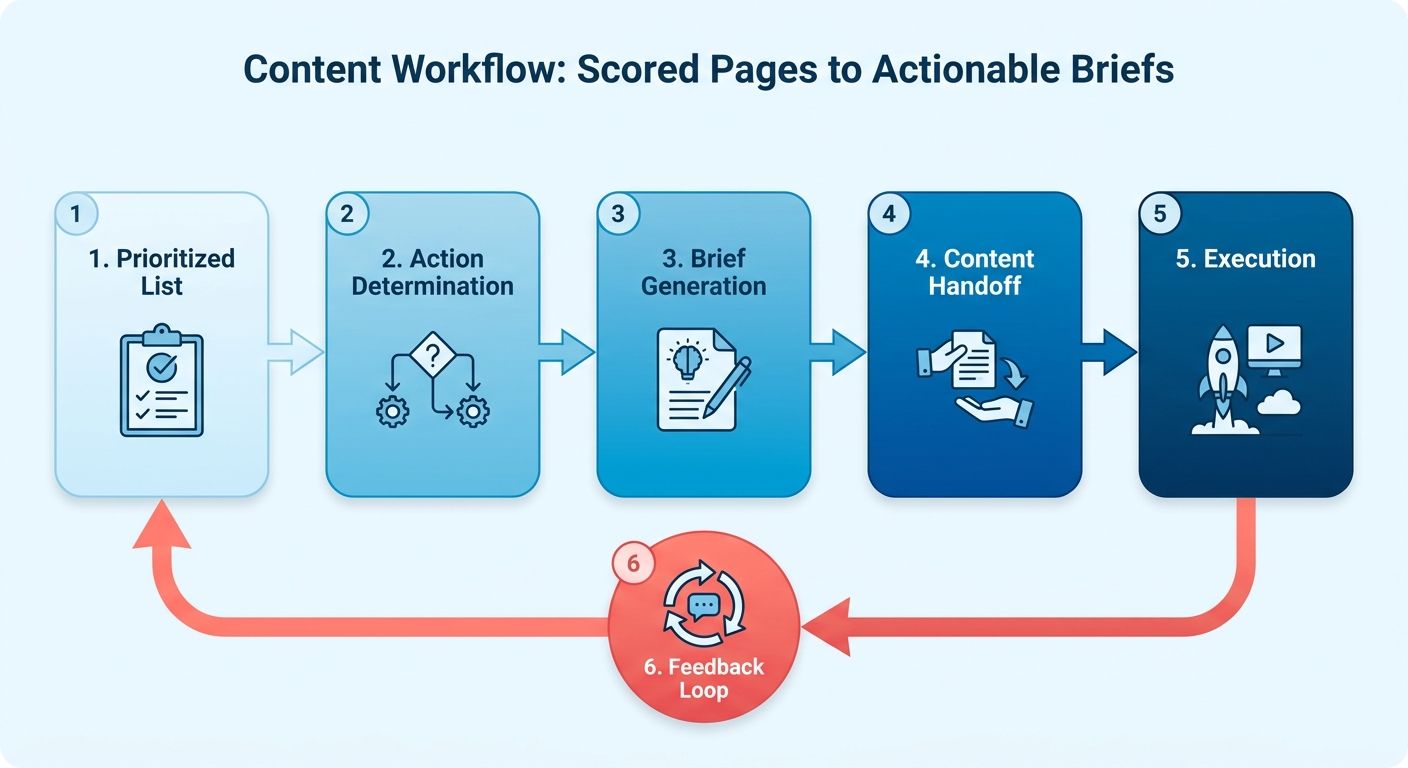
Once the prioritized list exists, turn it into actionable briefs. The scores show which pages need attention and what work they require. Defining the action first makes the content handoff easier.
Strong visibility with low engagement calls for a title update. Pages outside the top spots need expansion. Each signal maps to a brief, format, and priority.
Turning the prioritized list into briefs
Work through the list row by row. Capture the page URL, triggering signal, and recommended action. The writer should not need to reconstruct the task's purpose.
AnyPost supports this handoff with workflow features. The Taxonomy Researcher surfaces low-difficulty, high-intent keywords for your niche. Each piece can target terms you can realistically win. The SERP Competitor Analyzer studies top-ranking articles and builds a structure by identifying gaps.
Together, these tools give writers the intent and angle before drafting begins. A complete brief includes the intent, angle, and success condition.
What format should each gap become?
Match the format to search intent, not habit. This prevents the queue from producing blog posts when another format fits better.
- Informational intent → a blog post or long-form guide. These serve queries where searchers want to understand something.
- Transactional intent → a landing page. Buying-intent queries need a clear offer more than extensive depth.
- Quick-answer intent → an X-thread or short-form snippet. Long-tail near-misses may need a direct answer surfaced quickly.
The Persona Engine keeps the voice consistent across formats. A blog post, landing page, and X-thread from one brief should sound like the same brand. This consistency is difficult to maintain when teams repurpose content manually. Our resource on the benefits of automated SEO reporting explains how these data streams inform planning.
Routing work once a page crosses a signal
Let the signal determine priority. When Search Console data shows that a page needs attention, move it to the top of the list. Nobody needs to notice the change or file a ticket manually. Our integration surfaces these shifts automatically.
Give every item a clear commitment to prevent stalled work. Set draft and publishing targets for each item. The list then becomes an accountable plan.
AnyPost brings context extraction, competitor analysis, and multi-channel production into one dashboard. This reduces manual triage. Signals route, briefs take shape, and the team creates content.
Skip this level of automation if you publish fewer than a handful of pages monthly. At that volume, setup may take longer than manual review.
Close the Loop with CMS and Analytics Wiring
The loop closes when data moves without manual handoffs. Upstream systems produce decisions, while this section covers execution. At scale, measurement, generation, publishing, and re-measurement must work together.
The full cycle starts with a Search Console signal. It updates the queue, generates a draft, publishes to your CMS, and flags the URL for review. No planning meeting or manual export is required. Each connection works as follows.
Wiring the webhook flow
The trigger chain runs GSC → a cloud message queue → a webhook endpoint → your CMS. Search Console email alerts already identify new issues. Convert those alerts into machine signals. Instead of a person reading the email, a message queue sends it to a webhook. The webhook then updates the queue.
The publishing system sends finalized drafts to WordPress or Contentful through an API. SEO meta tags are filled before publication. Title tags, meta descriptions, and structured data are ready when the page reaches the CMS. Rich results depend on clean structured data, which GSC monitors afterward.
What the post-publish trigger should do
A post-publish trigger automatically marks an updated URL for re-evaluation 7 to 14 days after publication. This turns the process into a loop rather than a one-way pipeline. The updated page returns to the measurement pool on schedule.
The timeframe matters because GSC updates its performance report quickly, but one day provides noisy data. Allow a week or two for impressions to stabilize before judging the edit.
Watching the loop without watching it
Build two KPI tiles and one alert. The tiles track Updated Pages CTR Change and New Content Ranking Velocity. Both use Search Console data. A dashboard can show them alongside organic traffic from GSC and Analytics.
Search-side actions and on-site visits remain separate user steps. Keep their reporting streams distinct so technical alerts stay clear.
The most useful alert sends a Slack or Teams message when any page drops more than 5 positions after an update. That signals a possible rollback.
For scale, batch the work. Ten thousand URLs do not need ten thousand webhook calls. Group updates into scheduled batches, prioritize them using the earlier score, and process the remainder more slowly. Each re-measurement feeds the next cycle automatically.
Measure the Lift, Then Feed It Back
You cannot judge a queue adjustment without measuring the same page consistently. Each iteration produces a change. Measuring that lift distinguishes an improving system from one that simply creates drafts.
Before adding a page to the queue, freeze four baseline numbers: pre-update impressions, CTR, average position, and conversion rate. These control readings help show whether the change produced results or followed a seasonal shift.
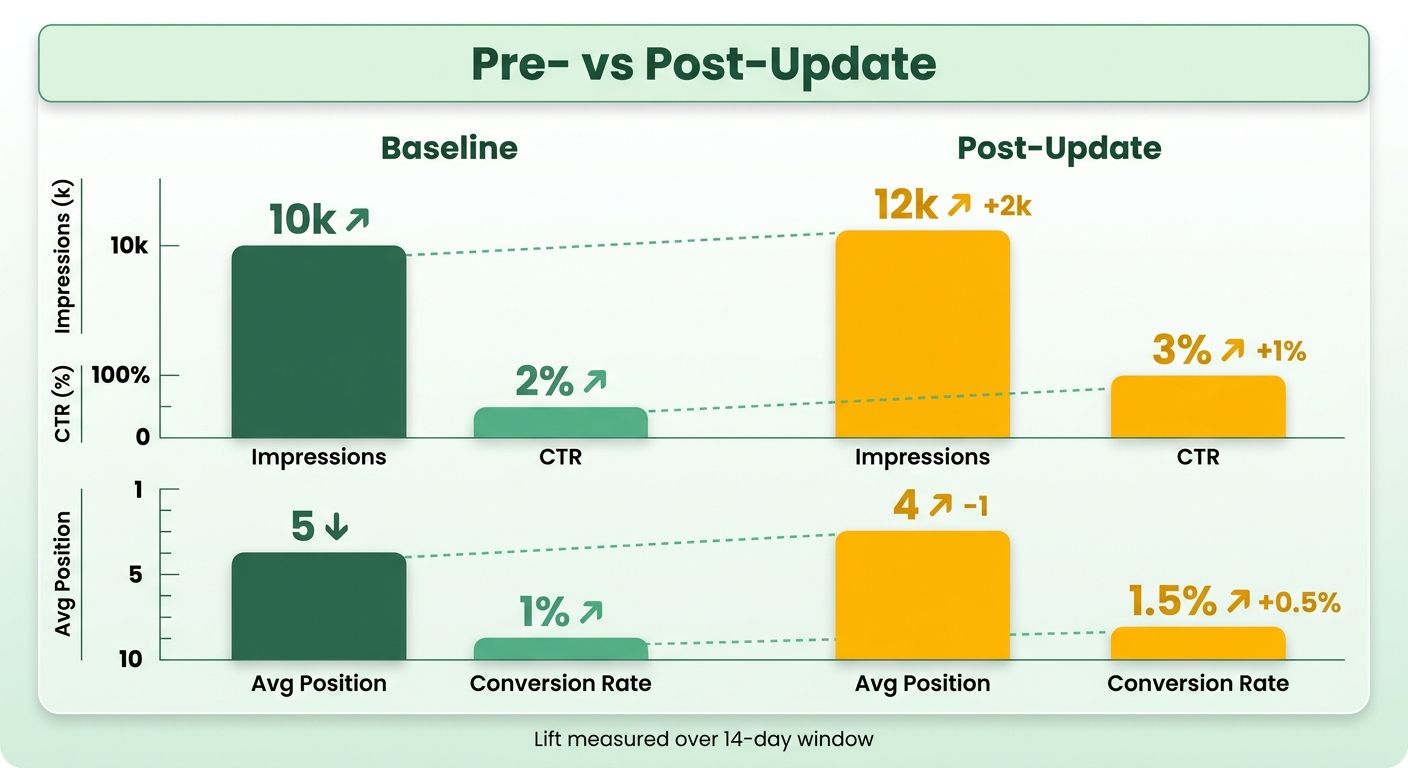
Comparing pre- and post-update windows
Pull two matched time windows and compare them side by side. Use a 14-day pre-update window and a 14-day post-update window. If traffic is thin or noisy, extend both windows to 30 days. Looker Studio combines Search Console and Google Analytics, showing impressions and CTR alongside on-site conversions.
Read both datasets together to follow the journey from query to conversion. Remember that they still represent different interaction stages.
When is a lift real versus random noise?
A change counts only when it reaches statistical significance. Run a paired t-test or Bayesian lift analysis on both windows. Hold the threshold at ≥95% confidence. Below that level, the result may be noise.
This standard matters more in automated pipelines. When pages are scored and re-queued at scale, false positives can influence later decisions. Require significance before changing queue weights.
Metadata edits and content-depth refreshes produce different types of lift. A title tag on a visible page aims to improve click-through. Expanding a striking-distance article aims to improve position and visibility. Test the metric each action was designed to change.
Feeding results back into the queue
Adjust page priorities based on measured results. If CTR-focused metadata edits repeatedly clear the 95% threshold while depth rewrites stall, give CTR improvements more weight. Each cycle then uses confirmed lift instead of guesses. Our dashboard tracks these shifts, showing the impact of each edit.
Log every iteration in a Loop Retrospective sheet. Record the page, action, result, and unresolved issues. Run a quarterly audit across the pipeline. Trace one page from data pull through generation and publication. Confirm that every handoff still works.
Illustrative example: a tech blog runs three full cycles. After prioritizing CTR wins, the team spends less time debating which page to change. The data makes that decision. The loop decides, the data confirms, and the retrospective records why.
For more on scaling this measurement discipline, see our breakdown of the benefits of automated SEO reporting.
Advanced Signals and Future-Proofing the Loop
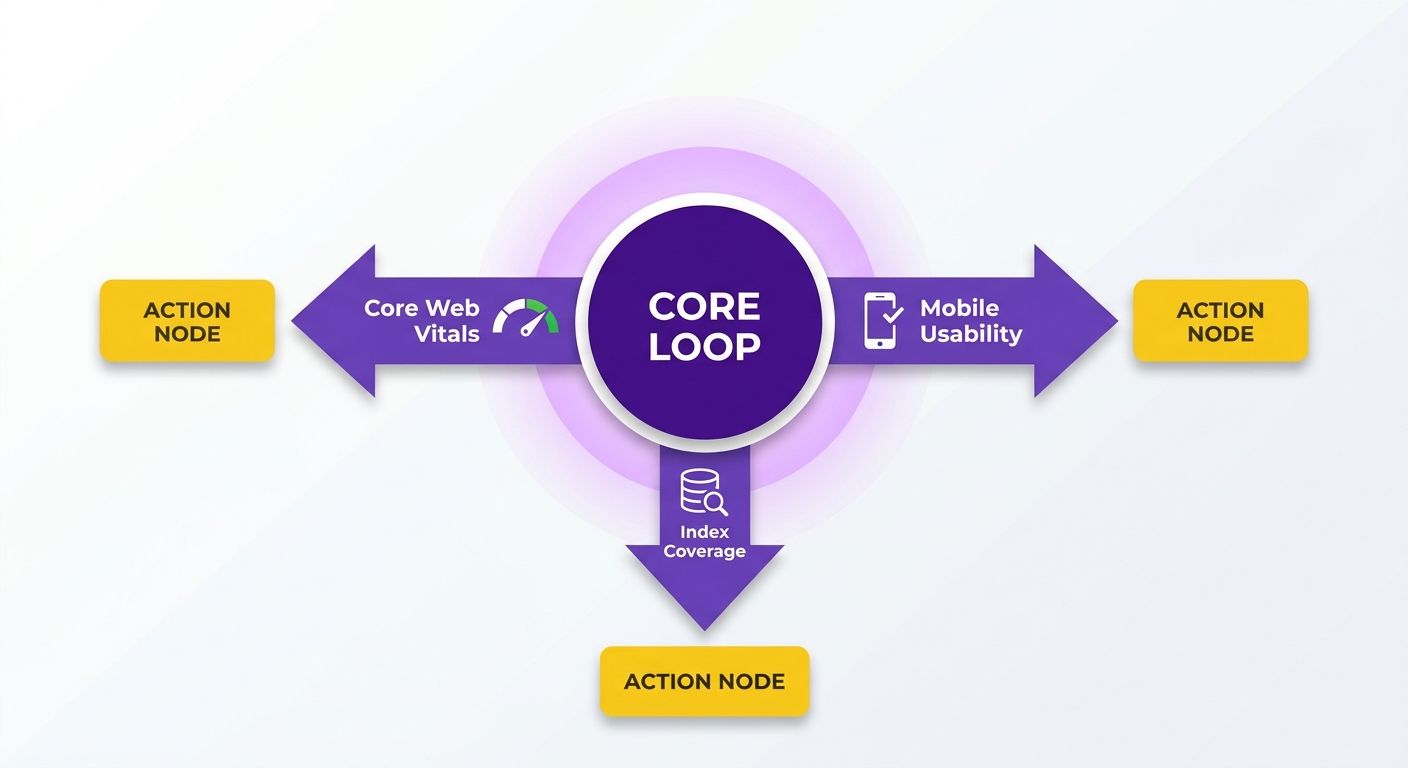
Once the core loop runs, add new GSC signals to the scoring model. Core Web Vitals, mobile usability alerts, and index coverage data can all trigger queue actions. These signals may identify problems before rankings decline.
Add branches to the decision tree rather than manual reviews. Each new signal should map to a specific action. This keeps the loop self-adjusting without adding more judgment calls.
Folding UX and index signals into the score
Add three inputs: Core Web Vitals status, mobile usability flags, and index coverage errors. Each should route to a fix rather than a rewrite. A failing LCP score needs a performance ticket. A “soft 404” or “blocked by robots.txt” flag needs a crawl fix first.
Core Web Vitals include three metrics: Largest Contentful Paint (load speed), First Input Delay (interactivity), and Cumulative Layout Shift (visual stability). Send a failing status to the queue as a high-priority UX ticket. Content depth cannot solve a page Google flags for slow LCP.
Index coverage is a common missed opportunity. A page with a soft 404 or robots block remains invisible, regardless of copy quality. Catch it in the feed and fix the technical problem first. Keep these tasks in a technical queue separate from editorial work.
When to A/B test headlines instead of rewriting
Test headlines on pages with strong search visibility but few clicks. When a page ranks well, Google has already judged the content relevant. A low CTR may mean the snippet does not persuade users to click.
Generate three or four title variants for a low-CTR page. Publish them and let CTR movement identify the winner. AnyPost captures your brand's DNA through its Business Context Graph, so each variant maintains your voice.
Segment branded and non-branded traffic before testing. Branded queries reach loyal readers who already know you, so narrative titles may work well. Non-branded queries reach new readers through keywords, so use literal, keyword-first titles. The GSC branded filter separates the two.
Future-proofing against SERP changes
Add schema generation to every content brief. AI-generated answers and rich results use structured data, so pages without schema may miss these features. Adding it now avoids retrofitting later.
Scaling is the other half. A spreadsheet queue breaks past 10,000 URLs. Move to a content-ops setup where GSC signals sync in near real time and route themselves. This shift from periodic audits to a live queue supports continued growth.
Skip the advanced branches if you manage under a few hundred URLs. The overhead is not worthwhile until signal volume exceeds what you can review manually.
Frequently Asked Questions
1. Can I use a Google Sheet instead of BigQuery for storing Search Console data?
Yes, spreadsheets work well for smaller datasets. As your content library grows, migrate to a cloud data warehouse. This lets you query your historical search footprint more efficiently. Set a retention policy that matches Google's historical availability limits.
2. Why shouldn't I try to make Search Console clicks match Google Analytics sessions?
These platforms track different user actions. A click occurs on the search results page. A session begins after a user successfully loads your website. Redirect latency and ad blockers can also create differences. Treat the metrics as separate signals for different funnel stages.
3. My page ranks well but gets few clicks. Should I rewrite the whole thing?
No, a full rewrite is unnecessary and could risk current rankings. If a page ranks near the top but has a low CTR, search engines already trust its content. Focus on improving the title tag and meta description instead.
4. How long after publishing an update should I wait before judging whether it worked?
Allow one to two weeks for re-crawling and metric stabilization. Reviewing data too soon may reflect temporary fluctuations. For lower-traffic pages, extend the window to a full month.
5. How do I know a traffic lift came from my edit and not seasonal variation?
Record baseline visibility, CTR, and conversion metrics before making changes. Compare matched pre- and post-update windows using methods such as a paired t-test. Accept changes only when they reach a high level of statistical significance.
6. Should I always A/B test headlines the same way for every page?
No, user intent differs between these audiences. Branded searches come from people who already trust you. They may respond well to narrative titles. Non-branded searchers want direct answers, so use literal, keyword-focused headlines.
7. When is this automated feedback loop not worth building?
If your team produces only a few articles monthly, the technical overhead may outweigh the savings. Building and maintaining this pipeline requires a multi-week investment. Manual audits may be more practical for low-volume sites.