
What Are the Benefits of Automated SEO Reporting for Marketing Teams

Key Takeaways
- One agency cut report generation time by 75% after switching to automated dashboards. Analysts got more time for strategy work.
- A firm managing 30 clients saved over $270,000 annually by automating routine reporting tasks.
- Automated tools pull data directly from Google Search Console and Analytics. That reduces accuracy drift from manual exports.
- Reports refresh on preset schedules, daily, weekly, monthly, without anyone touching a spreadsheet.
- Automated reporting solves three problems manual processes handle poorly: accuracy, timeliness, and cross-client consistency.
- The main value is not time savings. It is more strategy and insight time.
- Automation handles data aggregation and alerts. Human judgment still interprets the numbers.
Why Automated SEO Reporting Matters
Ask any marketing lead what eats their week, and reporting lands near the top. Pulling rankings, stitching together traffic exports, reformatting for stakeholders. Hours of manual labor. So when people ask what the benefits of automated SEO reporting are, the honest first answer is relief from administrative overhead.
That shift from data collection to active campaign optimization is where the real return shows up. It connects directly to how we build voice-aligned content at AnyPost.ai.
What it actually solves
Manual reporting is fragile. Teams rely on static exports and risk outdated information or formatting discrepancies that skew performance reviews. Automated systems bypass these issues by establishing direct API connections to your analytics platforms. The data displayed stays current and uniform.
This addresses the debate between automated delivery and manual oversight. Software excels at gathering and organizing metrics. It cannot replace the strategic context a marketer brings. The ideal workflow uses technology for data retrieval, leaving final analysis and planning to the team.
Who benefits most
Marketing teams, digital strategists, and the stakeholders who sign off on budget. A news media site tracked impressions and popular pages to adapt content. An e-commerce site tracked conversion points from organic traffic and lifted sales. Different site types need different KPIs. Generic reporting guides fall short here.
This is where standard guides skip something. If reports now track AI search visibility and each site needs its own KPIs, then engagement metrics belong in that KPI set. When you publish content through our platform, real-time analytics tracking lets you see how that content performs the moment it ships. That closes the loop between creation and feedback instead of waiting for a monthly review.
Manual vs automated
| Factor | Manual Reporting | Automated Reporting |
|---|---|---|
| Time per client | ~1 hour/week | Near zero after setup |
| Data accuracy | Prone to copy errors | Pulled from source, consistent |
| Update frequency | When someone gets to it | Scheduled, real-time |
| Scalability | Breaks with growth | Handles more clients easily |
| Team focus | Data assembly | Strategy and analysis |
Setup difficulty: moderate. Connecting data sources and defining KPIs takes a day or two upfront. Maintenance: low once running.
Metrics worth tracking to prove it works: organic traffic growth, keyword rankings, conversions and revenue, technical health, and engagement rates across published pages. For teams looking to go deeper, exploring how automated SEO reporting integrates with content generation workflows can streamline creation and measurement in one place.
Data-driven decision making
Data pulled on a schedule is only useful if it changes what you do next. That's the real answer for what the benefits of automated SEO reporting are for a strategy team. It moves you from describing the past to deciding the next move. Instead of compiling spreadsheets, analysts can identify trends and anomalies.
This shift changes how marketing departments operate. When manual data gathering is removed, teams can focus on translating metrics into actionable campaigns, ensuring that every strategic pivot is backed by evidence.
Which metrics drive decisions
The metrics worth automating are the ones tied to outcomes, not vanity counts. Track keyword rankings, organic traffic, impressions, average position, and indexing status. Then connect those to conversions, lead quality, and revenue.
One SEO report tracked conversions and caught a rise in form submissions. That signal pushed the team to refine strategy toward higher-value opportunities, which lifted lead quality. The real value comes from understanding what happens after a user converts. A modern report needs newer visibility inputs and downstream outcome links to be complete. Metric breadth alone tells you nothing.
How automation turns data into strategy
It shortens the gap between publishing and knowing. One marketing agency automated organic traffic reporting to compare performance before and after new content shipped. Traffic and engagement climbed. Another automated keyword rank tracking and spotted which terms drove results, then adjusted fast.
Combine that before-and-after comparison with real-time dashboards, and you get a closed feedback loop. A marketer publishing voice-aligned content sees the performance response almost immediately, not in a monthly review. Generic reporting guides skip this piece. When your content creation and analytics tracking share the same system, you can measure how well your content maintains the brand voice you built into it. Real-time analytics tracking lets you see engagement metrics surface the moment content goes live.
Larger organizations prove the reliability angle. Scotiabank used automated SEO reporting to sharpen its digital strategy and improve performance tracking. The University of North Dakota used automated reports to coordinate SEO work across departments, which improved collaboration. Different site types, different KPIs, same principle: consistent data everyone trusts.
Best practices for a decision-ready workflow
Keep it lean. Schedule reports daily, weekly, or monthly based on how fast your decisions move. Align every tracked KPI to a specific business goal. Cut anything that does not inform an action.
Skip heavy custom reporting if you manage a single site with stable traffic. The setup cost outweighs the payoff. But once you're publishing regularly and juggling multiple content streams, a coupled report-and-create workflow pays for itself. The real value comes when automated content generation and real-time analytics work together to show what's driving traffic, leads, and revenue.
Cross-team collaboration
Ask marketing, sales, and dev what they want from a report and you'll get three different answers. That's the collaboration problem automated reporting quietly fixes. When you look at the benefits of automated SEO reporting through a cross-departmental lens, the headline is not speed. It's that everyone reads from the same live numbers instead of arguing over three stale exports.
Automated SEO reporting eliminates version confusion. A live dashboard refreshes on its own and pulls straight from source data, so sales sees the same visibility trend the SEO team sees. As Daria Chetvertak of SE Ranking put it, automation "eliminates the variance and makes the output predictable for clients and reviewers alike." Predictable output is what makes a report shareable without a translation meeting.
How shared reporting improves cross-team communication
It gives every department a common reference point and cuts the back-and-forth. Instead of marketing exporting a file, reformatting it for stakeholders, and fielding follow-up questions, the data lives in one place everyone can open. That single source shortens the distance between a shift in the numbers and a decision about it.
Teams running live dashboards report a real behavior change: fewer check-in requests and more trust, because stakeholders can self-serve their data between formal updates. When people stop asking "what's the latest?" they start asking "what do we do about it?"
The feedback loop between marketing and sales is where this pays off. When sales teams can see which specific landing pages or search terms are driving the highest-quality leads, they can coordinate with marketing to prioritize those topics. This alignment ensures that promotional efforts match the search intent of high-value prospects.
What teams should share and what stays human
Sharing raw dashboards is easy. Sharing meaning is the work automation cannot do for you. The role of the team is to provide context to the numbers, explaining the "why" behind traffic shifts and outlining the next steps.
This extends to content quality. When cross-functional teams review performance, they need to know not just that a page is ranking, but that it represents the brand accurately. A unified dashboard allows content creators and SEO specialists to evaluate performance and brand alignment side by side.
AnyPost.ai's multi-source content integration feeds that loop. It pulls your performance and content signals into one view, so the instant a piece publishes, the whole team sees both how it ranks and whether it sounds like you. A modern dashboard connects to a huge range of data sources and refreshes without manual exports, which means brand-consistency feedback arrives as fast as the ranking data does.
Best practice: give each department a tailored view of the same dataset. Sales gets conversion and lead-quality slices, dev gets technical health, leadership gets outcomes. One source, many lenses.
KPI alignment and customization
The same engine tracks different KPI sets for different objectives, side by side.
Setting up custom KPIs that tie to goals
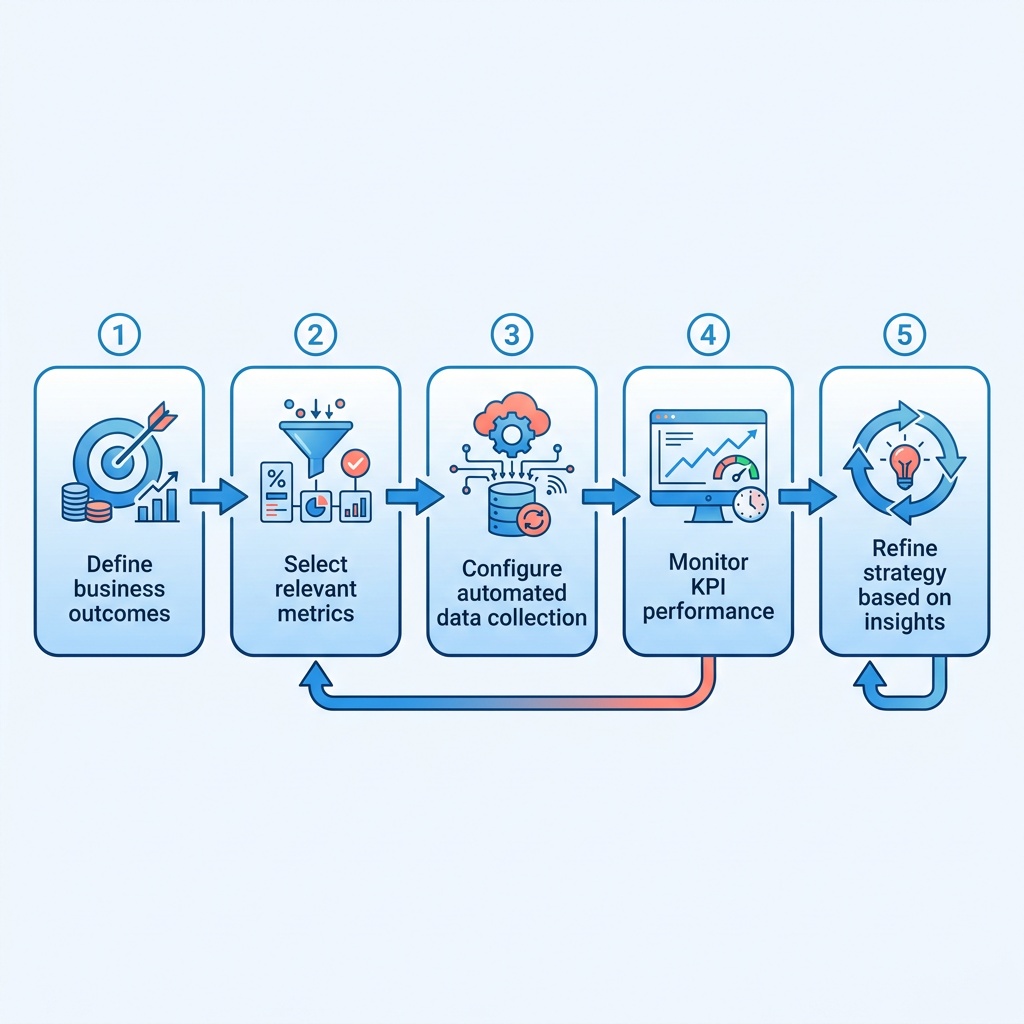
Pick outcomes first, metrics second. A useful custom KPI connects an SEO action to a business result you already report on. Then automate the collection so the number refreshes itself and flags movement.
By focusing on downstream actions rather than surface-level traffic, teams can see exactly how organic search contributes to the bottom line. This changes the conversation from "how much traffic did we get?" to "how did that traffic impact our pipeline?"
Best practices:
- Tie each KPI to a decision. If no one changes behavior based on a metric, cut it from the report.
- Establish clear thresholds. Set up automated alerts for significant drops or spikes so the team can react immediately.
- Track multi-touch touchpoints. Monitor how organic search interacts with other channels like paid ads or email.
- Segment by goal, not by channel. One view for revenue, one for lead quality, one for brand reach.
Why brand-voice consistency belongs on your KPI list
Evaluating the qualitative aspects of your content is just as important as tracking quantitative metrics. Measuring whether your published material aligns with your brand guidelines ensures that your search visibility does not come at the cost of brand integrity.
This is where voice-aligned content creation and automated reporting connect. Our Persona Engine matches tone to your brand profile at the point of creation, so consistency is not something you audit weeks later. Because we crawl your entire site to build a Business Context Graph, every article sounds exactly like you wrote it, and that consistency holds across each platform you publish to.
By pairing a Persona Engine with custom KPI tracking, you close the loop between what you publish and what your report says about it. This ensures that your content remains high-quality and on-brand even as you scale production.
For teams building this out, AnyPost brings automated context extraction, content production, and real-time analytics into a single dashboard.
Agency collaboration and expectation management
Agencies live or die on expectation management. A client who feels in the dark starts firing off check-in emails, and every one of those pulls a strategist off billable work. This is where the benefits of automated SEO reporting show up in a way generic guides skip: not just cleaner charts, but a shared source of truth that keeps the client relationship calm.
Live dashboards do the heavy lifting. When clients have direct access to their performance metrics, transparency stops being a promise and becomes the default. This self-service model allows clients to check progress at their convenience, shifting the agency-client dynamic from reactive updates to proactive strategy discussions.
How automated reports set client expectations
Automated reporting sets expectations by making output predictable. Scheduled, consistent reports mean a client knows what lands in their inbox and when. That removes the guesswork that breeds friction, and it frees your team to talk strategy instead of defending a spreadsheet.
The key is matching the report to the account. When you tune the automated feed to what a client actually values, whether that is lead generation, brand awareness, or technical site health, the report reads as a conversation about their goals, not a data dump.
Where brand-voice consistency fits in
Brand-voice consistency is a critical content-quality signal that agencies must monitor.
This matters because voice drift is a common point of friction. A client hands over brand guidelines, then quietly notices the blog stopped sounding like them. Pairing voice-aligned content creation with automated reporting closes that gap. You publish, and the system tracks whether the content held the client's tone alongside traditional performance metrics.
This creates a genuine feedback loop. When your content generation and reporting tools are aligned, you can verify that the output matches the client's established guidelines. Scaling content production does not dilute the brand's identity.
What stays human
Software handles the logistics of data retrieval. Human oversight remains essential for interpreting the results. A dashboard can highlight a drop in traffic, but it requires an analyst to explain the context, such as a seasonal trend or a search engine algorithm update.
This human touch is particularly important when evaluating content quality. Analysts must review the automated insights to ensure that the strategic direction remains aligned with the client's long-term business goals.
When the reporting and the content both reflect the client's strategic vision, expectation management stops being damage control and becomes the relationship itself.
Real-time monitoring and competitive intelligence
When a keyword ranking drops overnight or a competitor suddenly jumps ahead, real-time monitoring is what tells you before your stakeholders ask why. One of the core benefits of automated SEO reporting here is that you do not wait for the end of the month to spot the shift. Dashboards refresh on their own, flagging changes as they happen so you can respond while the window is still open.
A competitor publishes new content targeting your keywords. An automated dashboard surfaces the movement within hours, not weeks. You read the alert, review the new content, and decide whether to refresh your own page or let it ride. That speed matters when search visibility is contested.
How real-time monitoring improves decision speed
Real-time monitoring shortens the loop between event and action. When rankings or traffic shift, automated reports pull the updated numbers immediately and surface them in a dashboard or send an alert. You see the change, investigate the cause, and adjust strategy without waiting for the next scheduled review.
This immediacy allows teams to run agile experiments. If a team launches a new optimization campaign, they can monitor the immediate indexing and ranking response. This rapid feedback helps them decide whether to apply the optimization strategy to other sections of the site or pivot their approach.
Tracking search engine results page features in real time helps teams identify when they lose a featured snippet or a local pack placement. Identifying these losses immediately allows technical teams to audit schema markup or page speed issues before the drop impacts overall organic traffic.
What competitive intelligence automated reports surface
Competitive intelligence in automated reporting usually means tracking visibility shifts across the same keyword set you and your competitors target. When a competitor's page jumps in rankings, the dashboard flags it. You click through, read what changed, and decide if you need to respond or if the move is noise.
Automated reports also track backlink acquisition, content publication frequency, and domain authority shifts over time. These signals do not tell you what to do, but they tell you where to look. If a competitor gains 20 high-authority backlinks in a week, you investigate their outreach strategy or content asset. If their content output doubles, you check if they're covering gaps you missed.
The real value of automated SEO reporting here is that it handles the monitoring itself. You focus on reading the competitive story the data tells and deciding what moves next. Manual tracking would miss half the signals or deliver them too late to matter.
Coupling real-time reporting with voice-aligned content creation
Integrating real-time performance tracking with content creation workflows allows teams to optimize their output dynamically.
We built our real-time analytics feature around this idea. When you publish voice-aligned content through our platform, the system tracks performance from the start. You see which pieces drive engagement and which miss, and you refine voice guidelines based on actual reader response instead of guessing. That feedback loop is what moves teams from content production to content optimization.
This integration addresses the core operational challenges of scaling SEO campaigns. By combining creation and measurement, teams can ensure that their content strategy remains responsive to market changes.
For teams managing competitive markets, real-time monitoring paired with automated SEO reporting tools creates a feedback system that keeps you responsive without burning analyst hours on data pulls. The dashboard does the watching. You do the deciding.
Accuracy and error reduction
Manual SEO reporting breaks in predictable ways. Someone copies a number into the wrong cell. A date range gets set differently across two exports. A tab does not refresh before the deck goes out. When people ask what the benefits of automated SEO reporting are for accuracy, this is the honest answer: the machine pulls straight from source data, so the errors that creep in during copy-paste and reformatting simply do not happen.
That reliability compounds. Automated tools connect directly to platforms like Google Search Console and Google Analytics and refresh on a schedule, which means every report reads from the same live numbers instead of a manual snapshot someone took on a Tuesday. Accurate data enables downstream, trustworthy feedback on how your content is actually performing.
What errors automation eliminates
Automated reporting removes transcription and consistency errors. Manual reports fail when data is hand-copied, formatted inconsistently, or pulled at different times. Automation pulls from source databases on a fixed schedule, so the same query runs the same way every cycle.
This consistency is particularly valuable when reporting to external stakeholders. When data is pulled automatically, it eliminates discrepancies between different reports, building trust with clients who expect reliable and verifiable metrics.
How automated reports improve content feedback
Accurate reporting turns publishing into a measurable loop. By establishing a reliable baseline, teams can accurately measure the impact of their content updates.
This clean data foundation allows for more precise testing. When you can trust that your traffic and engagement metrics are free from manual reporting errors, you can confidently attribute performance changes to specific content optimizations or technical adjustments.
Best practices for keeping automated reports accurate
Accuracy is not automatic just because the tool is. A few habits keep it honest:
- Connect data at the source. Wire reports directly to GSC, GA4, and your rank tracker rather than intermediate exports.
- Lock your date ranges and definitions. Standardize what "organic traffic" means across every report so cross-comparisons hold.
- Audit the feed quarterly. Integrations break silently. Spot-check that every connected source still returns real numbers.
- Establish data validation rules. Set up alerts to flag if a data source returns zero or null values, indicating a broken connection.
Frequently Asked Questions
1. How much time does automated SEO reporting actually save compared to manual processes?
Automating your reporting workflow eliminates the hours spent exporting data, copying metrics into spreadsheets, and formatting slides. For teams managing multiple accounts, this removes the weekly administrative burden of data compilation, allowing team members to focus on analyzing performance and executing campaigns.
2. Can automated reporting replace the need for an SEO analyst on the team?
No. While software excels at gathering and organizing data, it lacks the strategic context needed to interpret those numbers. An analyst is still required to explain why metrics changed, identify the root causes of traffic shifts, and decide how to adjust the marketing strategy in response.
3. What happens if my automated dashboard shows a sudden ranking drop? How do I investigate the cause?
Real-time dashboards flag the drop immediately through alerts. You then manually investigate by checking Google Search Console for indexing issues, reviewing recent content changes, analyzing competitor movements in that keyword space, and examining technical health metrics the dashboard surfaces alongside ranking data.
4. Do I need automated reporting if I only manage one website with stable traffic?
If your site's traffic is consistent and you rarely update content, manual checks may suffice. However, if you begin scaling content production, running active campaigns, or managing multiple subdomains, setting up automated tracking becomes necessary to monitor performance efficiently.
5. How does automated reporting track brand voice consistency alongside traffic metrics?
By integrating content creation platforms with your analytics dashboard, you can monitor qualitative and quantitative metrics in one place. This setup allows you to verify that newly published pages adhere to your brand guidelines while simultaneously tracking their initial search performance.
6. Which metrics should I automate versus track manually in my SEO reports?
You should automate the collection of standard performance indicators like organic sessions, keyword positions, and conversion rates. Manual tracking should be reserved for qualitative assessments, such as evaluating the strategic value of new backlinks or reviewing the alignment of content with long-term business objectives.
7. Will automated reports work if my team uses different analytics platforms for different clients?
Automated reporting connects to multiple data sources simultaneously and pulls from each platform's API. The dashboard consolidates Google Search Console, Analytics, and other tools into one view, eliminating the version confusion that happens when different teams export from different platforms at different times.