
Content Automation Strategy: Which Workflow Stage to Automate First

In short: Approval and publishing bottlenecks can consume more time than content creation, with drafts often stalling for days waiting for stakeholder sign-off. A unified approval path that automatically routes content and triggers deadline escalations collapses the back-and-forth that delays entire production timelines. Publishing automation targets the manual reformatting across multiple platforms and streamlines asset distribution without browser-based intervention. The bottleneck rarely exists in creative work; it lives in approval, publishing, and distribution stages where manual coordination kills momentum. Teams that scale fastest audit where workflows actually stall, remove that friction first, then expand to the next bottleneck rather than automating everything simultaneously. Mapping the actual timeline of your last five content pieces often reveals that creative work moves faster than expected while approval chains stretch across email threads. Spreadsheet connectors, CMS integrations, and workflow platforms that route tasks based on content type form the core layer connecting drafting, approval, and publishing tools.
The Approval Trap
The part most teams underestimate isn't writing the content. It's everything that happens after the draft lands.
Review requests get buried in inboxes. Formatting turns into copy-paste work across channels. Assets wait on people who may not know they're blocking the next step. A brief arrives Monday. The draft is ready Wednesday. Then review slows, publishing gets pushed, and promotion loses its slot. One delay becomes three because each stage depends on the one before it.
Many teams automate email distribution first because it feels visible. The better first target is usually the handoff between review and publication. That's where small delays spread across your entire calendar. Removing that friction keeps approved work moving instead of forcing someone to coordinate every next step manually.
Centralized routing matters here: each stakeholder sees the right asset, knows what decision is required, and has a deadline tied to the workflow instead of a buried message.
Why This Bottleneck Costs More Than You Think
When a draft sits in email limbo for approval or a designer has to manually reformat assets for three platforms, you're watching hours of team capacity disappear on tasks that create no competitive advantage. One bottleneck stalls the next, and by week's end your content calendar has slipped days you can never recover.
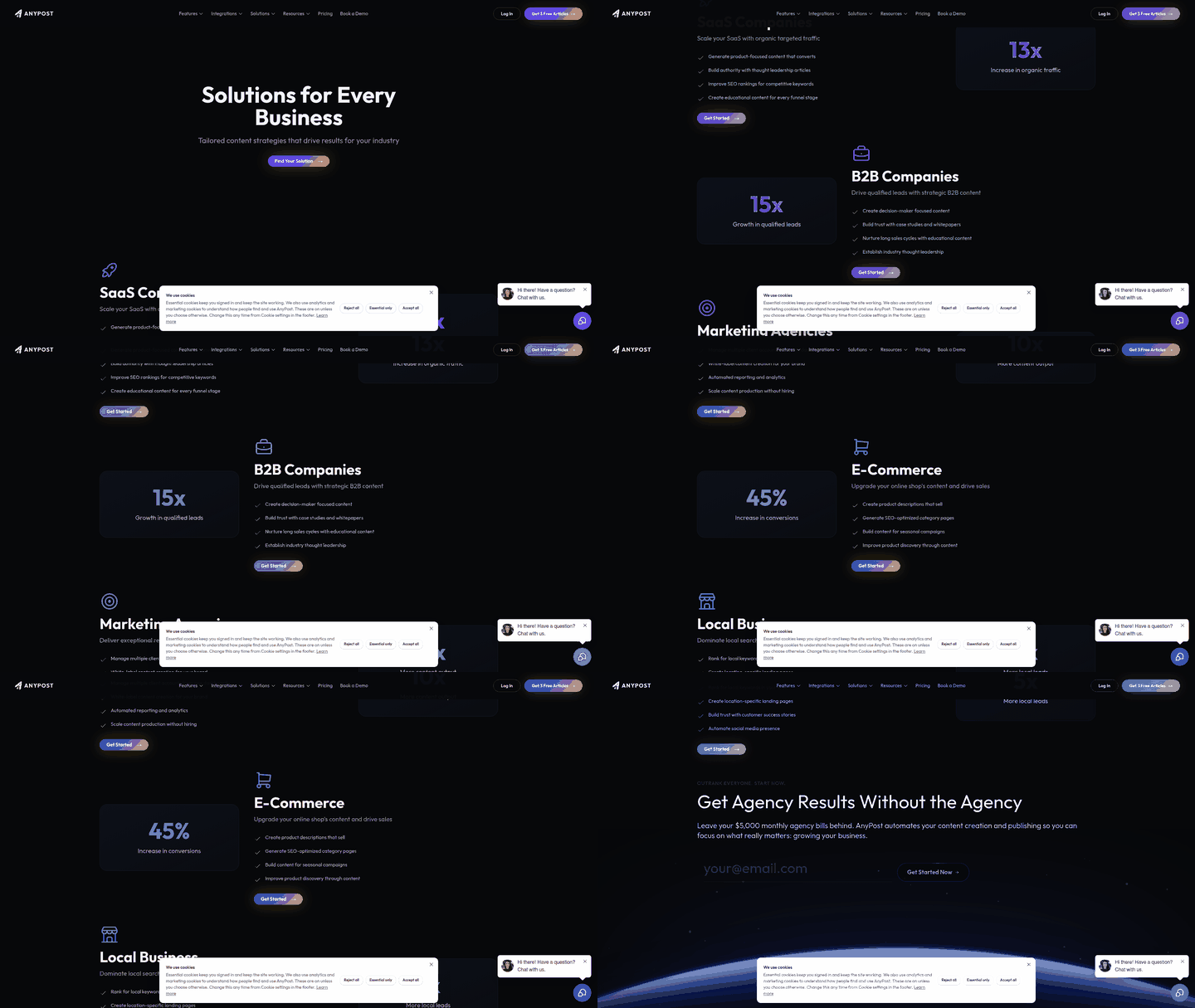
Content workflow management connects ideation, creation, review, approval, distribution, and performance tracking into a defined path so nothing stalls indefinitely.
This is why an automated content strategy beats "do everything at once." Instead of ripping out your entire workflow, you target the stage where removing friction enables the most downstream productivity. When you automate approvals, drafts move to publication without stalling. When you automate publishing, distribution happens instantly across channels instead of requiring manual reformatting. When you automate the repetitive parts of production, your team stops wrestling with busywork and starts shipping at volume.
The real lever isn't speed alone—it's consistency. When you codify your approval process into a system, it executes the same way every time. No forgotten sign-offs. No brand guidelines buried in someone's head. No slowest-tool throttling everything. A defined workflow builds accountability by assigning ownership for every task and deadline, so progress can be tracked in real time.
Where Your Workflow Actually Stalls
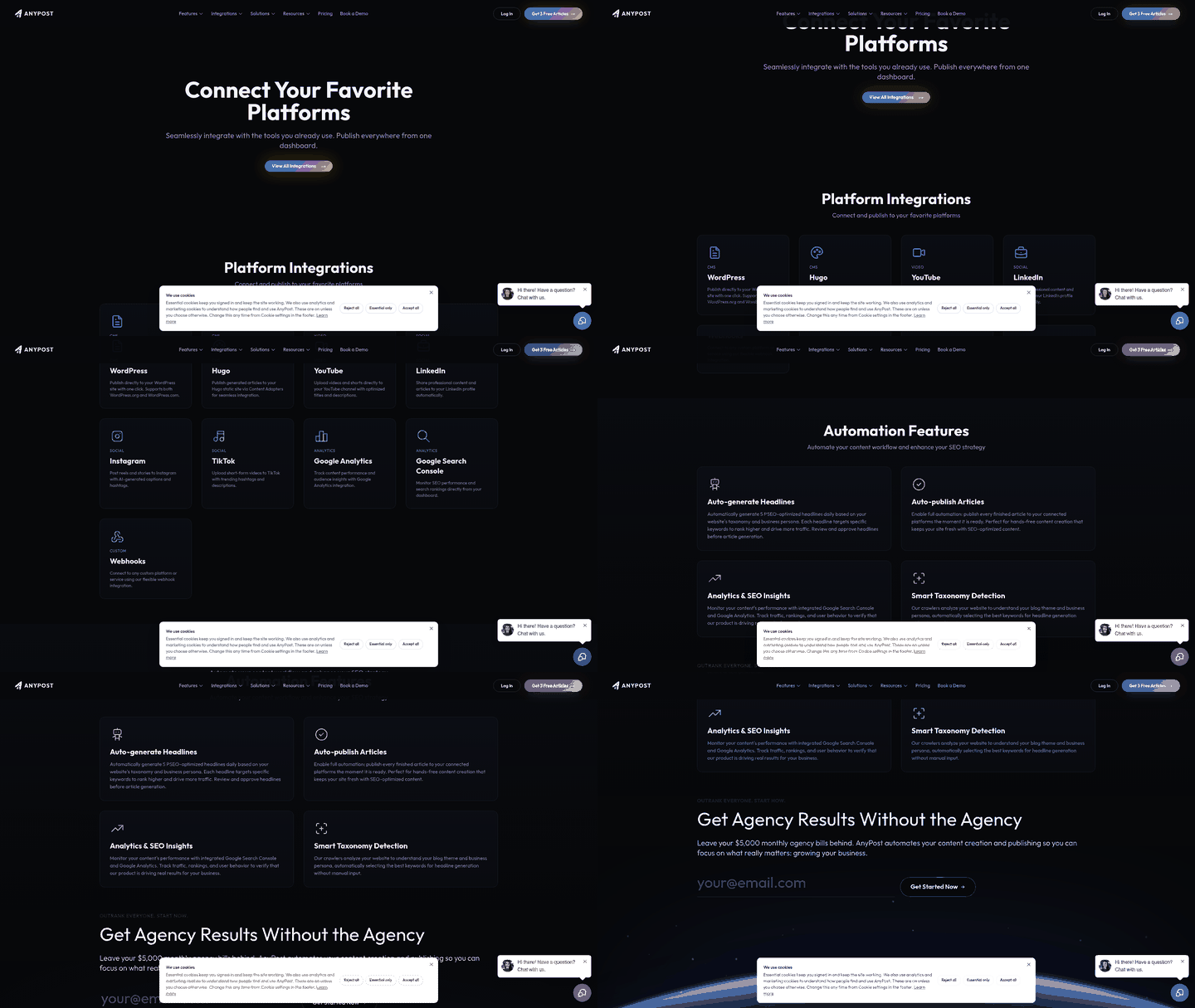
Start by mapping the actual timeline your team lives in, not the one you wish existed. Pull up your recent content work and trace each piece from intake to publication. Record when ownership changed, when status stopped moving, and which tasks required someone to chase, copy, paste, reformat, or remind. Then map dependencies between stages: a stalled approval blocks publishing, which blocks promotion and distribution. This shows which bottleneck unlocks or blocks upstream and downstream work, not just which single step is slowest. The pattern usually becomes obvious quickly.
Common Friction Points
-
Approval delays. Note how many days content sits waiting for stakeholder review. If a draft lands in someone's inbox and gets lost, that's your signal. Moving approvals into a centralized workflow instead of chasing sign-offs through email can reduce the time content spends waiting by days.
-
Manual reformatting. Count how many times you reformat the same piece for different channels. Blog post to social card to email to landing page—each one requires manual work.
-
Keyword research in spreadsheets. If your team maintains keywords in a master list and manually feeds them into briefs, that handoff is automatable.
-
Slack-based handoffs. When writers ping designers and designers ping project managers through Slack threads, you're using a communication tool as a workflow system. It won't scale.
-
CMS drafts stuck in review. Track which content pieces spend the most time in draft status before publishing. That's your approval bottleneck.
-
Repetitive outreach emails. If promotion involves sending similar emails to multiple contacts, you're repeating work that automation can handle.
The highest-friction stage—the one that compounds delays across the whole pipeline—is almost always approval and publishing. Attack that first, not because it's creative, but because removing it enables everything downstream.
Pick Your First Automation Target
The instinct is often to start big. Full API integration. Every tool connected. Everything automated at once. That's backwards. Teams that move fastest start with the stage where manual work is killing the most time right now, not the one that sounds most futuristic.
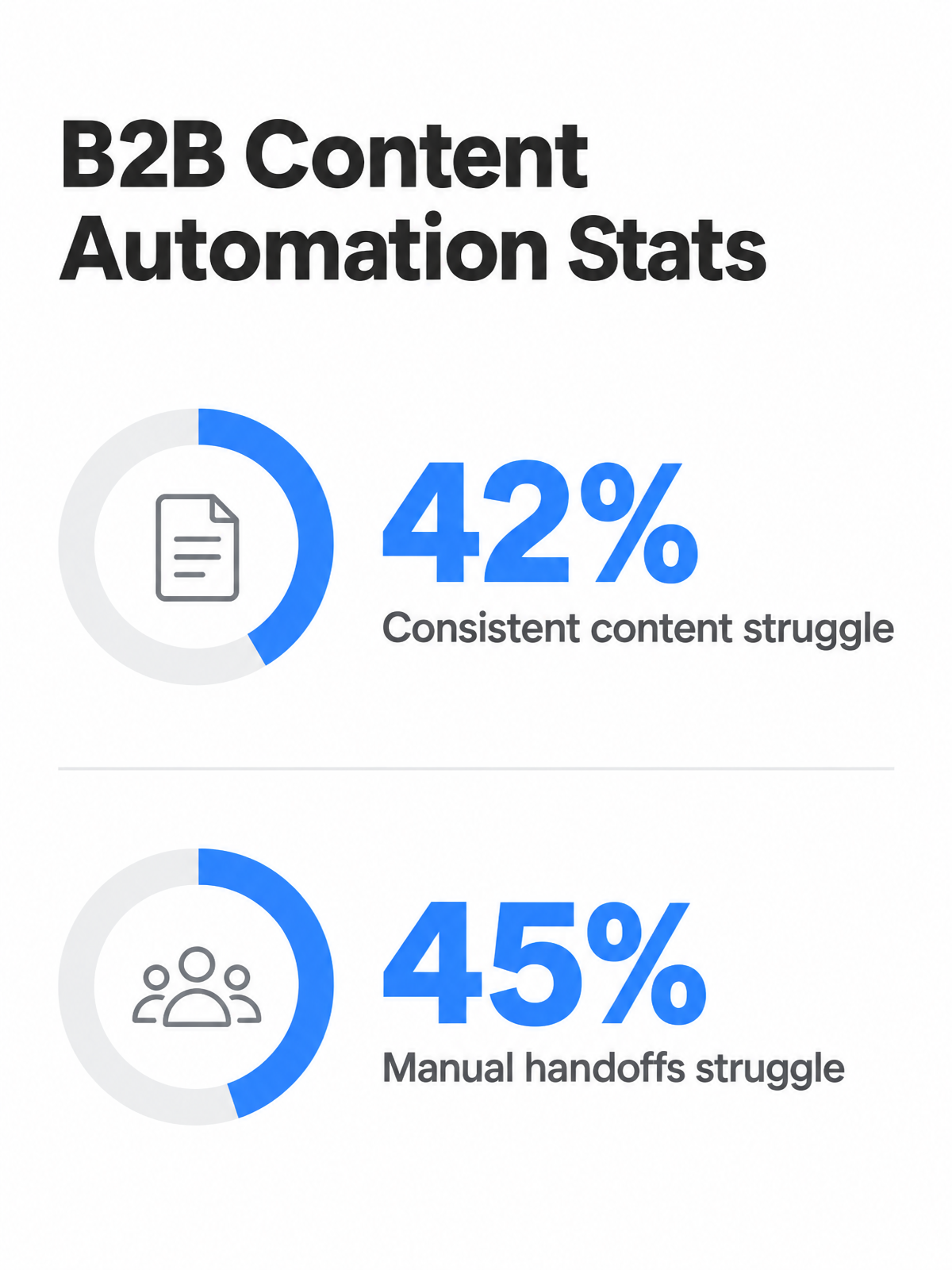
Many B2B marketers struggle to create content consistently, and many lack a scalable production model. Those numbers point to a systems problem, not just a writing problem. If intake, feedback, scheduling, and channel preparation all happen in separate places, your production system can only move as fast as its least organized handoff.
This is where a 2×2 ROI-versus-effort matrix matters more than chasing the shiniest tool. Plot your workflow stages on two axes: effort required to automate (low to high) and impact on your bottleneck (low to high). Your first target lives in the low-effort, high-impact quadrant—the stage where you save the most time with the fewest technical headaches.
Approvals, publishing, and repetitive content production tend to land here. Those gains compound fast when you're automating tasks your team touches dozens of times a week. Backlink acquisition outreach is the bridge between simple workflow automation and full API integration: it repeats research, outreach, tracking, and prioritization across every campaign, but it rarely requires custom API work.
Avoid the trap of automating for speed when you actually need control. If your team's constraint is creative oversight rather than throughput, one governed automation layer often works better than a patchwork of disconnected tools. The problem with isolated tools isn't only inconvenience—it's inconsistency. Brand rules get interpreted differently, limits vary by platform, and no one has a clean view of where work stands.
-
Identify the longest stall. Compare research, drafting, design, review, and publishing. Your first automation target should be the stage that most often prevents the next step from starting.
-
Calculate effort-to-impact ratio. Which bottleneck can you automate with existing tools or simple integrations? Skip the stage that requires custom APIs unless it's your true constraint.
-
Test one workflow end-to-end. Automate a single content type (blog post, social asset, email) through its full lifecycle before expanding. Measure time saved and quality impact.
Phased Rollout Without Breaking Your Calendar
The instinct when rolling out automation is to flip a switch and expect your whole team to adapt overnight. That breaks. Instead, anchor the rollout to your existing content calendar—the one your team already lives in, with deadlines that are real, not theoretical.
Start by choosing a single workflow stage to pilot. Not everything at once. Pick the bottleneck you identified earlier: approval chains that stall for days, manual reformatting across platforms, or repetitive production tasks. Run the automation through your next three to five content cycles in production, not a sandbox. Real deadlines. Real stakeholders. Real content. This is where you learn what actually works versus what looked good in a demo.
Define Success Metrics That Matter
You need metrics your team actually cares about, not vanity numbers. If you're automating approvals, measure approval turnaround time—how many days from submission to sign-off. If it's publishing, count publishing errors and delays. If it's production, track content pieces completed per week or tedious-task hours saved. Tie each metric to a baseline from your current workflow.
Set a decision point at the end of your pilot. Compare your baseline metrics against what you see after the pilot runs. If turnaround improves and errors drop, you scale. If metrics stay flat or something breaks, adjust the automation rules, not the concept. Teams that succeed here treat rollouts as iterative—test, measure, refine—instead of binary go-or-no-go calls.
Keep Humans in the Loop
Automation doesn't mean removing review. Build a governance checklist into your workflow: brand guidelines get checked, approval gates stay in place, quality standards are enforced. When you can't manually review every asset, embed automated quality checks alongside human review for high-stakes content. Let repetitive tasks run unattended. Flag edge cases for human eyes.
Communicate early to stakeholders. Show them what changes (manual approvals become instant notifications), what stays human-reviewed (final sign-off on brand-critical work), and which metrics you're watching. Monthly check-ins beat surprise rollouts. Teams adopt faster when they understand the handoff, not when automation appears invisible.
Monitoring and Common Traps
Set a monitoring rhythm that matches your actual publishing cycle, not a calendar. If you publish three pieces on Tuesday and nothing until Friday, check your automation's performance after Tuesday's batch lands, not on a fixed day. The goal is to catch drift while it's still small.
Watch Quality Where Automation Meets Human Review
Brand voice consistency is the first thing to slip when you automate. Automated systems can drift from your guidelines—awkward phrasing, tone that sounds robotic, metadata misaligned with your standards—and these gaps are what stakeholders catch first. Log a sample of published content each week and rate it against your brand guidelines on a simple scale. If more than two pieces per batch score below your threshold, your prompt needs refinement before the next cycle.
Publishing errors can matter more than expected. A scheduling tool that queues content but fails to publish to one platform, metadata that strips out critical SEO tags, images that upload broken—these compound fast and damage your metrics. Track which pieces actually made it live across all your channels versus which ones stalled. If your slowest tool is creating a bottleneck, that's your next automation target.
Approval turnaround and metadata quality tell you if your approval workflows are actually working. When sign-off takes longer than promised, dig into why: unclear feedback loops, too many stakeholders in the chain, or approvers missing notifications entirely. Check your SEO metadata—title tags, descriptions, alt text—for consistency and keyword alignment.
Quick Fixes for Common Problems
-
Brand rules scattered in people's heads? Document your tone, style, and visual guidelines in a centralized prompt library that everyone references. When a new person joins, they inherit the rules, not tribal knowledge.
-
Individual tools with mismatched batch limits? Connect them through APIs or workflow software so one constraint doesn't throttle the pipeline. If your image tool handles 50 items but your copy tool handles 10, you're wasting time.
-
Manual review becoming impossible at scale? Add automated quality checks for high-risk outputs—brand-rule drift, missing metadata, formatting errors—so your team only reviews exceptions, not everything.
Still Wondering?
How quickly can I expect to see measurable results from automation?
You can usually see early movement as soon as one real production cycle runs through the automated workflow. The fastest indicators are practical ones: fewer missed handoffs, less reformatting, fewer status-check messages, and a clearer view of what is ready to publish. Measure against your baseline so you can tell whether the change is actually improving throughput.
What if content creation itself is my team's slowest stage?
Then treat creation as the bottleneck, but inspect why it is slow before automating drafts. The delay may come from weak briefs, unclear keyword inputs, missing subject-matter expertise, or late feedback that forces rewrites. Automating the wrong part of creation can simply produce more work for editors, so diagnose the cause before adding tooling.
Do I need a technical team to connect my drafting, approval, and publishing tools?
Not necessarily. Many teams can start with pre-built integrations and workflow rules inside the platforms they already use. Bring in technical help only when the workflow depends on custom data movement, unusual permissions, or systems that do not connect cleanly out of the box.