Free AI Blog Writers Tested: Word Caps, Paywalled Exports, and Missing SEO Scores

The free draft is the cheap part
The part most teams underestimate is everything that happens after the draft. A free AI blog writer can turn out a first pass in minutes, so small-business owners and SaaS marketers often start there. The hours tend to pile up in the steps around that draft: checking facts, fixing headers, formatting for the CMS, and chasing links. Free-tier limits also shape your workflow more than your budget does. Free plans, Rytr's included, tend to cap how much you can generate each month, and one long post can use up much of that allowance. If you hit the cap halfway through a draft, you end up stitching together output from two or three tools. That patchwork is its own job.
| Workflow step | What free tools tend to cover | What often stays manual |
|---|---|---|
| First draft | Yes, within usage caps | Fact-checking and editing |
| Keyword research | Varies by tool | Choosing terms and checking intent |
| On-page SEO | Varies by tool | Headers, meta descriptions, internal links |
| Publishing | Varies by tool | Formatting and CMS upload |
| Backlinking | Rarely | Outreach |
If you publish one short post a month, a free tier can be enough. If you publish weekly, the manual column turns into a recurring cost paid in staff hours. We built AnyPost.ai to cover the steps after the draft. It generates SEO-optimized articles, publishes them directly to your existing website, and runs automated backlinking, so less of that table stays manual.
Tool 1 – Jasper (Free Tier)
Jasper is the hardest tool here to pin down. Our research found no confirmed details about its current free trial. We can't tell you its word or credit allowance, which exports it supports, or whether its SEO features work before you pay. We'd rather say so than repeat numbers we haven't checked. The missing details matter more than they look. A free tier is only useful if one draft can move from generation through editing to publishing without an upgrade screen appearing partway.
If any answer comes back "paid only," treat the trial as a demo. Don't plan production work around Jasper's free tier until you've confirmed those limits yourself.
Tool 2 – Writesonic (Free Tier)
Writesonic gave us the least to work with. We found no confirmed details about its free tier, so we won't guess at a monthly credit allowance, how many blog words those credits buy, or which formats you get without paying (blog posts, landing pages, social captions). Answer the credit question first. A tool that bills in credits rather than words can hide the real cost of a long post until you're halfway through drafting it. A rate that looks generous on the pricing page can still run dry before one full article is done.### What to test before you trust the free plan
Run one full article and track its credit use. Until you've run that test, keep client deliverables off Writesonic's free tier.
Tool 3 – AnyPost.ai (Free Tier)
We built AnyPost.ai for the stage that tends to swallow whole afternoons: everything after the draft. Whether our free tier actually delivers on that is a separate question, and this round of testing didn't answer it. So we're holding our own AI blog writer to the same standard as Jasper and Writesonic. Our research didn't confirm free-plan word limits, saved tones, SEO scores, export formats, or publishing options. Grading ourselves from memory would undercut everything else in this article.
What to check on our free plan
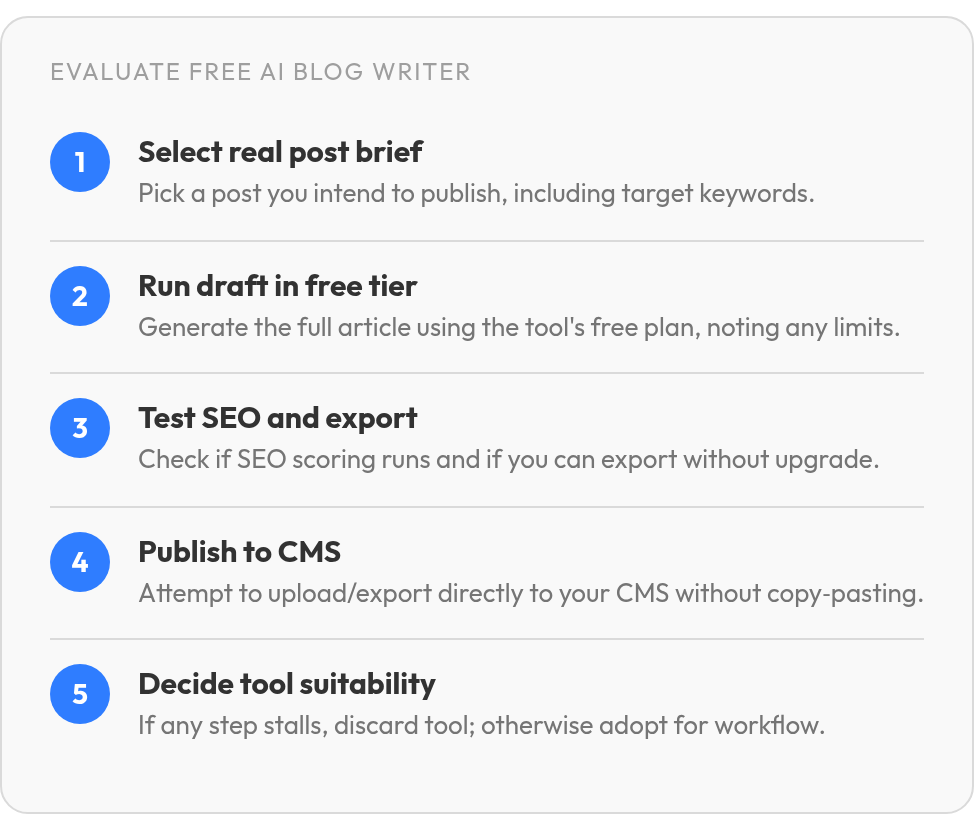
Run one real post through it and note where the first upgrade screen appears. If the flow stalls before publishing, the free plan isn't saving you time yet. Our test of 12 AI writers to find the ones that cut manual work covers which tools actually reduced the hand-work.
Tool 4 – Copy.ai (Free Tier)
Copy.ai lands in the same spot as Jasper and Writesonic. We couldn't verify anything about its free plan: no confirmed monthly credit or word limit, no confirmed SEO templates, no confirmed export rules. We won't fill those in from memory.
Which Copy.ai free features to check first
Draft one real post and write down what happens, including any point where it stalls:
- How much credit or word allowance remains after one long draft
- Whether any SEO template or content analysis runs without paying
- Whether a brand voice or persona setting saves between sessions
How good are its free long-form drafts?
We found no community feedback we could stand behind. When you read user threads, look for people who actually published Copy.ai drafts, and skip the ones who only praise its speed. Speed is easy to praise. If a draft needs heavy restructuring, the free plan often saves you less time than it seems to.
Tool 5 – Rytr (Free Tier)
Rytr is the one tool where we could confirm the actual cap. The free plan is "Free forever" and includes 10,000 characters per month, 40+ writing use cases, and 30+ languages. Characters are a much smaller unit than words, so that number looks bigger than it is once you use Rytr for blog posts. A quick way to check: paste your last published post into a character counter and compare the total to 10,000. If one post comes close, the free plan covers roughly one draft a month.
| Plan | Price | Monthly character limit |
|---|---|---|
| Free | $0 | 10,000 |
| Lite | $9/month | None |
When Rytr Lite is worth paying for
In Rytr's words, Lite "includes everything in Free and removes the monthly character limit." The Personal ($19/month) and Pro ($49/month) tiers add connected sources, relationship tracking, and research runs. None of those help with blog drafting. We couldn't verify SEO scoring, export formats, saved brand voice, direct publishing, or output quality on either plan, so test those on the free account before you pay. If you publish more than one long post a month, skip the free plan and evaluate Lite directly.## Side by side: what we could actually verify A feature matrix is only as useful as its emptiest cell. Most of ours are empty, and we'd rather show you the blanks than fill them with guesses about any tool, our own included.
| Tool | Free-plan capacity | Plan that lifts the cap |
|---|---|---|
| AnyPost.ai | Not verified | Not verified |
| Jasper | Not verified | Not verified |
| Writesonic | Not verified | Not verified |
| Copy.ai | Not verified | Not verified |
| Rytr | 10,000 characters/month | Lite, $9/month |
Rytr is the only row we could confirm. Its limit counts characters, so don't line it up against word limits you see elsewhere.
How to score each tool after testing it
Run one real post through each free plan and score every stage from 0 to 2. A 0 means the stage sits behind a paywall, a 1 means it works but needs manual cleanup, and a 2 means it works free.
- Research: does it help you pick topics and keywords?
- Draft: does a full post fit inside the allowance?
- SEO: does any score or optimization check run free?
- Publish: can you export or post without copy-pasting?
A tool that scores 2 on drafting and 0 everywhere else still leaves the rest of the afternoon to you.## How to choose the right free writer for a complete workflow Pick your tool by where your afternoon disappears, not by which draft reads best. If drafting takes you twenty minutes but formatting, optimizing, and posting take two hours, a better AI blog writer saves you very little. Name your bottleneck first. Then test only for that.
| Bottleneck | What to test on the free plan |
|---|---|
| Publishing by hand | Whether a finished post reaches your CMS without copy-paste |
| SEO checks | Whether any scoring runs before an upgrade prompt |
| Volume | Whether one full post fits inside the monthly cap |
How to run a fair free-tier test
Use a real post you'd publish anyway, built around your actual target keywords. Sample prompts hide the limits that matter, because they're short and nobody has to publish them. Run the same brief through each tool and log the first screen that asks you to pay.
Does your business type change the pick?
It can. A brick-and-mortar shop needs location terms and service-area pages handled well. A SaaS team tends to publish longer comparison and feature posts, which burn through caps faster. If you publish one short local update a month, a capped free plan may be all you need. SaaS teams can compare options in our roundup of SaaS content writing tools for lead generation.## Where this leaves your free-tier shortlist We're not naming a winner. Rytr's cap is the only number we verified, and we didn't confirm free-plan limits, exports, SEO scoring, or publishing access for Jasper, Writesonic, Copy.ai, or our own tool. A ranking built on those blanks would be guesswork with a nice table around it.### What to check before you commit Take one post you plan to publish this month and push it through a free tier, from brief to live page. Drop any tool that stalls before the final step. A free draft that leaves you an hour of copy-paste can cost you more than a $9 upgrade.
