Free Video Repurposing Tools Waste Clips: Match Format to Channel Intent

What You Need to Know
- Some social video research has described square (1:1) as a transition format, a temporary stop between widescreen and vertical rather than an endpoint.
- In practice, three specs often decide whether a repurposed clip performs: aspect ratio, duration, and caption quality.
- Some auto-clip detectors can export in common ratios such as 9:16, 1:1, and 16:9, but free tiers may include export limits or watermarks that can undercut LinkedIn credibility.
- Some caption-first editors can handle 9:16 and 1:1 for muted feed video, though free tiers may run through available minutes quickly.
- Vertical 9:16 is widely used for TikTok, Reels, and Shorts; 16:9 horizontal remains common on YouTube.
- Some multi-format resizers can reframe across multiple ratios, but free tiers may reduce resolution, so a crisp source clip can arrive soft.
Match Format to Intent or Keep Bleeding Reach
Match the format to what a channel's audience actually came to do, and you stop losing reach on clips that technically post but never perform. That's the gap most free video repurposing tools quietly ignore. They often export one file, usually square, and treat the job as done.
Good AI content repurposing works the other way around. It can read what each channel rewards, then shape the clip to fit that intent before anything hits the upload button.
Here's why it may show up in your numbers. When a video meets a platform's specs, it can render at full quality. When it misses, the platform may crop it, compress it, or reject it. That's the split between a clip that earns watch time and one that gets scrolled past in half a second. Intent-driven repurposing can protect the framing, the pacing, and the search signals you built into the original.
Why the "Safe" Square Export Is a Waste Clip
Waste clip: a technically valid video that ignores how the target channel's audience actually watches, so it underperforms or gets cropped.
Some social video research has described square as the most common shape in certain periods, with vertical framing close behind. But the same research tends to frame square as a possible transition format, a stopping point between widescreen and vertical, not a destination. As regular users turned into video producers themselves, the workflow shifted and vertical consumption kept climbing.
Many platforms have since continued that transition. Vertical framing now tends to dominate common placements, and square is less often the shape a feed favors. So a free tool defaulting to 1:1 may be optimizing for a format that some research called temporary years ago. That "safe" square export can land out of step on the exact channels it's aimed at.
Aspect Ratio Is a Framing Decision, Not a Crop
Changing aspect ratio isn't just post-production cropping. It's a choice about how you shoot and frame in the first place. Center your subject, plan around the crop, and the clip can survive more placements. Ignore it, and some platforms' per-tab thumbnail cropping may chop your key visual out of frame in the main feed.
The same platform can demand different framing for different jobs. Organic and paid placements often want different shapes, and one generic export can't reliably serve both. This is where automated, voice-aware repurposing may pay off, matching each output to its destination instead of shipping one file everywhere.
Two Axes: Shape First, Then Trim to the Cap
Match on two axes, not one. Pick the aspect ratio the audience watches in, then trim to the placement's length cap. Treating shape and length as separate export toggles is why many clips miss.
Length can swing hard inside a single platform. Long-form feed posts may run far longer than short-form Reels or Stories, so the container you pick can change the rule by an order of magnitude. Let intent decide it. Long-form watch calls for the feed; quick discovery calls for Reels. AnyPost turns your content into social carousels and posts, then publishes across LinkedIn, X, Instagram, TikTok, and YouTube, so agencies and SaaS teams juggling five channels stop guessing and start matching.
Feature Comparison Matrix & Decision Guide
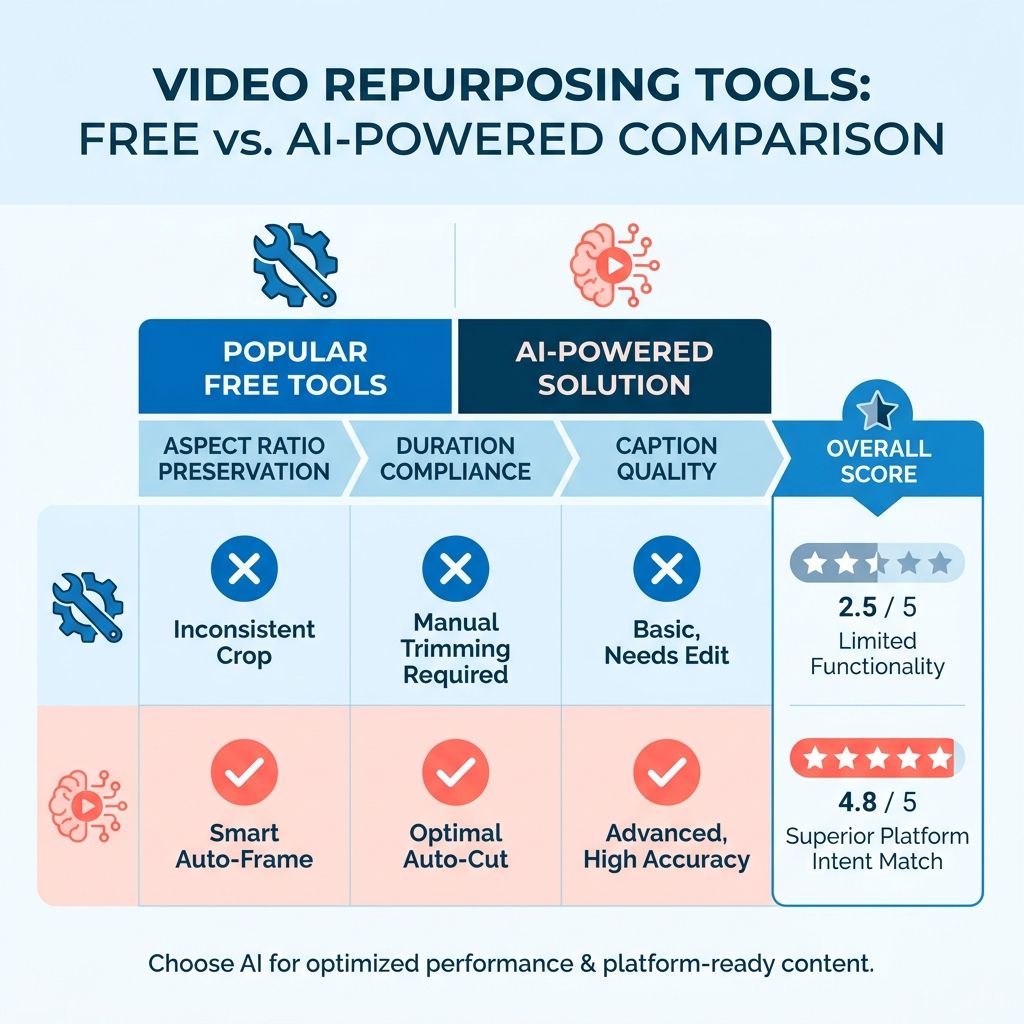
Most free video tools ship one export and move on. The problem surfaces the moment you line them up against what each channel actually rewards. So rather than ranking tools on raw feature count, we can score them on how well they hold format and intent through the repurposing step. That's where free-tier repurposing tends to break down.
The three specs that often decide whether a clip performs are the same across platforms: aspect ratio, duration, and caption quality. Get those wrong and the platform may crop, compress, or bury the upload. The matrix below sorts common free options by how they generally handle each, plus the friction you may hit before your first export.
The Comparison That Actually Predicts Performance
| Tool Category | Free-Tier Limit | Core AI Feature | Export Formats | Ideal Channel |
|---|---|---|---|---|
| Auto-clip detectors | May include watermarks or export caps | Highlight/scene detection | Common ratios (e.g., 9:16, 1:1, 16:9) | Short-form feeds |
| Caption-first editors | May include limited minutes per month | Auto-subtitle + styling | Common vertical and square ratios | Muted feed video |
| Multi-format resizers | May reduce resolution on free tier | Aspect-ratio reframing | Multiple ratios | Cross-posting one clip |
| Timeline editors | Often manual work | None (manual cutting) | Export settings vary | Long-form editing |
The pattern gets clearer once it's side by side. Some auto-clip tools can save time but may leave a watermark that undercuts LinkedIn credibility. Caption-first tools may win on feed video, where many people watch muted, but can drain free minutes quickly. Manual timeline editors may give you clean, watermark-free output, but you do the reframing yourself.
Aspect ratio is often the spec that trips people up. 9:16 vertical is commonly used for TikTok, Reels, and Shorts. 1:1 square can still work in muted feeds. 16:9 horizontal remains a common choice for YouTube. Some free resizers help, but many may reduce resolution on free tiers, so a crisp source clip can arrive soft.
The Three-Step Filter: Goal, Then Platform, Then Tool
Skip the feature-hunting and answer three questions in order.
Start with the goal. Are you driving watch time on short-form, or building authority with caption-heavy explainers? That answer may eliminate half the tools before you compare a single spec.
Then pick the platform. A vertical clip under a short-form length limit may point you toward an auto-clip detector. A muted feed post for a professional audience may point you toward a caption-first editor. Cross-posting the same message everywhere may point you toward a resizer that keeps your framing intact.
Only then choose the tool. If watermark presence matters for a brand channel, rule out anything that stamps free exports. If you need clean multilingual subtitles, a caption specialist may beat a generalist clipper.
Now the limit worth naming. Free tools may handle one channel decently. They can fall apart when you need the same source video reshaped for several platforms, each with its own length, ratio, and voice, without stripping your search signals along the way. Chaining multiple free tools to cover that gap can cost more time than it saves. That's the manual work AI content repurposing across channels is built to remove, matching format to intent automatically instead of forcing you to rebuild every clip by hand.
End‑to‑End Workflow: From Long‑Form Video to Multi‑Channel Clips
A single long-form webinar can feed a week of posts. But only if the workflow respects where each clip lands. Skip the mapping step and you may get one square file cloned across five channels, half of them cropped on arrival.
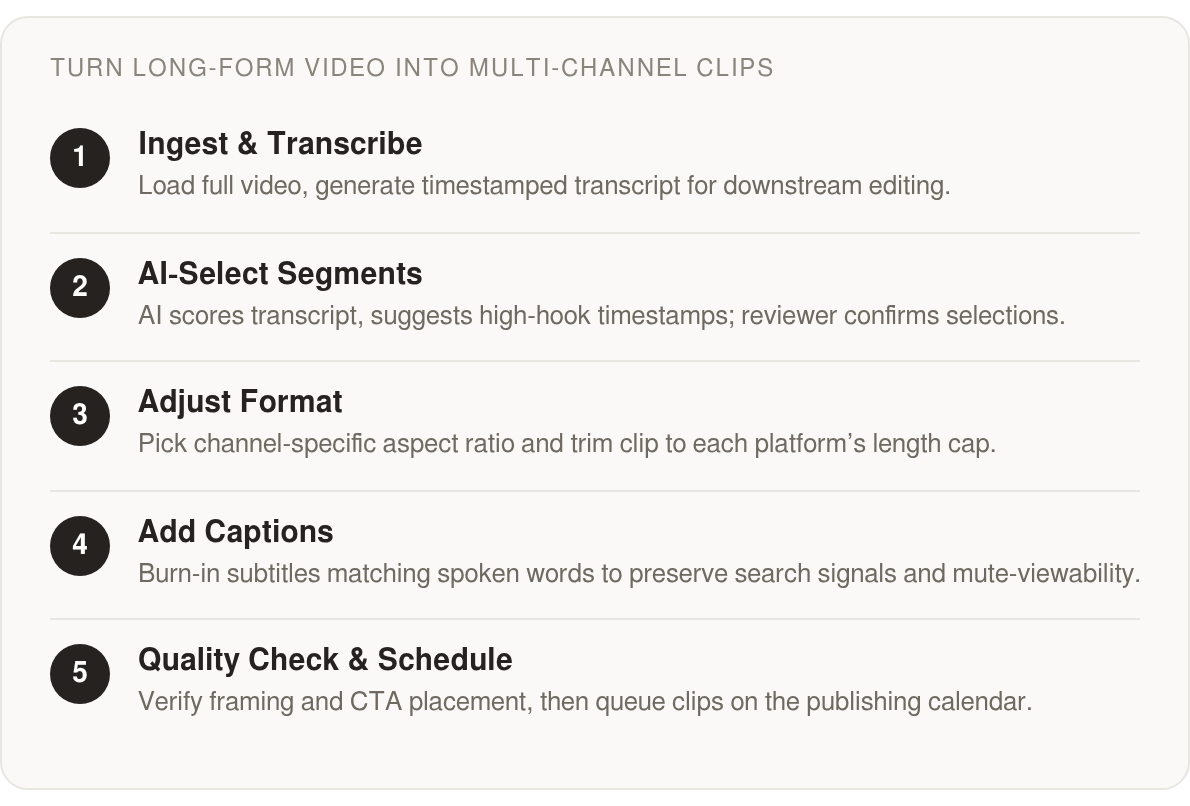
Here's a pipeline that respects channel intent from start to finish: ingest the long-form asset, transcribe it, flag the clip-worthy moments, adjust format per channel, caption, export, then schedule. Each stage has a natural hand-off point where a free tool can slot in, and a few where you still touch it by hand.
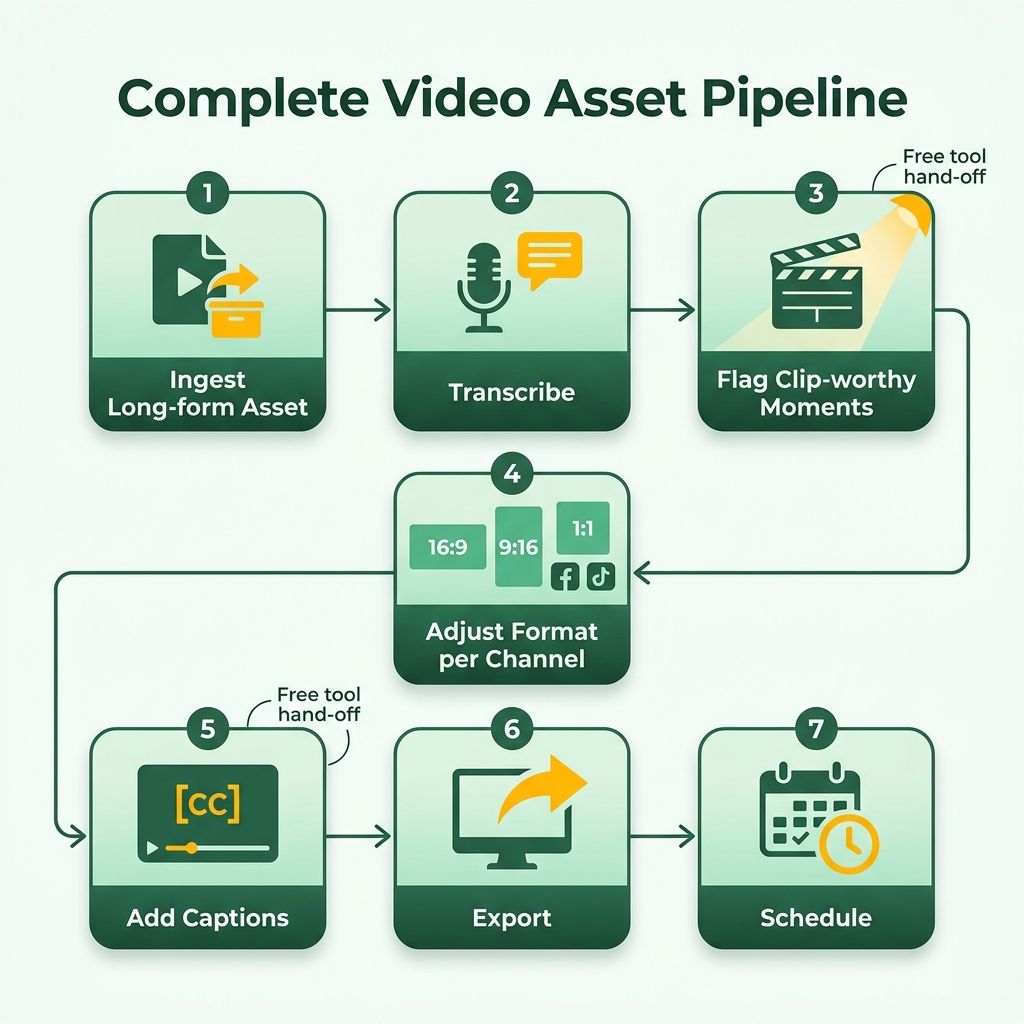
One hypothetical mapping: a single source recording could become a 9:16 cut for TikTok and YouTube Shorts, a 4:5 feed cut for LinkedIn or Facebook organic, a 16:9 cut for YouTube, and a separate 4:5 or 9:16 cut for Facebook ad placements depending on the placement. Each version would keep the same core hook but trim to the container's length and burn in captions where the feed autoplays muted. This is not a universal spec; it is an example of how one source asset might be split after checking the relevant platform and placement requirements.
Ingest, Transcribe, and Let AI Find the Moments
Load the full recording first. A clean transcript is the backbone of everything downstream, so transcription comes second, not last. Once you have text with timestamps, clip selection stops being guesswork.
This is where automation can pay off. AI can read the transcript, score segments by hook strength and completeness, and hand you timestamped candidates instead of a two-hour scrub. You review, you don't hunt. The manual hand-off is small: confirm the picks and trim the edges where the AI cut a sentence short.
Match Aspect Ratio First, Then Trim to the Cap
Format adjustment is where many free tools waste the clip. They often default to square, a shape that made sense years ago and may no longer match where the platforms landed. Some platforms offer several video formats and update them often, and organic feed and paid in-feed placements may not share the same recommended shape. A square export may satisfy neither.
Run the two axes again. Pick the aspect ratio your audience actually watches in, then cut to that placement's length cap. The caps can swing widely inside one platform. A native feed post, a Reel, and a Story may each cap out at a different length, so the same clip can fit one and get rejected by another. Intent can decide the container, not the platform name.
Captioning follows. Burned-in captions can carry the clip on mute, and they may preserve the keyword signals your search intent depends on. This is the step where voice alignment often matters most, since the on-screen text is often the first thing a viewer reads.
Quality-Check Before Anything Ships
Never batch-publish a raw export. Thumbnails may crop differently per view, and feed tabs can slice a clip's framing without warning. Center your subject or plan the crop, or your framing may get chopped on the tab that matters. Check the CTA placement too, because a call to action buried under the platform UI does nothing.
For scheduling, a weekly cadence can keep the pipeline honest: one long-form asset in, a staggered run of clips out across the week.
Running these stages in order is the whole point. Shape and length stop being afterthought export settings and become the decision that makes the clip land.
Platform‑Specific Clip Specs That Kill Waste Clips
Free tools often love a square export. It fits everywhere technically, so it can feel safe. But safe is how you may end up with waste clips. Some research tells a sharper story about what each channel may reward, and it rarely rewards the default.
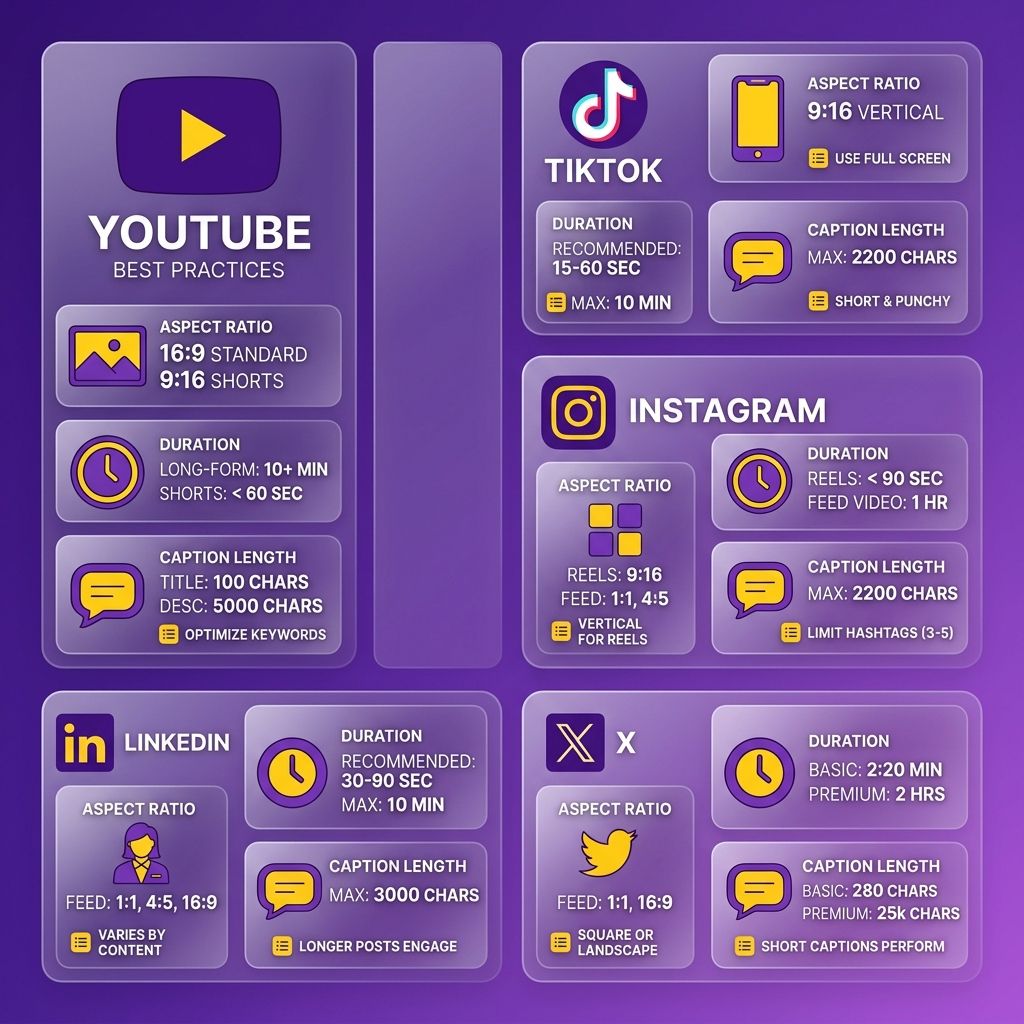
This is where smart repurposing separates itself. Instead of one file cloned across five feeds, you can match two things per placement: the aspect ratio your audience watches in, and the length cap the container enforces. Miss either and the platform may crop, compress, or bury the upload.
Square Is a Legacy Default
Square earned its reputation as the shape that fits anywhere, and for a while it was widely described as common in social feeds. That may sound like a case for square. But some orientation research points the other way, framing 1:1 as a transitional shape, a stepping stone between widescreen and the vertical viewing habits that now run much of mobile.
Fast-forward to current specs. Many feeds have moved toward vertical and portrait-friendly formats, and square is often no longer the shape short-form surfaces are built around. The transition some studies predicted has largely landed on vertical.
So a tool that ships square output may be optimizing for a format the platforms have already passed. You can default to 9:16 for short-form, and treat 4:5 as a feed compromise when one file has to survive both organic and paid placement.
One Platform, Different Containers, Different Caps
Length isn't really a platform setting. It's a container setting. A single platform routinely runs several video containers at once: a long-form post surface that may tolerate lengthy watch time, and short-form surfaces like Reels and Stories that cap clips at much shorter lengths.
Same platform, different length rules, sometimes off by orders of magnitude. The variable is intent. Long-form watch time lives in the post container. Short discovery lives in Reels and Stories. Pick the container by what the viewer came to do, then trim to its cap.
That's why a clean short clip that performs in one feed can fail on another. What renders on one short-form surface won't automatically clear another's ceiling. Match the trim to the destination before export, not after.
Run a Two-Axis Check Before Every Export
Combine the orientation data with the hard caps and you get a simple pre-flight rule. Set the aspect ratio first, then the duration. Two axes, checked in order, every time.
- Aspect ratio: 9:16 for vertical short-form, 4:5 when one file has to cover feed and ads, 16:9 mainly for long-form watch surfaces.
- Duration: trim to the container's cap, not the platform's max. A short-form Reel and a long-form post are not interchangeable.
- Captions: burn them in. Silent autoplay is common, and readable text can carry the clip.
- Thumbnail crop: center your subject. Feeds may crop previews differently per tab, so plan around the tightest feed view.
Skip the checklist for a single native upload where you control the frame end to end. For everything you repurpose across channels, it pays for itself in reach. Automating that voice-aligned, multi-channel step is where the waste clips finally stop.
Fold Free Tools Into Your Calendar, Then Scale With AnyPost.ai
A content calendar only works if it repeats without you rebuilding it every week. The trick is treating each free-tool clip as a scheduled slot, not a one-off. Once you map long-form assets to fixed publishing days, repurposing stops being a scramble and becomes a routine your team can run on autopilot.
Here's the realistic version for an SMB or a small agency. Record one anchor asset a week, such as a webinar or a founder talk. Clip it with your free tools, then assign each cut to a channel slot that already lives on the calendar. The format work can happen once, and the schedule can carry it forward.
What Does a Repeatable Weekly Calendar Look Like?
A workable week might assign one anchor recording, several derived clips, and fixed publish days per channel. For example, Monday you ingest and transcribe. Tuesday you clip and caption per platform. Wednesday through Friday the clips go live on their mapped feeds. The structure repeats, so nobody has to reinvent the workflow each cycle.
Keep the anchor asset central. One recording can feed a vertical short, a square feed cut, and a wide YouTube segment without new filming. The calendar just holds each shape to its correct day and channel.
Agencies running multiple clients can stack this. Each client gets the same skeleton, different anchor content. The pattern scales because the decisions are already made.
How Does AnyPost.ai Replace the Manual Steps?
AnyPost.ai is a SaaS service that automates the publishing and cross-channel distribution most free tools leave on your plate. It publishes directly to LinkedIn, X, Instagram, TikTok, and YouTube, so the upload-per-platform grind disappears. Its Persona Engine matches your brand voice, which keeps tone consistent across every cut.
Two features specifically close the gaps free clip tools open. AI avatar cloning lets you clone an existing avatar or generate new ones for branded content, and AnyPost can turn that content into social carousels and posts automatically. The search angle stays intact too, since the surrounding copy gets built with intent in mind rather than pasted in as an afterthought.
That matters because the format-to-intent framework only holds if the search signals survive the export. Free tools export a file. This approach carries the voice, the content quality, and the intent mapping through to the live post. We break down the full pass in our guide on how AI accelerates content repurposing across channels.
How Do You Measure Whether the Clips Work?
Track three signals per clip: views, click-through to your site or offer, and leads generated. Views can tell you the format fit the channel. Click-through can tell you the caption and hook did their job. Leads can tell you the whole chain paid off.
Watch these per channel, not in aggregate. A vertical short might pull views on TikTok but drive clicks on LinkedIn. Real-time analytics can let you spot which shape converts where, then push more anchor content toward the slots that produce leads.
Skip the vanity dashboard if it doesn't connect clips to pipeline. Reach without click-through is a signal to fix your hook, not a win to celebrate.
Quick Questions, Straight Answers
If I only have time to export one file, which aspect ratio survives the most placements?
Use 4:5 as a feed compromise. It can hold up across both organic and paid placements when a single file has to serve two jobs. For short-form surfaces like TikTok, Reels, and Shorts, 9:16 vertical generally performs best.
Why does a watermark specifically hurt on LinkedIn?
LinkedIn is a professional, brand-credibility channel, so a free-tool watermark may signal a shortcut and undercut trust with that audience. Some auto-clip detectors save time but may stamp free exports, which is why the article can rule them out for brand channels where polish matters most.
What's the difference between a platform's max length and a container's cap?
The platform max is the ceiling; the container cap is what may actually apply to your specific placement. A single platform can run several containers side by side, so a long-form post surface may tolerate lengthy watch time while Reels and Stories cap at much shorter lengths. Trim to the container, not the max.
Is the two-axis check ever safe to skip?
Skip it only for a single native upload where you control the frame end to end. For anything repurposed across channels, run both axes, since aspect ratio and duration each get enforced separately and missing either one may get the clip cropped, compressed, or buried.
If square was once the most common format, why is it now called a waste clip?
Some orientation research has framed 1:1 as a transitional shape, a stepping stone between widescreen and vertical, not an endpoint. Many platforms have since continued that shift toward vertical feeds, so shipping square now may optimize for a format the surfaces have already moved past.
Which free tool category fits muted feed video best?
Caption-first editors often fit muted feeds, where many people watch without sound. They may handle 9:16 and 1:1 with auto-subtitles and styling, which can make them useful for LinkedIn and feed video. The catch is their free tiers may exhaust available minutes quickly.
How do I know if a repurposed clip actually worked?
Track three signals per clip: views, click-through, and leads. Views can confirm the format fit the channel, click-through can show the caption and hook landed, and leads can prove the full chain paid off. Watch these per channel, not in aggregate, since a vertical short might pull views on one platform but clicks on another.
What does AnyPost.ai handle that chaining free tools doesn't?
AnyPost.ai automates the publishing and cross-channel distribution that free tools leave on your plate, posting directly to LinkedIn, X, Instagram, TikTok, and YouTube. Its Persona Engine keeps brand voice consistent across cuts, and it builds surrounding copy with search intent so SEO signals survive the export.
