
How to Build an Efficient Content Repurposing Workflow

Quick Summary
An efficient AI content repurposing workflow can turn one source asset into multiple channel-native formats and reduce manual production time. The part most guides skip: each repurposed piece can also carry location metadata and an internal link back to the source, so formats can support a small local-search play instead of a one-off social echo.
That reframing changes the math. Plenty of teams treat repurposing as pure distribution, but it can also support search visibility when tagged consistently. Publish a podcast transcript as its own indexable page, add location metadata, link it back to the flagship post, and you've built a repeatable process instead of a one-off echo.
In this article, "local-SEO tagging" means a small documented set of fields attached to each asset: city or region, service-area label, a source URL to link back to, and optional UTM parameters for off-site links. Standalone derivative pages should be self-canonical when they are materially distinct; duplicates should not be published as separate indexable pages.
What an efficient repurposing workflow actually looks like
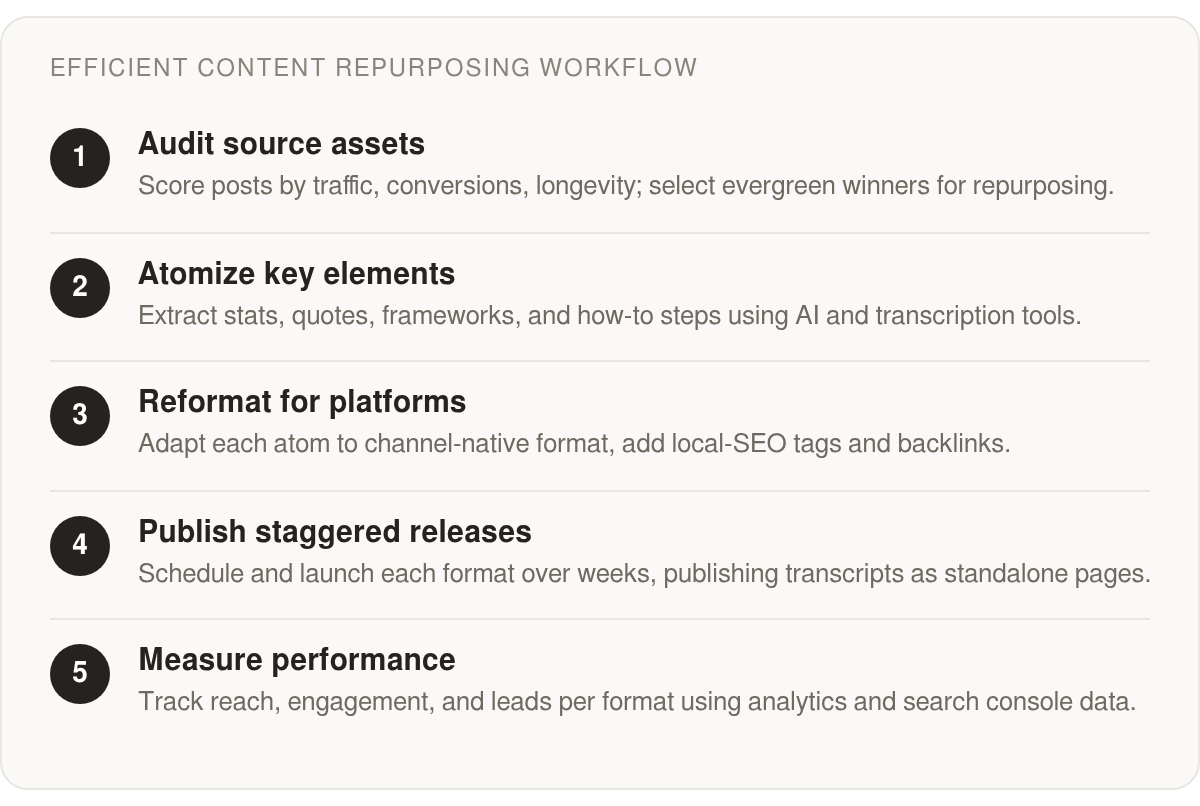
The workflow runs in three core phases: audit, atomize, reformat. Each has clear tasks, automation options, and a realistic effort cost per asset. The table maps the full pipeline so you can see where automation earns its keep.
| Phase | Primary Tasks | Tools/Automation | Effort per Asset | Difficulty |
|---|---|---|---|---|
| Audit | Score posts by traffic, conversions, longevity; pick evergreen winners | Analytics dashboards, spreadsheets | Low | Low |
| Atomize | Extract stats, quotes, frameworks, how-to steps | AI writing assistants, transcription tools | Moderate | Medium |
| Reformat | Adapt to platform, add local-SEO tags, embed internal links | Automation builders, video/audio editors | Higher | Medium |
| Publish | Stagger release over several weeks, publish transcripts as standalone pages | Scheduling tools, CMS | Low | Low |
| Measure | Track by format across reach, engagement, leads | Analytics, GSC | Ongoing | Medium |
Notice the local-SEO step lives inside Reformat, not as an afterthought. Tag each asset by region, point it back to the source, and a carousel or transcript becomes an internal-link node and a potential local landing surface. Spread those releases across several weeks and you get a more consistent internal-link cadence instead of a single-day spike.
The formats one post can spin off, and what they buy you
One flagship post can generate several channel-native assets: short-form video, long-form video, podcast, newsletter, LinkedIn carousel, infographic, and social posts. The exact number depends on the depth of the source and the team's checklist.
- Some B2B teams report that repurposing extends content ROI; the size of the lift varies by audience and format.
- A systematic repurposing process can help a team reach more audience per hour than one-off production, but the multiple varies.
- Automating mechanical steps can reduce content creation time, but the amount depends on the workflow and platforms in use.
- Publishing repurposed formats as separate pages can add indexable local-search surfaces when the pages are distinct and properly linked.
Track success across three KPI categories: reach (impressions, new-audience percentage), engagement (watch time, shares, comments), and lead generation (sign-ups, demo requests). Measure by format, not just topic. Different formats pull different segments, and many marketers still can't quantify their content's impact. Format-level data helps fix that.
What you need to run it
- People: one content lead plus a part-time editor for platform adaptation.
- Software: analytics, transcription, an AI assistant, a scheduler, and a CMS that publishes standalone pages.
- Data: performance history to pick winners, plus location and keyword tags for local optimization.
Hold off on full automation until you have a steady source-content pipeline. The setup overhead won't pay back until there's a consistent flow of flagship content feeding it.
The operating principles, up front:
- Build around one strong source asset, then adapt it into channel-native pieces rather than copying it everywhere.
- Treat audit, atomization, reformatting, publishing, and measurement as one connected system.
- Prioritize assets that already show business value, search promise, or local relevance.
- Match each content fragment to the format where it has the best chance to work: video, email, carousel, transcript, infographic, or short social copy.
- Compare outcomes by format so you can see which versions create reach, engagement, and leads.
- Keep the operating model lean: a clear owner, a reviewer, the right tools, and a repository that stores brand and location context.
Why most repurposing leaves ranking value on the table
Manual repurposing quietly eats your team's best hours. Every hour spent reformatting by hand is an hour not spent optimizing for search. But the bigger payoff sits underneath the time savings: automation can let you attach location metadata and an internal link to the source without adding a manual step. A blog post, a podcast clip, and an email newsletter can all carry the same location signals when the pipeline handles tagging for you.
Repurposing consistently ranks among the tactics marketers name when they want more mileage from work they've already produced. Yet most of that value can leak away when formats ship untagged. Fold local-search optimization into an automated pipeline and each format stops being a disposable social echo. It starts working as its own search-supporting asset. That's the recommendation this whole piece builds toward: stop treating repurposing as distribution only, and start treating it as a search-aware program.
The manual repurposing tax nobody budgets for
Manual repurposing costs you twice: once in labor, once in lost optimization. Teams hand-reformat a blog post into a carousel, a video, and an email, then move on without tagging any of it for local search. The work gets done. The local-search value often evaporates.
The scale is real. Many content teams are already stretched thin, juggling limited writing capacity and struggling to prove the impact of what they publish. When production is that strained, local-SEO tagging is the first task to get skipped. Automation is what can keep it from being skipped.
Every repurposed asset is a local-search landing surface
Treat each repurposed piece as a standalone indexable page, not a duplicate. Publish a transcript, a summary, or a data breakdown as its own page with location metadata and an internal link back to your flagship post, and you convert distribution into another crawlable search surface.
To avoid duplication, the derivative page needs a distinct job. A transcript page can use structure, timestamps, takeaways, and regional context that the source article does not have. Use a distinct URL under the site's normal content folder and a self-canonical tag when the page is materially distinct. If the page is a near-copy of the source, do not publish it as separate indexable content.
This is where programmatic SEO shows what automated content can do at scale. Generating large volumes of targeted pages can help capture long-tail search traffic. Apply that same logic to repurposing: instead of one localized page, you can generate a set of locally-tagged micro-assets from a single source. Each one becomes a separate landing surface for a specific area's search queries if it is distinct enough to earn that role.
The payoff is consistency. If every derivative asset carries the same local context and points to the right source, your search footprint and your brand experience reinforce each other instead of drifting apart.
Store location data once, tag every asset automatically
The differentiator in a repurposing pipeline isn't rewriting ability. It's stored context. When your workflow holds location metadata, service areas, and brand guidelines as reusable structured data, an AI layer can inject the right local-SEO tags into every generated asset instead of you tagging each one by hand.
To make that concrete, define a small set of fields for each derivative: city or region, service-area label, source URL to link back to, and optional UTM parameters. For standalone indexable pages, use self-canonical URLs and add local business schema only when the page is materially distinct. A page that mostly reuses the source text with a new location name is not a new local landing page.
That's human-in-the-loop done right. You define the structured context once, the automation applies it consistently, and you review for quality rather than retyping the same city names into fifty posts. For a deeper walkthrough, see our guide on how to repurpose content across channels effectively.
Skip this level of automation if you publish one asset a month. The setup only pays off once you're producing at volume.
Auditing your existing content library
Most teams start their audit by chasing the wrong signal. They sort by pageviews, crown the top five posts, and call it done. What gets missed: content with modest traffic but high time-on-page, strong conversion history, or a topic that maps directly to a local service area. Those are the assets that become the backbone of a pipeline that compounds over time.
What a useful content inventory actually includes
Pull every asset type into one place before you evaluate anything: blog posts, ungated PDFs, past webinars, evergreen guides, case studies, testimonials, product demos, and social threads with outsized engagement. The format doesn't matter yet. What matters is that nothing stays invisible.
For each asset, capture a small set of metadata fields that actually drive repurposing decisions. Topic cluster and target persona tell you what audience segment the content was built for. Original publish date tells you how much freshness work it needs. Format tells you what it can become. Then layer in performance signals: traffic volume, time on page, bounce rate, social shares, and conversions. Tools like Google Analytics, SEMrush, and Ahrefs surface these without manual exports.
Two fields most audits skip: the geographic relevance of the content, and whether it already contains an internal link to a primary pillar page. Both matter enormously once you start embedding local-SEO tagging into repurposed assets. If a webinar transcript has no location signal and no internal link to your local landing page, it's a dead-end asset. Flag it.
How to spot high-value assets worth the investment
How-to guides, whitepapers, case studies, and product demos hold up over time because they answer questions that don't expire. These are your repurposing anchors: one long-form asset can generate short video clips, infographics, social posts, poll questions, and a refreshed blog post, all pointing back to a local-optimized source page.
There's a real tension in the sources here worth naming. One view holds that outsiders, new hires, or people external to the business surface repurposing angles that insiders miss, because familiarity creates blind spots. A competing view says the quality ceiling for automated repurposing is set by deep internal context: brand guidelines, past campaign data, audience segment history. Both are right, but at different stages. Fresh outside eyes are useful for ideation, spotting which archived assets have untapped angles. Structured internal context is what lets automation produce on-brand, locally relevant outputs rather than generic rewrites. Run the outsider lens during the audit itself, before you hand assets to any automated workflow.
Building your repository as a local-SEO foundation
A centralized repository isn't just organization hygiene. It's the data layer your workflow reads from when attaching location tags and internal links to new assets.
Each asset record should store the geographic signals it already contains, its internal link status, and which pillar or local landing page it should point back to. When an asset gets repurposed into a short video clip, a social post, or a standalone transcript page, those fields travel with it. Matching each format to the right channel keeps that reach compounding rather than colliding, since LinkedIn favors short videos while a transcript page serves longer-form search intent. A 30-second trailer, a transcript page, and a pull-quote infographic can each function as a distinct internal-link and local landing-surface asset, reinforcing the source page's local search signal.
The value of the audit scales with the size and messiness of your library. If you already know exactly what you have, the inventory overhead may be light. But as your archive grows, the audit is what separates a workflow that compounds from one that just redistributes.
Scoring and prioritizing what gets repurposed
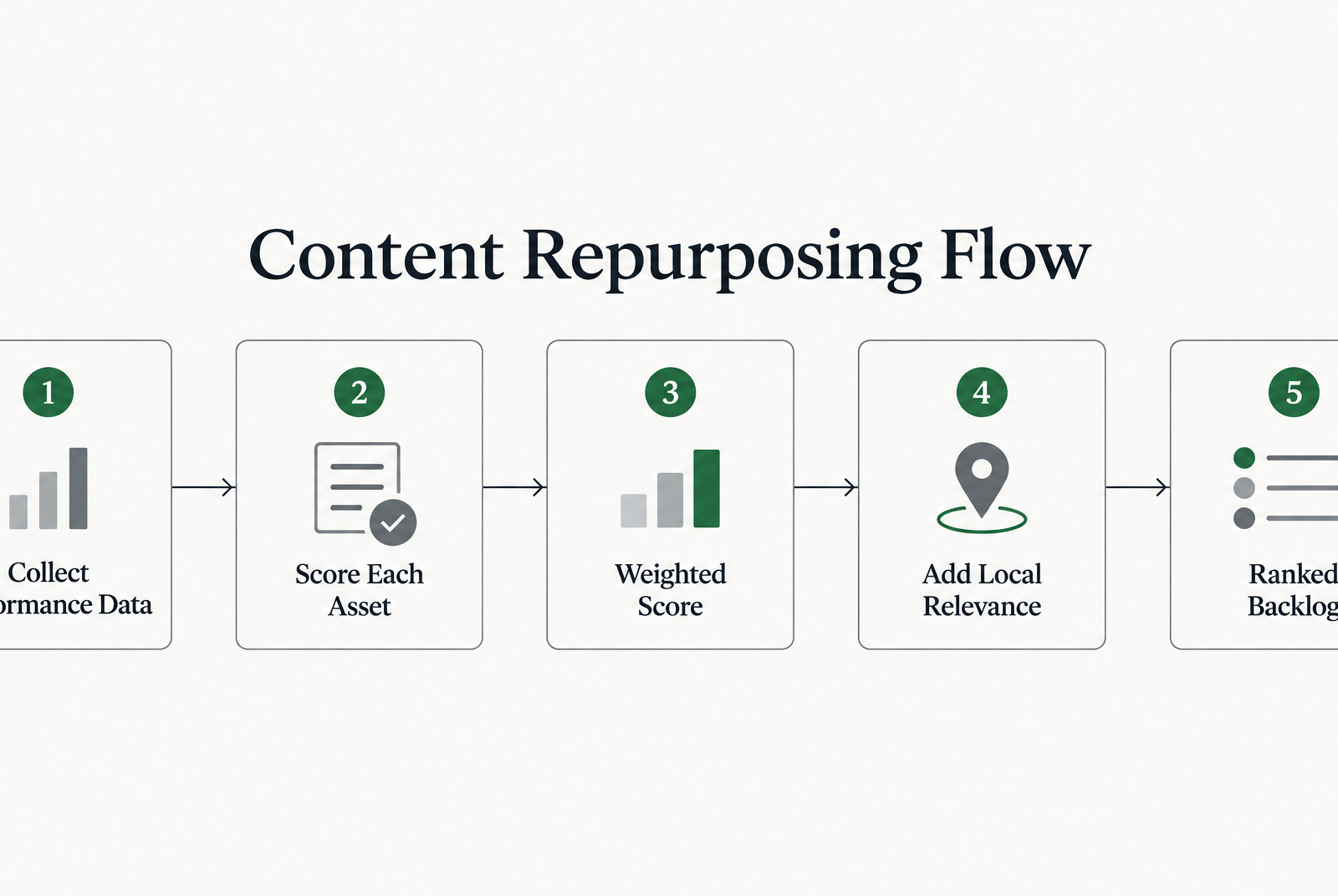
Most scoring frameworks fail for one reason: they rank content by raw traffic and stop there. A useful model weighs several signals together. Score each asset on organic traffic, third-party backlink profile, engagement, and conversion history. Then add local-search relevance, because that column decides which pieces earn the local metadata and internal links worth building.
There's a tension worth resolving before you score anything. Some practitioners argue you should only repurpose what already performed well, since a post that flopped the first time rarely wins the second. Others point toward content decay: pages that used to rank but are slipping down the SERP. Both are right about different assets. My read for the local angle: decayed-but-once-ranking pages are a higher-value target, because the search history is already established and re-tagging can help reclaim local visibility.
How to build the scoring matrix
Give each asset a 1-to-5 score across five columns, then weight them. Organic traffic and third-party backlinks carry the most weight for SEO value. Social shares and conversion rate cover audience pull and business impact. Local relevance is the tiebreaker.
A practical weighting stacks the columns in priority order:
- Organic traffic and keyword footprint: the heaviest signal
- Existing third-party backlinks: next in line for SEO value
- Conversion history: weighted for business impact
- Local-search relevance (maps to a service area): the deciding factor
- Engagement signals like shares and time-on-page: the lightest touch
Multiply, sum, and sort. The top of that list becomes your prioritized backlog.
Which assets should jump the queue
Pull performance data from the tools you already run. In Ahrefs, hunt for posts that ranked for more keywords than they do now, dropped positions in the SERP, or once drove real traffic. In Google Analytics, sort your best performers by the last month, quarter, or year, depending on how fast you publish.
Cross-reference the two lists. A page that scored high on past traffic, now shows decay, and also maps to a location you serve is your prime candidate. It carries search equity you can reclaim. Repurpose it into new formats, re-tag each format for the local area, and link every piece back to the refreshed source.
Low performers with high potential still make the list. A thin post tied to a strong service area can be rebuilt as a fuller guide, then sliced into platform-native pieces: break the long-form piece into bite-sized chunks and write each one for the channel it lands on.
How often the list should refresh
Treat the backlog as a running document, not a one-time exercise. Re-score on the same cadence you check analytics. Fast publishers often refresh monthly; most teams do fine quarterly. Decay is gradual, so a quarterly re-scan catches pages sliding out of position before the drop gets expensive.
Skip the scoring ritual for brand-new content. A post published last week has no reliable traffic or backlink signal yet, so it can't be ranked honestly. Let it gather a quarter of data first.
Designing the repurposing blueprint
A blueprint starts with atomization. You break one flagship post into its component parts before touching a single format. Pull out the statistics, the quotable frameworks, the how-to steps, the case study, the closing argument. Each fragment becomes raw material for a different channel.
Set a production target before the team starts cutting. The goal is not "make more posts." It's to create enough distinct assets to justify the audit and setup work without flooding channels with lookalike versions. What separates a working blueprint from content-farm output is the next move: every atom gets mapped to a target format and a target location tag at the same time, not tagged by hand later.
Every atom gets a format and a location in one step
A common repurposing move is to pull the headers from an article so each heading becomes the theme for a platform-appropriate post. We extend that idea one column further. Each header maps to a format, and each format inherits a location tag from the source asset's metadata.
In practice, keep a small mapping table: atom, target format, city or region, service-area label, source URL to link back to, and optional UTM content tag. Those fields travel with the atom.
So a stat becomes an X post. A framework becomes a LinkedIn carousel. A how-to section becomes a short video script. Each one carries the service-area tag and an internal link to the optimized source page. The mapping table is where the local-search campaign gets built, not as an afterthought.
Keep the tone adaptation honest here. What performs as a tweet thread will not deliver copied and pasted into a LinkedIn post. Video built for LinkedIn should differ in style from video built for Instagram. Formatting caters to the platform, and location context caters to the search intent behind it.
Store the location data, inject it everywhere
The blueprint needs a source of truth. Location data should not live in someone's memory, a campaign brief, and a half-updated spreadsheet all at once. Put regions, service areas, preferred language, and internal link destinations into reusable fields connected to the source asset.
AnyPost crawls your entire site to build a Business Context Graph of your products, messaging, and audience, so your brand's details are captured once and reused everywhere. Treat location and region metadata the same way, and the pipeline can carry the right local-SEO context into each generated asset. You tag once at the source. The system propagates the context across the derivative formats. That's the difference between a social echo and a coordinated set of search-aware outputs.
For audio or video-derived material, give the transcript a job of its own. It should summarize, structure, and support the source rather than merely mirror it.
One quality gate before anything ships
Assign clear roles: a writer owns voice, a designer owns visuals, an AI-tool operator owns generation and tagging. Every asset passes one gate before publishing. Check copy editing, brand-voice alignment, platform compliance, the location tag, and the internal link to source.
Then stagger the release. Spread social posts over two to four weeks instead of firing them all at once. That extends the promotional life of each piece and keeps your audience from tuning out.
Using AI and automation to generate platform-native assets
Most AI writing tools rewrite a paragraph about equally well. What sets them apart is memory: what each one stores about your brand, your past campaigns, and the locations you serve. That stored context is where a pipeline stops being a gimmick and starts compounding your local rankings.
We built our approach around that idea. Our Persona Engine matches your voice so every asset it generates already sounds like you wrote it, which means you skip rewriting each carousel or newsletter from scratch after the fact.
Stored location context beats manual tagging
The mechanic is simple: structured context travels farther than notes in a brief. When location and region metadata are stored as reusable fields, an AI layer can apply that context during generation instead of forcing an editor to patch it in later.
Those reusable fields can include city or region, service-area label, source URL, and UTM parameters. The proof sits in how fast localization scales once context is structured. Programmatic SEO can generate large volumes of targeted pages to capture long-tail and local search traffic. Apply the same operating logic to repurposing, and each output has a clear search role rather than existing only as a social variation. An asset isn't finished when the copy is rewritten. It's finished when the format, location context, and destination link are all correct.
Where AI speeds up repurposing most
AI earns its keep on the mechanical conversions. Turning a blog post into a carousel, a video script, a newsletter, or a set of social posts is exactly the kind of repeatable work a model can accelerate. Pull the headers from an article, treat each one as a theme for a platform-appropriate post, and AI can help with that split quickly.
Tone-matching is the second win. A tool that already knows your voice produces copy you tweak rather than rewrite. When the mechanical work is automated, the cost stays low, and the real value is in the hours it frees for optimization.
Don't hand the whole job to a robot
The biggest mistake we see is handing the entire job to AI and publishing whatever comes back. You know your brand better than any model does. Auto-generation can get you a draft with the configured destination links already in place; a human still owns the voice and the final call.
Skip full automation for anything carrying a strong brand argument or a sensitive claim. Use it for the volume work: the platform-native cuts, the internal links, the distribution prep. That split keeps quality high while the pipeline does the heavy lifting.
Scheduling, publishing, and distributing across channels
The mistake we see most often at the publishing stage is dumping every repurposed asset live on the same day. Some guidance points the other way: treat each published piece as a source asset you refine and release over time. That staggered cadence extends the promotional life of a single source piece and keeps your audience from tuning out the same idea in one afternoon.
Staggering matters even more once you fold local search into the workflow. Each post gets its own publish slot, its own location tag, and its own internal link back to the optimized source page. Instead of one loud day, you run a slow drip of small local-search signals across a month. That rhythm is what turns scheduling from a chore into a distribution engine.
Stagger the cadence, tag each slot
Queue your assets in a scheduling tool that supports bulk uploads, then assign each one a location tag before it ever hits the calendar. The tag travels with the post. For off-site links, use a simple UTM convention—for example, utm_source=social, utm_medium=organic, utm_campaign=source-slug, and utm_content=format-location—so referral traffic can be filtered by format and location. When you batch-schedule a carousel, a short clip, and a newsletter blurb from the same flagship, each carries its regional metadata into its slot without a manual pass later.
Think of the calendar as a sequence of micro-campaigns, not a dump truck. A Tuesday LinkedIn post targets one service area. A Thursday Reel targets another. Every slot links back to the source page, so the source receives a steady stream of internal and referral traffic rather than a one-day spike.
Format for the channel, not the clipboard
Copy-paste publishing kills reach. One common point is that what performs as a tweet thread will not deliver the same result pasted straight into a LinkedIn post. Formatting has to match the platform's rhythm, length, and reading habits.
From the customer's side, repurposing does not mean reposting identical content everywhere. The assembly and presentation should be tailored to each touchpoint. That's not just an engagement nicety. It helps you avoid duplicate-content problems and lets each version earn its own local query.
The practical move is to give each long-form derivative a distinct purpose. A podcast page can emphasize discussion flow, quotes, timestamps, and follow-up resources rather than restating the article line by line. Add the location tag, link it home, and use a self-canonical URL for the derivative page. That creates another search surface without making the two pages compete.
One narrative, many localized surfaces
Consistency is not optional. A consistent brand experience across every touchpoint keeps the customer journey moving; break it, and the journey stalls.
The trick is holding the core message steady while letting the packaging shift per region. Apply the same discipline to repurposed assets that you apply to your source content, and each format can keep the same underlying position while answering a slightly different local intent.
Version control keeps it honest. Track which atom came from which flagship, which location it targets, and where its internal link points. That map is what stops your channels from drifting apart.
Measuring performance and tightening the loop
A reality worth sitting with: many marketing teams can't quantifiably demonstrate the impact of their content. That gap is where most repurposing programs quietly stall. You produce multiple formats from one source, publish them over time, and then have no clean way to say which pieces actually moved rankings or leads.
Measurement is what closes that gap. When you build location metadata and an internal link into every asset, the pipeline gives you something rare: each format carries a trackable signal back to your optimized source page. That turns fuzzy "reach" into referral traffic you can attribute by location and by format.
Why track by format, not topic
Most teams roll everything up by topic and lose the plot. The more useful cut is by format. Different formats resonate with different audience segments, so a carousel that flops on engagement might still be your strongest internal-link driver back to the source page.
Set up your dashboard to compare formats side by side across three channels: SEO (indexed page rankings and referral clicks from the repurposed page), social (saves, shares, click-through to the source), and email (open-to-click on the linked asset). Watch which formats send the most qualified traffic to your location-tagged source, not just which get the most likes.
That distinction matters for the local angle. A repurposed transcript page can perform as both a discoverable search result and a pathway back to the main asset. Measure those jobs separately.
How to credit a conversion across repurposed assets
Single-touch attribution breaks the moment your pipeline works as designed. A prospect might see a short-form video, read a related page a week later, then convert from the email. Last-click credits the email and hides the two assets that did the warming.
Use a multi-touch model instead. Credit every touchpoint that carried a location tag and a link back to the source. That's the fair way to value a staggered release, because it rewards the drip of small local-search signals you built into the workflow rather than crowning whichever asset happened to close. If you only have last-click available, at minimum track assisted conversions so the earlier formats get partial credit.
How often to review, and what to test
Run a light weekly check on publishing health and a deeper monthly review on format performance. Save the structural decisions—which topics to re-atomize and which location clusters to double down on—for a quarterly pass.
A/B testing is where iteration pays off. Test one variable at a time on repurposed pieces: the hook in the first two seconds of a short video, the headline on a transcript page, the anchor text on the internal link to your source. Small headline and format tweaks compound because you're optimizing an asset that already earns traffic.
One caveat worth stating plainly: skip formal A/B testing on formats that get almost no traffic. You won't reach significance, and the time is better spent re-scoring which assets deserve repurposing at all. Feed those findings straight back into your next atomization cycle so the workflow keeps sharpening itself.
To close the loop on distribution, AnyPost automatically turns your content into social carousels and posts and publishes across LinkedIn, X, Instagram, TikTok, and YouTube, so the measurement patterns above map straight onto assets already flowing through your pipeline.
The bottom line on sustainable repurposing
The fastest way to wreck a repurposing program is to automate the wrong half of it. When teams struggle to produce enough quality writing, the instinct is to hand every step to a tool. That instinct is right for reformatting, scheduling, and tagging. It's wrong for voice.
We see the same failure pattern again and again: a team wires up full automation, then watches engagement flatten because every asset sounds like a template. The fix is to draw a clear line. Let automation handle the mechanical work and the local-SEO metadata. Keep a human on the voice and the argument.
Where workflows break down
Three pitfalls do most of the damage.
The first is duplicate content. Republishing a podcast transcript or a slide deck as a carbon copy of the source post makes you compete with yourself in the SERP. Some guidance is blunt on this: make the new page useful in its own right. That single move matters double for local search, because a standalone page can carry its own location tag and its own internal link to the optimized source. A duplicate carries nothing.
The second is tone mismatch. Some practitioners compare reposting to reheating leftovers versus turning last night's roast chicken into fresh tacos. Cross-posting identical copy across channels feels off when the vibe of each platform doesn't match. Repurposing adapts the tone; it doesn't paste.
The third is neglecting platform specs. A carousel sized for one feed looks broken on another. Automation should enforce those specs, not skip them.
How much to automate before voice suffers
Automate the parts that are rules-based: format conversion, image dimensions, location tagging, and the internal link back to your source page. Keep human review on anything judgement-based: the hook, the framing, the call to action.
This isn't a soft preference. Readers spot machine-assembled filler fast, and a single generic asset teaches your audience to scroll past the next one. The damage compounds quietly, since flat engagement rarely trips an alarm the way a broken link does. A short editorial pass per asset protects the thing that made repurposing worth doing in the first place.
One more caveat: if your team publishes fewer than a handful of assets a month, heavy automation is overkill. Build the checklist first, automate later.
The sustainable repurposing cheat sheet
Run every repurposed asset through this before it ships:
- Voice check: does it sound like you wrote it, or like a tool did?
- CTA relevance: is the call to action right for this platform and stage?
- Platform specs: correct dimensions, length, and format for the destination?
- Location tag present: is the local-SEO tag attached before publish, not bolted on later?
- Internal link to source: does the asset link back to your optimized source page?
- URL/canonical check: is the derivative page self-canonical and materially distinct from the source?
- UTM/tracking check: are off-site links tagged with consistent source, medium, campaign, and content values?
- No duplicate content: is long-form text clearly adapted rather than copied?
Keep this list inside your workflow, not in a doc nobody opens.
Questions People Ask
Won't publishing podcast transcripts and summaries as separate pages trigger duplicate-content problems?
Not if the page has a distinct job. Use structure, excerpts, timestamps, takeaways, regional context, and a clear internal link path back to the flagship asset so the derivative page adds value instead of repeating the source. If the page is materially distinct, use a self-canonical URL; if it is a thin copy, do not publish it as a separate indexable page.
Is automation worth setting up if I only publish one flagship asset a month?
Probably not. At that pace, a documented checklist and light AI assistance are usually enough. Save deeper automation for the point where repeated formatting, tagging, scheduling, and review are taking meaningful time away from strategy.
What's the actual difference between repurposing and just reposting the same content everywhere?
Reposting is duplication. Repurposing is adaptation: the idea stays consistent, but the hook, structure, length, CTA, and presentation change for the channel. The best workflows also connect each version back to the right source asset so distribution supports search.
What should I do with an old post that has no location signal or internal link to a pillar page?
Flag it in the audit and decide whether the topic still supports a service area or business priority. If it does, refresh the source first, add the missing local context and internal link, then repurpose from the improved version rather than from the weak original.