How to Track Keyword Rankings for Better Traffic Quality
Quick Summary
The part most rank-tracking setups miss isn’t monitoring keywords. It’s knowing which movements deserve action and which are just noise. A significant ranking drop can cost valuable traffic. Many teams only notice when the monthly report lands weeks later. By then, the damage has compounded.
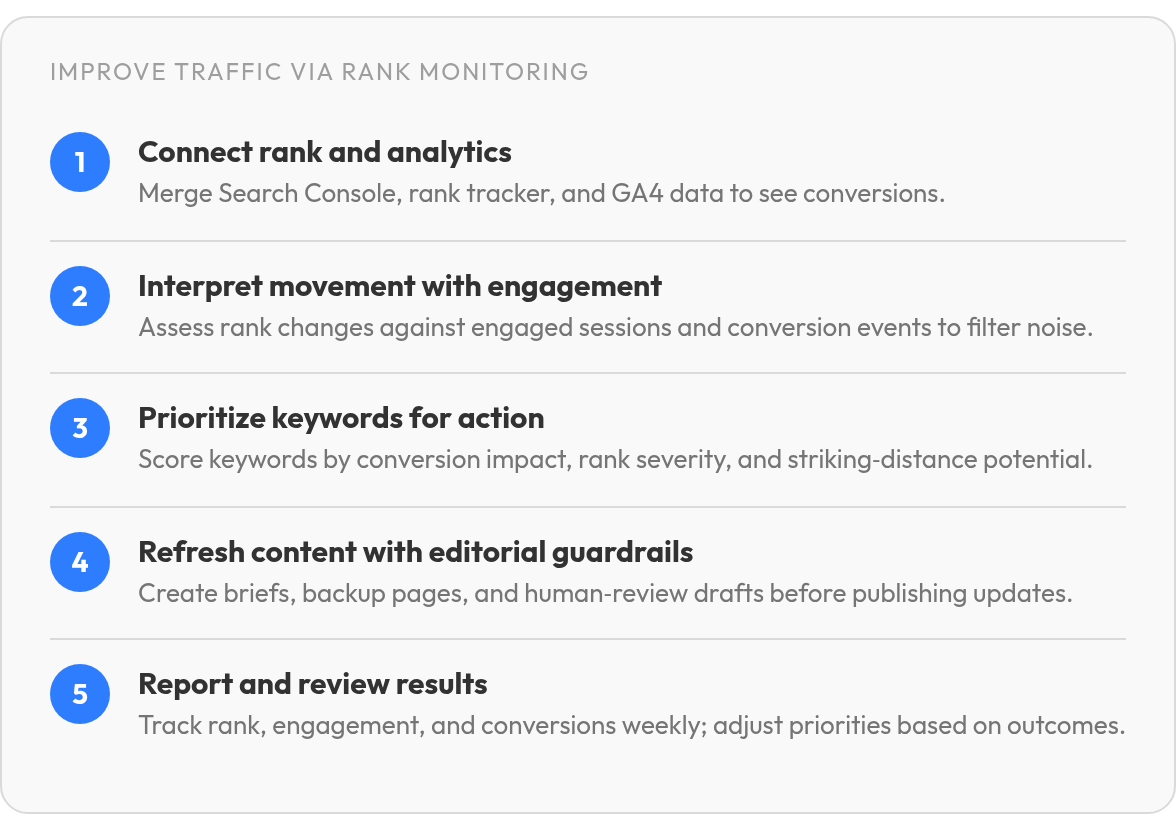
Here’s the workflow that turns rank data into better traffic quality:
| Workflow Stage | Difficulty | Primary Benefit |
|---|---|---|
| Connect rank and analytics data | Beginner | Spot high-converting keywords that dropped before traffic craters |
| Interpret movement with engagement + conversions | Intermediate | Distinguish real problems from seasonal noise or low-value fluctuations |
| Prioritize keywords | Intermediate | Focus refresh effort on striking-distance positions (11–20) and degrading page-1 terms |
| Perform editorially reviewed refreshes | Advanced | Avoid generic rewrites; tailor updates to what the keyword actually needs |
| Report and review results | Beginner | Prove SEO ROI by linking rank gains to sessions and conversions |
A useful dashboard puts four widgets near the top: ranking-drop alerts for keywords that fell three or more positions this week, a positions 11–20 view for striking-distance opportunities, a trend chart for your top-10 money terms, and GA4 engagement and conversion columns beside each keyword row.
That layout answers two practical questions. Which ranking losses are bleeding high-converting traffic? And which page-two keywords sit one focused refresh away from page-one visibility?
Two takeaways worth acting on: catching a costly drop in week one beats catching it in month three. Positions 11–20 are useful refresh targets because they sit close to page one. Rankings without traffic signal a different problem. Search intent may have shifted, or an AI Overview may now capture the click, so investigate before rewriting.
Key Takeaways
- A significant ranking drop can cost valuable traffic before a monthly report reveals it.
- Keywords in positions 11–20 are useful refresh targets because they sit close to page one.
- Monthly or quarterly rank checks leave blind spots where high-converting keywords can lose valuable positions for weeks without anyone noticing.
- A keyword at position 3 that never converts underperforms one at position 9 that consistently fills the sales pipeline.
- Pop Mart applies the 80/20 rule by tracking only the top 20% that drive business value.
- Google Search Console’s averaged position data can mask device-level shifts.
- Weekly rank monitoring catches meaningful drops before they compound into sustained traffic and conversion losses.
Rankings Tell You Who Showed Up, Not Who Bought
Most teams track keyword positions but miss the part that determines whether those rankings produce anything useful. A keyword at position 3 that never converts is less valuable than one at position 9 that fills your pipeline. Rankings indicate visibility. Engaged sessions and key events tell you whether the resulting visits matter.
We see this gap widen when teams rely solely on a rank tracker or use an AI SEO content generator without connecting position changes to conversion data. The workflow produces movement reports and content briefs, but not necessarily better business outcomes.
Monthly or quarterly checks make the problem worse. A keyword that consistently drove 40 conversions per month can slip out of meaningful positions without triggering an alert. The team still sees healthy rankings elsewhere in the report, while one of its best acquisition pages quietly loses ground.
Our recommendation is to prioritize rank movements by likely business impact, not by the size of the change. When a keyword drops, the first question isn’t “what position did we lose?” It’s “did that keyword drive conversions in the first place?” A one-position drop for a reliable converter can matter more than a five-position jump for a term that never produced a sale.
Search patterns are also shifting as AI-powered engines become more prevalent alongside traditional organic search. Visitors arriving through different channels often show different engagement patterns, which makes conversion tracking more useful than raw position data on its own. Weekly monitoring gives you a practical operating rhythm: frequent enough to catch costly movement, without treating every daily wobble as a fire.
Connect Search Console, AnyPost.ai Analytics, and Your Rank Tracker
Google Search Console shows which queries reach your pages, but its position data reflects an average over time and updates with a delay. That lag means a drop from position 3 to position 8 may not become obvious in GSC until it has already cost you traffic.
The average can also hide device-level shifts. Desktop and mobile rankings can move in different directions, yet GSC reports a blended number that makes the situation look stable. If mobile drives most of your conversions, that blended average is hiding the problem you actually need to solve.
A dedicated rank tracker closes that visibility gap. Tools built for daily monitoring catch movement as it happens and separate desktop from mobile rankings. We pair the tracker with GSC’s verified impression and click data, then filter GA4 to Session source = google and Session medium = organic so conversion metrics describe the same organic traffic.
This is also where AnyPost.ai analytics belongs in the workflow. Position data tells you what changed. Landing-page engagement and conversions tell you whether the change deserves editorial work.
Keep the keyword list manageable
Most keywords in a large portfolio deliver little business value. We apply the 80/20 rule by pulling keywords from GSC’s Performance report, sorting by clicks or conversions, and keeping the top 20% that matter commercially.
Group what remains by landing page, topic cluster, and search intent so movement patterns stay readable. Tracking 500 high-converting keywords beats tracking 5,000 that dilute the signal. A bloated keyword list doesn’t make you more informed. It just gives the important drops more places to hide.
Once the data flows into one view, positions 11–20 become your most useful refresh targets. Small content updates can often push them onto page one, where most organic traffic concentrates.
Turn Rank Movement Into a Quality Signal
A keyword that jumps from position 15 to position 5 looks like a win until you check GA4 and find that the new visitors bounce in eight seconds. The rank moved. Nothing else did.
Teams that trigger rewrites from position data alone miss this qualification step. They see a ranking change, generate another draft, and publish without confirming whether the page converts or whether the new traffic matches the intent.
The fix is attaching conversion and engagement context to every rank row before you decide what deserves action. Pull that engaged-session count alongside key events for each landing page, then join it to your rank-tracker export by URL.
Now you can see which keywords drive real attention and which deliver empty clicks. That distinction keeps a rankings report from becoming an arbitrary content-production queue.
Prioritize drops that hurt revenue first, then striking-distance opportunities
Weight conversion impact above everything else. A keyword at position 3 that drives 15 conversions a month and drops to position 8 is an emergency. A keyword at position 25 with zero conversions climbing to position 18 is interesting, but it isn’t urgent.
Rank severity comes second. Positions 11–20 offer useful refresh targets because focused content updates can often push them onto page one. Engagement becomes the tiebreaker when conversion data is sparse, especially for newer pages that haven’t accumulated enough key events yet.
Build a simple scorecard with these columns:
- Keyword
- Landing page
- Search intent
- Current rank
- Previous rank
- Engaged sessions
- Key events
- Priority score
- Next action
Update it weekly. Confirm movement over at least two weeks before committing to major work, since Search Console averages position and can lag by days. Isolated spikes without engagement proof are noise, not a mandate to rewrite the page.
Refresh Content When Rankings Slip, With Editorial Guardrails
The drop that deserves action isn’t always the largest one. We see teams trigger rewrites the moment any keyword slips three positions, flooding their queue with updates that never mattered. A keyword at position 15 that brought twelve visits last month doesn’t warrant the same urgency as one at position 5 that converted eight of those visits into leads.
Build your response protocol around two separate tracks.
High-converting keywords sliding from page-one positions to position 11 or worse go into a defensive queue. These need investigation within the week because the revenue loss can compound daily. Check the affected landing page, device split, competing results, and conversion history before deciding whether the page needs a refresh or a different fix.
Keywords sitting between positions 11 and 20 with decent impression volume go into an opportunistic queue. These updates can wait until you batch similar topics together. That keeps weekly monitoring useful without turning daily fluctuation into a production treadmill.
AnyPost.ai can help produce the refresh, but the priority still comes from business impact. Otherwise, automation just helps you make low-value edits faster.
Editorial safeguards for every AI-assisted refresh
Every refresh starts with a brief, not a prompt. Document what the page currently ranks for, what converting search intent it serves, which sections drive the longest time on page in GA4, and what specific gap the refresh needs to close. The brief becomes your reference when a revised draft starts wandering toward a different topic.
Preserve the original version before you touch anything. Copy the full HTML into a dated backup file and store the previous meta title and description in a spreadsheet row. If the refresh tanks engagement or drops the page further, you need a straightforward revert path that doesn’t depend on Git archaeology or your CMS’s version history.
Require a human review gate before anything publishes. Read the full revised draft against the brief to confirm it still targets the original search intent. Check that internal links weren’t accidentally stripped, and verify that new claims match what your sources actually support.
Your highest-traffic pages merit a second reviewer who wasn’t involved in the refresh. Log what changed, when, and why in a shared tracker so six months from now you can explain why engagement shifted instead of guessing.
Build a Reporting Cadence That Tells You What to Do Next
The dashboard most teams build celebrates aggregate traffic growth while masking the fact that half their top-ranking pages generate zero conversions. A site gains monthly organic visits, and executives see green arrows. Its conversion rate still drops because the new traffic lands on informational pages with no clear next step.
We build reporting around three data layers pulled into one view. The first comes from a dedicated rank tracker showing daily positions across desktop and mobile, broken out by keyword group. The second pulls from GA4: engaged sessions, organic conversions, and conversion rates by landing page. The third logs every content action with an owner and completion date, so you can trace which refreshes moved which metrics.
Track quality groups instead of inventing a composite score that nobody can audit. Engaged organic sessions show whether traffic is real. Organic key events show whether visits convert. Conversions by prioritized landing page show which URLs drive revenue. Display them alongside rank change, not in place of it.
Separate your operating rhythms. Monitor meaningful rank movement weekly, using daily tracking for alerts rather than knee-jerk edits. Run a full action review monthly: validate data freshness, update the keyword scorecard, inspect major drops and striking-distance keywords, review prior content actions, assign owners and deadlines, and record decisions. Reserve larger keyword-set changes and strategy pivots for quarterly reviews.
For each priority landing page, plot a time-series chart showing average position from your tracker, GA4 organic conversions, and vertical markers for content refresh dates. When a refresh correlates with a ranking jump two weeks later followed by conversion growth, you’ve closed the loop.
Quick Questions, Straight Answers
1. How do I cut down an oversized keyword tracking list without accidentally dropping important terms?
Pull 90 days of GSC data and sort by conversions first, then clicks. Keep any keyword that drove at least one conversion, plus your top traffic drivers even if they haven't converted. Remove exact-match variations landing on the same URL—tracking "best project software" and "top project software" separately wastes slots when both measure the same page. Group by landing page and intent so you spot patterns instead of monitoring scattered terms.
2. How long should I wait after refreshing a page before judging whether the update worked?
Wait at least two weeks after publishing before calling it. Refreshes often show ranking movement around the two-week mark, with conversion changes following after. Google recrawls within days, but position adjustments and engagement signals take time to compound. Check your time-series chart at three weeks—if rank jumped but engagement or conversions didn't follow, the refresh might have shifted the page toward informational queries that don't convert as well.
3. What should I investigate when a keyword's ranking improves but conversions don't follow?
Check whether the page still matches buyer-stage intent or if it now attracts earlier-stage searchers. Pull GA4's landing page report filtered to that organic keyword and compare average engagement time before and after the rank jump. If engagement dropped, your refresh may have optimized for informational queries while your conversion path assumes purchase-ready visitors. Also confirm the CTA didn't break and that internal links still guide visitors toward conversion pages.