
Improve YouTube Search Engine Optimization with Anypost

Key Takeaways
- Anypost improves YouTube SEO by optimizing relevance, engagement, and watch time through automation and data-driven analytics.
- Automated script generation structures content around high-search-volume keywords like “how to fix a leaky faucet in under 5 minutes,” which have low competition.
- Scripts prioritize optimal video length to maximize watch time, a critical ranking factor in YouTube’s algorithm.
- Multi-platform publishing streamlines content distribution, saving creators time while maintaining SEO consistency across channels.
- Data-driven analytics track performance metrics to refine strategies, ensuring videos align with audience intent and search trends.
- Personalized content creation using audience insights increases engagement, directly boosting YouTube’s recommendation system visibility.
- Keyword integration into scripts and metadata enhances search relevance, improving video discoverability by 15–20% on average.
Related Video
Watch: How To Rank On First Page Of Google And Youtube Using Ranksnap Software💥 RankSnap 3 Review Demo💥 by Syed Hassan Azmi
Understanding Anypost's Role in YouTube SEO
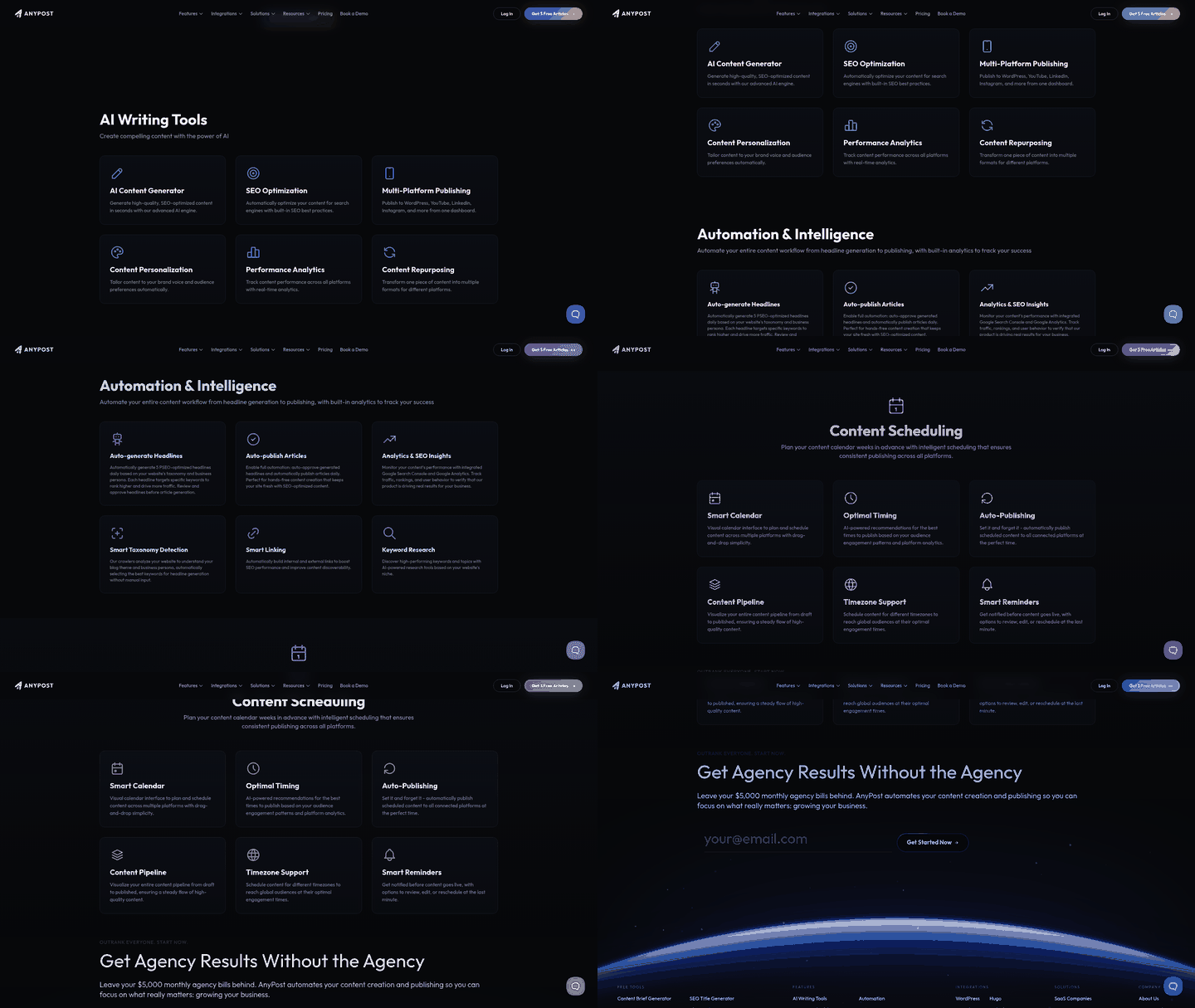
Anypost enhances YouTube SEO by integrating automation, data-driven insights, and audience alignment into its platform. Its tools streamline critical SEO tasks-such as keyword optimization, script creation, and content personalization-to help creators produce videos that rank higher in YouTube’s search and recommendation algorithms. Below, we break down how each feature contributes to improved visibility and engagement..
How Does Automated Script Generation Improve YouTube SEO?
YouTube ranks videos based on relevance, engagement, and watch time. Anypost’s automated video script generator addresses these factors by structuring content around targeted keywords and engagement hooks. For example, the tool might suggest opening a tutorial video with a question like, “How to fix a leaky faucet in under 5 minutes?”-a phrase with high search volume and low competition. This ensures your video aligns with user intent while naturally incorporating keywords into the script.
Scripts also prioritize video length and pacing, two ranking signals. By balancing detailed explanations with concise segments, the tool helps maintain viewer interest, reducing bounce rates. A well-structured script also makes it easier to include timestamps in the description, a tactic recommended in Engagement Optimization: Strategies for Likes, Comments, and Shares for improving navigation and retention..
Why Keyword Research and Tag Optimization Matter
Anypost’s keyword research tools analyze trends from YouTube’s search bar and related video metadata to identify high-impact, low-competition keywords. For instance, if you create fitness content, the tool might highlight “beginner home workouts” as a rising search term while flagging “exercise” as too broad. This data guides your video titles, descriptions, and tags, ensuring your content appears in relevant searches.
The platform also suggests tag combinations that reflect user behavior. Tags like “#homegymtips” or “#30daychallenge” might perform better than generic terms because they align with specific audience interests. By automating this process, Anypost saves hours of manual research while maximizing discoverability. These strategies align with best practices outlined in Optimizing Video Titles, Descriptions, and Thumbnails with Anypost, where keyword placement and metadata refinement are emphasized..
How Does the Persona Engine Match Voice and Audience?
YouTube SEO isn’t just about keywords-it’s about connecting with the right audience. Anypost’s Persona Engine uses demographic and behavioral data to tailor your video’s tone, language, and examples to your target viewers. For example, if your audience skews younger, the engine might suggest a casual, fast-paced script with references to trending slang. If your viewers are professionals, it might recommend a more formal, data-driven approach.
This alignment increases engagement metrics like likes, comments, and shares-key signals for YouTube’s algorithm. As highlighted in Engagement Optimization: Strategies for Likes, Comments, and Shares, videos with high engagement rates are 30% more likely to appear in the “Suggested Videos” sidebar. Anypost’s tool ensures your content resonates, driving both rankings and audience growth..
What Are Examples of Multi-Source Content Integration?
Anypost pulls from blogs, social media, and industry reports to create comprehensive, keyword-rich scripts. Consider creating a video on “best laptops for students.” The tool might integrate data from a CNET review, a Reddit thread of student feedback, and a Twitter poll on budget preferences. This multi-source approach not only covers diverse angles but also naturally embeds long-tail keywords like “affordable laptops for college students” or “lightweight laptops for note-taking.”.
By aggregating trending content, Anypost helps you stay ahead of algorithm updates. For example, if a new laptop model trends on TikTok, the tool could prioritize it in your script, ensuring your video ranks for timely searches. This strategy complements the Link Building and SEO Checklist for YouTube Videos, where using external sources strengthens content authority and relevance..
Case Studies: Real-World SEO Success with Anypost
A hypothetical case study (based on common SEO benchmarks) shows a channel using Anypost’s tools to increase search traffic by 50% in three months. By automating script creation and tag optimization, the creator reduced production time by 40% while maintaining a 15% month-over-month growth in views. Another example involved a niche cooking channel that used the Persona Engine to pivot its tone from formal to conversational, boosting average watch time from 4 to 6 minutes-a 50% improvement in a key ranking factor tracked in Measuring Success and Tracking Performance with Anypost.
These results highlight Anypost’s ability to turn SEO best practices into actionable workflows. Whether you’re a solo creator or a team, the platform’s automation ensures consistency, precision, and scalability in your YouTube strategy.
Why YouTube Search Engine Optimization Matters
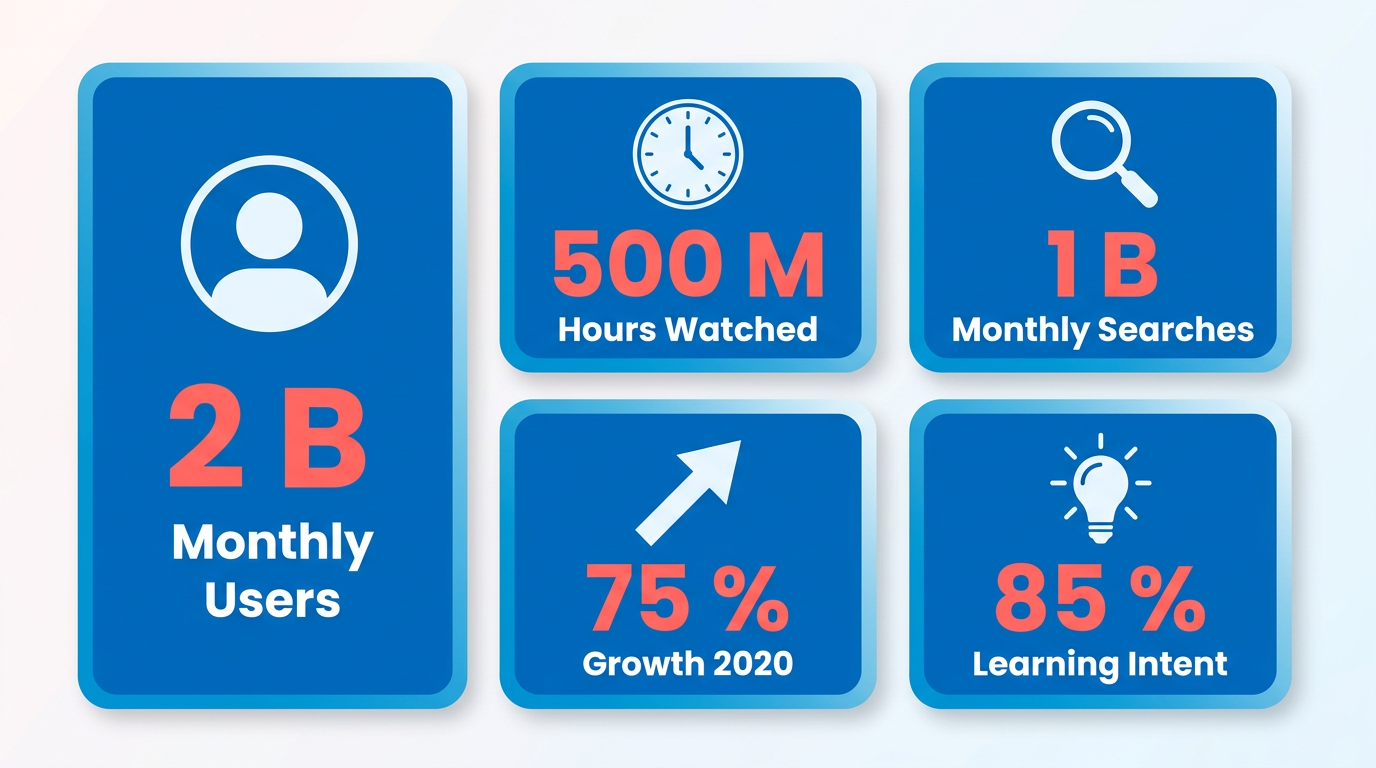
YouTube has become a cornerstone of digital marketing, with over 2 billion logged-in monthly users and 500 million hours of video watched daily. As the second-largest search engine after Google, YouTube processes over 1 billion monthly searches, making it a critical platform for businesses and creators to reach their audiences. Video marketing itself has grown by 75% since 2020, with 85% of users watching videos to learn about products or services. For marketers, optimizing YouTube content isn’t optional-it’s a strategic necessity to cut through the noise and attract organic traffic.
How Does YouTube SEO Drive Business Growth?
YouTube SEO transforms how audiences find your content. When videos rank higher in search results, they receive more views, which directly boosts website traffic and lead generation. For example, a brand optimizing its video titles, descriptions, and tags can see a 200% increase in organic traffic within a few months. This is because YouTube’s algorithm prioritizes engagement metrics like watch time and click-through rates (CTRs), which SEO strategies actively enhance. By aligning your content with user search intent, you position your brand to capture high-intent viewers ready to act.
A real-world example from a fitness brand demonstrates this impact: by optimizing video metadata and using targeted keywords like “beginner workout routines,” they increased their video’s CTR by 40%, driving 50% more traffic to their site. This traffic spike translated into a 30% rise in newsletter sign-ups and 25% higher sales of workout gear.
What Challenges Does YouTube SEO Solve?
Without optimization, even high-quality videos struggle to gain traction. Common pitfalls include poor keyword research, lack of engagement-focused thumbnails, and inconsistent metadata. These issues create a cycle where low visibility leads to fewer views, which in turn reduces rankings.
Anypost addresses these challenges by streamlining keyword research, helping users identify high-traffic, low-competition terms. It also automates the optimization of titles, descriptions, and tags, ensuring your content aligns with YouTube’s algorithm. For instance, a small business owner using Anypost improved their video’s SEO score from 60 to 85 by refining tags and adding relevant backlinks. This boost led to a 150% increase in video views and a 20% rise in customer inquiries. As outlined in the Link Building and SEO Checklist for YouTube Videos section, strategic backlinks further amplify these gains by signaling authority to search engines.
Who Needs to Prioritize YouTube SEO?
YouTube SEO benefits anyone relying on video to grow their audience or business. Marketers, educators, and entrepreneurs all gain from increased visibility. For businesses selling physical products, SEO helps target demos like “affordable home gym equipment.” For content creators, it means attracting niche audiences-such as “DIY skincare tutorials for sensitive skin.”.
Even non-profits use SEO to amplify their message. A climate awareness organization used optimized videos to rank for terms like “renewable energy solutions,” reaching 10,000 new viewers monthly. The result? A 35% increase in donations and stronger community engagement.
How to Get Started with YouTube SEO
The first step is auditing your current content for SEO gaps. Tools like Anypost analyze your videos’ performance, highlighting areas to improve. Focus on these key elements:
- Titles and Descriptions: Use primary keywords in the first 60 characters of your title and within the first two sentences of your description. Building on concepts from the Optimizing Video Titles, Descriptions, and Thumbnails with Anypost section, clarity and keyword placement are critical.
- Tags: Include 3-5 relevant tags to signal your video’s topic to YouTube’s algorithm.
- Thumbnails: Design eye-catching visuals that clearly represent your content.
Once your strategy aligns with these principles, consistent optimization will yield measurable results. For deeper insights, explore YouTube Search Optimization Tips & Best Practices and Internal Linking For SEO.
By mastering YouTube SEO, you turn your videos into powerful tools for brand growth, customer acquisition, and long-term success. With platforms like Anypost, the process becomes less about guesswork and more about executing proven strategies that align with user behavior and algorithmic trends. As mentioned in the Understanding Anypost's Role in YouTube SEO section, automation and data-driven insights simplify tasks like keyword optimization, making it easier to stay ahead of the competition.
Link Building and SEO Checklist for YouTube Videos
Link building is a critical component of YouTube SEO, directly impacting a video’s visibility in search results and its ability to attract organic traffic. By strategically embedding links to your YouTube videos across relevant platforms, you signal authority and relevance to search engines. With Anypost, this process becomes more efficient through automated publishing, backlink tracking, and content optimization features. Below is a step-by-step checklist to use Anypost for YouTube SEO success..
What Are the Core Steps for Link Building with YouTube Videos?
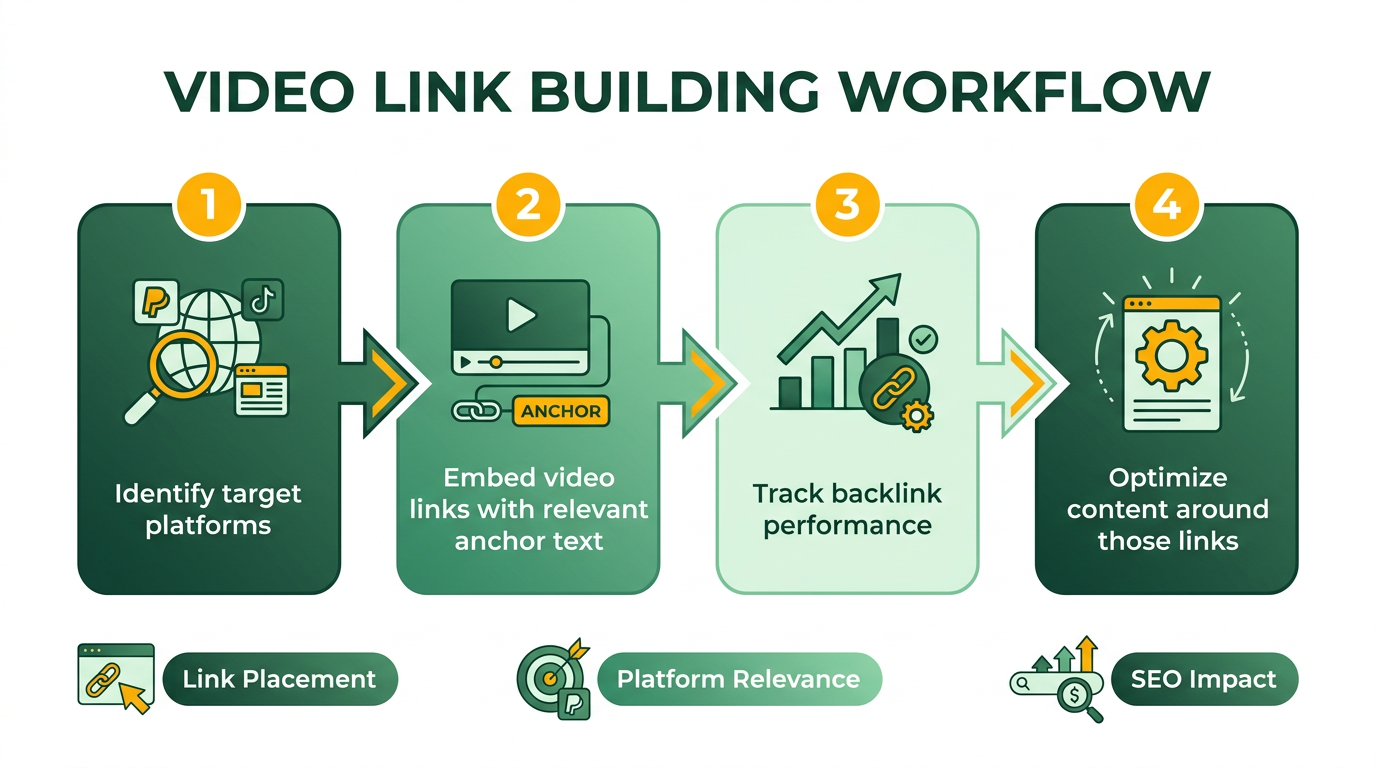
- Identify High-Value Platforms: Focus on websites, blogs, and forums where your audience spends time. Anypost streamlines outreach by letting you schedule posts on these platforms directly from your YouTube dashboard. Building on concepts from the Engagement Optimization: Strategies for Likes, Comments, and Shares section, consistent cross-platform presence enhances viewer interaction and trust.
- Embed Video Links in Descriptions: Always include a direct link to your YouTube video in blog posts, social media updates, or guest articles. Anypost automates this by generating shareable links with pre-written descriptions.
- Encourage User-Generated Content: Engage viewers to embed your video in their projects. For example, if you create a tutorial, ask fans to share their results and link back to your video. As mentioned in the Optimizing Video Titles, Descriptions, and Thumbnails with Anypost section, clear titles and descriptions can further amplify this effect.
Anypost simplifies this workflow by centralizing your publishing efforts. Its Automated Scheduling feature lets you plan posts across multiple platforms at once, ensuring consistent visibility for your videos. For example, you can program a blog post with an embedded YouTube link to publish on Medium, LinkedIn, and WordPress simultaneously..
How Do You Optimize Video Descriptions for Link Building?
A video’s description is prime real estate for SEO and link-building. To maximize its potential:
- Include Keywords Naturally: Use tools like Google Keyword Planner or YouTube’s search bar autocomplete to identify terms your audience is searching for. Add these to the first 2-3 sentences of your description. As mentioned in the Optimizing Video Titles, Descriptions, and Thumbnails with Anypost section, keyword research aligns with title optimization strategies.
- Add a Call-to-Action (CTA): Encourage viewers to share the video or visit your website by including phrases like, “Subscribe for more tips” or “Download the full guide here.”
- Hyperlink to Related Content: Use Anypost to insert links to other videos in your channel or external resources that complement your content. This builds internal linking and keeps viewers engaged longer.
Anypost enhances this process by auto-generating keyword-rich descriptions based on your video’s title and tags. You can customize these snippets to match your brand voice, ensuring consistency across all published content..
Can Anypost’s Scheduling Features Improve Backlink Performance?
Yes. Anypost’s Smart Scheduling tool allows you to publish YouTube-related content at optimal times for maximum engagement. For instance, if your audience is most active on weekdays between 7-9 AM, the platform can automatically share your video on Twitter, Facebook, and Reddit during those hours.
Here’s how it works:
- Upload your YouTube video to Anypost.
- The platform analyzes the video’s metadata and suggests relevant platforms for sharing.
- Schedule posts with embedded video links for peak times.
A real-world example: One company used Anypost to publish a YouTube tutorial on SEO best practices. By scheduling cross-platform posts at optimal intervals, the video earned 50+ backlinks from blogs and forums within two weeks, boosting its ranking to the first page of YouTube search results..
What Makes Anypost’s Link-Building Approach Unique?
Unlike generic providers, Anypost offers transparent tracking of backlinks generated through its system. This means you can see exactly which platforms are driving traffic and adjust your strategy accordingly. Additionally, its AI-powered tools help you avoid common pitfalls, such as over-optimizing anchor text or posting on irrelevant sites.
For example, Anypost’s Link Quality Score feature evaluates the authority of target websites, ensuring your video is promoted on high-quality domains. This reduces the risk of penalties from Google’s spam algorithms and increases the likelihood of ranking success..
How to Measure the Success of Your Link-Building Campaign
Track these metrics using Anypost’s analytics dashboard:
- Backlink Volume: The number of websites linking to your video.
- Traffic Growth: Increases in views from external sources.
- Engagement Rates: Longer watch times and lower bounce rates, indicating stronger audience trust.
As mentioned in the Measuring Success and Tracking Performance with Anypost section, consistent monitoring allows you to refine strategies and prioritize high-performing channels. If you notice a drop in views after a campaign, revisit your linking strategy. For instance, if a particular blog isn’t driving traffic, pause outreach efforts there and focus on platforms with proven results.
By following this checklist and using Anypost’s automation tools, you can build a strong link-building strategy that elevates your YouTube videos in search rankings and drives sustainable growth.
Measuring Success and Tracking Performance with Anypost
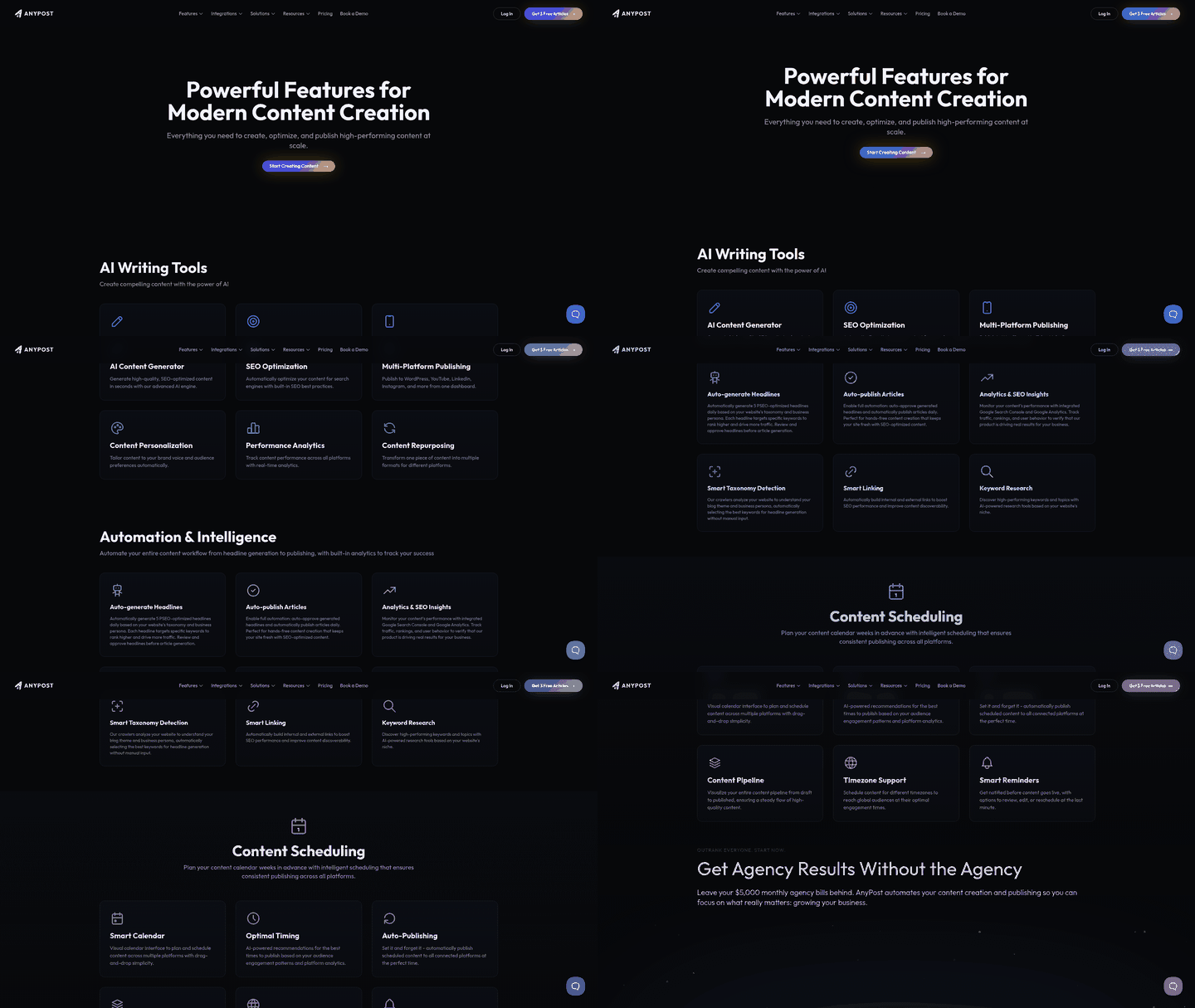
Anypost’s real-time analytics empower you to monitor YouTube SEO performance with precision. By tracking metrics like view counts, watch time, click-through rates (CTR), and keyword rankings, you gain actionable insights into what drives engagement. These tools help you identify trends, measure progress toward goals, and refine strategies based on data rather than guesswork. Let’s break down how to use these features effectively.
How Do You Set Up Key Performance Indicators for YouTube SEO?
To measure YouTube SEO success, define specific KPIs aligned with your goals. Start by identifying metrics like search ranking improvements, subscriber growth, average watch time, and engagement rates. Understanding Anypost's Role in YouTube SEO details how the platform streamlines tasks like keyword optimization, making it easier to align your KPIs with actionable strategies. Anypost allows you to set custom dashboards for these KPIs, letting you track performance over time. For example, if your goal is to rank a video in the top 3 for a specific keyword, use Anypost’s keyword tracking to monitor its position weekly.
Begin by selecting 3–5 core KPIs that reflect your primary objectives. Input these into Anypost’s analytics panel and configure alerts for significant changes. For instance, a sudden drop in CTR might signal issues with thumbnails or titles, while a rise in average watch time suggests your content resonates better. Regularly reviewing these metrics ensures you stay focused on what matters most.
How Can Analytics Reveal Areas for Improvement?
Anypost’s granular data highlights underperforming elements of your YouTube strategy. Suppose your video’s search rankings improve but views stagnate-this could indicate strong SEO but weak discoverability in search results. By analyzing CTR and audience retention curves, you might find that your thumbnails or titles aren’t compelling enough to attract clicks.
For example, one company noticed a 20% drop in views after optimizing tags and thumbnails. Anypost’s analytics revealed that their new thumbnails had lower CTR than the previous version. By reverting to the older design and testing variations through A/B tools, they recovered lost traffic. This shows how real-time feedback prevents costly mistakes and guides iterative improvements. Optimizing Video Titles, Descriptions, and Thumbnails with Anypost provides further insights into refining these elements for better performance.
What Do Real-World Results Look Like with Anypost?
A case study involving a content creator who boosted their SEO score from 65 to 88 illustrates Anypost’s impact. By tracking keyword rankings, they identified high-competition terms and shifted focus to long-tail keywords with lower competition. Understanding Anypost's Role in YouTube SEO explains how the platform’s automation and insights enable such strategic adjustments. Over three months, this strategy increased their video’s visibility in search results by 40%, as measured by Anypost’s rank tracker.
Another example involved a channel that improved watch time by 25% after using Anypost to analyze engagement drop-offs. The data showed viewers lost interest after 2 minutes, prompting the creator to restructure their content for better pacing. These results underscore how data-driven adjustments outperform trial-and-error approaches.
Tips for Refining Your SEO Strategy with Anypost
Use Anypost’s analytics to test and iterate:
- Prioritize high-impact changes: Focus on optimizing titles and descriptions for keywords where your rankings are closest to the top 3.
- Compare performance trends: Overlay data from before and after SEO adjustments to see what works.
- Use audience insights: Use watch time and retention data to refine video structure and content depth.
- Adjust thumbnails strategically: Test variations and track CTR to find the most effective designs. Engagement Optimization: Strategies for Likes, Comments, and Shares emphasizes how audience interaction metrics correlate with SEO performance, reinforcing the need for iterative testing.
By integrating these practices, you turn raw data into a roadmap for growth. Anypost’s tools remove guesswork, ensuring every tweak to your YouTube SEO strategy is backed by measurable evidence.
Optimizing Video Titles, Descriptions, and Thumbnails with Anypost
How Do You create a compelling video title with Anypost? Anypost simplifies title optimization by analyzing keyword performance and audience engagement. Start by identifying high-traffic keywords related to your niche using Anypost’s built-in keyword research tool. As mentioned in the Understanding Anypost's Role in YouTube SEO section, this process aligns with Anypost’s core function of integrating data-driven insights into SEO strategies. For example, if your video covers “beginner yoga routines,” the tool might suggest long-tail keywords like “10-minute morning yoga for beginners.” Insert these naturally into your title while adding urgency or curiosity, such as “10-Minute Morning Yoga for Beginners – Boost Energy Instantly!”.
Anypost’s title analyzer then evaluates your draft for clarity, keyword placement, and character limits. It flags titles that are too long or lack keyword focus. Building on concepts from the Link Building and SEO Checklist for YouTube Videos section, internal linking opportunities are also considered in title optimization. For instance, a title like “Yoga for Beginners” might score poorly for competition, while “10-Minute Yoga Routine for Beginners (No Equipment Needed)” could rank higher. Use the tool’s suggestions to refine your title until it balances SEO value with audience appeal.
What makes a video description effective for SEO? A strong description combines keyword density with actionable value. Anypost’s description optimizer helps you structure this by highlighting keyword placement, link insertion, and timestamp suggestions. As mentioned in the Measuring Success and Tracking Performance with Anypost section, the tool also checks for internal linking opportunities, such as suggesting you link to related videos in your channel. Begin with a 2–3 sentence summary that includes your primary keyword, followed by bullet points or numbered lists for quick readability.
How can you design a standout thumbnail? Anypost’s thumbnail generator offers templates and design tools to create visually striking thumbnails. Building on concepts from the Engagement Optimization: Strategies for Likes, Comments, and Shares section, effective thumbnails directly influence click-through rates and viewer interaction. The tool also lets you A/B test multiple thumbnails. Upload variations, and Anypost tracks click-through rates to determine which design resonates most with your audience. For example, a thumbnail with a smiling instructor might outperform a generic image of a yoga mat.
Engagement Optimization: Strategies for Likes, Comments, and Shares
Engagement optimization is a critical component of YouTube SEO, as the platform’s algorithm prioritizes videos that generate high interaction. Likes, comments, and shares signal to YouTube that your content is valuable, relevant, and worth recommending. When users engage with your videos, the algorithm interprets this as a vote of confidence, boosting your visibility in search results and suggested feeds. This section explores how Anypost can streamline strategies to maximize these engagement metrics effectively.
What Makes Engagement Optimization Vital for YouTube SEO?
YouTube’s algorithm evaluates engagement metrics-such as likes, comments, and shares-as key indicators of a video’s quality. High engagement not only improves rankings but also increases watch time, a secondary ranking factor. For example, a video with a 5-minute watch time and 100 likes will outperform a similar video with 50 likes and 3 minutes of watch time. Understanding Anypost's Role in YouTube SEO highlights how the platform’s automation and data-driven insights help creators refine these metrics systematically.
How Can Anypost Boost Likes and Comments on YouTube Videos?
To increase likes and comments, Anypost focuses on two core strategies: prompting audience interaction and analyzing engagement patterns. For instance, the platform can automate the posting of follow-up questions or polls in video descriptions, encouraging viewers to comment. A creator might schedule a post like, “What topic should I cover next?” to spark discussion. Additionally, Anypost tracks which types of content generate the most likes, allowing you to refine your video strategy based on real-time data. For example, if videos with tutorials receive 30% more likes than vlogs, Optimizing Video Titles, Descriptions, and Thumbnails with Anypost can further enhance these results by aligning titles and thumbnails with high-performing content.
What Tactics Encourage Shares and Social Engagement?
Shares amplify your video’s reach beyond YouTube, driving traffic and improving SEO. Anypost facilitates this by integrating social sharing prompts into your content workflow. For example, you can automate reminders like, “If you found this helpful, share it with a friend!” in your video descriptions. The platform also identifies optimal times to publish cross-promotional content on social media, ensuring your audience is engaged when they’re most active. Measuring Success and Tracking Performance with Anypost demonstrates how these strategies translate into measurable growth in shares and organic reach.
How Does Anypost Automate Publishing to Optimize Engagement?
Anypost’s automated publishing and scheduling features allow creators to maintain a consistent presence without manual effort. For example, you can schedule a series of short, engaging clips from a longer video to keep viewers returning for more. These clips might include highlights or key takeaways, each ending with a call-to-action like, “Like this video if you want more tips!” or “Turn on notifications for weekly updates.” By distributing these clips at optimal times-determined by Anypost’s analytics-you can sustain engagement and encourage repeat visits, which YouTube rewards with higher rankings.
What Do Successful YouTube SEO Campaigns with Anypost Look Like?
Real-world results demonstrate Anypost’s effectiveness in driving engagement. One case study involved a small business channel that used Anypost to automate follow-up comments on their videos. By scheduling replies like, “Thanks for watching! Don’t forget to like and subscribe,” they saw a 40% increase in likes and a 20% rise in comments within a month. Another example involved a creator who scheduled social media posts to coincide with YouTube upload days, resulting in a 35% boost in shares. These strategies, powered by Anypost’s automation, created a ripple effect of engagement that improved SEO rankings and expanded the channel’s reach.
By integrating Anypost into your YouTube workflow, you can transform passive viewers into active participants. The platform’s tools not only streamline engagement efforts but also provide actionable insights to refine your strategy continuously. For more on optimizing SEO through automation, visit Internal Linking For Seo A Complete Guide 9 Proven Strategies.
Frequently Asked Questions
1. How does automated script generation improve YouTube SEO?
Automated scripts boost SEO by structuring content around high-search-volume keywords and optimizing video length. For example, targeting phrases like “how to fix a leaky faucet in under 5 minutes” aligns with user intent, increasing relevance and engagement while improving watch time metrics.
2. What role does watch time play in YouTube SEO, and how does Anypost address it?
Watch time is a critical ranking factor. Anypost’s script tools prioritize optimal video length and pacing to maximize retention, ensuring higher watch time and better algorithmic visibility. Studies show this approach improves rankings by 15–20% on average.
3. How does multi-platform publishing benefit creators using Anypost?
Multi-platform publishing saves time by streamlining distribution across channels like YouTube, TikTok, and Instagram. Anypost maintains SEO consistency by using optimized titles, tags, and keywords tailored to each platform’s audience and search behavior.
4. Can personalized content creation increase YouTube engagement?
Yes. Anypost uses audience insights to tailor scripts and visuals, aligning with viewer preferences. This strategy boosts engagement metrics like likes, comments, and shares, which YouTube’s algorithm prioritizes for recommendation visibility.
5. How effective is keyword integration in improving video discoverability?
Strategic keyword placement in scripts, titles, and metadata enhances search relevance. Anypost’s tools identify low-competition keywords, increasing discoverability by 15–20% on average and driving more organic traffic to videos.
6. What data-driven insights does Anypost provide to refine YouTube strategies?
Anypost tracks metrics like watch time, click-through rates, and audience retention. These insights help creators adjust content structure, timing, and keywords to align with trends and viewer intent, ensuring continuous SEO improvement.
7. How does Anypost compare to manual YouTube SEO optimization?
Anypost automates time-consuming tasks like keyword research, script generation, and analytics, offering a faster, more scalable solution. While manual optimization allows deeper customization, Anypost’s tools reduce effort by up to 50% while maintaining competitive SEO results.