Pagination and SEO: How to Handle Paginated Content Correctly

Key Takeaways
- Use
rel="next"andrel="prev"tags to signal page relationships, as Google recommends for consolidated ranking authority. - Avoid indexation dilution by structuring pagination with clear, logical links between pages to prevent search engines from treating each page as standalone.
- Sites with over 500 pages should implement structured pagination to prevent crawl budget waste and ensure comprehensive indexing.
- Poorly linked paginated pages risk crawlers stopping after the first few URLs, leaving hundreds of product or content pages unindexed.
- Consolidate SEO value by using canonical tags for duplicate content or
rel="next"/"prev"for sequential pages to avoid thin content penalties. - Pagination on e-commerce sites with 100+ product pages split into 20-item pages creates 50+ URLs, demanding strict hierarchy to avoid fragmentation.
- Excessive pagination without clear navigation dilutes link equity across redundant pages, reducing the authority of individual URLs by up to 60%.
Related Video
Watch: How Pagination Affects SEO | Proper Pagination Setup Tutorial by Pearl Lemon SEO
Why Pagination Matters for SEO
Pagination directly impacts how search engines crawl, index, and rank your content. When implemented correctly, it ensures crawlers efficiently manage your site, avoids duplicate content pitfalls, and consolidates ranking authority. Poorly handled pagination, however, wastes crawl budget, fragments indexation, and dilutes SEO value across thin or redundant pages. Let’s break down why this matters for your site’s visibility.
How Pagination Impacts Crawl Efficiency and Indexation
Search engines allocate a limited crawl budget to each site-time spent crawling your pages. Excessive pagination without clear hierarchy forces crawlers to waste resources on low-value pages. For example, an e-commerce site with 100 product pages split into 20-item pages creates 50+ URLs for the same category. If those pages aren’t linked logically, Google may stop crawling after the first few pages, leaving the rest unindexed.
Industry data shows pagination is most common on sites with >500 pages, such as news blogs and product retailers. Without structured pagination (like <a href> links between pages), these sites risk indexation dilution: search engines may treat each paginated page as a standalone document, spreading ranking authority thin. This is why Google explicitly recommends using rel="next" and rel="prev" tags to signal page relationships, as outlined in their pagination documentation. As mentioned in the Canonicalization and Rel=Next/Prev: Best Practices section, these tags help clarify page hierarchies and consolidate authority.
Common SEO Risks of Poor Pagination
- Duplicate Content Conflicts. Paginated pages often share similar meta tags and content blocks. For instance, a blog post split into 10 pages might repeat the same introductory paragraph, confusing search engines about which version to rank. This can trigger penalties for low-quality content, a risk further detailed in the Understanding Pagination Patterns and Risks section.
- Wasted Crawl Budget. A site with 500 paginated pages but no clear navigation might see Google crawl only 200 before timing out, missing critical content. This is especially damaging for large sites where deeper pages hold valuable keywords but remain uncrawled. Building on concepts from the Crawl Budget and Faceted Navigation: Advanced Topics section, optimizing pagination is crucial to ensure crawlers prioritize high-value pages.
- Thin Content Indexation. Consider a product listing site where each paginated page shows 10 items. If those pages lack unique copy or user engagement signals, they may be deemed “thin” and excluded from search results entirely.
E-commerce platforms and blogs with category archives benefit most from fixing these issues. For example, a fashion retailer with 100+ product pages per category must prioritize linking between paginated pages and consolidating category-level authority. Blogs with multi-page guides should ensure each page includes unique keywords and internal links to the main article.
How to Optimize Pagination for SEO
Google’s stance is clear: pagination should guide crawlers to the most important content first. Start by creating a logical hierarchy-link pages sequentially using <a href> tags and mark the first page as rel="canonical" if it contains the most comprehensive content. Avoid using session IDs or parameters like ?page=2, which fragment URLs and confuse crawlers.
For e-commerce sites, consolidate product category authority by linking all paginated pages to a main category page. Blogs should use rel="prev" and rel="next" to signal that paginated articles are part of a series.
In short, pagination isn’t just about splitting content-it’s about guiding search engines to what matters. When done right, it strengthens crawl efficiency, boosts indexation accuracy, and safeguards your site’s authority. When done wrong, it becomes a silent SEO killer, leaving valuable pages buried in the crawl depth abyss.
Understanding Pagination Patterns and Risks
Pagination splits content across multiple pages, a common approach in blogs, e-commerce sites, and comment sections. This method improves user navigation but introduces SEO risks if not optimized. Let’s break down how different patterns work and the pitfalls to avoid.
What Are the Common Pagination Patterns?
Pagination appears in three main formats:
- Blog Archives: Sites split posts into numbered pages (e.g., /blog/page/1, /blog/page/2).
- E-Commerce Category Pages: Product listings are divided into pages (e.g., /shoes/page-1, /shoes/page-2).
- Comment Threads: Forums or blogs paginate user comments (e.g., /post-123/comments/page-1).
Each pattern serves a purpose but requires careful implementation. For example, e-commerce sites often split dozens of products into pages of 20 items each, creating hundreds of URLs. Without optimization, this can overwhelm search engines and dilute rankings. As mentioned in the Canonicalization and Rel=Next/Prev: Best Practices section, using rel=next/prev can help clarify page sequences for crawlers.
How Does Pagination Cause Duplicate Content Risks?
Search engines may index identical or near-identical content across paginated pages. A classic issue occurs when the root URL (e.g., /blog) and the first paginated page (e.g., /blog/page-1) display the same content. This confuses crawlers and splits authority between duplicates. To fix this, use canonical tags to indicate the “main” URL or employ rel=next/prev links to show the sequence of pages. For example, if your blog’s page 1 and root URL are identical, specify the canonical as /blog/page-1 to consolidate ranking signals.
Why Do Paginated Pages Suffer From Thin Content?
Thin content refers to pages with minimal unique information. Paginated product listings or blog archives often repeat the same headings, meta descriptions, or navigation menus across pages. Search engines prioritize pages with substantial original content, so thin pages may rank poorly or get excluded from indexes. Building on concepts from the Why Pagination Matters for SEO section, ensuring each page adds distinct value aligns with broader SEO goals.
What Are the Hidden Risks of Excessive Pagination?
Creating too many pages wastes crawl budget (the number of pages search engines crawl per site). If a site has 100+ paginated URLs for a single category, crawlers might prioritize these over more valuable pages like product detail pages or blog posts. As discussed in the Crawl Budget and Faceted Navigation: Advanced Topics section, managing crawl budget effectively is critical to avoid this pitfall.
A real-world example: One company noticed a 30% drop in organic traffic after splitting 200 blog posts into 20+ archive pages. Each archive page had less than 100 words of unique content, leading to poor rankings. They fixed this by consolidating older posts into a “resource hub” and using internal linking to direct users to the most relevant content.
How to Mitigate Pagination Risks
- Use rel=next/prev: Link paginated pages in order to help crawlers understand the sequence.
- Optimize Thin Pages: Add filters, sorting options, or unique summaries to differentiate pages.
- Audit Canonical Tags: Ensure no conflicting canonicals exist between root and paginated URLs.
Canonicalization and Rel=Next/Prev: Best Practices
Canonicalization and rel=next/prev are critical tools for managing paginated content in SEO. Canonicalization tells search engines which URL represents the "main" version of a piece of content, while rel=next/prev signals the sequence of paginated pages. These elements help avoid duplicate content issues and ensure crawlers index your content correctly. Below, we break down their role, implementation, and how they align with Google’s evolving guidelines. As mentioned in the Why Pagination Matters for SEO section, effective pagination management is essential to prevent indexing inefficiencies and maintain SEO value..
How Do Canonical Tags Work in Pagination?
When content spans multiple pages (e.g., an article split into 10 parts), each page may appear similar to search engines. A canonical tag (<link rel="canonical">) solves this by pointing to the primary URL-typically the first page in the series. For example, pages 2–10 of a paginated article should include a canonical tag linking to page 1. This consolidates link equity and prevents fragmented rankings. Building on concepts from the Understanding Pagination Patterns and Risks section, canonicalization mitigates many of the duplicate content pitfalls discussed there..
Best Practices for Implementing Canonicalization and Rel=Next/Prev
- Prioritize canonical tags over rel=next/prev. Google’s focus is on canonical URLs for indexing, so ensure all paginated pages clearly reference the main version.
- Use rel=next/prev only if needed. For short paginated series (under 20 pages), these tags add no value. For long sequences, test their impact on crawl efficiency. As noted in the Crawl Budget and Faceted Navigation: Advanced Topics section, crawl budget considerations may influence whether rel=next/prev improves crawler efficiency for extensive paginated content.
- Avoid mixing canonical and rel=next/prev conflicts. If page 2’s canonical points to page 1, its rel=next should still link to page 3. Inconsistent signals confuse crawlers.
- use internal linking. Use clear “Previous” and “Next” buttons on each page to guide users and crawlers.
Crawl Budget and Faceted Navigation: Advanced Topics
Crawl budget and faceted navigation are critical factors in optimizing paginated content for search engines. Crawl budget refers to the number of pages a search engine crawler will crawl on a website within a given timeframe. It’s a shared resource between how quickly a site is crawled and how many pages are prioritized. For large sites with paginated content-like e-commerce platforms or blogs-managing crawl budget ensures search engines focus on high-value pages instead of wasting resources on low-priority, duplicate, or thin content.
What Is Faceted Navigation and Why Does It Matter for Pagination?
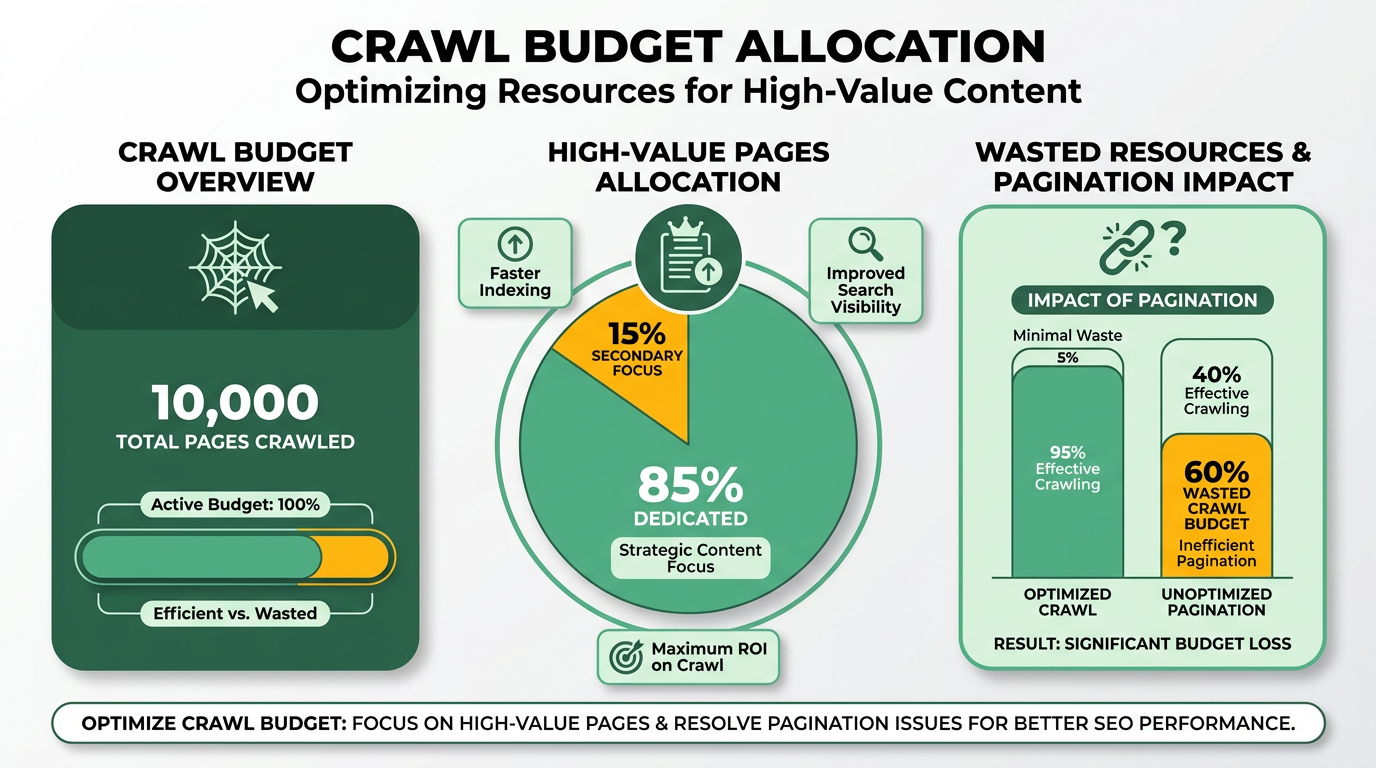
Faceted navigation is a filtering system that allows users to narrow down search results using multiple criteria. E-commerce sites commonly use it to let shoppers filter products by price, color, brand, or category. While this improves user experience, it also creates thousands of URLs with parameters (e.g., ?color=blue&price=100-200). Each of these URLs represents a paginated list, often with minimal unique content.
As mentioned in the Understanding Pagination Patterns and Risks section, pagination introduces SEO risks like indexation dilution and duplicate content. Faceted navigation exacerbates these issues by generating redundant URLs with little unique value. Without proper optimization, crawlers may waste time indexing these filtered pages, diluting your site’s SEO equity.
How Does Faceted Navigation Impact Crawl Budget?
Faceted navigation directly affects crawl budget by increasing the number of URLs crawlers must process. Search engines allocate crawl budget based on relevance and authority, but if your site has thousands of low-value filtered pages, crawlers might prioritize these over critical pages like product detail pages or blog posts.
Building on concepts from the Why Pagination Matters for SEO section, inefficient crawl allocation can delay the indexing of fresh content, reducing its visibility. For example, a product category with 10 filters could generate hundreds of URLs, each with a "page=2" parameter. This bloats your site’s index and fragments link equity, making it harder for search engines to find core content.
Strategies to Optimize Crawl Budget and Faceted Navigation
To prevent crawl budget waste, implement these strategies:
- Use
rel="canonical"andnoindexTags: Applyrel="canonical"to point filtered URLs to the main category page. For non-essential filtered pages (e.g.,?color=black), usenoindexto prevent indexing while allowing crawlers to find linked content. This consolidates authority and reduces index bloat, as outlined in the Canonicalization and Rel=Next/Prev section. - Configure Parameter Handling in Search Console: Use Google Search Console’s parameter handling tool to tell crawlers how to treat URL parameters. For example, mark sorting or filtering parameters as "no changes" to avoid crawling unnecessary variations. This reduces redundant requests without hiding content entirely.
- Simplify URL Structure: Avoid overloading URLs with multiple parameters. Instead, use a single, clean parameter for key filters (e.g.,
?filter=color). Combine filters programmatically to minimize permutations. For instance, merge?color=blue&size=mediuminto a single URL like?filter=color_blue_size_medium. - Prioritize Core Content in Sitemaps: Include only high-priority paginated pages (e.g., first page of a blog archive) in your XML sitemap. This guides crawlers to focus on pages most valuable for SEO.
A real-world example: An online retailer reduced crawl budget waste by 40% after implementing rel="canonical" for filtered category pages and using noindex on low-traffic filters. By consolidating URLs and updating parameter settings in Search Console, they redirected crawlers to product detail pages, boosting organic traffic by 22% in six months.
For deeper insights into crawl budget management, explore SEO Pagination Best Practices and Considerations. To refine internal linking strategies alongside pagination, check out Internal Linking For Seo A Complete Guide 9 Proven Strategies.
Testing and Troubleshooting Pagination: Common Issues and Solutions
Practical Decision-Making: When to Paginate and How
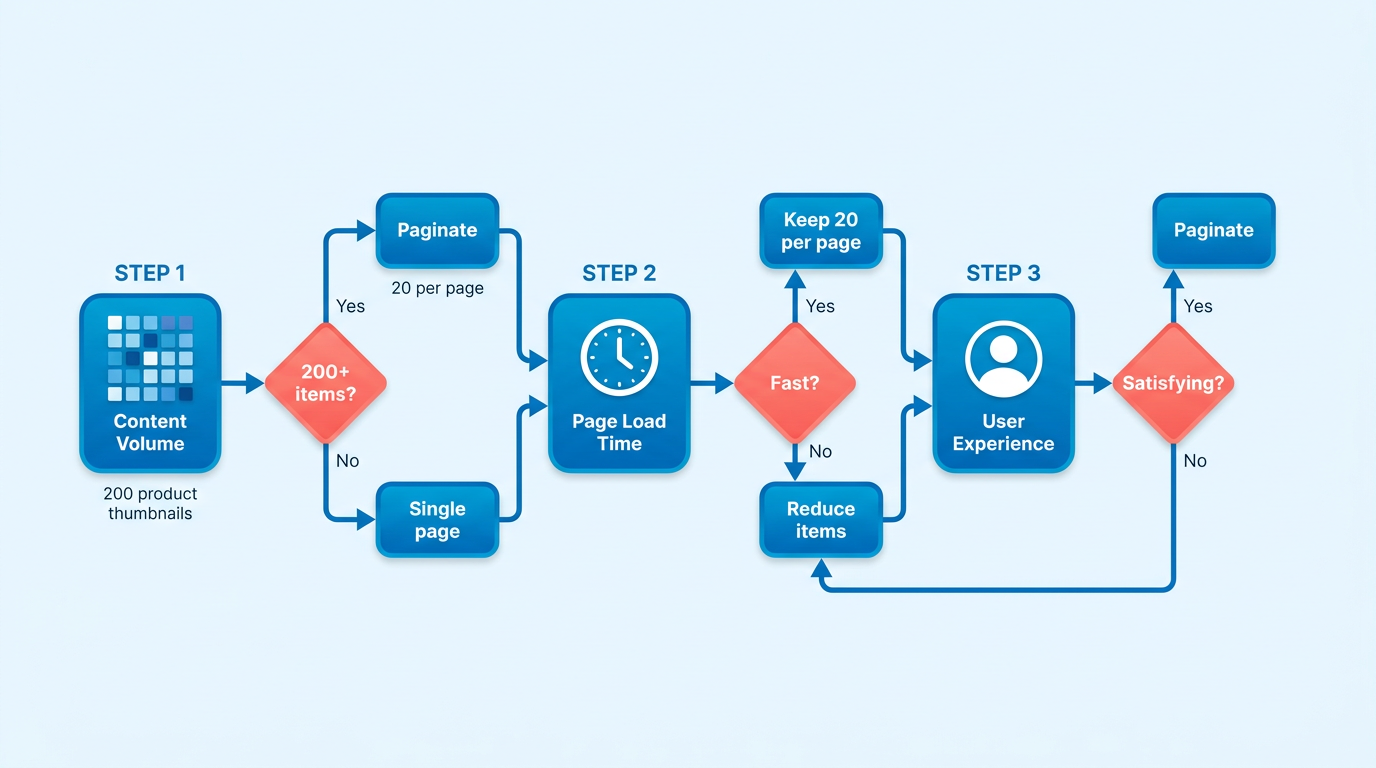
Pagination is necessary when presenting large volumes of content that can’t be displayed on a single page without overwhelming users or diluting SEO value. For example, e-commerce sites with hundreds of products in a category or blogs with dozens of articles in a topic archive benefit from splitting content into manageable pages. A common scenario is an online store listing 200 products across 10 pages (20 items per page), ensuring each page loads quickly and remains user-friendly. Pagination also helps search engines crawl and index individual pages effectively, avoiding issues where deeper content becomes “invisible” to crawlers.
How Do You Implement Pagination Correctly?
To ensure search engines understand the relationship between paginated pages, use <a href> links to connect each page in sequence. For example, page 1 should link to page 2, page 2 to page 3, and so on. Additionally, implement rel="next" and rel="prev" tags to signal the order of pages. The first page should have rel="next" pointing to the second page, while the second page includes rel="prev" for the first and rel="next" for the third. This prevents search engines from treating pages as standalone content.
As mentioned in the Canonicalization and Rel=Next/Prev: Best Practices section, canonical tags also play a role in consolidating SEO value. The first page in a paginated series should include a canonical link to itself, while subsequent pages should canonicalize the first page. This avoids duplicate content penalties and directs ranking authority to the primary page. For instance, page 2 of a blog archive would include <link rel="canonical" href="https://example.com/blog/page-1"> to ensure credit flows to the first page.
What Alternatives Exist for Paginated Content?
Load more buttons and view all options are popular alternatives to traditional pagination. A “load more” button keeps users on a single page, loading additional content dynamically. This improves user experience by reducing clicks but can hinder SEO if the content isn’t accessible via direct URLs. To mitigate this, ensure the entire dataset is available in a paginated format for crawlers.
Infinite scroll is another alternative, commonly used in social media feeds, but it risks burying important content deep within a page. Unlike pagination, it offers no clear entry points for search engines, potentially reducing visibility. A “view all” button that aggregates content onto one page works well for small datasets but becomes impractical for large ones due to slow load times and poor user experience.
How Do You Choose the Right Method?
The decision hinges on balancing user experience and crawl efficiency. For large datasets (e.g., 200+ items), pagination is often the safest choice, as it maintains crawlability and avoids overwhelming users. If your audience prefers seamless browsing, combine “load more” with paginated archives for crawlers.
Building on concepts from the Crawl Budget and Faceted Navigation: Advanced Topics section, crawl budget is another consideration. Excessive pagination-such as splitting 20 items into 20 pages-wastes crawl resources and dilutes SEO value. Instead, aim for a reasonable number of pages, like 10–20 items per page. For example, an e-commerce site might split 200 products into 10 pages of 20 items each, ensuring each page has enough unique content to rank.
Example of Successful Pagination Implementation
A well-known e-commerce platform split its product categories into 20-item pages, using rel="next/prev" tags to link them. This approach helped search engines index all 200+ products while keeping individual pages fast and user-friendly. Additionally, the site used canonical tags to direct SEO value to the first page, improving its ranking for competitive keywords. For similar strategies, explore internal linking techniques to enhance SEO visibility.
By carefully evaluating your content volume, user preferences, and technical requirements, you can choose a pagination strategy that strengthens both SEO and user satisfaction.
Testing and Troubleshooting Pagination: Common Issues and Solutions
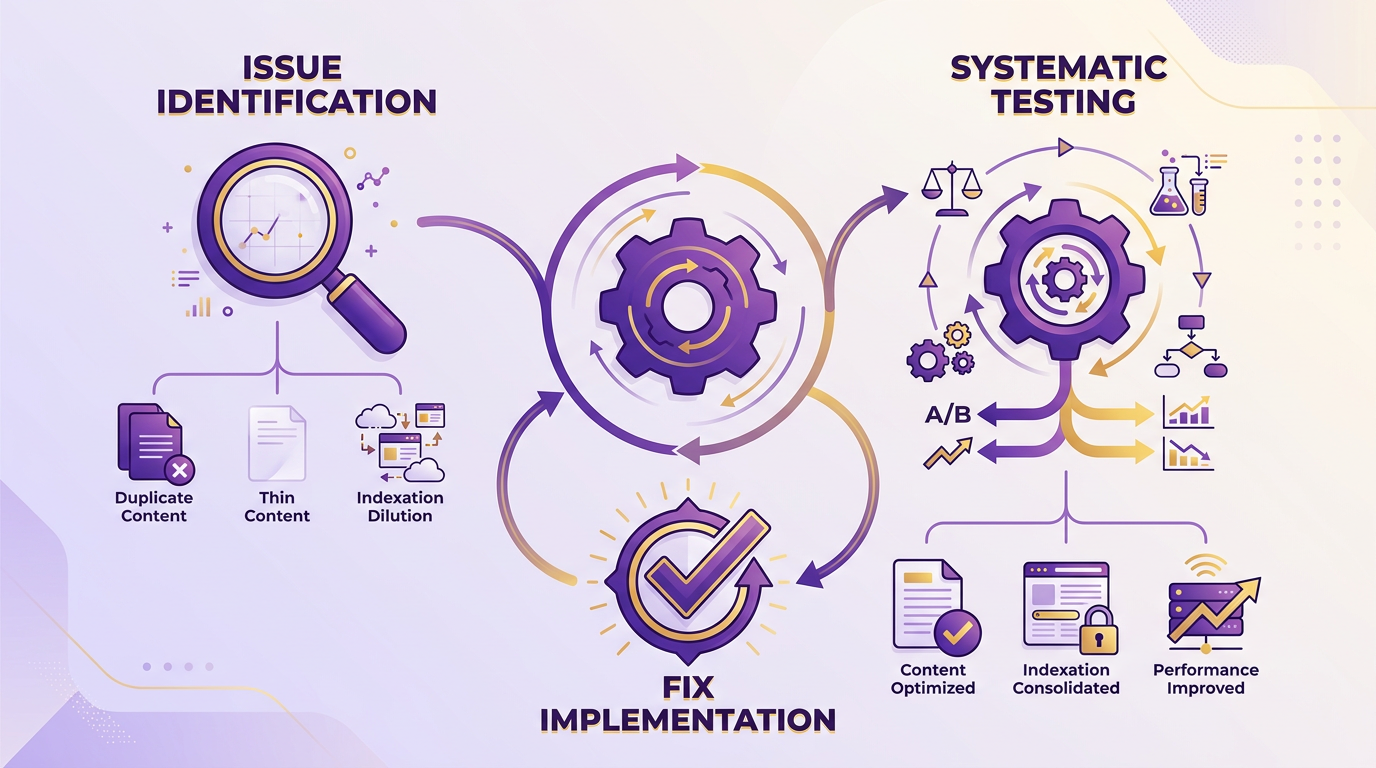
Testing and troubleshooting pagination requires a structured approach to identify issues like duplicate content, thin content, or indexation dilution. Start by understanding the most common problems that arise with paginated content, then systematically test your site’s implementation, and finally apply fixes based on the results. This process ensures search engines and users can manage paginated sections efficiently. Understanding Pagination Patterns and Risks provides foundational context on why these issues occur..
What Are Common Pagination Issues?
Three primary issues negatively impact SEO when pagination is misconfigured: duplicate content, thin content, and indexation dilution. Duplicate content occurs when paginated pages have overlapping text, confusing search engines about which version to rank. Thin content happens when individual pages lack enough unique value to justify their existence. Indexation dilution spreads link equity too thinly across too many pages, weakening the authority of key pages.
For example, an e-commerce site listing products across 50 pages without consolidating categories may see Google index all pages equally, despite most having minimal unique content. This wastes crawl budget and reduces the visibility of high-value pages. Understanding Pagination Patterns and Risks explains how these patterns introduce SEO challenges..
How Do You Test Pagination for SEO?
Start by auditing your paginated sections using Google Search Console and crawl tools. First, check the “Coverage” report in Search Console for crawl errors or indexing anomalies in paginated URLs. Look for patterns like “soft 404s” or pages with low search traffic despite high impressions.
Next, use a crawl tool like Screaming Frog or Ahrefs to inspect:
- Canonical tags: Ensure each paginated page points to the main page in the series or itself if it’s standalone.
- Rel=next/prev links: Verify that
<link rel="prev"and<link rel="next"tags correctly connect pages in sequence. - Meta descriptions: Confirm they’re unique per page to avoid duplication and improve click-through rates.
For example, a news site with paginated articles might find missing rel=next tags between pages 2 and 3, causing Google to treat them as separate, unrelated content. Canonicalization and Rel=Next/Prev: Best Practices details how to implement these technical elements correctly..
How Do You Fix Pagination Issues?
Fixing pagination problems often involves technical adjustments and content optimization. Start by correcting canonical tags-point all paginated pages to the main page (e.g., example.com/category/page/1) unless the final page is standalone. For paginated lists (like product categories), use rel=next/prev tags to establish hierarchy.
If pages have thin content, consolidate them. For example, merge pages 4–10 of a 20-page product list into a single category page with filters. Practical Decision-Making: When to Paginate and How offers guidance on determining when consolidation is appropriate.
A real-world example: One company fixed duplicate content by adding unique meta descriptions and rel=next/prev tags to their blog archives. This reduced indexed pages by 40% while boosting the main archive page’s ranking by 25% in three months..
What Tools Help Optimize Pagination?
Crawl tools like Screaming Frog can export paginated URLs into spreadsheets, letting you batch-edit rel=next/prev tags or canonical links. Combine this with Google’s URL Inspection tool to request recrawling of fixed pages.
By systematically testing and fixing pagination, you ensure search engines prioritize your most valuable content while improving user navigation. Always validate changes using Search Console’s URL Testing Tool before scaling fixes across your site.
Frequently Asked Questions
1. What is the purpose of rel="next" and rel="prev" tags?
These tags signal sequential page relationships to search engines, consolidating ranking authority as recommended by Google. They prevent indexation dilution by linking paginated content logically, ensuring crawlers treat pages as part of a series rather than standalone duplicates.
2. How does poor pagination waste crawl budget?
Unstructured pagination forces crawlers to waste resources on low-value pages. For example, 50+ URLs for a single product category may remain unindexed if pages aren’t linked clearly, leaving hundreds of pages undiscovered and reducing site visibility.
3. Why is structured pagination critical for large sites?
Sites with over 500 pages need structured pagination to avoid crawl budget waste and ensure comprehensive indexing. Clear page links help crawlers manage efficiently, preventing them from stopping after the first few URLs and leaving content unindexed.
4. How does pagination affect e-commerce SEO?
E-commerce sites with 100+ product pages split into 20-item pages create 50+ URLs. Without strict hierarchy, search engines may fragment rankings, diluting authority. Proper use of rel="next"/rel="prev" ensures all pages are indexed and contribute to consolidated rankings.
5. What’s the risk of excessive pagination?
Excessive pagination without clear navigation dilutes link equity by up to 60%, reducing individual page authority. This spreads SEO value thin across redundant pages, increasing the risk of thin content penalties and lower rankings for all paginated URLs.
6. How can SEO value be preserved in paginated content?
Use canonical tags for duplicate content or rel="next"/rel="prev" for sequential pages to consolidate SEO value. This prevents thin content penalties and ensures crawlers prioritize the most relevant page in a series for indexing and ranking.
7. What happens if paginated pages aren’t linked logically?
Search engines may treat each page as standalone, fragmenting indexation. For example, an e-commerce site with 50+ product pages might have only the first few indexed, leaving the rest invisible to search engines and reducing potential traffic significantly.
