Turn one blog into a newsletter, X thread, and YouTube script.

Key Takeaways
- Most B2B SaaS teams ship only 2 to 4 blog posts a month. That's a hard output ceiling, and repurposing lifts it without a single extra writing session.
- One blog post can become seven-plus platform-ready pieces in under two minutes with an AI repurposing tool.
- What takes 8 to 12 hours by hand runs in under 60 minutes with an AI workflow.
- Repurposing lets a team push 20 to 100 assets a month with the same headcount.
- Content spread across channels can pull significantly more total impressions than posting to one platform.
- It fixes three problems at once: writer fatigue, siloed teams, and a brand voice that drifts.
- Automation nails speed and structure. Where it falls down is voice, and most tools quietly ignore that gap.
Why one blog should never stay one blog
Long-form eats hours. Research, drafting, editing, all of it upfront. Repurposing takes that sunk cost and stretches it across every surface your audience already uses, without booking another writing session.
Build a structured workflow around it and distribution scales on its own. You take the posts that already perform, translate them across channels, and widen your footprint while headcount stays flat. The focus moves from producing more to distributing smarter. Instead of fighting the algorithm on one platform, you compound your presence across several.
What repurposing actually fixes
Content repurposing: taking one long-form asset and reshaping it into distinct formats so it reaches people on the platforms they already prefer.
It takes pressure off writers to invent fresh topics every week. It gets social, email, and video teams aligned around one source document instead of working in three separate silos. But scaling it introduces a real problem: keeping a single, recognizable identity.
Flood five channels with derivative assets and any tone mismatch shows up fast. Your audience notices when the newsletter sounds nothing like the blog.
Why voice breaks the moment you scale
Automated systems are good at reformatting. They're much weaker at holding the original author's style.
That's the operational catch. A pipeline can reshape text into a thread or a newsletter, but strong social copy needs specific hooks and CTAs that match your identity. Once automation solves speed, the bottleneck moves to quality control. Your blog might read sharp and authoritative while the generated social posts default to generic, robotic filler.
Our Persona Engine reads your existing content library to capture how you actually write, then holds that voice across every output, whether it lands in a feed, an inbox, or a video, while still meeting each channel's formatting rules.
Who this pays off for
Agencies, SaaS founders, local businesses, e-commerce brands. Anyone producing long-form and stretched thin on distribution sees the sharpest returns.
Skip aggressive repurposing if you publish one post a quarter with no distribution goals. The throughput advantage only pays off when you have a steady content engine to feed it. But if you're already writing and just not reaching enough people, this is the highest-use move available.
The SEO upside seals it. More formats mean more internal linking, wider keyword coverage, and cross-channel discovery loops that feed traffic back to the original post. One piece of writing, compounding authority across every surface that matters.
Turn a blog into an X thread that earns the scroll
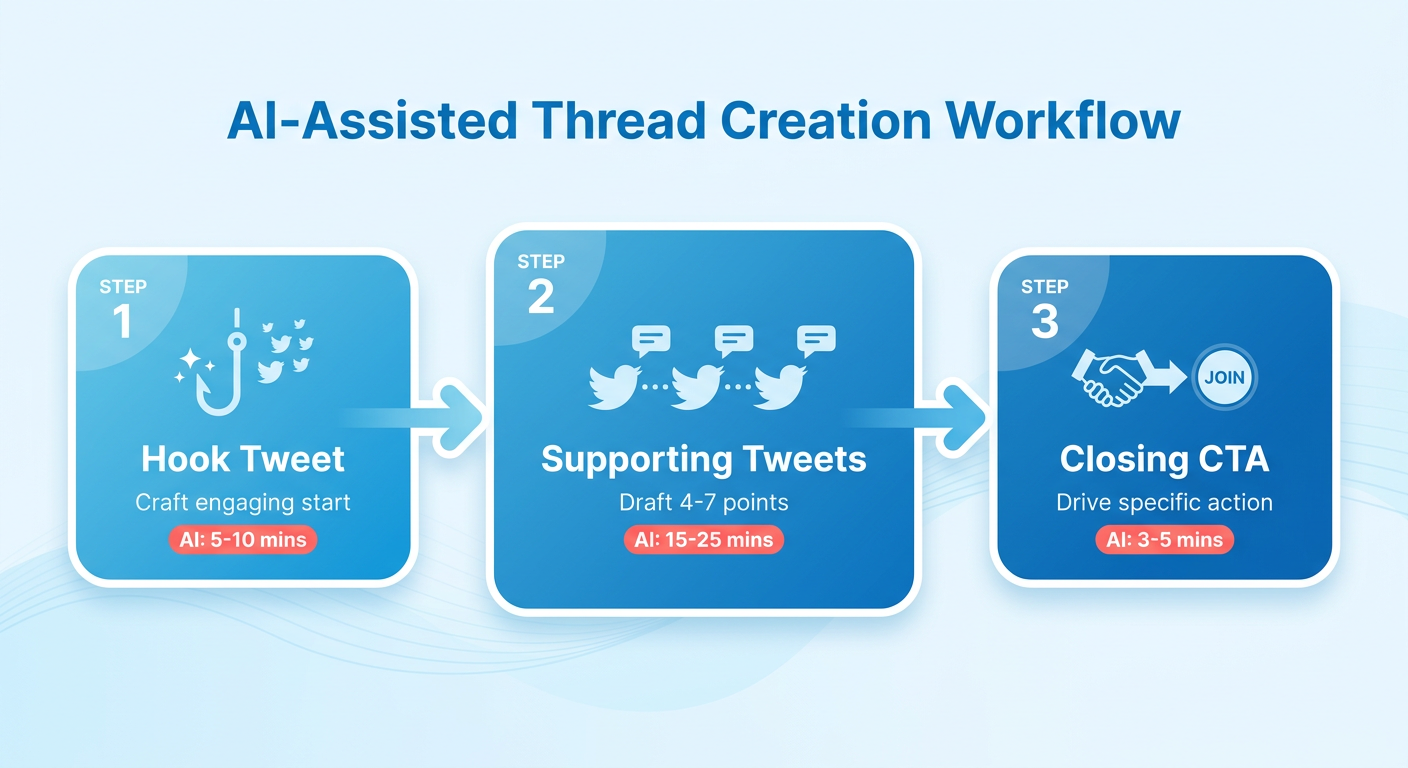
An X thread turns your blog's narrative into a scrollable sequence built for a fast feed. The structure is fixed: one hook tweet, four to seven supporting tweets, a closing CTA. Every tweet earns the next scroll or loses the reader.
Software helps here. Instead of copy-pasting key points by hand, an automated pipeline pulls the core narrative straight from your published URL. The goal is a sequence that reads like you wrote it, not a dry auto-summary.
What makes a thread actually convert
Thread anatomy: a hook tweet that stops the scroll, 4 to 7 supporting tweets that each land one idea, and a CTA tweet that sends readers back to the full post or newsletter.
Keep each tweet under 250 characters. That leaves breathing room and forces you to cut filler. One idea per tweet is the discipline that separates threads people finish from threads people abandon. Creators who distill complex ideas into clean, single-idea tweets build engaged audiences precisely because every tweet delivers one clear thing plus a reason to follow.
How to prompt for a thread that stays on-brand
Start with a format-specific prompt, not a generic "summarize this." Detailed instructions beat vague ones, especially against a long source article.
Try this:
"Summarize the blog into a 7-tweet X thread, each tweet ≤ 250 characters, include one statistic and one visual suggestion. Match our brand voice: [tone description]."
The voice instruction is the part that matters most. Enforce your style and a reader moving from your feed to your site gets one consistent brand, not two.
Before you generate, pull the core data point, the sharpest quote, and the main claim. Map them to specific thread beats: hook, problem, solution, proof, CTA. That keeps the output logical instead of a pile of loose facts.
How to boost reach and track what works
Add visuals. A generated chart, a short avatar clip, or a GIF gives the eye somewhere to land between text tweets, and threads with visuals plus a tight CTA tend to outperform plain-text ones.
Pace the posting. Space the tweets evenly, cap hashtags at one or two relevant tags, and tag an account only when the mention is genuine, not decorative. Schedule through your queue tool and post when your audience data shows peak activity.
Track four numbers:
- Impressions: total reach of the thread
- Engagement rate: replies, reposts, and likes against impressions
- Link clicks: how many readers moved to the full post
- Follower growth: new follows the thread drove
The metrics point to friction. High reach with low click-through means the hook worked but the CTA gave nobody a reason to click.
Want the full multi-format workflow? AnyPost turns one blog into social carousels, posts, and multi-platform content across networks, all from a single dashboard.
Turn the same blog into a newsletter that converts
A newsletter is direct inbox access. No algorithm decides who sees it. That's why we treat the email version as the highest-intent format in any repurposing workflow, and why the copy has to stay in your voice from subject line to footer.
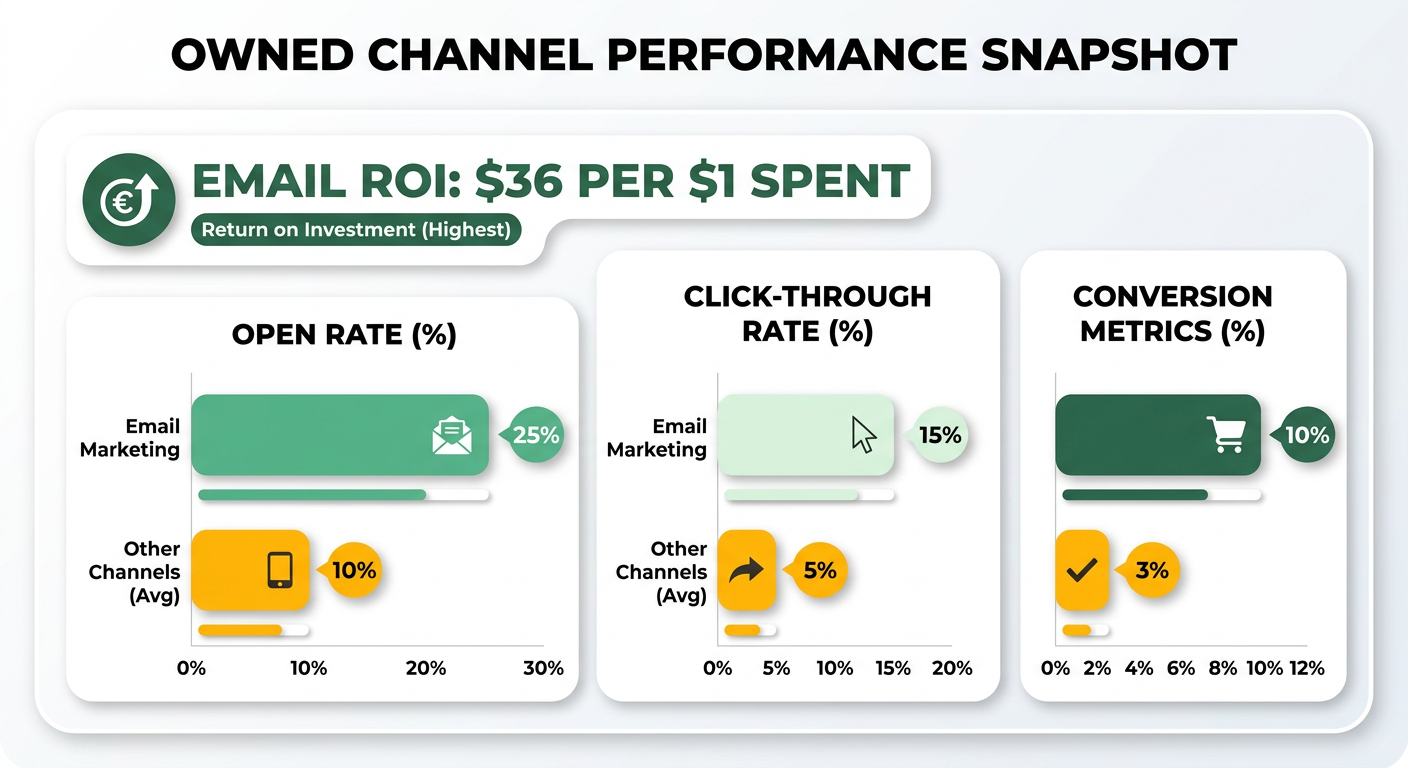
The throughput case is easy. Email marketing is widely reported to deliver one of the highest returns on investment of any owned channel, which makes the newsletter the format where voice consistency pays back fastest. A good platform drafts the newsletter in the same pass as your other assets, holding one tone across all of them.
The structure that makes a newsletter convert
A converting newsletter runs on a fixed skeleton: subject line, preheader, a short intro, two to three content blocks, one clear CTA button, and a footer. Each element does one job. The subject earns the open. The intro earns the scroll. The CTA earns the click back to your blog.
Keep the blocks tight. Main insight in block one, a supporting point in block two, a proof point or quick tip in block three. Don't paste the whole post. The newsletter teases; the blog delivers.
The prompt we run: "Write a 300-word newsletter intro that teases the blog's main insight, includes a brief personal anecdote in our brand voice, and ends with a compelling CTA." Feed it your existing brand-voice profile and the draft matches your prior sends instead of reading like a generic summary.
How to personalize without extra writing
Personalization lives in dynamic fields, not rewritten copy. Merge tags for first name, company, or segment let one draft serve every subscriber a little differently. Segment-specific data blocks let you swap block two by industry or plan tier while the rest of the email stays fixed.
Design carries voice too. AI-generated images and avatars add visual personality that matches your look across every send. A consistent visual signature makes the email recognizable before anyone reads a word.
AnyPost's Newsletter Automation creates and distributes newsletters on its own, so the long-form work you've already published becomes inbox-ready without a separate writing pass. Because the Persona Engine holds your tone from blog to email, every send keeps the voice your subscribers already know.
Which metrics tell you it's working
Track four: open rate, click-through rate, conversion rate, unsubscribe rate. Open rate grades your subject line. Click-through grades your CTA. Conversion grades the offer. Unsubscribe grades whether the content earns its place in the inbox.
A/B test one variable at a time. Run two subject lines through your email platform, let the data pick the winner, then test CTA copy next send. Small, repeated tests compound. For example, a SaaS team that repurposes a strong blog into a newsletter might see open rates that beat typical industry benchmarks. That lift isn't luck. It's a subject line matched to a proven blog headline, sent to a list that already trusts the voice.
The blog feeds the newsletter. The newsletter grows the list. The list gives your next repurposed piece a bigger launchpad. That's the loop worth building.
Turn a blog into a YouTube script without the filler
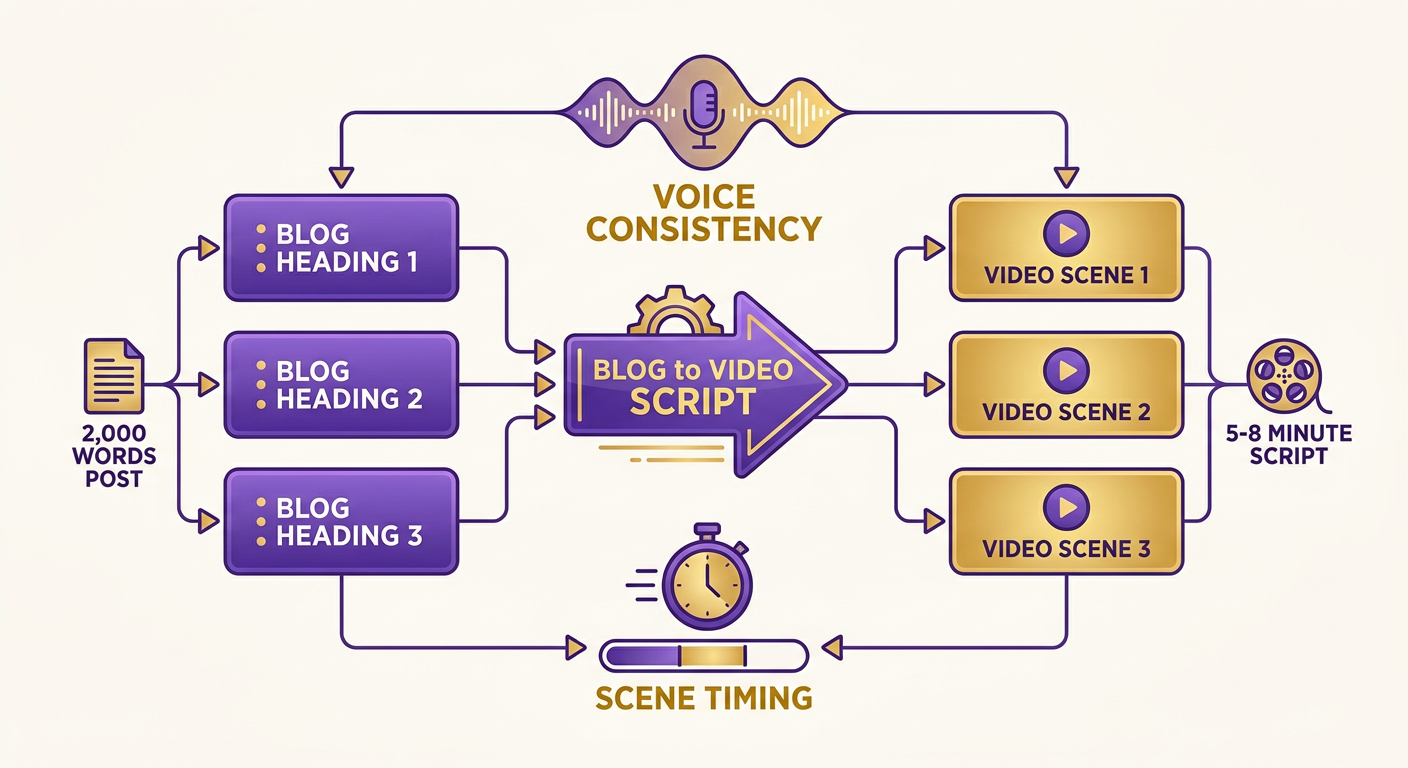
A YouTube script is the hardest format to repurpose well, because video punishes filler. A 2,000-word blog post typically yields a 5 to 8 minute script, and that translation needs careful pacing. Standard summarizers strip out the conversational bits and leave you with a dry, robotic voiceover.
So the script has to be written to sound natural when spoken. Automated tools can map headings to scenes and draft CTAs, but holding a consistent brand tone from hook to outro takes a system built to preserve how you actually talk across every video.
The script format that holds attention
A high-retention script runs on six blocks: hook (0 to 15 seconds), problem statement, solution walkthrough, proof points, CTA, and outro. The hook is non-negotiable. You've got 15 seconds before viewers bounce, so lead with the sharpest tension in your blog, not a slow intro.
Map each blog section to a scene. Budget roughly 30 seconds per bullet point so the pacing doesn't rush or drag. A blog with a six-point list becomes three minutes of solution walkthrough. Tight pacing prevents the padding that tanks watch time.
A prompt that works: "Create a 10-minute YouTube script from the blog, include speaker cues, on-screen graphics ideas, and a closing CTA to download the free guide." Detailed instructions get you a shootable script instead of a generic text summary.
How to produce the video without a presenter
AI avatar cloning can generate a talking-head video with nobody on camera. You get a consistent presenter, no filming, no reshoots when the script changes. Update a line, regenerate the segment. That's what turns a script into a finished asset in the same repurposing pass.
Before you generate, run a storyboard checklist:
- Visual assets: on-screen text for each proof point, plus a lower-third for your CTA.
- B-roll suggestions: screen recordings or stock clips that match each scene.
- On-screen text: pull one stat or quote per scene to reinforce the spoken line.
- Thumbnail ideas: a face plus three-to-five words that name the payoff.
How to optimize for YouTube SEO
Feed the algorithm a keyword-rich title, a description that front-loads your primary term, tags pulled from the blog's SEO keywords, and closed captions generated automatically. Captions do double duty. They boost accessibility and give YouTube more text to index, so your video surfaces on search the way your blog does.
This is the throughput payoff. Repurposing generally runs cheaper than building each format from scratch, and one blog can produce a substantial number of derivative pieces when you count every fragment. But the raw count matters less than whether all those pieces sound like you. A YouTube script that sounds off-brand costs you more trust than the reach it buys.
The video slots into the same loop as your other formats. Cross-channel content builds compounding discovery, and every asset points back to the free guide.
For more repurposing plays, see 5 AI Repurposing Moves That Turn One Blog Into Six Channels.
Automating the whole workflow with AnyPost.ai
AnyPost.ai automates the creation of your X thread, newsletter, and YouTube script. Each template locks in structure, CTA style, and your brand voice profile, so every generation stays consistent instead of reading like a fresh summarizer each time.
Then connect your CMS. WordPress, Webflow, or any platform can fire a trigger through Zapier or a native API the moment you publish. A new post URL hits the pipeline, and the three drafts generate.
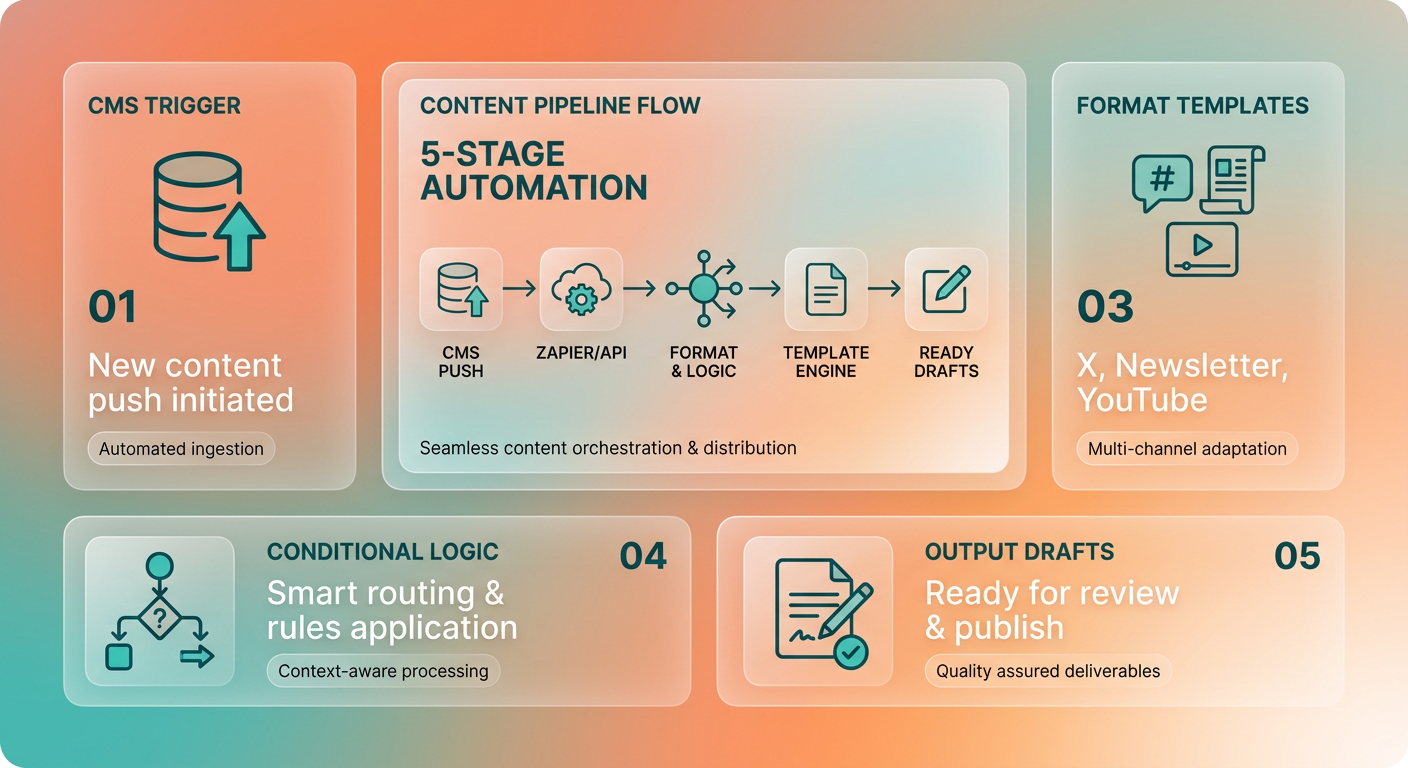
Add conditional logic to match format to substance. If a post clears your length threshold, route it to a full video script. Shorter posts skip the script and get a tighter social thread instead. That rule keeps thin posts from producing thin video.
The quality checks that keep output on-brand
Automation buys speed. Keeping quality high takes oversight. The bottleneck shifts from creation time to holding your voice identical across a thread, an inbox, and a video hook.
So build in a human checkpoint. The flow generates a preview, a person edits for tone and accuracy, then the version locks. Three quick gates:
- AI preview: draft all three formats in one pass so voice stays matched across them.
- Human edit: tighten the hook and CTA, the two spots where automated output reads flattest.
- Version control: keep a record so you can roll back a bad edit without regenerating.
Never publish straight from the generator. Structured prompts handle layout fine, but the hook and closing line still earn a human read.
How publishing and measurement close the loop
Once a draft is approved, push it live without leaving the pipeline. Schedule the thread through your social scheduler, send the newsletter through your email platform, upload the video via the YouTube API. No copy-paste, no format drift between draft and publish.
Then watch the numbers in one place. A dashboard that aggregates reach across every channel tells you which format each post wins on, which lets you reallocate effort fast.
The payoff is straightforward. Work that once demanded hours of manual repurposing per blog collapses into a fast generation plus a quick human edit. With AnyPost.ai, that whole workflow lives in a single dashboard, so one blog becomes a thread, a newsletter, and a video script without leaving the pipeline. Real-time analytics then close the loop, showing you which format each post wins on straight from your channel data.
Measuring success and optimizing across channels
You can't optimize what you don't measure, and repurposing multiplies the surfaces you have to watch. The fix is one scorecard that tracks each format on its own terms, then feeds the insight back into your prompts. That last loop is what most teams skip, and it's exactly where an analytics tool earns its rent.
Repurposing isn't a one-way pipeline from blog to channels. It's a flywheel. Your X thread drives newsletter signups, your newsletter subscribers become your most reliable video audience, and every new subscriber gives you more data to sharpen the next generation. Track it as a loop, not a funnel.
Which KPIs matter per format
Each channel answers a different question, so measure each on its native metric instead of forcing one number across all three.
- X thread: impressions and engagement rate. The hook tweet's reply and repost numbers tell you whether your opener actually stopped the scroll.
- Newsletter: open rate and click-through rate. Opens grade your subject line; clicks grade the body copy and CTA.
- YouTube script: average watch time and subscriber growth. Watch time is the retention signal; if viewers bail at the 30-second mark, your hook block is failing.
Pull these into one dashboard so you're comparing the same source post across all three surfaces at a glance. A unified view stops you from over-indexing on whichever channel happens to be loudest that week.
How to attribute conversions back to each format
Tag every repurposed asset with UTM parameters before it ships. Distinct source and medium tags per format let your analytics separate a lead from the thread from a lead from the newsletter, even when both link to the same blog post.
For anything with a longer sales cycle, single-touch attribution can mislead. A prospect might find you on a thread, subscribe from the newsletter, then convert after a video. Use a multi-touch model so each format gets credit for its part in the flywheel, not just the last click.
The ROI math is clean. Weigh saved labor against lead and sales revenue. When the revenue from your expanded distribution outpaces the software cost, the workflow is profitable.
How the iteration loop actually works
The loop is four steps: data, insight, prompt refinement, re-generation. Read the metrics, spot the weak format, adjust the prompt that produced it, regenerate. No new writing session required.
Say your thread impressions are strong but newsletter clicks lag. That's not necessarily a content problem; it could be a CTA-wording problem in your newsletter prompt. Tweak the prompt, regenerate, ship, measure again. A digital marketing agency might run three rounds of this. Round one exposes a flat video hook. Round two fixes the newsletter CTA. Round three sharpens the thread opener. Small prompt edits, compounding across every future post, can lift qualified leads meaningfully because the improvement applies to all output going forward, not just one asset.
Run A/B tests inside the loop too. Split headlines, CTA wording, and thumbnails across the three channels, then feed the winners back into your voice profile so consistency and performance improve together.
Frequently Asked Questions
1. How long should my original blog post be to repurpose it effectively?
Comprehensive articles provide the richest source material for multi-format campaigns. Longer pieces contain enough data points, subheadings, and narrative depth to generate detailed scripts and multi-part social sequences, whereas shorter updates are best suited for quick social updates.
2. Should I paste my entire blog into the newsletter version?
No, the goal of the email is to drive traffic back to your website. Distill the core value proposition into a few high-impact blocks that spark curiosity, leaving the detailed analysis and supporting evidence on your blog to encourage click-throughs.
3. What's the difference between a format-specific prompt and a generic summarize prompt?
Format-specific prompts outline the exact structural constraints of the target channel, such as character limits, visual cues, and speaker transitions. Generic prompts lack these parameters, resulting in standard summaries that fail to fit the native style of platforms like X or YouTube.
4. If my thread gets high impressions but few link clicks, what should I fix?
Focus on optimizing your call-to-action. High reach indicates your hook and core content successfully engaged the audience, but a low click-through rate suggests the final transition didn't offer a strong enough incentive for readers to visit the full article.
5. Can I produce a YouTube video from a blog without appearing on camera?
Yes, digital avatars can present your content directly from the generated script. This approach eliminates the need for studio space, cameras, and manual editing, allowing you to update and regenerate video segments instantly whenever your source material changes.
6. Why does brand voice break when teams automate content repurposing?
Standard automation tools focus entirely on structural reformatting without accounting for stylistic nuances. This causes the output to sound generic and disconnected from your brand's established identity. AnyPost addresses this by analyzing your existing content to ensure your unique tone is maintained across all channels.
7. How do I attribute a conversion when a lead touches multiple repurposed formats?
Implement tracking links for each asset and analyze the customer journey using multi-touch attribution. This ensures that early-stage touchpoints, like social threads, receive appropriate credit alongside late-stage touchpoints, like email newsletters, providing an accurate picture of your campaign's performance.
