Automate SEO Reporting Without Dashboard Sprawl: 6 Tools That Turn Rankings Into Clear Actions

Quick Answers
A growing set of specialized tools can automate SEO reporting across traditional search, AI visibility, and traffic data with scheduled delivery and anomaly alerts. Visibility shifts can appear as impressions dropping while rankings hold steady, and traditional dashboards often don't explain these changes. Audit-focused plans are often priced lower than broader suites, but usage caps and add-ons vary widely. Manual reporting still consumes significant time when teams pull rank data, traffic metrics, and backlink changes from disconnected platforms. Platforms such as SE Ranking can consolidate Search Console, Analytics, and rank-tracking data into scheduled, branded reports. AI search visibility tracking for tools like ChatGPT, Claude, Gemini, and Perplexity may be included in some newer platforms and offered as an add-on in others. Some platforms, including SEOcrawl AI, can monitor critical URLs and alert on heading, status-code, or canonical changes.
Quick Summary
SEO reporting has evolved beyond rank-and-traffic dashboards. Brand visibility now spans organic search, LLM results, and social channels, but many reporting tools still treat each channel separately. A common gap is impressions dropping while rankings hold steady, brands appearing or disappearing in AI-generated answers, and clients wanting to understand why.

The table below summarizes representative tools grouped by the reporting challenge they most directly address. It is a starting point for evaluation, not a feature comparison of specific plan entitlements.
| Reporting challenge | Representative tools to evaluate | What to verify | Common trade-off |
|---|---|---|---|
| Rank and AI visibility monitoring | SE Ranking, Ahrefs, Semrush, SEOcrawl AI | Scheduled frequency, country coverage, AI-search visibility included vs add-on | Depth in one channel vs breadth across search, AI, and traffic views |
| Traffic and cross-channel consolidation | Looker Studio, Whatagraph, Supermetrics, Databox | Connector coverage, scheduling limits, white-label availability | Free or low-cost tiers may cap schedule/delivery; pricing may scale with data sources |
| Technical audit automation | SEOptimer, SE Ranking, SEOcrawl AI, dedicated crawlers | Crawl frequency, prioritization of issues, export/white-label options | Automated audits surface many issues; human prioritization is still required |
| Backlink monitoring | Ahrefs, Semrush, SE Ranking, Majestic | Lookup limits, alerting speed, historical depth | Link-index coverage and query volume often affect cost and monitoring depth |
| AI summaries and anomaly detection | AI-report add-ons, DashThis AI, platforms with AI reporting layers | Whether summaries are included or add-on, review workflow, explanation quality | AI-generated explanations require verification before client delivery |
Pricing structures vary widely across the category. Audit-focused tools may have lower entry prices with usage caps on crawls and keywords, while broader suites often cost more. Agencies managing multiple clients should verify whether white-label reporting and unlimited scheduling are included or cost extra.
AI search visibility tracking remains a newer capability. Some platforms include monitoring for ChatGPT, Claude, Gemini, and Perplexity as core functionality, while others often charge separately or include it only at higher tiers. Teams focused on AI citation monitoring need to confirm whether that capability is included or requires additional budget.
Why manual reporting is the hidden tax on SEO teams
Manual SEO reporting swallows entire afternoons. You pull rank data from one platform, traffic from another, backlink changes from a third, then wrestle spreadsheets into something a stakeholder might actually read. By the time the report lands, the data is already stale and the next reporting cycle is looming.
Automated reporting can compress that cycle substantially. The software handles the data pulls, tracks changes automatically, and delivers branded reports on a schedule you set once.
Platforms such as SE Ranking, SEOptimer, and SEOcrawl AI can bring rank tracking, site audits, backlink monitoring, and Search Console data into a managed reporting workflow. You configure the template and sources once; the system handles recurring delivery without another export.
The practical advantage is earlier visibility into change. Anomaly alerts can highlight an abrupt ranking movement, a crawl problem, or a backlink change while there's still time to investigate. SEOcrawl AI's URL monitoring may be useful for teams that need technical change detection between formal audit cycles.
Fragmented reporting creates decision fatigue. When your team checks five different dashboards to understand performance, patterns get missed and action gets delayed. Centralized automation reduces that friction by giving stakeholders a consistent view of the signals they need.
The trade-off is breadth versus clarity. More data sources improve coverage, but too many metrics overwhelm decision-making. The most effective approach automates high-frequency, low-judgment tasks—rank checks, crawl diagnostics, and backlink counts—while reserving human review for the strategic calls those metrics inform. Automated SEO reporting workflows turn monitoring into a feedback loop without implying that software can fully automate content decisions.
The sections below follow the reporting-to-action loop rather than a strict product-by-product list. Some tools appear in multiple sections because they span rank tracking, audits, and backlink monitoring.
Tool 1: Rank‑Tracking Automation (e.g., Ahrefs, SEMrush, or similar)
Rank-tracking tools can be separated into those that log position changes and those that attempt to connect changes to a next action. This distinction matters because a rank log alone rarely tells a stakeholder what to do next.
SE Ranking is positioned as a platform that ties rank monitoring to AI search visibility and traditional organic metrics in a single reporting view. Scheduled reports can be configured to reduce manual work for multi-client teams.
Ahrefs is commonly associated with backlink depth and also offers rank tracking. AI search coverage may not be included in base plans, so teams should confirm plan-specific coverage.
SEOcrawl AI can be used for scheduled position checks and AI-prompt monitoring across large content estates or multiple markets, though exact coverage depends on the plan.
One caveat worth naming: rank tracking surfaces what changed but does not automatically prescribe the content fix. The data starts the feedback loop; your team closes it.
| Tool | What to verify for rank tracking | AI-search coverage consideration | Best-fit scenario |
|---|---|---|---|
| SE Ranking | Scheduled rank checks; country coverage varies by plan | May include AI visibility; confirm plan | Multi-client reporting |
| Ahrefs | Rank tracking available; backlink data commonly emphasized | May require add-on or higher tier | Backlink-heavy analysis |
| SEOcrawl AI | Scheduled monitoring positioned for larger estates | May include multiple LLM monitoring; confirm | Enterprise or multi-market teams |
Tool 2: Traffic & Conversion Consolidation (e.g., Google Data Studio + GA, Supermetrics, or similar)
Consolidation platforms replace separate logins, manual exports, and spreadsheet merges with a single reporting workflow. They pull metrics from analytics platforms, ad accounts, and social channels, then deliver scheduled reports to client inboxes. The system handles aggregation and timing; interpreting traffic shifts or conversion changes remains a human task.
Looker Studio (formerly Google Data Studio) is often positioned as an accessible consolidation option. It can connect directly to major analytics and webmaster platforms and support third-party connectors through partners such as Supermetrics. Scheduled report delivery may be limited on free plans; check whether paid tiers provide enough schedule capacity for your agency. Pairing Looker with a middleware connector that pre-aggregates data can reduce live API calls and keep dashboards responsive.
Whatagraph is marketed as a multi-channel reporting platform with native integrations for web analytics, PPC platforms, and social channels. It can automate scheduled delivery via PDF or live dashboard link, and white-label branding may be available. Pricing may scale by connected data sources rather than users, which can help small teams but may penalize agencies with a wide channel mix for each account. Reviews often highlight multi-channel management, but users may still need to verify data accuracy against native platform exports.
Supermetrics is often used as a data pipe into Looker Studio, Google Sheets, or a BI tool rather than as a report generator. Scheduled syncs can keep dashboards current without manual CSV exports. It tends to fit teams already committed to a visualization layer and needing a stable, high-volume data bridge.
Databox can pull data from marketing platforms and deliver scheduled reports; white-label options may be available at higher tiers. Verify scheduling limits by plan.
Consolidation tools organize delivery across channels, but they don't explain the cause of a ranking change or prescribe the next SEO fix. That interpretation still sits with your team.
Tool 3: Technical SEO Audit Automation (e.g., Screaming Frog, Sitebulb, or similar)
Technical SEO audits used to mean running a crawler once before launch, exporting a thousand-row spreadsheet, and hoping someone would actually read it. That workflow becomes difficult to sustain when teams manage several sites or need to catch regressions soon after deployment.
Automated audit platforms can schedule recurring checks for SSL status, canonical tags, schema markup, Core Web Vitals, and structured data, then deliver reports on a regular cadence without manual triggers. White-label exports let agencies share findings under their own branding, and some platforms offer tiered plans that scale crawl volume and keyword tracking as client rosters grow.
Recurring site crawls can monitor specific technical elements—product-page headings, canonical configurations, and redirect chains—and alert teams when they change. Scheduled monitoring can catch deploy mistakes that one-off audits might miss, particularly when site updates ship between manual review cycles.
Audit scope and prioritized worklists
Automated audits surface many issues, but not all matter equally. Grouping findings by severity—pages returning 5xx errors or missing canonical tags versus cosmetic warnings—helps teams fix critical blockers first rather than chasing low-impact items. Broken indexation paths carry more weight than missing alt text.
SE Ranking, for example, can be used to view site audits alongside rank positions, which may help teams check whether a technical regression coincided with SERP movement. That relationship can turn technical monitoring into an ongoing investigative process rather than a standalone snapshot.
SEOptimer is another audit-focused option often positioned for smaller teams, with white-label output and crawl or keyword limits that vary by plan.
Tool 4: Backlink Monitoring & Outreach Automation (e.g., Majestic, Monitor Backlinks, or similar)
Automated backlink monitoring can replace recurring spreadsheet reviews with digests that surface new links, lost links, and attribute changes. Platforms such as SE Ranking, Ahrefs, and Semrush can check referring domains and deliver reports that help teams decide which changes deserve attention.
SE Ranking, for example, can be used to track backlink status changes and generate weekly or monthly digests showing new domains, lost links, and nofollow flips. It can combine backlink data with rank tracking and site audits, which may help agencies manage several client profiles without duplicating setup.
Ahrefs is commonly used to detect new and lost backlinks quickly and send alerts when high-authority links drop. Its frequently updated index may be useful when timing matters for link reclamation. Automated email alerts can keep teams informed without requiring daily dashboard checks.
Pricing and lookup limits shape what you can monitor
Backlink lookup limits determine how many referring domains you can track before hitting a ceiling. Entry plans may cover smaller client rosters, while higher tiers may enable more domains and deeper historical data. SE Ranking and Ahrefs plans may have different lookup limits, so verify against your client list.
Majestic is often positioned as a backlink-first platform rather than an all-in-one suite. It may be used for repeatable discovery and exportable research, with pricing that can scale based on query volume rather than keyword tracking. Teams often consider Majestic when they need historical context on link profiles but do not need the technical audit and rank-tracking features bundled into broader platforms.
Automated checks can identify broken destinations, unexpected attribute changes, and authority losses sooner than a periodic manual review. Scheduled reporting then gives account teams a consistent record for client communication.
Tool 5: AI‑Driven Report Summaries & Anomaly Detection (e.g., ChatGPT‑powered add‑ons, DashThis AI, or similar)
Some SEO platforms are beginning to add AI-generated executive summaries or anomaly detection to help identify ranking trends before they materially affect a client's traffic. These systems may analyze patterns across an account or portfolio and translate metric changes into plain language rather than raw spreadsheet output. Other tools focus on suggested report layouts or data-quality checks.
The pricing gap between basic automation and advanced AI insights can be substantial. Entry-level reporting tools generally cost less than platforms that add predictive analytics, anomaly detection, and generated summaries to a broader SEO suite. Teams may reduce reporting time after setup, but the value depends on whether the AI layer identifies meaningful issues or merely reformats historical data.
Human review remains important. An automatically generated explanation can provide a useful starting point, but teams should verify its factual accuracy and confirm that an apparent anomaly reflects a real business or search change before sending it to a client.
Implementation Checklist: From Data Pull to Action
Configuration hand-offs between rank tracker, traffic consolidator, technical audit, and backlink monitor matter more than the individual tools themselves.
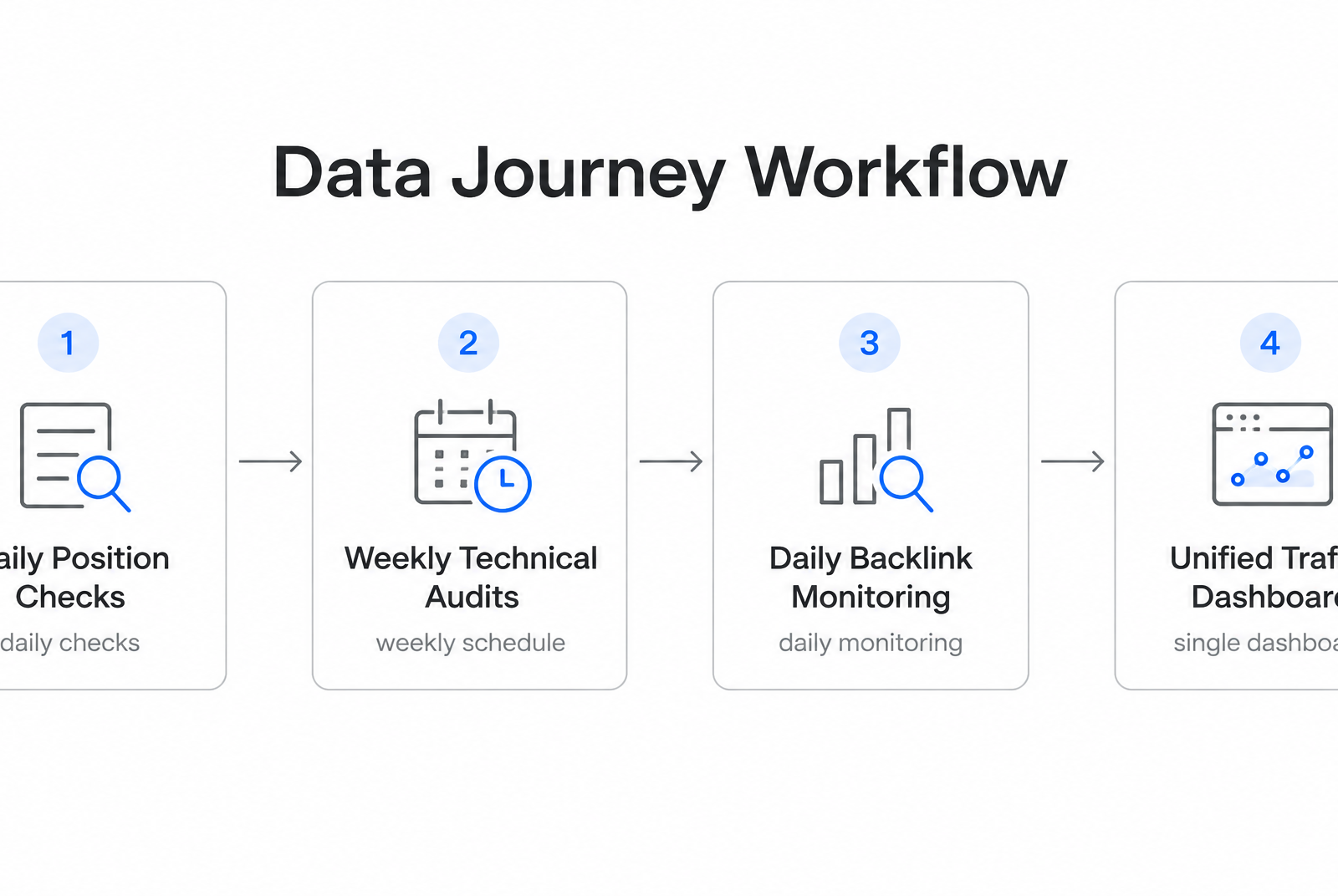
Start with a rank tracker as the primary signal layer. Tools such as SE Ranking, SEMrush, and SEOcrawl AI can run scheduled position checks and feed that data into a workspace that also holds Search Console imports and GA4 metrics. This can reduce CSV exports and manual keyword-to-landing-page matching.
Next, layer in technical audits on a weekly or bi-weekly schedule. SE Ranking's site monitor can be configured to watch headings, status codes, canonicals, and schema and alert on changes. SEMrush can run scheduled site audits for crawl errors and indexing problems. For teams managing multiple domains, SEOcrawl AI may offer roll-up reporting, though capabilities vary by plan.
Backlink monitoring runs in parallel. Platforms such as SE Ranking and Ahrefs can track new links, lost links, and anchor-text shifts on a schedule, then surface changes that may warrant review. Alerts for links pointing to pages that already rank strongly can receive priority because those pages have more visible traffic exposure.
The traffic consolidator ties the workflow together. Connect Looker Studio or Whatagraph to your rank tracker and GA4 so one dashboard can show keyword movement and traffic impact on the same timeline. When a client asks why sessions changed, the team can investigate the relevant landing pages and search terms without assembling separate exports.
Where reporting automation meets content execution
Which platforms compress the reporting-to-action gap? The part many teams underestimate isn't tracking rankings—it's connecting those numbers back to the content engine that can respond. AnyPost.ai approaches this differently: it is designed as a content creation and publishing workflow rather than another reporting dashboard, generating SEO-optimized content, publishing across channels, and tracking performance in one environment.
Growing agencies and resource-constrained marketing teams may benefit when the platform that creates content also monitors how it performs. Teams can review analytics alongside content-generation and publishing controls, keeping the feedback loop in one operating environment.
No single platform scores highest across every workflow priority, and the decision depends on integration requirements and content velocity. When evaluating automation tools, consider reporting depth, integration coverage, actionability, pricing structure, and implementation fit. The right choice should show what's ranking, identify what needs adjustment, connect to the existing site and social accounts, and scale with publishing volume.
Some marketing teams report scaling content workflows when the platform handles both creation and tracking, surfacing keyword gaps and performance signals worth acting on. Automation reduces the manual assembly work involved in recurring reports, leaving more time for strategy than for data pulls across multiple browser tabs.
Quick Questions, Straight Answers
1. Can I automate SEO reports if my client uses a CMS that doesn't integrate with major rank trackers?
Most platforms pull data from Google Search Console and Google Analytics rather than your CMS directly, so integration gaps rarely block automated reporting. Platforms such as SE Ranking, SEOptimer, and Whatagraph can connect to Search Console regardless of whether you run WordPress, Shopify, or a custom build. The main limitation appears when you need to monitor on-page elements such as heading changes or schema markup continuously. That requires crawler access to the live site, which works for any public domain but may encounter permissions barriers on staging environments or password-protected development sites.
2. How do I avoid paying twice for AI search visibility tracking if I already subscribe to a legacy SEO suite?
Check whether your current platform bundles AI citation monitoring or charges separately for it. Semrush and Ahrefs often position AI tracking as an add-on at higher tiers, while SE Ranking and SEOcrawl AI may include monitoring for ChatGPT, Claude, Gemini, and Perplexity in base subscriptions—but this can vary by plan and provider. Compare the add-on with the cost of a platform where that capability is included, especially when managing several client accounts.
3. What happens when an automated audit flags hundreds of technical issues at once—how do I know which ones actually hurt rankings?
Prioritize by severity rather than tackling the full list sequentially. Pages returning 5xx errors, missing canonical tags, or blocked from indexation deserve attention before cosmetic warnings such as missing alt text on decorative images or minification suggestions. Platforms that connect audit timelines to ranking changes can help teams determine whether a technical regression coincided with traffic loss, separating urgent fixes from cleanup work that can wait.
4. Do scheduled backlink reports catch toxic links fast enough to prevent manual penalty reviews?
Automated backlink monitoring detects new referring domains on a schedule, but speed alone does not prevent penalties. Teams still need to assess suspicious links and use the appropriate Search Console process when necessary. SE Ranking and Ahrefs can send alerts when unusual backlinks appear, shortening reaction time compared with periodic manual checks. A standing review process is more reliable than waiting for the next client report to investigate a potentially harmful change.
