Automated Search Engine Position Tracking: How to Automate SEO Reporting for AI Search

Before we get into it, the short version:
- Google's September 2025 API shift made deeper crawling more expensive for third-party tools.
- AI search results are probabilistic. The same prompt can surface different citations across users and sessions.
- An automated rank-tracking pipeline has five stages: data pull, storage, transformation, reporting, distribution.
- Google Search Console is free, but it returns lagged averages, not live search results.
- Tracking 500 keywords daily across multiple devices, locations, and AI platforms requires API calls, storage, and a scheduler.
- No-code reporting tools create dashboards fast, but they lock you into the tool's transformation logic and refresh cadence.
- Custom Python or Apps Script pipelines require more setup and give you full control over tagging, grouping, and volatility math.
The decision most teams skip
Most teams still track rankings manually or rely on tools that report what happened yesterday. The real cost is lag. A visibility drop caused by Google inserting an AI Overview, or by a competitor claiming a featured snippet, is already done before a delayed dashboard catches it. Automated position tracking flips the sequence: you pull data, store it, shape it, and push reports that flag movement while someone can still respond.
The harder choice is not in stringing the tools together. It's picking components that answer the questions your team actually asks. Search Console data tells you what happened on your own properties. Live SERP snapshots show competitor positions and SERP features. AI citation data shows whether ChatGPT, Perplexity, or Gemini mentions you at all. Most setups end up running more than one source, because treating rank tracking as a single combined dashboard usually hides one of those answers.
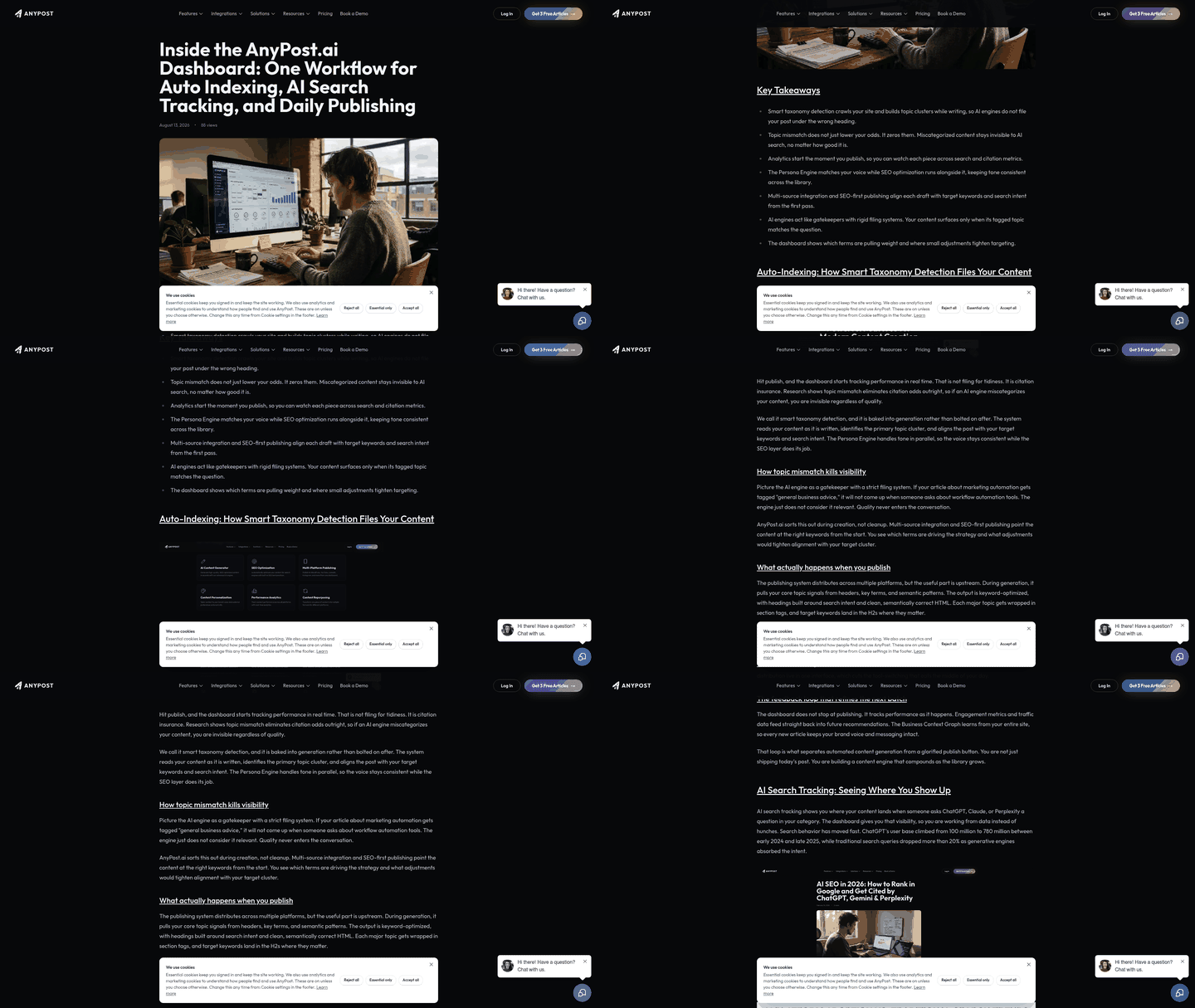
What you're actually building
You're building a five-stage pipeline: data pull, storage, transformation, reporting, and distribution. The pull fetches rankings, clicks, impressions, and CTR. Storage keeps a time-series record so you can compare this week against last month. Transformation tags keywords by intent, groups them by product line, and calculates visibility scores or share of voice. Reporting renders those metrics into dashboards or spreadsheets. Distribution sends the report to email, Slack, or a client-facing link.
The difference between manual checks and an automated workflow is context. Instead of asking "Where do we rank today?" you can ask "Which keyword group moved, which URL changed, which SERP feature appeared, and who needs to act on it?" That historical trail is what turns position tracking from a vanity metric into an operating system for SEO decisions.
Components, skills, and constraints at a glance
| Pipeline Stage | Tool or Data Source | Cadence or Constraint | Practical Skill Level | Primary Benefit |
|---|---|---|---|---|
| Data Pull | Google Search Console API | Free; lagged data; API quota limits apply | Beginner (via connectors) to Intermediate (direct API) | Owned-property visibility trends; no per-query cost |
| Data Pull | Third-party SERP/rank API | Paid per query; live or daily; depth varies by tier | Intermediate | Captures live SERP features, competitor positions, and device/location variants |
| Data Pull | AI visibility or AI search tracking tool | Paid per credit or keyword; refresh cadence varies | Beginner to Intermediate | Probabilistic citation tracking in ChatGPT, Perplexity, Gemini, Claude |
| Storage | Google Sheets | Cell limits; performance degrades with large data sets | Beginner | Free, familiar interface; works with Apps Script automation |
| Storage | BigQuery or warehouse | Scales to billions of rows; query costs apply | Advanced | Handles large keyword sets, historical archives, and complex joins |
| Transformation | No-code tool (Coupler.io, Stackby, Octoboard) | Automated via GUI; limited custom logic | Beginner | Fast setup; recurring refresh without code |
| Transformation | Python or Apps Script | Custom logic; runs on scheduler or manual trigger | Intermediate to Advanced | Full control over tagging, grouping, and volatility calculations |
| Reporting | Looker Studio, DashThis | Auto-refresh from connected data source | Beginner | Visual dashboards; client-ready white-label options |
| Reporting | Custom script output | Outputs CSV, sends email, or posts to Slack | Intermediate | Tailored format; integrates into existing workflows |
| Distribution | Scheduled email or Slack post | Time-triggered via tool or cron | Beginner to Intermediate | Proactive alerts when rankings or features shift |
The table is about the constraints that dictate the build: API limits, data-delay windows, skill level, and how much control you need before the numbers reach a stakeholder.
Why position data isn't enough anymore
Manual rank monitoring worked when search visibility meant ten blue links. The puzzle now is whether ChatGPT, Perplexity, or Gemini decides to mention, cite, summarize, or ignore you when a buyer asks for options. You can rank in Google and still lose the buyer before they reach your site because an AI answer recommended someone else.
Automation isn't mainly about saving time on spreadsheet updates. It's about tracking visibility across surfaces that move faster than a manual check can follow. A daily dashboard can still be useful for trend analysis, but it won't save you when a featured snippet disappears or a competitor enters an AI-generated answer days before traffic loss shows up in analytics. Automation lets you watch those signals together instead of discovering them one by one.
AI search runs on probability, not positions
Traditional rank tracking assumes a fixed position. Rank third for "project management software" and everyone sees the same result. AI-generated answers don't work that way. Visibility depends on whether the system mentions you, cites you, summarizes your page, or leaves you out for a given prompt. Monitoring that is less like checking a static rank and more like sampling a moving recommendation layer.
Tracking AI visibility means repeated sampling to estimate citation probability, not a single daily check. You need to know which prompts trigger mentions, which competitors get cited instead, and which pages the AI platforms pull from when they do reference your domain. API-only queries often miss what users actually see on the frontend, where live citations and sentiment matter most. We lean toward platforms that combine traditional SERP tracking with AI search monitoring, because the full picture includes both where your brand appears and where it doesn't.
Building a pipeline that doesn't drift
Teams often approach automated rank tracking as a dashboard decision. It's really a data-engineering choice, and it dictates which questions you can answer six months later. The September 2025 Google change, when the &num=100 parameter was removed, forced rank trackers to choose between full daily depth and margin. Many cut frequency or depth. That matters because positions 11-50 can be more volatile than the top three, and many tracked keywords sit beyond page one. That's where pipeline opportunity concentrates, and where competitors stopped looking daily.
Pick the data source before the dashboard
In our experience, reliable pipelines start with a clear choice: your verified properties, competitor positions across the full SERP, or brand presence in AI-generated answers. Search Console is free and returns clicks, impressions, average position, and CTR for properties you control, but it lags and averages position across impressions. That's not the exact rank a searcher sees. If you're pulling thousands of pages, plan pagination and batch your requests.
Third-party SERP APIs fill the competitive-intelligence gap. Many offer API-only keyword tracking, with AI visibility priced separately from traditional crawling. If you need geo-specific rankings at city or ZIP level, or device splits, confirm the provider supports those dimensions before building your schema. AI visibility tools that track ChatGPT, Perplexity, Gemini, Google AI Overviews, and AI Mode usually charge per credit or tracked prompt. SEOmonitor's AI Visibility Index can show where a brand stands in AI search, and Keyword.com has built AI-specific rank trackers to surface citations across LLM platforms.
Quota limits and storage you can query
Search Console quotas can bite mid-pull, so build in backoff from the start instead of hammering the endpoint when a request fails. Data often lags, so schedule daily pulls and timestamp each snapshot with the date Google assigns, not the pull date.
Store scheduled snapshots in a database or warehouse that supports time-series queries. A practical rank-data schema includes keyword, date, search engine or AI platform, market, device, URL or cited URL, position, SERP feature presence (featured snippet, Local Pack, AI Overview true/false), and a visibility metric. For AI platforms, add mention type and response ID so you can tie multiple citations back to a single answer.
Add data-quality checks before the reporting layer consumes the data. Remove duplicate rows by keyword, date, device, and market. Flag missing rows when expected data has not arrived. Log quota failures so you know which date ranges need a backfill. Review outliers where a keyword makes an unusually large single-day jump to separate real volatility from crawl errors. One team framed the gap: "One of the issues we have is just getting an easy top level view to send to managers." Clean schemas and freshness checks turn raw API responses into data leadership actually trusts.
Reporting is where decisions happen
When automated rank tracking pulls in hundreds of rows a day, your reporting choices determine whether the team acts or ignores it. Reporting is not a cosmetic final step. It's the layer that turns measurement into decisions. A good report surfaces the rankings that shifted, the AI citations that appeared or vanished, and the competitor moves that matter, while burying the noise.
The split between overview and drill-down matters more than most teams realize. Overview widgets answer the executive question: share of top-10 positions across your keyword set, 90-day visibility trend, and AI share of voice compared with two competitors. Are we winning or losing? Drill-down views answer the operational question: filter by keyword group and see which URLs dropped from page one or which competitor claimed an AI Overview you used to own. When a marketing director asks why traffic dropped last week, the overview flags the timing, while the drill-down shows three product keywords that lost featured snippets to a competitor's updated FAQ page.
Group keywords before you set thresholds
Keyword grouping turns a flat list of ranks into a usable map. We group by intent, informational, commercial, branded, and by product category. A SaaS company tracking "project management software" separately from "free project management tool" can see that free-tier pages win long-tail searches while competitors own the commercial head terms. When rankings shift, context tells you whether to refresh content, adjust bids, or ignore a low-priority fluctuation.
Threshold-based alerts replace vague "something feels off" with transparent rules. Standard alerts can flag ranking drops past a set threshold, new competitors entering the top ten, or meaningful volatility in core keywords. The middle of the results page deserves attention because it often shows momentum before the traffic graph catches up. A keyword moving toward page one may need support; a steady decline may signal content decay, intent mismatch, or a SERP feature change.
Avoid unsupported machine-learning claims in favor of rules you can audit. "AI detected an anomaly" sounds clever until a stakeholder asks why content was flagged. A rule such as "rank dropped six positions and the keyword has above-median search volume" is reproducible. When an alert fires, the workflow turns the flag into a task: a ranking drop for "automated SEO reporting" creates a content-refresh review that your team can investigate, prioritize, and act on.
AI-assisted insight without the black box
When a top page falls from position 3 to position 8 overnight, the data tells you what happened but not why or what to do next. That's where we layer AI-assisted analysis. We feed ranking changes, AI-visibility signals, and SERP feature shifts into a model with a prompt asking for pattern recognition, competitive context, and recommended actions.
The mechanics are straightforward. Pull ranking rows, keyword, date, position, URL, change delta, AI Overview presence, citation status across major AI platforms, and structure them as CSV or JSON. Your prompt should instruct the model to cite the input rows by keyword and date, identify visibility patterns such as volatility clusters, SERP feature displacement, and prompt-level citation gaps, name which competitors gained ground, and generate next-step tasks. Examples include a content-refresh review for pages that lost AI Overview citations, a new-page consideration for queries where competitors own the answer box, or AI citation improvement when you rank well in Google but an AI platform keeps recommending a rival.
Keep evidence separate from suggestion
Retain the raw ranking rows, the exact prompt text, the model or platform name, the date of analysis, and the rule that produced each recommendation. When someone asks why the system flagged a keyword, you should be able to show the ranking history, the AI response verbatim, and the citation data that triggered the alert. That prevents the black-box problem. Teams trust AI-assisted recommendations when they can audit the reasoning, not when a tool simply says "optimize this page" without evidence.
A useful AI layer distinguishes evidence from suggestion. Evidence is the ranking row, cited URL, SERP feature state, or AI-search response that changed. Suggestion is the recommended action attached to that evidence. Keeping them separate makes it easier to approve, reject, or refine the recommendation without losing confidence in the data.
Cadence and governance: the part that keeps it alive
When ranking data, AI-visibility signals, and SERP feature shifts arrive each day, reporting cadence decides whether your team acts or lets the data age into irrelevance. Teams often default to weekly summaries because that was the natural rhythm a few years ago. Cadence should follow volatility and decision speed instead. Fast-moving keyword groups and AI citation monitoring may deserve daily review. Stable enterprise sections can sit in a weekly digest. The goal is not constant refreshing; it's matching the reporting rhythm to the moment when someone can still act.
Keep the pipeline running when quotas hit
Your reporting workflow breaks when an API hits a quota, returns incomplete rows, or falls behind schedule. Most teams find those failures only when a stakeholder asks why last Tuesday's data never arrived. Search Console imposes rate limits for search analytics and URL Inspection. When Search Console throws a rate-limit error, wait before retrying. The limits are minute-level, and immediate retries compound the block.
Build retry and backoff logic into the workflow. Set alerts for stale timestamps. Keep a dashboard change log that records metric definitions, source changes, threshold adjustments, and stakeholder-facing interpretation notes. Assign clear ownership: one person owns pipeline health and watches for data lag or API errors, one owns dashboard definitions and the change log, and one translates alerts into content or SEO actions. Without that governance layer, automation just moves broken reporting from a spreadsheet into a prettier dashboard.
Questions People Ask
Can I track AI search visibility without paying for a separate tool if I already use Google Search Console?
Not fully. Search Console is useful for your verified Google properties, but it does not report whether ChatGPT, Perplexity, Gemini, or other AI experiences mention your brand. To monitor those surfaces, you need a process that samples AI responses, stores mentions or citations, and compares them over time.
Why do most rank trackers stop at position 20 now instead of tracking deeper results?
Depth became a cost and product-design tradeoff for providers. Some tools narrowed default tracking, others reduced refresh frequency, and others moved deeper monitoring into higher tiers. If positions below page one matter to your strategy, confirm how far the tool checks, how often it refreshes, and whether deeper results are included in the plan you are buying.
How do I know if my ranking pipeline is breaking before stakeholders notice missing data?
Treat pipeline health as its own report. Monitor whether the expected rows arrived, whether timestamps are fresh, whether duplicate records appeared, and whether any source returned errors that require a backfill. If the system can alert you before the stakeholder dashboard looks empty, the automation is doing its job.
