ChatGPT, Descript, and Opus Clip: An AI Stack for Repurposing One Blog
What You Need to Know
- AI-assisted repurposing of a 2,000-word blog into seven formats can take roughly 100 minutes, compared with manual work spread across separate specialist roles.
- Content that reaches a few hundred blog readers can reach 5,000 to 15,000 people when distributed across video, social, and newsletter channels.
The Cost of Publishing Once and Moving On
Most teams treat distribution as an afterthought. The blog goes live, gets shared once, and the content cycle resets. That's not a time choice. It's a gap in content strategy with a real number attached to it.
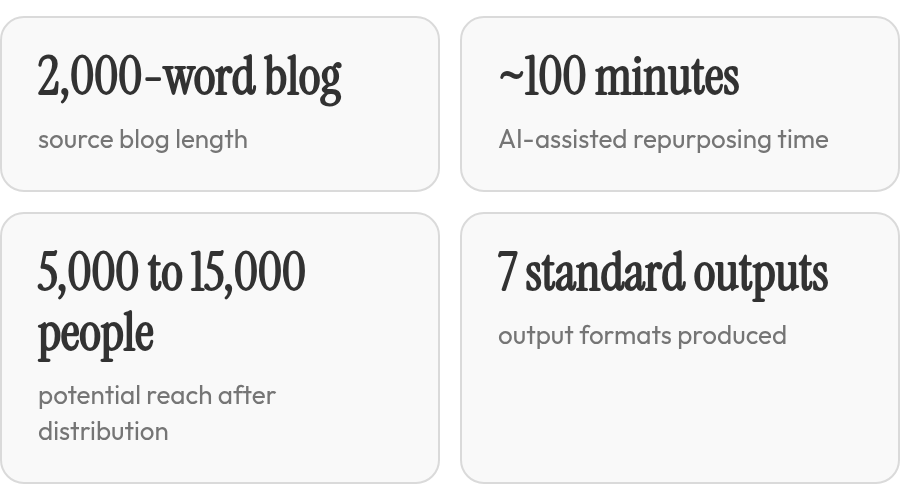
The stat tile above summarizes the arithmetic: roughly 100 minutes of AI-assisted work and a potential reach of 5,000 to 15,000 people across video, social, and newsletter channels. That's more than a formatting win. One piece of content can support a full week of distribution across the platforms your audience already uses.
The tools mostly reformat content. They resize, transcribe, and draft. The judgment about which angle works on LinkedIn versus TikTok still belongs to a person.
The Production Gap
| Dimension | Manual Repurposing | AI-Assisted (7 Formats) |
|---|---|---|
| Time per 2,000-word blog | Hours across multiple roles | ~100 minutes |
| Formats produced | Often 1–2 | 7 standard outputs |
| Channels reached | Single platform | Multi-channel distribution |
The gap that stalls teams is not generating the output. It's the handoff once the tools finish. Content lands without a clear owner, and distribution fades before it can compound.
What Manual Repurposing Actually Costs
The part most teams underestimate is not writing the content. It's everything that comes after.
A repurposing workflow built on in-house writers and manual editing looks clean on a sprint board: extract the core argument, adapt it into a thread, newsletter, video script, carousel copy, and captions, then edit, approve, and upload. What reads as one workflow tends to fragment across specialist roles. A video scriptwriter reshapes the material around hooks, pacing, and visual cues. A social copywriter shifts tone and emphasis for each platform. An editor checks whether the adaptations are still accurate. Each person processes the same source independently, and none of that overlap shows up as a distinct deliverable.
When teams price this honestly, the numbers add up quickly. Writer time, editing rounds, approval cycles, and upload overhead hit every format. AI-assisted workflows can reduce that cost by limiting redundant handoffs and giving everyone one source to work from.
| Approach | Cost Per Piece | Time per Blog | Coordination |
|---|---|---|---|
| Manual in-house | High | Hours across multiple roles | Multiple roles |
| AI-assisted workflow | Lower | Less time | 1-2 people |
| Done-for-you service | Bundled monthly retainer | Minimal | External team |
Done-for-you services are a separate category. Agencies on retainer take your long-form content and return finished assets. You get human judgment and no production overhead, at a fixed monthly rate whether you publish once that month or ten times.
Manual gives editorial control at the highest per-unit cost. Outsourcing trades that cost for your time. Neither scales without restructuring the workflow. The AI stack addresses the production gap, but it still needs someone to approve the result and decide where it belongs.
The Fragmented Stack: ChatGPT, Descript, and Opus Clip
Building a repurposing workflow on three separate tools can work. What those tools can't do is manage the seams between them for you.
Each tool is strong at its narrow job. ChatGPT can adapt a blog post into multiple platform-ready formats, though quality output tends to require iterative prompting rather than a single shot. A better approach is to drop in the source material and ask, "What's worth sharing from this?" or "Which moments have the strongest hooks?" Treating it as a thinking partner improves output quality.
Where the Stack Breaks Down
Descript handles podcast and video editing through transcript-based text editing—faster than timeline scrubbing for most teams. The QA gap shows up on export. Short-form exports may need manual reformatting before they fit TikTok or Reels, and captions are a separate step.
Opus Clip solves the vertical-format problem but adds its own QA burden. It returns a batch of candidate clips quickly, and the time saved surfacing those moments is real. Not all clips come out publish-ready: some need trimming, some need recaptioning, some get cut entirely. The Virality Score is a useful queue-ordering signal, but it's a directional hint, not a guarantee. A high score is worth a closer look; it doesn't replace editorial judgment.
Subscription Math
Running Descript and Opus Clip together means two separate subscriptions. Adding ChatGPT pushes the monthly stack higher. That's before factoring in time spent on reformatting, caption cleanup, and QA across every clip batch.
| Tool | Core job | Key limitation | Starting price |
|---|---|---|---|
| ChatGPT | Platform-adapted text from source content | Iterative prompting required; no native video output | Varies |
| Descript | Transcript-based audio and video editing | Short-form exports may need format fixes; captions are separate | Varies |
| Opus Clip | Short-form clips from long-form video | Requires manual review; free tier adds watermarks | Varies |
The fragmented stack works for teams that want control over every layer. In our work with content teams, coordination overhead catches people off guard: format fixes, watermark upgrades, and QA passes that each tool leaves for a human.
Picking the Right Stack for Your Team
The counterintuitive part is that manual production ranks highest on output variety. Human writers adapt pacing, tone, and format quickly. Every other dimension leans toward AI.
| Option | Speed | Cost | Skill Floor | Output Variety | Key Limitation |
|---|---|---|---|---|---|
| Manual workflow | Low | High | High | High | Hours per blog; requires multiple specialist roles |
| ChatGPT-led full stack | High | Medium | Medium | High | No native video; prompt quality is the ceiling |
| Opus Clip | High | Low | Low | Low | Short-form clips only; quality varies by source material |
| Descript | Medium | Low | Medium | Medium | Clips may need format fixes for short-form; steeper learning curve |
| Descript + Opus Clip | Medium | Medium | Medium | High | Two separate subscriptions; handoff friction between tools |
Where Each Tool Actually Leads
Opus Clip is the speed leader for clip volume. Drop in a long recording and it surfaces captioned, vertical-format clips quickly—enough to turn a single podcast into a stack of social assets in one sitting. Results vary: some come out post-ready, some need a light trim, some get discarded. Its scoring system is most useful for ordering the review queue, not for making the final editorial call.
Descript works best when transcript-level control matters more than automation. Filler-word removal and multitrack editing handle work no clip tool touches. It is the stronger choice when the source needs structural changes rather than simple excerpting.
ChatGPT alone is enough when the source is text and the outputs are written: threads, carousels, newsletters, captions, and LinkedIn posts from a single source document. Opus Clip is redundant until long-form video exists. Descript earns its seat when transcript-level control matters more than automation. For on-camera work where brand voice and pacing are non-negotiable, skip the AI stack. Manual production still owns that lane.
A Four-Week Pilot Checklist
Before committing budget to a full stack, these are the numbers worth tracking:
- Time per blog across seven finished formats
- Publishable assets without heavy revision
- Revision rate on AI-generated clips
- Traffic and impression lift from cross-channel distribution versus single-channel
- Cost per finished asset across the tools and workflow time you're committing to
If revision rate stays elevated after an adjustment period, the bottleneck is usually prompt quality or clip selection criteria, not the tool itself.
Quick Questions, Straight Answers
Does a high Virality Score from Opus Clip mean a clip is ready to publish?
No. The score can help sort a large batch, but it does not evaluate every editorial requirement. Reviewers still need to check whether the excerpt has enough context, whether the captions reflect the speaker accurately, and whether the clip makes sense without the original recording.
What if I only have a blog post and no source video—can I still use this stack?
ChatGPT is sufficient for the text-only route. It can turn the source document into written channel variations, while the editing and clipping tools become relevant only after recorded material exists. Starting with text also lets a team test its messaging before investing in video production.
When does running all three tools together justify the cost over using just one?
The combination makes sense when the publishing plan genuinely includes both written and video assets. A team focused on newsletters and social copy can keep the workflow text-based. A team producing recorded interviews may prioritize the video tools and add ChatGPT when it needs written distribution around those recordings.
Once the tools finish generating content, what typically stalls distribution?
Ownership is usually the missing piece. Someone must approve the assets, select the publishing order, adapt any final details, and place each item into the relevant channel workflow. Without that assignment, even usable drafts remain in folders while the team moves on to its next project.
