Headless CMS vs. Traditional: Which Feeds AI Content Pipelines Without Breaking
The Short Version
ICE Mortgage Technology reportedly cut editing time and reduced developer tickets after switching to a headless CMS. Headless platforms deliver content through APIs to any channel simultaneously, while traditional CMSs were built for single-site pages and require workarounds for multi-channel distribution. Headless platforms can offer uptime commitments and regional failover, while WordPress uptime typically depends on your hosting provider. The ICE Mortgage Technology result shows the gatekeeper tax in action: cutting editing time and developer tickets only matters if publishing stays reliable. Structured content in headless systems enables AI tools to auto-generate metadata and internal links accurately, whereas traditional CMS markup mixes presentation with semantics.
The Part Most Teams Underestimate
Traditional CMS bundles content, database, and design into one coupled system, which is why even small layout changes can require developer help. Headless CMS separates content storage from presentation and delivers through APIs, so your content feeds any channel without rewriting it.
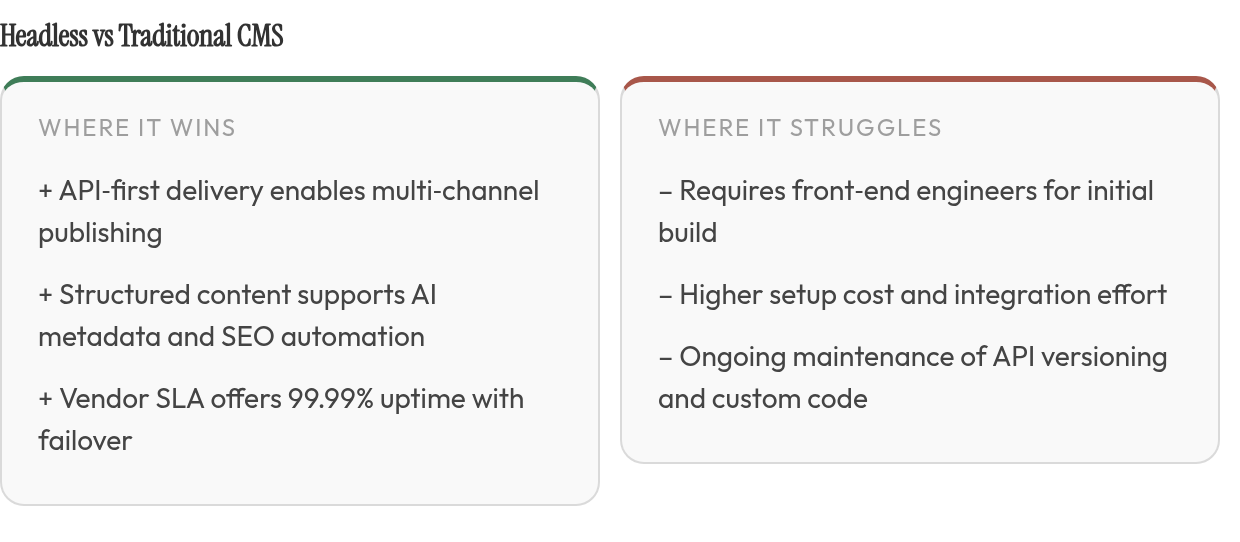
The catch: headless needs front-end engineers to build the display layer, while traditional gives marketers a visual editor out of the box.
Here's what matters when AI generates content at scale.
Publishing and Editing Speed
Once a headless implementation is built, marketers can make routine content changes without waiting on engineering. Headlines, summaries, images, and structured fields move through the editorial workflow without touching the front-end codebase. Traditional CMS platforms are faster to launch because the editing interface and site rendering layer already ship together, but that convenience can become a constraint when content must move beyond one website.
Headless platforms let content teams work independently after the front-end is in place, but that independence comes with setup cost. If you publish to one website and already have a visual page builder you like, traditional wins on speed to first publish. If you're feeding content to a website, mobile apps, email, and other distribution surfaces, headless wins on speed to every later publish.
API Flexibility and Multi-Channel Reach
A headless CMS delivers content through RESTful or GraphQL APIs, which means any device or platform that can make an API call can consume your content. Traditional CMSs were built for pages, not for data feeds, so pushing content to a mobile app or voice assistant usually requires exports, connectors, or parallel content management.
The trade-off: API flexibility requires developers to build and maintain the front-end integration. Traditional platforms bundle the display layer, which is simpler but locks you into their templating system. When AI generates articles at scale and you want to test them across web, email, and social simultaneously, the API model handles that more naturally. When you're running a single blog and don't plan to expand channels, the flexibility is overhead you may not need.
Developer Dependency and Collaboration Friction
In headless systems with mature editorial tooling, marketers can manage structured entries while developers improve the front-end separately. That separation reduces one common source of friction: the constant handoff between the person who owns the message and the person who controls the template.
Yet many marketers and developers describe their collaboration as strained, ineffective, or nonexistent, and the root cause varies by architecture. In traditional CMSs, marketers wait for developers to implement layout changes or troubleshoot plugin conflicts. In headless setups without strong editorial tools, marketers wait for developers to build preview environments or wire up workflows.
The winner depends on where your bottleneck actually sits. If your team fights over who controls the page template, headless with a visual modeler can reduce friction. If your team is small and lacks front-end capacity, traditional keeps everyone publishing without a backlog.
SEO Automation Readiness
Traditional CMSs were built for pages, so their content is often mixed with presentation markup: headings styled for layout rather than semantic meaning, metadata buried in theme files, and reusable blocks stored as rendered HTML. AI SEO tools struggle with this because they need clean, structured data to understand topic relationships and generate reliable recommendations.
The practical difference: if you want AI to auto-tag articles, generate meta descriptions, or map internal links based on topic clusters, structured content makes that possible with fewer errors. If your SEO strategy is manual or plugin-based and you're comfortable with that workflow, the structured-content advantage may not justify the migration cost.
Reliability and Uptime
Enterprise headless vendors can offer platform-level uptime commitments and regional failover because the content API is treated as managed infrastructure. Traditional CMSs like WordPress don't provide that guarantee at the platform layer; availability depends on the hosting provider, server configuration, caching setup, and plugin stability. A managed WordPress host might perform extremely well, but the responsibility sits in a different place.
The separation of content API from front-end in headless architectures creates resilience: if your website's front-end crashes, your content API can still feed your mobile app or email system. Traditional CMSs tie availability to the monolithic stack, so when the site goes down, more of the publishing and delivery workflow tends to go down with it.
For teams running revenue-critical content operations, failover and vendor commitments matter. For teams with forgiving traffic patterns, they may not.
Integration and Maintenance Burden
CMS integrations are often difficult, and the source of that difficulty shifts by architecture. Traditional CMSs rely on plugins for analytics, forms, payment gateways, SEO, and publishing automation. Plugin updates can disrupt your site. Headless CMSs push integration responsibility to your development team, which means more predictable behavior but higher setup cost.
The hidden cost is different in each model: traditional CMSs need plugin audits, security patches, and theme updates; headless CMSs need API versioning, custom front-end maintenance, and developer time to wire new features. Neither is maintenance-free. The question is whether you'd rather manage plugins or manage code, and that depends on your team's skill set.
Most teams land on a hybrid. A modern front-end framework pulling content from a proven CMS back-end can capture much of headless's speed and flexibility without betting everything on a full rebuild. If you're launching a standard website with one channel and limited dev resources, traditional wins. If you're feeding AI-generated content to multiple platforms and have engineering capacity, headless wins. The middle path, decoupled front-end, familiar back-end, is where many growing businesses actually end up.
Why AI-Powered Content Pipelines Need the Right CMS
When AI generates dozens of articles per month, your CMS either accelerates the work or becomes the slowest part of the pipeline. We see teams hit three friction points that compound at scale: developers become content gatekeepers, integrations require constant maintenance, and editing workflows consume time that should be spent on review, strategy, and distribution.
The collaboration tax is real. When you automate content creation for SEO, workflow frictions multiply. Each AI-generated draft needs human review, voice alignment, and multi-channel distribution — tasks that should flow through your CMS without developer intervention.
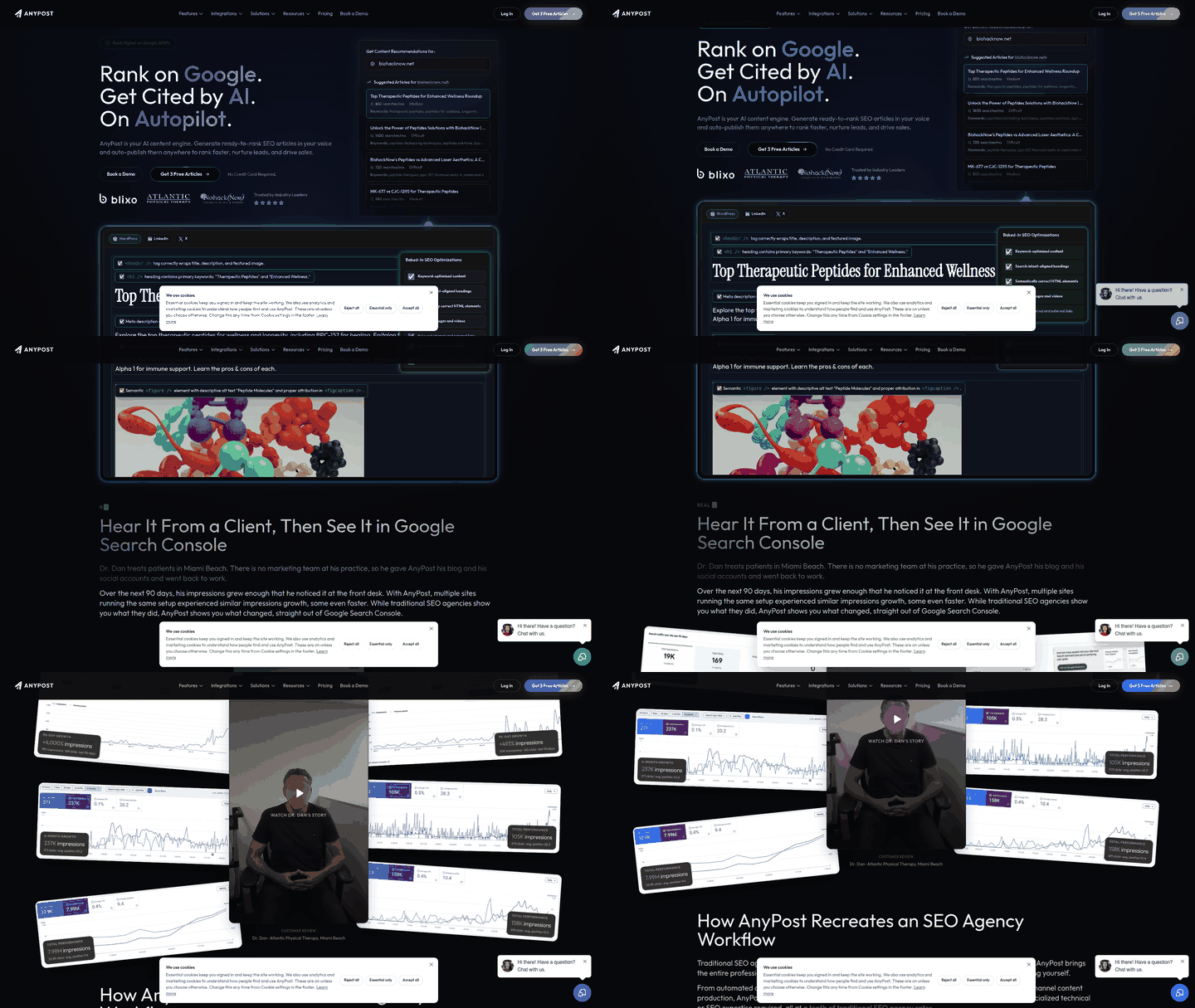
Modern content operations show what's possible when the architecture supports autonomy. The strongest systems move engineers away from content maintenance tickets and toward product, performance, and revenue-focused work.
Defining an AI Content Pipeline
An AI content pipeline moves through six stages: generation, editing for voice and accuracy, SEO enrichment with keywords and structure, repurposing across channels, CMS publishing, and performance feedback that informs the next cycle.
Traditional CMS platforms couple content and presentation in one system, which can force developer involvement at multiple checkpoints. Headless CMS separates content storage from delivery through APIs, letting marketing teams publish independently while developers iterate the front-end without touching content workflows.
Where CMS Choice Governs AI ROI
The architecture reveals a hidden cost structure: developer time spent as content gatekeeper. When AI generates content at scale, this gatekeeper tax becomes a throughput ceiling. What worked for a small manual publishing calendar breaks when the draft volume rises and every article needs enrichment, review, publishing, and measurement.
Headless platforms support AI workflows better because they expose structured content through APIs that AI tools can read and enrich programmatically. Traditional CMS platforms often keep content inside page templates mixed with presentation markup, forcing manual extraction and reformatting. When your AI tool needs to pull existing content for repurposing or push enriched drafts back into your CMS, API access determines whether the integration is straightforward or painful.
Reliability matters more at scale. A traditional CMS running plugins for SEO, analytics, and forms creates multiple integration points that can break independently. Each plugin update risks compatibility issues. Headless architectures connect services through standard APIs with defined contracts, making integrations more predictable and failures easier to isolate.
Traditional CMS — The Known Path
WordPress, Joomla, and Drupal are unified systems that bundle content creation, storage, design, and delivery into one coupled backend. You draft an article inside the CMS, add meta descriptions and tags through built-in fields or plugins, preview how it looks in the live theme, then hit publish. The same database that stores your content also renders the front-end pages visitors see, which is why design changes can pull developers into work that appears simple from the outside.
That coupling made traditional CMS the practical default for single-website businesses. Small teams get a visual WYSIWYG editor, drag-and-drop page builders, and thousands of plugins that add functionality without custom code. For a standard business site or blog, this all-in-one approach remains the faster, cheaper launch path — no front-end engineering required, and hosting costs start low.
Automation Depends on Plugins and Connectors
When you automate content creation for SEO at scale with AI tools, traditional CMS creates a dependency chain. Publishing an AI-generated draft to WordPress usually means installing a plugin, configuring API credentials, mapping fields between your content generator and the CMS, then maintaining that connector as both platforms update. Some teams write custom scripts instead, but either path adds integration complexity that API-first systems are designed to reduce.
The real friction shows up when compatibility breaks. A theme update conflicts with your publishing connector, or a security patch disables the endpoint your automation relied on. Each fix pulls a developer back into what should be a hands-off pipeline, turning collaboration between marketing and engineering teams into a recurring bottleneck.
Maintenance Overhead Compounds With Plugins
Traditional CMS stacks accumulate ongoing work: plugin updates, theme compatibility patches, security fixes, PHP version migrations, and hosting configuration. A site running a large plugin stack needs regular audits to catch conflicts before they break publishing workflows. What launched quickly becomes a maintenance burden that scales poorly when AI generates a larger content queue and every publishing hiccup blocks the pipeline.
Headless CMS — The API-First Engine
A headless CMS separates content storage from the front-end layer that displays it. Instead of coupling your content database with a pre-built website template, you manage content in one system and deliver it through APIs to any front-end — your site, mobile app, voice assistant, or a future channel no one has built yet. Contentful, Contentstack, Sanity, and Storyblok are the platforms companies actually evaluate when they commit to this model.
The separation lets AI-generated drafts flow into the content repository without requiring the website template to be rewritten around each publishing workflow.
Why Headless Fits AI Pipelines Better
Marketers in decoupled systems can often handle routine editorial changes without a developer ticket. When AI generates a larger draft volume, removing that handoff matters because each extra approval loop slows the entire content operation.
The same structured content model that speeds human editing also powers AI workflows. Headless platforms store content as discrete fields, title, body, meta description, author, rather than page-locked HTML. AI tools can read that structure, recommend optimizations, and generate new entries programmatically. Traditional CMSs often mix content with presentation markup, which means AI systems have to work harder to distinguish the article from the layout code around it.
Reliability and Integration Tradeoffs
Uptime guarantees vary across headless platforms. When evaluating vendors, ask about SLA commitments, regional failover capabilities, and what happens if a data center goes offline. These details determine whether your content API stays accessible during an outage or whether your publishing pipeline stops until recovery completes.
The developer-platform split creates integration work traditional CMSs avoid. Collaboration between marketers and developers can be strained, and CMS integrations often require dedicated engineering effort. Headless gives you multi-channel flexibility, but you own the front-end build, the preview environment, and the deployment pipeline. If your team lacks front-end engineering capacity, that ownership becomes a blocker faster than the API flexibility becomes an advantage.
How to Choose Between Traditional and Headless
When you automate content creation for SEO at scale, workflow friction isn't background noise — it's a filter that decides which platform survives first contact with your team. We see the same pattern across agencies and SaaS teams: they pick a CMS based on API features or enterprise buzz, then find out later that their marketers can't publish without filing developer tickets, or their front-end is stable but collaboration has collapsed. The architecture matters less than whether your specific team can actually use it without adding headcount — and whether the platform gives you the governance, audit, and permission controls your publishing risk requires.
The Matrix That Matters
Speed, autonomy, and hidden costs are a useful starting filter, but they are not the whole evaluation:
| Dimension | Traditional CMS | Headless CMS | What Decides It |
|---|---|---|---|
| Publishing Speed | Marketers edit and publish independently; no deploy step | Requires developer to build preview + publish flow; faster once built | Team size and technical capacity |
| API Flexibility | Limited; content is coupled to site structure | Content feeds any channel through APIs | Number of distribution channels |
| Developer Dependency | Low for content updates; high for design changes | High upfront; low ongoing if workflows are built | Whether you have front-end engineers |
| Collaboration Friction | Visual editor reduces tickets; plugins can cause conflicts | Teams without preview tooling often report strained collaboration | Editorial autonomy priority |
| Integration Difficulty | Plugin sprawl creates risk over time | Requires custom API work; cleaner long-term | Existing stack complexity |
| Reliability & Performance | Hosting-dependent; plugin stack affects uptime | Vendor-managed SLA options and failover | Is uptime business-critical? |
| Total Cost | Lower upfront; plugin/hosting creep over time | Higher build cost; predictable scaling | Budget and engineering availability |
Three Buyer Personas and Where They Land
Solo founder or lean startup: You're publishing to one site, budget is tight, and you don't have a front-end engineer. Traditional CMS wins. The all-in-one setup gets you live quickly, and plugins handle SEO without code. Headless's flexibility is wasted here.
Small agency: You manage multiple client sites, need white-label control, and have a developer who's tired of content tickets. Headless with managed infrastructure such as Contentful, Storyblok, or Sanity makes sense if clients pay for the setup cost. If not, a headless-ready traditional CMS like WordPress with a decoupled front-end captures much of the speed gain without the full rebuild risk.
SaaS growth team: Content feeds your site, mobile app, in-product help docs, and partner portal. You have front-end engineers and ship daily. Pure headless works when your team owns the front-end and can iterate preview flows independently; in that environment, integration and collaboration friction can drop significantly. Traditional's visual editor becomes a constraint, not a convenience.
The contradiction most evaluations ignore: headless costs more upfront but can scale more predictably, while traditional launches cheaper but may compound costs through plugin sprawl and developer time. Your decision hinges on whether you're optimizing for month one or month eighteen.
For teams wrestling with this trade-off, our guide on automated SEO reporting covers the tooling layer that sits on top of either architecture — because publishing speed matters less if you can't measure what's working.
FAQ
Q: Can I migrate from WordPress to headless without losing SEO rankings?
Yes, if you preserve URL structure, implement proper 301 redirects, and maintain content quality. Map your existing permalink structure to the new system before migration, use a redirect plugin or server-level rules to forward old URLs, and verify all internal links resolve correctly. Monitor Search Console for crawl errors during the first two weeks and fix any broken redirects immediately.
Q: How much does it cost to build a headless CMS setup?
Development costs vary widely depending on feature complexity, number of content types, and integration requirements; headless platform fees also vary by vendor and usage. Traditional CMS hosting can start low but scales unpredictably with traffic and plugin overhead. Total cost of ownership depends on whether you value predictable scaling or lower upfront spend.
Q: Do I need a full-time developer for a headless CMS?
