How to Repurpose a 2,000-Word Article: Mine Subheads First, Intro Last

Quick Summary
Most repurposing work stalls at the hand-off, not the writing. One person pulls blocks from the article, someone else is supposed to ship the post, and the block sits in between with nobody watching it. A single tracking table can keep that hand-off visible. You mine the subheads into blocks, assign each block a channel, and write the intro last.
The channels below are the ones we chose for this example. They are not a quota for how many outputs one article should produce. Difficulty uses a simple 1-5 scale for this example: 1 means light editing and no design, and 5 means heavy rewriting, design work, approvals, and multi-step publishing.
| Source block | Target channel | Transformation step | Owner | Automation status | Output status | Difficulty (1-5) |
|---|---|---|---|---|---|---|
| First H2's core claim | LinkedIn text post | Hook line plus three supporting points | Social manager | Manual | Drafted | 2 |
| H2s two to four | Instagram carousel | One subhead per slide, rewritten for skimming | Social manager + designer | AI-assisted draft, human edit | In design | 4 |
| Data block | X post | One stat with a context line | Social manager | Manual | Scheduled | 1 |
| How-to section | Email newsletter | Summary plus link to the pillar | Email owner | AI-assisted draft | Awaiting approval | 3 |
| Intro (written last) | Pillar article and captions | Rewrite once the blocks are final | Editor | Manual | Not started | 2 |
- Reused research is where the value comes from. One content agency estimates that research, data, and audience analysis take 50-75% of the effort behind a new blog post. Every block you pull reuses that work. Each channel still needs its own rework, so repurposing is faster than writing from scratch, but it still takes real hours.
- Unclear hand-offs are a hidden tax. A block marked "drafted" with no owner can sit untouched for weeks.
- Automation status is earned. Mark a step as AI-assisted only after you've tested that the tool handles that channel's format. If it doesn't, the row stays manual.
What We'd Recommend Before You Start
- Pick articles that carry research, data, audience insight, or a real point of view. Those are the pieces with something worth moving into other formats.
- Fill in the owner column before anyone writes a caption. Drafting is the easy part; moving a block from source material to published asset needs a named person.
- Budget time by format. A text post can move in an afternoon, while a designed carousel usually needs extra rewriting, layout, and approval rounds.
- Route blocks by shape. Procedural sections usually need room to breathe, while a pointed claim can often stand alone as a short social post.
Where the Value in a 2,000‑Word Article Actually Sits
The most expensive part of a 2,000-word article is the research, and that work goes idle the day the post goes live. If you publish once and move on, only the readers who land on that one URL ever benefit from it. Given how much of the effort that research represents, letting it sit on a single page is a poor return.
A solid content repurposing strategy gets more mileage out of the same investment. In our experience, the subheads are where the writer has already sorted the research into self-contained claims. Each H2 can become a block that you adapt for LinkedIn, X, a newsletter, or a carousel, without rereading the whole piece every time. We map the full flow from research to repurposing in our SaaS content writing blueprint.
You Save Research Time, Not Editing Time
Repurposing tends to win because the material is already researched, argued, and organized. It is still slow work. Every block needs rewriting for the channel's format and audience, and a paragraph lifted straight from the article rarely works as a carousel slide or a newsletter opener.
That's why we mine subheads first and write the intro last. The subheads give you the raw blocks. Once you know where each block landed, you can write an intro that points readers back to the full article instead of guessing at it.
When Repurposing Isn't Worth It
Skip the process if the article has little original research or few clear claims. You'd only be spreading a weak idea across more channels. Skip channels your audience doesn't use, too. A few well-adapted posts tend to outperform a stack of half-edited ones on platforms nobody on your team monitors.
Mine Subheads First: Turn Every Subhead into a Content Block
A subhead promises a topic, but it rarely carries enough context to stand alone. Pull an H2 from its article, and a reader often gets a claim with nothing behind it. So treat every subhead as a candidate block until it passes a standalone check.
How do you split the article into blocks?
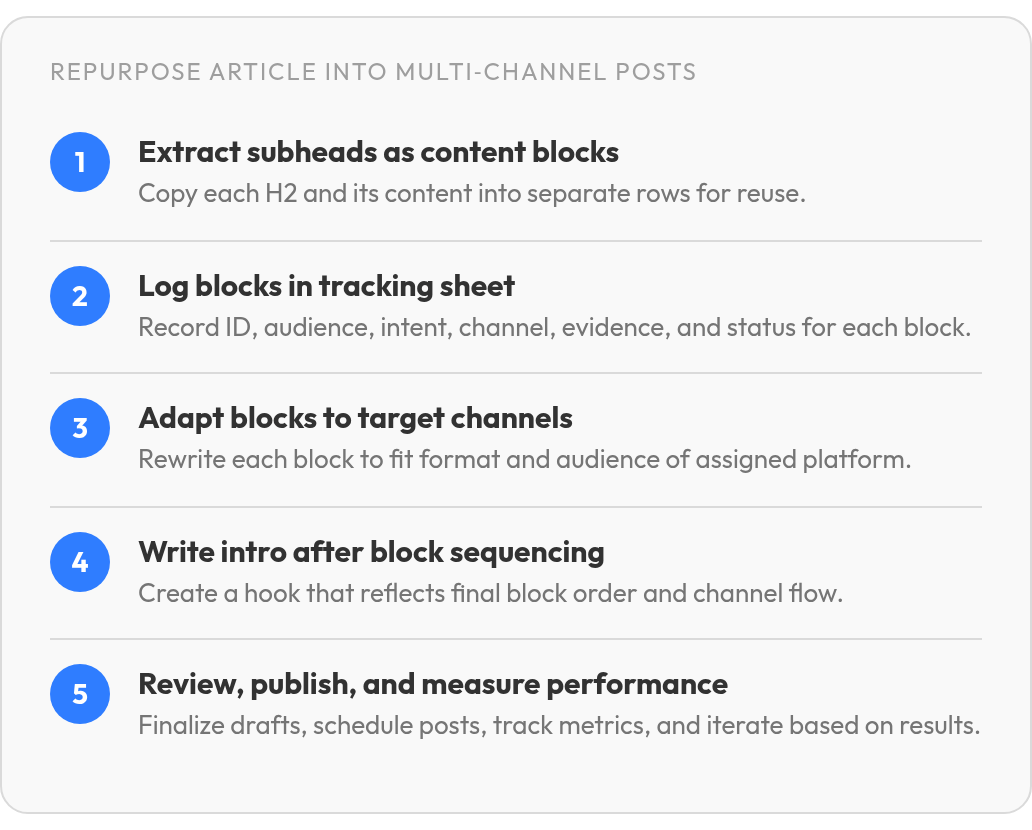
Copy each H2, along with the paragraphs, examples, and evidence beneath it, into its own row. Then read each row cold, as if you'd never seen the article. If a block leans on a term defined three sections earlier, add one line of context or merge it with its neighbor.
Expect to rework every block. The article is the source material, not the finished social copy. What you do have is the argument, the examples, and the proof, already assembled. The remaining job is reshaping them for the place they'll be read.
What should the tracking sheet hold?
Give each block one row with these columns:
- Block ID: a short label you can find again later. The article slug plus a sequential number, such as
repurpose-2000-word-article-03, keeps blocks from different articles from getting tangled. - Audience: who the block helps, for example founders or in-house marketers.
- Intent: whether the block teaches, persuades, or gives a reason to click through.
- Channel and format: an X thread, a carousel, a newsletter section.
- Supporting evidence: the stat or example that keeps the block from being an empty claim.
- Production status: where the block sits, from drafted to edited to scheduled.
Intent does the routing. A block that explains a process may need a visual sequence. A block built around a strong opinion may need only a sharp hook and a few supporting lines.
Adapt Blocks to Channels (And Save the Intro for Last)
The intro is the one block you shouldn't write first. Until you know which blocks made the cut and in what order, any hook you write describes the original article. Your reader never sees that article. They see the post.
A workable content repurposing strategy treats each channel as its own edit. LinkedIn readers often decide based on the line before the "see more" cut, so the hook carries the post. X rewards one claim per post, and each thread post should make sense on its own. Newsletter subscribers opted in, so you can give them more context. Platform limits change, so check each one's current limits when you publish rather than working from fixed word counts. Done by hand across five channels, this adaptation step can swallow whole afternoons, which is the cost the next section weighs against automation.

Illustrative example: The subhead "How Subhead Mining Reduces Research Duplication" becomes the LinkedIn hook "You already did the research. Stop redoing it for every post."
When you join blocks, bridge sentences keep the sequence readable:
- Contrast: "That holds until..."
- Continuation: "Once that's in place,..."
- Example: "In practice, that looks like..."
- Transition: "The next snag shows up at..."
How do you turn a paragraph into a video outline?
Split the paragraph into five slots. Write the hook as one spoken line, then pull two or three talking points. Add one supporting example and a visual cue, such as on-screen text or a screen recording. Close with one action for the viewer to take.
Where does the intro go in the packaging workflow?
Our order runs: select blocks, sequence them per channel, adapt each block, write the channel-specific intro, review, then publish. Because the intro comes after sequencing, the hook can promise exactly what the post delivers. For a single standalone post, skip the ordering. With one block, there's no sequence for an intro to set up.
Putting AnyPost.ai to the Test on Your Workflow
Automation tends to break at the step nobody tested. A tool can draft a decent LinkedIn post and still fail to read a draft article, flatten your voice, or publish to the wrong account. Treat our product the way you'd treat any candidate tool: check it against your workflow before you connect anything.
Keep your content repurposing strategy independent of any single tool. Define the block schema in your own tracking table: source subhead, block text, supporting evidence, target channel, owner, and review status. If our tool maps subheads to blocks for you, the table becomes a checklist. If it doesn't, the table still runs the workflow, and your process isn't tied to a feature.
Test Each Feature Against Your Own Workflow
Run a real article through each item below before you commit. Older blog posts and sales summaries can be out of date. Your own output is the evidence that counts.
- Source ingestion: We support multi-source content integration. Confirm it accepts the format you actually work in (a URL, a CMS export, or pasted text) and whether it handles draft or gated pages.
- Voice controls: Our Persona Engine matches tone to your brand. Check whether that voice holds as the same article becomes a LinkedIn post, a carousel, and a newsletter.
- Intro generation: Find out whether it uses templates, AI rewriting, or another method. Whichever it uses, someone on your team checks the facts and the channel fit before anything ships.
- Publishing destinations: We publish to LinkedIn, X, Instagram, TikTok, and YouTube, and directly to your existing website. List which accounts you'll connect, what permissions each requires, and which channel limits apply.
- Results tracking: Use real-time analytics tracking to see how each repurposed piece performs, so you judge the workflow on real numbers instead of hunches.
Your Own Article Is the Only Fair Time Test
Skip the testimonials. Time one article through your manual process. Then run a comparable article through the tool, and count the time you spend reviewing and fixing its output. If fixing the drafts eats as much time as the tool saves, keep the manual workflow.
Measure, Iterate, and Scale the Repurposing Engine
The stage most teams underestimate comes after publishing. A team can ship ten posts from one article, glance at the likes, and move on to the next draft without knowing which block worked.
Keep measurement as lean as the rest of the process. We track four numbers per post: reach or impressions, engagement, click-through rate, and attributable conversions where your CRM can see them. Pull these from each channel's native analytics and your existing web reporting. If you plan to rely on our tool for channel-level dashboards or exports, confirm the current documentation lists them first. Until then, tag every link with UTM parameters, the short tags added to a URL that tell your web analytics where a visit came from. Tagged links let you trace site visits and leads back to a specific block.
One Variable Per Test Keeps the Data Honest
Change one thing at a time: the intro hook, the block order, or the call to action. Keep the audience and the review window as consistent as you can, and define each metric the same way every time. Change two things at once and you can't tell which one moved the result.
On a channel with too few clicks to separate two variants, skip formal testing. Watch the trend across several posts instead.
Winning Blocks Earn a Spot in the Evergreen Library
Rank blocks on your own numbers, not someone else's benchmark. When a block keeps performing across several posts, move it into an evergreen library you can draw from later. One content agency recommends resharing the original post at three months, six months, and a year. Treat that as a starting rhythm, and adjust once your own data points somewhere else.
Questions People Ask
Is it worth repurposing an article that has little original research?
Usually, no. Repurposing magnifies what is already in the article. If the source piece is thin, the better move is to strengthen the original argument before turning it into more assets.
Do you still need to write the intro last if you're only making one post?
Not necessarily. The intro-last rule is most useful when several blocks need to work together. For a single post, focus on making the opening line match the one idea the post is about.
