NinjaReports Pricing vs Competitors: What the Numbers Mean for SEO Automation Budgets

What NinjaReports' entry plan actually buys
The cheapest line on a pricing page often tells you the least. Line up NinjaReports pricing against competitors and the starting price looks like an easy win, until you read what that price covers. Capterra lists three flat monthly tiers and a short set of documented details:
| Detail | What Capterra lists |
|---|---|
| Published plans | Three flat-rate monthly tiers |
| Listed features | Website SEO Audit Tool, full on-page SEO audit |
| Feature differences by tier | None listed — all three plans show the same features |
The listing is clear on the three monthly prices and the audit features. It says nothing about what the higher tiers add. That gap is the first clue to what the tool is built for.
Which SEO jobs does the entry plan cover?
SEO work tends to split into four jobs: auditing pages, writing content, publishing it, and building backlinks. Capterra describes NinjaReports as a web-based reporting and analytics tool, with a dashboard for monitoring SEO metrics and tracking site performance. So the entry plan likely pays for the first job. Writing, publishing, and the link building that often moves rankings all happen somewhere else, on someone else's time.
Do the review scores justify the price?
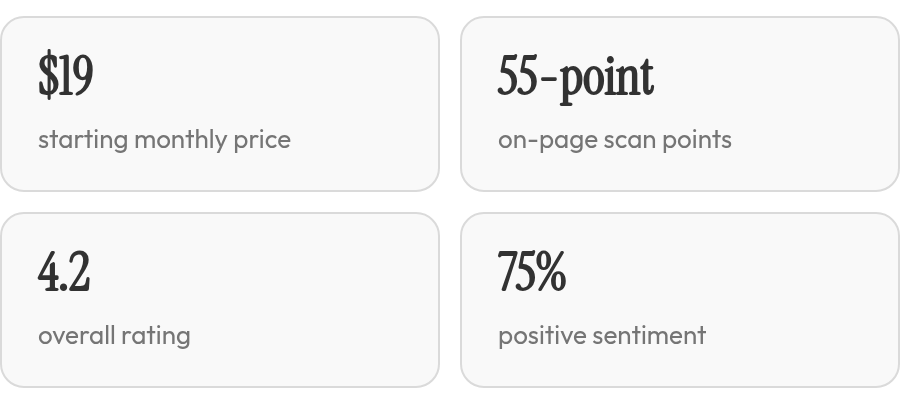
The scores are mixed once you look past the overall rating. NinjaReports earns 4.2 overall, 3.7 for features, and 4.1 for value for money in Capterra's ratings. Reviewers seem reasonably happy with what they pay, but the features score trails the overall and value scores. No score measures how much of the SEO workload the tool takes off your plate, and small review samples can swing on a few opinions. Treat them as an early signal and keep testing.
In our experience, a reporting tool is a good buy when your gap is client-ready reports. If you also need content written, published, and linked, an entry plan can turn into a hidden tax. You still pay for that work, either in staff hours or in the extra tools you stack on to fill the holes.
Reading the NinjaReports pricing page for what it leaves out
NinjaReports publishes three monthly tier prices and almost nothing about what the higher tiers add. That's the first thing we flag when teams weigh NinjaReports pricing against competitors. With the entry tier, you can evaluate the audits and reports on your own sites before paying more.
| Listing detail | What the data shows |
|---|---|
| Published plans | Three flat-rate monthly tiers |
| Feature differences | None listed across the three plans |
| Core features | Website SEO audit that crawls all of your pages and a reporting and analytics dashboard |
There are no annual prices, no Content Module, and no separate line-item fees in the data. The higher plans exist, but the listing doesn't say what they add. If they gate seats, client counts, or report volume, the listing doesn't say. Use the entry plan to find those walls yourself. Crawl your largest property, build a client-facing report, and write down every point where the tool asks you to upgrade.
What reviewers say the money buys
Reviewers rate value for money at 4.1, while the overall rating is 4.2 and features trail at 3.7. Sentiment splits 75% positive, 21% neutral, and 4% negative. None of the review text we found mentions surprise fees or unexpected usage caps. We read that as a low-cost tool doing a narrow job without overcharging for it.
The gaps that matter for automation budgets
For an automation budget, what's missing matters more than what's listed. The data shows no monthly limits on articles, keywords, or API calls. It mentions no content generation and no consulting. There's no enterprise pricing and no hint of what would trigger a custom quote.
If your plan depends on publishing content at volume, the listing can't price that work for you. Budget NinjaReports as a reporting line item and look elsewhere for output.
Ahrefs and SEMrush pricing: what we could and couldn't find
We went looking for Ahrefs and SEMrush price tables to set beside NinjaReports, and our research data didn't include them. Any fair read of NinjaReports pricing vs competitors has to admit the competitor side is mostly blank.
The closest signal comes from Looker, which Capterra features as the top alternative to NinjaReports. Looker publishes no starting price at all. Its listing says "Contact vendor."
| Signal | NinjaReports | Looker | Ahrefs / SEMrush |
|---|---|---|---|
| Starting price | Published flat monthly tiers | Contact vendor | Not in our research data |
| Value-for-money score | 4.1 (23 reviews) | 4.4 (1,902 reviews) | Not in our research data |
| Custom quote | None listed | Yes, through vendor contact | Not in our research data |
What a "Contact vendor" price tells you
It tells you the price depends on a sales call. Custom quotes tend to stay hidden until you describe your team size and usage, so you can't budget from the pricing page. Looker still earns a 4.4 value score, so buyers who got a quote may have found it fair. It tells you nothing about what your quote would be.
Sample size matters here too. A score built on 23 reviews can move with a handful of new opinions. One built on 1,902 barely budges.
If Ahrefs is the tool you're actually weighing, compare on the job you need done, not the sticker. Our breakdown of NinjaReports vs Ahrefs for keyword gap analysis covers that head-to-head. Either way, published tiers and an unpublished quote aren't equivalent numbers. You can plan around the first. The second is an opening bid.
Feature-cost matrix: where the automation rows go blank
The hardest part of building this matrix was accepting how many cells stay empty when you only allow documented data. Compare NinjaReports pricing with competitors feature by feature and the automation rows go blank fast. That includes our own pricing cells, because we won't fill them with numbers we can't show you here.
| Automation feature | NinjaReports | Ahrefs / SEMrush | AnyPost.ai |
|---|---|---|---|
| Brand-voice matching (Persona Engine) | Not listed | Not in our research data | Core feature |
| Content, SEO and social automation | Not listed; listing covers audits and reporting | Not in our research data | Built to run these without manual management |
| Automated backlink outreach | Not listed | Not in our research data | Not covered in this comparison |
| Programmatic SEO pages | Not listed | Not in our research data | Not covered in this comparison |
| Per-feature cost or usage caps | None published across the three listed plans | Not in our research data | Not published in this comparison |
Where the copywriter hours go
An audit tool tells you what to fix. It doesn't write the fix. With NinjaReports, drafting, editing, and publishing all happen outside the subscription, so those hours land on payroll instead of the invoice. That cost rarely shows up when teams compare plan prices side by side.
AnyPost.ai's Persona Engine is built to match your brand's voice so drafts start closer to publishable. We haven't seen a public benchmark on hours saved that we'd stand behind, so we won't quote one. Measure it instead: log editing time per article for two weeks on each workflow, then price those hours at your copywriter rate.
When this matrix is the wrong lens
If all you need is a site audit and a client-ready report, ignore the automation rows. A flat-rate audit plan covers that job, and content automation would be overkill.
A simple ROI worksheet, from spend to leads
A spend-to-leads calculator needs two columns, and public data fills only one. You can write down NinjaReports' three listed monthly fees to the dollar. The lead column stays empty, because no listing we found reports conversion rates, lead values, or content output for any of these tools.
So we built the worksheet the evidence supports. Each row shows what public listings give you and what you'll have to measure during a test run.
| Input | What public data provides | What you supply |
|---|---|---|
| Monthly fee | Three flat-rate monthly tiers (Capterra) | Any extra seats or add-ons you'd need |
| Hours saved per month | Nothing published | Time logged on reporting before and during the test run |
| Cost of that time | Nothing published | Your internal or freelance hourly rate |
| Leads attributed | Nothing published | Form fills or calls traced to pages you optimized |
| Value per lead | Nothing published | Close rate × average deal size |
| AnyPost.ai as a second column | Content, SEO and social automation; brand-voice matching; no price in this comparison | A vendor quote, if you want a side-by-side |
Once the test run fills in the right-hand column, the math is short: (hours saved × hourly cost + leads × value per lead − monthly fee) ÷ monthly fee.
What the worksheet shows before you commit
The fee column shows the ceiling of what's public. Capterra publishes three monthly tier prices but no feature differences between them, and its scores attach to the whole product, not a tier. They can't tell you whether the higher plans earn their price over the entry one.
We'd give the most weight to the 4.1 value-for-money score and the 3.7 features score. The features score sits below the overall 4.2, which is the same gap the pricing table shows: the plans list the same features, so the price difference isn't explained. A low-cost tool that does less can still cost you more once you count the hours spent on the work it skips.
This worksheet won't carry you to enterprise-scale planning. The data has no volume pricing, and Looker's "Contact vendor" gives you nothing to enter. Start with the entry tier, log hours from day one, and treat any upgrade as unproven until NinjaReports documents what the higher tiers add.
The bottom line on NinjaReports pricing vs competitors
Paying for NinjaReports buys you measurement, not output. That's as far as the public data lets us go. NinjaReports scores 4.2 overall, with a 3.7 features score and a 4.1 value-for-money score. The features score points to the same budgeting issue: the pricing page shows higher tiers but no listed feature differences, so buyers can't verify what the extra spend adds.
Which tool fits which job
| Need | Better fit | Reason |
|---|---|---|
| On-page analysis, SEO reports and site audits on a tight budget | NinjaReports | Reviewers give it 4.1 for value for money, so the cost appears to match the reporting you get |
| Client-ready reporting for an agency | NinjaReports, starting at the entry price | Its dashboard gives you one place to monitor SEO metrics and track website performance |
| High-volume content, programmatic SEO, multi-channel publishing | AnyPost.ai | Built to automate article generation, programmatic SEO pages, brand-voice matching, and publishing to your site and social channels |
If you need content produced rather than measured, NinjaReports isn't the tool. Nothing in its listing writes articles or builds pages, and that's the gap we built AnyPost.ai to fill. We haven't published our pricing in this comparison, so we won't claim we win on cost.
What to check before you set a budget
Start on the entry plan and ask the vendor what each higher tier adds before paying more. Hold that answer against the work you actually need done. If you plan to pair a reporting tool with a content service, budget for both, since one won't replace the other. And if your real need is a service that writes and ships content, reporting scores can only tell you so much.
