One Webinar, Five Formats: Turning a 45-Minute Recording into X Threads and Newsletters
TL;DR
- A 30-60 minute webinar contains enough substance for multiple standalone blog posts and breaks into six repurposing tactics mapped to buyer needs.
- The six repurposing tactics are not interchangeable; each serves a specific buyer at a specific point in their journey.
- Without a deliberate repurposing strategy, the default is one summary post, exported slides, and an archived recording, leaving most substance unused.
- Blog posts drawn from a webinar need their own entry point, tighter scope, and a shape built for readers who weren't in the room.
- An editorial filter applies four criteria: a citable data point, a story hook, a direct quote, or an immediately actionable insight.
- We recommend treating a SlideShare deck as teaser content that pulls non-attendees toward the full on-demand recording, not as a destination itself.
- Pre-sorting tagged moments by output format rather than subject matter gives teams organized working material instead of a raw transcript.
Quick Summary
The part that often gets underestimated isn't the webinar itself. It's the work that comes after. A content repurposing strategy treats that recording as raw stock, not a one-and-done event, and maps each tactic to a specific buyer need and output format. That mapping is what separates a webinar that keeps producing for weeks from one that dies on the archive shelf.
A typical 30-60 minute webinar carries enough substance for multiple blog posts, organized across six repurposing tactics:
| Tactic | Buyer stage | Audience need | Source moment | Output format | CTA | Success metric |
|---|---|---|---|---|---|---|
| Section-based blog posts | Search-driven researchers | Clearly scoped article | Dense Q&A or long-form blog bucket | 1-3+ standalone articles | Point readers to the recording, article, or relevant resource | Clicks and conversions |
| Q&A questions into FAQ content | Late-stage evaluators | Specific answers without watching the full session | Dense Q&A sequence | FAQ page or blog post | Link to the relevant resource or next step | Clicks and downstream action |
| SlideShare adaptation | Visual learners and non-attendees | Teaser context and a reason to watch | Clear step-by-step walkthrough | Deck-style reference | Watch the on-demand recording | Clicks to the recording |
| Guest speaker contributions | Audience overlap with the speaker | Expert-authored perspective | Direct speaker quote | Expert-authored posts | Point readers to the recording, article, or relevant resource | Clicks and downstream action |
| Quotes and stats into social posts | Social followers and scrollers | Immediate hook | Direct quote or citable stat | Social posts with poll data | Reply, click, or follow | Impressions and downstream action |
| Follow-up email | Registrants who missed or want review | Short recap with resource links | Story hook or actionable insight | Recap with resource links | Click to resource links | Opens and clicks |
The five draft formats below — X thread, newsletter, carousel, short-video script, and blog outline — convert the strongest tagged moments. They do not replace the six tactics.
Blog posts from a webinar shouldn't just reproduce the recording. They need creative restructuring to be useful on their own: one article might expand a single topic, another might build a list, a third might collect the strongest quotations. A transcript makes the raw material easier to locate, but editorial judgment creates the finished asset.
A SlideShare has a different job. It should give non-attendees enough context to understand the subject and create a reason to watch the on-demand recording. If the webinar had no visual deck, working from the spoken material tends to be faster.
The Recording Is Raw Stock, Not a Finished Asset
The problem we see most often isn't a shortage of content ideas. A solid webinar gets one summary post, a few slides on social, and then moves on. The recording sits in an archive. Most of the substance never surfaces again.
A structured content repurposing strategy shifts that equation. The better question isn't "what can we pull from this?" It's: which buyer needs which format, and at which point in their journey? That answer turns a single recording into ongoing content rather than a one-time event.
The organizing principle is audience intent. Search-driven researchers may need a clearly scoped article. An existing subscriber may prefer a short recap with links. A fast-scrolling social follower needs an immediate hook. A live attendee who wants to go deeper can use a detailed Q&A or the complete recording. The source is shared, but the reading situation is not.
The Hidden Cost of Skipping the Framework
When tactic selection is skipped, the easiest outputs are usually a summary post, an exported deck, and an archived recording. The restructuring work disappears, along with any chance of giving each audience a useful entry point.
A webinar-derived post shouldn't behave like a condensed transcript. It needs a clear promise in the headline, a narrower subject, and enough context for someone who missed the event. The same logic applies to social posts, email, video, and FAQ material — each format has to earn attention on its own terms.
That's why repurposing works better as a mapped workflow than as an afterthought. We walk through how the same decision logic extends across platforms in our AI content repurposing guide.
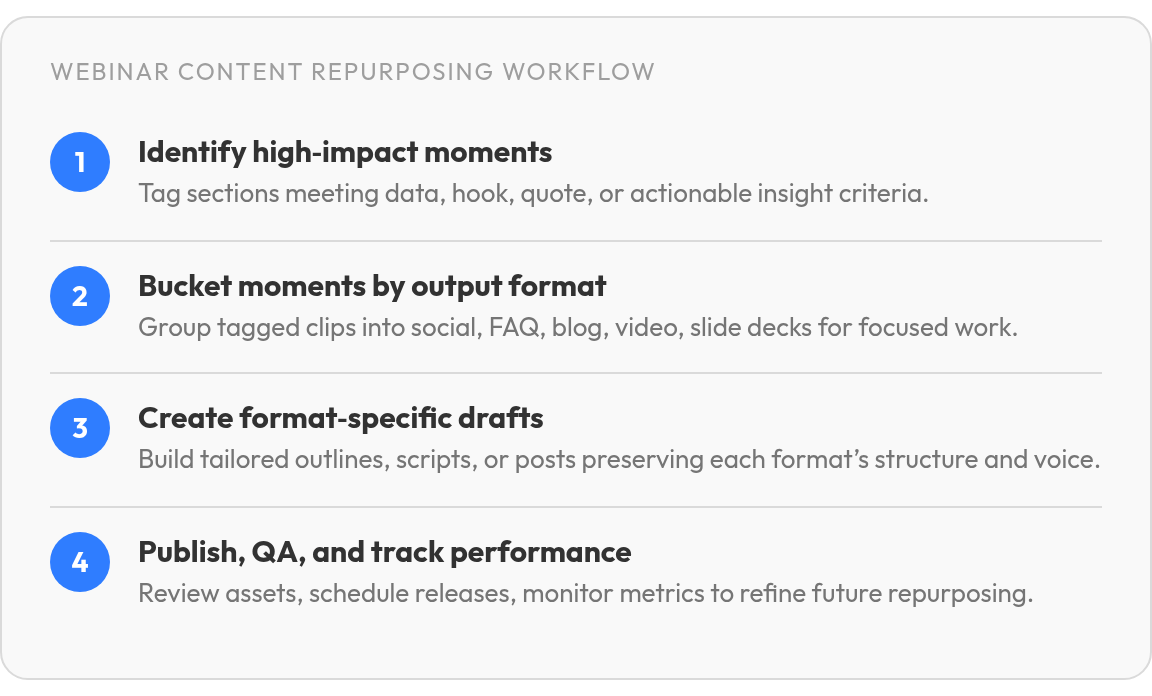
Step 1 – Pinpoint High-Impact Moments in the Recording
Most recordings sit unwatched because the team never made a map. Before any content repurposing strategy can work, you need to decide which parts of the recording are actually worth something to anyone.
We use a reliable editorial filter: a moment earns a tag if it does at least one of four things. It delivers a specific data point your audience can cite. It opens with a story hook — a problem, a tension, or a surprising contrast. It contains a direct attendee or speaker quote. Or it lands an actionable insight someone can apply immediately. Anything outside those four tends to read like a transcript summary, not a content asset.
Four Criteria, Not a Gut Check
The four-part test replaces the unreliable reaction of "that section felt interesting." A lively exchange can still lack the substance to stand alone, while a quieter explanation may provide the strongest material for a newsletter or article.
A citable point can anchor a headline or social post. A story hook can supply the opening of a blog article. A quotation can give a guest post or email a human voice. An actionable insight can become a checklist or short video. Tagging why a moment matters makes the format decision much easier later.
Bucketing Before You Build
Once you've tagged the moments, group them by what they can become, not by subject. A stat and a speaker quote go into the social-post bucket. A dense Q&A sequence goes into the FAQ or long-form blog bucket. A clear step-by-step walkthrough goes into the short-form video or slide-deck bucket. Your team stops staring at a raw transcript and starts working from pre-sorted material. That same pre-sorting logic is what makes AI-assisted, multi-platform repurposing faster down the line.
The buckets also reveal gaps. If one proposed format has no suitable moments, don't force it into the production schedule. Skip this tagging step for a purely product-demo webinar with no narrative arc — there's rarely enough editorial substance there to justify the time.
Step 2 – Turn Tagged Moments Into Format-Ready Drafts
The tagged moments from Step 1 give you raw stock. This step is where your content repurposing strategy gets structure, and where most teams lose momentum by treating every format the same way.
Each output format follows its own internal logic. Forcing the same draft into every channel produces weak content regardless of how strong the source material is. The format-by-format breakdown in our guide to AI content repurposing covers the platform-specific mechanics in more depth.
X thread. Open with the sharpest tension in the recording as your hook: one sentence, no throat-clearing. Follow with a short series of tweet-length points ordered so each one advances the idea rather than restating it. Close with a direct action step or a question that invites a reply.
Newsletter. Expand that thread structure. Open with a short paragraph that reframes the problem. Don't summarize the thread; find a fresh angle on why it still matters. Develop each body point into a compact paragraph that advances the idea. Close with one concrete action the reader can take before tomorrow.
Carousel. One idea per slide, no exceptions. Pull the single clearest claim from each thread point and cut everything else. If a slide needs two sentences, split it into two slides. End on the next step.
Short-video script. State the problem from your hook out loud in a few seconds. Follow with a few spoken points drawn from your tagged moments, each short enough to deliver without notes. Close with a direct prompt: comment, save, or link click.
Blog outline. Map your extracted bullet points to a working title that states the reader's outcome. Group related points under a few section headers, with supporting claims and one anchor each.
The conversion stage should preserve distinctions between outputs rather than multiply identical drafts. The same source moment can support several assets, but the opening, pacing, and call to action should be rebuilt for the destination.
Step 3 is the review pass before shipping: confirm the facts, voice, and platform fit of each draft. That check keeps a small error from becoming the audience's first impression.
Step 4 – Ship, Schedule, and Track What's Working
The part teams rush is the part that bites them. After your content repurposing strategy produces drafts across the five headline formats, the temptation is to queue everything and walk away. That review pass can save you from a stat that's off by a decimal point or a social graphic that crops your speaker's name out of frame.
QA is not optional. Run a specific checklist: confirm every data point against the original recording, verify formatting renders correctly on the target platform, read each piece aloud to check that the brand voice holds, and approve every visual asset at its final dimensions. If nobody on your team signed off on the creative, it doesn't ship.
A publishing calendar also prevents assets from competing with each other. Give the longer article room to establish the subject, then use shorter formats to point toward the recording, the article, or the relevant resource. Scheduling isn't just administrative — it determines whether the audience experiences a connected sequence or a pile of unrelated posts.
Which Signals Tell You What to Repeat
Publishing across channels without a measurement framework is broadcasting into a void. The signals that matter depend on which buyer need each asset serves. Email opens tell you whether your subject line earned attention. Clicks tell you whether the content inside delivered on that promise. Social impressions indicate reach, but reach without downstream action is just a number.
Build the habit of pairing each signal with a decision. If opens are strong but clicks lag, the content inside isn't matching the hook your subject line set. If social impressions spike but conversions stay flat, the asset is hitting the wrong audience or the call to action is buried. Track which format drives which signal, and you'll know which tactic deserves another run and which one to retire.
Skip granular attribution modeling if your team is small. A spreadsheet tracking opens, clicks, impressions, and conversions per asset is enough to spot patterns and make calls. Review those results alongside qualitative feedback, replies, questions, and direct messages, since a smaller audience response can reveal a useful editorial direction that raw reach misses entirely.
FAQ
What should we repurpose instead of a SlideShare if our webinar had no visual deck?
Start with material that does not depend on presentation design. The Q&A can become an FAQ page, a guest speaker can develop an expert-authored post, and the follow-up email can connect registrants with the most relevant resources. Those options use the discussion and transcript directly, so the lack of slides does not create a production gap.
Can we expand the X thread into a newsletter, or does the newsletter need its own separate draft?
Use the thread as source material, not as the finished newsletter. The short format tests which idea earns attention, while the email can add context, explain the consequence for the reader, and guide subscribers toward a resource. Rebuilding the piece also prevents the email from sounding like a string of disconnected social updates.
How do we know when to retire a repurposing tactic versus try it again with different source material?
Look for a repeated failure at the same stage of the reader journey. A format that consistently attracts attention but fails to prompt the intended next step may need a sharper call to action or a better audience match. If the same problem remains after those editorial adjustments, move the production time to a format whose results more clearly support the buyer need.
Does every moment in a webinar qualify for repurposing, or does most of the recording not meet the bar?
Most of the recording is supporting material rather than a standalone asset. The useful moments are the ones that can carry a clear promise without requiring the audience to watch the entire session first. Sections that need extensive setup can still help an editor build a larger article or email, but they should not automatically become independent posts.
