The Complete Guide to SEO Site Migrations Without Losing Traffic

Key Takeaways
- Conduct a pre-migration audit to identify crawl errors, broken links, and content gaps before launching changes.
- Implement 301 redirects in a staging environment to preserve link equity and avoid traffic loss during URL changes.
- Monitor traffic daily for 90 days post-launch to detect drops early and address issues like 404 errors promptly.
- Use tools like AnyPost.ai to track rankings, traffic trends, and crawl performance in real time during migrations.
- Validate all redirects pre-launch, as 17% of sites never recover lost traffic from incomplete redirect chains.
- Capture pre-migration traffic benchmarks to compare post-launch performance and identify anomalies effectively.
- Address 404 errors within 30 days post-launch to ensure crawl bots access new content and maintain SEO value.
Why SEO Site Migrations Matter
SEO site migrations can determine whether a business retains its online visibility or suffers a dramatic traffic drop. Poorly executed migrations often lead to traffic losses of 20–50%, with recovery times stretching beyond 18 months in many cases. For example, a domain change caused one company to lose 44% of organic traffic, while another saw rankings plummet by 50%. These examples underscore why strategic planning-like mapping 301 redirects and preserving content intent-is critical. A well-managed migration, however, can turn the tide: TransferWise’s switch to Wise initially cut traffic from 32.3 million to 13 million monthly visits but eventually surged to 205 million after a full redirect map was implemented, as detailed in the Post-Launch Monitoring and Recovery section. This shows that even major disruptions can recover with precision.
What Risks Do Unplanned Migrations Pose?
Unplanned migrations create three major risks: traffic loss, rankings decay, and revenue decline. Industry data reveals that 17% of sites never regain pre-migration traffic levels, even after 1,000 days. For businesses relying on search-driven leads, this volatility can erode customer trust and budget forecasts. Domain changes are particularly risky, with traffic drops typically ranging from 20–40%, while platform or protocol shifts (like HTTP to HTTPS) often cause 10–25% dips. These numbers highlight why treating migration as a technical checkbox rather than a strategic process is a costly mistake.
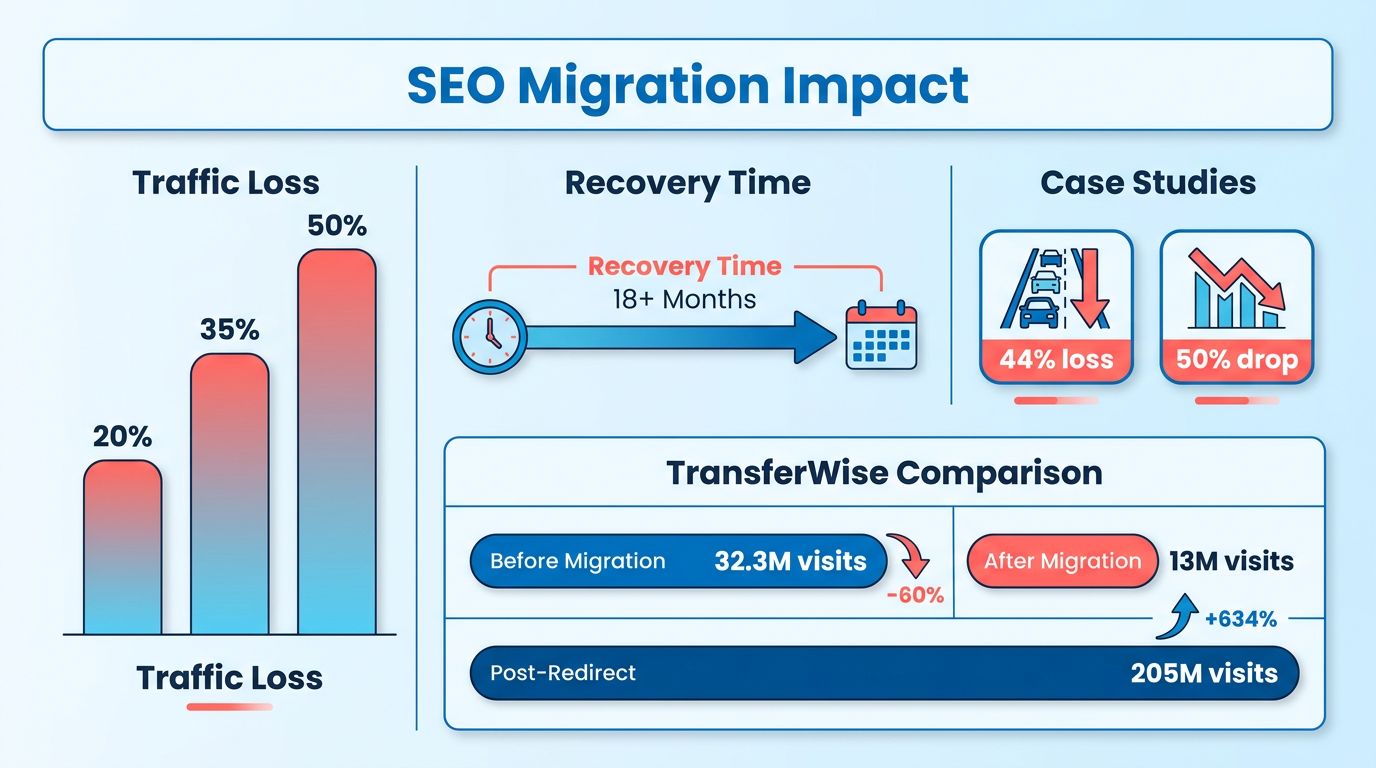
Real-world failures further illustrate the stakes. One company lost 50% of its rankings after a poorly mapped domain migration, while another faced a 30% traffic drop that took over six months to stabilize. These cases align with broader trends: an analysis of 892 migrations found an average recovery time of 523 days (18 months), emphasizing the long-term impact of rushed decisions. Conversely, businesses that prioritize pre-migration audits, staging environments, and post-launch monitoring avoid these pitfalls. For instance, Atlas Marketing’s 2026 checklist demonstrates how a 90-day recovery plan can mitigate risks by tracking crawl errors and traffic benchmarks weekly, as outlined in the Technical Execution: Redirect Mapping and URL Structure Changes section.
Who Benefits From a Successful Migration?
The primary beneficiaries include in-house marketers, founders, and teams managing revenue-dependent websites. For marketers, a smooth migration preserves SEO equity, allowing them to focus on content strategy rather than damage control. Founders gain peace of mind knowing their brand’s visibility isn’t compromised during technical overhauls. E-commerce and SaaS businesses, which rely heavily on search traffic, see the most direct revenue impact. A 20–40% traffic drop for an online store, for example, could translate to a $100,000+ monthly revenue loss during recovery.
Tools like AnyPost.ai’s AI SEO system streamline these efforts by automating aspects of content audits and redirect mapping. Their SaaS service helps teams maintain topical authority by analyzing keyword continuity and content quality during migrations, as emphasized in the Content Strategy: Preserving Topical Authority and Internal Linking section. This is crucial for preserving domain strength and ensuring search engines recognize the site as a reliable authority. For teams without dedicated SEO specialists, such tools reduce the risk of human error in complex tasks like URL inventory and canonical tag updates.
How Do Migrations Impact Revenue and Brand Authority?
A successful migration sustains revenue by maintaining traffic flow to high-converting pages. For example, a SaaS company that updates its pricing page without losing rankings ensures potential customers still find its offers. Similarly, preserving topical authority through consistent content structure and internal linking prevents competitors from capitalizing on gaps. Decoding’s 2026 guide notes that AI-driven visibility checks during migrations help identify broken links or crawl issues that could otherwise drive users away.
The long-term brand impact is equally significant. Consistent search visibility reinforces customer trust, while sudden traffic drops may signal instability to both users and algorithms. For businesses undergoing domain or platform changes, the post-migration 90-day period is critical. Continuous monitoring of metrics like bounce rate and dwell time, as outlined in Search Engine Land’s site migration guide, ensures teams address issues before they affect user experience or revenue.
By treating SEO migrations as a strategic process rather than a technical hurdle, businesses protect their online presence. The right tools-like AnyPost.ai’s AI-powered SEO systems-offer actionable insights to manage these transitions smoothly, turning what could be a disruptive event into an opportunity for growth.
Pre-Migration Planning and Auditing
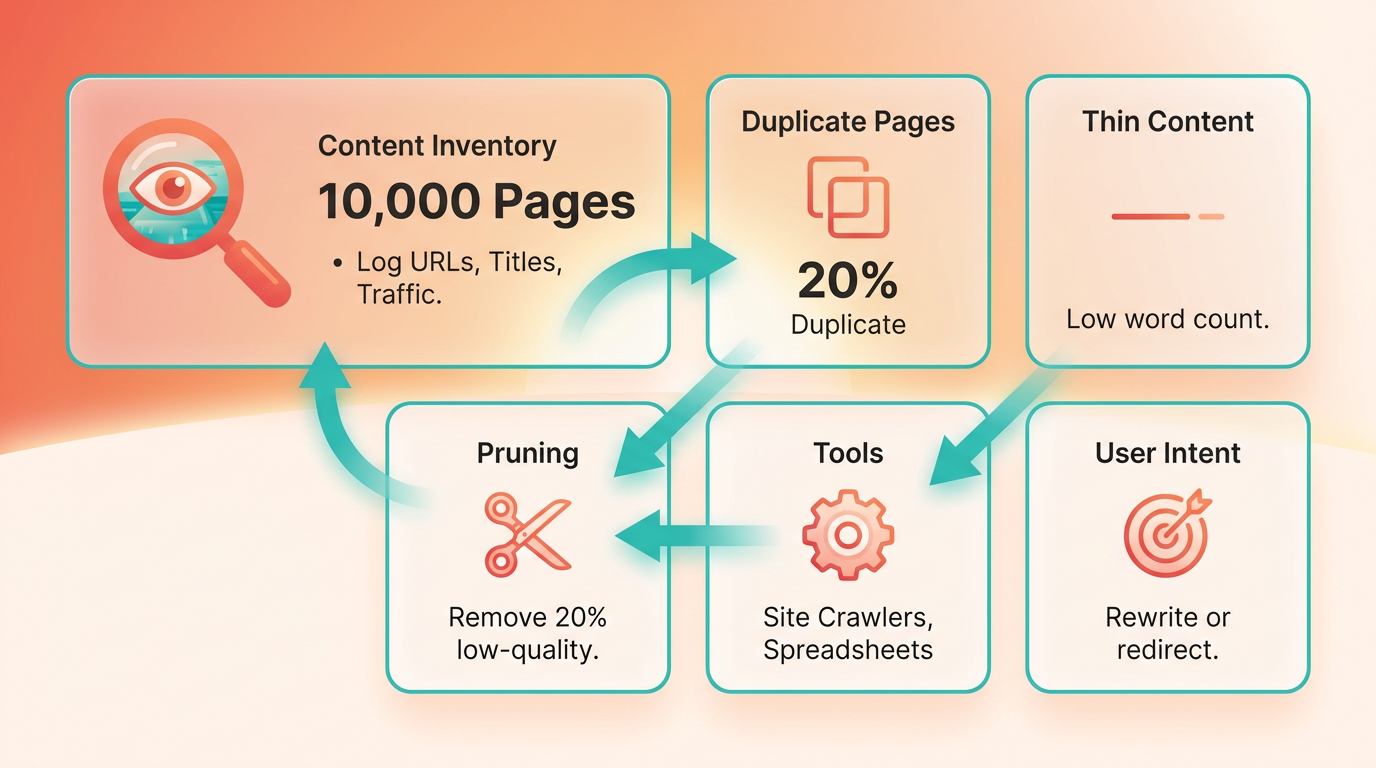
How Do You Conduct a Content Inventory? Start by cataloging every page on your current site, including blog posts, product listings, and internal resources. A content inventory helps identify duplicates, thin content, or outdated pages that need removal or updates. Use tools like site crawlers or spreadsheets to log URLs, page titles, word counts, and traffic metrics. For example, a company with 10,000 pages might find 20% of them are low-quality or irrelevant, requiring pruning. This step also reveals opportunities to consolidate similar content or repurpose underperforming pages. Focus on user intent-if a page no longer aligns with search queries or business goals, prioritize rewriting or redirecting it. As mentioned in the Why SEO Site Migrations Matter section, neglecting outdated content can lead to significant traffic losses.
What Technical Checks Should You Perform Before Migration? Technical audits ensure your new site won’t suffer from crawl errors or indexing issues. Start by analyzing crawlability using tools like Screaming Frog or Ahrefs to identify broken links, server errors, or pages blocked by robots.txt. For example, a misconfigured robots.txt file might prevent search engines from accessing critical pages, leading to traffic loss. Next, validate your sitemap and internal linking structure. Ensure all key pages are included in the sitemap and that navigation links are functional. Building on concepts from the Common Challenges and Solutions section, Atlas Marketing’s 2026 guide emphasizes testing your site’s mobile responsiveness and page speed, as poor performance can harm rankings.
How Do You Establish a Pre-Migration Baseline? Before launching your new site, capture a snapshot of your current SEO performance. Use Google Search Console to record metrics like indexed pages, click-through rate (CTR), and average position for keywords. In Google Analytics, track traffic sources, landing page performance, and conversion rates. This baseline lets you measure post-migration success and identify issues quickly. The TechCognates 2026 playbook suggests exporting historical data from both platforms to compare against post-launch metrics. As mentioned in the Post-Launch Monitoring and Recovery section, setting up alerts for sudden traffic declines using tools like AnyPost.ai’s AI-driven analytics can flag anomalies in real time.
Why Prioritize High-Value Pages for Migration? Not all pages are equal-focus on preserving content that drives the most traffic, conversions, or brand visibility. Start by identifying pillar pages, category hubs, and high-ranking blog posts. For instance, a B2B software site might prioritize its pricing page (which gets 30% of organic traffic) over older case studies. Use a spreadsheet to list these pages with details like keyword rankings, backlink profiles, and user engagement metrics. The Decoding guide warns that neglecting this step can lead to traffic losses-companies that failed to map top-performing URLs during domain switches saw up to 50% drops in rankings. Building on concepts from the Technical Execution: Redirect Mapping and URL Structure Changes section, these pages become the foundation of your redirect map, ensuring they retain their SEO value on the new site.
How Do You Create a Redirect Map? A redirect map links old URLs to their new counterparts, preventing 404 errors and preserving link equity. Begin by exporting all current URLs and matching them to new paths based on your site’s new structure. For example, if your old URL structure was /products/shoes and the new one is /shop/shoes, set up a 301 redirect to maintain rankings. Use tools like Excel or specialized migration software to organize redirects, and validate them in a staging environment before launch. As mentioned in the Why SEO Site Migrations Matter section, the Ranka 2026 guide highlights pitfalls like redirect chains (e.g., A → B → C) or loops (A → B → A), which confuse search engines. AnyPost.ai’s AI-powered redirect tools can automate mapping and detect conflicts, ensuring a clean transition.
Final Checks Before Launch. Once your audit, technical tests, and redirect plan are complete, run a final cross-department review. Confirm that internal teams (marketing, IT, customer support) agree on the new URL structure and that all canonical tags, schema markup, and meta data are consistent. A staged rollout-like migrating one section at a time-can help catch issues before full launch. Building on concepts from the Launch Day: Executing the Migration Plan section, this step ensures alignment across teams and minimizes post-launch disruptions. By following these steps, you’ll minimize traffic loss and position your site for long-term SEO success. For advanced strategies on AI-driven migration tools, explore How To Optimize SEO With AI SEO System.
Technical Execution: Redirect Mapping and URL Structure Changes
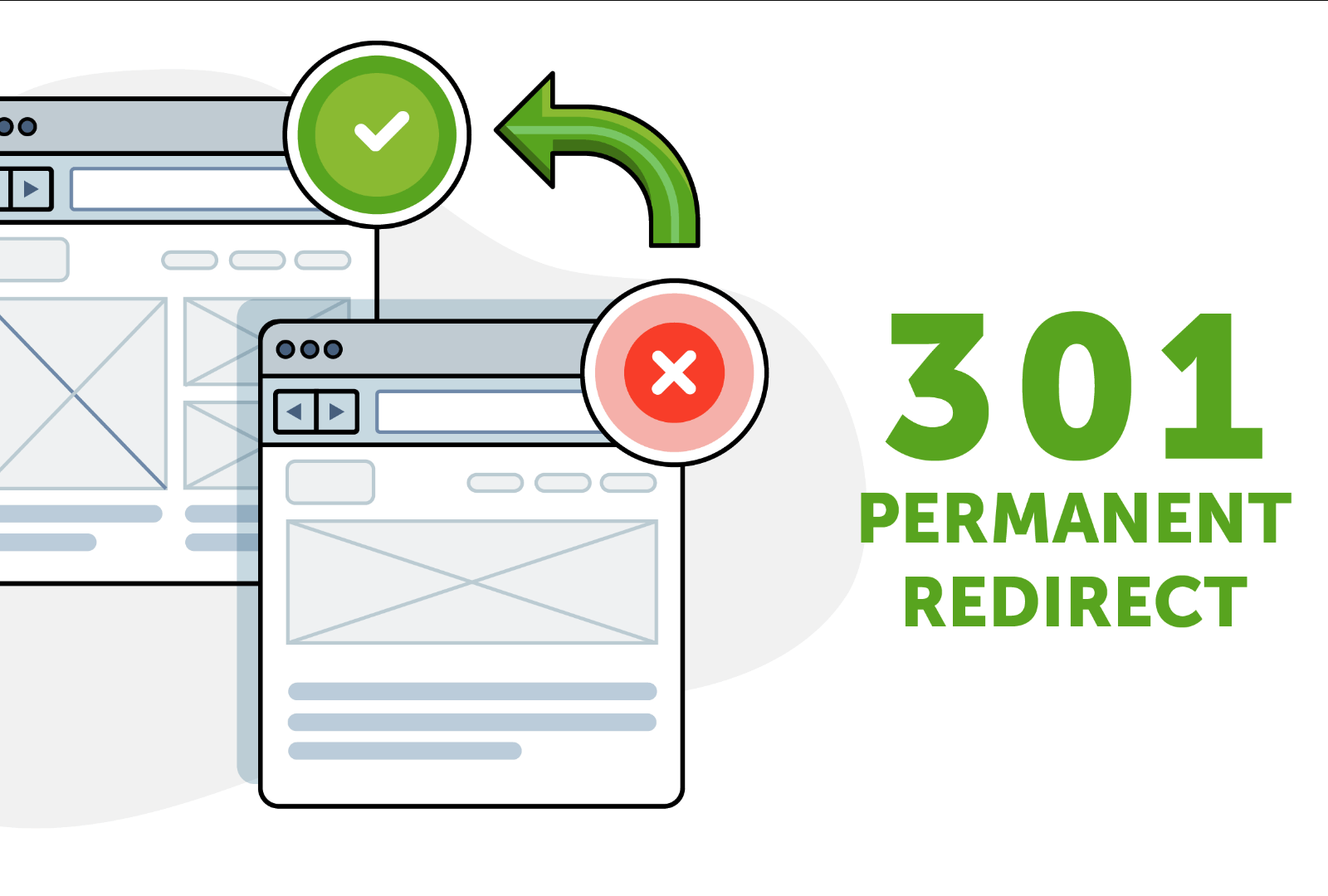
Start by auditing your current site to list every URL that needs a redirect. Use a 301 redirect for permanent changes, ensuring search engines pass link equity to the new URLs. A real-world case study shows the risks of skipping this step: When TransferWise migrated to Wise, traffic initially dropped from 32.3 million to 13 million monthly visits before rebounding to 205 million after a full redirect map was implemented. As mentioned in the Common Challenges and Solutions section, redirect chains can exacerbate such issues, highlighting the need for one-to-one 301s and avoiding redirect loops.
When redesigning URLs, focus on three key elements: preserving titles, meta tags, and structured data. Building on concepts from the Content Strategy: Preserving Topical Authority and Internal Linking section, semantic consistency in URLs ensures alignment with user intent and keyword research. For example, if your old URL was /services/seo, the new URL might expand to /search-engine-optimization/consulting to better match search queries.
Staging environments are critical for identifying 404 errors, redirect loops, and crawlability issues. As outlined in the Post-Launch Monitoring and Recovery section, submitting an updated sitemap to Google Search Console after validation helps track crawl errors effectively. Testing also helps identify orphaned pages-content with no incoming links-which should be fixed to maintain internal equity.
Content Strategy: Preserving Topical Authority and Internal Linking
A strong content strategy during an SEO site migration ensures your topical authority remains intact while maintaining the structural integrity of your internal linking. This section outlines actionable steps to safeguard your site’s SEO value, repurpose content effectively, and measure performance post-migration.
How Do You Preserve Topical Authority During Migration?
Topical authority depends on your site’s ability to dominate specific subjects through high-quality, relevant content. During a migration, merge duplicate or overlapping pages to consolidate authority. For example, if two blog posts cover similar topics, combine them into a single comprehensive guide and redirect the old URLs using 301 redirects. This avoids diluting your rankings across weaker pages.
Prune outdated or low-performing content that no longer aligns with your brand or audience needs. Tools like Google Analytics and Search Console help identify underperforming pages by analyzing metrics like traffic, bounce rate, and average session duration. When removing content, redirect links pointing to those pages to relevant, high-authority pages. This maintains your site’s relevance while preserving link equity. For a detailed approach to evaluating content, refer to the How Do You Conduct a Content Inventory section.
What Internal Linking Practices Prevent Page Authority Loss?
Internal linking reinforces your site’s hierarchy and distributes authority across pages. During migration, audit your existing internal links to ensure they point to updated URLs. Use a site crawler to detect orphaned pages-those without incoming links-and reconnect them to relevant sections. For instance, if a product page loses its internal links during migration, manually update navigation menus, blog posts, and category pages to restore connections.
Implement a canonical tag strategy to prevent duplicate content issues. If multiple URLs serve the same content post-migration, designate one as the canonical version. This tells search engines which page to prioritize for indexing. Combine this with a 301 redirect map to guide users and bots to the correct URLs. As mentioned in the Technical Execution: Redirect Mapping and URL Structure Changes section, avoiding redirect chains (e.g., A → B → C) by pointing all outdated links directly to the final destination is critical.
How Can You Repurpose Content for Consistency Post-Migration?
Content consistency is critical to retaining audience trust and search visibility. Use tools like Anypost.ai to repurpose existing content into new formats-such as social media snippets, email newsletters, or video scripts-without duplicating effort. For example, a long-form blog post on SEO strategies can be split into shorter, platform-specific versions for LinkedIn or Twitter. Anypost.ai’s AI-driven workflows automate this process while preserving your brand voice and SEO keywords.
Pair this with a content calendar to plan updates and new content around your migration timeline. Schedule audits every 30–60 days post-launch to refresh outdated links, add new internal connections, and align content with evolving search trends. The Decoding 2026 strategy recommends integrating AI search visibility into your calendar, ensuring your content aligns with how users interact with AI-powered assistants like Google’s Search Generative Experience (SGE).
How Do You Track Content Performance After Migration?
Post-migration, monitor key metrics like organic traffic, keyword rankings, and page load speed using Google Analytics and Search Console. Set up alerts for sudden traffic drops, which could indicate broken links or indexing issues. For instance, if a page’s traffic plummets after migration, check for crawl errors in Search Console and fix 404s by updating redirects. As discussed in the Post-Launch Monitoring and Recovery section, continuous tracking ensures long-term SEO stability.
Use Search Console’s URL Inspection tool to confirm migrated pages are indexed correctly. If a page is still indexed under the old URL, submit a new sitemap and request reindexing. Pair this with A/B testing tools to compare user engagement on redesigned pages, ensuring your content remains as effective as before.
By combining strategic pruning, strong internal linking, and AI-powered content repurposing, your site can emerge from a migration stronger than before. For deeper insights into AI-driven SEO workflows, explore how to optimize SEO with an AI SEO system.
Post-Launch Monitoring and Recovery
Post-launch monitoring is critical to ensuring your site migration doesn’t result in long-term traffic loss. Even the most carefully planned migrations can encounter unexpected issues, so continuous tracking of rankings, traffic, and technical health is essential. This section outlines actionable steps to monitor performance, resolve issues quickly, and create a recovery plan using tools like Google Search Console, Google Analytics, and AnyPost.ai..
How Do You Track Keyword Rankings and Traffic Post-Launch?
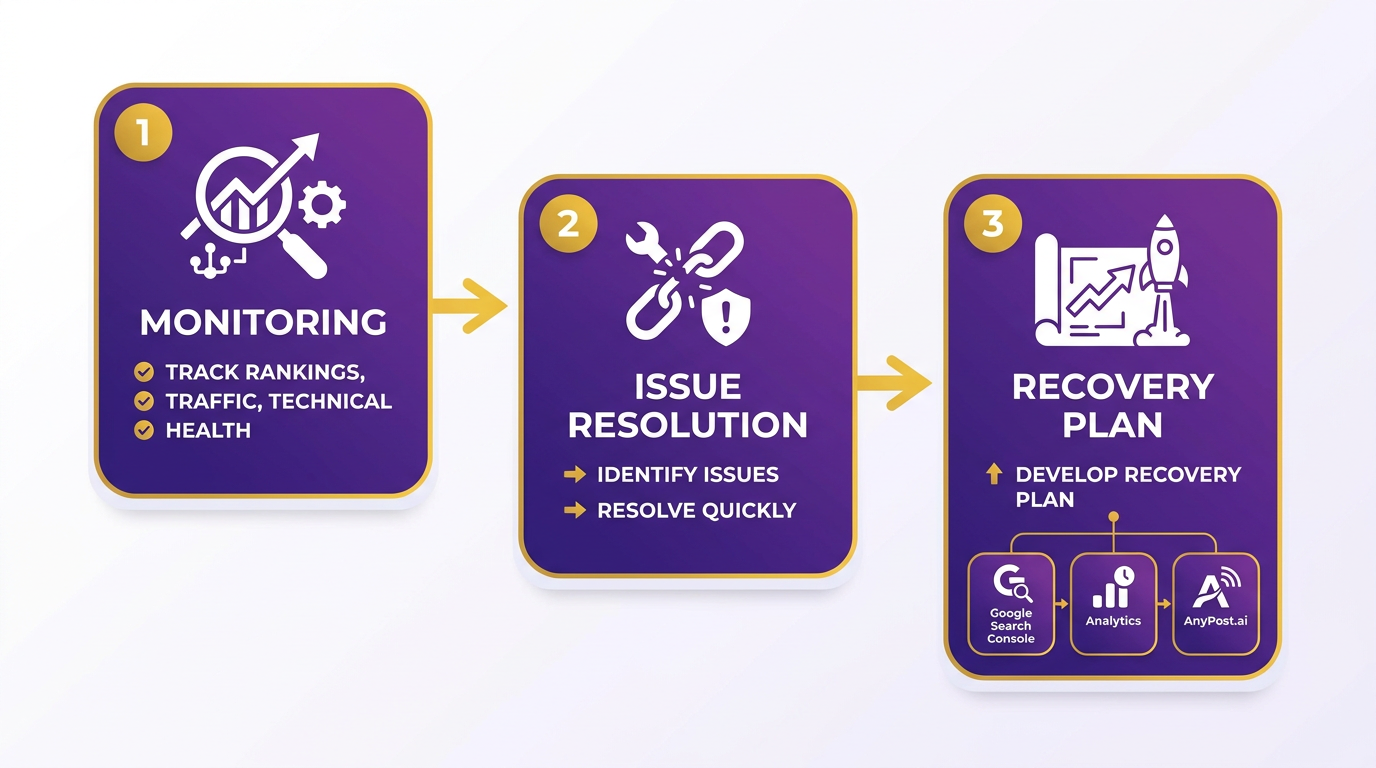
After migration, your first step is to compare your site’s performance against pre-launch benchmarks. Use Google Search Console to monitor organic traffic trends and identify ranking drops. For example, if your site experiences a domain change, expect short-term traffic dips of 20–40% (as noted in migration studies). Track keyword rankings using Google Analytics to segment traffic by source and identify anomalies.
A real-world example from the TransferWise-to-Wise migration shows how critical this is: traffic fell from 32.3 million to 13 million monthly visits initially but rebounded to 205 million after redirect fixes. As mentioned in the How Do Redirect Chains Cause Traffic Loss? section, redirect issues can severely impact traffic recovery. To replicate this success, establish a 30–60–90 day monitoring plan. Daily keyword tracking in Search Console helps pinpoint ranking shifts, while Analytics reveals traffic recovery patterns..
What Technical Issues Should You Monitor After Launch?
Technical issues like crawl errors, server errors, and broken redirects can silently erode traffic. Use Google Search Console’s Coverage Report to identify 404s, 500 errors, or crawl blocks. For server health, tools like uptime monitors can flag 5xx errors in real time. Redirect chains-where Page A redirects to Page B, which then redirects to Page C-are particularly harmful; audit these using a sitemap crawler or Search Console’s URL Inspection tool.
One study of 892 migrations found that 17% of sites never regained pre-migration traffic, even after 1,000 days. Common culprits included unresolved crawl errors and incomplete redirect maps. Building on concepts from the How Do You Create a Comprehensive Redirect Map? section, validate all URLs daily for the first month and fix errors within 24–48 hours..
How Can AnyPost.ai Streamline Post-Launch Monitoring?
AnyPost.ai offers a unified dashboard for tracking rankings, traffic, and technical SEO metrics, reducing the need to switch between tools. Its real-time alerts notify you of ranking drops or traffic declines, enabling faster fixes. For example, if a critical page’s traffic plummets, AnyPost.ai highlights the issue and lets you drill down into Search Console data to diagnose the root cause.
The platform also simplifies competitive analysis, showing how your rankings compare to competitors post-migration. Building on concepts from the Content Strategy: Preserving Topical Authority and Internal Linking section, this is especially valuable for high-stakes migrations where losing ground to competitors could be irreversible..
What’s a Post-Launch Checklist for SEO Recovery?
A structured checklist ensures no step is missed during recovery. Start by verifying all 301 redirects are functioning correctly, then audit internal links for broken URLs. Use Search Console to review indexing status and fix crawl errors. For technical SEO, confirm canonical tags are intact and schema markup is error-free.
Here’s a sample 30-day checklist:
- Days 1–7: Daily traffic and ranking checks; fix crawl errors.
- Days 8–30: Weekly audits of redirect performance and internal link equity.
- Days 31–60: Reassess content performance and update underperforming pages.
For deeper insights into AI-driven SEO recovery strategies, explore How To Optimize SEO With AI Seo System..
How Do You Respond to Traffic Drops?
If traffic declines exceed 30% post-launch, act immediately. Start by analyzing Search Console’s “Performance” tab to identify low-traffic pages. Cross-reference with Analytics to see if the drop is site-wide or page-specific. For domain-based migrations, check if Google has indexed the new domain correctly.
If the issue is localized, fix redirects or recreate lost content. If the problem is broader, consider submitting a new sitemap or requesting reindexing. In extreme cases, a temporary rollback may be necessary, though this should be a last resort.
By combining Google’s native tools with AnyPost.ai’s centralized tracking, you’ll minimize downtime and accelerate recovery. Stay proactive-every hour of delay increases the risk of permanent traffic loss.
Common Challenges and Solutions
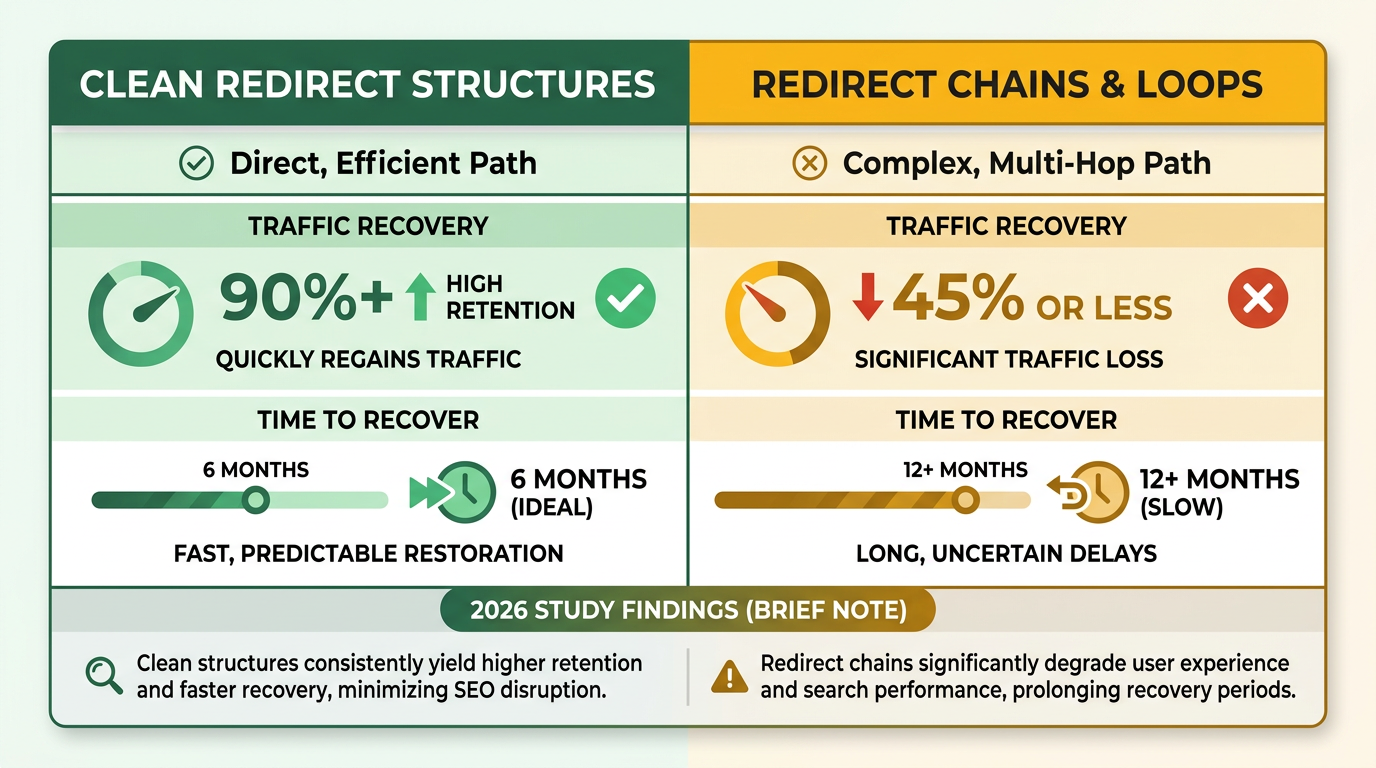
To solve this, create a single-source redirect map using tools like AnyPost.ai to audit and streamline paths. As mentioned in the Technical Execution: Redirect Mapping and URL Structure Changes section, a comprehensive redirect map ensures efficient URL transitions. Prioritize 301 redirects for permanent URL changes and eliminate unnecessary steps. A 2026 study found that migrations with clean redirect structures recovered 90% of traffic within six months, while those with chains took twice as long..
Why Are Crawl Errors a Silent Traffic Killer?
Crawl errors occur when search engines can’t access pages, often due to broken links or server issues. Building on concepts from the Pre-Migration Planning and Auditing section, proactive technical audits are essential to identify vulnerabilities before they impact traffic. Use tools like AnyPost.ai to automatically identify and fix broken internal and external links. For instance, during a domain change, crawl your site daily to catch errors like 404s or 500 server errors. A 2026 guide emphasizes that 80% of traffic recovery hinges on resolving crawl errors within the first 30 days post-launch..
How Can Stakeholders Avoid Miscommunication During Migrations?
Mismatches between technical teams and leadership often lead to rushed decisions. To align teams, establish a 30-60-90 day monitoring plan shared with all stakeholders. As highlighted in the Post-Launch Monitoring and Recovery section, continuous tracking ensures early detection of issues like server errors. Technical teams should validate redirect logic and canonical tags, while leadership tracks traffic benchmarks. A 2026 playbook notes that companies with clear communication protocols saw 3x faster recovery times than those without. Tools like AnyPost.ai help bridge gaps by providing real-time dashboards for both teams to track progress..
What Role Does Automated Link Management Play in Preserving Rankings?
Manual updates to internal and external links are error-prone and time-consuming. Building on concepts from the Content Strategy: Preserving Topical Authority and Internal Linking section, maintaining a cohesive internal linking structure ensures search engines continue to associate authority with the right pages. AnyPost.ai automates this process by scanning your site for broken links and suggesting fixes. One implementation example shows a 75% reduction in manual labor for link updates during a migration..
How Critical Is a Redirect Map for Avoiding Orphaned Pages?
Orphaned pages-content without backlinks-are invisible to search engines and users. As mentioned in the Technical Execution: Redirect Mapping and URL Structure Changes section, a comprehensive redirect map solves this by linking every old URL to a relevant new one. Start by crawling the current site to inventory all pages, then map them using a spreadsheet or migration tool. The 2026 Site Migration SEO Guide recommends cross-checking this map with sitemap submissions and crawl reports to catch gaps. AnyPost.ai’s automated tools can flag orphaned pages during this process, ensuring no content slips through..
What Happens If You Skip Post-Migration Monitoring?
Traffic drops often go unnoticed without continuous tracking. As emphasized in the Post-Launch Monitoring and Recovery section, monitoring crawl errors, traffic trends, and indexing status for at least 90 days is critical. Tools like AnyPost.ai allow you to set up alerts for sudden drops in organic search performance. A 2026 analysis found that 17% of sites never recovered traffic losses because teams stopped monitoring after 30 days.
Conclusion and Next Steps
A successful SEO site migration hinges on meticulous planning. Start with a pre-migration audit to identify crawl errors, broken links, and content gaps, as outlined in the Pre-Migration Planning and Auditing section. Map URLs systematically using 301 redirects to preserve link equity, and validate redirects in a staging environment before launch. Post-launch, monitor traffic benchmarks daily for the first 90 days to catch drops early. Tools like AnyPost.ai streamline this process by tracking rankings, traffic trends, and crawl performance in real time, ensuring no critical issues slip through.
For example, one company saved 50% of its traffic by implementing a full redirect map during a domain change. Conversely, 17% of sites never recover lost traffic, often due to incomplete redirect chains or ignored crawl errors, as discussed in the Common Challenges and Solutions section. A checklist should include:
- Inventory audit: List all pages, redirects, and canonical tags.
- Traffic benchmarks: Capture pre-migration metrics for comparison.
- Post-launch validation: Test redirects and submit updated sitemaps, as detailed in the Post-Launch Monitoring and Recovery section.
- Ongoing monitoring: Use tools to track recovery progress.
The work doesn’t end once the site launches. For the first 30 days, prioritize identifying and fixing 404 errors, ensuring crawl bots access new content, and updating backlinks where URLs changed. By day 60, analyze traffic trends against benchmarks and address any unexpected drops. By day 90, optimize underperforming pages and refine technical SEO elements like meta tags or internal linking.
Continuous monitoring is non-negotiable. A study of 892 migrations found an average recovery time of 523 days, highlighting the need for patience and persistence. AnyPost.ai’s AI-driven analytics can automate much of this work, flagging issues like broken links or sudden ranking declines. For instance, one business used similar tools to recover 80% of lost traffic within six months by systematically addressing crawl errors and improving content relevance.
Real-world data underscores the risks of poor execution. One case study shows a company’s traffic plummeting from 32.3 million to 13 million monthly visits after a domain change-until a complete redirect map boosted it to 205 million. This illustrates the power of precise URL mapping and post-migration adjustments, as emphasized in the Why SEO Site Migrations Matter section. Conversely, 44% of migrations face significant traffic loss when teams treat SEO as an afterthought, per industry reports.
To avoid these pitfalls, adopt a proactive mindset. For example, a 30-60-90-day recovery plan, as outlined in multiple guides, helps teams stay agile. Start with daily checks, shift to weekly reviews after 30 days, and focus on long-term optimization by day 90. Pair this with AnyPost.ai’s tracking capabilities to maintain visibility into performance metrics.
SEO site migrations demand precision, but the rewards-stable rankings, preserved traffic, and long-term growth-are worth the effort. Start by auditing your site’s current health, then follow a structured migration plan with AnyPost.ai’s tools to monitor every step. For deeper insights into AI-driven SEO strategies, explore How To Optimize SEO With AI SEO System or ChatGPT SEO Playbook.
Remember: 523 days is the average recovery time, but with the right tools and processes, your site can rebound faster. Begin today-your traffic depends on it.
Frequently Asked Questions
1. What is the most critical step before starting a site migration?
Conducting a pre-migration audit to identify crawl errors, broken links, and content gaps is essential. This step prevents traffic loss and ensures a smooth transition, as 17% of sites fail to recover lost traffic from overlooked issues.
2. How long should traffic be monitored after a site migration?
Daily traffic monitoring is required for 90 days post-launch. This period allows early detection of drops caused by 404 errors or redirect failures, which are critical to address within 30 days for full recovery.
3. Why are 301 redirects vital during a migration?
301 redirects preserve link equity and prevent traffic loss by mapping old URLs to new ones. Incomplete redirect chains cause 17% of sites to permanently lose traffic, making validation in a staging environment non-negotiable.
4. What tools can track SEO performance during a migration?
Tools like AnyPost.ai provide real-time tracking of rankings, traffic trends, and crawl performance. They help identify issues like broken links or ranking drops, ensuring quick resolution during migrations.
5. How should 404 errors be addressed post-launch?
Fix 404 errors within 30 days to maintain crawl bot access and SEO value. Unresolved errors block bots from indexing new content, leading to prolonged traffic declines and reduced search visibility.
6. What is the average recovery time for post-migration traffic?
Recovery typically takes 523 days on average. Continuous monitoring and prompt fixes for issues like redirect errors or crawl problems are essential to accelerate recovery and minimize long-term losses.
7. How can pre-migration benchmarks improve post-launch analysis?
Capturing traffic metrics before migration provides a baseline for comparison. This allows teams to identify anomalies, measure recovery progress, and validate the success of fixes like redirect updates or content optimizations.
