The Real Advantage of Automated Rank Tracking Software: Finding Bottom-Funnel Wins Before Traffic Slips

Quick Summary
A ranking drop gets expensive before anyone notices it. Automated rank tracking software runs daily checks and alert thresholds, so bottom-funnel slips and striking-distance chances surface while a content refresh can still fix them.
This is the morning view a busy founder should scan in two minutes. The rows are illustrative examples, so swap in your own pages and numbers.
| Keyword / page | Current rank | 7-day change | Alert trigger | Striking distance? | Est. Traffic or lead impact | Suggested action |
|---|---|---|---|---|---|---|
| "[product] pricing" / pricing page | 8 | Down 5 | Moved more than 3 positions | No | High: money keyword | Refresh copy, check what changed in the SERP |
| "[product] alternative" / comparison page | 14 | Up 2 | None yet | Yes (11 to 20) | Medium | Expand comparison, add internal links |
| "[product] integration" / feature page | 19 | Down 4 | Close to leaving the top 20 | Yes | Medium | Refresh this week |
| "[use case] software" / landing page | 9 | Up 6 | New entry into the top 10 | No | Rising | Tighten the CTA, keep monitoring |
- Daily data catches what averages hide. A page slipping from position 3 to 8 can lose a large share of traffic before the next manual review. Google Search Console's 28-day position average tends to blur that move for weeks.
- Thresholds turn movement into lead math. Estimated lead change = estimated traffic change × your conversion rate. Recovering 400 visits at a 2% conversion rate works out to roughly 8 leads. Use your own conversion rate, not a benchmark.
Stable, evergreen informational posts don't need daily alerts. A weekly or monthly check usually covers them.
Key Takeaways
- Revenue pages carry the most risk from slow detection. A small slip there can turn into real lead loss before the next manual review.
- Page-one position drops often hide in Search Console's 28-day average, so daily checks catch the slide before it costs traffic.
- Prioritize by lead impact, not position. Translate each ranking move into expected visits, conversions, and refresh effort.
- Pages sitting just outside page one are often the highest-return refresh targets, because modest updates can move them into view.
- Weekly spreadsheet reviews leave room for delay. Automated Slack or email alerts surface important movement the same day.
- Striking-distance keywords drift in and out often, so a snapshot from last month is a poor basis for this month's refresh queue.
Where daily tracking actually pays for itself
Our recommendation is simple: put daily tracking and instant alerts on the pages that make money, and let everything else ride a slower cycle. That's the split where the advantages of automated rank tracking software are biggest and the noise is smallest.
The reason is the gap between a ranking slip and someone noticing it. Manual rank checks charge a hidden tax. Someone opens a spreadsheet, types keywords into a browser, copies positions, and repeats the routine across several tools. That chore can swallow whole afternoons, and it only catches what had moved by the time you looked.
Automation closes that gap. Daily checks flag a drop quickly, and threshold alerts push it straight to Slack or email, so nobody has to remember to open a report. Since click-through rate falls steeply as a result moves down the page, a few days of lag on the wrong page can cost real pipeline.
Bottom-funnel keywords pay back fastest
A bottom-funnel keyword is a search someone types when they're ready to buy, compare, or book, like "[product] pricing" or "[service] near me." These terms bring in leads, so a slip hits revenue directly. They also tend to recover quickly because the page already exists and already converts.
The second group worth watching closely is the page-two candidate. That's a URL relevant enough to rank but not strong enough to earn consistent clicks. These pages are usually better refresh targets than brand-new content because the foundation is already built. You're renovating, not pouring concrete.
Finding the keywords stuck just off page one
The keywords costing you the most usually aren't on page three. They're parked just outside page one, close enough to tease you and far enough down that few searchers click. Daily data lets you pull every term in positions 11 to 20 into one bucket, instead of stumbling across them months later.
Build the bucket from a daily export
Start with a fresh export of every tracked keyword, its current rank, and its monthly search volume (how many people search that term each month). Filter to positions 11 through 20. Then add two columns: the ranking URL and a plain intent label such as pricing, comparison, how-to, or brand. That sheet is your striking-distance bucket.
Rebuild it from recent data each time rather than recycling an old list. A keyword that looked promising last month may have already broken through, slipped away, or shifted intent entirely.
Conversion value outranks raw volume
Sort by volume alone and you'll often work on the wrong pages. Score each keyword on traffic potential and on buying intent, then multiply the two. A modest "[product] alternative" term just outside page one often deserves attention before a glossary term with slightly higher volume.
An integration landing page close to page one is a good example. It may need a clearer use-case section, stronger internal links from related feature pages, and a more direct CTA for visitors comparing tools. Informational terms with no path to a lead can wait. Refresh hours tend to pay back faster on pages that sell.
Alerts that catch the slide while it's happening
A weekly spreadsheet dump tells you what broke last week. A push alert tells you what's breaking this morning. That timing difference matters most for the striking-distance bucket you just built.
In the spreadsheet workflow, someone exports positions on Monday, eyeballs the deltas, and flags whatever looks off. Anything that moves after that review sits unnoticed until the next routine check. An automated alert lands in Slack or email when the tracker sees the move, so the refresh can start before losses stack up.
Three triggers cover most of the risk
For bottom-funnel and striking-distance terms, alerts on three events tend to cover most of what matters:
- A swing of more than 3 positions in either direction, so you catch gains worth reinforcing as well as drops.
- A new keyword entering the top 10, often a page close to winning that deserves a quick update.
- A page falling out of the top 20, a sign the content has lost relevance and needs more than a tweak.
Each alert works best when it maps to one next step: open the ranking URL, compare it with the pages that passed it, and queue a refresh brief.
Fewer alerts get read
Alert fatigue sets in fast. Set a tiny threshold across your whole keyword list and the channel fills with noise people learn to mute. Keep instant alerts for money and striking-distance terms, and push evergreen pages into a weekly automated SEO report. Stable brand terms rarely need an interruption every time the SERP changes.
Turning a rank drop into a quick content refresh
An alert is only half the job. The part most teams underestimate is the hour after it fires, when someone has to decide what to change on the page. That hour is where tracking either pays off or quietly evaporates.
Near-page-one pages tend to reward the lightest touch. If a URL already ranks for the right query, a targeted update is often more useful than a full rewrite. You're not reinventing the page. You're closing the gap between what your result offers and what the current winners answer better.
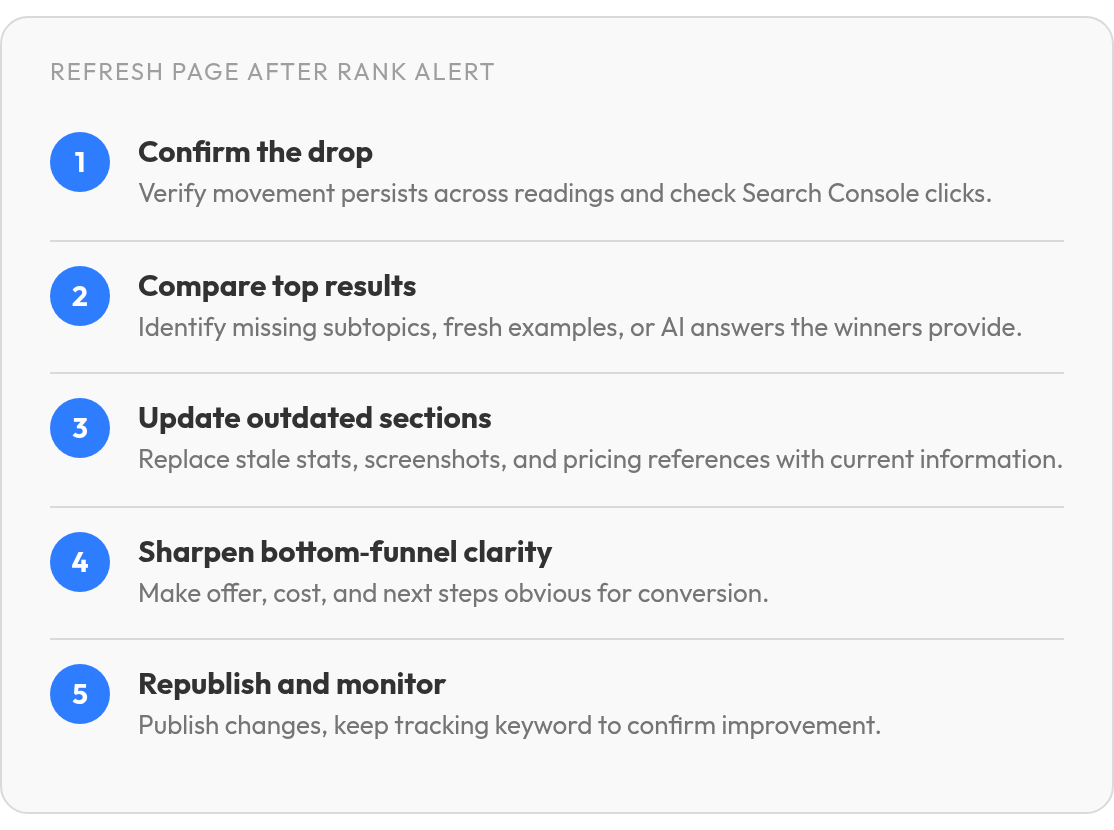
Five checks before you republish
- Confirm the drop. Make sure the move holds across more than one reading and isn't a one-day wobble. Then cross-check clicks in Search Console.
- Compare against the current top results. Note what they cover that you don't: newer subtopics, fresher examples, or the answer an AI Overview cites.
- Update outdated sections. Swap stale stats, screenshots, and pricing references first. Content decay often hides in those details.
- Sharpen bottom-funnel clarity. Make the next step obvious. Spell out who the offer suits, what it costs, and how to start.
- Republish and keep watching. Leave the keyword on active tracking so you can see whether the refresh worked.
Lead math beats rank math
We don't promise a fixed lead lift for a two-position gain, and you shouldn't either. Anyone quoting one is guessing. Use a simple formula instead: incremental leads = incremental organic visits × conversion rate.
Run each candidate page through that estimate and weigh it against the hours the refresh will take. A page with clear commercial intent can justify an afternoon of edits even when its traffic upside looks moderate. Low-intent informational pages often won't clear the bar, so they go to the back of the queue.
A dashboard built around decisions, not positions
Most rank reports fall apart at the last step. They list hundreds of positions and leave someone to work out which few rows deserve attention before lunch. The same daily data can sort itself into decisions, but only if you build the dashboard around actions instead of raw numbers.
Freshness is what makes that work. A good dashboard shows material movement while there's still time to investigate, compare the SERP, and assign a page update. If it only confirms what everyone suspected weeks ago, it's just an archive.
Which widgets earn a spot?
Cap it at five widgets, each tied to an action:
- Ranking drops list the pages you investigate today.
- Striking-distance keywords list the refresh candidates sitting just off page one.
- Top-10 entrants flag new wins you can reinforce with internal links.
- Top-20 dropouts catch pages losing their foothold before they disappear.
- Competitor benchmarks track share of voice, meaning your slice of total visibility across the keyword set. Average position alone can hide a rival steadily taking ground.
What goes in the bottom-funnel report?
Give each keyword one row with these fields: keyword, URL, current position, position change, alert trigger, intent level, owner, action, and estimated traffic or lead impact. The owner and action columns are what turn a report into a to-do list. Sort by lead impact, and pricing and comparison pages rise above informational posts that move a lot but convert little.
If you track a small, stable keyword set, skip the widgets entirely. A sorted weekly table will do the job.
Your next move: collect the history that makes prediction possible
Every alert in this article has one limit: it fires after a ranking has already moved. That's worth planning around. The daily history you collect now may become the raw material for prediction later.
It's the difference between reading a tide table and waiting for the water to reach your feet. Months of daily positions show which pages wobble before major updates, which rivals tend to climb in the same weeks, and which bottom-funnel terms hold steady. Machine-learning alerts may eventually flag those patterns early, but the history has to exist before prediction can work.
Where should AI take over, and where shouldn't it?
We see the clearest payoff in two jobs, though this is still early. The first is forecasting volatility (how much a ranking swings) on money pages. The second is suggesting new bottom-funnel topics drawn from the pricing and comparison queries you nearly rank for. Both could turn data you already have into a short list of next actions without adding headcount. Those are the jobs we think lean teams should hand to software first, and we lay out the reasoning in our look at where automated SEO tools are heading.
Go slower with automated backlink acquisition. Outreach at scale tends to produce links no editor would place by choice, and those links can cost you more than they earn. If you only track a handful of keywords, skip prediction for now. A simple alerting and review workflow will cover you this quarter, and the history it builds will still be there when you're ready for more.
Quick Questions, Straight Answers
Is Google Search Console enough for tracking bottom-funnel rankings?
Search Console is useful for validation, especially when you want to see whether impressions and clicks changed after a ranking move. It is less useful as the first alarm bell. For revenue pages, use rank tracking to spot movement quickly, then use Search Console to confirm the business impact.
What should you do if a ranking alert turns out to be a one-day blip?
Do not rewrite the page immediately. Check whether the same URL keeps moving in the wrong direction, look at the SERP that triggered the alert, and decide whether competitors actually changed the answer set. If the result snaps back, log it and move on.
Do more alerts mean better protection against traffic loss?
Not usually. More alerts can make the important ones easier to miss. The safer setup is a narrow instant-alert list for keywords tied to revenue, with lower-priority terms routed into a recurring report.
How do you choose between refreshing a high-volume informational page and a lower-volume comparison page?
Choose the page that is more likely to create pipeline, not the one with the biggest search volume. A comparison query usually signals a visitor who is closer to buying, while an informational query may attract readers who never become leads. Prioritize the refresh that has the clearest path from visit to conversion.
Does a small business with a short keyword list need AI-powered rank prediction?
Usually not. Prediction becomes useful when you have enough ranking history for patterns to emerge. For a small list, focus on clean tracking, sensible alert rules, and regular review before adding another layer of software.
