Turn Existing Content into Fresh Posts Quickly

The expensive part of content is the post you already wrote
The costly part of content usually isn't the blog post sitting in your CMS. It's the weeks that post sits idle while your team rebuilds the same ideas from scratch for every new channel. That hidden tax compounds. Each network you add can mean another feed to fill, another format to learn, and another calendar slot that won't fill itself.
You can't hire your way out of that cadence. So when we think about how to automate content creation for SEO and social, we start with distribution, not drafting. The model is one evergreen asset adapted across several channels, not five assets built separately.
Why not just write more new content?
Repurposing tends to return more per hour. The research, the outline, and the hard thinking are already done, so adapting that work costs far less than starting over. Buffer's guide offers a useful benchmark it calls the 5-to-1 rule: aim for at least five smaller social posts from every long-form piece.
Reach is part of it too. Buffer notes that repurposing can expand reach and support SEO by targeting similar keywords across different platforms. One strong article can feed a newsletter, a LinkedIn carousel, and a short video script without anyone reopening the research doc.
There's a catch. Repurposing isn't crossposting, which shares content as-is, and it isn't reposting, which repeats it on the same channel. That distinction is a warning against copy-paste, not against repurposing. Change the format and the angle, and the post feels new to the person scrolling.
Keep the ambition in check. You don't need to be everywhere. Buffer recommends focusing on platforms where your audience is actually active and where you have the bandwidth to keep quality up. A well-adapted post on two channels often does more than a thin one stretched across six.
Where manual repurposing eats your week
The time doesn't vanish in one big task. It leaks out through fragmented workflows: copy-pasting between docs, rewriting channel by channel, resizing visuals, chasing separate approvals. The difficulty ratings below are our editorial workflow estimates (1 = easy, 5 = hard), not platform data.
| Format | Manual effort | AI-assisted adaptation | Difficulty |
|---|---|---|---|
| Blog page | Re-edit, re-optimize | Drafted updates, human review | 2 |
| Newsletter | Rewrite intro | One key takeaway pulled out | 2 |
| X thread | Compress into hooks | Drafted from headers | 3 |
| LinkedIn carousel | Outline and redesign slides | Slide copy drafted, design check | 4 |
|---|---|---|---|
| YouTube script | Rewrite for speech | Script drafted, voice edit | 5 |
Notice the pattern. The further a format drifts from written prose, the more a human has to stay in the loop.
The playbook at a glance
- Repurposing works best when one researched source becomes multiple channel-specific assets, not a batch of copied excerpts. Buffer's 5-to-1 rule (five social posts per long-form piece) is a reasonable starting target.
- Pick sources by goal: social momentum calls for conversation signals like mentions, comments, and shares, while traffic campaigns need evidence of click-through.
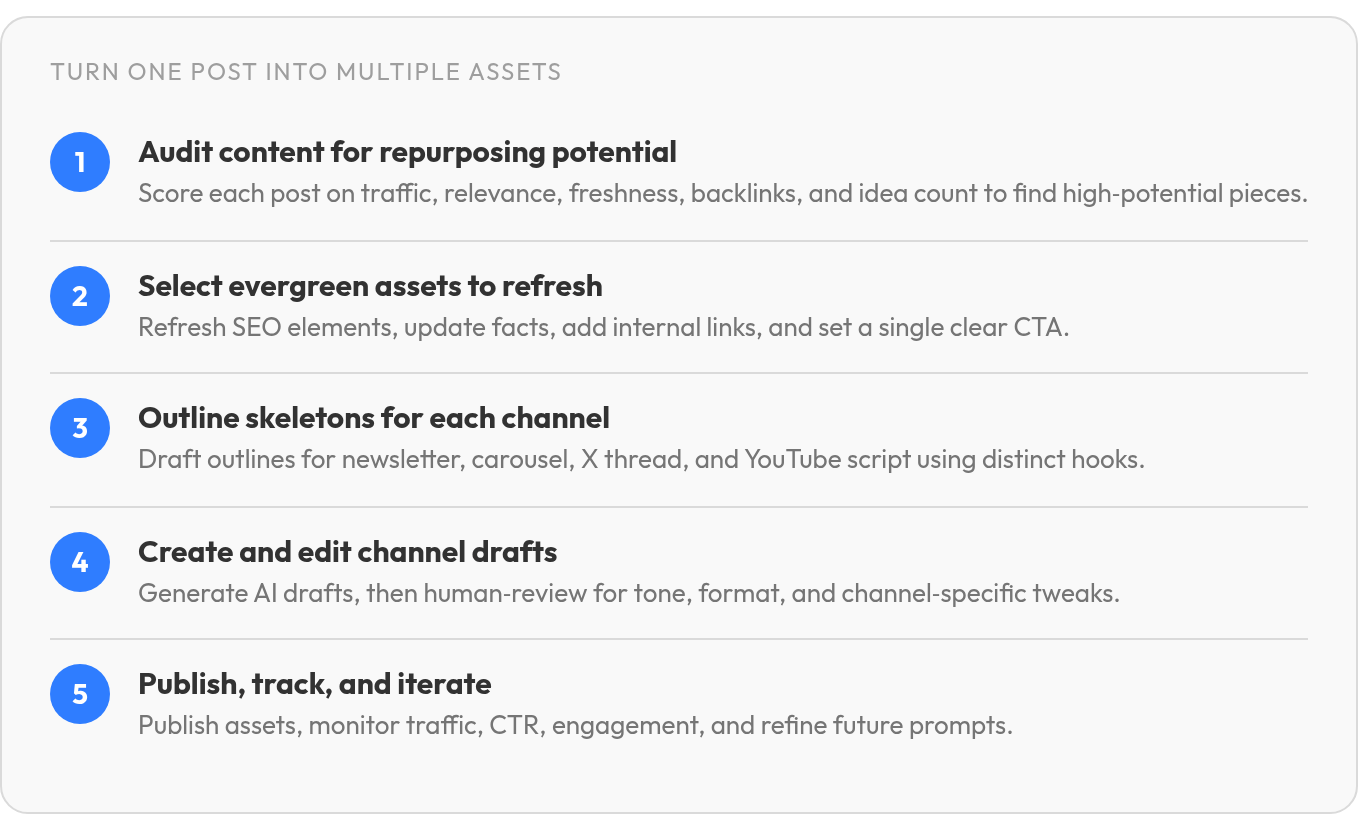
- A practical audit scores each asset on traffic, backlinks, relevance, freshness, and how many standalone ideas it holds.
- The heavier the format shift, the more editorial judgment it needs. A spoken script rates a 5 on our difficulty scale; a blog update rates a 2.
Finding the evergreen posts worth a second life
Your most popular post is often the wrong one to repurpose first. A piece can rack up pageviews and still produce flat social posts, because the metric that matters depends on what you want. Chasing follower growth? Look for content with the most mentions, comments, and shares. Chasing traffic? Look for high click-through rates. Raw popularity tends to blur those two goals into one muddy number.
That split shapes everything downstream. Before you automate anything, you need a shortlist that deserves the automation. Otherwise you just scale weak ideas faster.
Build a content scorecard before you write a single prompt
A plain audit sheet is enough to start. Make each row a published asset and score a handful of columns, such as:
- Traffic: how much the piece earns today
- Backlinks: how much authority it carries
- Relevance: how closely it fits what you sell now
- Freshness: how recently the facts held up
- Repurposing potential: how many distinct, self-contained ideas it holds
Then pull your performance dashboard up next to the sheet. Flag posts with strong historical performance, sections that have aged badly, keyword gaps, and passages that could stand alone as a post or page. An outdated section doesn't disqualify a winner. It often marks the cheapest place to add new value, as long as you refresh the page without losing the rankings it already holds.
Depth decides how many posts a piece can feed
More distinct ideas, more posts. A source can only become LinkedIn, X, Instagram, TikTok, or YouTube pieces if it has enough material. In-depth blog posts, long-form videos, and webinars tend to be the richest sources because they often cover several self-contained points you can slice into short segments.
Short posts are a different story. A 600-word piece rarely holds several separate ideas, and forcing it gets you multiple rewordings of one point. Audiences notice. Route short pieces through a lighter, single-post refresh instead of the multi-post queue.
Keep seasonal and event-specific content out of the quick-refresh lane entirely. Those pieces live or die on timing and shouldn't run on autopilot. Evergreen assets can go back into rotation right away, so they belong at the top of your scorecard.
Turn one article into five ready-to-post assets
The trap in a five-asset workflow isn't volume. It's sameness. Trim one blog post five ways and you get five shorter copies of the same article. Readers on every feed can tell. The fix is to give each asset a different job: one earns the click, another teaches fast, another restarts the conversation.
So we sketch a skeleton for each asset before any AI draft runs. The template below is an illustrative workflow built from one long-form source; treat it as a pattern, not finished output. We go deeper on the newsletter, X thread, and YouTube script versions in a separate walkthrough.

What each of the five assets needs
-
SEO-refreshed page. Rewrite the title tag and meta description around the query the page actually earns. Update headings, replace stale facts, and add internal links to newer posts. End with one clear CTA, not three competing ones.
-
Newsletter snippet. A teaser, one key takeaway, and a CTA. One sharp takeaway gives subscribers a reason to click; a generic excerpt doesn't. Treat this slot carefully, since a newsletter that reads like pasted copy can train people to stop opening it.
-
LinkedIn carousel outline. Open with a cover slide that names the problem. Give each middle slide one idea from the article, in order. Close with a recap slide and a nudge back to the full piece.
-
X thread. Lead with your most surprising claim. Sequence the follow-ups so each one survives being screenshotted on its own. Save the link for the end, after you've earned the click.
-
YouTube script. Write a tight intro that names the payoff, then break the article's sections into spoken segments and finish with a CTA. This one needs its own editing pass, because a sentence that reads cleanly on the page can often sound stiff out loud.
When to drop an asset
Skip the YouTube script if nobody on your team will record it. A script that dies in a shared folder is pure sunk cost. Cut any channel where your audience isn't active, too. Four assets on channels you can actually maintain tend to beat five spread thin.
Measuring what your repurposing engine actually produces
The number most teams watch after republishing is the wrong one. Raw reach tells you a post went out. It doesn't tell you whether the repurposed version earned attention or just filled a slot. Without that distinction, automation mostly scales noise.
Track four signals per asset, split by channel: organic traffic, click-through rate, engagement and reach, and conversions. A carousel and a refreshed blog page fail for different reasons, and blended totals bury both. Give clicks some patience as well. AI-generated answers in search can absorb some clicks that used to reach your page, even as people start searching for your brand by name. A flat click line next to climbing branded queries can still mean the asset is doing its job.
Why engagement quality matters more for recycled posts
Recycled content tends to land softer than fresh content. People who've already seen an idea often have less reason to stop for it again. The fix is usually the framing, not the substance: a new hook can give a familiar idea a fresh reason to be read. Organic social reach has also shrunk over time, so a weak opener can waste a post's only real shot.
So test, and keep each test simple:
- Use each network's native analytics.
- Change one variable at a time: headline, hook, format, or CTA.
- Post under comparable conditions, such as similar days and times.
- Compare CTR, engagement, and conversions, not likes alone.
During a regular review, feed the winners back into your brand-voice and prompt guidelines, and add qualitative feedback from your team and audience alongside the numbers. One tradeoff to accept: on channels where you post only a few times a month, skip formal A/B tests. The samples are too thin to tell you anything.
Your next move: scale the 5-to-1 workflow across your library
Batch it. Start with your strongest long-form assets from the scorecard and build the derivative pieces while the source is still fresh in your team's head. Measure for one cycle, then work down the list. Before rewriting older pages for search, protect the rankings they already hold.
The efficiency case is real, with a caveat. Adapting one asset into carousels, posts, and newsletters by hand can swallow whole afternoons, and automating that step, including publishing out to each channel, can hand a lot of that time back. Treat those hours as a testing budget, not a reason to post more. Recycled posts start at an engagement disadvantage, and the time automation frees up is what lets you test your way out of it.
FAQ
Is repurposing just a polite word for posting the same thing everywhere?
No. The source can stay the same, but the reader experience has to change. A good repurposed asset is rebuilt for the behavior of the platform: skimming a carousel, opening an email, watching a short video, or following a threaded argument. If the new version doesn't give the audience a different entry point, it probably needs another edit.
What if most of your archive is short blog posts?
Treat them as update candidates rather than full campaign engines. A short post can still become useful again with a cleaner headline, sharper CTA, stronger internal links, or a tighter social teaser. Just don't ask it to carry a whole series unless it contains enough separate ideas to support one.
Your refreshed page's clicks went flat. Did the repurposing fail?
Not necessarily. Look for evidence of movement around the page, not only on it. A refreshed asset may support awareness, branded demand, or social engagement before it produces a visible lift in page sessions. Review each channel on its own so one weak format doesn't distort the rest of the campaign.
Can AI handle repurposing end to end, with no human in the loop?
AI can speed up the drafting, but the last mile still needs editorial taste. Someone has to check whether the hook is credible, the examples fit the audience, the design works, and the script sounds natural when spoken. We built AnyPost.ai to turn one source into newsletters, carousels, and posts for LinkedIn, X, Instagram, TikTok, and YouTube; the best use of that speed is better review and testing, not skipping judgment.
