Turn One AI Blog Draft Into an X Thread, Newsletter, and YouTube Script

Quick Summary
This workflow takes one blog draft, either as a URL or as pasted text, and turns it into several channel-ready assets in a single automated run. According to the workflow's documentation, one form submission produces 7+ ready-to-use content pieces in under 2 minutes. We judge it on that full run, not channel by channel.
| Channel | Source Input | AI-Assisted Output | Documented Time | Core Benefit |
|---|---|---|---|---|
| X | One blog draft (URL or pasted text) | 7-tweet thread plus an alternative hook for A/B testing | Included in the same under-2-minute run | Two hooks to test against each other |
| Newsletter | Same draft | 3 subject lines (curiosity, benefit, direct), preview text, full body | Included in the same run | Subject-line options ready before you send |
| YouTube | Same draft | 60-second script (Hook → Problem → Solution → Proof → CTA) with visual suggestions | Included in the same run | A shot-ready structure instead of a blank page |
The review ratings below are our editorial estimate of how much human editing each asset tends to need. They aren't benchmark data. On a scale where 1 means light polish and 5 means heavy rework, we rate the X thread a 2, the newsletter a 3, and the YouTube script a 4. The script often needs the most work because its visual cues have to match footage you actually have.
A thin draft is the one input this can't fix. A weak argument gets copied into all three channels just as fast as a strong one.
What each channel needs from your draft
- Use one strong source draft as raw material for several channel-specific assets instead of rewriting for each channel from scratch.
- The X version should compress the argument into a tight sequence. Pasting article paragraphs won't work.
- The email version should tease the article and give readers a reason to click through.
- The video version needs spoken language, practical visual cues, and a final human pass before recording.
Why one draft should feed every channel
Most teams underestimate the work that comes after the post is written. Then come a fresh doc for X, another for email, and a third for video. An AI blog post generator covers the drafting half of that job. The repurposing half is the hidden tax, and it can swallow whole afternoons.
Our recommendation is to stop treating each channel as its own writing project. Feed one substantial draft into a single automated run instead. You drop in a blog URL, a YouTube URL, or raw text. The run reads the source and returns variations built for each platform rather than three rewrites of the same paragraph.
What lands in your doc after one run
The thread, newsletter, and script arrive in one formatted document, organized by platform, ready to copy, customize, and publish. Once the drafting time drops that far, source quality becomes the thing that limits you.
When the run isn't worth it
Thin inputs defeat the point. Short source material won't split into distinct assets, so you'll get near-duplicates in different formatting. The same goes for channels you don't actively maintain. Generating posts for a dormant account just adds to the pile.
Adapt each asset instead of republishing the same copy. We won't claim a duplicate-content penalty here, but identical copy reads as identical copy, and each channel rewards a different shape. We also won't claim this lifts lead conversion. What it does is put channel-specific starting points in front of your team early, so their time goes into improving assets instead of staring at blank documents.
Map your blog draft to channel blueprints
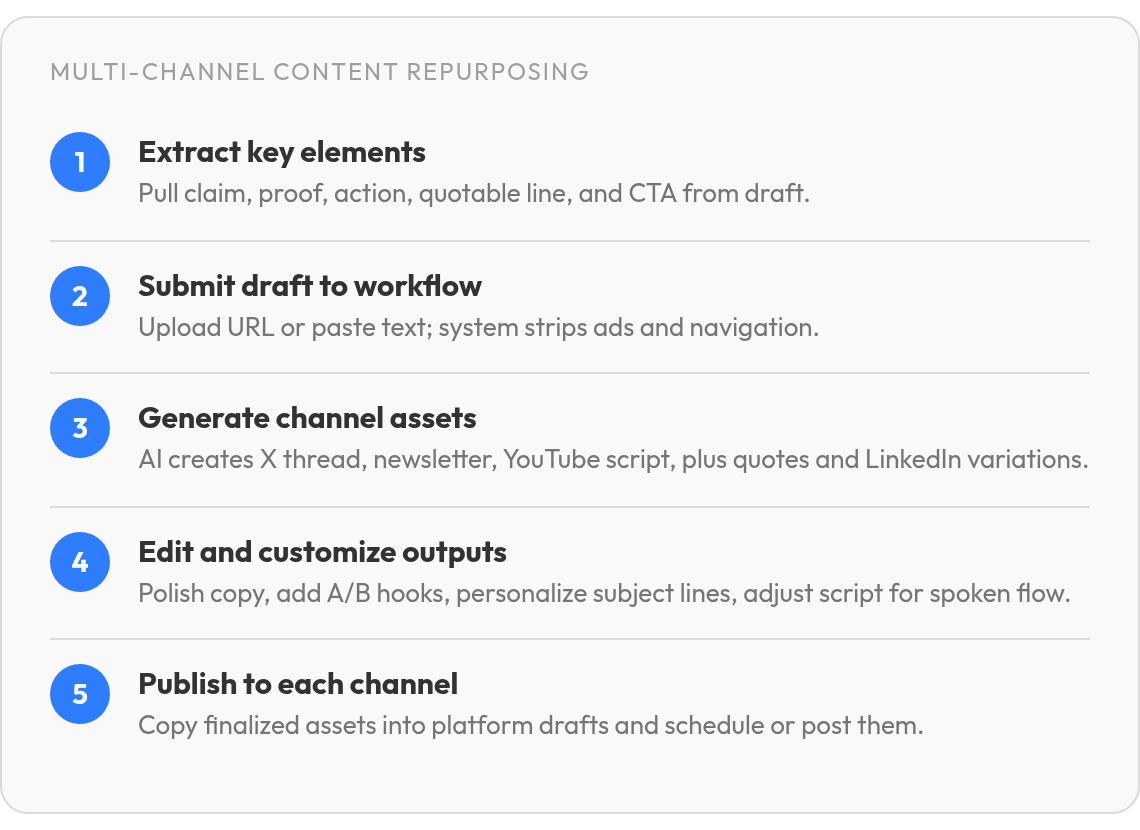
Weak repurposing runs tend to fail before the AI touches anything. The usual cause is a source draft that never committed to one clear argument. A blog post generator can produce long, smooth copy that still leaves a thread with little to say. So before you submit, pull the important parts out of the draft yourself.
Five pieces to pull before you hit submit
- Key claim: the one sentence you want readers to repeat.
- Supporting proof: the number, example, or result that backs the claim.
- Action step: what the reader should do tomorrow.
- Quotable line: a sentence that still makes sense on its own.
- CTA candidate: the next click you want.
If you can't fill this list, the draft isn't ready. Fixing it now costs less than reviewing several channels of vague output later. A draft with one clear argument and enough supporting material gives the model more to vary. Shallow material pushes every format toward the same generic point, which is why short news briefs rarely carry enough substance for a multi-channel package.
Where each piece ends up
The output blueprints stay the same between runs, so your extractions land in predictable places. The key claim usually drives the social opener and the start of the video. The supporting proof gives the middle of the thread and the validation beat in the script something concrete. The quotable line often becomes a hook candidate or a subject-line option. The action step and CTA candidate close each format.
Brand voice holds up best when you send the same target-audience and custom-instruction fields on every run and keep your tone guidelines in the prompt itself. Before publishing, check each generated asset the same way: the key claim should open the piece, the proof should stay concrete, and the CTA should fit the channel. Someone on your team should still read every piece before it ships.
Generate an X thread in minutes
A thread is a small container. Most threads fail because teams keep whole blog paragraphs and run out of room before the argument goes anywhere.
The blog post gives you the argument. The thread forces you to compress it. Break the job into four steps and let each one narrow the work:
- Extract: pull the main claim, one supporting detail, and the action step from the draft.
- Outline: ask for a short sequence of beats, one idea per post, with the payoff placed before the close.
- Draft: expand each beat into social copy that fits on a single screen.
- Refine: rewrite the opening hook and the closing CTA last, once the middle has settled.
We always ask for a spare opening line. A second hook gives you a simple A/B test without rebuilding the whole asset.
Why pasting blog paragraphs falls flat
The feed has its own rhythm: short lines, one idea at a time, visible structure, and emoji only where they help the sentence. Blog paragraphs ignore all of that. And if the draft has no single claim, don't bother with a thread at all. A string of hedged points reads as filler no matter how clean the copy looks.
Automation is most useful for the structure. Let the workflow turn the source into channel shapes, then have an editor tighten the language for the feed.
Spin a newsletter that keeps readers hooked
Newsletters built from a blog post tend to fail by copying the blog post. Paste the full draft into an email and readers get a wall of text with no reason to click. The blog is the long version. The newsletter should be the shorter, more pointed version that sends people back to it.
Each run returns subject-line options, preview text, a conversational body, and a closing CTA. You start from a finished campaign draft instead of an empty email template.
Tease the post instead of summarizing it
We build the body in three moves. Open with the problem behind your key claim in a sentence or two. Then give the single most useful insight from the draft, the one a reader could act on today. Close with a link to the full article and a CTA that tells readers what they'll get when they click.
Resist adding a second insight just because the blog has room for it. Every extra point you put in the email gives readers one less reason to open the post.
Pick the subject line yourself
The subject lines are options, not a ranked list. Curiosity tends to suit lists that already trust you. Direct suits readers who scan for usefulness. Benefit works when the payoff is concrete. Add personalization by hand where your subscriber data supports it, and if you want proof of which angle wins, split-test two of them on your own list.
Some audiences expect the full article in their inbox. For them, send the long body and drop the click-back CTA.
Draft a YouTube script you can actually say out loud
Written sentences can fall apart on camera. A line that reads cleanly in your post can trip you up when spoken, because the eye tolerates clauses the ear can't hold. Your post was written for readers. The script has to be rewritten for listeners, and teams often skip that step.
The script follows a compact persuasive arc: grab attention, name the problem, show the fix, make the case, and point viewers to the next step. Each beat maps to an extraction you already made. The quotable line can open the video. The key claim frames the tension. The action step becomes the practical turn, your proof supports the recommendation, and the CTA tells viewers what to do next.
Making written copy sound spoken
Read every line out loud before you keep it. Cut any sentence that takes two breaths to finish. Use contractions and the words you'd use with a colleague. If a line lists several items, keep the strongest one, because viewers can't scroll back.
Visual cues that pull their weight
The script comes with visual suggestions, and we treat them as a shot list. Put on-screen text over the proof beat when the evidence is worth remembering, since figures tend to stick better when viewers see them as well as hear them. A 60-second video has no room for B-roll that doesn't reinforce the claim.
Dense technical references are a poor fit for video. A compact script can't carry a long sequence of steps, so a thread or newsletter will usually serve that content better.
Because the script arrives with everything else, it's easy to trust it too much. Treat it as a first draft. Rehearse it once, fix every line you stumble on, and check that each on-screen figure matches your post before you record. That last check matters most, since the script is the asset we rate as needing the heaviest edit.
Common Questions
1. Can I start a repurposing run from a video or a live web page instead of a finished blog draft?
Yes. The source can be a finished article, a video link, or pasted copy. The important filter is substance: if the material is too short or too narrow, the generated assets will feel like the same idea wearing different formats.
2. Will posting the same draft on X, in email, and on YouTube trigger a duplicate-content penalty?
The bigger risk is reader fatigue, not a proven penalty. We don't claim search engines punish repurposed copy, but identical text reads as identical to anyone who follows you on several channels. Adapt each version to its channel's shape instead of republishing word for word.
