
Turn One Product Demo Into 12 Posts Across X, YouTube, and Your Newsletter

Key Takeaways
- The real work in content repurposing often starts after you publish, when each of the 12 posts gets tuned on its own to how its platform handles search and discovery.
- One demo can split into 4 X posts, 4 YouTube Shorts, and 4 newsletter teasers, each with its own hook style.
- Writing captions and reformatting copy per platform is often the main bottleneck, especially when every cut needs a different tone and CTA.
- Three ROI levers may matter once posts go live: search traffic lift, engagement rate per format, and lead capture from newsletter teasers.
Quick Summary
The part many teams underestimate isn’t turning a demo into 12 posts. It’s what happens after you hit publish. Most guides stop at the split. The real work often begins once each platform copy is live and needs to be discovered on its own.
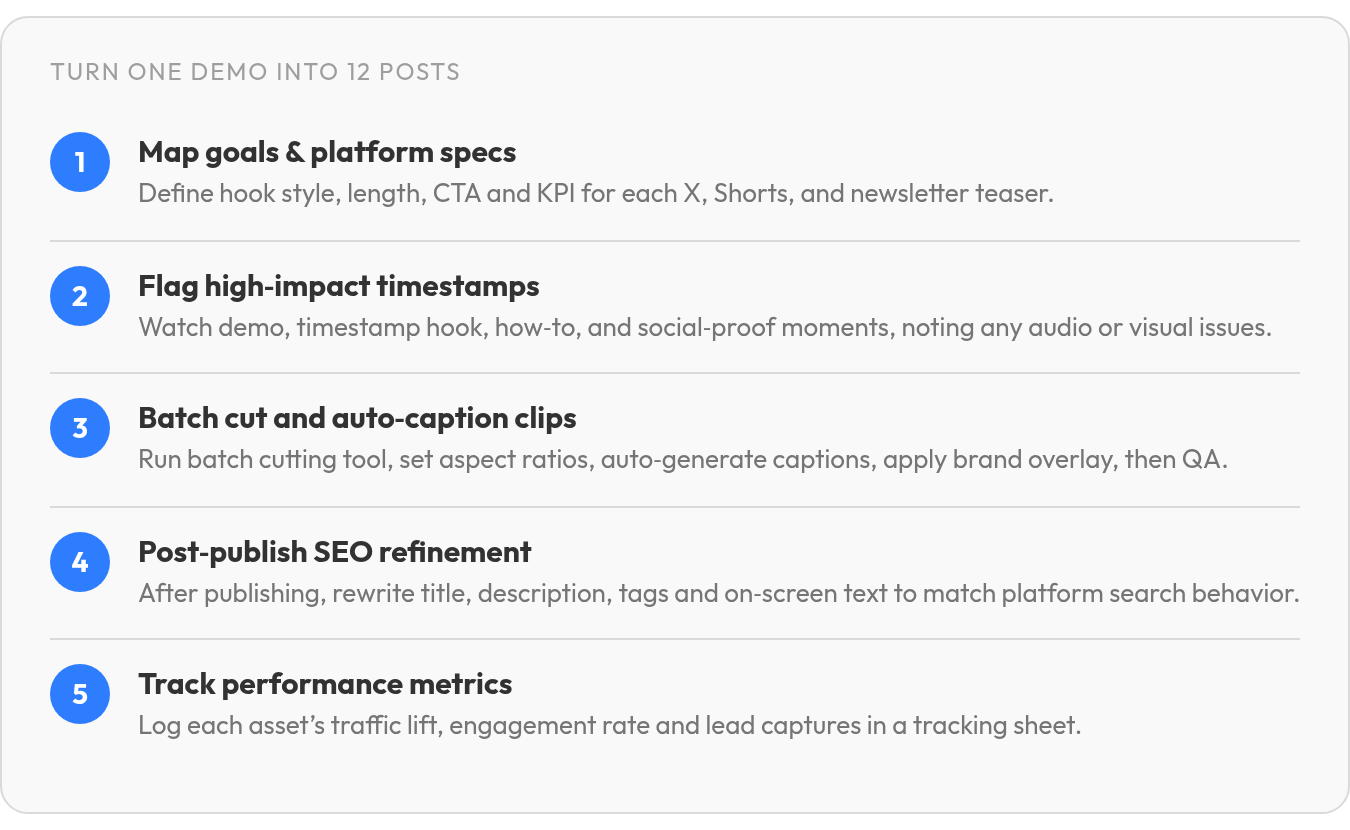
That’s the stage missing from many ai content repurposing workflows: post-publication refinement. You treat every one of the 12 posts as its own asset, tuned to how that platform surfaces content. Chop a demo once and you have raw material. Refine each cut afterward and you may have 12 pieces that each earn their own traffic.
Here’s the workflow at a glance, so you can see where the time goes and where the payoff may hide.
The One-Demo-to-12-Posts Workflow Table
| Platform | Content Length | Hook Style | Required Assets |
|---|---|---|---|
| X (4 posts) | roughly 40–280 characters | Punchy claim or stat | Demo screen-grabs, captions |
| YouTube Shorts (4 clips) | roughly 15–60 seconds | Visual payoff in the first few seconds | Vertical clips, on-screen text |
| Newsletter (4 teasers) | short blurb, a few lines | Curiosity gap + CTA | Still frame, short blurb, link |
This assumes the demo is already recorded. The bottleneck is often caption generation and reformatting copy for each platform’s tone. That single step can swallow whole afternoons when you do it by hand, which is where automated captioning and repurposing tools may earn their keep.
The Person-Hours You May Save
Manually repurposing one demo into 12 posts can take a meaningful chunk of a day across editing, writing, and reformatting each cut for a different platform. Automate the repurposing pass, keep a light human review on top, and that may shrink considerably. The saving isn’t just speed. It may free the hours you’d then spend on the refinement stage many teams skip.
Add post-publication tuning and you’re not just publishing faster. You’re publishing 12 assets that each get a second pass for visibility, which is where compounding returns may live.
The ROI Levers Worth Measuring Later
Track three things once the posts are live. Traffic lift from search on each platform, engagement rate per post format, and lead capture from newsletter teasers. Refining each copy independently is what may move the first lever, since a Short that performs in YouTube search can behave differently from an X post surfacing in a keyword query.
Your 12-Deliverable Checklist
- 4 X posts, each built around one distinct hook from the demo
- 4 YouTube Shorts, each cut to a single visual payoff
- 4 newsletter teasers, each with its own curiosity gap and link
- 1 SEO refinement pass per post after publishing, tuned to that platform’s search patterns
- 1 tracking sheet logging traffic, engagement, and leads per asset
Skip the refinement stage if you’re running a one-off campaign with no search intent behind it. For anything you want ranking months from now, that post-publication pass is often the difference between 12 posts that vanish and 12 that keep working.
Why One Demo Beats a Month of Fresh Ideas
A single product demo already holds your best explanation, your sharpest visuals, and your real proof. The waste is treating it as one asset when it may also work as a library of smaller ones.
That’s the case for ai content repurposing done carefully. You film once, split the footage into platform-native cuts, then refine each one so it can be discovered on its own terms. A raw clip and a search-tuned clip can pull very different traffic. If you want the broader playbook, our guide on repurposing content across channels covers the full spread.
Why One Demo Beats Twelve New Concepts
Fresh ideas are expensive. Each new asset often needs its own concept, script, shoot, and edit before it reaches a feed. Repurposing skips most of that.
Some video-repurposing guides make the point that the secret is not necessarily more time or budget, but smarter repurposing. That lines up with what we see. The bottleneck is rarely creativity. It’s often the production cost of starting from zero every single time.
Twelve posts from one demo can also give you twelve independent discovery bets. A YouTube upload, a Shorts clip, and an X teaser may each surface for different searches. Refined separately after publishing, they may stop competing with each other and start covering more ground.
What the Hidden Content Tax Actually Costs
Every channel demands its own format, and that’s where the tax may hide. A clip that lands on one platform can flop on another if you don’t adjust for how people actually watch.
Sound is an obvious one. In many feed environments, viewing happens with the audio off, so captions can be a baseline requirement. Being able to edit, resize, and caption a video is often part of the baseline toolkit. A cut without captions can quietly lose a meaningful share of its audience before the first line lands.
Placement matters too. Each platform has an audience that expects different content, so the real work is often matching your message to what resonates in each space. Post the same clip lazily everywhere and you may pay the tax without knowing it. Tune each cut to its platform, and the demo can work harder for you.
Which Teams Get the Most From This
SaaS founders and agency leads often benefit most, because both live with the same squeeze: high-value products to explain, thin teams to explain them. One demo may become a month of touchpoints instead of one launch-day spike.
Length rules shift by platform, so post-publication tuning is often where the payoff sits. Some research suggests shorter videos often earn stronger engagement, since viewers may not wait through a long message. Some platforms are also described as rewarding creative, attention-grabbing short clips, while others may favor content that creates belonging and puts the brand forward.
Skip this workflow if you publish rarely and treat each video as a one-off. The math tends to pay only when you’re refining the same demo across channels, not chasing a fresh idea every week.
Map Platforms, Goals, and Success Metrics
Before you touch a single clip, decide what each of the 12 posts is actually for. It sounds obvious, but it’s a step many teams skip, and it’s often why repurposed content lands everywhere and performs nowhere.
The framing that may make ai content repurposing pay off is simple: every platform copy is a separate asset with its own job, reader, and success metric. A YouTube Short chasing watch-through time is not the same piece as an X post chasing saves, even when they come from the same footage. Map that upfront, and your post-publication refinement has a target instead of a vague hope that things “do well.”
One Goal Per Platform, Not One Goal For All 12
Assign each channel a single primary outcome. When you ask one post to drive traffic, leads, and brand awareness at once, it may do none of them well.
We tend to sort demo-derived posts into three buckets:
- Traffic. Long-tail search and clicks back to your site. Newsletter deep-dives and YouTube descriptions often carry the load here.
- Lead gen. A specific action, like a trial signup or a gated resource. Reserve this for channels where the reader already trusts you.
- Brand awareness. Reach and recognition. Short-form clips on X and Shorts often do heavy lifting.
Write the goal down next to each of the 12 posts. That single line can decide your hook, CTA, and later, which keyword you tune the copy around.
The KPI You Track Is the KPI You Refine Toward
Each platform may reward different behavior, so each can get a different number to watch. Pick one per channel and ignore adjacent vanity metrics.
For X, impressions and saves may tell you whether the hook earned attention. For YouTube Shorts, watch-through rate may matter more than views alone. A clip people finish may signal to the platform that it’s worth recommending, and it can tell you which part of the demo actually held people. For newsletters, open rate can measure subject line performance and click rate can measure whether the body delivered.
These aren’t just report-card numbers. They can feed the refinement stage. A Short with strong watch-through but weak clickthrough may need a sharper description and tags, not a re-edit. Read the metric, then fix the right layer.
Set the Cadence and Style Rules Before You Cut
Decide how often each post ships and what it looks like while the demo is still fresh. Short-form platforms may reward frequency, so a demo might spin out several X posts across a week. A newsletter usually runs on its own steady rhythm.
Lock down tone, CTA placement, and visual branding per channel now, in a simple one-page reference. When you batch-produce 12 posts, having those rules written down keeps the set consistent and can speed up the SEO pass later. For the broader system behind this, our guide to repurposing content across channels walks through how these pieces connect.
Skip this mapping work only for a one-off. For a full 12-post split, going in blind may waste the refinement stage before it starts.
Extract the Moments Worth Splitting Out
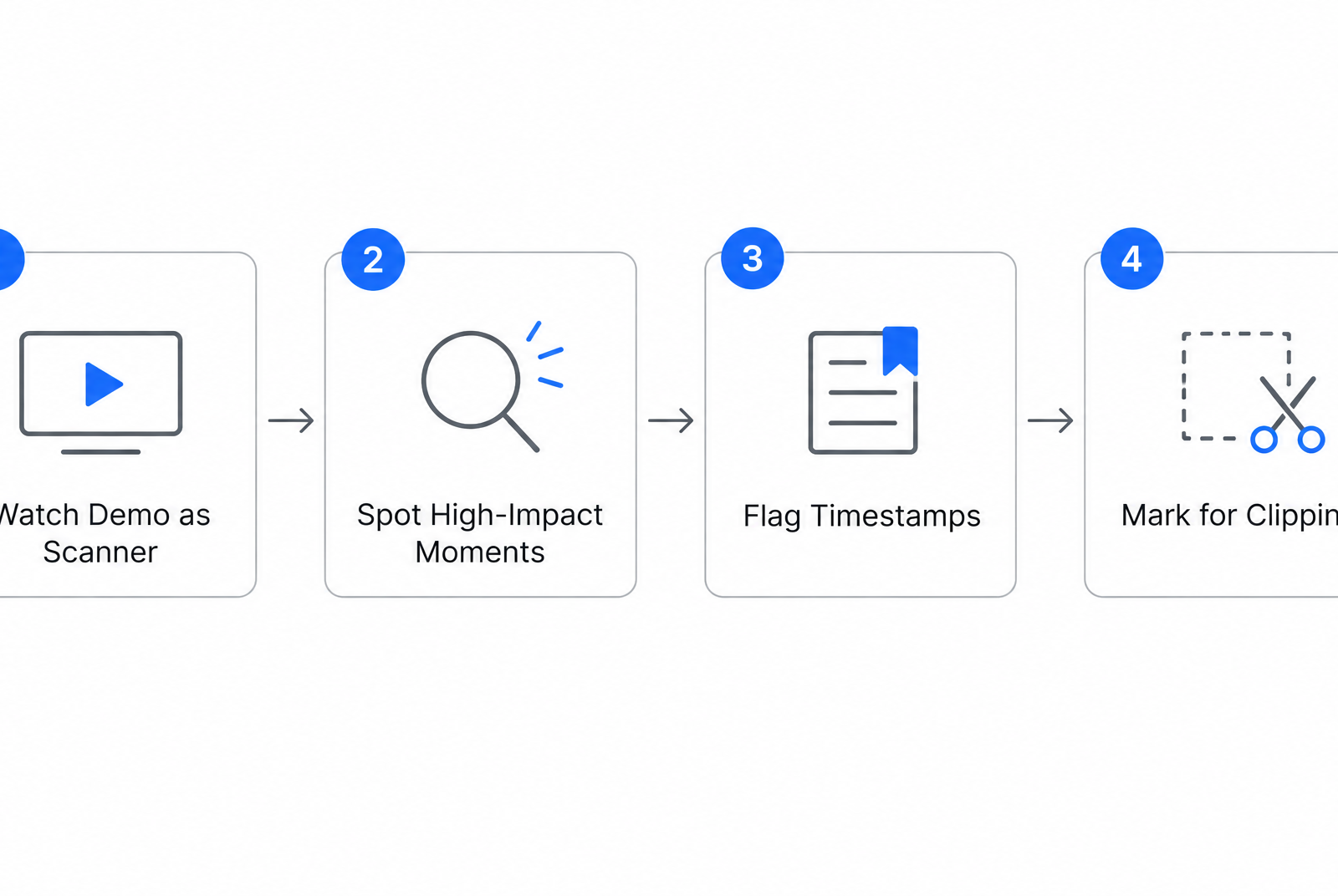
You can’t refine what you never flagged. Before any post-publication tuning matters, you need raw material worth tuning, and that starts with watching your demo like a scanner instead of a viewer. Many teams press play once, nod along, and miss the three seconds that would have carried an entire X post.
Watch it again with a different job. Every strong moment is a future asset, and good ai content repurposing means spotting those moments before you cut, not after. Flag them now and your later refinement work has clear inputs. Skip this pass and you’re likely editing blind.
Timestamp Everything Worth Keeping on the First Watch
Open a review tool that lets you drop timestamped notes as the video runs. Frame-accurate annotation apps and a simple Notion doc can both work. The point is capturing the moment and the reason in one place, so a note can become a real editing instruction later.
Log more than you think you’ll use. A demo may hide quotable lines and visual beats you forgot were there. We tend to flag anything that made us lean in, then trim the list down once we know each platform’s job.
Note the flaws too. If the audio dips or the screen text is too small to read on a phone, write that next to the timestamp. That small warning can save you from cutting a clip that looks great on your monitor and unreadable in a feed.
Three Moment Types Carry Most of the Weight
Not every second is worth splitting out. In our experience, three kinds of moments do the heavy lifting, and naming them as you scan can speed up the whole pass.
The hook moment is where something surprising happens: a result appears faster than expected, or a common frustration gets solved on screen. These can open a post because they may make someone stop scrolling. The how-to moment is a clean, self-contained step that teaches one thing. The social proof moment is a customer line or a real outcome shown in context, the kind of thing that reads as evidence rather than a pitch.
Tag each flagged timestamp with one of these three. When you get to the split, you may already know which platform each moment feeds.
Match Clip Length to the Platform, Not the Footage
A moment that works whole in a longer video may struggle in a fast feed unchanged. Short-form platforms often reward a tight cut that lands in the first breath. A newsletter clip can breathe a little more and lean on the surrounding text.
So flag the length too. Mark whether a moment is a scroll-stopper or a longer teaching beat, because that decision can shape both the edit and the search behavior you tune for afterward. A clip cut for one platform’s pace is the raw asset. The independent discovery comes later, when each cut gets its own refinement pass. For more on stretching one recording across channels, see our guide on repurposing content across channels.
Slice, Caption, and Polish: Automated Clip Production
The slicing is often the easy part. Feed a demo into a batch-cutting tool, mark your in and out points, and you can produce platform-native clips fairly quickly. What often earns traffic is what you do to each clip after it’s live, which is the stage many ai content repurposing workflows quietly skip.
Treat automation as the fast draft, not the finish. Batch cutting and auto-captioning can get you rough assets in one pass. The post-publication tuning—where you rewrite each clip’s title, description, and on-screen text to match how people actually search on that platform—is what can turn lookalike posts into pieces that perform on their own.
Batch Cut First, Auto-Caption Second, QA Always
Many modern editors expose a batch workflow: define your clip boundaries once, apply an aspect ratio per destination, and export the full set. Vertical for Shorts and TikTok, horizontal for YouTube upload and X, square or taller feed crops where the platform favors them. Native framing often matters because clips that fill the frame can stop the scroll.
Auto-captions come next, but the point isn’t just muting or unmuting. Captions can also give your edit a pacing layer. They let you emphasize product names, call out the action on screen, and keep a viewer oriented when the UI changes quickly.
Here’s the catch that often isn’t automated away: AI captions may get proper nouns, product names, and technical terms wrong often enough to cause embarrassment. Budget a manual pass on every clip. Fix brand terms, numbers, and punctuation. A few minutes of review can be cheaper than a screenshot of a garbled caption going around.
For legibility, keep text high-contrast against its background, large enough to read on a phone at arm’s length, and clear of each platform’s UI overlays. Sans-serif fonts often hold up best at small sizes.
Automated Clip Production Is Only Half the Job
Brand consistency is another thing worth programming once. A logo lockup, a two-color palette, and a caption style applied to all 12 clips can make the set feel like one campaign instead of a dozen strays. Apply these as templated overlays so every export can inherit them without manual placement.
But visual polish may not be enough for discovery. Search text often matters. Once each clip publishes, that’s your cue to start the refinement pass this whole workflow is built around.
Give each of the 12 posts its own searchable copy. A YouTube Short may benefit from a keyword-forward title and description. An X post may want a hook plus a tappable link back to the full demo on your site. Short clips that point viewers to the full version can pull real traffic when the on-platform copy is tuned to that platform’s search behavior, not copy-pasted across all 12.
A tradeoff worth naming: if a clip is purely a brand moment with no search intent behind it, you may skip the SEO pass. Not every post needs to rank. For the ones meant to earn discovery, the refinement may be the point. For the wider playbook, our guide on repurposing content across channels goes deeper.
Tailor Each Clip for X (Twitter)
X gives you comparatively little room and a short patience window within your 12-post set. That’s often why the post-publication step matters more here, not less. A clip that lands flat on X may not be broken footage. It may be a copy line nobody tuned after it went live.
This is where ai content repurposing can earn its keep on X. The platform has its own search behavior, and your post text may be part of what gets indexed, so the same clip you cut for YouTube often needs a different word layer here. Write that layer around the phrases your buyers actually type into X search. Publish, watch which wording pulls impressions, then refine the ones that stall.
What Makes an Early Hook Work on X
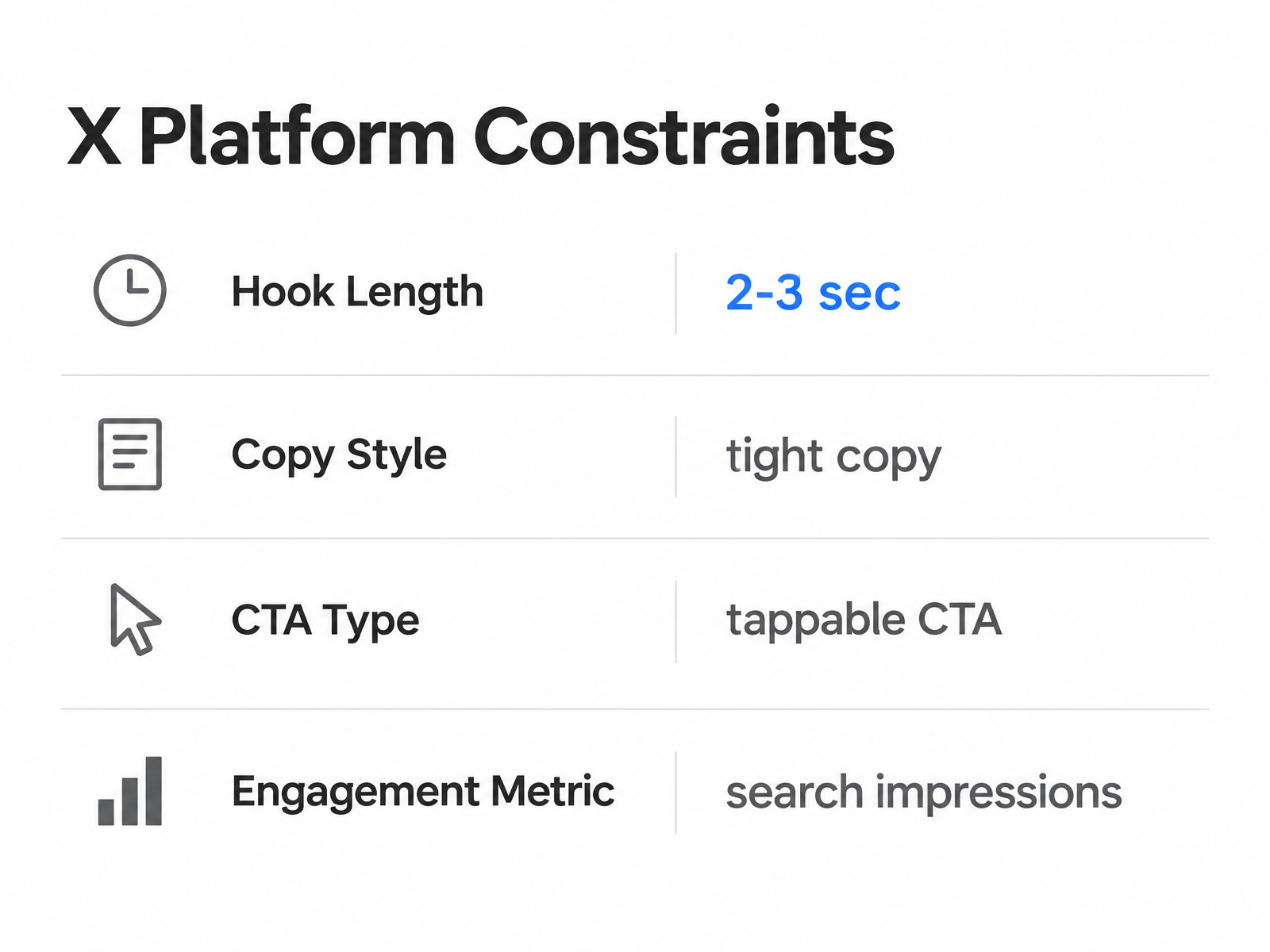
Some platforms count a view only after a viewer watches for a couple of seconds, and you may get even less time than that to stop the scroll. On X, that clock can be unforgiving. Your clip should open mid-action or on your sharpest visual, never on a title card that burns the first second.
Cut the demo so the payoff moment sits up front. If your feature clicks into place later in the raw footage, that may be frame one on X. Front-load the proof. The context can follow in the copy line.
Native Video or GIF for Maximum Reach
Native video often wins for product demos on many social feeds. Uploading directly to X rather than dropping a link can keep viewers in the feed, where some algorithms may surface it more readily. This can let the clip do its work without asking anyone to click away first.
Burn captions in and use them to make the product action legible without extra setup. Reserve GIFs for quick loops or teasers. When you’re showing a feature working, captioned native video may do the job.
How to Refine the Copy Line After Publishing
Keep the text tight and the call to action singular. One clip, one ask. Short demo clips often perform better with a clear, tappable CTA instead of competing links. Stay inside the character limit by cutting adjectives, not the ask.
Then treat the live post as a draft. If X analytics allows it, look at whether impressions appear to come from search or feed activity. Posts pulling traffic from search may be surfacing on the right words. Posts stuck on feed-only reach may need their copy line rewritten with the query language people actually use. This per-post tuning is the stage many workflows drop, and it may be the difference between 12 clips that look busy and 12 that each have a chance to rank. If you want the deeper mechanics of tuning video copy for search, our video SEO tips walk through it.
Post-publication playbook for X
- Fields to edit after launch: the leading hook line, the CTA, the caption wording, and on-screen text if it repeats the post copy.
- When to edit: after the post has collected enough impressions to show a pattern, rather than reacting to the first few hours.
- Metrics that may trigger changes: feed-only reach with little search activity, low saves, low profile clicks, or a quick spike that dies.
- Before/after example: If a post is stuck in feed-only reach, you might test changing a caption from something generic like “Demo walkthrough” to a buyer-language hook such as “How [your product] handles [specific task] quickly.” Use your real value promise, not a fabricated stat.
One limit worth respecting: skip the thread format for a demo that already stands alone. Stretching a single clip across several posts to look thorough can dilute the hook and split engagement. If the clip explains itself quickly, let it. Save threads for demos that genuinely need setup.
Adapt Clips for YouTube Shorts
A Short isn’t necessarily a tiny YouTube video. It can be a vertical story with a beginning, a middle, and a reason to keep watching, and that changes how you cut the demo for it. Where X may reward a two-line jab, YouTube Shorts may reward a tight arc: a hook, a single useful payoff, and a soft nudge toward more.
That arc is only half the job. The other half is what many ai content repurposing workflows never touch. Once your Short is live, its title and description may become search text that YouTube indexes on its own terms, so copy that worked elsewhere often needs to be rewritten here. Publish, watch which phrasing seems to help retention, then tune the ones that stall.
Build the Short as a Three-Beat Story, Not a Clip
Open on the moment from your demo that shows the payoff, not the setup. The first frame should answer “why watch,” and bold on-screen text can carry the premise before the viewer has context.
From there, land one clear value proposition. Pick a single thing the demo proves, show it in a short segment, and close with a soft sell that points somewhere. A short clip that drives viewers to the full version on your own site can work well, especially with a tappable call to action instead of a hard pitch.
The arc should feel complete even if the viewer never clicks. The click is the next step, not the missing ending.
The Title and Description Do the Ranking, Not the View Count
Teams often upload all 12 posts, paste the same caption into each, and wonder why the Short never surfaces in search. YouTube may treat the title and description as independent signals. A Short titled to match how buyers phrase the problem can be found long after the initial push fades.
So refine each one after it goes live. Rewrite the title around the exact search phrase your audience is likely to type, front-load the description with that same language, and keep hashtags to the few that describe the actual topic. This is the post-publication tuning that may separate a Short that gets discovered from a Short that just posted.
Give it time to collect a pattern before you edit. If retention drops near the opening, your hook may be the problem, not the footage. If impressions are flat, the title may not be matching search.
Post-publication playbook for YouTube Shorts
- Fields to edit after launch: title, description, opening on-screen text, first frame, and CTA.
- When to edit: after enough data has accumulated to show a trend; a set review window can be helpful.
- Metrics that may trigger changes: flat impressions, low watch-through rate, weak clickthrough to the full demo, or retention drops near the opening.
- Before/after example: For a Short stuck with flat impressions, you might test changing a title from something like “New demo highlight” to “How [your product] handles [viewer problem].” This is a structured test, not a guaranteed ranking formula.
Skip Shorts When the Moment Needs Room to Breathe
Not every demo beat belongs in a Short. If the point only makes sense with extended context, forcing it into the format may gut the value, and the retention curve can show it.
Route those moments to the long-form upload and let the Short tease them instead. A good Short can send viewers to the full explainer, which is the handoff many teams build into their video SEO workflow. Use the format where it fits, not everywhere by default.
Create a Newsletter Teaser That Drives Clicks
The email in your 12-post set is the odd one out. It generally doesn’t get indexed by a search engine, so post-publication refinement looks different here. Instead of tuning for what people type into a search bar, you tune for what makes them open, then click. That’s the version of ai content repurposing that fits the inbox: you send, read the open and click data, then rewrite the parts that stalled.
Treat the teaser as a live asset, not a one-and-done send. The demo clip is your raw material. The subject line, preview text, and CTA are the layers you refine after the first send tells you what worked. Many teams write one subject line, hit send, and never look back. Instead, send, watch which wording pulls opens, and swap the ones that flatline before the next issue goes out.
The Subject Line Is the Only Thing That Gets a Second Chance
Your subject line does one job: earn the open. Nothing else in the email matters if it stays unread. So write for curiosity, not summary. A line that hints at a payoff often beats a line that explains it, because the explanation may remove the reason to click.
Pair the subject with preview text that extends the hook instead of repeating it. If your subject teases the problem, let the preview name the moment in the demo that solves it. Two lines, one continuous thought. When you refine after a send, change these together, since they often read as a single unit in many inboxes.
Skip clever wordplay if your audience is technical buyers. In our experience, plain and specific often out-opens cute and vague for B2B product content. Say what the reader gets, then stop.
Embed the Clip So It Survives a Phone Screen
Most email clients won’t autoplay video, so don’t build the teaser around a feature that breaks on open. Lead with a still frame that captures the sharpest moment of the demo, and link it to the full video hosted elsewhere. The image can carry the message even where motion isn’t supported, and the reader still knows what they’re clicking through to watch.
Design the whole thing for a thumb. Many people read email on a phone, so the frame often needs to be legible at small size, the tap target large, and the copy above it clear before scrolling. Test the send on an actual device, not just a desktop preview.
Put the CTA Above the Fold, Then Repeat It
Place your primary button right after the teaser, while attention is highest. A reader who watched part of the demo is warm. Make the next step obvious before that warmth cools. One clear action per email, either “watch the full demo” or “book a demo call,” not both competing.
Add a second instance of the same CTA at the bottom for readers who scroll first and decide later. After the send, look at which position drew the clicks and let that data shape the next issue. This is where an automated engine may earn its keep: the same demo can feed social carousels and posts across LinkedIn, X, Instagram, TikTok, and YouTube, so each asset can feed the next without as much manual rework.
Post-publication playbook for newsletter teasers
- Fields to edit after send: subject line, preview text, teaser copy, still frame, primary CTA, and secondary CTA placement.
- When to edit: after the send has produced enough open and click data to show a pattern, usually before the next issue.
- Metrics that may trigger changes: low open rate suggests the subject/preview combination underperformed; low click rate suggests the body or CTA may need work.
- Before/after example: If opens are low, you might test changing a subject line from something like “Our latest demo is live” to “The [task] demo you asked about” or another curiosity line tied to the actual demo payoff. Use what you know about the reader, not a guessed number.
Orchestrate Publishing, Scheduling, and Automation
Hitting publish on 12 posts in one afternoon can feel productive. It can also bury half of them. The calendar isn’t a to-do list you clear in one sitting. It’s the thing that may keep every platform copy alive long enough to earn its own discovery.
That’s the part of ai content repurposing that scheduling advice often skips. Tools may sell you batch upload, one-click rollout, and “set it and forget it.” We treat scheduling differently: the publish date is the start of each post’s life, not the finish, so the calendar needs to hold both the launch and the tuning that comes after.
Load All 12 Into One Calendar, Not Twelve Browser Tabs
Get every post into a single view before you schedule anything. Many schedulers support bulk import or an API-based push, which can save you from pasting captions one platform at a time. Map your columns to each field the platform needs: caption, hashtags, thumbnail, link.
The payoff isn’t just speed. When all 12 sit in one grid, you may see the gaps: an empty Thursday, three posts stacked on one morning, a channel that’s gone quiet for a week. You can’t fix idle channels you can’t see.
Stagger the Rollout So You Don’t Flood Your Own Audience
Publishing all 12 at once can train your audience to tune you out. Spread them. A Short on Monday, an X post Wednesday, the newsletter teaser Friday, then loop back with the next cuts the following week.
Staggering can also help the refinement work. When posts go live days apart, you may get cleaner signal on each one before the next drops. You can watch which X wording pulls impressions, then apply what you learned to the caption you haven’t scheduled yet. Fire everything at once and the data may blur together.
Add UTM parameters to every outbound link before you schedule. A simple tag like utm_source=youtube_short&utm_campaign=demo_q3 can tell you which of the 12 actually drove the click, not just which got views. Without it, you may be guessing which cut earned the traffic. With it, your later tuning has a target.
Schedule the Refinement Pass, Not Just the Publish Date
Put the SEO revisit on the calendar the same way you put the launch. A set review window—for example, a week later if that fits your platform’s data cycle—can remind you to check a Short’s retention and rewrite the title if it stalled. Another reminder can prompt you to review an X post’s impressions and test a new hook.
Automation can handle the trigger, not the judgment. Some automated flows can be configured to fire a follow-up email after someone opens a newsletter teaser, or to ping you when a post passes a view threshold you choose. What it can’t reliably do is decide the new headline. That remains a human call, which is why the calendar reminder matters more than the automation itself.
Treat the scheduler as a two-part machine. Half of it ships the 12 posts on a rhythm your audience can absorb. The other half can drag you back to each one, on a set date, to tune the copy that may decide whether it gets discovered. Skip the second half and you may have automated 12 posts straight into obscurity.
Maintain Editorial Oversight and Brand Consistency
Twelve posts from one demo means twelve chances to sound like twelve different companies. That’s a hidden tax nobody prices in. You may save hours on production, then quietly lose them cleaning up copy that drifted off-voice. Or worse, you don’t catch it and your readers do.
Editorial oversight belongs in the post-publication stage too. Many ai content repurposing workflows treat brand voice as a pre-flight check: write it right, ship it, done. We treat it as a live layer, because every time you rewrite a title or description to chase a platform’s search behavior, you risk pulling the copy away from how you actually sound. Refine for ranking, yes. Just don’t let the refinement mute your voice.
Off-Brand AI Copy Is the Fastest Way to Lose Trust
Readers can often smell generated filler now, and they tend to be vocal about it. When a post feels machine-stamped instead of made by people who care, the reaction can be quick and unforgiving. That skepticism isn’t limited to any one audience.
When your 12 posts all carry the same limp AI phrasing, you can inherit that reaction across every platform at once. A voice checklist is your guardrail: three or four non-negotiables per post, like your signature phrasing, your point of view, and words you never use. Run each SEO-refined copy against it before and after you tune for search.
Build the Checklist Into the Review, Not Around It
A brand voice check that lives in someone’s head can fail at post number four. Put it where the editing happens. Collaborative docs with inline comments, or a Notion board with an approval column, can let a reviewer flag a stalled X post the same moment they retune its hook for search.
We keep the loop tight: draft copy, tune it for the platform’s search terms, then a second set of eyes checks voice before it goes live. The reviewer isn’t rewriting. They’re catching the two or three lines where search optimization may have sanded off the personality. That handoff can be faster than a full manual rewrite and can scale to a dozen posts without a meeting.
Compliance Is Part of the QA Pass, Not an Afterthought
Every platform has rules you can trip over, and background music is a classic one. A track that’s fine in your newsletter may get a YouTube Short muted or a clip pulled depending on platform licensing. Bake a licensing check into the same QA loop that handles voice and search copy.
Make the final pass one sweep across all 12: rights on any audio or footage, voice matches the checklist, and the search-tuned title and description still read like you wrote them. When one of these fails, fix it before publish, not after a takedown. If you want the wider system this connects to, our guide on repurposing content across channels covers how the pieces fit together.
Skip this loop for a single throwaway post and you may survive. Skip it across 12 assets you want ranking independently, and off-brand drift can compound faster than the traffic.
Turn One Batch Into a Sharper Next One
The numbers are where many teams get lazy. They check a like count, feel good or bad, and move on. That isn’t measurement. It’s a vibe. If each of your 12 posts is its own ranking asset, then each one needs its own scoreboard, tracked against the single goal you assigned it when you mapped the platforms.
This is the loop that may make ai content repurposing compound instead of plateau. You published 12 posts, tuned each for its platform’s search behavior, and now the performance data can tell you which tuning actually worked. Read it well, feed it into the next demo, and each batch may get sharper. Skip it, and you may be guessing twelve times over.
One Dashboard, Not Twelve Scattered Tabs
Pull every post’s numbers into a single view, sorted by the goal you gave it. A YouTube Short may get judged on retention and search impressions, not likes. An X post may get judged on saves and profile clicks. The newsletter teaser may get judged on click-through, not opens alone.
The mistake is comparing posts against each other. A Short with strong retention and an X clip with many saves aren’t in the same race. Each post competes against its own past performance and its own platform benchmark, so your dashboard needs to hold twelve separate yardsticks, not one blended average that hides what’s actually working.
Watch the trend, not the single spike. One post can pop for reasons you may never replicate. A phrasing pattern that lifts several posts over a couple of weeks is a signal worth acting on.
The Post-Publication Test That Tells You What to Rewrite
Change one variable per post, then wait for the platform’s search to respond. The refinement stage only teaches you something if you isolate what changed. Rewrite a title, hold everything else, and the next few weeks of impressions may tell you whether the new wording pulled or stalled.
Run these tests one layer at a time:
- Hook copy: swap the opening line or on-screen text, and watch the hold rate move.
- Thumbnail or first frame: test the payoff frame against the setup frame, and watch click-through shift.
- CTA wording: change what you ask for, and watch saves, follows, or clicks respond.
Give each test room to breathe. Search indexing can lag behind publishing, so a title you rewrote on Monday may not show its true pull until the platform re-crawls and re-ranks it. Judge too early and you may kill a winner.
Feed the Wins Back Into the Next Demo
The best insight from this batch may belong in your next shoot, not just your next edit. When a specific phrase or moment performs across multiple platforms, that’s a signal to build the next demo around it from the start.
Track which demo moments produced your highest-performing cuts. Over a few cycles, you may spot a pattern: certain kinds of moments repurpose into winners, others fizzle no matter how you tune them. That knowledge can reshape how you film, so the raw material gets better before you ever cut it.
For the wider playbook on closing this loop across channels, our guide on repurposing content across channels goes deeper on the systems side.
FAQ
What tools do I actually need to turn one demo into 12 posts?
You need four practical layers: a way to mark strong demo moments, an editor that can cut multiple assets from one recording, captioning support, and a publishing system that can push the finished posts to the right channels. AnyPost can be used for the content repurposing and multi-platform publishing pass, so you’re not rebuilding the same asset by hand for every destination.
How long should I wait before refining a post after it goes live?
Wait long enough to see a pattern instead of reacting to the first few hours. The exact review date can vary by platform, but the principle is the same: let the post collect enough impressions, retention, opens, or clicks to show which layer underperformed. Then edit the copy, title, CTA, or subject line based on that signal.
What do I do with a demo moment that has weak audio or tiny on-screen text?
Don’t throw it out automatically. Mark the issue during review, then decide whether the visual payoff is strong enough to rescue with captions, cropping, or a different frame. If the product action still isn’t understandable on a phone, route that moment to a newsletter explanation or long-form video instead of forcing it into a fast-feed clip.
Does the newsletter teaser need the same SEO refinement as the clips?
No. The newsletter should be refined like an inbox asset, not a search asset. Focus on the subject line, preview text, teaser copy, and CTA. The question is not whether the email can rank; it’s whether subscribers open it, understand why the demo matters, and click through.
How can I tell whether an X post is ranking in search or just getting feed reach?
Look beyond the total impression count. If the post keeps earning activity after the initial feed push, its wording may be matching search behavior. If it spikes once and dies, treat the copy line as the weak layer and rewrite it around the problem language your buyers are likely to use.
Is it ever fine to skip the post-publication refinement pass?
Yes. Skip it for throwaway brand moments, time-boxed announcements, or campaign posts that were never meant to earn discovery after the launch window. Use the refinement pass where there is lasting search intent or a clear conversion path worth improving.
Why can’t I trust auto-captions and just publish?
Auto-captions can be a strong draft, not a final QA pass. Product names, technical language, and punctuation often still need a human check because small errors can make a polished demo look careless. Review captions the same way you review the title or CTA: as part of the asset, not a decoration.
What aspect ratio should each clip use across the platforms?
Frame for the destination instead of exporting one universal crop. Shorts often need a vertical cut, X and standard YouTube placements may need a wider frame, and some feeds benefit from square or taller crops. The goal is simple: make the product action fill the available space without hiding important UI behind platform controls.