White-Label Ahrefs Dashboard Setup: How Agencies Automate Branded SEO Reports With DashThis
Key Takeaways
-
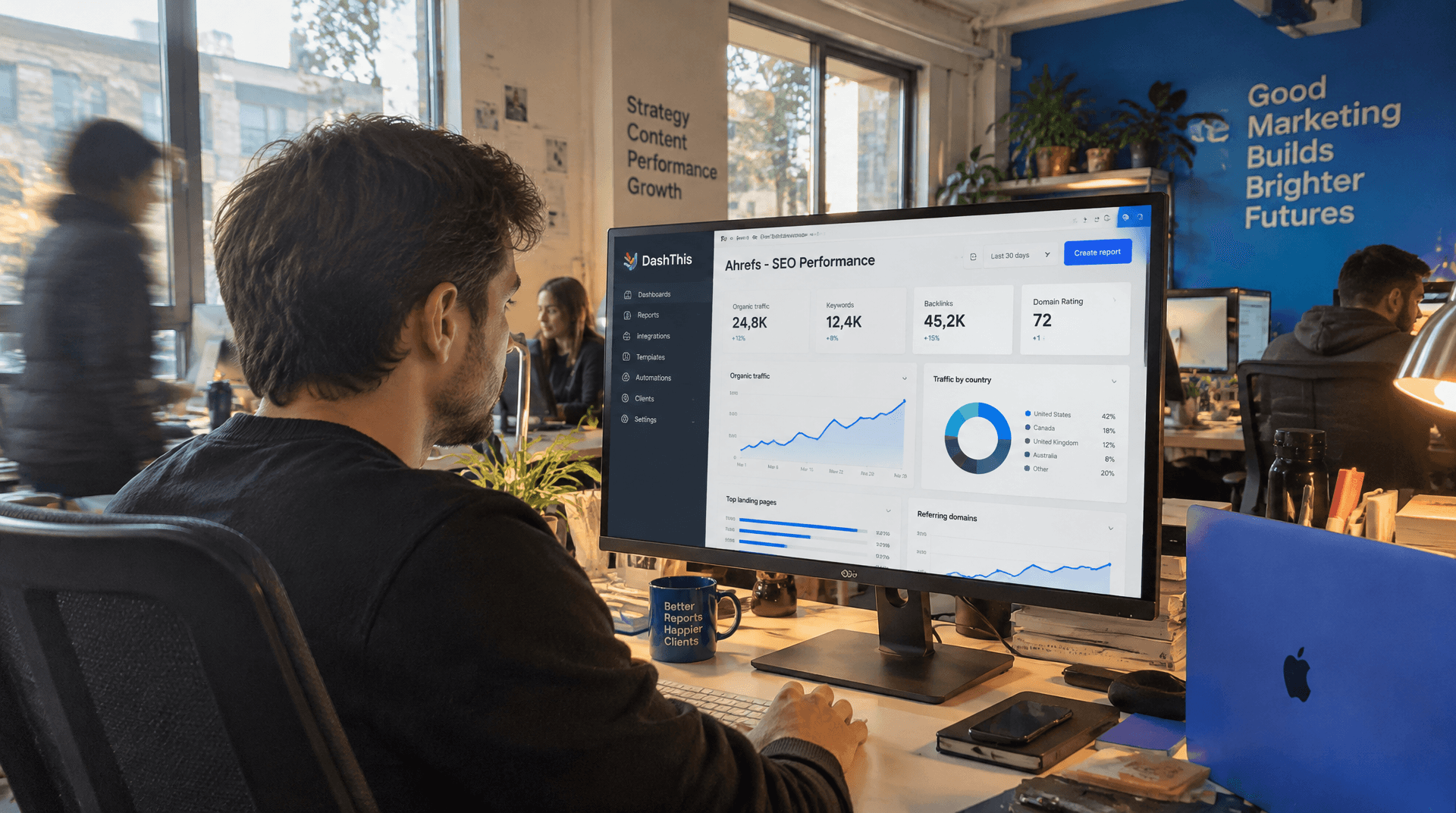
DashThis connects directly to Ahrefs and automates white-label SEO reports by pulling backlink profiles, Domain Rating, and organic keyword data into branded dashboards.
-
Agencies eliminate manual CSV exports and formatting cycles by building the dashboard once, then scheduling automatic updates on weekly or monthly cadences.
-
White-label dashboards combine Ahrefs metrics with Google Search Console and Analytics data, showing clients how backlink growth drives organic traffic in one view.
-
Clients access live reports through custom agency domains like reports.yourcompany.com, seeing only your branding with no third-party tool references visible anywhere.
Quick Summary
Most agencies spend hours each month exporting Ahrefs data, formatting spreadsheets, and pasting numbers into branded templates. A white-label Ahrefs dashboard in DashThis pulls that workflow into a single setup: connect your data sources, configure the layout once, and schedule automatic delivery. After that, the dashboard updates itself.
The integration surfaces backlink profiles, Domain Rating, organic keywords, rankings by position band, and referring domains. You're not sacrificing detail for automation—you're redirecting the time you used to spend on copy-paste cycles toward link outreach and content strategy that actually move rankings.
What you get from the setup
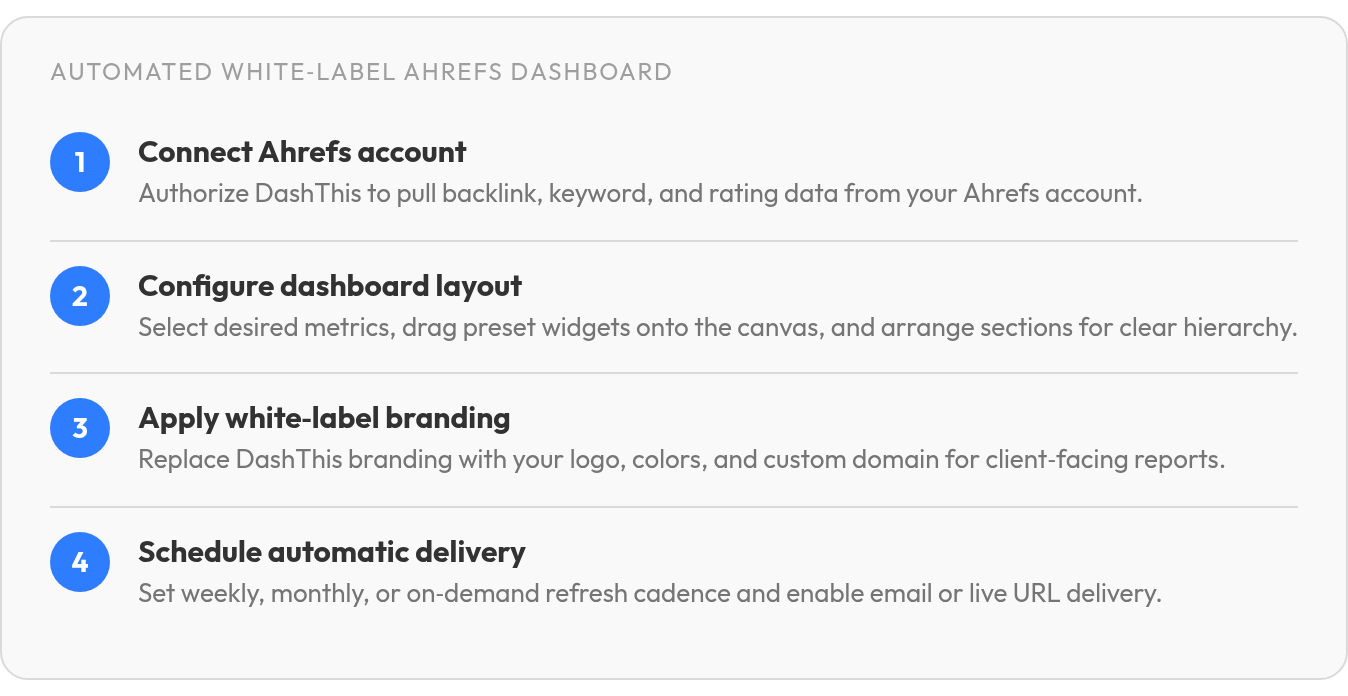
Connect your Ahrefs account, choose the metrics that matter for each client, and set the cadence.
Connect your Ahrefs account, choose which metrics matter for each client, and schedule the cadence. Reports refresh automatically—weekly, monthly, or on-demand—so clients see fresh data without waiting for you to compile a PDF.
Quick-start table: Ahrefs + DashThis setup
| Setup Step | Ahrefs KPI Tracked | DashThis Feature | Reporting-Effort Impact |
|---|---|---|---|
| Connect Ahrefs account | All backlink & keyword data | Integration support | Eliminates manual CSV exports |
| Select and configure layout | Domain Rating, organic keywords, backlinks | Customizable widgets | Streamlines report creation |
| Apply white-label branding | N/A | Custom domain, logo, colors | Client sees your brand, not DashThis |
| Schedule auto-delivery | Referring domains, organic traffic value | Email dispatch or live URL | Cuts recurring reporting hours significantly |
Domain Rating uses a 0-100 scale, so you can show clients how their backlink profile stacks up against competitors at a glance. Keyword rankings split into positions 1-3 and 4-10, making it easier to highlight first-page wins without digging through raw SERP data. For agencies tracking link-building campaigns, the referring domains count updates automatically—clients log into the branded portal on your custom domain and see new links as they appear.
What agencies actually report with this stack
Most white-label Ahrefs dashboards include three KPI groups: link and authority metrics (backlinks, Domain Rating, referring domains), keyword ranking distribution (total organic keywords, plus breakouts by position), and organic performance (estimated monthly traffic, traffic value, and the number of ranking pages).
White-label dashboards that remove vendor branding and deliver data under your own domain tend to land well with clients. The automation win is workflow: scheduled refreshes remove the export-format loop, while DashThis's AI Insights feature turns raw Ahrefs data into takeaways instead of leaving clients to read charts. The time savings then compound—automation frees capacity for new clients or deeper optimization work on existing accounts.
Why White‑Label Ahrefs Dashboards Matter
When you white-label Ahrefs data through a dashboard platform, you're turning a multi-hour monthly process into an asset that updates itself. The shift from manual compilation to automated delivery can free up blocks of time agencies redirect toward optimization and strategy work.
What a white-label Ahrefs dashboard actually does
A white-label SEO report is a performance dashboard delivered under your agency's branding, with no third-party tool references visible. You connect Ahrefs alongside other platforms like Google Analytics and Search Console, and the dashboard automatically pulls backlink profiles, Domain Rating, organic keyword counts, and ranking position bands into a single view. Clients log in through your custom domain—something like reports.yourcompany.com—and see your logo, your colors, and your reporting structure from the URL to the final metric.
The workflow shift isn't subtle. Instead of logging into Ahrefs each month, exporting CSV files, pasting numbers into branded templates, and repeating the cycle for every client, you build the dashboard once during onboarding. After that, the data refreshes on the schedule you set—weekly, monthly, or on-demand—and clients access current performance without waiting for you to compile it.
Why this matters for agency operations
Automated white-label dashboards let you redirect the hours you used to spend formatting reports into optimization work that moves client metrics. When you're managing multiple clients, the compounding time cost of manual reporting—data exports, spreadsheet cleanup, presentation formatting—can swallow whole afternoons every week. The dashboard becomes a client-facing asset that runs in the background while your team focuses on strategy, link outreach, and content planning.
Step‑by‑Step: Connecting Ahrefs to DashThis
The setup process for building a white-label Ahrefs dashboard is straightforward. Most agencies can get their first branded report live quickly using the preset template approach built into DashThis.
What the integration gives you
The Ahrefs connector in DashThis pulls backlink metrics and organic search data into your dashboard through a direct integration. You get access to preset widgets that drop the most-requested SEO data into your layout without manual configuration: backlink counts, referring domains, and keyword ranking data.
Position segmentation is useful for client reporting. You can surface which keywords are ranking near the top of the first page and which ones sit further down, making the "we're close to breaking through" conversation easier than pointing at a raw keyword count.
How you connect it
Log into DashThis and add Ahrefs as a data source. Authorize the connection to your Ahrefs account, then select which project you want to report on. Once connected, drag preset widgets onto the dashboard or build custom ones from the available metrics.
The dashboard refreshes on schedule. Each reporting period inherits the same layout, so you're not rebuilding monthly. For agencies managing multiple clients, that shift frees up hours each month compared to the manual export-and-format workflow, redirecting that capacity toward link building and content strategy instead of data compilation.
Designing Branded, Client‑Ready Dashboards
The setup work ends when you send the first dashboard to a client, and that's where the white-label Ahrefs dashboard proves its value. You're not just automating data pulls; you're building a presentation layer that clients associate with your agency, not with DashThis or Ahrefs.
What white-label removes
A white-label dashboard strips out every trace of the software provider. DashThis lets you replace its URL with your own custom domain—something like reports.youragency.com—so clients never see a third-party address. You upload your logo, apply your brand colors, and send reports from your own email address. The dashboard becomes an extension of your agency's identity.

This matters most when you're competing on retention. Clients who log in to a branded portal tied to your domain are less likely to go shopping for the underlying tool. The SEO metrics stay the same—Domain Rating, backlinks by target URL, organic keywords segmented into positions 1–3 and 4–10—but the presentation signals that you control the reporting infrastructure. That retention effect compounds the time savings: fewer hours rebuilding reports means more capacity for the strategic work that keeps clients from churning.
Building readable hierarchy with Ahrefs preset widgets
The Ahrefs connector in DashThis includes preset widgets that drop key metrics into your layout without manual configuration. Start with Domain Rating and referring domains at the top to show authority trends, then layer in organic traffic and keyword position bands to connect link building to ranking outcomes.
Organize the widgets so clients can scan vertically: high-level authority signals first, then granular keyword and backlink details below. Use section headers to separate "Backlink Profile" from "Organic Performance" so stakeholders can jump to the data they care about. Apply consistent spacing and widget sizing across sections—varied layouts read as improvised, while uniform rhythm signals intentional design.
Pair metrics with dimensions to surface the stories clients ask about. Backlinks by Target URL shows which pages attract the most links. Referring Domains by Anchor Text reveals how other sites describe your client's content. These focused widgets turn raw Ahrefs data into narratives clients can act on, and the preset format streamlines the initial build across accounts.
Automating Data Refreshes & Client Delivery
When you set up a white-label Ahrefs dashboard, recurring data-refresh and client-delivery cycles shrink from hours to minutes. The platform pulls updated backlink counts, Domain Rating shifts, and organic keyword movements on a schedule you configure once—weekly, monthly, or on-demand—and clients see current numbers without waiting for you to compile anything manually. For agencies managing multiple accounts, every saved hour compounds across your client roster.
What automated refresh cycles remove from your workflow
Manual reporting workflows can consume hours each month when you're exporting CSV files, pasting data into branded templates, and formatting everything for presentation. Automation replaces that recurring burden with native connectors and scheduled refreshes. For an agency serving multiple clients, those saved hours can be redirected toward link building, content strategy, or client optimization work that moves rankings.
The gain is not just speed; it also removes the copy-paste-format loop that swallows whole afternoons without producing new insights. Automated dashboards let you deliver consistent, current data to clients without rebuilding reports from scratch every cycle.
Naming conventions and version control as practical habits
Use consistent client-code prefixes in your dashboard titles—something like CLIENT_Ahrefs_Monthly or ACME_SEO_Dashboard_Oct2026—so you can locate the right report quickly when a client calls with questions. If you're iterating on a layout or testing new widget combinations, clone the live dashboard and append a version suffix like _v2_draft to keep experimental changes separate from what clients are actively viewing. These aren't platform constraints; they're workflow hygiene that keeps recurring reports organized as your client list scales.
Scaling Across Multiple Clients Without Breaking Your Workflow
When you're building white-label Ahrefs dashboards for ten or twenty different clients simultaneously, the preset template library becomes the difference between sustainable scaling and chaotic manual rework. DashThis includes preset SEO templates and widgets for the most-requested SEO metrics—backlink counts, Domain Rating, referring domains, keyword rankings—so you can drop them into a client dashboard without rebuilding the layout from scratch each time. You configure the template once, apply your branding, then clone it across your client roster with each account pulling its own domain data automatically.
Starting from the template library rather than blank dashboards
The preset SEO template includes the metrics most clients ask about: organic traffic from Google Analytics 4, keyword position bands from Ahrefs, and backlink growth over time. You connect your data sources—Ahrefs, Google Search Console, Google Analytics—and the widgets populate themselves. This approach cuts initial setup from a multi-hour rebuild to a template-based setup per client, which compounds quickly when you're onboarding multiple accounts in the same month. For an agency reporting to multiple clients, automated reporting can return substantial hours back every month compared to manual workflows.
Combining Ahrefs with other connected platforms for complete reporting
DashThis connects 30+ marketing platforms, so you can layer Ahrefs backlink data alongside Google Ads spend, Facebook engagement, and Shopify conversion metrics in a single dashboard. One agency reduced monthly reporting time from 30-40 hours to 10-20 hours while providing more detailed information by merging SEO and paid channels into unified client views. When a client sees that new referring domains from your link-building campaign correlate with higher organic sessions and actual revenue in the same report, the value becomes visible without requiring separate decks or explanations.
Before you send any dashboard live, verify the connected domain matches the client's actual site and confirm that date ranges align across all widgets. This client-by-client review—checking that Ahrefs pulls data from the correct project, that Google Analytics connects to the right property—prevents the most common scaling mistake: automated reports that update perfectly but show the wrong client's data. That remaining 10-20 hours from the earlier example is the review layer, not report assembly, and it is where agencies still earn their fee.
Quick Questions, Straight Answers
1. Can I combine Ahrefs data with paid advertising metrics in the same white-label dashboard?
DashThis connects 30+ marketing platforms, so you can layer Ahrefs backlink and organic keyword data alongside Google Ads spend, Facebook engagement, and other paid channels in one unified client view. That multi-channel approach lets clients see how link-building campaigns correlate with paid performance and revenue without switching between separate reports.
2. What happens if I accidentally connect the wrong Ahrefs project to a client dashboard?
The dashboard will pull data from whichever Ahrefs project you authorized during setup and update automatically on schedule, so verifying the connected domain before you send the first report live prevents the most common scaling mistake: perfectly formatted dashboards showing another client's backlink profile and keyword rankings.
3. Do clients need their own Ahrefs subscription to view the white-label dashboard?
Clients access the dashboard through your custom agency domain. You connect your Ahrefs data once during setup, and DashThis pulls the metrics into the branded portal where clients see only your logo and reporting structure.
4. How granular can I get with keyword position tracking beyond the 1-3 and 4-10 bands mentioned?
The article documents preset position bands that split rankings into 1-3 and 4-10 segments to highlight first-page wins without raw SERP analysis. For agencies that need different segmentation or page-two tracking, custom widgets built from available Ahrefs metrics and dimensions can surface the breakouts your reporting strategy requires.
5. If a client's Domain Rating drops suddenly, will the dashboard explain why or just show the number?
The dashboard surfaces Domain Rating shifts on the 0-100 scale automatically, and DashThis's AI Insights feature can pull actionable takeaways from the raw Ahrefs data instead of charting numbers alone. Pairing Domain Rating with referring domains and backlinks by target URL in the same layout gives clients context for authority changes without manual interpretation.
